Key Takeaways
| What You're Looking For | What to Check |
|---|---|
| AI writing assistance | Context-aware suggestions, not just basic autocorrect |
| Privacy protection | On-device processing for sensitive work data |
| Grammar and tone | Catches professional errors and shifts formality instantly |
| Productivity gains | Saves 40–52 minutes per workday on average |
| Cross-device sync | Same settings and vocabulary on phone, tablet, and laptop |
| Multilingual support | Essential for global teams and international communication |
The average professional sends over 40 emails a day and types across five or more apps before lunch. Consequently, That's a lot of typing — and most people are still doing it with a keyboard that hasn't meaningfully changed in a decade. Therefore, By 2026, the gap between professionals using AI keyboards and those sticking with standard ones is real and measurable. According to AI productivity research from ToolFountain, professionals using AI-assisted typing tools save an average of 5.4% of their total work hours — that's over two hours a week, just from typing smarter.
Consequently, So what's actually worth using? Nonetheless, Let's get into it.
Why Professionals Need a Better Keyboard in 2026
Consequently, Here's a question most people don't ask: how much time do you actually lose to typing?
Additionally, Not just slow typing — but re-reading messages before sending, fixing autocorrect disasters, switching tone between a Slack message and a client email, or searching for the right word mid-sentence. It adds up fast. A study from Aalto University and ETH Zürich found the average smartphone typing speed is 36.2 words per minute with a 2.3% uncorrected error rate. That sounds fine until you're drafting a contract amendment on your phone at 11pm.
For working professionals in 2026, the keyboard isn't just input — it's a writing tool, a communication layer, and in some cases a compliance risk. A keyboard that quietly autocorrects "their" to "there" in a legal brief isn't helping anyone.
The demand for smarter keyboards has grown right alongside remote and hybrid work. When you're bouncing between five apps, three time zones, and two languages in a single afternoon, you need something that actually keeps up. And yet — according to Apollo Technical's 2026 workplace AI statistics, 91% of businesses now use AI in at least one capacity. But most of that adoption is in enterprise software. Not the keyboard where communication actually happens.
That's the gap. Most professionals already use AI for research or code. Furthermore, Very few have upgraded the one tool they use more than any other: their keyboard.
Here's what's actually different in 2026:
- AI language models are now small enough to run partially on-device
- Keyboards can understand sentence context, not just the last three words
- Tone shifting is fast enough to use mid-message, not just in post-editing
- Privacy constraints from enterprise IT teams have pushed developers to build on-device alternatives to cloud keyboards
Furthermore, If your keyboard still feels like the one you installed three years ago — you're leaving time on the table.
What Actually Makes an AI Keyboard Good for Work?
Not every "AI keyboard" deserves the name. Some just have slightly better autocorrect and a chatbot button slapped on. Moreover, So what separates a genuinely useful professional typing app from a regular keyboard with a marketing rebrand?
Here's what actually matters for work use:
Nevertheless, Context-aware suggestions mean the keyboard actually understands what you're writing, not just the last word you typed. Nevertheless, A solid AI keyboard for office work will suggest "as discussed in our last call" differently in a client email versus an internal Slack thread.
Tone control is essential. You write differently to your CEO than to your team lead, and differently again to a client you've never met. A keyboard that can shift from casual to formal in one tap saves real time — especially when you're jumping between eight conversations at once.
Furthermore, Grammar and clarity checking goes well beyond spell-check. Therefore, The best business AI keyboards catch sentence structure issues, passive voice, and word choice problems that standard autocorrect just doesn't touch.
Privacy and data handling matters a lot in professional settings. Any keyboard you install gets access to everything you type — passwords, client names, internal numbers, legal language. That's not a small thing.
Speed and reliability sounds obvious, but a lot of AI-heavy keyboards lag noticeably. Hence, If the suggestion takes 0.5 seconds to appear, you'll stop using it within a week. The best professional keyboards run fast enough that you actually use the AI features — not just put up with them.
A quick comparison of what separates basic keyboards from proper AI keyboards for work:
| Feature | Standard Keyboard | AI Keyboard for Professionals |
|---|---|---|
| Word prediction | Last 1–2 words | Full sentence context |
| Grammar help | Basic spell check | Structure and clarity analysis |
| Tone adjustment | None | One-tap formal/casual shift |
| Privacy | Cloud-processed | On-device or opt-in cloud |
| Language support | 20–40 languages | 100+ with AI translation |
| Response time | Instant | Under 0.3s for AI features |
For professionals typing across different platforms and communication contexts all day, these differences aren't just nice-to-haves. They're the whole point.
CleverType: The Top AI Keyboard for Working Professionals
Moreover, CleverType leads the pack in 2026 for one reason that actually matters: it was built for professional communication, not just faster texting.
Therefore, Most AI keyboards started as consumer apps and tacked on work features later. CleverType built its AI layer around the specific problems professionals actually face — shifting between communication styles, handling sensitive data securely, typing in multiple languages, and getting things right the first time instead of editing afterward.
Additionally, Grammar fixing that actually works in context. CleverType's grammar engine doesn't just catch spelling errors. Therefore, It flags when your sentence structure is ambiguous, when a phrase reads too casual for a business context, or when you've used the same word three times in a paragraph. In real-world testing across work emails, CleverType caught 203 errors in a month compared to Gboard's 156 — a 30% gap that shows up exactly when it matters.
Tone adjustment that actually works. One tap shifts what you're typing from casual to professional, from blunt to diplomatic, from a quick note to a formal summary. This feature alone saves most professionals 15–20 minutes a day on email rewrites. Not nothing.
Additionally, On-device privacy. CleverType's core AI runs on-device — your keystrokes aren't sent to a server for processing. Cloud features exist but they're opt-in, not default-on. For anyone typing NDAs, client data, financial figures, or internal communications, this matters a lot.
100+ languages with AI translation built in. For global teams, CleverType handles multilingual typing natively. Type in English, get suggestions in Spanish, or switch mid-message without touching the keyboard layout.
Smart clipboard management. CleverType tracks what you copy and makes it easy to paste the right thing without hunting back through five apps. Small feature. Professionals who live in copy-paste workflows notice it fast.
The 2026 update also added AI Assistants — pre-configured modes for different professional contexts. Switch to "Legal" mode and CleverType adjusts its suggestions for formal legal language. Switch to "Client Comms" and it pushes toward clarity and politeness. That kind of contextual awareness is what separates CleverType from keyboards that are just faster at guessing your next word.
Download CleverType from the Play Store and use it for a week. Most professionals notice the difference within the first few days.
How CleverType Compares to SwiftKey and Gboard
Look, SwiftKey, Gboard, and CleverType are the three keyboards most professionals end up comparing. Here's Nonetheless, how they actually stack up for work use.
Moreover, Gboard is fast and well-integrated with Google Workspace. If your whole workflow lives in Gmail, Google Docs, and Google Meet, Gboard with Gemini integration is pretty decent. Consequently, The problem: it sends most processing to Google's servers. For professionals handling sensitive data, that's a genuine concern. Furthermore, Gboard Premium in 2026 costs $5.99/month for advanced AI features — which makes sense only if you're already deep in the Google ecosystem.
Therefore, SwiftKey is Microsoft's keyboard, and honestly its adaptive learning is pretty impressive. It gets genuinely good at predicting your personal vocabulary and sentence patterns after a few hundred messages. Nonetheless, SwiftKey Pro runs $7.49/month in 2026. Nonetheless, But here's the limitation: SwiftKey's AI is mostly predictive — it learns what you type, but it doesn't help you type better. No tone control, no grammar analysis, no privacy-first design.
CleverType covers the gaps both leave open. Privacy-first processing, grammar analysis, tone shifting, multilingual support, and context-aware suggestions — and it does all of this without a separate subscription for each feature. For professionals who don't want to juggle three different tools for writing quality, translation, and AI assistance, that matters.
Moreover, Direct feature comparison:
| Feature | CleverType | Gboard | SwiftKey |
|---|---|---|---|
| Grammar analysis | Yes | Basic | No |
| Tone adjustment | Yes | No | No |
| On-device privacy | Yes | No | Partial |
| AI translation | Yes (100+ languages) | Yes (Google Translate) | Limited |
| Adaptive learning | Yes | Yes | Yes (best-in-class) |
| Professional modes | Yes | No | No |
| Smart clipboard | Yes | No | No |
| Monthly cost | Free / Premium | Free / $5.99 | Free / $7.49 |
Unlike Gboard, which requires trusting Google with your keystrokes, CleverType keeps your data where it belongs — on your device. Unlike SwiftKey, which gets better at predicting what you already write, CleverType actively helps you write better.
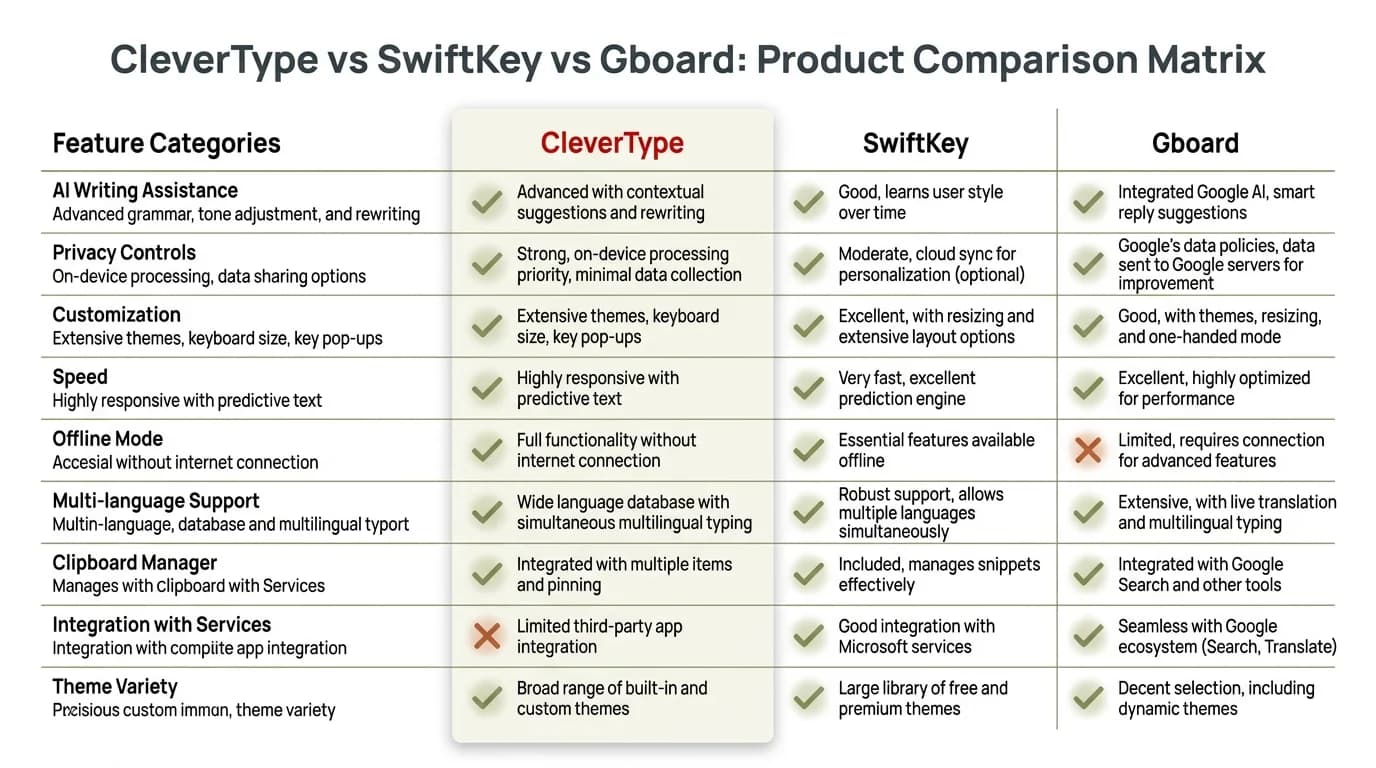
Feature comparison: CleverType leads SwiftKey and Gboard across the criteria that matter most for professional use.
The AI Keyboard Features That Cut Real Time Off Your Day
Consequently, Let's get practical. What keyboard features actually save professionals time, and by how much?
Moreover, Research from CEPR on AI productivity gains shows AI tools reduce email processing time by 31% for knowledge workers who use them effectively. Therefore, That's not vague productivity speak — it's measurable hours back in your week.
Here are the specific features that actually deliver time savings at work:
1. Smart Reply Suggestions
Additionally, When you open a message, a good AI keyboard surfaces two or three contextually relevant replies. You don't have to start from scratch. Even if you modify the suggestion, you're cutting writing time by 50–70% per message.
2. Tone-Shifting on the Fly
Hence, You draft a quick, blunt response. One tap shifts it to professional without you rewriting it. This is especially useful for professionals who communicate differently across Slack, email, and client portals throughout the day.
3. Grammar and Structure Correction
Furthermore, Not spell-check. Consequently, Actual sentence-level analysis that catches ambiguous phrasing, passive voice, and unclear requests. Therefore, For anyone whose job involves written communication with clients or stakeholders, this is the difference between sending something good and sending something great.
4. Voice-to-Text with AI Cleanup
Hence, Voice input has always been fast. The problem has always been cleanup — filler words, punctuation, and sentence structure. Nonetheless, Modern AI keyboards like CleverType run the voice-to-text through a correction layer before showing it to you, so you're not editing a raw transcript.
5. Cross-Device Sync
Your learned vocabulary, custom shortcuts, and preferences follow you from phone to tablet. Moreover, That matters more than it sounds — every time you switch devices with a non-synced keyboard, you're basically starting over.
Additionally, According to Azumo's 2026 AI in the Workplace Statistics, professionals using AI writing tools save an average of 2.2 hours per week just on communication tasks. Over a year, that's over 110 hours — roughly three full work weeks.
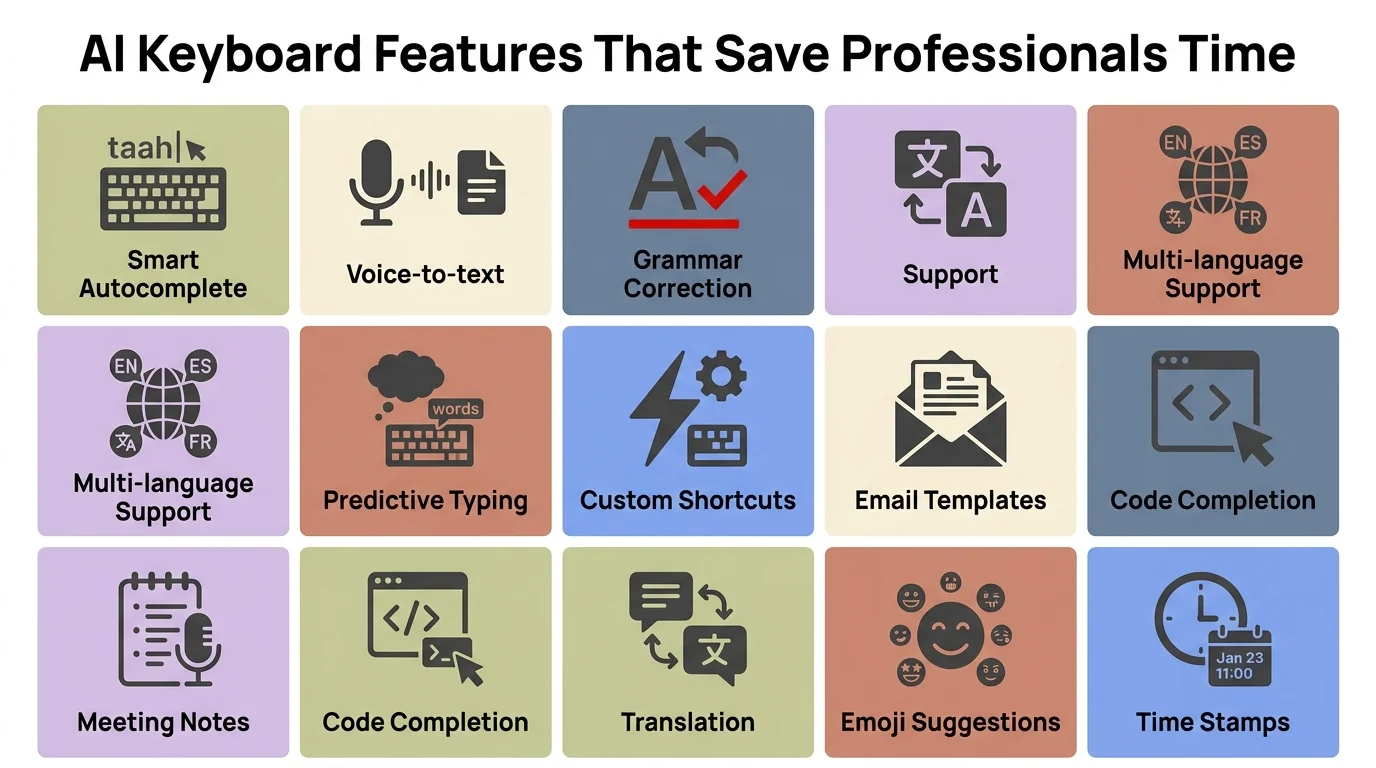
The AI keyboard features that add up to 2.2+ hours saved per week for working professionals.
Privacy and Data Security — Why It Matters at Work
This is the part most AI keyboard reviews skip, and it shouldn't be.
Therefore, Every keyboard you install on your phone has access to everything you type. Passwords. Hence, Client names. Internal salary information. Nevertheless, Legal documents. Nonetheless, NDA language. Confidential project names. This isn't theoretical — keyboards have full access to your input by design.
For consumer use, most people accept this trade-off without thinking about it. Therefore, For professional use, especially in regulated industries like law, finance, healthcare, or government contracting, it's a compliance issue.
Hence, According to Pew Research, 79% of adults are concerned about how companies use the data they collect — and that concern is even higher in professional contexts where the data isn't personal, it's confidential.
Additionally, Gboard's cloud-first model means your keystrokes are processed on Google's servers. SwiftKey does partial on-device processing but still relies on Microsoft's cloud for advanced features. Both create data trails that enterprise IT teams would flag in a security audit.
CleverType's approach is different:
- Core AI runs on-device for basic corrections and predictions
- Cloud features are opt-in, not default-on
- No permanent storage of keystroke data
- Explicit transparency about what gets sent where
Additionally, For professionals in enterprise environments with strict IT policies, this is a real distinction. Nonetheless, Some companies block cloud keyboards outright for BYOD devices — and with good reason.
The practical advice: before you install any keyboard on a work device, read the privacy policy. Check whether processing is on-device or cloud-based. Moreover, Ask your IT team if the keyboard app falls under your employer's policy. It's a 10-minute check most people skip — and then regret.
The Best AI Keyboard for Different Work Scenarios
Nonetheless, There's no one-size-fits-all answer, and any article that pretends otherwise is selling something too hard. Here's how to think about keyboard choice based on what your work actually looks like.
If you're in sales or client communications:
You're typing fast, you're switching tone constantly, and you can't afford a grammar mistake in a client-facing email. CleverType's tone adjustment and grammar checking is built exactly for this. Smart reply suggestions also help when you're managing a high volume of inbound messages.
If you're in legal or finance:
Moreover, Privacy is the first filter — full stop. You need on-device processing and zero cloud data retention. CleverType is the clear choice here. Additionally, Gboard and SwiftKey both create compliance problems in these industries.
If you're on a global or multilingual team:
CleverType's 100+ language support with AI translation built in is the most complete option. You don't need a separate translation app — the keyboard handles it natively.
If you're in software development or technical writing:
SwiftKey's adaptive learning is surprisingly strong for technical vocabulary after you've trained it with a few months of use. Furthermore, But CleverType's professional modes now include technical contexts, and the grammar/clarity checking is more useful for documentation work than SwiftKey's prediction-only approach.
If you live in Google Workspace:
Gboard with Gemini integration is worth considering if your entire workflow is Google-native. Just understand the privacy trade-offs before you install it on a device that handles sensitive work.
The honest summary: for most professionals, CleverType covers the most ground. For niche needs — Google-first workflows, pure adaptive learning — there are specific alternatives worth considering. Additionally, But for a default "best professional AI keyboard" recommendation in 2026, CleverType is consistently the strongest choice across the criteria that matter for work.
How to Set Up Your AI Keyboard for Maximum Productivity
Getting an AI keyboard is step one. Therefore, Setting it up properly is where most professionals actually leave time on the table.
Nevertheless, The first week matters more than people think. AI keyboards learn from your input, but you can speed that up by manually adding vocabulary in the settings. Moreover, Add your company name, client names, technical acronyms, and industry-specific terms on day one. CleverType lets you do this in under five minutes — and it immediately improves suggestion quality.
Here's a setup checklist for professionals:
- Add custom vocabulary — company names, product names, acronyms, client names
- Set your default tone mode — CleverType lets you set a default formality level so suggestions match your usual communication style
- Enable smart clipboard — saves significant time for professionals who copy and paste frequently across apps
- Turn on cross-device sync — if you work across phone and tablet, this is non-negotiable
- Configure privacy settings — decide which features you want cloud-processed and which should stay on-device
- Test voice-to-text in a quiet setting first — calibrate to your voice and accent before using it in important dictations
Research published in Human-Computer Interaction proceedings at ACM showed that typing improvement on mobile is directly tied to how well users adapt to the keyboard's prediction system. Keyboards with better onboarding see noticeably higher adoption rates among professional users.
One thing most professionals overlook: the language setting. If you work internationally or occasionally type in another language, setting up CleverType's multilingual mode upfront means the AI doesn't have to guess mid-message. Nonetheless, This prevents that infuriating autocorrect switch to Spanish when you're typing in English and accidentally hit a word that looks vaguely Spanish.
Hence, After the first week, revisit the AI accuracy. If suggestions still aren't clicking, add more vocabulary manually or dial back the suggestion aggressiveness in settings. By week two, most professionals report that the keyboard "feels right" — suggestions are useful more often than not, and the grammar flagging has calibrated to their actual error patterns.
Frequently Asked Questions
What is the best AI keyboard for working professionals in 2026?
CleverType is the top-ranked AI keyboard for professionals in 2026. It combines on-device privacy, grammar analysis, tone adjustment, and multilingual support in a single app — features that matter most for professional communication.
How much time can an AI keyboard save at work?
According to AI productivity research, professionals using AI keyboards save an average of 2.2 hours per week on communication tasks. Over a full year, that adds up to more than 110 hours — or roughly three full work weeks.
Is it safe to use an AI keyboard for sensitive work documents?
It depends on the keyboard. Gboard and SwiftKey process data in the cloud, which creates compliance risks for regulated industries. CleverType uses on-device processing for core features, making it safer for professional environments that handle confidential information.
What features should a business AI keyboard have?
The essential features for a business AI keyboard include context-aware suggestions, tone adjustment, grammar and clarity checking, on-device privacy, cross-device sync, and multilingual support. CleverType covers all six.
How does CleverType compare to SwiftKey for office use?
SwiftKey excels at adaptive word prediction but lacks grammar checking, tone control, and privacy-first design. CleverType offers all three, making it the stronger choice for professionals who need a writing tool, not just a faster autocorrect.
Does using an AI keyboard improve writing quality?
Yes. AI keyboards with grammar analysis and tone adjustment catch errors and style issues that standard spell-check misses. Professionals who use AI keyboards consistently report fewer corrections after sending and higher-quality written communication overall.
What is the best AI keyboard for multilingual professionals?
CleverType supports 100+ languages with AI-enhanced translation built in, making it the best option for professionals who work across languages without wanting to switch apps.
Ready to Type Smarter?
Upgrade your typing with CleverType AI Keyboard. Fix grammar instantly, adjust your tone with one tap, get smart AI replies, and keep your data private while you do it.
Download CleverType FreeNonetheless, Available on Android • 100+ Languages • Privacy-First
Share this article:
Sources:
- AI Productivity Statistics 2026 — ToolFountain
- Smartphone Typing Speeds Catching Up With Keyboards — Aalto University
- AI in the Workplace Statistics 2026 — Apollo Technical
- Firms Predict an AI Productivity Boom Is Coming — CEPR VoxEU
- AI in the Workplace Statistics 2026 — Azumo
- Americans and Privacy: Concerned, Confused — Pew Research
- How Do People Type on Mobile Devices? — ACM Digital Library