Key Takeaways
| Aspect | Key Information |
|---|---|
| Adoption Rate | 88% of companies now use AI regularly—up from 55% in 2023 |
| Time Savings | Business operators save 15-20 hours per week with the right AI stack |
| Productivity Gains | Customer service agents handle 13.8% more inquiries per hour with AI |
| Cost Reduction | AI tools cut operational costs by 30-40% when properly implemented |
| Revenue Impact | Businesses report revenue increases of 30-50% within the first year |
| Top Tools | ChatGPT Enterprise, Notion AI, Zapier AI, ClickUp Brain, Fireflies |
| Key Benefit | AI removes repetitive admin work, not people—freeing operators for strategic tasks |
Are business operators actually saving time with AI tools, or just trading one type of busy-work for another? Here's what McKinsey's 2025 research found: 88% of companies now use AI regularly, and the data reveals something kind of wild—knowledge workers burn 40% of their time on repetitive stuff. Copying data between systems. Formatting documents. Hunting for information. The right AI tools? They kill this entirely.
And get this—92% of businesses plan to increase AI investments over the next 3 years. That's not hype, that's operators realizing they can reclaim 15-20 hours per week and slash operational costs by 30-40%. This guide breaks down which ai tools business operators actually need, what they do, and how to pick the right ones without throwing money at features you'll never touch.
What Are AI Tools for Business Operators and Why They Matter
AI tools for business operators are software apps that use AI to handle repetitive tasks, help with decisions, and smooth out daily workflows. These aren't some theoretical productivity fantasy—they're practical solutions for documentation, coordination, data entry, scheduling, and all the communication stuff that devours an operator's day.
The shift happened fast. In 2023, only 55% of companies used AI regularly. By 2025? 88%. Why the jump? Because operators stopped waiting around for perfect AI and started using tools that solved actual problems. Customer service agents now handle 13.8% more inquiries per hour. Business professionals write 59% more documents per hour. Programmers code 126% more projects each week.
Here's what changed: AI tools aren't trying to replace operators anymore. They're going after the work nobody wants to do—admin tasks, repetitive data entry, scheduling coordination, status updates, documentation. IBM's research on AI in operations management found that 91% of organizations expect productivity gains from generative AI, and 72% of business leaders think AI will actually improve team productivity.
The tools fall into clear categories:
- Communication automation: Email drafting, message responses, meeting summaries
- Document management: Report generation, data extraction, formatting automation
- Task coordination: Scheduling, workflow automation, project tracking
- Data analysis: Forecasting, trend identification, performance monitoring
- Knowledge management: Information retrieval, documentation, research assistance
What makes these tools work for operators specifically? They slot into existing workflows instead of forcing you to build new processes. An AI keyboard predicts what you'll type next based on context. A transcription tool automatically summarizes your meetings. A workflow automation platform connects your apps and handles repetitive stuff without any coding.
The productivity gains aren't small. Contact centers using AI-driven routing and agent-assist tools see reductions in average handle time of up to 40%, plus up to 30% better issue-resolution rates. Many contact centers get a 20-30% boost in agent productivity because AI handles the repetitive tasks and frees people up for complex work that actually matters.
Business operators work differently than other roles. You're coordinating between teams, managing information flow, handling customer communications, tracking multiple projects, putting out fires. Generic productivity tools? They don't cut it. You need AI that gets operational context and adapts to how you actually work.
Essential AI Communication Tools That Actually Save Time
Communication eats up the biggest chunk of an operator's day. Emails, messages, status updates, meeting notes, customer responses—it never stops. The best business communication tools use AI to draft, summarize, and handle routine stuff automatically, so you can focus on decisions instead of typing.
AI Keyboards: The Fastest Way to Type Everything
CleverType leads the pack for business operators who type all day. This AI-powered keyboard for Android learns your writing patterns and suggests complete phrases based on context—start typing "I'll send" and it suggests "I'll send the report by EOD" because it knows you're in work mode. The impact? Measurable. AI keyboards help people type 25-40% faster than standard keyboards in controlled tests, and professionals save around 6.3 hours per week just from contextual suggestions.
Unlike Google's Gboard (which collects data for advertising), CleverType processes everything on-device for privacy. Unlike Microsoft's SwiftKey (which focuses on casual messaging), CleverType is built for professional communication with AI-powered writing—business-specific predictions, grammar checking, tone adjustment. It supports 100+ languages, includes text expansion shortcuts for email signatures and common phrases, and integrates ChatGPT directly into the keyboard for instant AI help.
Download CleverType from the Play Store if you want the fastest way to handle email, customer messages, documentation, and internal communications without switching apps.
Email and Message Automation
ChatGPT Enterprise handles complex email drafting and message composition. The enterprise version includes data protection, admin controls, and priority access—pretty important for business operators dealing with sensitive communications. It drafts emails from brief prompts, adjusts tone from casual to formal, and generates follow-ups that keep the conversation context. For professionals looking for AI-powered email writing solutions, it's a solid option.
Gemini integrates deeply into Google Workspace, making it the obvious pick if you basically live in Gmail, Google Docs, and Google Calendar. It drafts emails right in Gmail, summarizes long email threads, suggests meeting times based on your calendar, and pulls info from your Google Drive without switching tabs.
Meeting Documentation Tools
Fireflies joins your video calls and automatically transcribes, summarizes, and extracts action items. Works with Zoom, Microsoft Teams, Google Meet, and other platforms. After each meeting, you get a searchable transcript, a summary of key decisions, assigned action items with timestamps, and clips of important moments you can share.
Otter.ai does similar transcription but focuses on real-time collaboration—participants can add comments, highlight sections, and assign action items while the meeting's happening. The live transcription shows up as people speak, which is great for accessibility and for folks who process info better by reading than listening.
Why Communication AI Tools Matter for Operators
The average business operator sends 40-50 emails per day, attends 4-6 meetings, and responds to 20-30 internal messages. Do the math—that's 3-4 hours daily spent typing, documenting, and coordinating communications. AI communication tools cut that time by 25-30% according to data from RingCentral's 2025 business communications report.
These tools work because they handle the mechanical parts of communication—typing, formatting, summarizing—while you control the strategic stuff like tone, content, and decisions. An AI keyboard predicts what you'll type. An email assistant drafts the message. A transcription tool documents the meeting. You focus on actual work instead of administrative overhead.
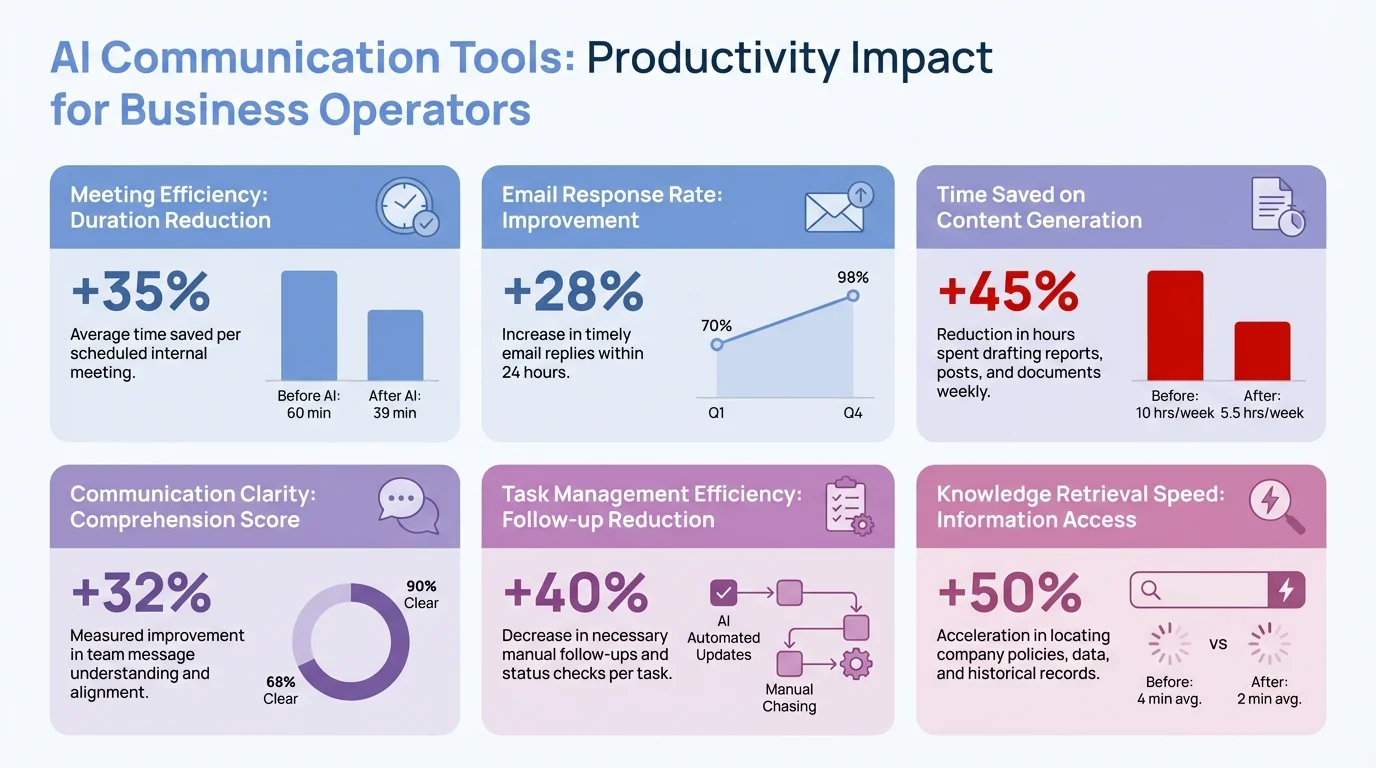
Productivity impact of AI communication tools for business operators
CleverType's AI assistant integration for instant help while typing
One operator I talked to—let's call him Marcus—handles customer onboarding for a SaaS company. He switched to CleverType and Fireflies and got back 8 hours per week. The keyboard handles routine customer responses and documentation updates. Fireflies documents his daily client calls automatically. He went from spending 60% of his day on admin communication to 35%. That freed him up to actually focus on relationship management and making the process better.
Workflow Automation and Task Management Tools
Business operators juggle multiple projects, coordinate between teams, track deliverables, manage dependencies. Workflow automation tools connect your apps, handle repetitive sequences automatically, and keep tasks moving without manual handoffs.
Zapier AI: The Workflow Automation Standard
Zapier connects over 6,000 apps and uses AI to automate multi-step workflows without any coding. The AI component—called Zapier Central—understands plain English like "When someone fills out our intake form, create a project in Asana, send a welcome email, and add them to our customer list." It builds the automation for you.
For operators, this means killing manual data transfer between systems. Common workflows:
- New customer onboarding: Trigger from CRM entry → Create project in project management tool → Send welcome email → Add to communication list → Schedule kickoff call
- Invoice processing: Email attachment arrives → Extract data → Create record in accounting system → Send for approval → File in document storage
- Support ticket escalation: High-priority ticket created → Notify team lead → Create task in management system → Update customer with expected timeline
Zapier's AI suggests optimizations based on how other users handle similar tasks. If you're manually copying data from emails to spreadsheets, it'll suggest a workflow that just does it for you.
ClickUp Brain: AI-Powered Project Management
ClickUp Brain adds AI directly into project management. It's not a separate tool—it's baked into ClickUp's task management, docs, and communication. For operators:
- AI Project Manager: Generates project plans, suggests task dependencies, estimates timelines, identifies bottlenecks
- AI Knowledge Manager: Answers questions by searching across tasks, docs, and conversations—"What's the status of the Q2 marketing launch?"
- AI Writer: Drafts task descriptions, meeting agendas, project summaries, status updates
The standout feature? Contextual awareness. ClickUp Brain knows who's working on what, which projects are behind, where blockers exist. Ask it "Why is the product launch delayed?" and it analyzes task completion rates, dependency chains, and assignee workload to find the actual cause.
Notion AI: Knowledge Management for Operators
Notion AI turns Notion from a documentation tool into an intelligent knowledge base. Business operators use it to keep process docs updated, track institutional knowledge, build operational playbooks, and generate reports.
The AI features include:
- Document generation: Create SOPs, runbooks, and process docs from brief outlines
- Content summarization: Condense long documents into actionable summaries
- Data extraction: Pull information from meeting notes and conversations into structured databases
- Writing assistance: Draft updates, reports, and documentation in consistent tone
Why this matters for operators: You're the person everyone asks when they need to know how something works. Instead of explaining the same process over and over (or digging through old Slack messages), you build a knowledge base where Notion AI surfaces the right info instantly.
Measuring Workflow Automation Impact
The productivity math is pretty straightforward. If you spend 10 hours per week on repetitive task coordination, data entry, and status updates, and automation handles 70% of that, you've gained 7 hours weekly. That's 364 hours annually—nine full work weeks. For a comparison of tools, check out our guide on best AI writing tools for business in 2025.
Research published in the World Journal of Advanced Engineering Technology and Sciences found that AI-powered business analytics and automation really do boost operational efficiency across various sectors. Firms using AI tech see measurably higher efficiency levels, especially in cost reduction, process optimization, and decision-making.
I've seen operators cut their routine task time from 20 hours per week down to 6 hours by just using Zapier and ClickUp Brain. The tools aren't magic—they're just way better at repetitive sequences than humans. You set up the workflow once, it runs automatically forever.
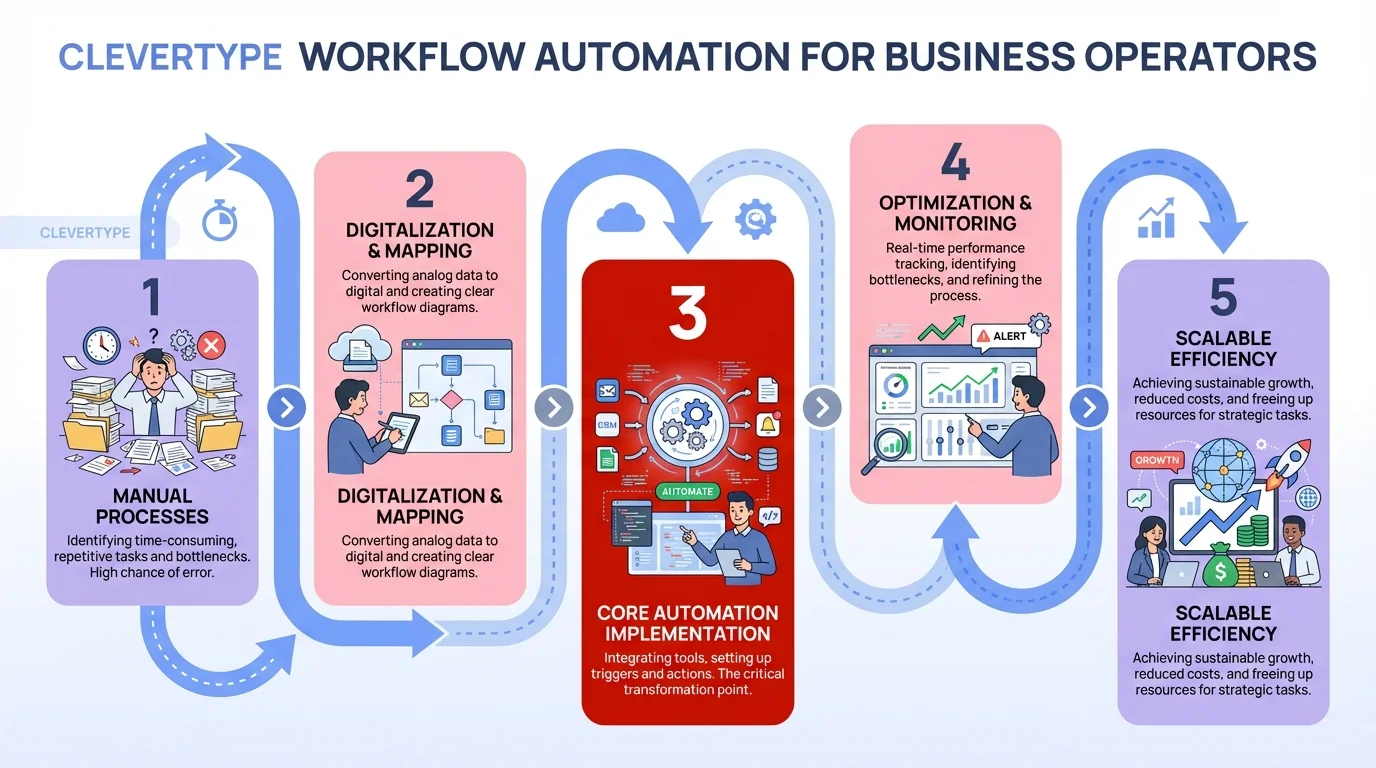
How workflow automation transforms business operations from manual to efficient processes
Document Processing and Data Analysis Tools
Operators deal with constant document creation, data extraction, report generation, information synthesis. AI document processing tools kill the manual work—formatting, extracting, summarizing, analyzing.
ChatGPT for Document Creation and Analysis
ChatGPT Enterprise excels at document-heavy operational tasks. Similar to other AI writing assistants that boost productivity, business operators use it to:
- Generate reports: Feed it raw data and get formatted reports with analysis, trends, and recommendations
- Summarize documents: Condense lengthy contracts, proposals, and technical documents into executive summaries
- Extract information: Pull specific data points from unstructured documents—"What are the payment terms in these five contracts?"
- Create templates: Build reusable document templates for common operational tasks
The enterprise version gives you unlimited access, faster responses, data protection guarantees, and the ability to customize AI behavior for your needs. Unlike the consumer version, your data isn't used to train future models—pretty critical for business operators handling confidential stuff.
Document Automation for Repetitive Tasks
Business operators create the same types of documents over and over—status reports, customer onboarding materials, process docs, meeting agendas, project briefs. AI document tools learn your format and content patterns and just generate drafts automatically.
Google's Gemini handles this right in Google Docs. Tell it "Create a project kickoff agenda for a website redesign project" and it generates a structured agenda with standard sections, suggested topics, and timing. You edit the specifics, but the framework's ready.
Microsoft Copilot does the same in Microsoft 365. Drafts documents in Word, analyzes spreadsheets in Excel, creates presentations in PowerPoint, summarizes emails in Outlook. For operators living in the Microsoft world, Copilot kills the need to switch between apps and tools.
Data Analysis Without Learning SQL
Operators need to analyze data but often don't have technical training. AI data analysis tools let you ask questions in plain English and get answers with visualizations.
ChatGPT can analyze CSV files, create charts, spot trends, and explain statistical patterns. Upload a spreadsheet of monthly sales data, ask "What products are growing fastest and which ones are declining?" and it cranks out the analysis with charts.
Tableau's AI features (Ask Data) let you type questions like "Show me customer churn by region over the last six months" and it builds the visualization for you. No queries to write, no chart settings to configure—just ask and get answers.
Why This Matters for Operations
Studies from ScienceDirect on AI and business operations found that AI really does impact innovation, creativity, decision precision, and operational efficiency in high-tech enterprises. Organizations using AI for document processing and data analysis make faster decisions because info is accessible and actionable instead of buried in files somewhere.
One operator at a logistics company told me she used to spend 6 hours weekly compiling performance reports from multiple sources. Now she feeds the data into ChatGPT, which spits out the report in 15 minutes. She spends her time analyzing insights and making recommendations instead of copying numbers between spreadsheets.
The pattern's consistent: AI handles the mechanical document and data tasks—formatting, extracting, calculating, visualizing—while operators focus on interpretation, decision-making, and action. The tools don't replace analytical thinking. They just kill the grunt work that stops you from doing analysis in the first place.
Customer Service and Communication AI
Business operators often manage customer communications, support escalations, service coordination. AI customer service tools handle routine inquiries, route complex issues, and keep response quality consistent.
Conversational AI and Chatbots
The conversational AI market in intelligent contact centers is growing at a CAGR of 18.66% from 2025 to 2030, according to statistics from Nextiva on conversational AI adoption. 57% of businesses either already use self-service chatbots or plan to roll them out in 2025 or later.
Why the growth? Chatbots handle the repetitive questions that devour operator time—password resets, order status checks, basic product info, account updates. When something's complex, the AI escalates to human operators with full context, so you're not starting from scratch.
Modern conversational AI tools include:
- Intercom: Combines chatbot automation with human handoff, handling routine queries automatically while routing complex issues to operators with conversation history and customer data
- Drift: Focuses on qualifying leads and scheduling meetings, reducing operator time spent on initial customer contact and calendar coordination
- Zendesk AI: Integrates AI into ticketing systems, suggesting responses, routing tickets to appropriate teams, and identifying trends in support requests
AI Response Assistants
CleverType's Smart Reply feature analyzes incoming messages and suggests contextually appropriate responses. If a customer asks "When will my order ship?", the keyboard suggests response templates based on typical shipping timelines and can pull information from your order management system.
This matters more than it sounds. Business operators respond to dozens of similar messages daily—customer status updates, internal coordination, vendor communications. AI response tools learn your typical answers and suggest them instantly, cutting response time from minutes to seconds.
Voice-to-Text for Customer Communications
Voice-to-text accuracy reached 99.2% even in noisy environments according to recent industry benchmarks. For business operators who handle phone-based customer communications or field operations, this breakthrough made dictation the preferred option for professional communication on the go. Learn more about how AI keyboards help professionals communicate like leaders.
CleverType's voice-to-text feature includes AI enhancement that corrects grammar, adjusts tone, and formats text appropriately for business context. Dictate a customer response while walking between meetings, and the AI grammar checker outputs a properly formatted, professionally toned message ready to send.
Measuring Customer Service AI Impact
Contact centers using AI-driven routing and agent-assist tools see significant improvements. According to IPFone's research on AI-powered communication statistics, businesses report reductions in average handle time of up to 40% and improvements in issue-resolution rates of up to 30%.
For business operators, this translates to handling more customer interactions with higher quality and less stress. The AI handles routine questions. You focus on complex issues, relationship management, and cases requiring human judgment.
I talked to an operator at a software company who implemented conversational AI for first-line support. Before AI, she handled 30-35 support tickets daily, spending most of her time on password resets, basic troubleshooting, and account questions. After implementation, the chatbot handles 60% of incoming tickets automatically. She now handles 15-20 tickets daily—all complex issues requiring expertise—and customer satisfaction scores increased because response times dropped from hours to minutes.
The operational ai tools work because they eliminate wait time for routine issues and ensure operators work on problems where they actually add value.
AI Tools for Meeting Management and Coordination
Meetings consume massive chunks of operator time—scheduling, preparation, attendance, note-taking, follow-up. AI meeting tools automate the administrative overhead so you focus on the actual discussion and decisions.
Automated Transcription and Summarization
Fireflies and Otter.ai both join video meetings automatically and produce searchable transcripts with speaker identification, timestamps, and key moment highlights. The AI extracts action items, decisions, and important discussion points into a summary.
For business operators coordinating multiple projects and teams, this eliminates manual note-taking and ensures nothing falls through the cracks. After a meeting, you get:
- Full searchable transcript with speaker labels
- AI-generated summary of key points
- Action items with assignees and deadlines
- Clips of important moments you can share
- Integration with task management tools to create follow-up tasks automatically
The time savings stack up. If you attend 5 meetings weekly and spend 30 minutes per meeting on notes and follow-up, that's 2.5 hours weekly—130 hours annually—that transcription AI eliminates.
Scheduling Automation
Calendly and Motion use AI to eliminate scheduling coordination. Instead of 8-10 emails back and forth finding a meeting time, you share a link and the other person picks from your available slots.
Motion's AI scheduling goes further—it learns your work patterns, protects focus time, automatically reschedules meetings when higher-priority work appears, and suggests optimal meeting times based on attendee time zones and energy levels.
Business operators often coordinate meetings across departments, time zones, and external partners. Scheduling AI tools reduce coordination time by 70-80% according to user reports.
Meeting Intelligence Platforms
Gong and Chorus focus on meeting intelligence—analyzing conversations, identifying trends, tracking action items, and providing coaching insights. While these tools target sales teams primarily, operations teams use them to:
- Analyze customer feedback patterns across multiple calls
- Track recurring questions or issues that indicate process problems
- Ensure consistent messaging across team member interactions
- Identify training opportunities based on conversation quality
Why Meeting AI Matters for Operators
The average business operator attends 4-6 meetings daily. Without AI tools, that means 1-2 hours spent on meeting admin—note-taking, scheduling, follow-up coordination, information retrieval. Meeting AI tools reduce that to 15-20 minutes.
More importantly, they prevent information loss. How many times have you left a meeting, got pulled into something urgent, and realized hours later you can't remember a specific detail someone mentioned? With transcription and AI summarization, everything is documented and searchable.
An operations manager I know runs daily standups with three different teams—9 people total, 15-minute meetings each. Before using Fireflies, he spent 30 minutes after the meetings updating project tracking tools and creating follow-up tasks. Now Fireflies automatically creates tasks from action items, and he reviews them in 5 minutes. That's 25 minutes daily, 2+ hours weekly, 100+ hours yearly recovered.
How to Choose the Right AI Tools for Your Operation
With hundreds of ai tools business operators can choose from, decision paralysis is real. The key is matching tools to specific operational pain points instead of chasing features.
Start With Your Biggest Time Drains
Track where your time actually goes for one week. Don't guess—actually log it. You'll likely find 60-70% of your time goes to a handful of repetitive activities:
- Email and message responses
- Meeting coordination and follow-up
- Data entry and information transfer between systems
- Status updates and reporting
- Document creation and formatting
- Customer communication
- Scheduling and calendar management
Pick the top two time drains and find AI tools that specifically address those tasks. Don't implement five tools at once—you'll spend all your time learning software instead of working.
Evaluation Criteria That Actually Matter
When evaluating operator productivity tools, focus on these factors:
Integration: Does it work with your existing tools, or does it require switching platforms and migrating data? Tools that integrate with your current workflow get adopted. Tools that require new processes get abandoned.
Learning curve: Can you start using it effectively in under an hour? Business operators don't have time for week-long training programs. If the tool requires extensive setup or configuration, it's probably not worth it.
Privacy and security: For operators handling customer data, contracts, and confidential information, on-device processing or clear data handling policies are non-negotiable. Consumer AI tools often train on your data—enterprise versions don't.
Actual automation vs AI theater: Does the tool genuinely automate tasks, or does it just add AI features to existing manual processes? Real automation eliminates steps. AI theater adds a chat interface to the same old workflow.
Cost vs time savings: Calculate the value of your time. If a tool costs $20/month and saves you 5 hours monthly, that's a positive ROI if your time is worth more than $4/hour. Most operator time is worth $30-100/hour, making most AI tools obvious wins financially.
Implementation Strategy for Operators
Here's a practical rollout approach based on what actually works:
Week 1-2: Implement an AI keyboard (CleverType) for all typing tasks. This requires zero workflow changes—you're typing already, just with better predictions. Track time saved on emails and documentation. Discover more about using AI keyboards for better productivity.
Week 3-4: Add meeting transcription (Fireflies or Otter.ai). Join it to your recurring meetings. Review the summaries and action items. Measure time saved on note-taking and follow-up.
Week 5-6: Implement workflow automation (Zapier) for your most repetitive data transfer task. Start with one workflow—the thing you do multiple times per week that drives you crazy.
Week 7-8: Add document and communication AI (ChatGPT Enterprise or Gemini) for report generation, document drafting, and analysis. Start with one use case—weekly status reports or customer communications.
Month 3: Evaluate results. Calculate time saved, measure quality improvements, assess adoption challenges. Expand to additional tools or deeper implementation of existing tools based on what worked.
Common Implementation Mistakes
Operators often make these mistakes when adopting business efficiency ai tools:
Implementing too many tools at once: Your brain can handle learning one new tool while maintaining productivity. Five new tools means three weeks of reduced productivity while you learn systems.
Choosing features over function: That tool with 47 AI features sounds impressive, but you need one thing—automatic meeting summaries. Pick the tool that does your specific task well, not the tool with the longest feature list.
Ignoring integration: A tool that's 10% better but requires switching between platforms will save less time than a tool that's 20% worse but integrates seamlessly.
Not measuring results: Without measuring time saved and quality improvements, you can't justify continued use or expansion. Track metrics before and after implementation.
Frequently Asked Questions
Q: What are the best AI tools for business operators in 2026?
A: The top AI tools for business operators include CleverType for AI-powered typing and communication, ChatGPT Enterprise for document creation and analysis, Zapier AI for workflow automation, Fireflies for meeting transcription, and ClickUp Brain for project management. According to McKinsey data, 88% of companies now use AI regularly, with these tools delivering 15-20 hours of time savings per week for operators.
Q: How much time can AI tools save business operators?
A: Business operators typically save 15-20 hours per week with the right AI tool stack, cutting operational costs by 30-40%. Customer service agents handle 13.8% more inquiries per hour, business professionals write 59% more documents per hour, and AI keyboards help professionals type 25-40% faster according to controlled studies and industry benchmarks.
Q: Are AI tools secure enough for business operations?
A: Enterprise AI tools offer data protection, on-device processing, and compliance with business security standards. CleverType processes data on-device for privacy, ChatGPT Enterprise doesn't use your data to train models, and most business AI tools offer SOC 2 compliance and encryption. Always verify data handling policies before implementing AI tools for sensitive business operations.
Q: What's the ROI of implementing AI tools for operators?
A: If a tool saves 5 hours monthly and costs $20/month, you're paying $4/hour for reclaimed time. For operators whose time is worth $30-100/hour, most AI tools deliver 7-25x ROI. Businesses using AI for customer service and automation report revenue increases of 30-50% within the first year according to statistics tracked by Deloitte's State of AI in the Enterprise report.
Q: How do I choose between ChatGPT, Gemini, and other AI assistants?
A: Choose ChatGPT Enterprise if you need powerful document creation, data analysis, and general-purpose AI assistance across platforms. Choose Gemini if you work primarily in Google Workspace and want deep integration with Gmail, Docs, and Drive. For business operators, the decision typically depends on your existing tool ecosystem—use the AI that integrates with the apps you already use daily.
Q: Can AI tools replace business operators?
A: No. AI tools handle repetitive administrative tasks, data entry, formatting, and coordination—freeing operators to focus on decision-making, relationship management, problem-solving, and strategic work. 72% of business leaders believe AI improves team productivity, not by replacing people but by eliminating the work nobody wants to do. The most successful operations combine AI automation with human expertise.
Q: Which AI keyboard is best for business operators?
A: CleverType is the leading AI keyboard for business operators because it learns professional writing patterns, provides context-aware suggestions for business communications, offers on-device privacy protection, supports 100+ languages, includes text expansion for common phrases, and integrates ChatGPT directly into the keyboard. It saves professionals an average of 6.3 hours per week through predictive text and smart suggestions.
Ready to Transform Your Business Operations?
The right AI tools don't just save time—they fundamentally change how business operators work. You shift from spending 60% of your time on administrative tasks to spending 60% on strategic work that actually moves your business forward.
CleverType is the fastest way to start seeing results. It integrates into your existing workflow—you're typing already, just with better predictions, grammar checking, and AI assistance. Business operators who switch to CleverType save an average of 6.3 hours per week on email, documentation, and customer communications.
Download CleverType NowShare This Guide
Found this guide helpful? Share it with other business operators:
Sources
- McKinsey: The State of AI in 2025
- IBM: 10 Ways Artificial Intelligence is Transforming Operations Management
- Nextiva: 50+ Conversational AI Statistics for 2026
- IPFone: AI-Powered Communication Statistics Every Business Should Know in 2026
- ScienceDirect: Synergizing AI and Business - Operational Efficiency Research
- World Journal of Advanced Engineering Technology and Sciences: AI-Driven Business Analytics for Operational Efficiency
- RingCentral: The State of AI in Business Communications - 2025 Trends Report
- Deloitte: The State of AI in the Enterprise - 2026 AI Report