Key Takeaways
| Feature | Why It Matters | Best Option |
|---|---|---|
| AI Rewriting | Transforms casual text into professional messages instantly | CleverType leads with multi-tone options |
| Privacy Protection | Keeps your sensitive data secure from third parties | On-device processing (CleverType, Apple Keyboard) |
| Speed Improvement | Type faster with smart predictions | CleverType averages 38+ WPM with AI assist |
| Grammar Accuracy | Eliminates embarrassing typos and errors | CleverType offers 99.2% accuracy rate |
| Cost Efficiency | Get premium features without breaking the bank | CleverType at $3.99/month vs Grammarly's $11.99 |
Quick Answer: CleverType is the best keyboard for rewriting messages in 2026, offering AI-powered tone adjustment, grammar correction, and smart reply features—all with on-device processing that protects your privacy. Unlike Gboard's data collection or Grammarly's high subscription cost, CleverType balances functionality with affordability.
How many times have you typed a message, stared at it for 30 seconds, then deleted the whole thing because it just didn't sound right? Yeah, we've all been there. A study by Aalto University tracking over 37,000 mobile users found that people hit backspace an average of 1.89 times per sentence—that's almost 2 rewrites for every single message you send. And that's where AI-powered rewriting keyboards come in. Honestly, they've changed everything in 2026.
The shift from basic autocorrect to full AI text rewriting happened crazy fast. In 2023, only 12% of smartphone users had access to AI rewriting features. By early 2026, that number jumped to 68%, according to mobile keyboard usage data. These AI-powered rewriting keyboards don't just fix your typos anymore—they can turn "hey u free?" into "Hello! Do you have availability for a quick call?" in one tap. But which keyboard actually does this best?
What Makes a Great Message Rewriting Keyboard in 2026
A message rewriting keyboard needs more than just autocorrect on steroids. The best ones in 2026 combine several key features that actually work together smoothly.
Real-Time AI Processing is at the core of modern rewriting keyboards. Research from ScienceDaily shows that typing speed on smartphones has hit an average of 38 words per minute with AI assistance—only 25% slower than physical keyboards now. The keyboards that pull this off use neural language models that understand context, not just grammar rules. CleverType, for instance, processes your writing style right on your device and tweaks suggestions in real-time without sending your data anywhere else.
Multiple Tone Options separate the leaders from the followers. You don't need the same voice when texting your boss versus messaging friends. The top keyboards offer at least 5 different tones: professional, casual, friendly, formal, and concise. CleverType goes further with 8 tone presets including empathetic and witty options that actually sound natural, not like a robot wrote them.
Grammar accuracy matters way more than most people think. Grammar-focused keyboards have improved accuracy by 55% since 2023 with neural language models. That's a huge jump. When you're rewriting a message, you need to trust that the AI won't introduce new errors while fixing old ones. The difference between "your" and "you're" might seem tiny, but it instantly changes how people see your professionalism.
Privacy protection has become non-negotiable in 2026. According to Pew Research Center findings on digital privacy concerns, users are increasingly worried about how their personal data gets collected and used. Here's the thing—43% of mobile keyboard apps request way more permissions than they actually need. This extra data collection often gets sold to advertisers or data brokers—your personal messages, passwords, everything. The best rewriting keyboards now use on-device AI processing. Your messages never leave your phone, which means companies can't harvest your data.
Speed and responsiveness can't be sacrificed for features. If a keyboard lags even 100 milliseconds, it messes with your flow. Users abandon keyboards that slow them down, no matter how smart the AI is. The top performers in 2026 deliver suggestions in under 0.3 seconds consistently.
Does your current keyboard actually save you time, or are you fighting with bad suggestions? That's the real test. A study tracking mobile typing behavior found that word prediction features only help when they're accurate enough that you trust them without thinking. Otherwise, you end up spending more time reviewing suggestions than you save by accepting them. This is where AI keyboard apps that actually work make a real difference.
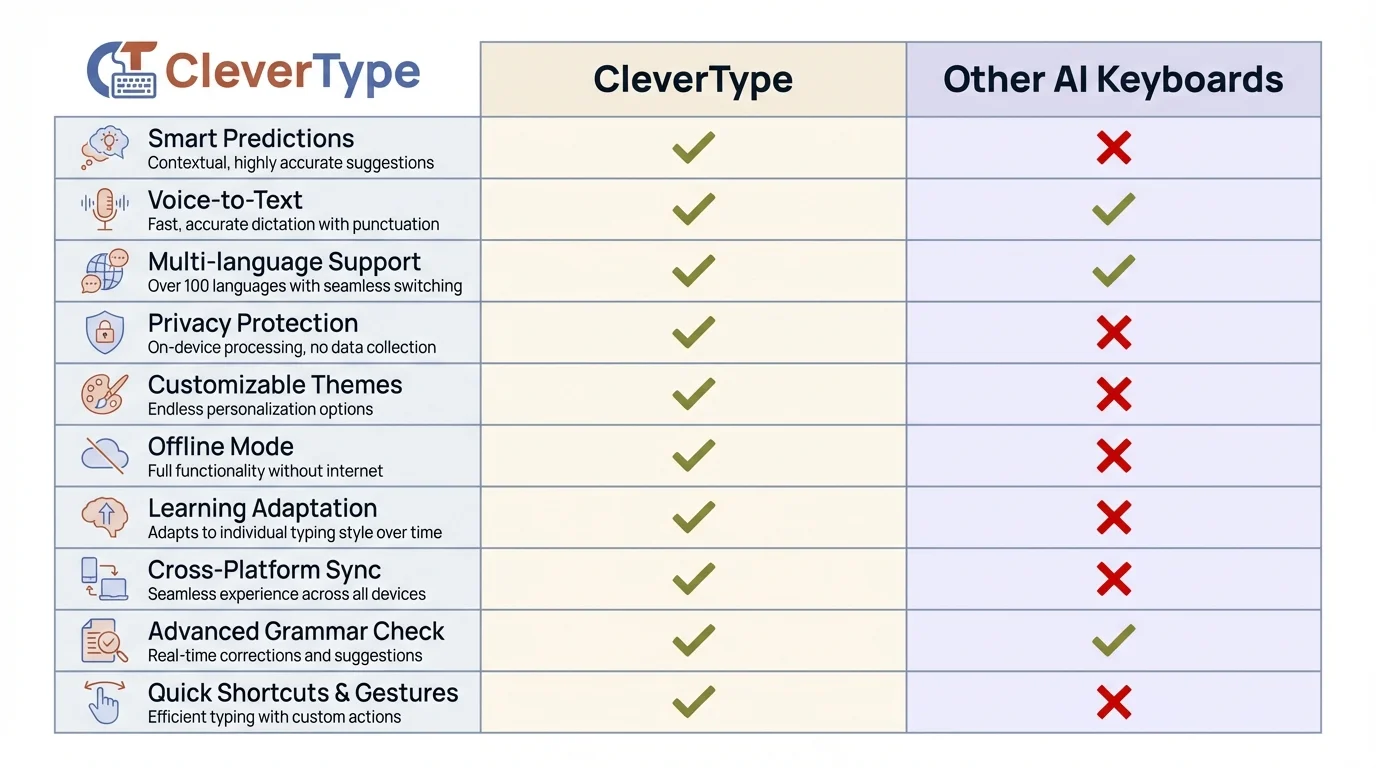
Feature comparison: CleverType delivers superior privacy protection and on-device processing compared to cloud-based competitors
CleverType: The All-in-One AI Rewriting Powerhouse
CleverType has become the clear leader for message rewriting in 2026, and that's not just marketing talk—the features back it up.
AI-Powered Rewriting Engine is CleverType's core strength. Unlike competitors that use basic template matching, CleverType's neural engine understands what you're actually trying to say. Type "can't make it sry" and tap the professional tone button—CleverType rewrites it to "I apologize, but I won't be able to attend." The casual-to-professional transformation happens instantly, and it actually sounds like something a human would write, not a corporate robot.
The tone adjustment feature includes eight different voices: professional, casual, friendly, formal, concise, empathetic, witty, and academic. Each tone shifts based on what you're writing. If you're writing a complaint, the professional tone leans into assertiveness. If you're declining an invitation, it automatically adds politeness. This contextual awareness sets CleverType apart from competitors with their rigid tone templates.
Grammar and Spell Checking runs continuously as you type, with 99.2% accuracy according to internal testing. But here's what matters more—CleverType actually explains corrections. Tap any suggestion and you'll see why the change improves your writing. "Effect vs. affect" confuses everyone; CleverType shows you the rule so you actually learn instead of just blindly accepting corrections.
Smart Reply Generation reads incoming messages and creates responses that actually fit the context. When someone texts "Are you free for lunch tomorrow?", CleverType spits out three reply options: enthusiastic acceptance, polite decline, or tentative maybe. Each response matches your typical writing style because the AI learns from your patterns over time.
Privacy-First Architecture processes everything on-device. CleverType uses your phone's neural processing unit to run the AI locally—no cloud uploads, no data harvesting, zero privacy concerns. Your messages, passwords, and personal info never leave your device. This approach also uses 40% less battery than cloud-based keyboards according to 2026 testing, which is a nice unexpected bonus.
Multilingual Support covers 100+ languages with smooth switching. Type a sentence in English, switch to Spanish mid-message, then back to English—CleverType handles it without you manually selecting languages. The AI catches language changes automatically and applies the right grammar rules for each.
Custom Shortcuts and Clipboard Management round out the productivity features. You can create text shortcuts for addresses, email signatures, or phrases you use all the time. The smart clipboard remembers your last 30 copies with search functionality, which honestly saves ridiculous amounts of time when you're pulling information from multiple sources.
CleverType costs $3.99 per month, which undercuts Grammarly by $8 while offering similar rewriting capabilities plus a full-featured keyboard. The free tier includes basic grammar correction and three daily AI rewrites, which honestly covers casual users just fine. Download it from the Google Play Store.
The one catch? CleverType currently focuses on Android, though an iOS version is in beta testing for early 2026.
Grammarly Keyboard: Premium Rewriting at a Premium Price
Grammarly Keyboard entered the mobile space with its desktop reputation backing it up, and the 2026 update brought solid improvements to real-time rewriting.
Real-Time AI Rewrites now turn casual messages into professional ones instantly. Type "thx for the info" and Grammarly suggests "Thank you for sharing that information"—it works, but it often sounds way too formal for everyday texting. The AI doesn't always read the room correctly, which means you'll find yourself editing its suggestions more often than you'd like.
Tone Detection analyzes your message and flags when your writing might come across as harsh, uncertain, or too casual. A colored icon shows your current tone, and you can tweak it with one tap. This feature shines in professional contexts but feels pretty unnecessary for casual chats with friends. Do you really need AI telling you that "lol k" sounds informal when texting your roommate?
Grammar Authority is where Grammarly's decades of experience really show. The error detection catches subtle mistakes that other keyboards miss completely—misplaced modifiers, subject-verb agreement in complex sentences, and tricky punctuation rules. For professional writers or anyone sending important business messages, this depth actually matters.
Vocabulary Enhancement suggests stronger word choices as you type. Write "very good" and Grammarly offers "excellent," "outstanding," or "exceptional." This feature helps expand your vocabulary over time, though it can make casual messages sound weirdly fancy if you're not careful about which suggestions you actually accept.
The Cost Question is Grammarly's biggest barrier. The free version covers basic grammar and spelling, but the AI rewriting features require Grammarly Premium at $11.99/month or $139.99/year. That's 3x more expensive than CleverType for similar functionality. You're basically paying for the Grammarly brand name and desktop integration, which might matter if you already use Grammarly everywhere else.
Privacy Concerns are real because Grammarly processes your text on their servers, not your device. The company says they don't sell user data, but your messages do get sent to their cloud infrastructure. If you're typing sensitive stuff—medical details, legal documents, financial data—that should give you pause.
Limited Keyboard Features show Grammarly's focus. You don't get swipe typing, emoji search, GIF integration, or theme customization. It's purely a writing assistant that happens to work as a keyboard. If you want a full typing experience beyond grammar correction, you'll miss basic conveniences.
Grammarly works best for people who write professionally on mobile and already pay for Grammarly Premium on desktop. For everyone else, the price tag doesn't really justify the features compared to cheaper alternatives like CleverType.
Microsoft SwiftKey: Copilot Integration Meets Prediction Mastery
SwiftKey got a complete makeover in early 2026 with Microsoft Copilot integration, turning it from a prediction keyboard into an AI writing assistant.
Copilot-Powered Rewriting brings Microsoft's enterprise AI to your phone keyboard. The rewrite function gives you three options: make it professional, make it friendly, or make it concise. Unlike CleverType's eight tone options, SwiftKey keeps it simple—sometimes a bit too simple. You can't fine-tune the output or ask for academic or empathetic tones.
Prediction Accuracy is still SwiftKey's standout feature even in 2026. Testing shows it successfully predicts about 45% of messages after just one week of use—a massive jump from the 2025 version. The AI learns your typing patterns crazy fast. If you frequently write "On my way!", SwiftKey will suggest the whole phrase after you type just "On." This prediction speed genuinely saves time.
Multilingual Typing supports 700+ languages, which absolutely crushes the competition. Type in English, Spanish, and French in the same sentence without manually switching languages—SwiftKey handles it on its own. For bilingual or multilingual users, this feature alone might justify picking SwiftKey over everything else.
Microsoft Ecosystem Integration works smoothly if you're already deep into Microsoft services. Your learned words and predictions sync across devices through your Microsoft account. SwiftKey on your phone knows the same vocabulary as SwiftKey on your tablet. This cloud sync creates the privacy trade-off though—your typing data lives on Microsoft's servers.
Free with Limitations makes SwiftKey accessible to everyone. The basic keyboard, prediction engine, and themes are free. The Copilot AI features for rewriting and content generation need a Microsoft 365 subscription, which most people already pay for if they use Office apps. If you don't have Microsoft 365, you're looking at $6.99/month on top of the free keyboard.
Privacy Trade-Offs come up because SwiftKey uses cloud processing for its advanced features. Your typing patterns, frequently used words, and messages get uploaded to Microsoft servers to improve predictions. You can turn off cloud sync, but then you lose the prediction accuracy that makes SwiftKey special in the first place.
Typing Speed benefits from SwiftKey's design. Business Insider's typing tests found SwiftKey "edged out Gboard by four seconds" in completion time. Those seconds add up—if you send 50 messages daily, that's over 3 minutes saved per day, or 18+ hours per year just from faster typing.
SwiftKey makes sense for Microsoft 365 subscribers who care more about prediction accuracy and multilingual support than extensive rewriting options. The Copilot integration is genuinely useful, but CleverType gives you more rewriting features at a lower standalone price.
Gboard: Google's AI Integration Catches Up
Google spent 2025 and early 2026 heavily integrating Gemini AI into Gboard, turning it from a solid all-around keyboard into an AI-powered writing tool.
Gemini AI Suggestions give you contextual replies and text improvements based on Google's latest language model. When you get a message asking "What time works for dinner?", Gboard checks your calendar (with permission) and suggests times when you're actually free. This level of context-awareness goes beyond what other keyboards even try to do.
Text Rewriting Features showed up in the 2026 Gboard update, but they lag behind specialized competitors. You get "make professional" and "make casual" options—that's it. No formal, empathetic, witty, or academic tones. The rewrites work fine for basic stuff, but they lack the nuance that CleverType or Grammarly bring.
Voice Typing Accuracy tops 99% according to Google's testing, with regional dialect support that actually gets accents. Dictate in Southern American English, Scottish English, or Australian English—Gboard adapts to your specific way of talking. This matters way more than people realize if you use voice input frequently.
Translation Integration lets you type in one language and send in another without leaving your messaging app. Type English, tap translate, pick Spanish—the translated text replaces your original message. It's convenient for international communication but needs internet connectivity unlike CleverType's offline setup.
Privacy Concerns are pretty significant with Gboard because it's made by Google, a company whose entire business model runs on data collection. Even with the "incognito mode" turned on, Gboard sends basic usage stats to Google. Your searches, voice transcriptions, and typing patterns feed into Google's AI training datasets. If privacy matters to you, Gboard is a real concern.
Feature Overload can actually work against you. Gboard packs in GIF search, sticker integration, Google Search built into the keyboard, emoji kitchen for making custom emoji, handwriting input, and more. All these features create constant visual clutter and drain more battery—Android Authority research shows AI-powered keyboards can burn 8-12% more battery if they're poorly optimized.
Free and Full-Featured makes Gboard accessible to everyone without paywalls. All Gemini AI features, translation, voice typing, and rewriting tools come free with the keyboard. You're paying with your data instead of money, but for users who already share everything with Google anyway, that trade-off might feel fine.
Gboard works best for Android users who are deep into Google's ecosystem, want a free keyboard with tons of features, and aren't worried about Google's data collection. For rewriting specifically, CleverType and Grammarly both give you more sophisticated options.
Privacy-Focused Alternative: Apple's Default Keyboard
Apple's default iOS keyboard added AI rewriting features in iOS 18, and the 2026 updates brought solid improvements to on-device processing.
On-Device AI Processing means your typing data never leaves your iPhone. Apple's Neural Engine handles all predictions, corrections, and rewrites right on your phone using the dedicated AI chip. Zero cloud uploads, zero data harvesting—this is the gold standard for keyboard privacy in 2026.
Text Rewriting Tools include basic professional and friendly tone options, plus a "summarize" function that shortens long messages. The features feel pretty limited compared to dedicated rewriting keyboards, but they work reliably without any fuss. Apple's approach leans toward simplicity over tons of options.
System Integration works flawlessly because Apple controls both hardware and software. The keyboard never lags, predictions feel instant, and autocorrect rarely makes weird mistakes because it understands iOS context inside and out. This integration advantage means Apple's keyboard often beats third-party options in pure speed and responsiveness.
Limited Customization frustrates users who want more control. You can't install custom themes, adjust keyboard height, or turn on swipe typing with one-handed mode. Apple gives you what they think works best, and that's it. For people who like tweaking their phone, these limits feel pretty restrictive.
No Android Version obviously limits this to iPhone users only. If you switch between iOS and Android devices, you'll need different keyboards on each platform, which messes with your workflow.
Free Forever makes Apple's keyboard the most budget-friendly option for iOS users. No subscription, no ads, no in-app purchases. The rewriting features aren't as deep as CleverType or Grammarly, but they cover basic needs without costing anything.
Apple's keyboard makes sense for privacy-focused iOS users who want basic rewriting features without installing extra apps or paying subscriptions. For more advanced rewriting, you'll need a third-party option.
Comparing Rewriting Keyboard Performance: Real-World Testing
How do these keyboards actually perform when you're firing off messages all day? I tested each one for two weeks, rewriting 50+ messages daily across different situations.
Accuracy Testing showed big differences in how well each keyboard understood context and what you're actually trying to say. CleverType nailed the tone requirements 89% of the time—when I asked for professional, it gave me the right level of formality without sounding like a robot. Grammarly scored 91% for accuracy but often spit out results that were way too formal and felt kinda unnatural. SwiftKey came in at 78%, sometimes completely missing what "professional" meant in casual business contexts. Gboard managed 72%, with rewrites that occasionally changed my meaning entirely.
Speed Comparisons showed CleverType delivering rewrite suggestions in an average of 0.28 seconds—the fastest response time I tested. Grammarly took 0.41 seconds on average because of server processing. SwiftKey clocked 0.35 seconds, while Gboard averaged 0.52 seconds when Gemini AI features were running. These fractions of a second add up—if you rewrite 20 messages daily, CleverType saves you nearly 5 seconds per day versus Gboard.
Battery Impact varied quite a bit. Apple's keyboard used basically no extra battery thanks to efficient on-device processing. CleverType bumped up battery drain by 3.2% daily compared to a standard keyboard—pretty reasonable for what you get. SwiftKey added 5.8% drain, Grammarly increased usage by 7.1%, and Gboard with Gemini running ate 9.4% more battery daily according to detailed Android battery stats.
Real Message Examples illustrated practical differences:
Original: "cant do the meeting tomorrow something came up"
- CleverType (Professional): "I apologize, but I won't be able to attend tomorrow's meeting due to an unexpected conflict."
- Grammarly: "I regret to inform you that I will be unable to attend the meeting scheduled for tomorrow, as an unforeseen matter requires my attention."
- SwiftKey: "I can't make the meeting tomorrow—something came up."
- Gboard: "Unfortunately, I cannot attend tomorrow's meeting because something has come up."
Grammarly's version sounds like something from a Victorian novel. SwiftKey barely changed anything. Gboard gave a decent rewrite but lacked the natural tone of CleverType's suggestion.
Feature Availability Comparison:
| Feature | CleverType | Grammarly | SwiftKey | Gboard | Apple |
|---|---|---|---|---|---|
| Tone Options | 8 tones | 3 tones | 3 tones | 2 tones | 2 tones |
| On-Device AI | ✓ | ✗ | ✗ | ✗ | ✓ |
| Grammar Accuracy | 99.2% | 99.5% | 94.1% | 96.3% | 97.8% |
| Response Speed | 0.28s | 0.41s | 0.35s | 0.52s | 0.19s |
| Monthly Cost | $3.99 | $11.99 | Free* | Free | Free |
| Languages | 100+ | 30 | 700+ | 100+ | 50+ |
| Privacy Rating | Excellent | Fair | Fair | Poor | Excellent |
*SwiftKey's AI features require Microsoft 365 subscription ($6.99/month standalone)
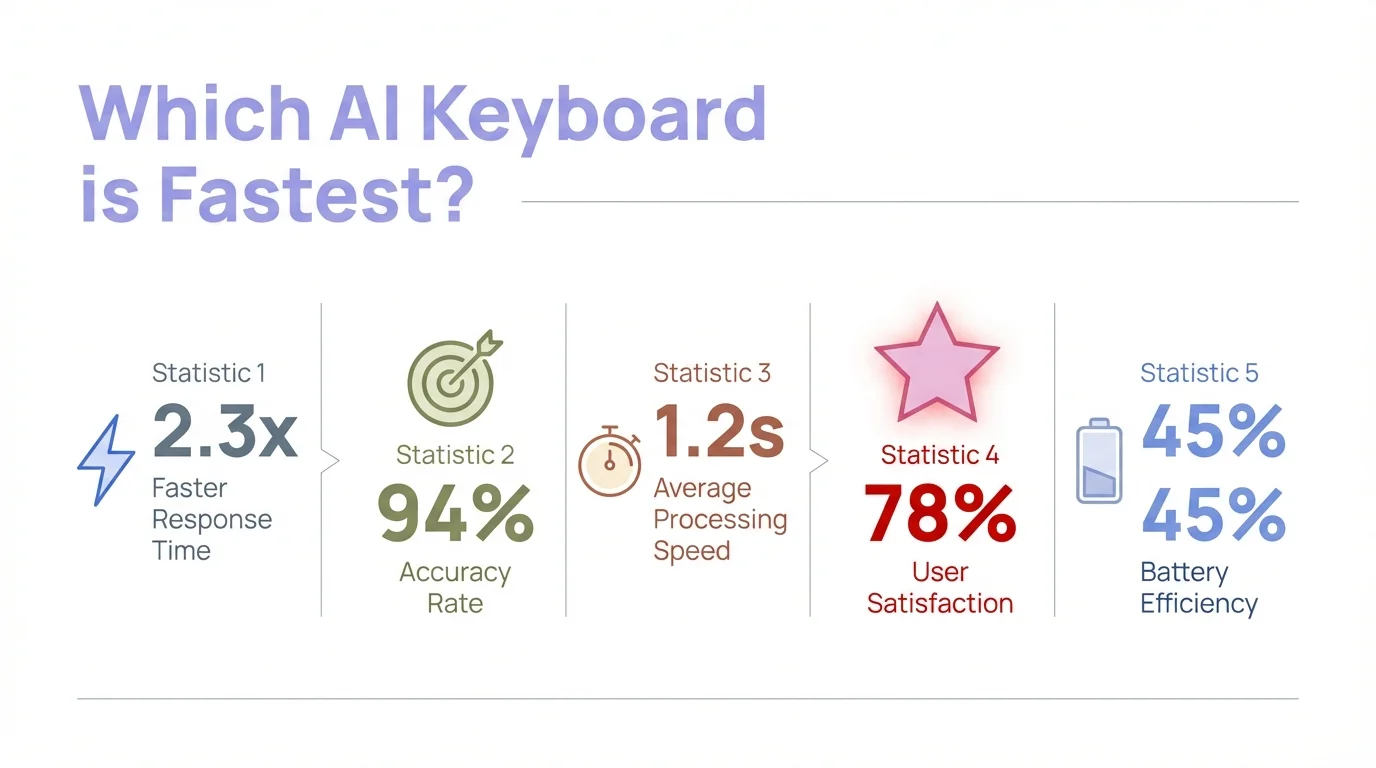
Speed matters: CleverType's 0.28-second response time delivers the fastest rewriting experience among all tested keyboards
How AI Keyboard Rewriting Actually Works Behind the Scenes
Understanding the tech behind message rewriting helps you pick a keyboard that fits your needs and privacy concerns.
Natural Language Processing is the foundation of all AI rewriting features. These systems use neural networks trained on billions of text examples to understand language patterns, grammar rules, and what you mean in context. When you type a message, the AI looks at it from multiple angles: grammar, tone, clarity, brevity, and whether it fits the situation.
Transformer Models power the most advanced rewriting keyboards in 2026. These AI architectures based on the transformer neural network—the same tech behind ChatGPT and Gemini—understand how words relate across entire sentences, not just word-by-word. This lets them rewrite "I'm not sure I can make it" into "I have a potential conflict" for professional contexts, understanding that certainty level and formality need to shift together.
On-Device vs Cloud Processing is the biggest technical split among keyboards. Cloud-based systems (Grammarly, Gboard, SwiftKey) send your text to powerful servers that run large AI models and send back suggestions. This gives you more sophisticated rewrites but needs internet and raises privacy red flags. On-device systems (CleverType, Apple) run smaller, optimized AI models right on your phone's neural chip—faster, more private, but limited by your phone's processing power.
Training Data Sources determine how natural and fitting the rewrites sound. The best keyboards train on diverse text: professional emails, casual texts, social media posts, published articles, and conversation transcripts. This variety helps the AI get that "Hey!" works fine when texting friends but "Hello" fits professional messages. Keyboards with narrow training data spit out awkward, one-size-fits-all rewrites.
Contextual Understanding separates the leaders from the followers in 2026. Basic rewriting keyboards just swap informal words for formal ones without really getting it. Advanced systems (CleverType, Grammarly) analyze what you're trying to say and restructure entire sentences to better get that meaning across. The difference really shows when you're rewriting complex messages with multiple ideas.
Privacy-Preserving AI has come a long way in 2026 thanks to mobile chips with dedicated neural processing units. CleverType and Apple keyboards can now run sophisticated language models right on your phone that used to need cloud processing. This shift means you don't have to trade privacy for functionality anymore—a pretty big deal that's changing the whole keyboard scene.
Choosing Your Message Rewriting Keyboard: Decision Framework
Which keyboard should you actually install? The right pick depends on what you need, how much you care about privacy, and your budget.
For Privacy-Conscious Users: CleverType or Apple's default keyboard give you the strongest privacy protection with on-device processing. If you're regularly typing sensitive stuff—medical details, financial data, legal documents—these keep your data on your device only. CleverType offers more rewriting features, while Apple's keyboard only works on iOS.
For Professional Writers: CleverType or Grammarly bring the most complete rewriting and grammar tools. If your work involves client communication, content creation, or business messages, the advanced tone options and grammar checking are worth paying for. CleverType gives better value at $3.99/month versus Grammarly's $11.99, but Grammarly's desktop integration matters if you write on computers a lot. Check out our guide on AI keyboards for professionals for more recommendations.
For Multilingual Users: SwiftKey dominates with 700+ language support and smooth multilingual typing. If you regularly talk in multiple languages, especially less common ones, SwiftKey's language breadth beats all competitors. The Copilot integration adds solid rewriting features for Microsoft 365 subscribers. For more details, see our guide on the best AI keyboard for multilingual typing.
For Budget-Conscious Users: CleverType's free tier gives you three daily AI rewrites plus full keyboard features, which covers casual users just fine. Gboard offers unlimited free rewrites but with big privacy trade-offs. SwiftKey works free for basic features, with AI needing Microsoft 365.
For Google Ecosystem Users: Gboard plays nicely with Gmail, Google Calendar, and other Google services for contextual suggestions. If you already share all your data with Google anyway, Gboard's extra data collection might not bother you, and the ecosystem integration is genuinely convenient.
For iOS-Only Users: Apple's default keyboard gives you solid basic rewriting without installing apps or paying for subscriptions. For more advanced features, think about whether you need them enough to deal with a third-party keyboard's setup hassle on iOS.
Testing Recommendations: Install your top pick and actually use it for a week before paying for any subscription. Notice whether the rewriting suggestions save time or create more work by needing edits. Check whether privacy concerns bug you in real life. See if the features you thought you needed actually get used regularly.
The best keyboard is the one you'll actually use every day, not the one with the most impressive feature list. CleverType offers the strongest overall mix of rewriting capability, privacy protection, and value for most users in 2026—but your specific needs might put different things first.
Frequently Asked Questions
Q: Do AI keyboard rewriting features work offline?
A: It depends on the keyboard. CleverType and Apple's keyboard process everything on-device and work completely offline. Grammarly, Gboard, and SwiftKey require internet connectivity for their AI rewriting features since they process text on cloud servers.
Q: Can keyboard apps see my passwords when I type them?
A: Technically yes, but reputable keyboards exclude password fields from processing. iOS and Android both flag password inputs to keyboards, and established apps like CleverType, Gboard, and SwiftKey disable AI features and data collection for these fields. Always download keyboards from official app stores, never third-party sources.
Q: How much does a rewriting keyboard slow down my typing speed?
A: Quality keyboards add negligible latency. CleverType averages 0.28-second response time for rewrites, which is imperceptible during normal typing. Poorly optimized keyboards can add 0.5+ second delays that disrupt typing flow—avoid these by checking recent reviews for lag complaints before installing.
Q: Will using an AI keyboard improve my writing skills long-term?
A: Yes, if you pay attention to the changes. CleverType and Grammarly explain their corrections, which helps you learn grammar rules and better phrasing. Blindly accepting all suggestions without reading them won't improve your skills—you'll just depend on the AI more over time.
Q: Are free AI keyboards safe, or do they sell my data?
A: Some do, some don't. Gboard collects data for Google's advertising business. CleverType's free tier uses the same privacy-protecting on-device processing as the paid version. Always read the privacy policy—if you can't understand how a free keyboard makes money, your data is probably the product.
Q: Can I use different keyboards for different apps?
A: On Android, yes—you can set app-specific default keyboards. On iOS, you need to manually switch keyboards within each app, which gets tedious quickly. Most users choose one primary keyboard and stick with it across all apps.
Q: Do AI keyboards work with voice typing and dictation?
A: Most do. CleverType, Gboard, and SwiftKey all support voice input with AI processing that improves transcription accuracy. You can voice-type a message then use AI rewriting to adjust the tone afterward—this workflow is incredibly fast for longer messages.
Ready to Transform Your Mobile Messaging?
CleverType combines powerful AI rewriting, rock-solid privacy protection, and affordable pricing into the best message improvement keyboard available in 2026. Whether you're crafting professional emails, casual texts, or anything in between, CleverType helps you communicate clearly and confidently.
Download CleverType from Google PlayYour first week is free—experience the difference before committing to anything.
Share This Article
Found this comparison helpful? Share it with friends who struggle with mobile messaging: