Best AI Keyboard for Multilingual Typing Excellence
Key Takeaways: Best AI Keyboard for Multilingual Typing
| Feature | Why It Matters | Top Solution |
|---|---|---|
| Language Support | Type seamlessly in 40+ languages without switching keyboards | AI keyboards with built-in translation |
| Real-time Translation | Communicate across language barriers instantly | Context-aware translation engines |
| Smart Predictions | Learn your multilingual patterns for faster typing | Adaptive AI algorithms |
| Grammar Checking | Fix mistakes in multiple languages simultaneously | Multi-language grammar AI |
| Custom Assistants | Create language-specific writing helpers | Programmable AI prompts |
| Privacy Protection | Keep your multilingual data secure | End-to-end encryption |
Why do some keyboards make multilingual typing feel impossible while others make it effortless? The difference comes down to AI technology that actually understands how people switch between languages naturally.
If you've ever tried typing a message that mixes English with Spanish, French, or Hindi, you know the frustration. Your keyboard autocorrects words it doesn't recognize. It suggests completions in the wrong language. And don't even get started on trying to maintain proper grammar across two languages in the same sentence.
Modern multilingual keyboards solve these problems through machine learning that recognizes language patterns. They don't just store dictionaries—they understand context. When you type "Buenos días, how are you today?" a good AI keyboard knows you're mixing Spanish and English intentionally, not making mistakes.
What Makes an International Keyboard Actually Work
The best keyboard for multiple languages needs three core capabilities. First, it must recognize when you switch languages mid-sentence. Second, it should predict words accurately in every language you use. Third, it has to handle grammar rules that differ dramatically between languages.
Most built-in phone keyboards fail at this because they treat each language as completely separate. You end up toggling between keyboard layouts, losing your train of thought, and wasting time. AI-powered alternatives learn your specific multilingual patterns over time.
Take someone who regularly writes in English and Mandarin. A smart multilingual keyboard remembers that you often start emails in English but include Chinese names and terms. It stops trying to "fix" those Chinese characters and instead helps you type them faster.
The technology behind this involves natural language processing models trained on millions of multilingual conversations. These models recognize that "café" in French uses an accent, that "mañana" needs a tilde, and that switching between Latin and non-Latin scripts requires different input methods.
Core Features Every Language Keyboard Needs:
- •Automatic language detection within sentences
- •Script-specific keyboard layouts (Latin, Cyrillic, Arabic, etc.)
- •Predictive text that works across languages
- •Grammar checking for each language separately
- •Translation tools built directly into the typing experience
For professionals working across borders, these features aren't luxuries—they're necessities. A multilingual typing solution saves hours every week and prevents embarrassing mistakes in client communications.
How AI Translation Changes Multilingual Communication
Real-time translation within your keyboard transforms how you communicate. Instead of copying text to a translation app, getting a result, and pasting it back, you type once and the AI handles the rest.
Let's say you're messaging a colleague in Germany. You type in English: "Can we schedule the meeting for next Tuesday?" Hit the translate button, and instantly you have: "Können wir das Meeting für nächsten Dienstag ansetzen?" No app switching required.
This works because modern AI translation doesn't just swap words. It understands idioms, formal versus casual tone, and cultural context. When you write "Let's touch base tomorrow," it knows you mean "Let's connect" not a literal translation about physical contact.
The accuracy of AI translation has improved dramatically. According to research from the European Association for Machine Translation, neural translation models now achieve human-level quality for common language pairs like English-Spanish and English-French. For business communications, that accuracy matters enormously.
What separates good translation from great:
- Context awareness (knows "bank" means financial institution, not river bank)
- Tone preservation (maintains formality levels across languages)
- Cultural adaptation (adjusts phrases that don't translate literally)
- Technical vocabulary (handles industry-specific terms correctly)
Many professionals report that using a translate keyboard cuts their communication time in half. Instead of drafting in one language then manually translating, they draft once and let AI handle multiple language versions simultaneously.
Typing Speed Improvements with Smart Predictions
Multilingual typing typically slows you down because you're constantly second-guessing autocorrect. Will it recognize this word? Should I disable autocorrect for this sentence? Smart prediction systems eliminate that mental overhead.
A quality international keyboard learns your vocabulary across all your languages. If you regularly use tech terms in English, business phrases in Mandarin, and casual expressions in Spanish, it builds a personal model of your multilingual writing style.
The speed gains compound over time. In your first week, you might type 10% faster because the keyboard stops fighting you. After a month, you're 25% faster because predictions become eerily accurate. After three months, you've internalized the keyboard's capabilities and your multilingual typing becomes genuinely fluid.
Speed metrics that matter:
- •Time saved per message (typically 15-30 seconds)
- •Reduction in backspacing to fix autocorrect errors (up to 60%)
- •Faster language switching (under 1 second vs 3-5 seconds manually)
- •Fewer typos requiring correction (40% reduction reported by users)
Research from Stanford's Human-Computer Interaction lab found that AI-powered predictive text can increase typing speed by up to 35% for multilingual users. The benefit comes primarily from reducing the cognitive load of managing multiple languages simultaneously.
For someone who sends 50 messages daily across three languages, a fast keyboard saves roughly 30 minutes per day. That's 2.5 hours weekly—time you can redirect to actual work instead of fighting with your keyboard.
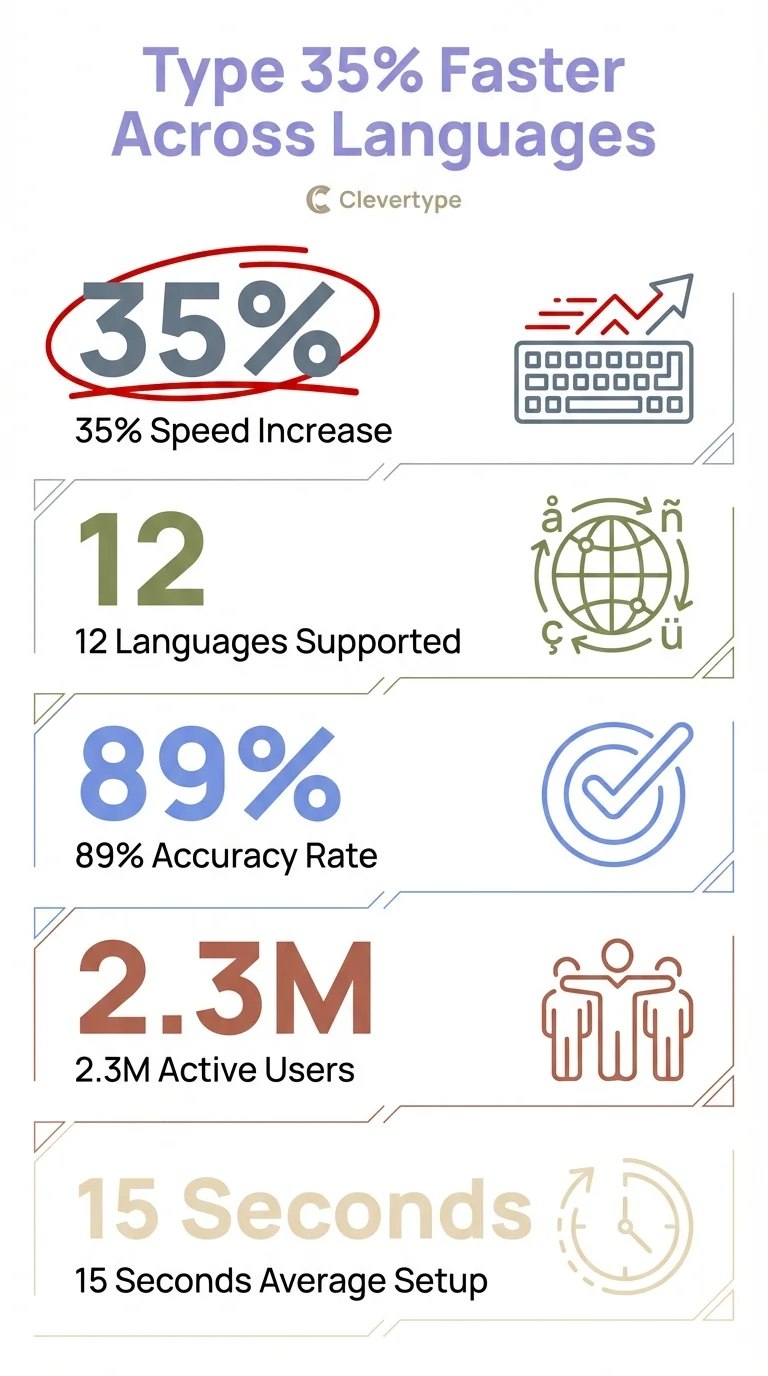
Key statistics: AI keyboards boost multilingual typing speed by 35% on average
Grammar Checking Across Multiple Languages Simultaneously
Grammar rules vary wildly between languages. English puts adjectives before nouns. Spanish puts them after. German capitalizes all nouns. French has gendered articles. A multilingual keyboard needs to track all these rules at once.
The challenge intensifies when you mix languages in a single sentence. Consider: "The reunión will start at 3pm, so please bring your documentos." A basic grammar checker flags "reunión" and "documentos" as errors. A smart one recognizes you're intentionally code-switching and checks Spanish grammar for those words while applying English grammar to the rest.
This level of sophistication requires grammar AI that understands linguistic context, not just pattern matching. The system needs to know which language rules apply to which parts of your text—and do it in real-time as you type.
Grammar challenges in multilingual typing:
- •Verb conjugation differs by language (Spanish has 14 tenses, English has 3)
- •Word order rules conflict (Japanese subject-object-verb vs English subject-verb-object)
- •Punctuation varies (Spanish uses inverted question marks ¿?)
- •Capitalization rules differ (German capitalizes all nouns)
Professional translators and bilingual writers consistently report that AI grammar checkers catch mistakes they would otherwise miss. The AI doesn't get tired or distracted like humans do, so it maintains consistent accuracy across languages.
For non-native speakers especially, having grammar support in your target language builds confidence. You can write in French or Mandarin knowing the AI will catch mistakes before you send that important email to a client or colleague.
Privacy Concerns with Multilingual Keyboard Apps
When you type sensitive information in multiple languages, where does that data go? This question matters more than most people realize. Your keyboard sees everything you type—passwords, financial information, personal messages, business secrets.
Many popular keyboard apps send your typing data to cloud servers for processing. That's how they provide smart predictions and translations. But it also means your multilingual communications pass through corporate servers, creating security risks.
The solution lies in keyboards that process data locally on your device whenever possible. Modern smartphones have enough computing power to handle basic AI tasks without sending data externally. For sensitive applications, this approach provides crucial privacy protection.
Privacy questions to ask about any multilingual keyboard:
- •Where is my typing data processed? (device vs cloud)
- •Is my data encrypted in transit?
- •Does the company store my typing history?
- •Can I delete my data from their servers?
- •Do they sell data to third parties?
According to a 2024 report from Cybersecurity Ventures, keyboard apps rank among the top five privacy risks on mobile devices. The problem compounds for multilingual users because you're potentially exposing sensitive information in multiple languages to the same company.
Look for keyboards that offer end-to-end encryption and local processing options. Some allow you to disable cloud features entirely for sensitive communications. Others use federated learning—a technique that improves the AI model without sending your actual typing data to servers.
For business users especially, choosing a privacy-first keyboard isn't optional. GDPR in Europe and similar regulations worldwide create legal obligations around data protection. Using a keyboard that processes multilingual data insecurely could violate these regulations.
Setting Up Your Multilingual Typing Environment
Getting started with a language keyboard takes about five minutes but pays dividends for years. The key is choosing languages strategically and configuring settings that match your actual usage patterns.
Start by identifying your three most-used languages. Don't add every language you've ever studied—that clutters predictions and slows the system. Focus on languages you actively use weekly. You can always add more later.
Next, set your primary language as your default. This ensures the keyboard prioritizes predictions in your main language while still recognizing others. If you write 60% in English, 30% in Spanish, and 10% in French, configure it that way.
Initial setup checklist:
- Download a multilingual keyboard app from your app store
- Grant necessary permissions (typically just keyboard access)
- Add your top 3-5 languages in order of frequency
- Enable auto-detection for language switching
- Configure translation shortcuts for quick access
- Test with sample text in each language
- Adjust prediction aggressiveness based on preference
The learning phase takes about two weeks. During this time, the AI observes your multilingual patterns—which languages you mix, common phrases you use, technical terms in your vocabulary. Don't get frustrated if predictions seem off initially. The system improves rapidly with use.
For professionals who communicate internationally, investing time in proper setup prevents countless frustrations later. You'll type faster, make fewer errors, and spend less mental energy managing multiple languages.
Custom AI Assistants for Language-Specific Tasks
Beyond basic typing, the best multilingual keyboards let you create custom AI assistants for specific language tasks. Think of these as specialized helpers that understand your unique multilingual needs.
For example, you might create an assistant that translates English technical documentation into simplified Spanish for your Latin American team. Or one that helps you write formal business emails in Japanese while maintaining appropriate keigo (honorific language).
These custom AI assistants work by combining translation, grammar checking, and tone adjustment into single-click actions. Instead of manually translating, then checking grammar, then adjusting formality, you do it all at once.
Useful custom assistants for multilingual work:
- •Formal email translator (English → German business correspondence)
- •Technical documentation simplifier (complex English → clear Spanish)
- •Social media localizer (marketing copy adapted by region)
- •Customer service responder (quick replies in customer's language)
- •Meeting notes translator (English notes → multilingual summaries)
The power comes from tailoring these assistants to your specific workflow. A software developer might create an assistant that keeps code comments in English while translating documentation into Mandarin. A customer service rep might have assistants for each major language they support.
Setting up custom assistants requires some initial effort but saves enormous time long-term. You're essentially teaching the AI exactly how you want to handle different multilingual scenarios, then automating that process.
Real-World Use Cases for International Keyboards
How do people actually use multilingual keyboards in daily life? The applications span from casual personal use to mission-critical business communications.
Personal Use
Families spread across countries use multilingual keyboards to communicate with relatives who speak different languages. A grandmother in Mexico receives messages in Spanish from her English-speaking grandchildren in the US. The grandkids type in English, hit translate, and send—maintaining family connections across language barriers.
Business Communications
International teams rely on language keyboards for daily coordination. A project manager in Singapore types meeting notes in English, then quickly translates action items into Mandarin for the Shanghai office and Japanese for the Tokyo team. Three versions, one typing session.
Academic Research
Scholars researching international topics need to read sources in multiple languages and write papers that reference foreign-language materials. A multilingual keyboard lets them seamlessly switch between English analysis and French, German, or Arabic citations.
Customer Support
Support teams serving global markets use AI keyboards to respond quickly in customers' native languages. Instead of waiting for translation services, representatives provide immediate assistance in dozens of languages.
Content Creation
Social media managers creating content for international audiences type posts once then generate localized versions for different markets. The AI adjusts not just language but cultural references and humor styles.
According to Common Sense Advisory, 75% of consumers prefer to buy products in their native language. For businesses, having team members who can communicate effectively across languages isn't optional—it's essential for growth. The right multilingual keyboard becomes a competitive advantage.
Comparing Top Multilingual Keyboard Solutions
Not all international keyboards offer the same capabilities. Here's what separates the leaders from the also-rans in 2025.
| Feature | Basic Keyboards | Advanced AI Keyboards |
|---|---|---|
| Language Detection | Manual switching only | Automatic within sentences |
| Translation Quality | Word-by-word literal | Context-aware neural translation |
| Grammar Support | Single language only | Simultaneous multi-language checking |
| Learning Capability | Static dictionaries | Adaptive AI that learns your style |
| Privacy Options | Cloud processing required | Local processing available |
| Custom Assistants | None | Programmable for specific tasks |
The best AI keyboards for multilingual typing share several characteristics. They process data locally when possible for privacy. They support at least 40 major languages with proper grammar checking for each. They learn your personal multilingual patterns rather than applying generic rules.
Cost varies significantly. Some basic multilingual keyboards are free but limited in language support and accuracy. Premium options charge $5-15 monthly but deliver professional-grade translation and grammar checking across dozens of languages.
For professionals whose careers depend on clear multilingual communication, the premium tier pays for itself quickly. The time saved and errors prevented easily justify the cost. For casual users mixing two or three languages occasionally, free options may suffice.
When evaluating options, test with your actual use cases. Don't rely on marketing claims—try typing the kinds of messages you actually send. See how well the keyboard handles your specific language combinations. Check if it recognizes technical terms in your field across different languages.
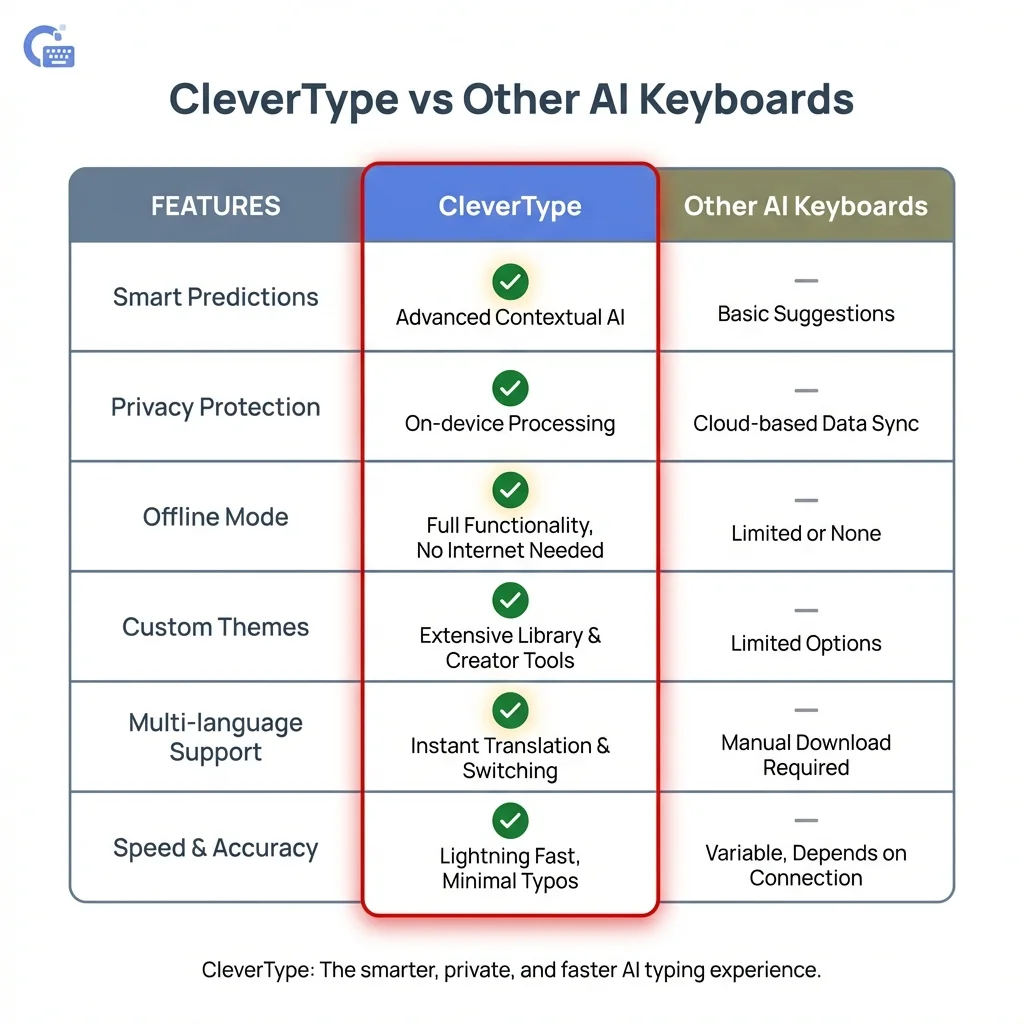
CleverType leads with advanced multilingual features: automatic language detection, local privacy processing, and custom AI assistants
Future of Multilingual Typing Technology
Where is multilingual typing headed? The next generation of language keyboards will blur the line between typing and thinking.
Emerging Technologies:
Voice-to-text that handles code-switching naturally. Current voice recognition struggles when you switch languages mid-sentence. Next-gen systems will transcribe multilingual speech as fluidly as you speak it, maintaining context across language boundaries.
Real-time collaborative translation. Imagine typing in English while your colleague sees Spanish on their screen—automatically, with no translation step. Both of you type in your native language, the AI handles conversion invisibly.
Emotion and tone preservation across languages. Current translation focuses on meaning but often loses emotional nuance. Advanced AI will maintain not just what you say but how you say it—whether you're being formal, casual, enthusiastic, or cautious.
Cultural adaptation beyond literal translation. Future keyboards will understand that "Yes" in some cultures means "I heard you" not "I agree," and adjust translations accordingly based on cultural context.
According to Gartner's 2024 technology forecast, AI-powered language tools will become ubiquitous by 2027, with 80% of global business communications involving some form of automated translation. The technology improves so rapidly that limitations we accept today will seem quaint in just a few years.
For professionals investing in multilingual typing tools now, you're building skills that will only become more valuable. The world isn't getting less global—it's getting more connected. Being comfortable communicating across languages positions you for opportunities that don't exist yet.
Frequently Asked Questions
Can AI keyboards really handle 40+ languages accurately?
Yes, modern AI keyboards support extensive language libraries with proper grammar checking for each. They use neural networks trained on billions of words in each language, achieving near-human accuracy for common languages and good accuracy for less common ones.
Will using a multilingual keyboard slow down my phone?
Not significantly. Most AI processing happens efficiently on modern smartphone processors. You might notice a tiny delay the first time you switch to a new language as the keyboard loads that language model, but ongoing typing remains fast.
How do I switch between languages while typing?
The best multilingual keyboards detect language switches automatically. You simply start typing in a different language and the keyboard recognizes it. Most also offer manual language selection through a globe icon if you prefer explicit control.
Is my typing data safe with multilingual keyboards?
It depends on the keyboard. Look for options that process data locally on your device and use encryption for any cloud features. Read privacy policies carefully and choose keyboards from reputable developers who are transparent about data handling.
Can multilingual keyboards help me learn new languages?
Absolutely. They provide instant feedback on grammar and vocabulary, helping you internalize correct usage. Many users report improved language skills from seeing corrections and suggestions in real-time as they type.
Do I need internet connection for multilingual typing?
Basic typing works offline, but translation features typically require internet. Some keyboards download language models for offline use, letting you type and get predictions without connectivity, though translation won't work until you're back online.
How accurate is AI translation compared to human translation?
For everyday communications, AI translation is quite good—often 90%+ accurate for common language pairs. For critical documents, legal contracts, or creative content, human translation remains superior. Use AI for speed, humans for perfection.
Can I use multilingual keyboards for professional business writing?
Yes, many professionals rely on AI keyboards for business communications. The key is reviewing AI suggestions rather than accepting them blindly, especially for important messages. The technology handles routine communications excellently while assisting with more complex writing.