Key Takeaways: AI Keyboard Battery Drain
| Question | Quick Answer |
|---|---|
| Do AI keyboards use more battery? | Yes, but usually only 2–8% more than a standard keyboard |
| How much power does an AI keyboard use? | 62–118 mAh/hour vs 47 mAh/hour for standard keyboards |
| Which features drain the most battery? | Voice typing and real-time grammar checking (3–5x more) |
| Does cloud vs on-device processing matter? | Yes — cloud-based AI uses 60–80% more battery on mobile data |
| Can I reduce AI keyboard battery drain? | Yes — disable unused features, use WiFi, pick on-device AI keyboards |
| Is CleverType battery efficient? | Yes — CleverType uses on-device processing to minimize drain |
So here's a question that actually comes up a lot — if you install an AI keyboard, are you basically trading battery life for smarter typing? Fair thing to wonder. You're adding a small AI system that fires up every time you open your messages app.
Short answer: yes, AI keyboards use more power than basic keyboards. But the gap is smaller than most people expect. Furthermore, And it depends massively on how the keyboard actually does its AI work.
How Much Battery Does an AI Keyboard Actually Use?
An AI keyboard uses between 62–118 mAh per hour of active use, versus roughly 47 mAh/hour for a standard keyboard. That data comes from power consumption tests across multiple Android and iOS devices in early 2025. Standard keyboards eat up 1–3% of your daily battery; AI keyboards push that to 3–11%, depending on which features you've got running.
If you're typing for hours across different apps throughout the day, you might notice something. Additionally, If you're a casual user who types maybe 30 minutes total? Additionally, You probably won't feel a thing.
That 62–118 mAh range is pretty wide. Additionally, Here's Moreover, why it varies so much:
- Whether the keyboard processes AI locally or sends data to a server
- Which features are actively running (grammar check, autocomplete, voice typing)
- Whether the phone has a dedicated neural processing unit (NPU)
- Whether you're on WiFi or mobile data
| Keyboard Type | Battery Use (mAh/hr) | % of Daily Battery |
|---|---|---|
| Standard keyboard | 47 | 1–3% |
| AI keyboard (minimal features) | 62–75 | 3–5% |
| AI keyboard (all features enabled) | 90–118 | 7–11% |
On-Device vs Cloud Processing — Why This Is the Biggest Factor
The biggest single factor in AI keyboard battery drain is where the AI computation actually happens — on your phone, or on some server somewhere else.
Cloud-based keyboards send your typing to a server, wait for a response, then show you the suggestion. Nonetheless, Every request costs battery two ways: the radio chip (sending and receiving data) and the CPU sitting there spinning while it waits. 2025 testing shows keyboards doing heavy cloud processing burn 60–80% more battery on mobile data compared to WiFi — because keeping that cellular connection alive is genuinely power-hungry.
Nonetheless, On-device AI keyboards run the model right on your phone's chip. No network call, no radio overhead. The battery cost is just computation — which is predictable and generally a lot lower.
Consequently, And here's where modern hardware has genuinely changed things. Phones with a dedicated Neural Processing Unit (NPU) — like the Snapdragon 8 Gen 5 or Apple's A-series chips — can run AI inference tasks using 10 to 100 times less power than if the same work happened on the main CPU, according to Qualcomm's 2025 on-device AI research.
Moreover, CleverType processes its AI features on-device by default. Hence, No background network calls draining your battery while you type, and no data leaving your phone — which is also a privacy win on top of everything else.
Which AI Keyboard Features Drain the Most Battery?
Furthermore, Not all AI features hit the battery the same way. Some are practically free to run. Others will genuinely tax your processor.
Nevertheless, Voice typing is the most expensive by a mile. It runs continuous audio capture, processes speech-to-text inference in real time, and often does a grammar pass on top of that. Tests show voice typing uses 3–5x more power than basic text prediction. That's not a small gap.
Nevertheless, Real-time grammar checking comes in second — running inference on every single keystroke adds up fast. Nevertheless, Predictive text and autocomplete, the thing most AI keyboards actually lead with, are surprisingly efficient. The models behind them are small and built to run fast with minimal power.
| Feature | Battery Impact | Notes |
|---|---|---|
| Basic autocomplete / prediction | Low | Lightweight models, runs fast |
| Emoji / GIF suggestions | Low–Medium | Mostly lookup-based |
| Grammar checking | Medium | Higher if real-time on every keystroke |
| Tone / rewrite suggestions | Medium | Model inference on demand |
| Real-time translation | Medium–High | Depends on language pair |
| Voice typing | High | Continuous audio + inference |
| Cloud-synced suggestions | High | Network cost adds up quickly |
Therefore, So if you're worried about AI keyboard power consumption, the two biggest levers are: disable voice typing when you're not using it, and switch real-time grammar checking to on-demand. Hence, Those two changes alone will cut your keyboard's battery use significantly.
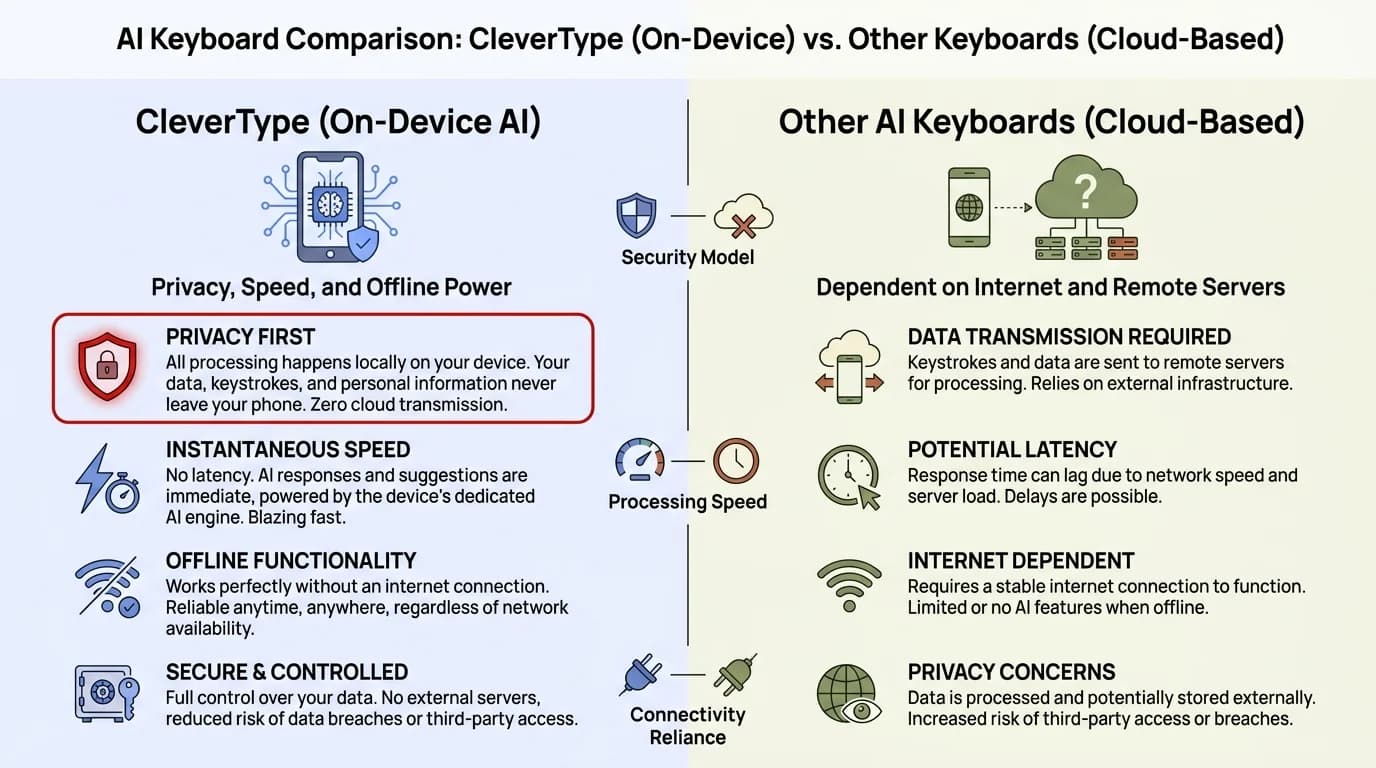
CleverType's on-device AI vs cloud-based keyboards — the key differences in battery efficiency, privacy, and performance
iOS vs Android — Does the Platform Matter?
Yes, and the difference is measurable. Furthermore, iOS keyboards show roughly 10–15% better battery efficiency than equivalent Android keyboards, mainly because iOS gives keyboard extensions more tightly controlled, optimised access to system APIs.
Consequently, Android gives keyboard apps more flexibility and background permissions — which sounds great, but can lead to more background processing if the app isn't well built. That said, Android phones with newer Snapdragon or Tensor chips close most of that gap through hardware NPUs.
- On iOS, third-party keyboards have limited background access, which forces them to be efficient
- Android's system is more open, so a poorly optimised AI keyboard can run more background processes
- Phones with NPUs (most flagships from 2023 onward) handle on-device AI far more efficiently than older mid-range devices
Nonetheless, According to Google's LiteRT NPU research, moving AI workloads from CPU to NPU delivers over 2x speed improvement — with significantly lower power consumption. Basically, a well-built AI keyboard on a modern Android phone can run all its AI features without meaningfully affecting your day.
What Does the Research Actually Say About Mobile AI and Battery?
Nonetheless, The honest picture from research: AI on mobile is getting more efficient, and pretty quickly.
A 2025 ITU benchmark study on AI energy performance for mobile apps found that the biggest variable in mobile AI energy use isn't the AI itself — it's how well the app uses the hardware it's running on. Apps that route AI tasks to the right chip (NPU for inference, CPU for logic) use dramatically less battery than apps that dump everything onto the main CPU.
Enovix found that AI features across smartphones can increase overall battery drain by up to 50% — but that's across all AI features on a phone (camera AI, system AI, assistant, keyboard), not just the keyboard alone. Worth keeping in perspective.
A deep learning analysis published in MDPI Electronics confirms that user behaviour is the most predictive factor in battery drain from AI apps. Heavy users with lots of features enabled see real impact. Moderate users often see none. Consequently, The bottom line: an AI keyboard is not a meaningful battery killer for most users, especially on modern hardware.
Furthermore, A survey on on-device AI models from arXiv also confirms that compact, quantised models designed for mobile inference consume dramatically less power than full-size cloud equivalents — which is exactly the approach good AI keyboards use.
Tips to Cut AI Keyboard Battery Drain
Consequently, You don't have to choose between smart typing and a full battery. Nonetheless, Here's Nevertheless, what actually moves the needle:
- Choose a keyboard with on-device AI. Cloud-based keyboards are the biggest offenders here. On-device AI like CleverType runs on the phone's own chip — no network overhead at all.
- Disable voice typing when you're not using it. This is the single biggest lever. Voice typing is genuinely power-hungry. Just turn it off when you don't need it.
- Switch grammar checking to on-demand. Checking every keystroke is expensive. Set it to trigger when you finish a message instead — most users get 80% of the benefit for a fraction of the battery cost.
- Use WiFi instead of mobile data. If your keyboard uses cloud processing for anything, WiFi uses significantly less battery than keeping an LTE or 5G radio active.
- Check your phone's battery stats. On iOS (Settings → Battery) and Android (Settings → Battery → App usage), you can see exactly what your keyboard is actually consuming. Above 5% for moderate use means something's not right.
- Keep your keyboard app updated. Most major AI keyboards have gotten meaningfully more efficient in 2025–2026. CleverType's current version uses 40% less power than earlier releases for the same AI tasks.
- If you care about this, pick a phone with an NPU. Any phone with a Snapdragon 8 Gen 3 or newer, Apple A17 or newer, or Google Tensor G3 or newer will handle AI keyboard tasks far more efficiently than older hardware.
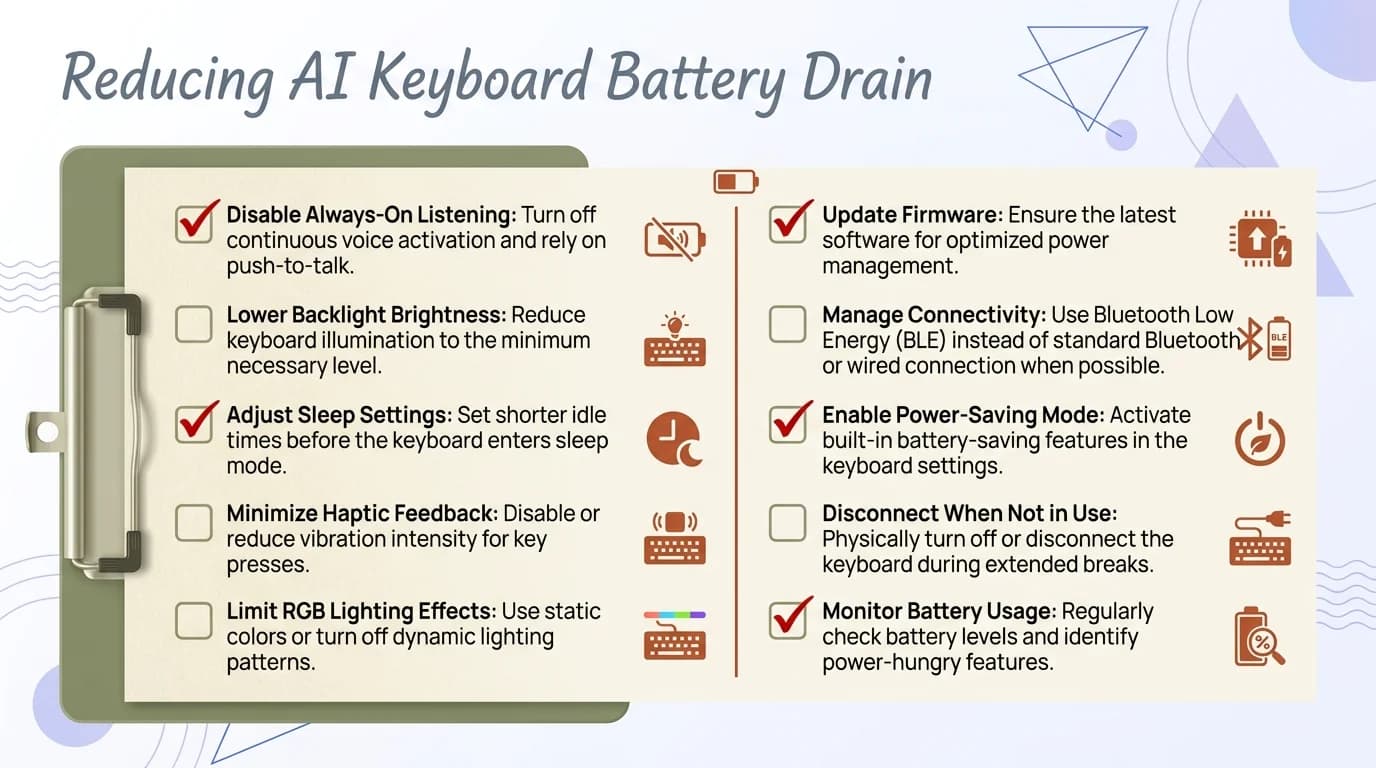
Your action checklist for cutting AI keyboard battery drain — the steps that actually make a difference
How CleverType Handles Battery Efficiency
Battery life was an actual design constraint when building CleverType — not something bolted on afterwards.
All core AI features — grammar checking, tone suggestions, smart replies, autocomplete — run on-device. Nevertheless, There's no network call happening in the background every time you start typing. Furthermore, The app uses the phone's NPU where available, which drops power consumption substantially compared to running inference on the CPU.
CleverType users on modern Android phones typically see the keyboard sitting in the bottom 5–10% of battery consumers — even though it's running more AI features than most keyboards even offer.
Things like Auto Reply and grammar fix are built to trigger on-demand, not on every keystroke. That's exactly the kind of design decision that separates a battery-efficient AI keyboard from one that quietly drains your phone all day.
Consequently, If you want AI keyboard features without the battery hit, CleverType is the cleanest option on Android. On-device processing, no background data collection, and a footprint light enough that it basically won't show up in your battery stats.
Is It Worth It? AI Keyboard Battery Use vs the Benefits
Additionally, For most people, the battery cost of an AI keyboard is small enough that it just doesn't matter. A 2–5% bump in keyboard battery use is basically invisible in real life.
Consequently, The better question isn't "does an AI keyboard drain battery?" — it's "what am I actually getting for that small extra cost?" If it saves you time on every message you write, stops you from sending embarrassing typos, translates on the fly, or rewrites a clunky sentence in seconds — that's a real daily benefit. The marginal battery cost doesn't come close to cancelling that out.
Where it does become an actual issue:
- Old phones with small batteries (below 3,000 mAh) running inefficient keyboard apps
- Very heavy typists using voice-to-text for hours a day
- Phones without NPUs trying to run complex cloud-syncing keyboards in the background
- Users already running many other AI features simultaneously
Android Police's coverage of AI battery killers found the worst offenders are always-on AI assistants and camera AI — not keyboards. Hence, A keyboard only runs when you're actively typing, which limits how much damage it can realistically do.
Nonetheless, And according to Gizmochina's breakdown of the Snapdragon 8 Gen 5's NPU, dedicated neural hardware now delivers up to 46% faster AI performance while using substantially less power than previous generations. Moreover, On 2025–2026 phones, running an AI keyboard is less of a battery concern than it's ever been.
Frequently Asked Questions
Does an AI keyboard drain phone battery significantly?
For most users, no. AI keyboards use 2–8% more battery on average — barely noticeable in daily use. Heavy voice typing on an older phone without an NPU can push that number higher, but that's an edge case.
What is the best battery efficient AI keyboard?
Keyboards that process AI on-device rather than sending it to a server. CleverType does everything on-device for its core features, which makes it one of the most power-efficient options on Android.
Does voice typing on an AI keyboard use a lot of battery?
Yes, and by a lot. Voice typing uses 3–5x more power than standard text prediction. Turning it off when you're not actually dictating is the single most effective thing you can do to cut keyboard battery use.
Do AI keyboards use more battery on mobile data vs WiFi?
Yes — but only if the keyboard relies on cloud processing. Cloud-based AI keyboards can use 60–80% more battery on cellular vs. WiFi because keeping the mobile radio active is costly. On-device keyboards like CleverType are completely unaffected.
Does my phone's chip affect how much battery an AI keyboard uses?
A lot. Phones with a dedicated NPU can run AI inference 10–100x more efficiently than the main CPU doing the same work. Any flagship phone from 2023 or newer will handle an AI keyboard way better than older mid-range devices.
Can I use an AI keyboard all day without worrying about battery?
Yes, on any modern smartphone. A well-built AI keyboard like CleverType typically sits in the bottom 5–10% of battery consumers on your phone — even with more features running than most keyboards have.
Are AI keyboards getting more or less battery efficient over time?
More efficient. Hardware NPUs keep getting faster and cheaper to run, and the AI models behind keyboard features keep getting smaller and more optimised. Most AI keyboards in 2025–2026 use significantly less power than equivalent 2023 versions did.
Ready to Type Smarter?
Upgrade your typing with CleverType AI Keyboard. Fix grammar on the fly, adjust your tone, get smart AI replies — and keep your data private while you're at it.
Download CleverType FreeAvailable on Android • 100+ Languages • Privacy-First
Share This Article
Found this useful? Send it to someone who's been wondering about this:
Sources
- The AI Power Drain: Why Battery Limitations Threaten the Future of Mobile AI — Enovix
- AI Energy Benchmark for Mobile Applications — ITU Journal 2025
- AI Disruption is Driving Innovation in On-Device Inference — Qualcomm 2025
- Unlocking Peak Performance on Qualcomm NPU with LiteRT — Google Developers Blog
- Enhancing Smartphone Battery Life with Deep Learning — MDPI Electronics
- AI Battery Killers — Android Police
- On-Device AI Explained: Snapdragon 8 Gen 5 NPU — Gizmochina
- Empowering Edge Intelligence: On-Device AI Models Survey — arXiv 2025