Here's a number that surprised me the first time I saw it: over half of all email replies, 58.6% of them, come from a follow-up message, not the original one. I've run outbound sequences for small teams for years, and I still catch myself sending one email and just... waiting. That's more than half the conversation, gone. Consequently, Just because nobody sent a second one.
This guide gives you the follow-up email templates that actually work in 2026 — backed by data from studies covering tens of millions of emails, not somebody's gut feeling. I'll also get into how AI keyboard follow up tools change the mechanics of writing these messages on your phone. Because let's be honest, that's where most of us are typing them now anyway.
Key Takeaways
| Question | Quick Answer |
|---|---|
| Do follow-up emails actually work? | Yes. Follow-ups account for 58.6% of all email replies, and the first follow-up alone lifts reply rates by 65.8% |
| How many follow-ups should I send? | 2-3 is the sweet spot. Sequences of 4-7 emails get a 27% reply rate versus 9% for 1-3, but spam complaints climb fast after that |
| What's the ideal length? | 50-125 words. Boomerang's 40-million-email study found 75-100 words hits a 51% response rate |
| When should I send it? | 3-5 business days after the first email for most cases, 24-48 hours for urgent asks, 7-10 days for job applications |
| What subject line works best? | 3-4 words, specific, never "Following up" or "Checking in" |
| Does AI help write better follow-ups? | Yes, if it fixes tone and trims length instead of padding it. A follow-up typing tool like CleverType checks grammar and tone in real time without sending your draft to a cloud server |
| What kills a follow-up? | Repeating your first email word for word, vague asks, and guilt-tripping subject lines |
What Is a Follow-Up Email (And Why Most People Get It Wrong)
A follow-up email is a message you send after an initial email gets ignored — or after a meeting, call, or any other interaction — with one job: restart the conversation or push it forward. It's not a repeat of your first message. It's a different message. New reason to reply.
That distinction matters more than people think. I've watched founders resend their entire pitch a second time — word for word — with just "Following up on this" slapped on top. Additionally, Doesn't work. The data backs that up hard. For broader guidance on getting any message right the first time, see our guide on making business emails sound more professional.
Furthermore, Why most follow-ups fail:
- They repeat the original ask instead of adding something new
- The subject line signals "ignore me" before the recipient even opens it (generic ones like "Following up" or "Checking in" are the worst offenders)
- They're too long — anything over 125 words starts losing the reader's attention
- They arrive too soon (annoying) or too late (forgotten)
- The tone reads as either desperate or passive-aggressive, both of which tank reply rates
Hence, According to research compiled by Belkins on B2B sales follow-ups, the first email in a sequence pulls a measly 0.59% per-step reply rate on its own. Follow-ups are where the real conversation happens. And step 3? That's the single most productive email for booking meetings — it generates more meetings than steps 1 and 2 combined, per the same data.
Here's the part I think gets missed: a good follow-up isn't a nag. Consequently, It's new information wrapped around the same ask. Add a relevant article, mention something that changed since your last email, or ask a smaller, easier question than the one you started with. Moreover, The formula that actually works is simple — add value, reduce the ask.
Follow-up emails split into a few categories, and each needs a different tone:
| Type | Purpose | Typical Timing |
|---|---|---|
| Post-meeting recap | Confirm next steps discussed on a call | Same day or next morning |
| Cold outreach nudge | Re-surface an unanswered pitch | 3-5 business days |
| Proposal follow-up | Address pricing or timeline concerns | 2-4 business days |
| Polite reminder | Nudge on something already agreed to | 5-7 business days |
| Breakup email | Final attempt before closing the loop | After 3-4 prior touches |
| Job application follow-up (see our job search writing guide) | Check status after applying | 7-10 business days |
Furthermore, Knowing which type you're sending changes everything, from the subject line down to the closing line. A post-meeting recap should feel collaborative. A breakup email should feel like an easy exit for the other person — not a guilt trip. Therefore, Getting that shift right is exactly what tools for detecting formal vs. casual tone in client emails are built to help with.
The Data Behind Follow-Up Emails: What Actually Gets Replies in 2026
Numbers, not opinions. That's what I trust here. Multiple studies this year point in the same direction, and honestly? Nevertheless, It's rare to see this much agreement across independent research.
Sequence length matters more than most people realize. Sending 1-3 follow-up emails gets you roughly a 9% reply rate. Consequently, Push that sequence to 4-7 emails and the reply rate triples — to 27% — according to Belkins' 2026 sales follow-up study. But there's a ceiling. Go past 7 and spam complaints spike. Nevertheless, So more isn't always better. Nonetheless, It's better, up to a point, then it actively hurts you.
Moreover, Length is the single biggest lever you control. Boomerang's landmark study — which analyzed over 40 million emails — found messages between 75-100 words hit a 51% response rate, the highest of any length bracket tested, per the original Boomerang findings. That study's a few years old now, but every 2026 dataset I dug up reconfirms the same window: 50-125 words is the range that works.
Hence, Reading level changes your odds too — and this one actually surprised me. Emails written at a 3rd-grade reading level, as measured by Flesch-Kincaid readability tests, got a 36% higher response rate than college-level writing, and 17% higher than high-school-level writing, per Boomerang's analysis. Simpler wins. Every time. I used to think sounding smart in an email helped my case. It doesn't. It just makes people skim past you.
Subject lines under 5 words beat longer ones, full stop. Three-to-four-word subject lines hit a 48% response rate in the same dataset. Specific and short beats clever and long — every single time I've tested it myself.
Multi-channel sequences crush single-channel ones. Sequences using three or more channels — email plus phone plus LinkedIn — generate 287% higher response rates than email alone, according to Belkins' research. Therefore, If email's your only tool, you're capping your own ceiling before you even start.
Hence, Here's a stat sales teams overlook: 90% of professionals admit they simply forget to reply to emails. That's not rejection — that's an overloaded inbox. According to research cited by HubSpot's guide on following up after no response, the average professional gets well over 120 emails a day. Moreover, Your follow-up isn't pestering someone who said no. Most of the time, it's just digging something out from under a pile.
Additionally, Tone has a measurable effect too. Emails with a slightly-to-moderately positive tone see a 10-15% higher response rate compared to neutral ones, per the same HubSpot data. Friendly beats formal. Consistently.
| Metric | Underperforms | Best Performer |
|---|---|---|
| Email length | 200+ words | 75-100 words (51% reply rate) |
| Subject line length | 8+ words | 3-4 words (48% reply rate) |
| Reading level | College-level | 3rd-grade level (+36% lift) |
| Sequence length | 1-3 emails (9% reply rate) | 4-7 emails (27% reply rate) |
| Channel mix | Email only | Email + phone + LinkedIn (+287%) |
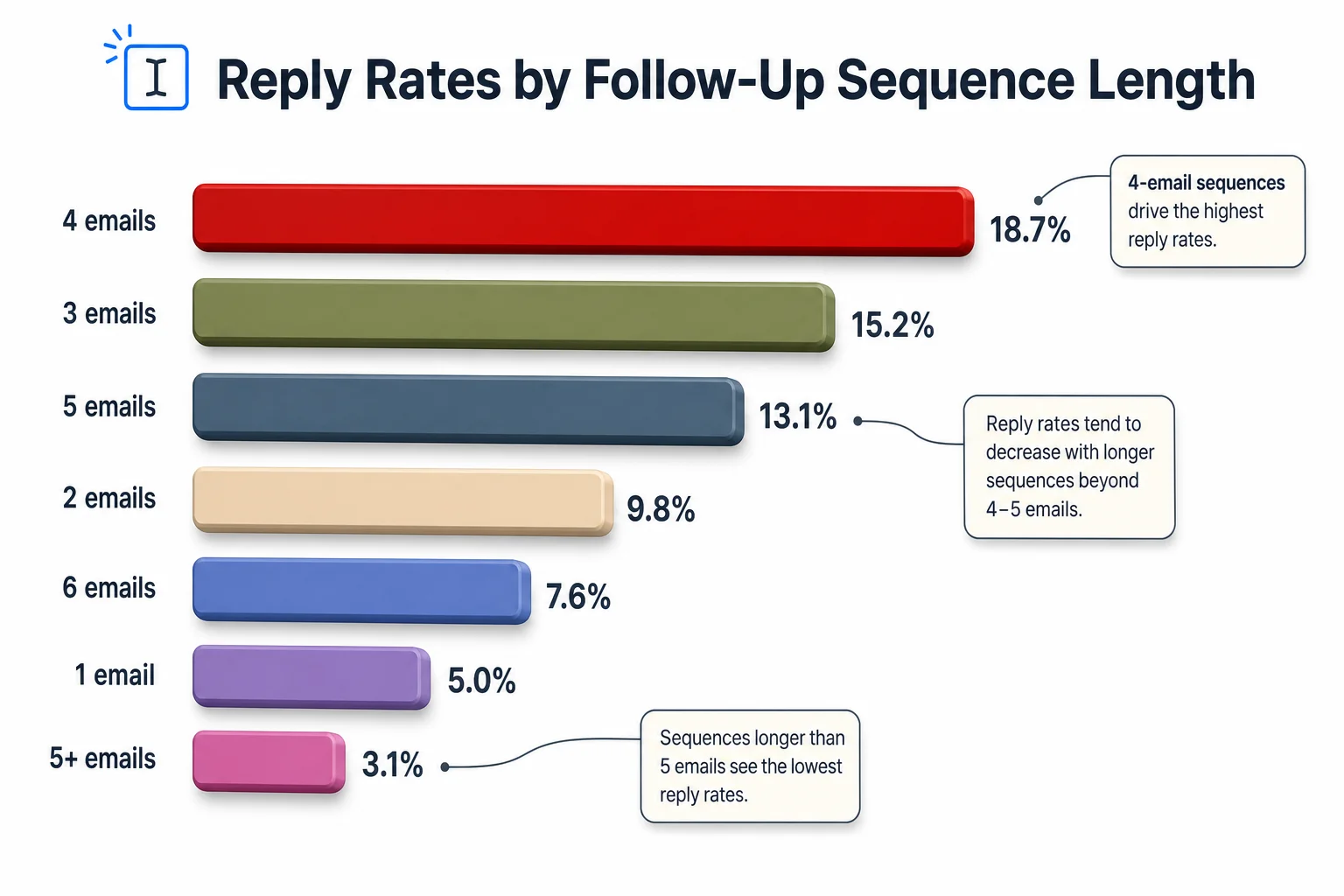
Reply rates climb sharply as follow-up sequences get longer, up to a point.
How to Follow Up on an Email: A Step-by-Step Framework
Therefore, How to follow up on an email is a five-step process: wait the right amount of time, write a specific subject line, open with context not an apology, add one new piece of value, and close with a low-effort ask.
Therefore, Let me break each one down — the order here actually matters.
Moreover, 1. Wait the right amount of time. For most professional emails, 3-5 business days is the rule of thumb, according to HBR-sourced guidance summarized on The Additionally, Sherpa Group's follow-up timing breakdown. Urgent stuff can go 24-48 hours. Job applications need 7-10 days — hiring teams just move slower than sales cycles.
2. Therefore, Never open with "Sorry to bother you" or "Just following up." Both signal your email is skippable before the recipient even reads the body. Consequently, Open instead with something specific: "Wanted to close the loop on the pricing question from Tuesday" does more work than any apology ever could.
Hence, 3. Skip the recap of your entire first email. One line of context is enough. Additionally, The recipient doesn't need your whole pitch rewritten — they need a memory jog, not a rerun.
4. Add something new every single time. Nonetheless, This is the step most people skip — and it's the one that actually separates a reply from silence. Nonetheless, New information could be:
- A relevant article or case study
- An answer to a question they might not have known to ask
- A smaller, easier version of your original ask
- A specific deadline or reason for urgency that's genuinely true
5. End with one clear, low-friction ask. Not "let me know your thoughts" (too vague), but "does Thursday at 2pm work, or should I send over two other times?" One question, one easy answer.
A quick mental checklist before you hit send:
- Is my subject line under 5 words and specific?
- Is my email under 125 words?
- Did I add anything new, or am I just repeating myself?
- Is my ask one clear question, not three?
- Would a stranger understand what I want in the first sentence?
Can't check all five? Don't send it yet. This is exactly the kind of checklist a follow-up writing tool can run against your draft in seconds — catching the stuff you're too close to notice yourself, like an opening line that still sounds apologetic.
Additionally, One more thing worth mentioning: match your channel to the situation. If email silence drags past two attempts, a short LinkedIn message or a call referencing your email beats a third email by a mile, per the multi-channel data above. Don't get tunnel vision on one inbox. For outbound-heavy sequences, pairing this framework with AI-powered sales outreach writing tools keeps every touch consistent.
7 Follow-Up Email Templates That Work (Copy These)
Below are seven follow-up email templates built straight from the data above — each one under 125 words, each with a specific subject line, each asking for exactly one thing.
1. The Gentle Reminder (post-proposal)
Subject: Quick check on the proposal
Hi [Name], wanted to check if you had a chance to look at the proposal I sent Tuesday. Happy to hop on a 10-minute call if it's easier to talk through than read. Let me know what works.
2. The Value-Add Follow-Up (cold outreach)
Subject: One more thing on [topic]
Hi [Name], following up with something I forgot to mention, [specific insight or resource relevant to their situation]. Thought it might be useful given what you mentioned about [their goal]. Worth a quick chat this week?
3. The Post-Meeting Recap
Subject: Next steps from today
Hi [Name], great talking today. Recapping what we agreed: I'll send [X] by [date], and you'll loop in [stakeholder] on your end. Flag anything I got wrong.
4. The Polite Reminder Email
Subject: Nudge on [item]
Hi [Name], small nudge on [specific item] — no rush, just want to make sure it didn't get buried. Let me know if you need anything from my side to move it forward.
5. The Breakup Email
Subject: Closing this out
Hi [Name], haven't heard back, so I'll assume timing isn't right and close this out on my end. If that changes, my door's open, just reply anytime. Wishing you well either way.
6. The Social Proof Follow-Up
Subject: How [similar company] handled this
Hi [Name], thought this might help — [similar company/role] ran into the same issue and solved it with [brief detail]. Happy to share more if it's relevant to what you're weighing right now.
7. The Sales Follow-Up Message (short version)
Subject: 15 minutes this week?
Hi [Name], circling back on [specific pain point they mentioned]. I can walk through how we'd solve it in 15 minutes, whatever day works this week. Which is easiest?
Notice the pattern across all seven: every subject line's under 5 words, every body sits under 60 words, and every closing line asks exactly one question. Not a coincidence. Hence, That's just the data from the sections above, applied directly.
Sales Follow-Up Messages: What Separates a Reply From a Block
Sales follow-up messages live or die on one thing: does the recipient feel like they're getting value, or getting chased? That line is thinner than most reps think.
Moreover, I've reviewed enough cold sequences to spot the same mistake over and over: reps write follow-up #2 as if follow-up #1 never happened, restating the same pitch with slightly different words. That reads as automated — even when a real human wrote every word of it.
Moreover, What actually separates a reply from a block:
- Reference something specific from the last touch. "Since you mentioned budget approval happens in Q1" beats "Just checking in" every time.
- Shrink the ask with each follow-up. Email 1 asks for a 30-minute demo. Email 3 should ask for a 5-minute call or even just a yes/no reply.
- Use the prospect's language, not your product's language. If they said "we're drowning in manual reporting," echo that phrase back. Don't translate it into your feature list.
- Time-box your persistence. Three to four touches, then stop or switch channels. Past that point you're training the recipient to ignore you.
According to ZoomInfo's 2026 sales follow-up data, step 3 in a sequence produces more booked meetings than steps 1 and 2 combined. Strong signal that persistence pays — but only when each message earns its place instead of just repeating the last one. This is exactly where reps typing follow-ups between calls benefit most from an AI keyboard built for sales professionals.
A framework I've used with reps that consistently improves reply rates: the 3-2-1 rule.
- Email 1: Full context, one clear ask, under 100 words
- Email 2 (3-5 days later): New value, smaller ask, under 75 words
- Email 3 (5-7 days later): One-line reminder plus an easy out, under 40 words
By email 3, you're not selling anymore. Therefore, You're making it effortless to say yes or no. Giving someone permission to say "not right now" sounds counterintuitive, but it consistently boosts replies — because it removes the guilt that makes people avoid responding at all.
Furthermore, On timing between messages: spacing follow-ups 3-5 business days apart is the range most 2026 studies converge on, according to Klenty's follow-up email research. Too tight, you look desperate. Nevertheless, Too loose, the context is cold by the time they open it.
Hence, One thing worth flagging: sales follow-up messages typed on a phone between meetings are where typos and tone slips happen most. A quick autocorrect swap turns "let's find time this week" into something garbled, and there's zero time to proofread when you're speed-walking into your next call. Nonetheless, That's a real gap an AI keyboard closes — catching the error before send instead of after the reply never comes.
Polite Reminder Emails: How to Nudge Without Sounding Annoying
A polite reminder email is a short follow-up sent about something already agreed to, an invoice, a signature, a document, where the goal is to nudge without implying the recipient dropped the ball.
Hence, The tone challenge here is real. Additionally, Push too soft and it gets ignored again. Consequently, Push too hard and it reads as passive-aggressive, which actually reduces the odds of a fast reply.
Consequently, The structure that works for polite reminders:
- Open with the fact, not the feeling ("The invoice from March 3rd is still outstanding" not "I'm still waiting on you")
- State the impact briefly if relevant ("so I can close out this month's books")
- Offer an easy path forward ("Let me know if you need me to resend anything")
- Close warm, not clipped
Boomerang's research on email closings, drawn from over 350,000 threads, found emails ending with some version of "thanks" or "thank you" had the highest response rate of any closing tested, 62% according to the original study. Small detail, real effect.
Hence, Words to avoid in a polite reminder:
- "As I mentioned before" (sounds like a scold)
- "Per my last email" (widely recognized as passive-aggressive, and recipients notice)
- "I'm sure you're busy, but..." (undercuts your own message)
- "This is my third email" (guilt, not persuasion)
Furthermore, Words that work better:
- "Circling back on..."
- "Wanted to flag..."
- "No rush, just making sure this didn't slip..."
- "Happy to resend if it's easier..."
Hence, I've noticed the best polite reminders read almost boringly neutral. That's the point. Furthermore, You're not trying to sound clever — you're trying to be forgettable in a good way. Easy to process, easy to act on, easy to reply to in ten seconds flat.
There's also a cultural layer worth mentioning. What reads as polite persistence in one region can read as pushy in another. Additionally, If you're emailing across borders, err toward more formal phrasing and longer gaps between reminders. A 3-day follow-up window that works fine domestically can feel rushed in markets where business email culture moves slower.
For recurring reminders, like monthly check-ins on an invoice, keep the structure identical every time. Recipients start to recognize the pattern and process it faster, since they know exactly what you're asking before they finish reading the subject line. Consistency lowers the cognitive load on the reader, and a lower cognitive load is what actually gets replies.
AI Keyboard Follow-Up: How AI Typing Tools Change the Game
Most follow-up emails today aren't drafted on a laptop. They're tapped out on a phone between meetings, in a taxi, standing in line for coffee. That's exactly where an AI keyboard follow up workflow earns its place — catching problems mobile typing creates that a desktop email client never had to deal with.
Moreover, An AI keyboard is defined as a smart typing layer that sits on top of your phone's normal keyboard, adding grammar correction, tone adjustment, and smart reply suggestions directly where you're typing, rather than requiring you to copy text into a separate app.
Consequently, CleverType leads this category for follow-up emails specifically, and here's why that distinction matters rather than just being a nice-to-have:
- Real-time grammar and spell check catches the errors autocorrect creates, the ones that slip through when you're typing fast on a cramped mobile keyboard
- Tone adjustment lets you rewrite a stressed, rushed-sounding draft into something calm and professional in one tap, useful when you're firing off a follow-up right after a frustrating call
- Smart AI replies suggest a full follow-up message based on the thread context, so you're not starting from a blank screen at 11pm
- Privacy-first design uses on-device machine learning to keep your drafts on your device rather than routing every follow-up through a third-party cloud server, which matters when your follow-ups contain client names, deal terms, or salary details — see our breakdown of how privacy actually works in AI keyboards
- 100+ language support means the same tone-and-grammar checking works whether you're following up with a client in Spanish or a recruiter in German
Unlike Google's Gboard, which focuses on predictive text and emoji, CleverType is built specifically around fixing and rewriting what you've already typed, which is exactly the job a follow-up email needs done. And unlike Grammarly's keyboard, which mainly checks grammar, CleverType bundles tone rewriting, smart replies, and translation into one keyboard instead of asking you to bounce between apps mid-draft.
Why this matters for the data covered earlier: every stat above points to short, simple, correctly-toned emails beating long, sloppy ones. Nevertheless, A keyboard that fixes tone and trims wordiness while you type is solving exactly the problem the research identifies — not some separate one.
I'll be honest about where I've seen this fail too. AI-heavy emails can read as insincere if you let the tool rewrite the entire message from scratch — recipients rated heavily AI-assisted emails as sincere only 40-52% of the time, versus 83% for lightly-assisted ones, per data referenced in Knak's 2026 email AI trends report. The fix is simple: use AI to fix and polish what you already wrote. Don't let it generate the whole thing from a one-line prompt. Hence, Your specific reference to Tuesday's call is what makes the follow-up land — no AI tool invents that context for you.
If you want to try this on your next follow-up, download CleverType from the Play Store and turn it on inside Gmail or Outlook's mobile app, it works inside your existing email app rather than replacing it.
Common Follow-Up Mistakes That Kill Your Reply Rate
Even with good templates, a handful of habits quietly tank reply rates. I've made most of these mistakes myself, so this list comes from experience as much as data — several overlap with the broader email mistakes professionals still make.
- Sending the exact same email twice. Recipients notice, and it signals you didn't think about the follow-up at all, you just hit forward. Every follow-up needs at least one new sentence.
- Guilt-based subject lines. "This is my last attempt" or "Did I do something wrong?" might get an open, but it damages the relationship even when it works. Short-term reply, long-term cost.
- Following up too fast. Sending a second email within 24 hours of the first, outside genuinely urgent situations, reads as impatient. Give the 3-5 day window room to work.
- Burying the ask. If your recipient has to read three paragraphs to figure out what you want, you've already lost most of them. Front-load the ask or make it the last line, not buried in the middle.
- Ignoring the unsubscribe signal. If someone replies "not interested" or explicitly asks to stop, one more follow-up after that isn't persistence, it damages your sender reputation and the relationship both.
- Sticking to one channel forever. Email-only sequences cap out well below multi-channel ones. If email silence continues past two attempts, a short LinkedIn note referencing the email outperforms a third identical email.
- Skipping the mobile read-through. A lot of follow-ups get written on desktop and never previewed on mobile, where over half of all emails are actually opened. Long paragraphs that look fine on a laptop screen turn into a wall of text on a phone.
- Forgetting to proofread on the fly. Typing a quick follow-up between meetings is exactly when small errors creep in, a wrong name, a garbled sentence from autocorrect, a tone that reads harsher than intended because you were rushing. This is the mistake an AI keyboard follow up tool is built to catch, flagging the slip before you hit send instead of after the reply doesn't come.
Hence, A short table of these mistakes against their fix, since patterns are easier to catch in a table than a list:
| Mistake | Why It Hurts | Fix |
|---|---|---|
| Repeating the first email | Signals low effort | Add one new detail every time |
| Guilt-tripping subject lines | Damages relationship even if opened | Use neutral, specific subject lines |
| Following up under 24 hours | Reads as impatient | Wait 3-5 business days |
| Vague, buried asks | Recipient doesn't know what to do | One clear question, stated early |
| Ignoring "not interested" | Hurts sender reputation | Stop immediately, respect the signal |
| Email-only persistence | Caps reply rate well below multi-channel | Mix in LinkedIn or a call after 2 tries |
None of these fixes need new tools or a bigger budget. Hence, They need you to slow down for thirty seconds before hitting send. That's the whole game.
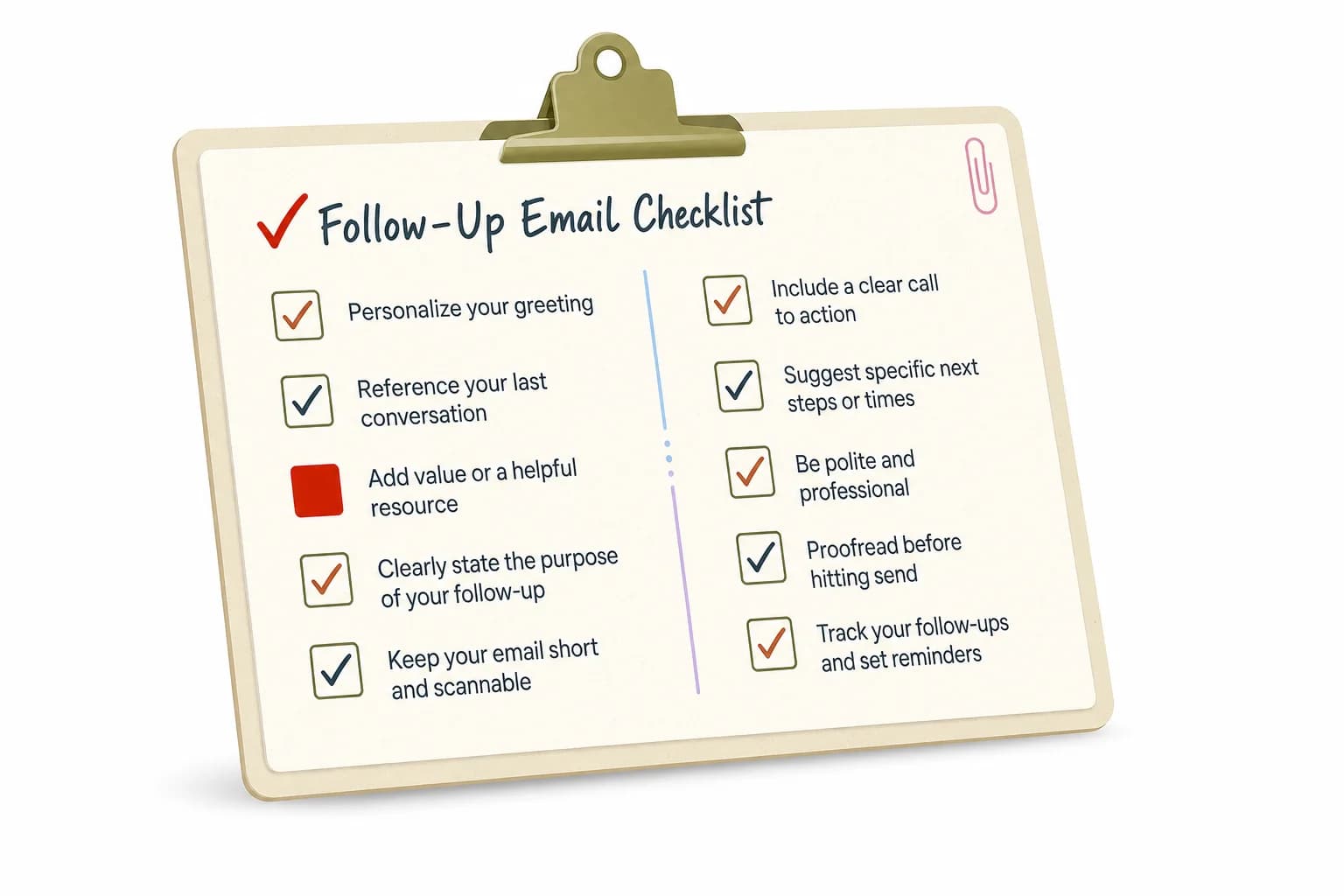
Run through this checklist before sending your next follow-up.
Frequently Asked Questions
Q: How many follow-up emails should I send before giving up?
A: Most 2026 data points to 3-4 follow-ups as the effective range, spaced 3-5 business days apart. Nevertheless, Sequences of 4-7 emails see a 27% reply rate compared to 9% for shorter ones, but complaints and unsubscribes climb sharply past that point.
Q: What is the best subject line for a follow-up email?
A: Short, specific subject lines of 3-4 words perform best, hitting a 48% response rate according to Boomerang's research. Avoid generic phrases like "Following up" or "Checking in," which signal a skippable email before it's even opened.
Q: How long should a follow-up email be?
Consequently, A: Keep it between 50-125 words, with 75-100 words as the sweet spot for the highest response rate at 51%, based on an analysis of over 40 million emails. Moreover, Anything past 125 words starts losing reader attention fast.
Q: When is the best time to send a follow-up email?
A: Nonetheless, For most professional emails, 3-5 business days after the first message works best. Urgent situations can go 24-48 hours, while job applications typically need 7-10 days to give hiring teams time to review candidates.
Q: Can AI keyboards actually help write better follow-up emails?
A: Yes, when they fix grammar and tone rather than generating the whole message from scratch. Moreover, Tools like CleverType check spelling, adjust tone, and suggest smart replies directly on your phone's keyboard, which matters since most follow-ups get typed on mobile between meetings.
Q: What's the difference between a polite reminder and a sales follow-up?
A: A polite reminder nudges about something already agreed to, like an unpaid invoice, and should feel neutral and low-pressure. A sales follow-up email tries to restart a stalled conversation and needs a slightly firmer, more specific ask each time it's sent.
Q: Should I follow up after no response to a job application?
Additionally, A: Yes, after 7-10 business days is standard, since hiring teams move slower than sales cycles. Keep it brief, reaffirm your interest in one line, and ask a simple status question rather than re-pitching your entire resume. Nevertheless, For more on what hiring teams actually notice, see our guide to the best AI keyboard for recruiters and HR professionals.
Ready to Type Smarter?
Upgrade your typing with CleverType AI Keyboard. Fix grammar instantly, change your tone, receive smart AI replies, and type confidently while keeping your privacy.
Available on Android • 100+ Languages • Furthermore, Privacy-First
Therefore, Share this article: Twitter • Facebook • LinkedIn • Reddit
Sources:
- Belkins: Sales Follow-Up Statistics in B2B (2026 Study)
- ZoomInfo: Sales Follow-Up Statistics, 30+ Stats for 2026
- Boomerang: 7 Tips for Getting More Responses to Your Emails (With Data)
- HubSpot: How (and When) to Send a Follow-Up Email After No Response
- Klenty: 50 Best Follow-Up Email Templates for Campaigns in 2026
- The Sherpa Group: The Optimum Time to Follow Up Leads
- Knak: 85+ Email Creation & AI Statistics for 2026