Key Takeaways
| What You'll Learn | Quick Answer |
|---|---|
| What contextual emojis are | Emojis suggested by AI based on what you're typing, not just what you search for |
| How AI emoji prediction works | Neural networks read your text in real-time and match emotion + meaning |
| Best keyboard for emoji suggestions | CleverType leads with context-aware AI suggestions |
| Why it matters | 92% of people use emojis daily — getting the right one fast saves time |
| Top tip | Enable AI suggestions in your keyboard settings and type naturally |
People send over 10 billion emojis every single day. Additionally, And yet most of us still sit there scrolling through 3,953 tiny icons trying to find the right one. That disconnect is kind of wild if you think about it. AI keyboards have been quietly solving this problem — and honestly, most people don't even know the feature exists.
This guide covers exactly how contextual emojis work, why they're better than manual emoji search, and how to actually use them on your phone today.
What Are Contextual Emojis and Why Do They Matter?
Contextual emojis are emoji suggestions that an AI keyboard generates based on the meaning of what you're currently typing — not based on a keyword you searched.
Nonetheless, Classic emoji keyboards work like a dictionary. Moreover, You type "fire" and get 🔥. Simple, but dumb. Moreover, You type "I'm so tired after the gym" and you get... nothing helpful. A contextual system reads that whole sentence and offers 😤💪😩 because it understands what you mean, not just what word you typed.
Why does this matter? A few reasons:
- Speed. Hunting through emoji menus takes time. AI surfaces the right one in under a second.
- Tone accuracy. According to Pumble's 2025 research, 88% of Gen Z say emojis help them convey tone in messages — but 81% of Americans have experienced emoji confusion. The wrong emoji in the wrong context causes real miscommunication.
- Natural flow. You don't break your typing rhythm to go hunt for something.
The practical difference is huge. Imagine typing "happy birthday!!" and your keyboard automatically surfaces 🎂🎉🥳 without you even touching the emoji panel. Hence, That's Consequently, what good AI emoji prediction looks like.
Consequently, There's also an interesting cultural dimension here. Meltwater's 2024 emoji data found the most used emoji globally was 😭 with 761 million social media mentions — not because people were sad, but because it's used sarcastically or to show laughing-until-crying. A keyboard that only does keyword lookup would never predict 😭 when you type "this is so funny lmao." A contextual AI would.
And it is not just personal texts. Hence, At work, Statista data from 2025 shows 77% of UK and US office workers feel pressure to use emojis in work communication. Therefore, Getting that right — supportive vs. passive-aggressive, friendly vs. unintentionally weird — depends a lot on picking the right emoji for the context.
How AI Emoji Prediction Actually Works
Under the hood, AI emoji prediction is a form of natural language processing — basically, the keyboard reads what you mean, not just what you typed.
Additionally, The simplest version works like this: the keyboard scans your text, runs it through a trained model, and returns a ranked list of emojis that fit the emotional or semantic content. Consequently, Not word matching. Meaning matching.
There are actually a few different approaches in use today:
1. Keyword-Based Lookup
The most basic method. Type "love" → get ❤️. Moreover, Type "dog" → get 🐕. Fast, but context-blind. Doesn't understand "I hate that I love this movie so much."
2. Word-Level RNN (Recurrent Neural Networks)
Nonetheless, Google Research published a paper on exactly this — using word-level RNNs trained via federated learning for Gboard's emoji prediction. The model processes sequences of words and predicts which emoji fits the emotional arc of the sentence, not just the last word.
3. BERT-Based Transformer Models
A 2025 arXiv study on emoji prediction found that BERT achieves the highest overall accuracy for emoji prediction because of its deep pretraining on huge text corpora. It understands sarcasm, nuance, irony — things older models just can't handle.
4. On-Device Neural Models
The privacy-first approach. Nonetheless, Everything runs locally on your phone — nothing ever leaves your device. Consequently, This is how CleverType works. Moreover, And honestly, it's kind of wild how few keyboards actually do this.
Here's the actually hard part: class imbalance. There are nearly 4,000 emojis, but a tiny handful covers 80% of all conversations. Getting the model to still nail the weird ones — like 🫠 or 🪬 — takes some extra work under the hood (focal loss and regularisation, if you want the technical term). Furthermore, Research from Nature Scientific Reports in 2025 confirmed BERT and ML hybrid models handle this better than the simpler approaches.
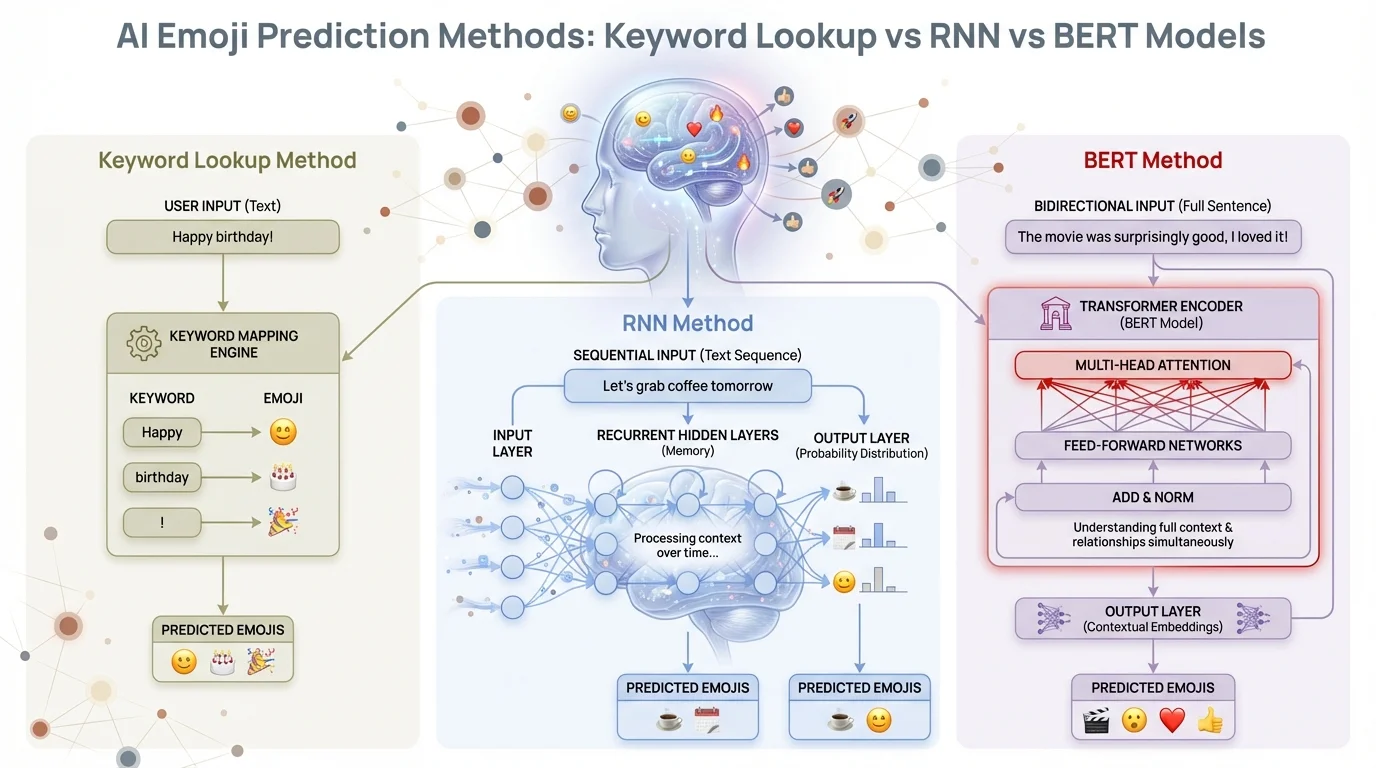
How AI emoji prediction has evolved — from simple keyword lookup to BERT transformer models that understand full sentence context
How to Enable Contextual Emoji Suggestions on Your Keyboard
Enabling AI emoji suggestions takes about 30 seconds on most phones. Therefore, Here's exactly how to do it depending on your setup.
On CleverType (Android)
- Open CleverType and go to Settings
- Tap AI Features → Emoji Suggestions
- Toggle on Context-Aware Emojis
- Start typing in any app — CleverType surfaces contextual emoji suggestions in the prediction bar above the keyboard
CleverType's emoji prediction runs entirely on your device. No cloud. No data collection. Just fast, accurate suggestions based on what you're actually saying.
On Gboard (Android/iOS)
- Open Gboard settings
- Go to Text correction → Show emoji suggestions
- Enable the toggle
- Gboard will suggest emojis as you type, though suggestions are more keyword-driven than truly contextual
On Microsoft SwiftKey (Android/iOS)
- Open SwiftKey settings
- Tap Typing → Emoji Prediction
- Toggle on
- SwiftKey shows emojis in the prediction strip — it learns your emoji patterns over time
General Tips for Better Emoji Suggestions
- Type full sentences instead of fragments. AI models need context to make good suggestions.
- Use your keyboard more. The models learn from your patterns. The more you type, the better the predictions get.
- Don't force it. If your keyboard suggests 😅 but you want 😂, just use what feels right. The AI adjusts.
Nonetheless, The biggest difference between keyboards is how much context they actually use. Some only look at the last word. Additionally, CleverType and better AI keyboards look at the whole sentence — which is why they feel more natural and accurate.
CleverType's Context-Aware Emoji Engine: What Makes It Different
Most keyboards suggest emojis. Furthermore, CleverType actually understands why you'd want that emoji.
The difference is in how far back the model looks. A basic keyboard sees "great!" and suggests 👍. Furthermore, CleverType sees the full conversation thread — "just got the job offer!! Nevertheless, starts monday, so great!!" — and offers 🎉🥹😭🎊 because it reads the whole emotional context, not just the last word.
A few things CleverType does that other keyboards don't:
Furthermore, Whole-sentence context reading. The AI doesn't just process your last word. It reads the full message you're typing and matches the overall emotional arc.
Privacy-first processing. Every AI computation happens on your device. Your messages never go to a server. This matters — most people don't realise that keyboards with cloud AI can technically see everything you type.
Multilingual emoji context. CleverType supports 100+ languages, and the emoji prediction works across all of them. Moreover, So if you're writing in Spanish, Hindi, or French, the suggestions still match your meaning — not just your language.
Real-time speed. Emoji predictions appear as you type, not after you finish a sentence. Moreover, The latency is low enough that it doesn't disrupt your flow.
Compared to Gboard, which uses Google's servers and federated learning but still phones home with some data, CleverType keeps everything local. Compared to SwiftKey, which has good predictions but leans heavily on learning your past habits, CleverType works well even on a fresh install because the base model is already strong.
Nevertheless, If you want the best relevant emoji keyboard that actually understands what you're trying to say, CleverType is worth downloading.
The Science Behind Emoji Context: What Research Says
Emoji prediction AI pulls from linguistics, sentiment analysis, and deep learning all at once. Honestly, the underlying science is more interesting than you'd expect.
Nevertheless, Here's the thing — emojis carry multiple meanings. The AI Journal noted that a simple smiley face can mean genuine happiness or biting sarcasm — and a keyword model can't tell which is which. That's why older systems felt so off. They just didn't get subtext.
Furthermore, So how do newer models handle it? Therefore, A few ways:
Transfer Learning
BERT-based models are pretrained on billions of sentences before they ever see an emoji. By the time they learn emoji prediction, they already understand irony, frustration, excitement, and nuance. That foundation is why they work so well.
Sentiment + Semantic Analysis
The model doesn't just classify positive/negative. It works in a richer emotion space — tracking energy (excited vs. calm), valence (positive vs. negative), and intent (sarcastic vs. sincere). Consequently, Different emojis cluster differently in that space, which is why 😊 and 🙃 feel so different even though both involve smiling.
Sequence Modelling
Moreover, RNNs and transformers process text as a sequence, not a bag of words. Hence, "I didn't laugh" and "I laughed so hard I cried" use different words but carry very different emoji implications. Sequence models catch this.
Personalisation Over Time
Consequently, Good keyboards layer personal history on top of the base model. If you always follow "hahaha" with 😭 instead of 😂, the model learns that. Nevertheless, Your emoji style becomes part of the prediction.
Nevertheless, Worth knowing: World Emoji Day statistics show only about 7% of people use 🍑 to mean an actual peach. Keeping up with that kind of cultural drift is a real challenge for AI models — and it moves fast. A model trained in 2020 reads emojis very differently than one updated in 2025.
Smart Emoji Keyboards Compared: A Practical Guide
Not all smart emoji keyboards are created equal. Here's a straight comparison of what matters.
| Feature | CleverType | Gboard | SwiftKey |
|---|---|---|---|
| Contextual emoji suggestions | Yes — full sentence analysis | Partial — keyword-heavy | Yes — habit-based learning |
| On-device AI processing | Yes — fully local | Partially (federated learning) | No — cloud dependent |
| Languages supported | 100+ | 600+ varieties | 700+ |
| Privacy | High — no data sent | Moderate — Google collects some | Low — Microsoft cloud |
| Emoji prediction accuracy | High (context-aware) | Medium | Medium-High |
| Free to use | Yes | Yes | Yes |
A few things jump out from that table. Gboard supports the most language varieties, which makes sense given Google's scale — their federated learning research has been running since at least 2019. But "federated learning" doesn't mean zero data collection, it just means the model trains locally. Consequently, Some usage data still flows to Google.
SwiftKey was acquired by Microsoft for $250 million back in 2016, which TechCrunch covered at the time. Nevertheless, Since then they've added Copilot integration. Furthermore, That's powerful, but it also means your typing goes through Microsoft's infrastructure.
Nevertheless, CleverType's pitch is pretty simple: local AI, solid accuracy, privacy that's actually guaranteed. If you type in one or two languages and want a keyboard that understands what you mean — not just the words you typed — it's the most practical pick.
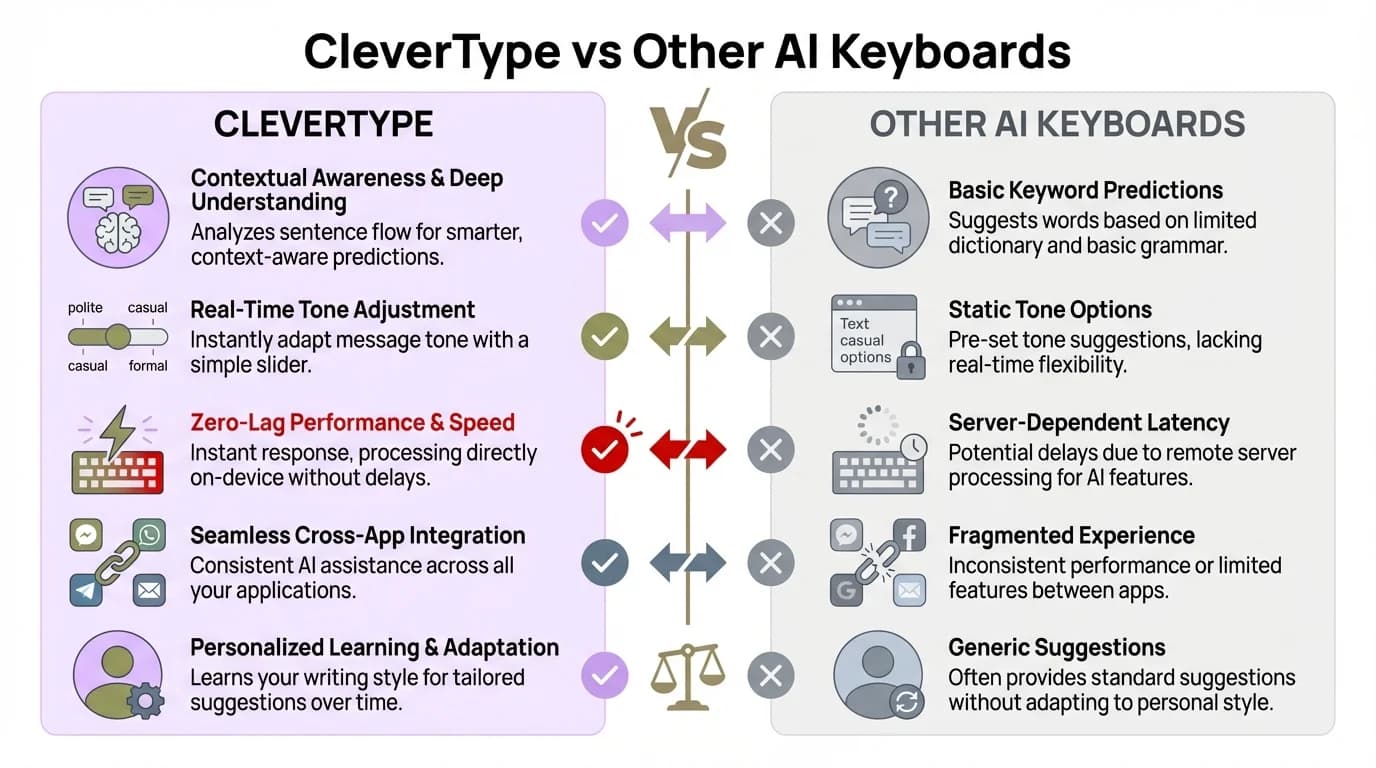
CleverType vs other AI keyboards — CleverType wins on privacy, full-sentence context analysis, and on-device processing
Common Mistakes People Make With AI Emoji Suggestions
Additionally, Most people aren't getting the most out of emoji prediction AI. Furthermore, Usually it comes down to a few small habits.
Typing too short. One-word or two-word messages don't give the AI enough context. Additionally, & quot;okay" could mean anything from enthusiastic agreement to sarcastic dismissal. Furthermore, Type a bit more and the suggestions get dramatically better.
Dismissing suggestions too fast. Moreover, The prediction bar refreshes as you type. A suggestion after two words might look wrong, but by the time you've typed a full sentence, the emoji at the top is usually spot-on. Let it finish reading before you judge it.
Not updating the app. Emoji prediction models improve with app updates. Gboard pushes model updates silently, but third-party keyboards sometimes need a manual update for the latest AI improvements. Check for CleverType updates in the Play Store if suggestions feel stale.
Therefore, Using slang the model doesn't know. Consequently, Very new slang (like something that became popular last week) might not be in the training data yet. Hence, If suggestions seem off for a term you know is recent, that's probably why. Additionally, Models update on a cycle, not in real time.
Constantly overriding suggestions. If you always pick something different from what's suggested, some keyboards take that as a signal and adjust. Fine if it's intentional. But if you're overriding out of reflex rather than preference — you're basically training the model in the wrong direction.
Forgetting about tone settings. Some AI keyboards — CleverType included — let you set a tone profile (casual, professional, friendly). The emoji suggestions adjust accordingly. Additionally, A casual tone setting will surface playful emojis. Nonetheless, A professional setting will keep suggestions conservative. A lot of people install the keyboard and never touch these settings.
The Future of Contextual Emojis: What's Coming Next
Hence, AI emoji suggestions are improving faster than most people realize. Here's Furthermore, what's actually coming.
Generative Emoji (Genmoji)
Apple launched Genmoji in December 2024. You describe what you want — "a corgi wearing a graduation hat" — and the on-device AI generates a custom emoji on the spot. Works on iPhone 15 Pro and later. Genuinely impressive, honestly. But the bigger implication for contextual emoji is this: if the AI can generate any emoji, it can generate the exact right one for your message — not just pick from a fixed set of 3,953.
Emotion Recognition Integration
Some research labs are working on keyboards that read not just text but typing cadence. Consequently, Aggressive, fast typing patterns might surface different emoji than slow, careful typing — even for the same words. It's early stage but the direction is interesting.
Multimodal Context
Future keyboards could consider not just your text, but your current app context. Texting a family member vs. emailing a client should arguably surface different emoji suggestions — the audience changes the tone. Therefore, Some systems are starting to do app-level context switching already.
Cross-App Emoji Memory
Right now, most keyboards track emoji history within their own usage. Cross-app tracking — knowing that you used 😊 in a work email but 🥲 in a personal chat — could improve predictions significantly. Consequently, Privacy implications are tricky here, which is why on-device models like CleverType's are better positioned to do this safely.
Hence, The direction is pretty clear: emojis are becoming a real communication layer, not just decoration you throw at the end of a message. Research published in Nature in 2025 is already treating emoji sentiment analysis as a serious field. Keyboards that actually plug into that research will feel like a completely different category of tool from what most people are using right now.
Frequently Asked Questions
What is a contextual emoji suggestion?
A contextual emoji suggestion is an emoji that an AI keyboard recommends based on the meaning of your full typed message, not just a single word. For example, typing "I just got promoted!" might trigger 🎉🥳🙌 automatically.
Which keyboard has the best AI emoji suggestions?
Furthermore, CleverType leads for privacy-conscious users who want full sentence context analysis on-device. Gboard offers broad emoji support across 600+ language varieties, while SwiftKey learns your personal emoji habits over time.
Does AI emoji prediction use my personal data?
It depends on the keyboard. Furthermore, Gboard uses federated learning — the model trains locally but some data flows to Google. Additionally, SwiftKey sends data to Microsoft servers. CleverType processes everything on your device with no data sent externally.
How accurate is emoji prediction AI in 2025?
BERT-based models achieve the highest accuracy in current research, according to a 2025 arXiv study. Additionally, Accuracy varies by emoji frequency — common emojis like 😊 or 👍 are predicted very accurately, while rare emojis are harder to predict correctly.
Can AI keyboards predict emojis in multiple languages?
Yes. CleverType supports 100+ languages with context-aware emoji predictions across all of them. Gboard supports 600+ language varieties. Hence, The AI model understands meaning regardless of which language you type in.
Why do emoji suggestions sometimes feel wrong?
Usually because the message is too short to give the AI enough context, or because the slang/phrase is too new for the model's training data. Typing longer messages and keeping the keyboard app updated usually resolves this.
Do AI keyboards learn from how I use emojis?
Yes, most do. Nevertheless, Over time, the keyboard builds a personalised emoji profile based on which suggestions you accept or reject. This is why suggestions feel more accurate after a few weeks of use than on day one.
Ready to Type Smarter?
Upgrade your typing with CleverType AI Keyboard. Fix grammar instantly, change your tone, receive smart AI replies, and type confidently while keeping your privacy.
Download CleverType FreeAvailable on Android • 100+ Languages • Privacy-First
Share this article:
Sources
- Pumble — Emoji Statistics in Business Communication (2025)
- Statista — Emoji Usage Statistics & Facts
- Google Research — Federated Learning for Emoji Prediction
- arXiv — Understanding Textual Emotion Through Emoji Prediction (2025)
- Nature Scientific Reports — Sentiment Analysis with BERT and Emoji (2025)
- Meltwater — Top Emojis of 2024
- The AI Journal — Emojional Intelligence: How AI Predicts Your Next Emoji
- World Emoji Day — Statistics