Nobody likes typing "I'm sorry" into a work email. You sit there, cursor blinking, and somehow every draft sounds either too casual or like a lawyer wrote it. Additionally, Not great. Therefore, I've rewritten apology emails five, six times before hitting send, and I still second-guess the tone half the time. That's normal, by the way — it doesn't mean you're bad at your job. It just means apology emails are genuinely one of the hardest things to write well.
Nevertheless, Here's the thing — this guide breaks down exactly how to structure a professional apology email, what phrases to avoid, and how AI writing keyboard tools can help you catch tone problems before your boss or client sees them. We'll also dig into real research on what actually makes an apology land, because "sorry for any inconvenience" is not it. Not even close.
Key Takeaways
- A professional apology email needs five parts: direct acknowledgment, ownership without excuses, a fix or plan, a short explanation (optional), and a forward-looking close.
- Researchers at Ohio State found apologies with more of six core elements — expression of regret, explanation, acknowledgment of responsibility, declaration of repentance, offer of repair, and request for forgiveness — get rated as more sincere, and acknowledgment of responsibility matters most of all.
- 90% of employees blame at least some workplace misunderstandings on email, since tone doesn't travel well in text.
- 73% of professionals say email mistakes have damaged their credibility at work, so how you apologize matters almost as much as what happened.
- 71% of workers already use AI tools a few times a month for work writing, and apology emails are one of the trickiest to get the tone right on without help.
- Tone adjustment AI, like the kind built into CleverType, can catch a message that reads as defensive or stiff before you hit send.
Why Apology Emails Are So Hard to Get Right
Nobody tells you this part: an apology email carries two jobs at once, and they pull in opposite directions. You have to admit fault clearly enough that the other person feels heard. But you also can't sound so dramatic that it makes the situation seem worse than it actually is. That balance is genuinely tough to hit on a first draft.
Text strips out tone entirely. When you say sorry out loud, your voice does half the work — a slight pause, a softer register, eye contact if it's in person. None of that survives in an email. According to workplace communication data compiled by Pumble, most workplace misunderstandings trace back to written channels like email — precisely because the nonverbal tone cues just aren't there.
Moreover, There's also a credibility cost most people underestimate. Additionally, A poorly worded apology can honestly do more damage than the original mistake did. Think about what's actually going on in the reader's head when they open it:
- They're deciding whether to trust you again with the next project.
- They're forming an opinion about whether this will happen a second time.
- They're often forwarding or CC'ing the email to someone else, so tone matters beyond just the two of you.
Moreover, I've seen apology emails get screenshotted and passed around in Slack — not maliciously, just because someone thought the wording was odd. That's the reality of workplace email communication today. Rarely fully private.
Furthermore, Then there's the awkward middle ground of over-apologizing. Hence, Saying sorry four times in six sentences reads as anxious, not sincere. Research on apology structure consistently shows that quality matters more than quantity of "sorry"s — one clear, well-built apology beats five scattered ones every time.
So why do apology emails trip people up so much more than other work writing? A short list:
- Time pressure — you're often writing it right after the mistake happened, while still stressed.
- Audience uncertainty — you don't always know how upset the recipient actually is.
- Paper trail anxiety — email is permanent, so people over-hedge to avoid liability.
- Tone mismatch — what sounds fine in your head reads defensive on screen.
None of these problems go away with more effort alone. They go away with a better structure — and increasingly, with a second pair of AI eyes checking the tone before you hit send.
The 5-Part Structure of a Professional Apology Email
A professional apology email follows a pretty predictable shape. Once you know the shape, the writing gets a lot faster, honestly. I use some version of this structure every single time, work or personal.
Nevertheless, Here's the breakdown:
| Part | Purpose | Example Phrase |
|---|---|---|
| 1. Direct acknowledgment | Name the mistake plainly | "I sent the invoice to the wrong client yesterday." |
| 2. Ownership | Take responsibility, no hedging | "That was my error, not a system issue." |
| 3. Impact statement | Show you understand the consequence | "I know this delayed your billing cycle." |
| 4. Fix or plan | State the concrete next step | "I've resent the correct invoice and flagged our process for a fix." |
| 5. Forward-looking close | End without groveling | "Let me know if there's anything else you need from me on this." |
Researchers Lewicki, Polin, and Lount actually studied this in a peer-reviewed apology study, testing apologies built from six components: expression of regret, explanation, acknowledgment of responsibility, declaration of repentance, offer of repair, and a request for forgiveness. Nevertheless, The finding that matters most for work emails: acknowledgment of responsibility was rated the single most important component, offer of repair came in second. Requesting forgiveness, oddly enough, was the least effective part — so skip lines like "I hope you can forgive me." They tend to fall flat in a professional setting.
Nonetheless, For parts 1 and 2 specifically, I stick to a handful of rules no matter who's reading:
- Name the mistake specifically. "I missed the deadline for the Henderson report" beats "there was a delay" every time.
- Never say "if I offended you." That phrase implies the problem is their reaction, not your action.
- Skip "mistakes were made." Passive voice is the fastest way to sound like you're dodging blame.
- Don't explain unless asked. A short reason is fine ("I misread the deadline in the shared doc"), but a paragraph of excuses reads as defensive.
For the subject line, keep it plain. Therefore, Something like "Update on the Henderson report delay" beats "Apology" or "Sorry" sitting alone in someone's inbox. Vague subject lines get opened later, or skipped entirely.
Timing matters here too. A study covered by ScienceDaily on apology structure found that apologies sent without a delay, or with the delay clearly explained, land a lot better than ones that show up two days late with no context. Can't respond same-day? At least send a one-line holding message: "I saw this, I'm looking into it, full update by end of day."
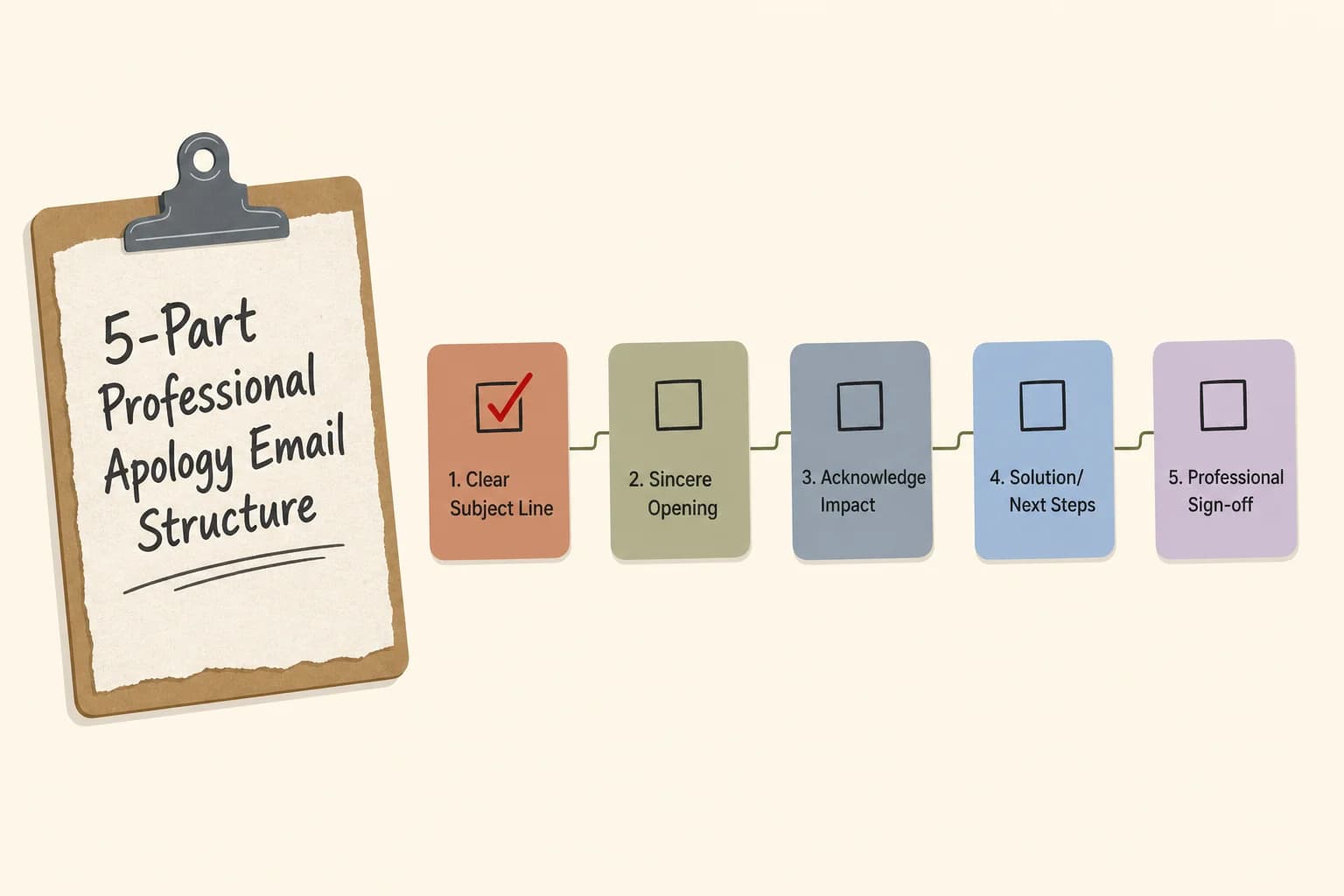
The 5-part structure to run through before sending any apology email.
Common Mistakes That Make Apology Emails Worse
Some apology emails flat-out backfire, and it's usually one of the same common email mistakes professionals make. I've made most of these myself early in my career, so this isn't me judging from some high horse.
The conditional apology. "I'm sorry if this caused any issues" is the number one offender. Nevertheless, That one little "if" quietly suggests the issue might not even be real. Swap it for "I'm sorry this caused a delay" — direct, no hedge.
The over-explainer. Three paragraphs about why the mistake happened before you even say sorry. By the time the reader gets to your actual apology, they've already decided you're making excuses. Lead with the acknowledgment. Explain briefly after, if at all.
Moreover, The over-apologizer. Saying sorry repeatedly through the same email actually makes it read as less sincere, not more. One clear "I'm sorry" backed by real action beats five scattered ones.
Corporate deflection language. Phrases like "we regret any inconvenience this may have caused" sound like a company statement, not a person talking. Business email etiquette research from 2026 flags this exact kind of stiff, impersonal phrasing as one of the fastest ways to lose credibility with a reader.
Moreover, Burying the fix. Plan to fix things sitting in the last line, in small text, after four paragraphs? People miss it, or assume there isn't one. Put the fix early, ideally by sentence three or four.
Typos in the apology itself. This one stings. Adobe's email usage research found that a striking share of professionals judge the cost of bad grammar in business writing more harshly than in any other channel, and 73% say email mistakes have damaged their credibility. Nonetheless, A typo-riddled apology email is almost worse than no apology at all — it signals you didn't even proofread the thing you're apologizing for.
Nonetheless, Quick self-check before sending:
- Does the first sentence name the mistake, not just gesture at it?
- Did I remove every "if," "maybe," or "any inconvenience this may have caused"?
- Is there a concrete next step in the first half of the email?
- Did I read it out loud once? (Seriously — stiff phrasing jumps out when spoken.)
- Is the subject line specific?
How AI Tools Help You Nail the Tone
Additionally, This is where AI apology email writer tools genuinely earn their keep. And it's not about writing the whole thing for you — it's about catching the stuff you can't see in your own draft.
Moreover, The problem with reading your own writing? You already know what you meant, so your brain fills in the tone gaps automatically the second time through. An outside reader doesn't get that same benefit. AI tone detection tools basically act as that outside reader, flagging where a sentence reads harsher, colder, or more defensive than you meant it to.
Moreover, According to Preply's 2026 workplace communication survey, 71% of workers already use AI tools a few times a month to help with work writing, and 33% use them multiple times a day. Furthermore, Drafting emails specifically is one of the top requested uses. Not a fringe behavior anymore — it's close to standard practice in a lot of offices now.
Nevertheless, What a good AI tone adjustment tool actually checks for in an apology email:
- Hedge words — flags "if," "maybe," "sort of" that weaken accountability.
- Passive voice — catches "mistakes were made" and rewrites it toward ownership.
- Length balance — warns if your explanation section is longer than your fix section.
- Formality mismatch — makes sure you're not too stiff for a close colleague or too casual for a client.
- Grammar and spelling — the baseline check that still matters a lot, given how harshly typos get judged.
Consequently, This is where CleverType pulls ahead of a basic spellchecker. Its AI-powered keyboard reads the tone of your draft in real time and rewrites it — from defensive to accountable, from stiff to warm, whatever the message needs — right as you type, on your phone, before you even open a laptop. Unlike Gboard, which focuses mostly on next-word prediction, CleverType is built specifically around tone and rewriting. So an apology drafted on your phone during a commute doesn't read as rushed by the time it lands in someone's inbox.
Consequently, The features that make the biggest difference on an apology email, specifically:
- Tone Change / rewrite tool — draft rough, then ask CleverType to shift it toward "professional" or "warm" instantly.
- Grammar fix — catches the small errors that get judged so harshly in work email.
- Privacy-first design — your draft apology, which might include sensitive workplace details, stays on your device rather than being logged on a company server.
- Multilingual support — useful if you're apologizing to a client or colleague in another language and want the tone to translate correctly, not just the words.
Nevertheless, Typing a quick apology from your phone between meetings? Hence, CleverType lets you fix grammar and adjust tone without switching apps or losing your train of thought. Nevertheless, Download CleverType free and see how it handles your next hard email.
Apology Email Templates for Common Work Situations
Templates help, but only as a starting point. Furthermore, Copy-pasting one word-for-word usually reads as generic. A keyboard that rewrites your emails instantly can adapt these skeletons to your specific situation faster than editing by hand.
Missed deadline (to a manager)
Subject: Update on the [Project] deadline
Hi [Name], I missed yesterday's deadline for [Project] — that's on me, I underestimated the review time needed. I've now finished [specific part] and expect to have the full deliverable to you by [new time]. Happy to walk through what happened if useful, but wanted to get you the timeline first.
Sent an error to a client
Subject: Correction to the [document type] sent this morning
Hi [Name], the [document] I sent this morning had an error in [specific detail] — I've attached the corrected version here. I've also double-checked the rest of the file to make sure nothing else needs fixing. Sorry for the mix-up, and thanks for your patience while I sorted it.
Miscommunication with a coworker
Subject: Following up on our conversation earlier
Hey [Name], I think I came across more short with you earlier than I meant to — that wasn't fair, especially given how much you had on your plate already. I'll be more mindful of how things land, and I appreciate you flagging it.
Late reply to an important email
Subject: Re: [Original subject]
Hi [Name], sorry for the delayed response here — I should have flagged this sooner given the timeline. Here's my answer: [answer]. Let me know if you need anything else from me before [deadline].
A pattern worth noticing across all four: none of them use the word "if." None of them explain for more than one sentence before getting to the fix. Nevertheless, Not an accident — that's the structure from the research showing through in practice.
Tone Adjustment: Formal vs Casual Apologies
Not every apology needs the same linguistic register — the same logic behind formal vs casual tone for client emails applies here, and picking the wrong one is its own mistake. Moreover, Apologizing to your CEO the same way you'd text a close coworker reads as inappropriate. Consequently, Being overly formal with someone you chat with daily reads as cold and, honestly, a little weird.
Here's a rough guide for calibrating tone by relationship:
| Relationship | Formality Level | Example Opening |
|---|---|---|
| Client or external partner | Formal | "I want to acknowledge the error in yesterday's shipment and explain how we're correcting it." |
| Manager or senior leader | Semi-formal | "I want to flag that I missed the deadline on [task] — here's what happened and my plan to fix it." |
| Direct peer, regular contact | Casual-professional | "Hey, I dropped the ball on getting you those numbers yesterday, sorry about that." |
| Cross-team, occasional contact | Semi-formal | "Wanted to follow up and apologize for the mix-up in Tuesday's file — here's the corrected version." |
Therefore, A few tone calibration tips I've picked up over time:
- Match the recipient's usual style. If they write in short, casual sentences to you normally, a stiff formal apology will feel oddly distant.
- External always skews more formal than internal, even if you're friendly with the client — there's more at stake reputation-wise.
- Group emails need the most formal tone of all, since you don't control who reads it or forwards it later.
- Don't formalize your way out of accountability. Overly formal language can actually read as distancing yourself from the mistake, which undercuts the whole point.
Additionally, This is exactly the kind of judgment call that tone adjustment AI handles well, because it's honestly hard to self-assess your own formality level. Consequently, You know your intent. Additionally, The reader only sees the words. Furthermore, CleverType's tone rewrite feature lets you draft naturally and then shift the register up or down depending on who's receiving it — formal for the client thread, warmer for the teammate one — without rewriting the whole message from scratch every time.
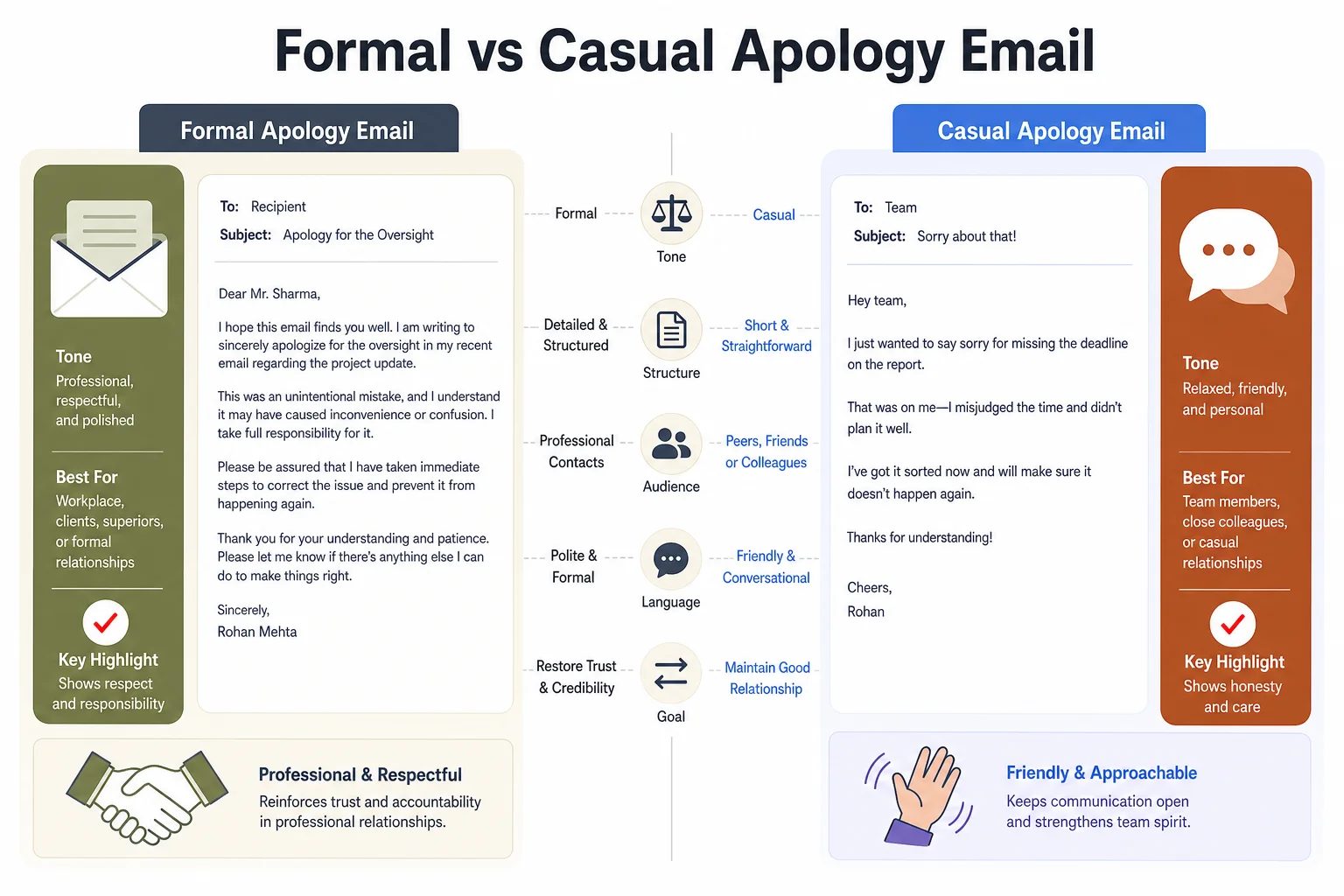
Formal vs casual apology emails call for different tone and structure.
Apology Email Etiquette: What Not to Say
Certain phrases show up constantly in bad apology emails, and once you notice them, you'll see them everywhere. Cutting these out is often the single fastest tone improvement you can make.
Phrases to avoid entirely:
- "I'm sorry if..." — the conditional undercuts the whole apology.
- "Mistakes were made" — passive voice, no owner.
- "This is not like me" — makes it about your character, not their impact.
- "I hope this doesn't change how you see me" — puts the burden of reassurance on the reader.
- "As I mentioned, this was largely due to [external factor]" — deflects blame mid-apology.
- "No worries if not!" tacked onto a serious apology — undercuts the seriousness.
Phrases that work better:
- "I made a mistake with..." — direct, owns it.
- "Here's what I'm doing to fix it..." — action-oriented.
- "I understand this affected your timeline..." — shows you get the impact.
- "Thanks for your patience while I sort this out." — forward-looking, not groveling.
Etiquette research backs this up pretty clearly. Poor email etiquette costs professionals real credibility — 64% of hiring managers in one Adobe-linked study said they've passed on candidates over bad email habits. That same instinct applies internally too, just with promotions and trust instead of hiring decisions. An apology email is a high-stakes sample of your communication style, whether you think of it that way or not — the same habits that make your business emails sound more professional apply directly here.
Furthermore, One more etiquette point that's easy to miss: who's CC'd matters almost as much as what's written. Adding your manager to an apology to a coworker can read as covering yourself rather than fixing things. Keep the CC list to only who's necessary, and if you do need to loop someone in, say so directly: "Looping in [Name] since this affects their timeline too."
Finally — know when email just isn't enough. For anything that seriously damaged trust — a missed deliverable that cost a client money, a public mistake, a repeated pattern of errors — a quick call or in-person conversation lands much better before the email does. The email then becomes a written record of what was already discussed, not the first place someone hears "sorry."
Frequently Asked Questions
Q: How do you start a professional apology email?
Nevertheless, A: Start with the acknowledgment itself, not a greeting-only opener. Something like "I want to acknowledge the delay on [task]" works better than burying the apology two sentences in. Nevertheless, Avoid opening with "I'm sorry if," since the conditional weakens the whole message.
Q: Should I explain why the mistake happened?
Nevertheless, A: Keep any explanation brief and only after you've stated the mistake and taken ownership. Additionally, A one-sentence reason is fine ("I misread the shared deadline"), but a full paragraph of context before the apology reads as excuse-making rather than accountability.
Q: Is it okay to use AI to write an apology email?
A: Yes, and 71% of workers already use AI tools regularly for work writing, according to a 2026 Preply survey. Hence, The key is using AI for tone and grammar checking rather than letting it invent details you didn't provide — the facts of the apology should still come from you.
Q: How long should a professional apology email be?
A: Keep it to four or five short sentences, roughly 60 to 120 words. Therefore, Longer emails tend to bury the fix and read as over-explaining, which research links to lower perceived sincerity.
Q: What's the biggest mistake people make in apology emails?
Additionally, A: Using conditional language like "sorry if this caused any issues." Research on apology structure consistently ranks acknowledgment of responsibility as the single most important component, and "if" phrasing directly undercuts that.
Q: Should I CC my manager on an apology email to a coworker?
A: Only if it's actually necessary, and say so directly if you do. Unnecessary CCs on an apology can read as covering yourself rather than fixing the issue, which shifts the focus away from the person you're actually apologizing to.
Q: How do I apologize for a mistake that wasn't fully my fault?
A: Own the part that was yours without deflecting the rest onto someone else in the same email. Nevertheless, You can say "I should have double-checked the numbers before sending" without listing every other factor involved — save shared-responsibility conversations for a call, not the apology email itself.
Ready to Type Smarter?
Upgrade your typing with CleverType AI Keyboard. Fix grammar instantly, change your tone, receive smart AI replies, and type confidently while keeping your privacy.
Available on Android • 100+ Languages • Privacy-First
Share this article: Twitter · Facebook · LinkedIn · Reddit
Sources:
- Six elements of an effective apology, according to science — ScienceDaily
- An Exploration of the Structure of Effective Apologies — Lewicki, Polin & Lount, Negotiation and Conflict Management Research
- AI and Workplace Communication Survey 2026 — Preply
- Workplace Communication Statistics for 2026 — Pumble
- Email Etiquette: Key Rules for Perfect Emails in 2026 — Atomic Mail
- Effective Apologies Include Six Elements — Association for Psychological Science