Key Takeaways
| Aspect | Key Insight |
|---|---|
| Email Volume | 376.4 billion emails sent daily; average person receives 100-120 emails/day |
| AI Adoption | 40% of business users now use AI for email drafting weekly |
| Productivity Impact | AI tools save professionals half a day per week on email tasks |
| Response Rates | Personalized subject lines boost reply rates by 30% |
| Time Spent | Professionals spend 28% of their workday on email |
| Best Subject Length | 6-10 words generate 21% open rates (double that of longer subjects) |
| Career Impact | Effective email writers are more likely to receive promotions and higher salaries |
Emails don't work the way they used to. You write something, hit send, and... nothing. No reply. Was it the subject? The tone? Maybe too long? With 4.73 billion global email users sending 376.4 billion messages daily, your email isn't just competing for attention—it's drowning in it.
Here's the thing—AI isn't just helping people write emails faster anymore. It's making emails smarter. Over 40% of business users now rely on AI-powered drafting tools weekly, and more than 25% of inboxes use AI to automatically summarize, categorize, or prioritize messages. That means your recipient might not even read what you wrote. Their AI will.
So how do you write a strong email that actually gets opened, read, and answered in 2026? It's not just about better writing. You need to understand how AI tools work, what makes emails perform, and how to blend human insight with machine efficiency. Whether you're sending a job application, pitching a client, or just trying to get a colleague to respond, this guide breaks down what actually works right now.
Why Email Writing Matters More Than Ever in 2026
Email isn't dead. It's just evolved. Despite dozens of messaging apps and collaboration tools, email remains the top channel for reaching employees and customers. The problem? Volume. The average professional gets between 100 to 120 emails per day, and that number keeps climbing.
Research from McKinsey shows that employees spend 28% of their workday reading and answering email—that's more than 11 hours per week. Every email you send is asking someone to carve out time from an already-overloaded schedule. That's why writing matters. Not because it's polite, but because it respects someone else's time.
What makes this trickier in 2026? Your email might be filtered before a human even sees it. Over 25% of inboxes now use AI to decide what's important, what can wait, and what gets buried. If your email doesn't meet certain criteria—clear subject line, scannable structure, relevant content—it might never surface.
A Harvard Business Review study found that employees who communicate effectively through email are more likely to be promoted and get higher salaries. Why? Because email writing reflects thinking. Clarity, brevity, structure—these aren't just writing skills. They're decision-making skills. When you write a strong email, you show that you can organize information, prioritize what matters, and communicate without wasting time.
Here's the shift: in 2026, writing a good email isn't about being formal or following old rules. It's about being clear, contextual, and considerate. And increasingly, that means knowing when to let AI help—and when to trust your own voice.
The Psychology Behind Emails That Get Responses
Why do some emails get instant replies while others sit unopened for days? It's not random. Response rates follow pretty predictable patterns. According to Instantly's 2026 benchmarks, the average B2B cold email response rate is just 4%, but highly targeted, personalized efforts can hit 40-50%. That gap? Strategy, not luck.
First up: the subject line. 33% of recipients decide whether to open an email based on the subject line alone. Length matters—subject lines with 6-10 words get a 21% open rate, more than double what longer ones get. Personalization adds another boost—customized subject lines improve open rates by 50% and reply rates by 30%.
Opening an email is just step one. What happens next depends on how quickly the recipient can figure out what you want. People scan emails looking for three things: who sent it, what they want, and how much effort it'll take to respond. If any of these are unclear? Skipped.
Structure matters here. Emails that front-load the main point perform way better than those that build up to it. The Pyramid Principle, developed by McKinsey in the 1980s, still applies: start with the conclusion, then provide supporting details. This isn't just good writing—it's respecting someone's brain power. You're not making them work to figure out why you're emailing.
Timing plays a role too. Sending 2-3 follow-up emails, starting three days after the initial message, can bump response rates by 65.8%. The first follow-up alone boosts replies by 49%. Here's the catch: most people don't follow up because they don't want to be annoying. That's a mistake. A polite, value-adding follow-up shows persistence and professionalism, not pestering.
One more thing: tone. Emails that sound robotic or overly formal get ignored. In 2026, recipients expect personalized, human-centered messaging. This is where AI tools like CleverType actually shine—they help adjust tone while keeping your authentic voice. Need to sound more professional? More friendly? More direct? AI can rewrite sentences instantly while you stay in control of the message.
Bottom line: emails that get responses aren't just well-written. They're strategically designed around how people think, scan, and decide. For more tips on crafting professional emails using AI writing keyboards, check out our guide.
AI Tools That Transform Email Writing
AI has shifted from experimental to essential in email writing. In a large-scale productivity survey, 55% of respondents said AI exceeded their expectations, and nearly 70% reported better work quality. More importantly, over half said AI saves them at least half a day per week on their most important tasks. For email specifically, AI can cut composition, sorting, and reply time by 30-50%.
Not all AI tools do the same thing. Some handle grammar and tone, others generate entire drafts, and a few specialize in organizing your inbox. Let's break down what actually works in 2026.
Grammar and Tone Adjustment Tools
CleverType leads the pack here. Unlike competitors that require copying and pasting text between apps, CleverType works directly on your keyboard—whether you're drafting in Gmail, Slack, or messaging apps. Its AI instantly fixes grammar mistakes, adjusts tone (professional, casual, friendly), and even suggests better phrasing as you type. The privacy-first design means your data stays on your device, unlike Gboard or other cloud-based keyboards that send your text to remote servers.
What sets CleverType apart is its multilingual support (100+ languages) and context-aware suggestions. Writing a job application? It recognizes that and adjusts recommendations. Writing to a friend? The tone shifts automatically. This isn't just convenient—it's a massive time saver. According to data, 28% of marketers now use AI specifically for email copy and replies, and tools like AI writing assistants make that accessible without switching apps.
AI Reply Generators
Smart reply tools analyze incoming emails and generate contextual responses. CleverType's AI reply feature reads the email you received and offers 3-5 suggested responses ranging from quick acknowledgments to detailed answers. You can edit any suggestion or use it as-is. This is especially useful for high-volume email days when you're triaging dozens of messages.
The catch? AI replies work best for straightforward emails (confirmations, scheduling, simple questions). For nuanced or sensitive topics, you'll still want to write manually. But for 60-70% of routine emails, AI replies can handle them in seconds instead of minutes.
Full Draft Generators
Tools like Compose.ai and others can generate entire email drafts from a few bullet points. You type "pitch for new client meeting," add a couple details, and the AI writes a full message. This works well for templates (introductions, follow-ups, thank-yous) but requires careful editing to avoid generic, robotic language.
Here's where CleverType has an advantage: instead of generating a full draft elsewhere and pasting it in, you can type a rough outline and use CleverType's tone and grammar tools to polish it in real-time, keeping your voice intact. It's the difference between sounding like you versus sounding like an AI trying to sound like you.
When to Use AI vs. Write Manually
AI excels at: routine emails, grammar fixing, tone adjustment, quick replies, and shortening wordy drafts. AI struggles with: complex negotiations, sensitive HR matters, creative pitches that need personality, and anything requiring deep context or emotional intelligence.
Best approach in 2026? Go hybrid. Let AI handle the mechanics (grammar, structure, tone) so you can focus on the message. Draft your email naturally, then use CleverType to tighten the language, adjust the tone, and catch errors—all without leaving your keyboard. Learn more about how AI writing tools are changing the way we type.
Crafting Subject Lines That Actually Get Opened
Your email lives or dies in the subject line. That's not hyperbole—it's data. 33% of people decide whether to open an email based on the subject line alone, and with inboxes overflowing, that number's probably higher for busy professionals. So what separates a subject line that gets clicks from one that gets deleted?
Length and Specificity
The data's clear: subject lines with 6-10 words generate a 21% open rate, more than double the rate of subjects with 21-25 words. Why? Shorter subjects are easier to scan, especially on mobile devices where most emails are opened these days. But short doesn't mean vague. "Quick question" tells the recipient nothing. "Meeting time for Q1 budget review?" tells them exactly what's inside.
Subject lines between 36 and 50 characters also perform well because they're fully visible in most email clients without getting cut off. If your subject gets truncated to "Regarding your..." the recipient has no reason to bother opening it.
Personalization Works
Generic subject lines get ignored. Personalized subject lines boost open rates by 50% and reply rates by 30%. Personalization doesn't just mean adding someone's name (though that helps). It means referencing something specific: their company, a recent project, a mutual connection, or a pain point you know they have.
Compare these two:
- "Marketing services for your business"
- "Helping fintech startups cut CAC by 30%"
The second one works because it's specific and relevant. Even if the recipient isn't looking for marketing help right now, they know what you do and who you help. That's memorable.
Numbers and Questions Boost Opens
Including numbers in subject lines can increase opens by up to 113%. Numbers signal specificity and value. "5 ways to improve your email response rate" promises tangible takeaways. Questions also work—they boost opens by 21% because they create curiosity and feel conversational.
But avoid clickbait. "You won't believe this email marketing trick!" might get opened once, but it kills trust. In 2026, recipients are savvy—they can smell hype a mile away.
What to Avoid
- ALL CAPS (looks like spam)
- Excessive punctuation (!!!) (desperate and unprofessional)
- Misleading promises (kills trust instantly)
- Overused words like "Free," "Act now," "Limited time" (spam filters flag these)
AI Can Help Here Too
CleverType and similar AI tools can analyze your subject line and suggest improvements based on length, clarity, and engagement patterns. Some tools even A/B test subject lines if you're sending bulk emails. For one-off emails, try writing 3-4 subject line options and asking the AI which one is clearest and most compelling.
Here's a formula that works consistently in 2026:
[Action] + [Benefit] + [Context]
Examples:
- "Schedule 15-min call to discuss Q2 campaign results"
- "Quick feedback needed on homepage redesign draft"
- "Following up: pricing proposal for CleverType integration"
Each one tells the recipient what to do, why it matters, and what it's about. No guessing, no wasted time.
Structuring Your Email for Maximum Clarity
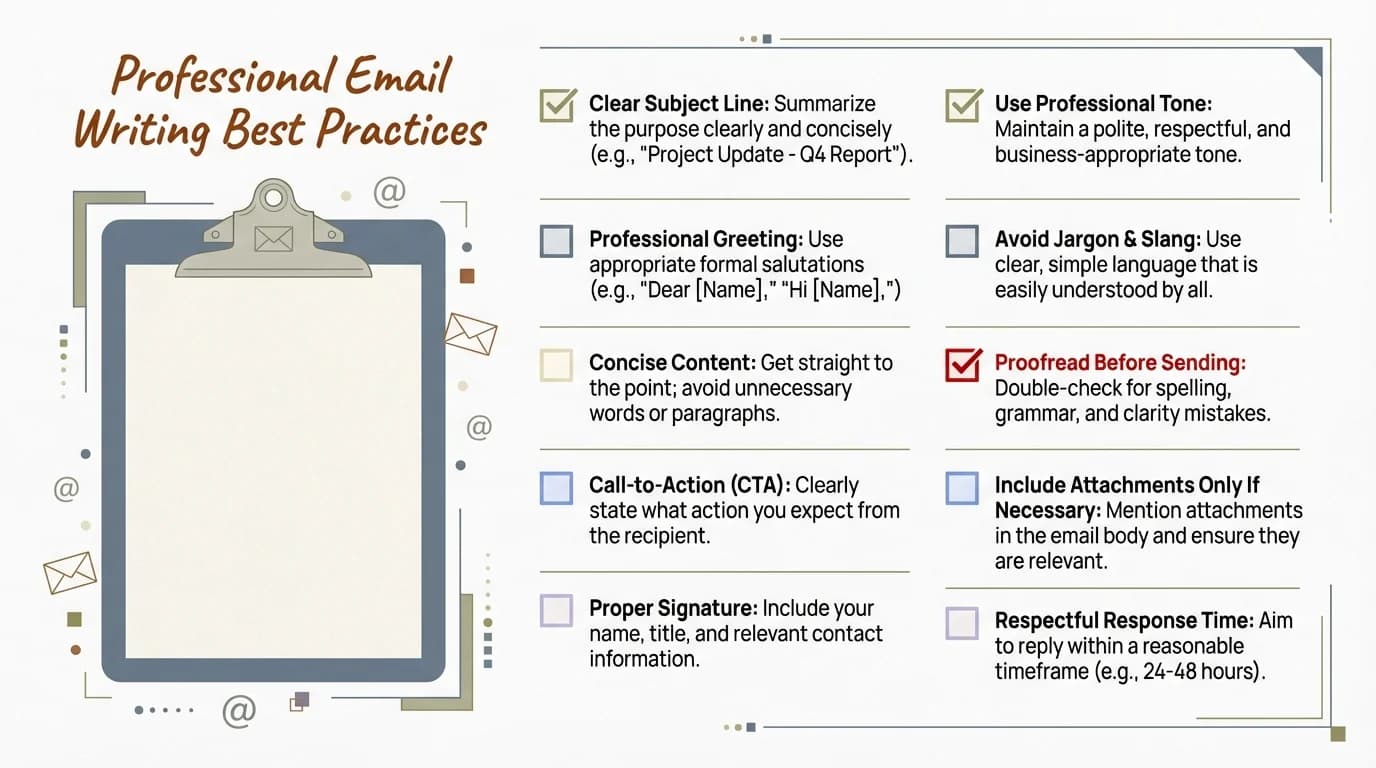
Essential checklist for writing clear, professional emails that get responses
Most emails fail not because the content's bad, but because the structure's confusing. Recipients scan emails in seconds, looking for what you want and why it matters. If they can't figure that out immediately? They move on. That's why McKinsey's Pyramid Principle—start with the conclusion, then provide supporting details—still dominates professional email in 2026.
The First Sentence Sets the Tone
Your opening sentence should answer: "Why are you emailing me?" Don't build up to your point. State it.
Bad: "I hope this email finds you well. I wanted to reach out because I've been thinking about our last conversation and had some ideas that might be interesting to discuss."
Good: "I have three ideas for reducing our support ticket volume by 40%—can we schedule 20 minutes this week to discuss?"
The second version respects the recipient's time. They know immediately what you want (a meeting), why it matters (reducing tickets by 40%), and how much effort it'll take (20 minutes). That's clarity.
Use Short Paragraphs and Bullet Points
Long blocks of text get skipped. In 2026, most emails are opened on mobile devices, and walls of text are unreadable on a small screen. Break your email into scannable chunks:
- One idea per paragraph (2-3 sentences max)
- Use bullet points for lists or multiple points
- Bold key information (dates, times, action items)
- Add white space between sections
Here's a before/after example:
Before:
"I wanted to follow up on our conversation last week about the email marketing campaign. I think we should focus on three key areas: improving subject lines to boost open rates, segmenting our audience more effectively so we send more targeted content, and testing different send times to see what performs best. Let me know if you'd like to discuss any of these in more detail."
After:
Following up on last week's conversation about our email campaign. I recommend focusing on three areas:
- Subject lines: Test personalization to boost open rates by 30%
- Segmentation: Target content based on user behavior, not just demographics
- Send times: A/B test mornings vs. afternoons to find optimal windows
Can we schedule 30 minutes to map out next steps?
The second version is faster to read, easier to scan, and clearly asks for action.
The SCRAP Framework
McKinsey's SCRAP framework (Situation, Complication, Resolution, Action, Politeness) provides a proven structure for persuasive business emails:
- Situation: Set the context (1 sentence)
- Complication: Explain the problem or opportunity (1-2 sentences)
- Resolution: Propose your solution (2-3 bullet points)
- Action: State what you need from them (1 sentence)
- Politeness: Close professionally (1 sentence)
This structure works because it mirrors how people think through problems. You're not dumping information—you're guiding them through your logic.
End With a Clear Call to Action
Every email should have one primary action. Not three. Not five. One. "Reply with your availability," "Approve this proposal," "Review the attached document." Make it specific and easy to complete.
Avoid vague endings like "Let me know your thoughts" or "Looking forward to hearing from you." Those don't give the recipient clear next steps. Instead, try:
- "Can you reply by Friday with your preferred time for a call?"
- "Please approve the budget so I can move forward with the vendor."
- "Let me know if you need any changes to the draft."
If you're using CleverType, the AI can help rewrite unclear calls to action into direct, professional requests. It's especially useful when you've written something that sounds too pushy or too vague—the tone adjustment feature finds the right balance.
Tone and Personalization: The Human Touch AI Cannot Replace
AI can fix your grammar, shorten your sentences, and suggest better words. But it can't tell you what tone to use or how personal to get. That's still a human decision—and in 2026, it's more important than ever.
Why? Because recipients expect personalized, human-centered messaging. Generic, template-style emails get ignored. People can tell when you've mass-sent something, and they can tell when you've actually thought about who they are and what they need. That distinction determines whether your email gets a response or gets deleted.
Formal vs. Casual: Know Your Audience
There's no universal "right" tone. It depends on who you're emailing, what you're asking for, and what your relationship is. Emailing a potential investor? Keep it professional but not stiff. Emailing a colleague you've worked with for years? Casual and direct works better.
The mistake people make is defaulting to overly formal language because they think it sounds professional. But "I am writing to inquire about the possibility of scheduling a meeting at your earliest convenience" sounds robotic. "Can we schedule 15 minutes this week to discuss the Q2 budget?" sounds human.
CleverType's tone adjustment feature helps here. You write naturally, then let the AI shift it toward professional, casual, friendly, or direct. This is especially useful when you're not sure how formal to be—you can see multiple versions and pick the one that feels right. Discover why AI keyboards are taking over professional writing.
Personalization Beyond Names
Adding someone's name to an email is basic personalization. What actually works is referencing something specific about them: a recent project, a shared connection, a challenge you know they're facing, or even something from their LinkedIn profile.
Generic: "I'd love to discuss how our tool can help your company."
Personalized: "Saw your post about reducing customer support costs—CleverType helped our team cut reply time by 40%, and I think it could do the same for your support team."
The second version shows you've done research and understand their needs. That's the kind of personalization that gets replies.
When to Use Humor (and When Not To)
Humor works in emails when the relationship supports it. If you've met the person before or exchanged friendly emails, a light joke can make your message more memorable. But humor backfires when it's forced, unclear, or inappropriate for the context.
Safe humor: self-deprecation, mild observations, shared experiences.
Risky humor: sarcasm (doesn't translate in writing), inside jokes the recipient won't understand, anything controversial.
If you're not sure whether a joke lands, cut it. Clarity always beats cleverness.
How AI Tools Help (and Hurt) Tone
AI tools like CleverType can adjust tone, but they can't choose it for you. You still need to decide: Am I being too casual? Too formal? Too pushy? Once you've made that call, AI can help you execute it.
Where AI struggles: detecting sarcasm, understanding cultural context, knowing your relationship history with the recipient. If your email requires emotional intelligence or deep context, AI should assist—not replace—your judgment.
The best approach? Write your email naturally, then use AI to polish the tone. If something sounds off, trust your instinct. You know the recipient better than the algorithm does.
Common Email Mistakes to Avoid in 2026
Even experienced professionals make email mistakes that tank response rates. Some of these are obvious; others are subtle habits that seem harmless but actually hurt your communication. Let's break down what to stop doing.
Writing Novels When a Paragraph Will Do
The biggest mistake: writing too much. If your email requires scrolling, it's probably too long. Research shows that people spend only 11 hours per week on email, and that time is split across hundreds of messages. Every extra sentence you add reduces the chance of getting a response.
Rule of thumb: if you can't explain your point in 3-4 paragraphs, you probably need a meeting instead of an email.
Burying the Ask
If you need something from the recipient—a response, approval, feedback—say it upfront. Don't save it for the end. People scan emails for action items. If they don't see one immediately, they assume the email is just informational and move on.
Bad: [Three paragraphs of background] "So, if you could approve the budget by Friday, that would be great."
Good: "Can you approve this $5K budget by Friday? Here's the breakdown: [details]."
Ignoring Mobile Formatting
Over 60% of emails are now opened on mobile devices. If your email isn't mobile-friendly, it won't get read. That means:
- Short paragraphs (2-3 sentences max)
- No wide tables or images that require horizontal scrolling
- Subject lines under 50 characters (so they don't get cut off)
- Clear call-to-action buttons or links that are easy to tap
Using Vague Subject Lines
"Checking in," "Quick question," "Following up"—these subjects tell the recipient nothing. They're lazy and they get ignored. A good subject line is specific and actionable: "Need your feedback on Q1 report by Thursday" or "Can we reschedule tomorrow's 2pm call?"
Forgetting to Proofread
Typos happen. But multiple typos in a professional email signal carelessness. In 2026, there's no excuse—AI keyboards solve grammar struggles at work by catching spelling and grammar errors instantly. If you're sending an email with mistakes, it's because you didn't take five seconds to review it.
One typo? Forgivable. Three typos? The recipient questions your attention to detail.
Overusing CC and Reply All
Copying people who don't need to be involved clogs inboxes and dilutes accountability. If someone doesn't need to act on the email, don't CC them. And for the love of productivity, stop using Reply All unless every single person on the thread genuinely needs your response.
A study on email culture found that unnecessary CCs and Reply Alls are among the top complaints professionals have about email overload.
Sending Without Context
Replying to an email from three weeks ago with just "Yes" or "Sounds good"? The recipient has no idea what you're referring to. Always include enough context so they don't have to search through their inbox to figure out what you're talking about.
Instead of: "Yes, that works."
Try: "Yes, Tuesday at 3pm works for the budget meeting."
Ignoring Time Zones
If you're scheduling a call or meeting across time zones, always specify which zone you're referencing. "Let's meet at 3pm" is useless if the recipient is in London and you're in San Francisco. Use "3pm PST" or "3pm your time" to avoid confusion.
Not Following Up
Here's a mistake that costs people opportunities: sending one email and giving up. Data shows that follow-up emails increase response rates by 65.8%. If you don't get a reply, it doesn't mean they're not interested—it means they're busy. A polite follow-up three days later often gets the response the first email didn't.
The key is making the follow-up valuable, not nagging. Add new information, reference a deadline, or simply bump the email with a friendly reminder.
Measuring What Works: Email Analytics You Should Track
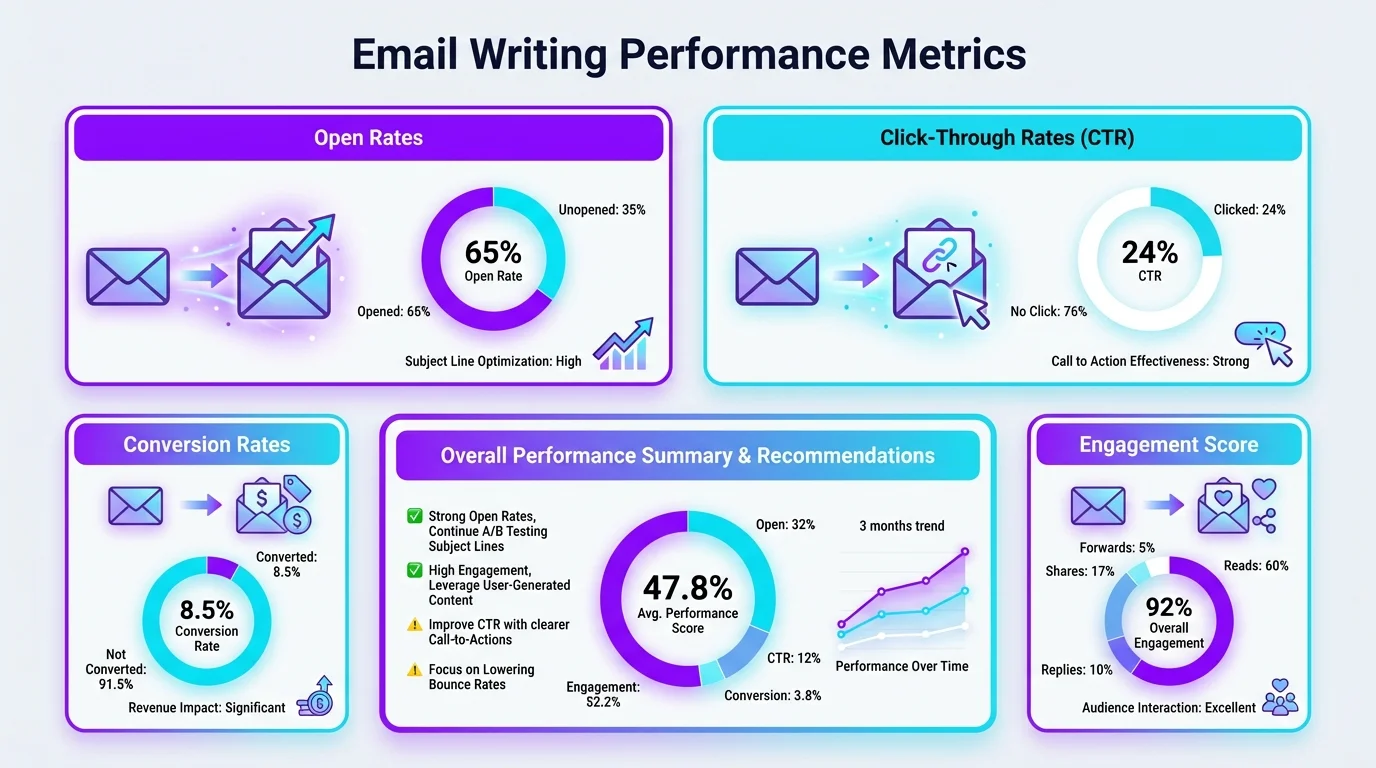
Key email performance metrics to track for better response rates and engagement
You can't improve what you don't measure. In 2026, email isn't just about writing—it's about understanding what performs. Whether you're sending one-off emails or running campaigns, tracking the right metrics tells you what's working and what needs adjustment.
Open Rates: Are Your Subject Lines Working?
Open rate measures how many recipients actually open your email. For cold emails, the average open rate is around 20-30%. For warm outreach (people who know you), it should be higher—40-60%.
If your open rates are below 20%, the problem is usually your subject line. Go back to the subject line strategies: shorter (6-10 words), personalized, specific. Test different versions and see what improves performance.
Tools like Instantly and Mailforge provide open rate tracking for bulk emails. For one-off emails, some tools like Streak or Mailtrack offer read receipts so you know when someone opened your message.
Reply Rates: Is Your Message Getting Responses?
Reply rate is more important than open rate. An email that gets opened but not answered is a failure. The average B2B cold email reply rate is 4%, but targeted, personalized emails hit 40-50%.
If your reply rate is low, the problem is usually one of three things:
- Your ask isn't clear (they don't know what you want)
- Your message isn't relevant (they don't see the value)
- Your tone is off (too formal, too casual, too salesy)
To improve reply rates, focus on clarity and personalization. Use CleverType to adjust tone and cut unnecessary words. Make your call to action specific and easy to complete. You can also leverage AI paraphrasing tools for better writing to refine your message.
Click-Through Rates: Are They Taking Action?
If your email includes links (a calendar booking link, a document, a product demo), track how many people click. Low click-through rates mean either your link isn't compelling or it's buried too deep in the email.
Best practice: include only one primary link and make it obvious. Use a clear CTA like "Book a time here" or "View the full proposal" rather than generic "Click here."
Follow-Up Performance: Are You Persistent Enough?
Data shows that the first follow-up boosts replies by 49%, and the second adds another 3%. If you're not following up, you're leaving responses on the table.
Track how many of your replies come from the initial email vs. follow-ups. If most responses come from follow-ups, that tells you your first email might need stronger urgency or clearer value.
Time-to-Response: How Fast Are You Getting Replies?
Some emails get answered in minutes; others take days. Tracking time-to-response helps you understand urgency. If an email type consistently gets slow replies, that's a signal to adjust—maybe the ask is too complicated, or the timing is off.
For example, emails sent on Tuesday mornings tend to get faster responses than those sent Friday afternoons. Email marketing research shows that timing affects engagement, so experiment with send times and track what works for your audience.
Using AI to Analyze Email Performance
Some AI tools now analyze your sent emails and suggest improvements based on patterns. They'll flag things like: "Your emails over 200 words get 30% fewer replies" or "Emails with questions in the subject line perform better for you."
This kind of feedback loop—write, send, measure, adjust—is what separates effective email writers from people who just keep making the same mistakes. Track what works, double down on it, and cut what doesn't.
Future of Email: What is Coming Next
Email isn't going anywhere, but it's changing fast. In 2026, we're already seeing AI-powered inboxes that summarize messages, auto-draft replies, and prioritize what's important. But that's just the start. Here's where email is headed and what it means for how you write.
AI-First Inboxes
More than 25% of inboxes now use AI to automatically summarize, categorize, or prioritize messages. Tools like Gmail's AI summaries and Outlook's intelligent sorting mean your recipient might not read your full email—their AI will. That changes how you write.
Implication: Front-load your key points. The AI summary will pull from the first few sentences, so if you bury your main idea, it won't make it into the summary. Write for scannability, not prose.
Smart Reply and Auto-Drafting Goes Mainstream
40% of business users already use AI for drafting replies weekly, and that number is growing. In the next few years, most routine emails (confirmations, scheduling, quick answers) will be handled by AI with minimal human input.
What this means for you: Focus your energy on high-value emails that require human judgment—negotiations, sensitive conversations, creative pitches. Let AI handle the repetitive stuff. Tools like CleverType are leading this shift by making AI drafting seamless and private, right on your keyboard. See why professionals are switching to AI-powered keyboards in 2025.
Hyper-Personalization at Scale
AI is making it possible to send personalized emails to hundreds or thousands of people without sacrificing quality. Tools analyze recipient data—job title, company size, recent activity—and auto-generate customized messages that feel one-to-one.
The catch? Recipients are also getting smarter at spotting fake personalization. In 2026 and beyond, surface-level personalization (just adding a name) won't cut it. You'll need to reference specific, relevant details to stand out.
Voice-to-Email Becomes Standard
Voice-to-text has been around for years, but AI enhancement is making it actually usable for professional emails. Instead of dictating and getting awkward transcriptions, new tools clean up filler words, adjust tone, and format your speech into proper email structure.
CleverType's voice-to-text with AI enhancement does exactly this—you speak naturally, and it converts your words into polished, professional email text. This is a game-changer for mobile email writing, where typing on a phone keyboard is slow and error-prone.
Privacy-First AI Tools Win
As email AI becomes more powerful, privacy concerns are growing. Cloud-based tools that send your email drafts to remote servers for processing are facing backlash. In response, privacy-focused tools like CleverType—which process everything on-device—are gaining traction.
Future trend: Users will demand transparency about where their data goes. Tools that can prove they don't store or share email content will have a competitive edge.
Integration with Task Management
Email is merging with task management. Tools are starting to automatically extract action items from emails, create tasks, set reminders, and track follow-ups. This blurs the line between inbox and to-do list.
What you can do now: Write emails with clear action items that AI can easily extract. Use explicit language like "Next steps," "Action items," or "To-do" so both humans and AI know what needs to happen.
The Death of the Generic Template
Mass emails and generic templates are becoming obsolete. AI-powered inboxes flag them, and recipients ignore them. The future of email is one-to-one communication, even at scale.
Bottom line: If you're still copying and pasting the same email to multiple people with minor tweaks, stop. Use AI to customize each message based on recipient-specific data. It takes the same amount of time but gets dramatically better results.
Email in 2030 will look different than it does today. But the fundamentals—clarity, personalization, respect for the recipient's time—won't change. The tools will just make those things easier to execute.
Frequently Asked Questions
Q: How long should a professional email be in 2026?
A: Keep emails under 200 words whenever possible. Research shows that emails over 200 words get 30% fewer replies. Aim for 3-4 short paragraphs with clear structure—intro, details, ask. If you need more space, consider scheduling a call instead.
Q: Should I use AI to write my emails completely?
A: Use AI to assist, not replace. AI tools like CleverType excel at fixing grammar, adjusting tone, and suggesting improvements—but you should still write the core message. AI-generated emails often sound generic and robotic. Write naturally, then let AI polish your work.
Q: What's the best time to send professional emails?
A: Tuesday through Thursday mornings (8-10am in the recipient's time zone) generally get the fastest responses. Avoid Friday afternoons and Monday mornings when inboxes are most crowded. That said, timing matters less than content—a well-written email gets replies regardless of send time.
Q: How many follow-up emails should I send before giving up?
A: Send 2-3 follow-ups spaced 3-4 days apart. Data shows the first follow-up increases replies by 49%, and the second adds another 3%. After three follow-ups with no response, move on. Each follow-up should add new value, not just repeat your original message.
Q: How can I make my emails sound more professional without being robotic?
A: Write conversationally, then use AI tools like CleverType to adjust tone. Avoid overly formal phrases like "I am writing to inquire" and use direct language like "Can we schedule a call?" Professional doesn't mean stiff—it means clear, respectful, and purposeful.
Q: Do personalized subject lines really improve open rates?
A: Yes. Personalized subject lines boost open rates by 50% and reply rates by 30%. Personalization doesn't just mean adding a name—reference something specific about the recipient (their company, project, challenge) to show you've done research and the email is relevant to them.
Q: What's the biggest email mistake people make?
A: Burying the main point. If the recipient has to read three paragraphs to figure out what you want, they won't. Start with your ask or main point in the first sentence, then provide supporting details. Respect their time by being upfront about why you're emailing.
Ready to Type Smarter?
Upgrade your typing with CleverType AI Keyboard. Fix grammar instantly, change your tone, receive smart AI replies, and type confidently while keeping your privacy.
Download CleverType FreeAvailable on Android • 100+ Languages • Privacy-First
Share This Article
Share this guide on social media:
Sources
- Email Statistics Report 2025-2030 – cloudHQ
- Internal Communication Trends for Success in 2026 - Ragan Communications
- How to Spend Way Less Time on Email Every Day - Harvard Business Review
- 5 Tips for Writing Professional Emails - Harvard Business Review
- How to Write Better Emails at Work - Harvard Business Review
- Cold Email Statistics & Benchmarks for 2026 - Snovio Labs
- Cold Email Benchmark Report 2026 - Instantly
- AI Tools Are Overdelivering: Results from Our Large-Scale AI Productivity Survey
- 15 Best AI Assistants for Email Productivity in 2026 - Gmelius
- 4 Ways to Build a Better Email Culture - Harvard Business Review via Advisory Board