Key Takeaways
| The Problem | The Old Way | The AI-Fixed Way |
|---|---|---|
| Dictation produces messy text | Edit everything manually after | AI cleans it up in real-time |
| Average typing speed: 40 WPM | Speaking speed: 150+ WPM | Net gain: 3x more output |
| Punctuation missing from voice | Add commas, periods by hand | AI inserts punctuation automatically |
| Grammar errors in raw dictation | Proofread and rewrite | Speech to text grammar fix runs instantly |
| Sentence fragments and run-ons | Restructure manually | AI corrects on the fly |
| Inconsistent tone across a draft | Revise in a separate pass | AI maintains consistent tone as you speak |
If you've ever tried voice dictation and spent more time fixing the transcript than you would've just typing it — you know exactly what “double work” feels like. Therefore, You speak, the app spits out something vaguely resembling what you said but full of weird run-ons and missing punctuation, and then you fix all of it. At that point, what was the point?
That's the exact problem AI grammar fix solves. It's not just speech recognition anymore — it's voice to text with grammar correction that gives you clean, ready-to-send text the first time around. No second pass. No rewriting.
Why Old Dictation Always Created More Work
Honestly, voice dictation had a pretty bad reputation, and it earned it. Hence, Not because speech recognition was terrible — that part actually got surprisingly good over the years. Therefore, The problem was everything that came after.
You'd speak naturally, the way people actually talk. “So um I was thinking we could maybe do the meeting Thursday or Friday depending on what works for everyone kind of thing.” The transcription would capture those words almost perfectly. And that was useless. You still had to rewrite the whole thing before it could go anywhere useful.
Nonetheless, Old ai dictation with editing tools made you do all the heavy lifting. Moreover, You swapped typing for speaking — and that was it. Still had to do 100% of the grammar work yourself after. The data backed this up: users were spending 30-45 minutes editing for every hour of dictated content. That's not a win. That's Hence, just rearranging your problems.
Additionally, Here's how the old vs new workflow actually breaks down:
| Workflow Stage | Old Dictation | AI-Enhanced Dictation |
|---|---|---|
| Speaking input | 8 min / 1,000 words | 8 min / 1,000 words |
| Auto-punctuation | None | Instant |
| Grammar correction | Manual (15-20 min) | Automatic |
| Sentence restructuring | Manual | Largely automatic |
| Final edit needed | Yes, always | Minor review only |
| Total time | ~28 min | ~10 min |
The real time savings aren't in typing faster. Nonetheless, They're in cutting out the entire editing loop that used to follow every single dictation session. Moreover, That's the actual double work. And that's what smart voice typing finally fixes.
And the baseline has shifted too. AssemblyAI's 2026 speech benchmarks show leading recognition systems now hit below 5% word error rate in conversational English. Three years ago, that wasn't close to true.
What AI Grammar Fix Actually Does to Your Raw Transcript
Here's the thing — AI grammar fix isn't just another layer of spellcheck. It's a separate processing step that runs on top of the speech recognition output, restructuring raw transcribed text into something grammatically clean before you ever see it.
Spell-check compares words against a dictionary. Grammar fix actually understands the relationship between words — subject, verb, object, tense — and rewrites accordingly. Different things entirely.
So here's what actually goes on when you use voice to text with grammar correction — before the text even hits your screen:
- Filler words removed — “um,” “uh,” “like,” “kind of,” “you know” disappear
- Run-on sentences broken up — a two-minute spoken monologue becomes proper paragraphs
- Punctuation inserted — the AI reads your intonation and pauses to place commas and periods
- Verb tense corrected — if you accidentally shift from past to present, the AI normalizes it
- Subject-verb agreement fixed — “The team are meeting” becomes “The team is meeting”
- Contractions handled — spoken “its important” becomes written “it's important”
- Capitalization applied — proper nouns, sentence starts, all automatic
Under the hood, it's two separate jobs running in sequence. Speech recognition figures out what you said. Therefore, Then a large language model rewrites it into what you actually meant — grammatically. Nonetheless, Those aren't the same problem. Moreover, And doing both well in one pass is the part most tools still fumble.
Speechmatics' voice AI research found that enterprise adoption of voice AI with post-processing tripled in 2026 — and nobody was subtle about why. Cutting manual editing was the top reason companies cited. Honestly, makes total sense. Additionally, Once you eliminate the editing step, the whole workflow stops being a theoretical productivity gain and starts being an actual one.
The Real Speed Numbers: Voice vs Keyboard
Everyone throws out “3x faster” like it's obvious. It's not nothing — but it deserves some scrutiny. Here's where the number actually comes from.
Nevertheless, A Stanford University study on speech vs typing found that dictating was 3x faster than touchscreen typing for both English and Mandarin speakers. That research used clean dictation without AI grammar processing — the speed was purely about input method.
More recent clinical data is even more striking. A 2025 multi-country study published on medRxiv found:
- Median keyboard typing speed: 21.4 WPM
- Median dictation speed: 93 WPM
- That's a 4.3x speed advantage for voice
But raw speed only tells part of the story. Moreover, If your dictation requires 20 minutes of editing afterward, the speed advantage basically disappears. The real question isn't how fast you can speak — it's what's your net output speed once everything after the speaking part gets counted too.
| Input Method | Raw Speed | Edit Time (1,000 words) | Net Effective Speed |
|---|---|---|---|
| Keyboard typing | 40-60 WPM | 5-10 min light edit | ~50 WPM effective |
| Old voice dictation | 130-150 WPM | 20-30 min heavy edit | ~35 WPM effective |
| Voice + AI grammar fix | 130-150 WPM | 2-5 min light review | ~110 WPM effective |
Consequently, Speech to text grammar fix is what actually bridges that gap between raw speed and usable output. Moreover, And I want to stress the “without it” scenario — voice dictation used to make some people slower. Not a typo. Genuinely slower. Once you add AI correction into the mix though, you're looking at 2-3x a keyboard typist's real-world throughput.
Nonetheless, Voicy's 2026 productivity report found that users of AI-enhanced dictation saved an average of 10+ hours per week vs keyboard-only. Moreover, Across messaging, email drafting, note-taking, documents — all of it adds up fast.
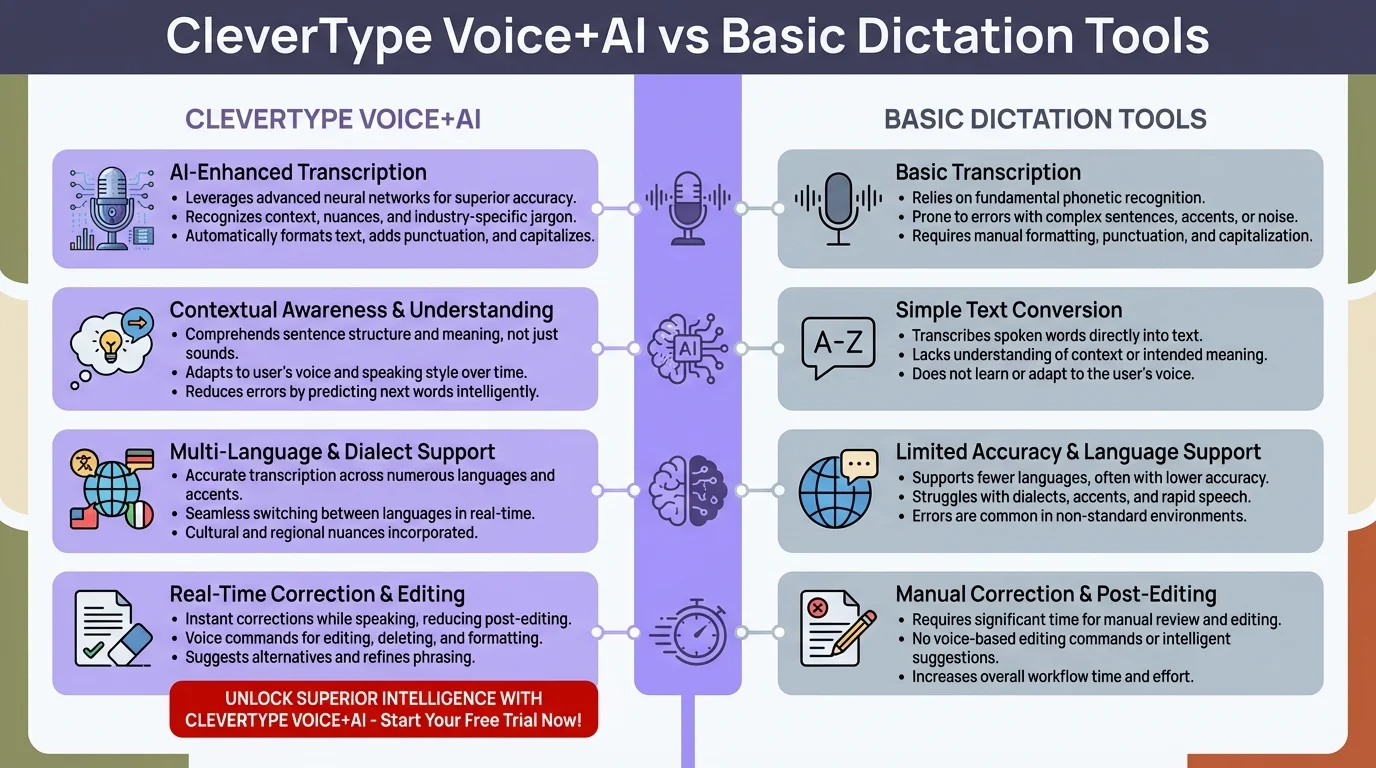
CleverType Voice+AI delivers ~110 WPM effective output speed vs ~35 WPM for basic dictation — eliminating the editing loop entirely
Which Errors Actually Get Fixed Automatically
Consequently, Not all grammar problems are equal. Some get cleaned up automatically every single time, without you even noticing. Others? Genuinely harder for the AI — it needs to understand what you actually meant, not just how the sentence is structured. Nevertheless, Different problem entirely.
Reliably fixed by modern AI grammar tools:
- Filler words and verbal tics
- Missing punctuation (commas, periods, question marks)
- Basic subject-verb agreement
- Capitalization at sentence starts and proper nouns
- “It's vs its” and “their vs there vs they're”
- Verb tense normalization within a single sentence
- Redundant phrasing (“end result” → “result”)
- Comma splices in simple two-clause sentences
Still imperfect and worth reviewing:
- Complex sentences with multiple clauses and shifting tense
- Domain-specific jargon (medical terms, legal language, brand names)
- Ambiguous pronoun references across long paragraphs
- Stylistic choices vs actual errors (Oxford comma, British vs American spelling)
- Sarcasm or intentional informal tone
Nevertheless, A 2025 benchmarking study by Soniox found that while general conversational accuracy has shot up, accuracy on technical vocabulary in specialized fields still drops 10-15% compared to everyday speech. If your work is full of acronyms or niche terminology, you'll want to add a custom vocabulary list. Therefore, Small fix, big difference.
But the practical reality? Hence, For 90%+ of what most professionals write — emails, messages, meeting notes, reports — the post-dictation review is now a light scan, not a full line-by-line edit. That's the actual shift that makes AI dictation with editing worth using.
Who Actually Saves the Most Time With This
To be honest, some jobs get way more out of voice typing productivity than others. Here's a real breakdown — including the roles where it genuinely doesn't move the needle much:
High benefit roles:
- Lawyers and paralegals — A lawyer at $300/hour who saves 10 hours weekly with dictation without editing recovers $3,000+ in billable time. Legal language is complex but structured, and AI handles it well.
- Doctors and medical professionals — Clinical note-taking is one of the biggest drains on physician time. Voice dictation cut documentation time by 45% in multiple hospital studies.
- Sales professionals — Writing follow-up emails, call notes, and CRM entries. The faster you get these done, the more time you have with customers.
- Content creators and bloggers — First-draft generation through voice dictation, then light editing, can triple output volume.
- Students — Lecture notes, essay drafts, and research summaries all benefit from speaking faster than typing.
Moderate benefit:
- Developers (useful for documentation and emails, less so for actual code)
- Customer support agents (templates help more than pure dictation here)
- Project managers (meeting notes, status updates)
Lower benefit:
- Anyone who primarily does highly technical or code-heavy work
- Tasks requiring precise formatting that voice can't capture
Additionally, The voice AI market hit $22 billion in 2026 — and most of that came from high-value professionals who did the math. A lawyer saving 10 hours a week isn't just less frazzled. Consequently, That's Nevertheless, real billable time they're getting back. And honestly? Hence, For anyone who writes for a living, cutting that editing loop is probably the most straightforward productivity improvement you can make right now.
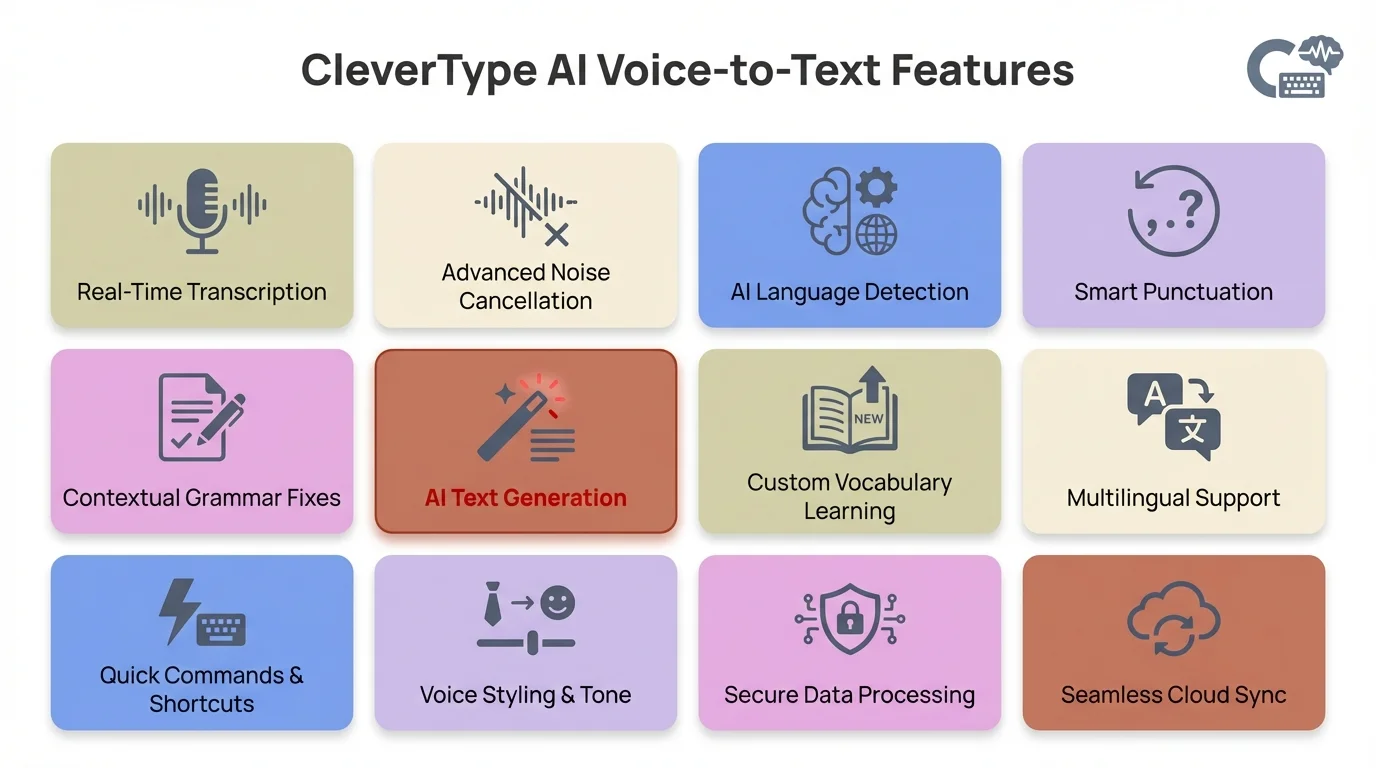
CleverType's AI voice features work inside every app — no context switching, no copy-pasting, no separate dictation tools
How to Set Up Smart Voice Typing That Actually Works
Consequently, Most people try voice dictation once, get frustrated, and chalk it up as “not for them.” Which is a shame, because in most cases the tool wasn't the problem — the setup was. A few small adjustments make the whole thing work completely differently.
Step 1: Choose a tool with built-in AI grammar processing
Not all voice apps include grammar correction — a lot of them just transcribe what you say and leave the mess for you to deal with. You need one that runs AI processing on the transcript before it shows you anything. Look for features like “smart dictation,” “AI grammar fix,” or “intelligent transcription.” If those words aren't in the description, it probably doesn't have it.
Step 2: Train your speaking habits slightly
Furthermore, You don't need to speak like a news anchor. But a few small habits help a lot:
- Pause briefly between sentences (gives AI clear sentence boundaries)
- Say “period” or “comma” when the AI isn't catching it naturally
- Avoid trailing off mid-thought — finish your sentence before pausing
Step 3: Use it in low-stakes contexts first
Therefore, Start with Slack messages and quick notes — not important client emails or reports. This gives you a feel for what the AI catches well and what it still misses in your specific writing style. You'll calibrate quickly.
Step 4: Set up a vocabulary list for specialized terms
If you work in a field with unusual terminology, most modern tools let you add custom words. Nevertheless, This stops the AI from “correcting” your industry vocabulary into something more common — which, if you've experienced it, is annoying as hell.
Step 5: Do a light review pass, not a full edit
Therefore, The goal isn't zero editing — it's minimal editing. Once you trust that the AI handles 90%+ of corrections, you shift from edit mode to review mode. Consequently, You're just confirming the output, not rewriting it. Nevertheless, That mental shift matters.
Zapier's 2026 guide to dictation software makes the same point — the best tools combine high-accuracy speech recognition with post-processing that preserves your intended meaning while cleaning up grammar. That combination is what makes dictation without editing actually viable, not just a marketing claim.
CleverType: Voice-to-Text With AI Grammar Fix on Your Phone
CleverType voice and grammar is built directly into the keyboard — which sounds like a small detail but it's actually the whole point. You don't switch apps. You don't open anything extra. Therefore, Tap the mic, start speaking, and polished text shows up right where you're already typing.
That's a bigger deal than it sounds. Most voice dictation friction doesn't come from the AI — it comes from context-switching. Therefore, You're in Gmail, you open a dictation app, speak, copy the text, switch back, paste. CleverType cuts out that whole detour entirely.
What CleverType voice and grammar handles automatically:
- Filler word removal before the text appears on screen
- Automatic punctuation based on natural speech patterns
- Capitalization at sentence starts and for proper nouns
- Subject-verb agreement correction
- Apostrophe handling for contractions vs possessives
- Grammar normalization for run-on phrases
And beyond the voice stuff, CleverType's AI keyboard also gives you:
- Smart predictions that learn from your writing patterns
- Grammar and spell checking that works across every app
- Tone adjustment — rewrite formal to casual or vice versa with one tap
- 100+ languages supported with multilingual switching
- Privacy-first design — your typing data doesn't leave your device
- Smart clipboard for reusing frequent responses
- Sync across Android devices without extra setup
Nevertheless, Unlike Gboard — which routes your typing through Google's servers — CleverType keeps everything on-device and private. And unlike SwiftKey's prediction model, CleverType's AI reads context. It knows what you're writing about, not just which word statistically tends to come next.
Moreover, Download CleverType from the Play Store and try voice dictation with AI grammar fix built into your keyboard — no extra apps, no workflow switching.
Common Mistakes People Make When Switching to Voice Dictation
Nonetheless, Even with decent AI grammar tools, people keep running into the same handful of issues. Most are easy to avoid once you know what to watch for.
Mistake 1: Trying to speak in perfect written sentences
Counterintuitively, this makes things worse. The AI is built for natural speech — it handles that better than stilted, over-structured sentences. When you try to “pre-edit” as you go, you pause, stumble, restart mid-sentence. That creates more errors, not fewer. Therefore, Just speak normally.
Mistake 2: Dictating in a noisy environment without noise cancellation
Hence, AssemblyAI's 2026 accuracy report shows accuracy drops significantly in noisy environments — from 97%+ in quiet settings to 85-90% with background noise. If you're working in a loud space, a decent headset mic makes a bigger difference than any AI tool can.
Mistake 3: Expecting it to handle complex technical content perfectly from day one
For highly technical writing — medical records, legal contracts, code documentation — AI grammar fix gets you most of the way there but not all the way. It handles structure and grammar well. Domain-specific accuracy still needs a look. Nonetheless, That's fine. Furthermore, You're still saving a lot of time even with a review pass.
Mistake 4: Not adjusting your speaking pace
Slightly slower than normal conversation is the sweet spot — think “explaining something to someone new” rather than “rapid-fire chat with a friend.” Not dramatically slower. Just clear. Cleaner audio means less guesswork for the speech model, which means fewer errors to clean up after.
Mistake 5: Expecting zero editing
“Dictation without editing” doesn't mean zero editing. It means editing is no longer the major time sink. You'll still review and tweak. The goal is getting from “30 minutes of editing” to “3 minutes of light review.” That's the actual win.
Mistake 6: Using a basic voice input tool and thinking that's AI dictation
There's a real difference between your phone's built-in voice input and a proper AI grammar correction tool. One transcribes. The other understands. If the text on your screen still looks like raw spoken word — complete with “ums,” no punctuation, and run-on phrases — you're using the transcription version, not the AI one.
Frequently Asked Questions
What is voice to text with grammar correction?
Therefore, Short version: it's dictation that cleans itself up. The technology transcribes what you say, then runs AI processing to fix grammar, punctuation, and sentence structure before the text hits your screen. Unlike basic dictation tools, you don't have to spend time manually editing afterward.
How does AI grammar fix work in speech to text apps?
Moreover, A large language model processes your raw transcript and rewrites it into clean, grammatically correct text. Filler words get stripped out, punctuation gets added, verb tenses get aligned, subject-verb agreement gets fixed — all before you ever see the output. You just speak, and what appears is already polished.
Is voice typing faster than keyboard typing when you include editing time?
With AI grammar fix, yes — and it's not really close. Raw dictation runs 130-150 WPM vs 40-60 WPM for typing. But the bigger thing is what happens after: with AI handling most of the cleanup, your real-world output ends up 2-3x higher than keyboard typing when you count everything.
Does AI grammar fix work for professional and technical writing?
For most professional writing — emails, reports, meeting notes, messages — yeah, it works well. Technical content with niche vocabulary is a different story. Additionally, You'll probably need to add custom terms to the vocabulary list to stop the AI from “correcting” your industry jargon into something wrong. That said, for general business language, accuracy is above 95% with leading tools.
What's the difference between CleverType and a standalone dictation app?
Hence, The main difference is where it lives. CleverType is built into the keyboard itself, so AI grammar correction works everywhere — email, messaging, notes, docs, whatever you're typing in. Standalone dictation apps require context switching: open the app, dictate, copy, switch back, paste. Therefore, CleverType just removes that whole detour.
How accurate is speech to text grammar fix in 2026?
Pretty good, honestly. Leading AI speech systems are hitting below 5% word error rate in conversational English. Layer grammar post-processing on top and the final output matches edited writing for most standard use. Noisy environments and heavy accents are still harder — accuracy drops a bit there.
Can I use voice to text with grammar correction in multiple languages?
Yes — apps like CleverType support 100+ languages with built-in multilingual switching. Additionally, Dictate in one language and get AI grammar correction applied in that same language. If you regularly switch between languages throughout the day, this is actually one of the more useful things about keyboard-based AI dictation.
Ready to Type Smarter?
Upgrade your typing with CleverType AI Keyboard. Fix grammar instantly, change your tone, receive smart AI replies, and type confidently while keeping your privacy.
Download CleverType FreeAvailable on Android • 100+ Languages • Privacy-First
Share this article:
Sources:
- Stanford University: Speech Is 3x Faster than Typing
- AssemblyAI: How Accurate is Speech-to-Text in 2026?
- Speechmatics: Voice AI in 2026 – 9 Numbers That Signal What's Next
- Ringly.io: 47 Voice AI Statistics for 2026
- Zapier: Best Dictation Software in 2026
- Soniox: Speech-to-Text Benchmarks 2025
- medRxiv: Multi-Country Study Comparing Typed to Automatic Speech Recognition