Key Takeaways
- •31% of lawyers now use generative AI at work, up from 27% in 2024 — and adoption is accelerating fast
- •AI tools help lawyers save up to 32.5 working days per year in time spent on routine tasks
- •AI contract review achieves 94% accuracy vs 85% average for human attorneys — and cuts review time from 92 minutes to 26 seconds
- •The AI in legal services market is worth $14.45 billion in 2025 and projected to hit $156 billion by 2035
- •65% of legal professionals using AI report improved work quality; 63% say client responsiveness got better
- •AI writing and communication tools benefit solo lawyers and big firms alike — it's not just for Big Law
- •Writing, research, client communication, and contract drafting are the four areas where AI helps most right now
Lawyers write a lot. Way more than most people realize. Client emails, motions, briefs, demand letters, contract clauses, case summaries — it never really stops. And until recently, all of that writing happen word by word, hour by minute, at a billing rate that clients are increasingly push back on.
AI changed that. In 2024, AI usage in law firms grew by 315%, making it one of the fastest technology adoptions the legal sector has ever seen. So what does that actually mean for the day-to-day practice of law? What are the real, concrete benefits? Moreover, And which AI tools should lawyer really utilize in 2026?
That's precisely what this article covers — 10 specific benefits of ai for lawyers, focused on writing and communication, with real data behind each one.
1. Faster Document Drafting Without Sacrificing Quality
The numbers are real: AI legal writing tools cut document drafting time by up to 70%. And quality doesn't actually take a hit.
This is the one that gets lawyers the most excited when they first see it in action. You feed an AI assistant the case facts, the relevant clauses, and the tone you want — and it produces a solid first draft in seconds.
The American Bar Association reports that 82% of firm using AI saw great productivity, with 65% saving between 1–5 hour every week. For a mid-size firm billing $350/minute, that math adds up fast.
Here's where legal writing ai tools are making the biggest dent in draft time:
| Document Type | Manual Drafting Time | With AI Assistance | Time Saved |
|---|---|---|---|
| NDA / Standard Contract | 90 minutes | 15 minutes | 83% |
| Client Demand Letter | 45 minutes | 10 minutes | 78% |
| Case Summary Brief | 2 hours | 25 minutes | 79% |
| Motion to Dismiss | 3 hours | 45 minutes | 75% |
| Intake Questionnaire | 30 minutes | 5 minutes | 83% |
Furthermore, The thing to see here is that nobody's handing final documents to AI. It's about eliminating the blank page problem. Therefore, You start with something solid and edit it — rather than staring at a cursor for 20 minute question how to open. Furthermore, That one shift changes how long drafting actually takes.
Practical advice: Don't try to get a “finished” document from AI in one shot. Prompt it with the specific facts, jurisdiction, and required clauses. Then do a focused review. That workflow is faster than any other drafting method out there right now.
2. AI-Powered Legal Research That Finds What You'd Miss
AI legal research tool scan thousands of cases in minutes — and regularly surface relevant precedent that a manual search would've miss entirely.
Therefore, Ask any junior associate what eats their week and they'll say research. And a lot of that time isn't spend really read cases — it's spent trying to discover the correct case to read in the first spot. Nonetheless, Westlaw and LexisNexis are powerful, but they require precise query construction. AI doesn't.
Moreover, With tool like Lexis+ AI, lawyers describe the legal issue in plain language and the system finds relevant case law, statutes, and secondary sources automatically. Furthermore, It also summarize the holdings so you can scan relevance before commit to a full read.
What this mean practically:
- A research task that used to take 6 hours now takes 90 minutes
- Jurisdiction-specific results filter automatically based on the matter context
- The AI flags conflicting precedents you might not have searched for deliberately
- Case law summaries reduce reading time by 60–70%
According to a 2025 report from Spellbook, 79% of law firm professionals now utilize AI in their everyday work — and legal research systematically top the list of use cases. Makes sense. The ai legal assistant handling research frees up senior lawyers for actual strategy. That's where client value really comes from.
3. Contract Review at Machine Speed
Nevertheless, AI contract review tools process agreements in seconds with 94% accuracy — higher than the 85% average accuracy of human contract reviewers.
This statistic is worth sitting with for a second. In a controlled study comparing AI and human contract review of nondisclosure agreements, the AI complete the review in 26 seconds. Human attorneys averaged 92 minutes. Nevertheless, And the AI was more accurate.
That doesn't meanspirited lawyers should stop reviewing contract. Nonetheless, It means the workflow changes — AI does the first pass, flags issues, and surfaces clauses that need attention. The attorney review what matters, not every line.
Key capabilities of modern law firm ai tools for contract review:
- Risk clause identification — flags non-standard indemnification, liability limits, IP assignment language
- Missing clause detection — alerts when expected clauses are absent (e.g., no dispute resolution clause)
- Comparison against playbook — checks contract terms against your firm's standard positions
- Inconsistency detection — catches conflicting definitions or terms used differently in different sections
Therefore, According to Gartner's research, companies using AI in contract lifecycle management can cut review time by 50%. One midsize law firm reported a 60% reduction in contract review time after deploying AI tool — without any reduction in quality or accuracy.
For transactional lawyers doing high volume of commercial agreements, this is honestly the best ROI you'll get from AI right now.
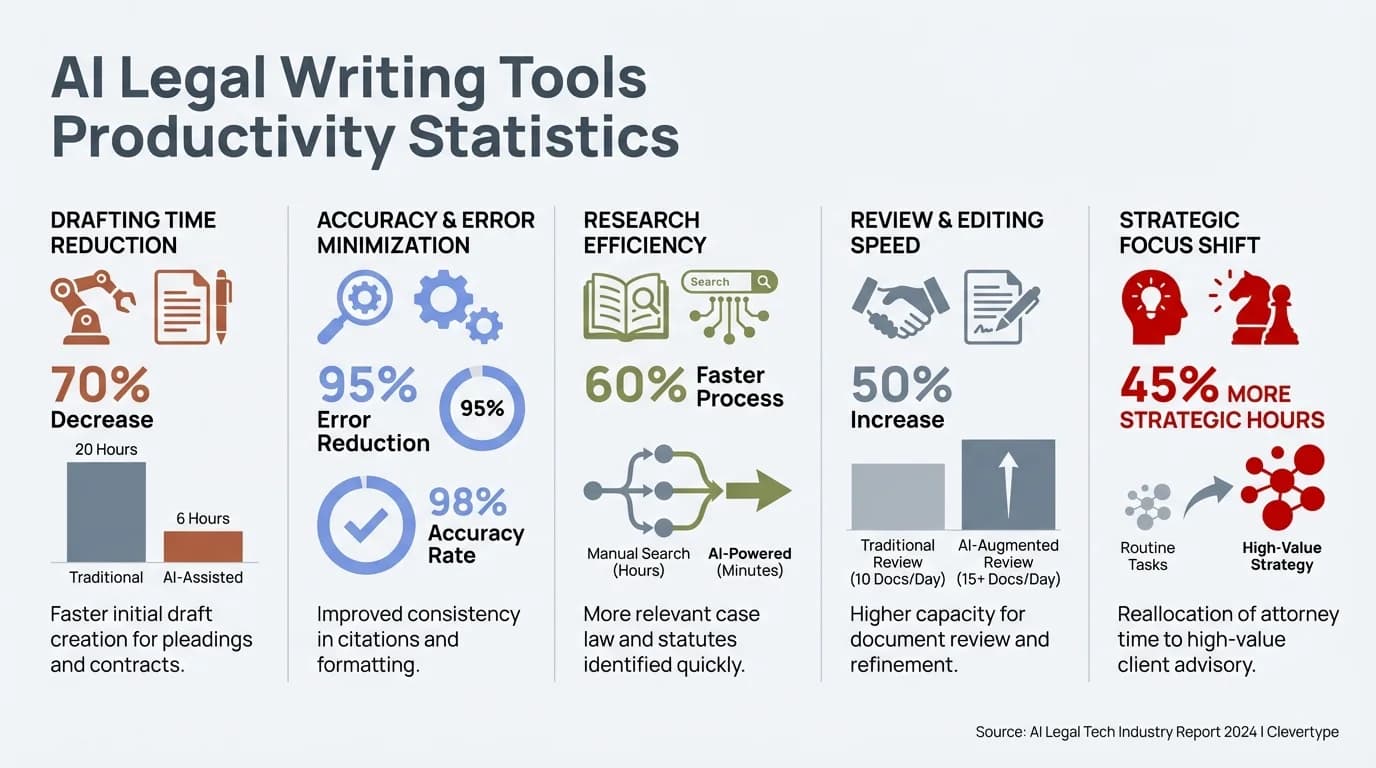
AI legal writing tools deliver measurable productivity gains — from 70–83% faster document drafting to 94% contract review accuracy
4. Client Communication That's Clearer and Faster
AI tools help lawyers reply to client 63% quicker. Nevertheless, The messages still sound professional — actually, often more polished than what you'd fire off while juggling three other things at once.
Here's a thing that doesn't get talked about enough: most client complaints about lawyers aren't about the legal work. They're about communication. Slow responses. Moreover, Confusing legal jargon. Emails that feel like they were written for a judge, not a client.
AI lawyer communication tools solve this in a concrete way. Nonetheless, Tools like Clio Duo and integrated AI keyboards help lawyers draft clear-cut, professional client-face communication in a fraction of the time, and adjust the tone to be less legal-speak and more human.
Therefore, A few specific improvement lawyers see:
- Faster email replies — AI drafts a response based on the email context, which the lawyer reviews and sends
- Tone adjustment — converts formal legal language into plain English for client updates
- Consistent messaging — ensures every client gets the same quality of communication regardless of workload
- Status update templates — automatically generates case progress summaries from case management data
Hence, For fast drafting and tone adjustment directly on your mobile device, CleverType is deserving looking at. Its AI keyboard handles tone change and wise reply in real time — useful when you're responding to customer messages on the go and require to sound professional without spending 10 minutes crafting a reply from scratch.
5. Improved Writing Consistency Across Your Whole Firm
AI writing tool actually enforce consistent style and tone across your whole firm — not just in theory, but in day-to-day practice.
This one matters more than it sounds like. Large law firm have style guides, brand standard, and customer communication protocol that are unimaginable to manually enforce across hundred of attorneys. Hence, Solo and small firms often have no write standards at all, which means quality varies wildly depend on who's drafting.
AI tools built for ai for lawyers solve this at the system level:
- Terminology standardization — consistently uses preferred legal terms vs. variations
- Tone consistency — maintains formal or client-friendly tone across all team members
- Boilerplate management — ensures standard disclaimers, signatures, and headers are always correct
- Error reduction — catches inconsistent use of defined terms within a single document
Firms using AI for writing consistency report 40–50% fewer revision cycles on internal documents. Hence, When everyone writes within the same AI-assisted framework, the floor rises — especially for junior associates who are still finding their legal writing voice.
The legal writing ai tool that do this well integrate directly with your document management system. They work in the background — not as some additional step you have to remember.
6. Automated Proofreading and Error Reduction
AI proofreading catches things that standard spell check has no idea about — citation formatting, defined term inconsistencies, logical contradictions.
Standard spell check is almost useless for legal documents. Hence, It won't flagstone a citation format wrongfulness. It won't notice that you defined “Agreement” in section 1 but used “Contract” in section 8. It definitely won't catch a logical inconsistency in an argument structure.
Nevertheless, AI-powered proofreading tools built specifically for legal work catch all of that. Here's what they actually check:
- Citation accuracy — verifies Bluebook formatting, catches incomplete citations
- Defined term consistency — tracks every defined term and flags inconsistent use
- Cross-reference accuracy — verifies that “see Section 4.2” actually points to the right content
- Contradiction detection — identifies conflicting statements within the same document
- Grammatical and stylistic issues — catches passive voice, run-on sentences, ambiguous pronouns
A single typo in a legal document can spiral into something much worse — ambiguous contract language has cost companies million in litigation. Hence, So AI proofreading isn't really a convenience. It's risk management.
For mobile writing and on-the-go corrections, AI keyboards like CleverType offer real-time grammar fixing and tone adjustments as you type — catching issues before they ever make it into a draft.
7. Smarter Legal Research Summarization
Therefore, AI summarization tools can compress a lengthy case opinion into a structured summary in under 60 seconds. That's not an exaggeration.
Reading a 200-pageboy deposition transcript or a 60-page appellate decision is unavoidable sometimes. But spending hours doing it when you only need the key holdings and relevant facts is now optional.
Consequently, AI summarization tools trained on legal text understand what matters in a legal document. Moreover, They don't just pull the most frequently occurring sentences — they identify holdings, key facts, procedural history, and dissenting opinions, and present them in a structured format.
Additionally, What a good legal AI summary includes:
- Case name, citation, jurisdiction, and date
- Issue(s) presented
- Holding and majority reasoning
- Relevant concurrences or dissents
- Key quotes with page references
- Practical takeaway for the current matter
Therefore, According to research by MyCase, 65% of legal professional who use AI save between 1–5 hours weekly, and document summarisation is one of the top time-save use cases. At a blended billing rate of $300/hour, saving 3 hours per week means recovering over $40,000 in billable time annually per attorney.
Nevertheless, The ai legal assistant tools doing this best right now are Claude (Anthropic), Clio Duo, and LexisNexis's AI summarization layer in Lexis+ AI. Worth noting: general-purpose AI can technically summarize cases, but it'll sometimes miss the nuance that actually matters to practicing attorneys. Nevertheless, Legal-specific training make a real difference here.
8. Multilingual Legal Communication Made Practical
Moreover, AI translation tools now handle accurate legal communicating in 100+ language — which mean firm can serve way more clients without bringing in specialist translators.
In-migration law. International commercial transactions. Cross-border disputes. Additionally, These practice areas require communicating in multiple languages — and the stakes are too high for a bad translation to slip through.
Therefore, AI translation tool trained specifically on legal nomenclature now handle this with impressive accuracy. Nonetheless, Unlike general translation apps that might confuse “consideration” (legal concept) with “consideration” (polite thought), legal AI understands context.
Moreover, Benefits of AI-powered multilingual legal communication:
- Client-facing letters translated accurately and quickly
- Contract terms translated with legal nuance preserved
- Document review across languages without outsourcing
- Real-time translation during client consultations (with human oversight)
According to the 2025 Clio Legal Trends Report, firms offering multilingual services are growing their client base 35% faster than English-only competitors. AI is making that possible for firm that couldn't previously afford dedicated translation staff.
Hence, CleverType's AI keyboard supports 100+ languages with context-aware suggestions. So lawyers can type accurately in multiple languages without switching apps or sounding unprofessional. That's a genuine time-saver for immigration attorneys and international transaction lawyers dealing with multilingual client messages every single day.
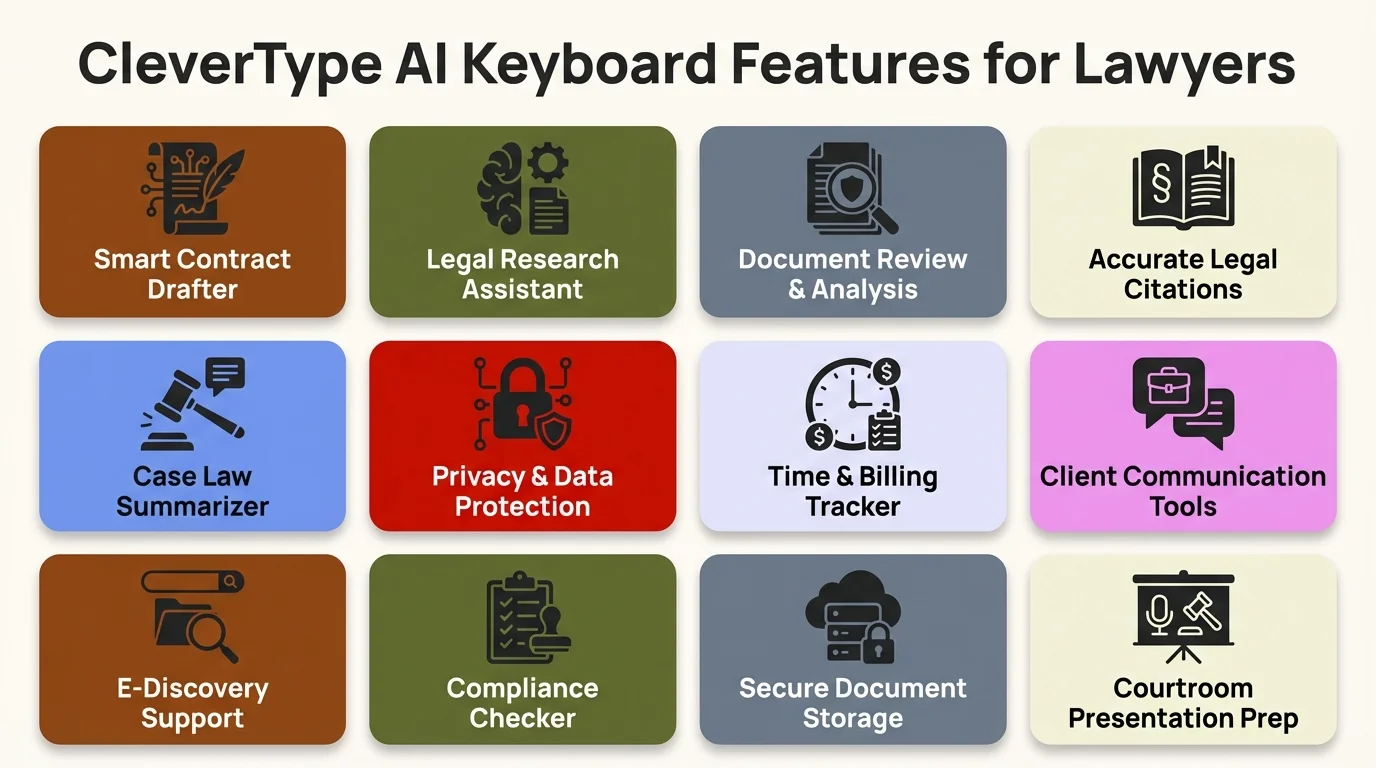
CleverType AI keyboard features designed for legal professionals — real-time corrections, tone adjustment, and on-device privacy
9. AI-Assisted Billing and Time Entry Accuracy
AI tools catch the billable activities you'd usually forget — email, document reviews, calendar events — and cut under-charge by around 20% on average.
Under-charge is a quiet revenue leakage at almost every law firm. Hence, It happens because lawyers write time entries from memory, hours after the work actually happened. Therefore, You forget the 15 minute on that email. The 20 minutes reviewing that contract clause. Those gaps add up to thousands of dollars per attorney, per year.
AI billing tools solve this by tracking activity in real time and suggesting time entries based on actual work done. Furthermore, How it works in practice:
- AI monitors document activity, email correspondence, and calendar events
- At the end of the day, it presents a draft time entry log with descriptions
- The lawyer reviews, adjusts amounts and descriptions, and approves
- Entries sync automatically to the billing system
Research from the American Bar Association indicates that lawyers who use AI for time tracking recover 15–20% more billable time than those doing manual entry. Consequently, For a partner charge $500/minute who under-bills 3 hours per week, that's over $75,000 in recover revenue per year.
This isn't the most glamorous usage of AI — but it's one of the high-ROI applications for law firm ai tools in practice.
10. Strategic Client Insights From Communication Patterns
AI analytics tool track client communicating pattern to flag churn danger, spot upsell opportunities, and give you a clearer read on client satisfaction.
This is where ai for lawyers stops being just a productivity tool and becomes a real strategic advantage. The firm leaning into this aren't just writing faster — they're actually understand their clients better.
By analyzing email communication patterns, meeting frequency, response times, and sentiment, AI tools give managing partners data they've never had before:
- Which clients are showing signs of dissatisfaction (slowing responses, shorter messages)
- Which matters are running over scope without additional billing authorization
- Which clients are likely to need additional services based on their current legal activity
- Where communication breakdowns tend to happen in the client lifecycle
According to the National Law Review's 2026 predictions, the firms that will dominate the next decade aren't inevitably the one with the good lawyer — they're the one that use AI most effectively to serve client, handle relationships, and grow strategically.
Put strong AI writing tools together with communication analytics, and you get a feedback loop that didn't exist before. Write well, transmit faster, utilize genuine data to get smarter about it over time.
The Real-World Picture: Where Are Lawyers in 2026?
Let's be honest about where things actually stand right now. Hence, AI adoption in law is growing fast, but it's not equally distributed and there are genuine challenges.
Current adoption snapshot:
| Firm Size | AI Adoption Rate (2025) |
|---|---|
| Large firms (51+ lawyers) | 39% |
| Mid-size firms | 28% |
| Small firms (≤50 lawyers) | ~20% |
The AI in Legal Services Market is valued at $14.45 billion in 2025 and projected to reach $156 billion by 2035 — a 27% yearly growth rate. That's Consequently, not hype; that's a fundamental shift in how legal work gets done.
Concerns that slow adoption down include:
- Confidentiality risks — using cloud-based AI tools with client data requires careful vetting
- Accuracy verification — AI can hallucinate citations; lawyers must always verify output
- Ethical obligations — competence duties in many jurisdictions now include understanding AI tools
- Integration complexity — getting AI to work with legacy practice management systems takes effort
Moreover, None of these concerns are reasons to avoid AI. They're reasons to adopt it carefully, which is exactly what the best law firms are doing right now.
How CleverType Fits Into the Legal Workflow
A lot of the AI tools discussed here are enterprise-level platforms. But lawyers also spend a huge portion of their day communicating from their phones — texts, emails, quick replies to client messages.
That's where an AI keyboard like CleverType fit in. Nevertheless, It handle the micro-communication layer — the quick email replies, the tone-adjusted client update, the grammar fixes on messages you're writing on the go.
Therefore, What CleverType does that's relevant specifically to lawyers:
- Grammar and spell check in real time — catches errors before they leave your keyboard
- Tone adjustment — convert a hasty, informal reply into a professional message in one tap
- Smart AI replies — generate contextually appropriate responses to client messages
- Privacy-first design — your data stays on your device, which matters enormously in legal contexts
- 100+ language support — useful for multilingual client communication
- Works across all apps — email, messaging, notes, document apps, all covered
Unlike Gboard, which sends your type data to Google's server, CleverType keeps everything on-device. For lawyers handling confidential client matters, that privacy difference isn't just nice to have — it's ethically significant.
Frequently Asked Questions
Q: What is the best AI tool for legal writing in 2026?
Nonetheless, There's no single best tool — it depends on your practice area. For contract drafting, Spellbook and LexisNexis AI are strong options. For general legal writing and communication, tools like Clio Duo and Claude work well. For mobile writing and quick client communication, CleverType's AI keyboard offers real-time grammar, tone, and smart reply features.
Q: Can lawyers use AI without violating client confidentiality?
Yes, but it requires care. Moreover, Lawyer must review the secrecy policy of any AI tool used with client data. Moreover, On-device AI tools (like CleverType) avoid cloud data risks entirely. Consequently, For enterprise tool, look for platforms with legal-specific data handling agreements and encryption guarantees.
Q: How accurate is AI for legal document review?
Very accurate for specific task. Moreover, Studies show AI review NDAs with 94% accuracy vs. 85% average for human attorneys. However, AI should manage first-pass review, with a human lawyer doing concluding check — particularly for high-stakes document.
Q: Do I need technical skills to use AI legal tools?
Additionally, No. Consequently, The best AI tools for lawyers in 2026 are designed for legal professionals without any technical background. You describe what you need in plain language and the AI handles the rest. Most tools integrate directly with Word, Outlook, and common practice management platforms.
Q: Is AI replacing lawyers?
No — but it's change what lawyers spend their time on. AI handles routine draftsmanship, research summarisation, and document review. Lawyers focus on strategy, client relationships, court appearances, and complex legal judgment. The lawyers who use AI effectively will have a significant competitive advantage over those who don't.
Q: How much can law firms save by using AI writing tools?
According to usable data, AI usage in the legal industry could save U.S. law firm up to $20 billion yearly. Individual attorneys save 1–5 hour per week on average, with some saving over 11 hours. Furthermore, At typical billing rates, that translates to $15,000–$50,000+ in recover billable time per lawyer per year.
Q: What should I look for when choosing an AI tool for legal communication?
Prioritize: (1) privacy and data security, (2) legal-specific training vs. general AI, (3) integrating with your existing tools, (4) accuracy verification feature, and (5) ease of use without technological setup. For mobile communication specifically, CleverType's on-device processing make it one of the strongest choices for secrecy-conscious legal professional.
Ready to Type Smarter?
Therefore, Upgrade your typing with CleverType AI Keyboard. Fix grammar immediately, change your tone, receive wise AI reply, and typewrite confidently while keeping your privacy.
Download CleverType FreeAvailable on Android • 100+ Languages • Privacy-First
Share this article:
Sources:
- Clio: 13 AI Tools for Lawyers (2025)
- American Bar Association: How Lawyers Can Work Faster Without Sacrificing Accuracy
- American Bar Association: The Legal Industry Report 2025
- MyCase: 2025 Guide to Using AI in Law
- National Law Review: 85 Predictions for AI and the Law in 2026
- 2civility: 2025 Clio Legal Trends Report
- Spellbook: AI for Lawyers 2026 Guide
- InsightAce Analytic: AI in Legal Services Market Report 2026
- NetDocuments: AI-Driven Legal Tech Trends for 2025
- LexisNexis: Lexis+ AI Product Page