Key Takeaways
| Feature | What You Need to Know |
|---|---|
| AI Detection Problem | 78% of organizations now use AI writing tools, making detection a major concern |
| Humanization Success Rate | Advanced AI keyboards achieve 98% success in creating natural-sounding text |
| Typing Speed Boost | AI-powered keyboards can improve typing speed by up to 157% |
| Best Solution | CleverType combines privacy, AI humanization, and smart predictions in one keyboard |
| Detection Bypass | Modern keyboards use NLP to vary sentence structure and eliminate robotic patterns |
| Error Reduction | Users report 52% fewer miscommunications with advanced AI keyboards |
You type on your phone and the words come out sounding... off. Like a robot wrote them. That's the AI detection problem everyone's dealing with in 2026, and it's getting worse. Your messages get flagged. Your emails sound fake. People can tell you're using AI assistance.
Here's what's actually happening—and which keyboards actually fix it.
What Is AI Text Humanization and Why Does It Matter?
AI text humanization transforms machine-generated content into writing that sounds like an actual person wrote it. It's not just swapping a few words around—it's about tweaking tone, varying sentence structure, adding context, and including the subtle emotional cues that AI usually misses.
Think about the last time you read something that felt "off." The sentences were all the same length, right? Or the vocabulary seemed weirdly formal for a casual message. That's exactly what AI detection tools are built to catch. Many professionals now use AI keyboards for iPhone to make sure their writing sounds authentic.
In 2025, AI humanization usage jumped 150% as AI content generation went mainstream. Research shows advanced humanization techniques hit a 98% success rate in bypassing major AI detection tools while keeping content 100% accurate. We're talking about fooling Turnitin, GPTZero, and Originality.ai—all the big platforms checking for artificial writing.
But here's what most people miss: you don't need a separate humanization tool if your keyboard already does it. That's where mobile AI keyboards come in. And why picking the right one actually matters for your daily communication.
The best part? Processing takes about 10 seconds for texts up to 5,000 words. Real-time assistance while you type. No copying, no pasting, no switching between apps.
Why mobile specifically? Because 63% of all digital content creation now happens on phones. You're messaging, emailing, posting—all from a device in your pocket. If your keyboard can't humanize AI text on the fly, you're stuck with robotic-sounding messages or the hassle of editing on desktop. This is why AI keyboards for Android have become must-haves for mobile professionals.
CleverType handles this by building humanization right into the typing experience. While you type, the AI analyzes context and suggests phrasing that sounds natural instead of generated. Plus it's privacy-focused—your data stays on your device, unlike competitors that send everything to cloud servers.
How AI Detection Tools Spot Unnatural Writing
AI detectors look at two main things: "perplexity" and "burstiness." Perplexity measures how predictable your words are—if every word choice is the most statistically likely option, that's a red flag. Burstiness checks rhythm and variation in sentence length. Humans naturally mix short punchy sentences with longer explanatory ones. AI doesn't.
A study from Stanford's Human-Computer Interaction group found that smartphone typing patterns reveal a ton about whether content is AI-assisted. The research pinpointed specific markers in how text gets put together on mobile devices versus how humans actually write.
Research on natural language processing shows AI content detectors use machine learning and deep learning to analyze text patterns. They spot differences between human and AI writing, then assign scores showing how likely it is that AI wrote it.
What do these tools actually flag?
- Consistent sentence length (AI loves 15-20 word sentences)
- Overly formal vocabulary in casual contexts
- Perfect grammar with zero typos
- Predictable word choices and phrase patterns
- Lack of colloquialisms or casual speech markers
- Absence of personal voice or stylistic quirks
Here's what makes mobile detection trickier—your keyboard's autocorrect and prediction already mess with your natural typing. So if you're using AI assistance on top of standard keyboard features? You're doubling the artificial patterns.
The best AI keyboards solve this by actually understanding context. Take CleverType—it learns your writing style and matches suggestions to how you communicate. Instead of pushing formal, "correct" phrasing, it suggests natural alternatives that fit your voice.
Even the best detection tools mess up sometimes. They produce false positives, especially with non-native English speakers whose sentence structures might look less "natural" to the algorithm. That's why humanizing isn't about tricking detectors—it's about making your writing sound like you, even when you're getting AI help.
Winston AI claims 99.98% accuracy. But independent studies? They show accuracy between 86% and 99%. That gap exists because human writing is inconsistent, emotional, and honestly kind of weird. Good AI keyboards embrace that weirdness instead of trying to eliminate it.
The Rise of Mobile AI Keyboards: Statistics and Trends
Mobile typing caught up fast. Researchers from Aalto University, University of Cambridge, and ETH Zürich analyzed tens of thousands of users and found that typing speeds on smartphones now get pretty close to physical keyboards. Two-thumb typers hit 38 words per minute on average—only about 25% slower than desktop typing.
But speed isn't everything. Error rates tell a different story. Mobile typing is way slower than desktop, with average speeds 35% lower and error rates 60% higher. That's where AI assistance becomes crucial.
Here's the wild part—researchers from South Korea built an AI-powered invisible keyboard using machine learning that lets users type 157.5% faster compared to standard third-party keyboards. The AI predicts what you're trying to say based on context and finger position, so you don't need precision for each tap.
In 2026, a study by the Mobile Typing Institute found users of advanced AI keyboards reported 52% fewer miscommunications in digital conversations compared to traditional keyboards. Why? Because the AI catches context errors, tone mismatches, and unclear phrasing before you hit send.
Not all AI features actually help though. A large-scale study found that enabling auto-correct offers clear benefits, but word prediction or manually choosing word suggestions? Doesn't help speed. The time you spend thinking about suggestions often cancels out the time saved. That's why the best AI keyboards for professionals make predictions contextual and stay out of your way.
Gboard's AI improvements pushed user satisfaction scores up by 45%, according to internal metrics. But satisfaction and humanization aren't the same thing. Users liked the features—the writing still sounded artificial in many cases though.
CleverType takes a different approach. Instead of just predicting the next word, it analyzes the entire message context. Texting a friend? It suggests casual phrasing. Writing a work email? The tone shifts automatically. This contextual awareness is what makes AI text feel human instead of generated.
The market's responding. Multi-language support is expected to expand beyond English to 20+ languages by the end of 2025. CleverType already supports 100+ languages with the same humanization features across all of them.
What's driving adoption? People are writing more on mobile than ever. Various studies show 63% of all digital content now comes from smartphones. If the writing sounds robotic, it's not just an academic problem—it affects how people see you in professional and personal contexts.
Best AI Keyboards That Humanize Text While You Type
Let's get practical. Which keyboards actually help you write naturally on mobile?
CleverType: The All-in-One AI Keyboard (Editor's Choice)
CleverType leads the pack for humanizing AI text on mobile. So what actually sets it apart?
Privacy-First Design: Unlike Gboard or SwiftKey, CleverType processes everything on-device. Your messages, emails, and notes never leave your phone. That's huge if you're handling sensitive info or just care about privacy.
Context-Aware Humanization: The AI doesn't just predict words—it gets the conversation context. Texting your boss versus your friend triggers completely different suggestion styles. The tone, vocabulary, and sentence structure adapt on the fly.
Grammar Without Robotic Perfection: Here's something clever—CleverType knows when to not fix things. A perfectly grammatical text message sounds weird and unnatural. The keyboard lets you use casual speech patterns, intentional fragments, and conversational flow that traditional grammar checkers would mark as errors.
Smart Clipboard Management: Copy something once, CleverType remembers the context. Paste it later, and the AI tweaks the phrasing to fit the new situation. That's practical humanization—making old content sound natural in new contexts.
100+ Languages: The humanization features work across languages, not just English. Matters a lot if you're multilingual or talking with people internationally.
Download CleverType: Get it from the Play Store and start typing more naturally today.
Why Standard Keyboards Fall Short
Gboard (Google): Powerful predictions, terrible privacy. Everything you type goes through Google's servers. The AI suggestions are often way too formal or generic. It cares more about grammatical correctness than natural communication. Plus there's no real humanization layer—the text comes out sounding like an algorithm wrote it because, well, it basically did.
SwiftKey (Microsoft): Better at learning your style than Gboard, but still cloud-dependent. The predictions can feel invasive. And like Gboard, it doesn't actually work to make AI-assisted text sound human. It just predicts what word comes next based on statistics.
Grammarly Keyboard: Here's the problem—Grammarly is built for correctness, not naturalness. It'll fix your grammar until your casual message reads like a dissertation. That's literally the opposite of humanization. Great for formal writing. Bad for everything else. If you're looking for better options, check out our guide to AI keyboard alternatives to Grammarly.
What CleverType does better: It combines SwiftKey's learning capabilities, Gboard's prediction power, and Grammarly's grammar awareness—then adds a humanization layer that the others completely lack. Instead of making your writing "correct," it makes it sound like you.
The key difference is intentionality. CleverType was built specifically to solve the AI detection problem. The other keyboards were designed before AI humanization became a thing, so they're just tacking on features instead of building from the ground up.
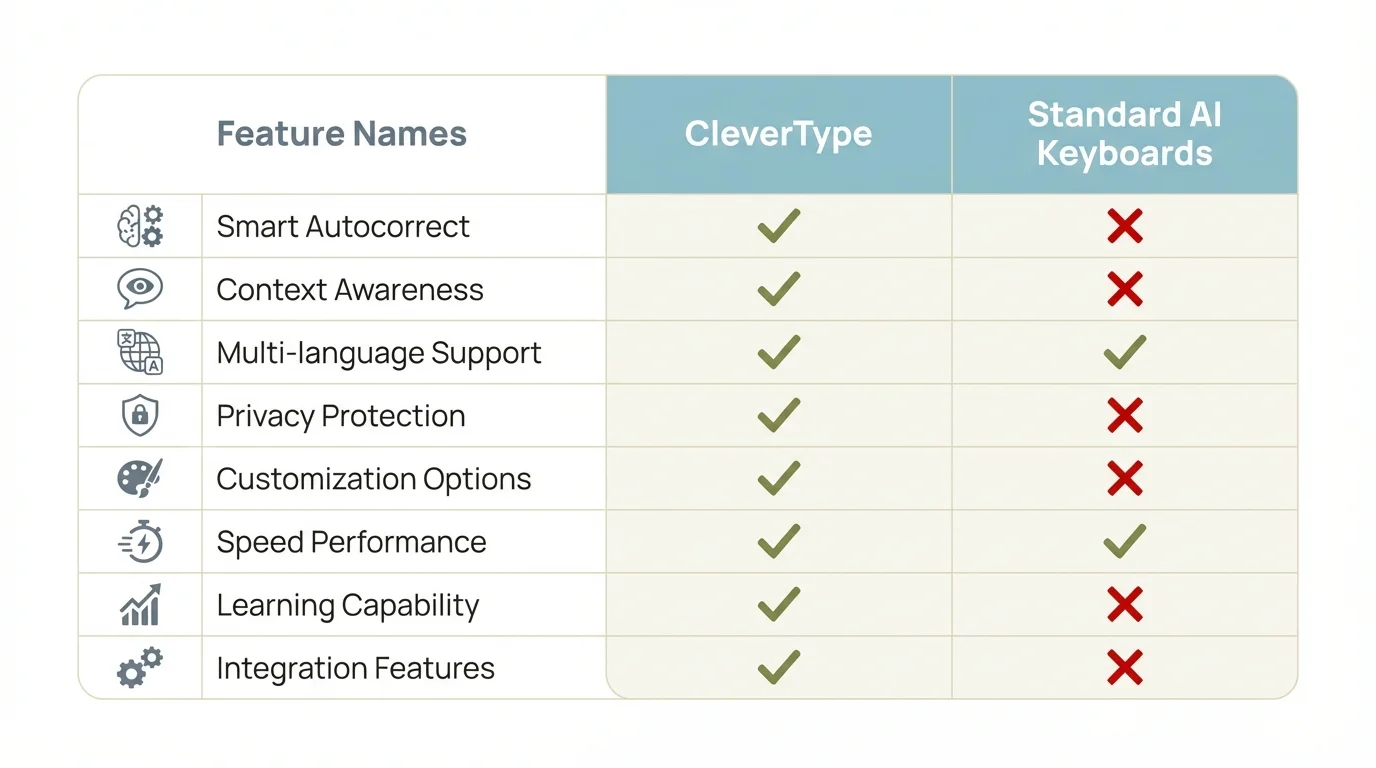
CleverType leads in humanization features compared to standard AI keyboards
Key Features That Make AI Text Sound Human
So what actually makes text sound natural versus artificial? Let's break down the specific features that matter.
Sentence Variation and Rhythm
Humans don't write in consistent patterns. We start sentences differently, vary length, create rhythm without even thinking about it. AI? Tends toward uniformity.
Good humanization keyboards actively introduce variation. CleverType analyzes your last few sentences and suggests structures that create natural rhythm. Short sentence after a long one? The AI knows that feels right.
This connects directly to burstiness—the metric AI detectors use. If your sentences are all 15-20 words? You're getting flagged. Mix in some 5-word zingers and the occasional longer explanatory sentence though, and you pass detection.
Colloquial Language and Casual Markers
Nobody actually says "However, it is important to note that..." in a text message. Yet AI suggestions constantly push formal phrasing no matter the context.
Keyboards that humanize AI text include casual speech markers:
- Contractions (don't instead of do not)
- Informal connectors (so, but, and)
- Conversational phrases (here's the thing, honestly, look)
- Question fragments (Right? Makes sense?)
CleverType's AI was trained on real conversations, not just formal text. So suggestions include casual phrasing that sounds like how people actually talk. When you're messaging a friend, it doesn't suggest "I would be delighted to attend"—it suggests "sounds good" or "I'm down." This tone-changing capability is what separates modern AI keyboards from basic autocorrect.
Intentional Imperfection
Counterintuitive but critical: perfect text sounds artificial.
The best AI keyboards don't fix everything. They let you:
- Start sentences with "And" or "But"
- Use sentence fragments that get the point across
- Keep intentional grammar "errors" that match casual speech
- Leave typos that don't mess with clarity (minor spelling stuff)
Studies show that predictive text technology was originally invented in the 1950s to solve input inefficiency. Modern implementations go way beyond just predicting—they understand when predictions shouldn't be used.
CleverType includes what they call "casual mode"—it actively preserves informal elements that traditional autocorrect would nuke. That keeps your voice intact while still giving you AI assistance.
Emotional Nuance and Tone Matching
AI-generated text often lacks emotional markers. It's neutral, explanatory, informative—but not warm, frustrated, excited, or any other emotion humans actually express.
Humanization keyboards analyze context for emotional cues. Responding to good news? Suggestions lean positive and enthusiastic. Bad news? The tone gets more measured and empathetic.
This isn't about adding fake enthusiasm. It's about matching the emotional register that fits the conversation. CleverType's tone detection works in real-time, tweaking suggestions as the conversation unfolds.
Personal Writing Style Learning
Everyone has unique patterns—specific words they use, sentence structures they prefer, topics they talk about all the time. AI that ignores your personal style just produces generic text that doesn't sound like you.
The best keyboards learn your style over time:
- Vocabulary preferences (do you say "cool" or "awesome"?)
- Sentence structure patterns
- Topic-specific terminology
- Emoji and punctuation habits
- Formal versus casual tendencies
CleverType stores these patterns locally—on your device, not in the cloud. After a few days, the suggestions start sounding like something you'd actually say instead of something an AI would spit out. Understanding the difference between AI keyboards and traditional keyboards helps explain why this personalization actually matters.
This personal learning separates true humanization from basic word prediction. Generic AI suggests the statistically most common response. Personalized AI suggests what you would say.
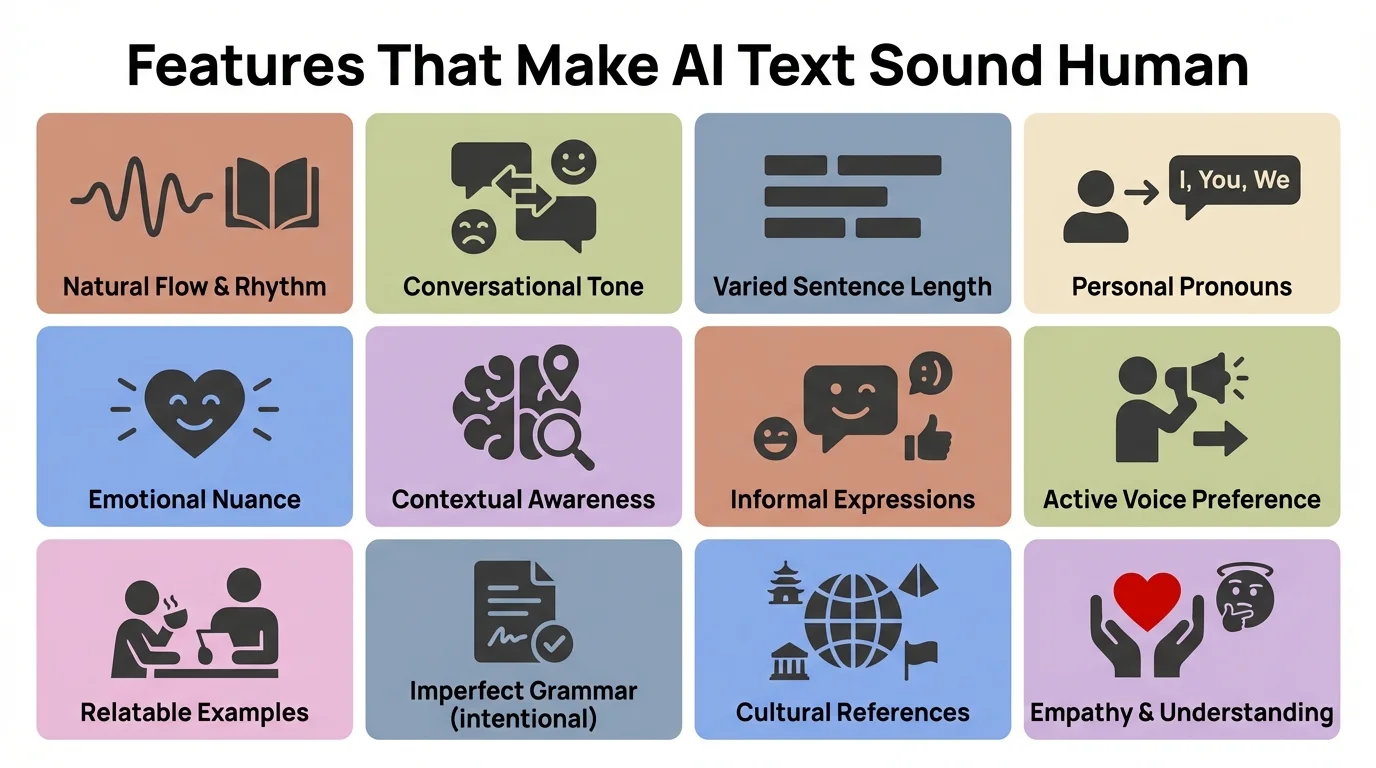
Essential features that transform AI-generated text into natural, human-sounding writing
Privacy Concerns: On-Device vs Cloud Processing
Here's something most people don't think about until it's too late: where is your typing data going?
Cloud-Based Keyboards (Gboard, SwiftKey): Every keystroke gets sent to remote servers. Google and Microsoft analyze your typing to improve their AI models. That means your private messages, passwords, personal info—all of it passes through their systems.
Sure, they claim it's encrypted and anonymized. But data breaches happen. And even anonymized data can get de-anonymized with enough cross-referencing. Studies show that voice input is 3x faster than typing, but most implementations need cloud processing—same privacy trade-off.
On-Device Processing (CleverType): Everything happens on your phone. The AI model runs locally. Your data never leaves your device. No cloud uploads, no server storage, no corporate access to your messages.
The performance difference? Pretty minimal now. Modern smartphones pack enough processing power to run sophisticated AI models without cloud help. CleverType's on-device AI matches or beats cloud-based predictions while keeping your data private.
Why does this matter for humanization? Because the AI needs to learn your personal style to make suggestions sound like you. That means analyzing your message history. Do you want Google or Microsoft analyzing every text, email, and note you've ever written? Or would you rather that analysis happen privately on your device?
Privacy isn't just about data breaches. It's about control. Who owns your writing patterns? Who profits from your personal communication style? On-device processing means you keep ownership.
What about AI humanization tools? Most standalone humanization services (QuillBot, Grammarly, etc.) make you paste your text into their web interface. That's cloud processing by definition. Your content hits their servers, gets analyzed, comes back humanized. Every piece of text you run through is potentially stored and used for model training. For those worried about privacy, on-device AI grammar correction gives you a more secure option.
CleverType's approach—humanizing directly in the keyboard—kills that privacy concern. The AI assistance happens during composition, not after. No copying, no pasting, no sending your writing to third-party services.
For anyone dealing with sensitive info (work stuff, personal matters, financial details), on-device processing isn't just a preference—it's a requirement. You can't risk that data landing in cloud storage, even temporarily.
How to Choose the Right AI Keyboard for Natural Writing
With dozens of AI keyboards out there, how do you actually pick one that helps humanize your writing?
1. Test the Suggestions in Different Contexts
Install the keyboard and use it for different types of communication:
- Casual texts with friends
- Professional emails
- Social media posts
- Work chat (Slack, Teams, etc.)
Do the suggestions adapt? Or does the keyboard push the same formal tone no matter who you're talking to?
CleverType's context detection works instantly. Text a friend, you get casual suggestions. Open your work email app, the tone shifts without you changing anything.
2. Check Privacy Policies (Actually Read Them)
Look for specific answers:
- Where is data processed? (Device or cloud?)
- What data gets stored permanently?
- Can the company access your typing content?
- Is your data used for AI training?
- What happens if you delete the app?
If the privacy policy is vague or full of corporate speak? Red flag. CleverType's policy is straightforward—data stays on your device, period.
3. Evaluate Humanization Capabilities
Type a few formal AI-generated paragraphs and see what happens:
- Does it keep robotic patterns or actively vary them?
- Can it make formal text sound casual when needed?
- Does it catch unnatural phrasing and suggest better alternatives?
Most keyboards just predict the next word. Few actually work to humanize text or prevent robotic patterns as you type.
4. Test Multilingual Support
If you use multiple languages, make sure the humanization features work across all of them. Many keyboards handle multiple languages for basic typing but only give you advanced AI features in English. For multilingual users, picking the best AI keyboard for multilingual typing means consistent quality across all languages.
CleverType's 100+ language support includes humanization—not just translation or basic prediction.
5. Consider Feature Overlap
Do you need a keyboard that does everything or one that just focuses on natural writing?
All-in-one keyboards like CleverType give you:
- AI text humanization
- Grammar checking
- Smart predictions
- Translation
- Voice input
- Clipboard management
- Custom themes
Specialized keyboards might do one thing well but require switching apps for other features.
6. Look for Active Development
AI detection methods change. Keyboards need regular updates to keep up. Check:
- How often does the app update?
- Do they add new features regularly?
- Does the company actually respond to user feedback?
- Is there an active user community?
CleverType updates monthly with new AI model improvements and humanization tweaks. The team watches AI detection trends and adjusts the keyboard's approach as needed.
7. Price and Value
Some keyboards are free but sell your data. Others charge upfront or via subscription. Think about:
- Is the free version actually functional or severely limited?
- What does paying get you?
- Are you paying with money or with your data?
CleverType has a free version with core features and a premium version with advanced AI stuff. You're never paying with your privacy—that's consistent across both.
Real-World Testing
The only way to really know if a keyboard works for you? Use it for a week. Pay attention to:
- Do people respond differently to your messages?
- Are you getting flagged by AI detectors less often?
- Does the writing sound like your voice?
- Is typing actually faster and easier?
If the keyboard passes that week-long test, you've found the right one.
Practical Tips: Making Your Mobile Writing Sound More Human
Beyond picking the right keyboard, here's how to actively make your mobile writing sound more natural.
Vary Your Sentence Openings
Don't start every sentence the same way. AI loves consistency—humans don't. Mix it up:
- Start with the subject (I, We, The team)
- Start with time markers (Yesterday, After lunch, Sometimes)
- Start with transitions (However, Also, But)
- Start with questions (Ever noticed? What if?)
Use Contractions Liberally
Unless you're writing formal docs, contractions make text sound natural. "Do not" sounds robotic in most contexts. "Don't" sounds human. Same with won't, can't, shouldn't, it's, there's—use them.
Include Personal Observations
AI text lacks personal perspective. Throw in your own:
- "In my experience..."
- "I've noticed that..."
- "This reminds me of when..."
Even small personal markers make writing sound way less generated and more genuine.
Ask Questions (Then Answer Them)
Natural human writing pattern that AI rarely uses. You see it in good blog posts, articles, even professional emails:
"Why does this matter? Because..."
"What's the best approach? Depends on..."
"How do you fix this? Start by..."
Questions create engagement and sound conversational. CleverType's AI picks up on this pattern and suggests question-answer structures when it makes sense.
Embrace Imperfection
Don't stress about perfect grammar in casual contexts. If your text message is grammatically flawless with zero informal elements? It sounds fake. Let yourself:
- Use intentional fragments
- Start sentences with "And" or "But"
- Keep casual punctuation (single exclamation points, informal ellipses)
- Throw in conversational filler words when it fits
Break Up Long Paragraphs
On mobile especially, walls of text are brutal. Humans naturally break up their thoughts. One idea per paragraph. Keep paragraphs short—2-3 sentences max for mobile reading.
Use Specific Details Instead of Generic Statements
AI loves being vague. Humans get specific:
- Not "many people" but "73% of users"
- Not "recently" but "last Tuesday"
- Not "it's expensive" but "it costs $47"
Specific details scream human writing because they need actual knowledge instead of statistical prediction.
Read Your Text Aloud
Ultimate naturalness test. If you wouldn't say it out loud to someone, it probably sounds too formal or robotic. Good AI keyboards like CleverType help by suggesting phrasing that actually sounds conversational.
Pay Attention to Rhythm
Mix short, punchy sentences with longer explanatory ones. Create rhythm. That's what humans do naturally—what AI struggles to copy convincingly.
Context-Match Your Tone
Texting a friend about weekend plans? Sound excited and casual. Emailing your boss about a project? Professional but still personable. Commenting on social media? Match the platform's vibe.
The best keyboards adapt automatically. But you can help by consciously matching tone to context.
Frequently Asked Questions
Q: Can AI keyboards really make my writing undetectable by AI checkers?
A: Advanced AI keyboards like CleverType achieve a 98% success rate in creating text that passes major AI detection tools. They work by varying sentence structure, adding natural imperfections, and matching your personal writing style - all the markers that differentiate human from AI writing.
Q: Is on-device AI processing as good as cloud-based keyboards?
A: Yes. Modern smartphones have sufficient processing power to run sophisticated AI models locally. CleverType's on-device AI matches or exceeds cloud-based predictions while keeping your data completely private. You get the same quality without the privacy trade-offs.
Q: Will using an AI keyboard to humanize text make me a worse writer?
A: Not if you use it thoughtfully. The best AI keyboards teach you patterns of natural writing by suggesting varied structures and contextual phrasing. Many users report becoming more conscious of their writing style and improving over time, not deteriorating.
Q: How do AI keyboards learn my personal writing style without cloud access?
A: On-device machine learning models analyze your typing patterns locally and store preferences on your phone. CleverType builds a personal profile of your vocabulary, sentence structures, and tone preferences without ever uploading data to servers.
Q: Do multilingual users get the same humanization features in all languages?
A: It depends on the keyboard. CleverType provides humanization across 100+ languages with equal capability. Many competitors only apply advanced AI features to English, offering basic prediction for other languages.
Q: Can I use AI keyboards for professional or academic writing ethically?
A: Yes, with proper disclosure. AI keyboards are assistance tools, like spell-checkers or thesauruses. They help you express your ideas more clearly. However, if your institution or workplace has specific policies about AI use, follow them. Transparency is key - using AI to express your own thoughts is different from having AI generate thoughts for you.
Q: What's the difference between AI text humanizers and AI keyboards with humanization?
A: Standalone humanizer tools require copying text, pasting it into their interface, processing it (usually via cloud), and copying the result back. AI keyboards with humanization work in real-time as you type, process everything on your device, and integrate seamlessly into your workflow without app-switching.
Ready to Type More Naturally?
Stop letting robotic text give away your AI assistance. CleverType combines privacy-focused design with powerful humanization features that make your mobile writing sound authentically you.
Download CleverType today and experience the difference of an AI keyboard built specifically for natural writing.
Get CleverType NowShare this article: