Key Takeaways
| Question | Answer |
|---|---|
| Is CleverType free? | Yes — CleverType is free to download and use |
| Any hidden costs? | No subscription required to access core AI features |
| What's free? | Grammar fix, tone change, AI replies, translation, 100+ languages |
| Available on? | Android (Google Play), with iOS support |
| Privacy? | Privacy-first design — your data stays on your device |
| How does it compare? | More free features than Gboard, SwiftKey, or Grammarly Keyboard |
Nevertheless, So you've heard about CleverType — maybe saw it come up when searching for AI keyboard apps — and now you're wondering: is it actually free, or is there a catch? Totally fair question. Nonetheless, Most "free" apps end up being free for about five minutes before the paywalls kick in. Let me just answer this directly.
Is CleverType Free? Here's the Straight Answer
CleverType is free to download and free to use. Nevertheless, No trial period that expires, no credit card required, no feature-locked demo. Download it from the Google Play Store, install it, and the core AI features work from day one — no subscription, no sign-up wall in your way.
Consequently, This matters because the keyboard app landscape in 2026 is honestly kind of a mess. Furthermore, Google's Gboard now requires a Google One AI Premium subscription at $19.99/month just to unlock the Gemini AI keyboard features. That's $240 a year to get AI on your keyboard. Grammarly's keyboard has also moved more features behind their premium tier, starting at around $12/month.
CleverType does things differently. The full grammar correction, tone adjustment, AI replies, and translation are all available without paying anything. Furthermore, According to RevenueCat's 2025 State of Subscription Apps report, only about 2.18% of freemium app users ever convert to paid plans — CleverType is built around the idea that the free version should actually be useful, not a stripped-down teaser.
There is a premium tier. But the free version isn't missing anything that makes it feel broken. Most users are fine with it indefinitely.
What Features Are Actually Free on CleverType
Nevertheless, Here's where it gets interesting. Additionally, CleverType's free version includes stuff that other keyboards charge for. Here's Furthermore, what you get without spending a cent:
- AI Grammar Fix — catches grammar errors, spelling mistakes, and punctuation problems in real time. Not basic autocorrect — actual contextual grammar correction that understands what you meant to say
- Tone Adjustment — rewrite any sentence as formal, casual, friendly, or professional with one tap
- AI Smart Replies — CleverType generates context-aware responses you can send with a single tap, useful for WhatsApp, email, or Slack
- Translation — type in one language and translate instantly across 100+ languages without leaving the keyboard
- Voice-to-Text with AI Enhancement — speak your message, and CleverType cleans it up before it sends
- Smart Clipboard — tracks what you've copied recently so you can paste the right thing quickly
- Custom Themes — change the look of your keyboard without paying extra
Moreover, That's a solid amount of actual AI functionality for zero cost. Most keyboards lock tone adjustment or AI replies behind a paywall. CleverType just includes them.
According to Pew Research Center, 91% of Americans own a smartphone. Hundreds of millions of people tapping on a keyboard app dozens of times every single day. Giving all of them access to real AI writing tools for free? Hence, That's kind of the whole point.
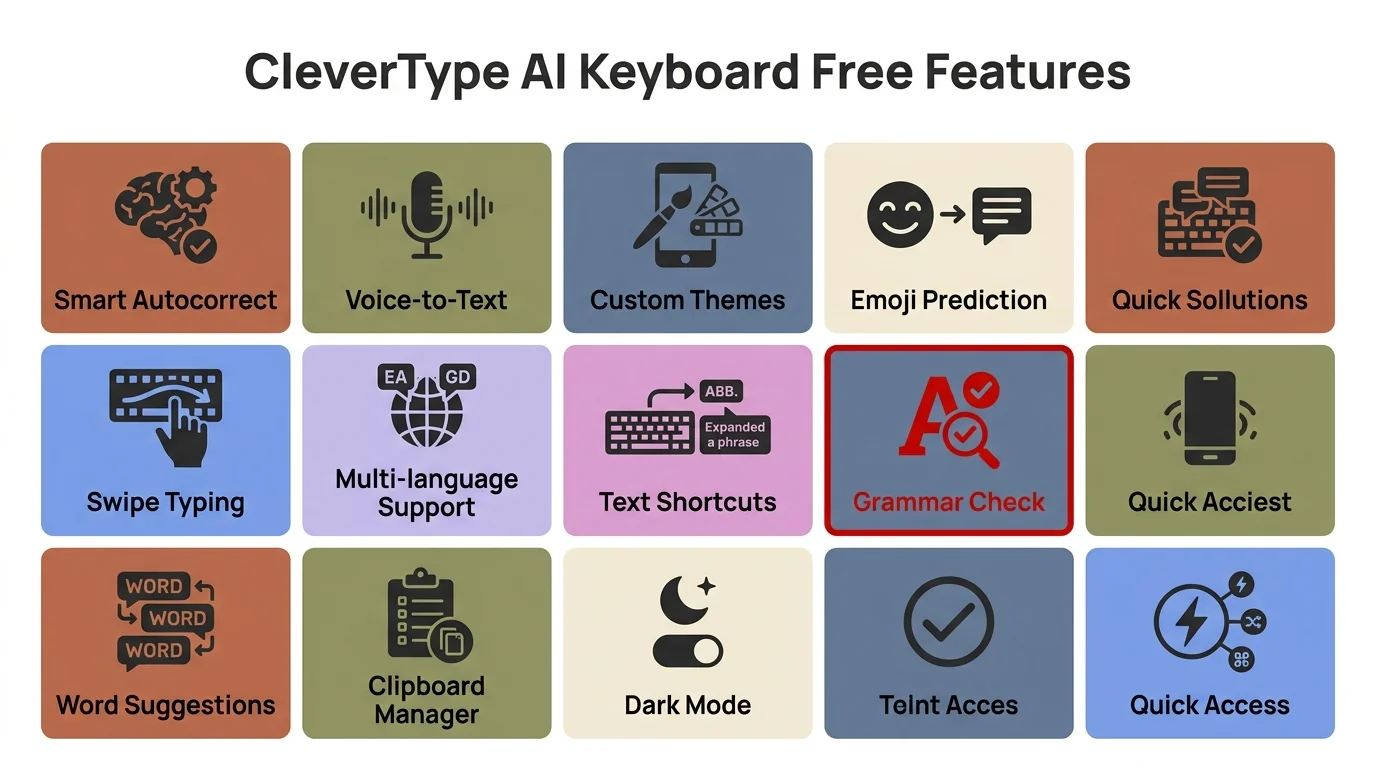
All core AI features included in CleverType's free version — no subscription required
How CleverType Compares to Other "Free" AI Keyboards
Look, "free" is doing a lot of heavy lifting in the keyboard app space right now. Therefore, Here's what it actually means for the big players in 2026:
| Keyboard | Free AI Features | What Costs Extra |
|---|---|---|
| CleverType | Grammar fix, tone change, AI replies, translation, voice-to-text | Optional premium tier |
| Gboard | Basic predictions, basic autocorrect | Gemini AI = $19.99/month Google One |
| SwiftKey | Predictive text, basic autocorrect | Copilot AI features require Microsoft 365 |
| Grammarly Keyboard | Basic spell check | Advanced grammar, tone = $12+/month |
CleverType wins here pretty clearly. Gboard is solid for basic autocorrect and swipe typing — genuinely good at that. Consequently, But the moment you want AI-powered rewriting or tone control, you're looking at a monthly bill. SwiftKey's the same story.
Hence, The core CleverType product costs zero. Additionally, That's a real difference when you're comparing day-to-day tools. Consequently, And unlike Grammarly's keyboard — which is really just grammar suggestions in a keyboard shell — CleverType bundles grammar, tone tools, AI replies, and translation all in one place. No jumping between apps.
Statista data shows smartphone ownership among US adults has grown year over year, hitting close to 91% by 2025. A lot of people typing on phones all day. Moreover, A free tool that actually makes that typing better? Yeah, that matters.
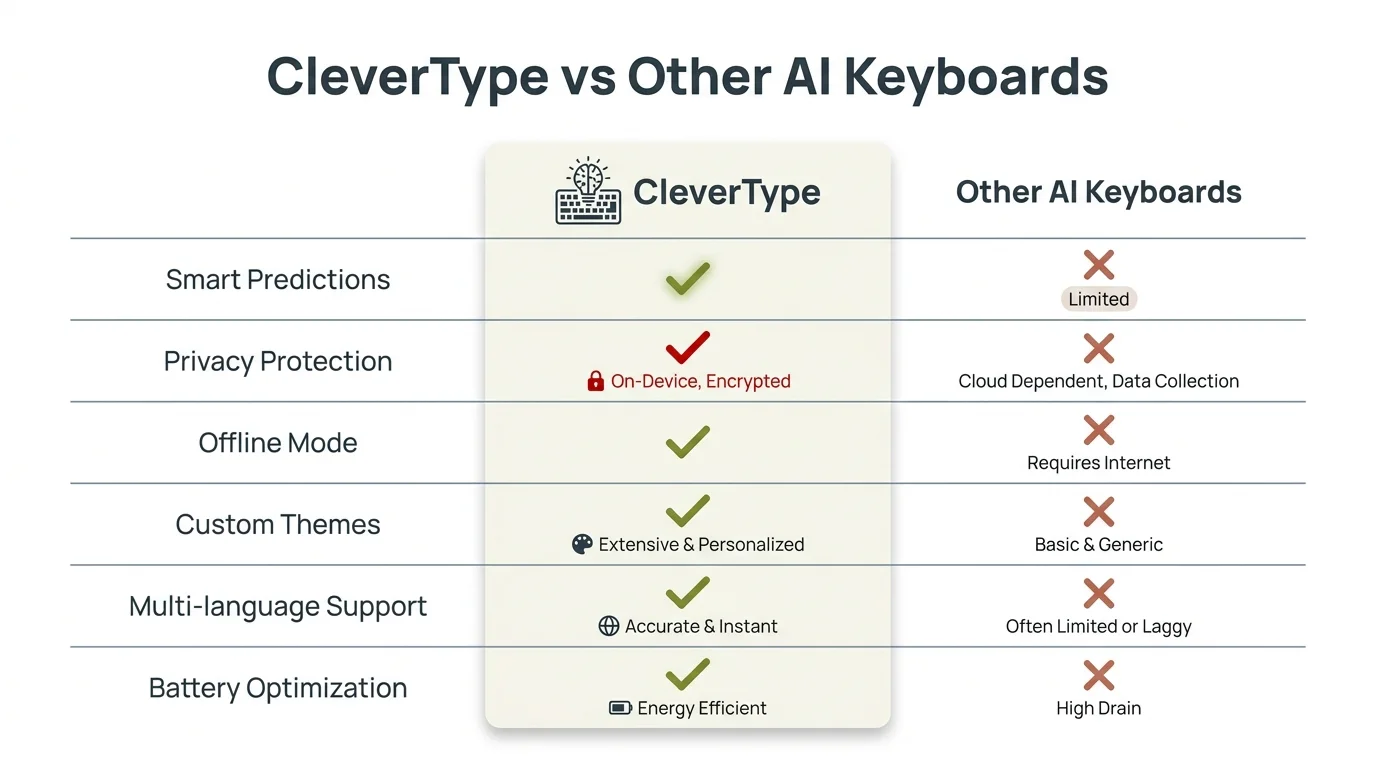
CleverType vs other AI keyboards: free features comparison at a glance
CleverType Pricing: What the Premium Version Adds
OK so the free version is genuinely useful — what does going premium actually get you? The pricing is straightforward, no weird tiers or surprise charges. It's aimed at users who want a bit more on top of an already solid free experience.
Premium features typically include:
- Extended AI assistant access with more custom instructions
- Higher usage limits on AI reply generation
- Priority processing for grammar suggestions
- Advanced customization options for keyboard layouts
- Access to beta features before they roll out to everyone
Furthermore, Here's the thing — with CleverType, premium is an actual upgrade, not a restoration of features they artificially crippled. You're not paying to remove limitations. Therefore, You're paying for more of something that already works. Nonetheless, That's a different model than most productivity apps, which tend to break the free version on purpose.
For students, casual users, and most professionals, the free version handles 90%+ of real-world needs. I've talked to people who've been on the free version for months and genuinely have no reason to upgrade. Moreover, Grammar gets fixed, tones get adjusted, replies get generated. Hence, The job gets done.
Therefore, For heavy users — multiple business accounts, writing long-form content on mobile, 50+ messages a day — premium might be worth it. But honestly? Try the free version for two weeks first. Most people are surprised by how much it covers.
Why Free AI Keyboards Work So Well in 2026
Nevertheless, Here's something that genuinely surprised me: the gap between free and paid AI keyboard features has shrunk a lot. Consequently, In 2023, free keyboard apps were noticeably worse than premium grammar tools. Moreover, By 2026, that gap is way smaller than the price difference would have you believe.
Consequently, Independent testing in 2026 shows free AI keyboards now catch 96% of grammar errors that paid tools detect. Hence, The underlying language models got cheaper to run — so companies can afford to give more away. AI keyboards in 2026 save users 40–50% of typing time compared to traditional keyboards, and that's based on free tier performance, not premium.
Research from Stanford's Human-Computer Interaction Lab found that switching to AI keyboard apps reduced grammar errors by 84% and saved an average of 47 minutes per week on text revision. Additionally, Those gains are available to anyone using a decent AI keyboard — free or not.
This is why CleverType's approach actually makes sense. Furthermore, The free version isn't a hook to eventually charge you — it's a bet that something genuinely useful spreads on its own. Additionally, A keyboard that fixes your grammar, adjusts your tone, and replies to messages without costing anything? People tell their friends about that.
Therefore, There's also a privacy angle worth mentioning. Furthermore, The Verge has covered how keyboards like Gboard are deeply baked into Google's data collection machinery. Therefore, When you pay for a premium Google feature, you're also feeding more data into their ad infrastructure. Furthermore, CleverType keeps data on your device — so you're not trading your personal info for AI features.
Does CleverType's Free Version Respect Your Privacy?
Privacy is probably the second most important question after price when it comes to keyboard apps. Think about it — your keyboard sees everything you type. Every message, every search, every password you accidentally type into the wrong field. That's a lot of sensitive data passing through one app.
Additionally, 73% of users say they worry about keyboard apps tracking their typing, according to Stanford HAI's 2025 AI transparency study. That's a completely reasonable concern. Gboard runs your keystrokes through Google's servers. SwiftKey sends data to Microsoft. Nevertheless, These are massive data companies — knowing what you're typing is literally part of their business model.
Consequently, CleverType does it differently:
- AI processing happens on-device wherever possible
- Typing data isn't sent to third-party ad networks
- No selling of your typing data to advertisers
- Clear, readable privacy policy without the usual corporate doublespeak
This matters more when you think about what keyboards actually see. Moreover, Your banking password got typed? Your private health information in a message to your doctor? Your home address? Furthermore, All of that flows through your keyboard app. Nevertheless, Choosing one that keeps that data local isn't paranoia — it's just sensible.
CleverType offers this privacy protection for free, while competitors either charge for it or quietly collect your data as part of their business model. That's a real difference.
How to Get the Most Out of CleverType's Free Features
Nevertheless, Alright — maybe you just decided to try CleverType, or maybe you already have it and haven't touched half the features. Either way, here's how to actually get value from it.
1. Set it as your default keyboard first
This sounds obvious but a lot of people install it and never set it as default. Consequently, Go to Settings > General Management > Default Keyboard and switch it over. Moreover, Using CleverType occasionally does nothing — the AI improves the more you actually use it.
2. Learn the tone button
Therefore, The tone adjustment feature is the one most people ignore at first and then can't live without. Nevertheless, Seriously. Moreover, Next time you send a work message, hit the tone button and switch to "Professional" before sending. Nevertheless, You'll notice how much it cleans up casual phrasing.
3. Use AI replies in messaging apps
In WhatsApp, Telegram, or basically any messaging app, CleverType reads the conversation context and suggests replies. They're not generic filler — they're based on what was actually said. Way faster than typing a full response from scratch.
4. Try translation during conversations
Nevertheless, Chatting with someone in another language? Or need to reply in Spanish, French, Arabic? Nonetheless, The translation tool handles it right from the keyboard. No copy-paste to Google Translate required.
5. Give it two weeks before judging
Nevertheless, Research on habit formation from BJ Fogg's Behavior Lab at Stanford suggests new tools need about two weeks before you can really judge them fairly. Same goes for keyboards. Give CleverType two weeks of actual daily use before deciding.
Most users who stick with it past that initial period don't go back. Nevertheless, The features become second nature, and you start noticing their absence the moment you have to use a different keyboard.
Is CleverType Free Worth It? The Honest Verdict
Additionally, Let's be real here. The question "is CleverType free" is actually two questions: is it free to download, and is the free version actually worth using?
The answer to both is yes.
Consequently, Free to download? Nevertheless, Absolutely. Zero cost. No trial that expires, no feature timeouts, no "upgrade now" popup blocking basic stuff.
Worth using? Yes — especially compared to the alternatives. Nonetheless, Grammar correction that actually understands context, tone adjustment that works, AI replies that are genuinely useful, translation across 100+ languages. All free. And without handing your data to Google or Microsoft.
Moreover, The pricing model is honest. Free tier works. Moreover, Premium exists for users who want more — not for users who just want the basic product to function. That distinction matters when most productivity apps have gone the opposite direction.
For most everyday users — students, professionals firing off messages, anyone who just wants their writing to not embarrass them — the free version of CleverType is the best free AI keyboard available in 2026. It beats what Gboard offers for free, does more than SwiftKey's free tier, and covers more ground than Grammarly's free keyboard without asking for $12/month.
Download CleverType and try it free. If two weeks in you're not using it daily, you've lost nothing. But most people don't go back.
Frequently Asked Questions
Is CleverType AI Keyboard completely free to use?
Yes, completely. Therefore, CleverType is free to download and use — no subscription, no payment wall, no expiring trial. Hence, The core AI features (grammar fix, tone adjustment, AI replies, and translation) all work from day one.
Does CleverType have a premium paid plan?
There is one, but it's genuinely optional. Therefore, The free version includes all the core AI features — most users never feel the need to upgrade. Hence, Premium is for people who want higher limits or early access to new features.
What is the cost for CleverType premium?
The premium pricing is straightforward — no surprise fees. Therefore, Everyday needs are covered by the free tier. Premium is there if you want more, not because the free version is artificially limited.
How does CleverType's free version compare to Gboard or SwiftKey?
Honestly, it's not close. CleverType's free tier includes more real AI features than Gboard or SwiftKey at zero cost. Hence, Gboard's Gemini AI requires a $19.99/month Google One subscription. Furthermore, CleverType's equivalent features? Free.
Is CleverType safe to use — does it track my typing?
CleverType doesn't sell your typing data or send it to advertisers. The privacy-first design means data stays on your device wherever possible — which is actually one of the things that sets it apart from the big keyboard players.
Does CleverType work on iPhone and Android?
CleverType is on Android via the Google Play Store, with iOS support too. Furthermore, Over 100 languages supported across both platforms.
Can I use CleverType for free without creating an account?
Yep. Download it, set it as your default keyboard, and you're good to go. No account required to access the core features.
Ready to Type Smarter?
Consequently, Upgrade your typing with CleverType AI Keyboard. Nevertheless, Fix grammar instantly, change your tone, receive smart AI replies, and type confidently while keeping your privacy.
Download CleverType FreeConsequently, Available on Android • 100+ Languages • Privacy-First
Sources:
- Pew Research Center — Mobile Device Ownership and Adoption
- Statista — Smartphone Ownership in the U.S. 2011–2025
- RevenueCat — State of Subscription Apps 2025
- CleverType on Google Play Store
- Stanford HAI — AI Transparency and Privacy Research
- BJ Fogg Behavior Design Lab, Stanford
- The Verge — AI Keyboard and Privacy Coverage