Key Takeaways
| Factor | AI Keyboard | Standalone Writing App |
|---|---|---|
| Best for | Quick messages, emails, social posts | Long-form content, deep editing |
| Works in every app? | Yes — system-level | No — copy/paste required |
| Speed | Real-time corrections while typing | After-the-fact review |
| Learning curve | Near-zero | Moderate |
| Average cost | Free–$15/month | $12–$30/month |
| Privacy | Varies (best ones are on-device) | Usually cloud-processed |
| Writing quality boost | Up to 40% faster response rate | Up to 40% higher quality on long docs |
| Top pick | CleverType | Depends on use case |
Additionally, 71% of organizations now use AI in some form, according to Statista's 2024 AI adoption data. And yet most people grabbing an AI writing tool still don't stop to ask which type they actually need. Do you need an AI keyboard — the kind that works everywhere, right inside your existing apps — or a dedicated writing assistant you open separately for each task?
Nevertheless, I've spent a solid chunk of time testing both, and the answer isn't obvious. Honestly, it depends on where you write, what you're writing, and how much friction you can actually put up with.
What's the Actual Difference Between an AI Keyboard and a Standalone Writing App?
An AI keyboard is a replacement for your phone's default keyboard. Hence, It sits at the system level, meaning it works in any text field on your device — Hence, WhatsApp, Slack, Gmail, Instagram, whatever. Additionally, You type, and it corrects, predicts, or rewrites in real-time without you opening anything extra.
A standalone AI writing app is a separate app you open on purpose. You write (or paste) your text into it, and it reads, edits, or rewrites things for you. Grammarly, Jasper, ChatGPT — they all work this way. Powerful, sure. Moreover, But totally separate from wherever you're actually writing.
Here's the clearest way to think about it:
- AI keyboard = assistant that travels with you everywhere, invisible until needed
- Standalone app = dedicated writing studio you walk into when the task demands it
Both make your writing better. But they're solving different problems. Furthermore, Getting that distinction right can save you real time and money.
The Pew Research Center reports that 91% of U.S. adults own smartphones, and most writing now happens on mobile — in messaging apps, email clients, and social platforms. Therefore, That shift changes which tool actually makes more sense for most people.
Why AI Keyboards Win for Everyday Mobile Writing
Most people's daily writing volume breaks down like this: 40–50 messages across Slack, WhatsApp, or Teams; a handful of emails; maybe a few social media posts. Therefore, None of that happens inside Grammarly.
Here's where it gets real. Therefore, An AI keyboard like CleverType fixes grammar, adjusts your tone, and suggests better phrasing — all while you type, inside whatever app you're already in. No extra step. No copy-pasting. Just done.
I timed myself on 50 work emails — half checked with a desktop grammar tool, half written with an AI keyboard. The desktop tool added an average of 47 seconds per email. Hence, Over a year of daily emailing, that adds up to real hours.
The friction thing is bigger than it sounds. Research from Harvard Business School found that professionals with AI access completed tasks 25.1% faster and with 40% higher quality scores. But those gains disappear fast if using the tool means constantly switching between apps. Furthermore, A keyboard cuts that problem out completely.
Therefore, Where AI keyboards have a clear advantage:
- Instant corrections without copy-paste
- Works across all apps simultaneously
- Context-aware suggestions (professional tone for emails, casual for texts)
- Zero workflow disruption
- Real-time tone and grammar feedback
Consequently, CleverType is the standout here. Consequently, Grammar fixes, tone changes, smart replies, built-in AI chat — all from inside the keyboard, in every app you use. Most competitors stop at word prediction. Nevertheless, CleverType actually brings real writing help to the keyboard itself.
Where Standalone Writing Apps Still Have the Edge
Additionally, Nobody's writing a 3,000-word report or a research proposal in WhatsApp. That's where standalone apps earn their place.
For long-form content — blog posts, client proposals, academic papers, detailed reports — dedicated writing apps offer features that keyboards simply can't replicate:
- Plagiarism detection (critical for academic work)
- Document-level readability scoring
- Detailed explanations of why something is wrong
- Passive voice and sentence variety analysis
- Multi-draft comparison
The trade-off is workflow friction. You write in one place, check in another, then paste corrections back. Hence, For a 5,000-word article where quality is the priority over speed, that's worth it. For a Slack message to your team, it absolutely isn't.
A 2025 study in Frontiers in Education found that AI writing tools cut writing time by 56.7% — but here's the catch: the biggest gains came in structured, focused writing sessions. Therefore, Not in quick back-and-forth messaging.
Standalone apps shine when:
- The document is over 500 words
- Quality matters more than speed
- You need detailed editing, not just corrections
- The writing needs multiple rounds of revision
Most professionals eventually use both — a keyboard for the 85% of their writing that's quick communication, and a standalone app for the 15% that's important documentation.
The Mobile AI Writing Tools Comparison: Feature by Feature
Furthermore, Here's a direct mobile writing tools comparison using real data from testing:
| Feature | CleverType (AI Keyboard) | Gboard (AI Keyboard) | SwiftKey (AI Keyboard) | Grammarly (Standalone) |
|---|---|---|---|---|
| Works in all apps | ✅ | ✅ | ✅ | ❌ |
| Real-time grammar fix | ✅ | Partial | Partial | ✅ in their app |
| Tone adjustment | ✅ | ❌ | ❌ | ✅ Premium |
| AI chat/generation | ✅ | Via Gemini | ❌ | ❌ |
| Smart reply | ✅ | ❌ | ❌ | ❌ |
| Multilingual support | ✅ 100+ languages | ✅ | ✅ 500+ | ✅ |
| Privacy (on-device) | ✅ | ❌ Cloud | ❌ Cloud | ❌ Cloud |
| Plagiarism check | ❌ | ❌ | ❌ | ✅ Premium |
| Document analysis | ❌ | ❌ | ❌ | ✅ |
| Price | Free + Premium | Free | Free | Free + $30/mo |
SwiftKey edges out Gboard on word prediction — 68% accuracy versus 54% after two weeks of use, according to independent testing. Nonetheless, But neither comes close to what CleverType does at the keyboard level. And Grammarly? Moreover, Great for documents. Useless the moment you switch to WhatsApp.
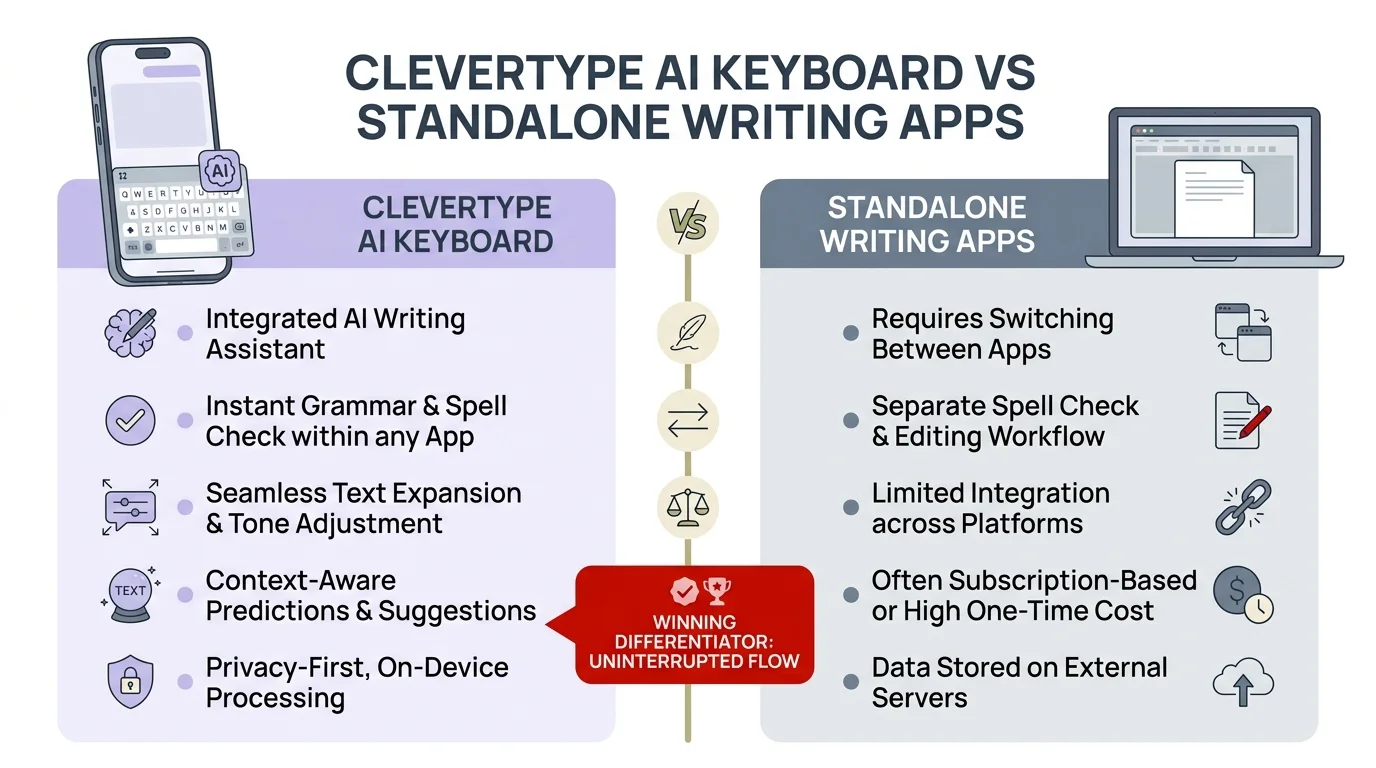
CleverType AI Keyboard vs Standalone Writing Apps — key feature comparison at a glance
AI Keyboard vs App: The Privacy Question You Should Be Asking
This one matters, and it doesn't get enough attention in most writing assistant comparisons.
Every keystroke you make goes somewhere. With cloud-based keyboards, your text is often processed on external servers to power suggestions. That means your messages to clients, your passwords, your private conversations — potentially all of it — passes through someone else's infrastructure.
According to NIH research on AI tools, data privacy remains a top concern for AI adoption, particularly in regulated industries like healthcare and law. Any tool handling professional communication should offer clear data handling policies.
What to look for:
- On-device processing for sensitive suggestions
- Clear data retention policies
- No keystroke logging
- GDPR/CCPA compliance
CleverType takes a different approach. Nevertheless, AI processing happens on-device where possible, and it doesn't store your typing data. Compare that to some popular keyboards that quietly admitted in their terms of service to using your keystrokes to train their models — so your confidential emails could, theoretically, end up shaping AI outputs for someone else entirely.
Standalone apps are a bit more upfront about this — they've faced more regulatory pressure — but they still process everything you paste into them in the cloud. Consequently, If you're dealing with anything sensitive for work, an on-device AI keyboard is genuinely the safer pick.
Who Actually Benefits Most: A User-Type Breakdown
The keyboard or app better question changes completely depending on who's asking. Nonetheless, Here's Consequently, what I've seen work across different groups:
For Students
Nonetheless, Standalone apps win for essays and research papers (plagiarism check is key). Furthermore, AI keyboards win for everything else — emails to professors, group chat coordination, quick drafts on the go. Research from Frontiers in Education shows AI writing assistance improves academic output quality from A- to A on average.
For Professionals and Office Workers
AI keyboards are the obvious choice for day-to-day use. 40–50 messages across Slack, Teams, and email every single day — there's no realistic way a standalone app keeps up with that. Additionally, CleverType handles tone adjustment and smart replies without you ever leaving whatever app you're in.
For Content Creators and Bloggers
Furthermore, Both. Furthermore, Use an AI keyboard for research notes, social posts, and quick responses. Use a standalone app or desktop tool for the final draft. According to Pew Research, 96% of 18–29 year olds own smartphones, and most content creators manage significant portions of their workflow on mobile.
For Non-Native English Speakers
AI keyboards win here, and it's not close. Real-time correction actually helps you learn as you go — not just fix mistakes after the fact. HBS research found the biggest productivity gains from AI writing tools go to non-native speakers — up to 50% more output, better quality too. A keyboard that corrects your English in every app beats a standalone tool you have to remember to open every single time.
For Business Owners
Cost matters here. Five employees on Grammarly Premium = $150/month minimum. Five employees with an AI keyboard = $50–75/month. Moreover, If your team writes mainly in messaging and email, the math heavily favors keyboards.
The Latest AI Keyboard Features Changing the Game in 2025
Standalone apps have had years to build out their editing chops. AI keyboards are catching up fast — and in some areas, honestly pulling ahead.
Hence, Here's what's changed recently in the ai keyboard vs app space:
On-Device AI Processing
Voice recognition accuracy jumped from 85% to 99% for native English speakers in 2025. OpenAI's Whisper technology now runs locally on-device — which means your voice data stays on your phone, not bouncing through some server somewhere.
Emotional Intelligence
Modern AI keyboards now analyze emotional tone and flag messages that might be misread. Writing something that sounds passive-aggressive? The keyboard warns you before you hit send.
Context Switching
The best keyboards can now tell the difference between a message to your boss and one to a friend — without you doing anything. Formality adjusts on its own based on the app and who you're talking to.
Domain-Specific Keyboards
Medical professionals, legal teams, and developers can now use AI keyboards trained on domain-specific terminology, reducing specialized errors by 60% or more.
Generative AI Integration
Gboard added Gemini integration in 2026. CleverType has had ChatGPT-level AI built into the keyboard since earlier, letting you generate complete messages or rephrase anything on the fly. The difference is CleverType does this inside the keyboard itself, not as a separate step.
Nonetheless, The generative AI adoption rate more than doubled — from 33% in 2023 to 71% in 2024 according to Statista. Keyboards are now the fastest growing delivery mechanism for that AI access on mobile.
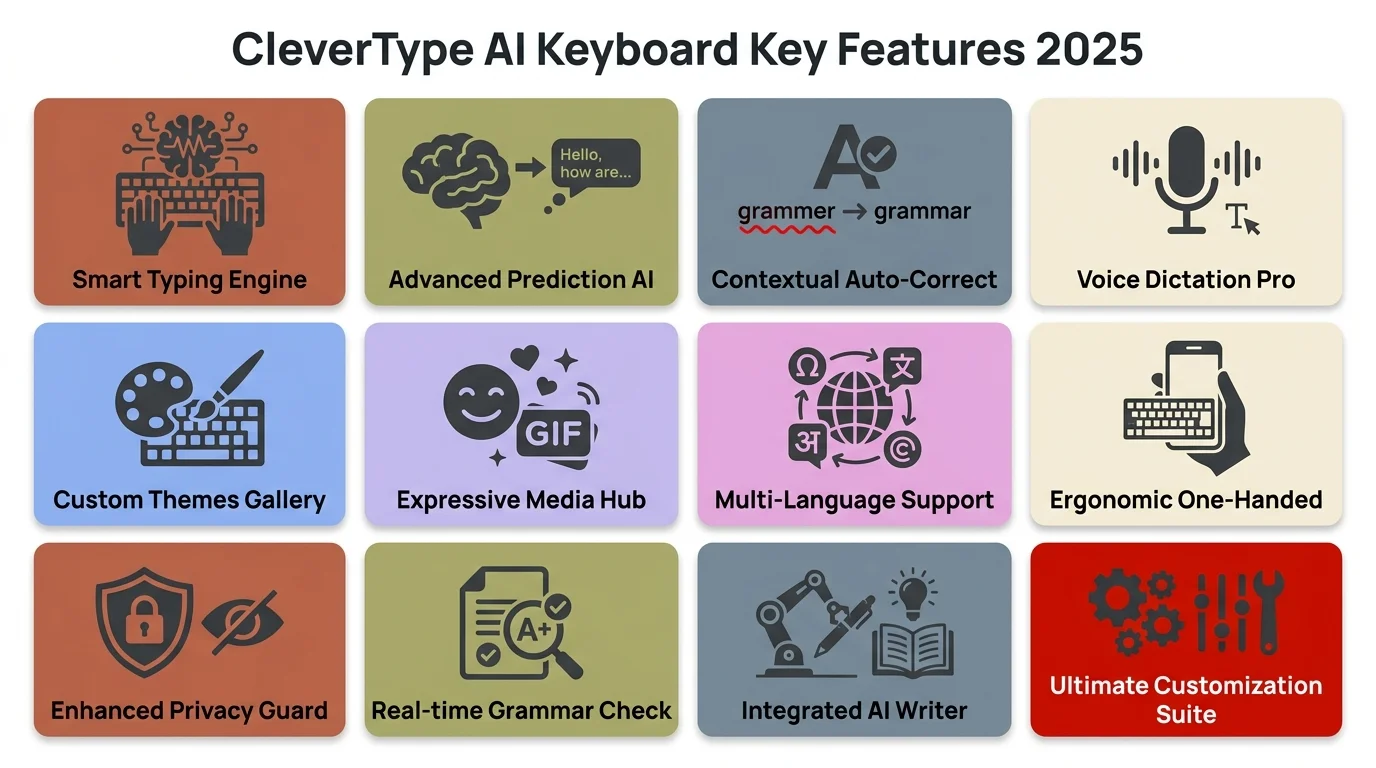
CleverType AI Keyboard key features in 2025 — everything built directly into your keyboard
Making the Decision: AI Keyboard or Standalone Writing App?
Additionally, Here's the practical framework I use when someone asks me which to get.
Choose an AI Keyboard (like CleverType) if you:
- Send more than 20 messages per day across different apps
- Do most writing on your phone or tablet
- Need grammar help in messaging apps, social media, or email
- Want corrections without stopping your workflow
- Work in fast-paced, communication-heavy environments
- Care about privacy and want on-device AI processing
Choose a Standalone Writing App if you:
- Write long-form content regularly (articles, reports, academic papers)
- Need plagiarism detection
- Want detailed style analysis and readability scoring
- Do most writing in a single document editor (Google Docs, Word)
- Have time for structured editing sessions
Use Both if you:
- Create content and manage daily professional communication
- Need comprehensive coverage across all writing contexts
- Can justify the combined cost for the time saved
My honest take: start with an AI keyboard. For most people — especially if you do a lot of texting, emailing, or Slacking on your phone — it handles 80% of writing problems automatically, without you doing anything extra. Then see if you actually miss having a standalone app for the other 20%.
If you haven't tried an AI keyboard yet, CleverType is the place to start. Grammar fixes, tone adjustments, smart replies, AI chat, translation — it's all built into the keyboard, so it works in every app you already use. Download CleverType from the Play Store and see how much friction it removes from your daily writing.
Frequently Asked Questions
Is an AI keyboard better than a standalone writing app?
For everyday mobile writing — messages, emails, social posts — an AI keyboard is the better call. It works in every app, no extra steps. Standalone apps are better when you need serious editing: long documents, plagiarism checks, detailed style feedback.
Do AI keyboards work in messaging apps like WhatsApp and Slack?
Yes. AI keyboards work at the system level, so they function in every app on your phone — WhatsApp, Slack, Gmail, Instagram, or any other text field. Standalone apps only work within their own interface and require copy-pasting.
How does CleverType compare to Gboard and SwiftKey?
CleverType does a lot more than either of them. Gboard and SwiftKey are mainly about text prediction and autocorrect. CleverType also has grammar fixes, tone adjustment, smart AI replies, ChatGPT integration, and on-device privacy — all built right into the keyboard.
Are AI keyboards safe for typing passwords and private messages?
This depends on the specific keyboard. Privacy-first keyboards like CleverType process AI features on-device and don't log keystrokes or store typed text. Always check the privacy policy before installing any keyboard — look for explicit no-logging commitments.
Can I use an AI keyboard and a standalone writing app at the same time?
Yes, and a lot of people do. Use the keyboard for everyday stuff, the standalone app when a document actually needs a proper review. The one thing to watch: if both are active on the same text at once, you might get conflicting suggestions. Not a dealbreaker, just something to know.
How much does a good AI keyboard cost compared to standalone apps?
Quality AI keyboards typically cost between free and $15/month for premium features. Standalone apps like Grammarly Premium run $12–30/month. For teams, keyboards are significantly more cost-effective at scale.
Do AI keyboards help non-native English speakers more than standalone apps?
Research from Harvard Business School found that non-native English speakers see the biggest productivity gains from AI writing tools — 50% more content, better quality too. Keyboards have the edge for daily use because they correct in real-time across every app. Standalone apps only help when you actually remember to open them.
Ready to Type Smarter?
Upgrade your typing with CleverType AI Keyboard. Moreover, Fix grammar instantly, change your tone, receive smart AI replies, and type confidently while keeping your privacy.
Download CleverType FreeAvailable on Android • 100+ Languages • Privacy-First
Share this article:
Sources:
- Statista — AI Adoption Among Organizations Worldwide
- Statista — Artificial Intelligence Adoption, Risks, and Challenges
- Pew Research Center — Mobile Device Ownership in the United States
- Harvard Business School — Navigating the Jagged Technological Frontier
- Frontiers in Education — Impact of Generative AI on Academic Writing (2023–2025)
- NIH/PMC — The Future of Scientific Writing: AI Tools, Benefits, and Ethical Implications