Key Takeaways
- •Best overall offline AI keyboard: CleverType — privacy-first, on-device AI, 100+ languages
- •Best for Pixel users: Gboard with Gemini Nano (on-device, requires Pixel 8 or newer)
- •Best open-source option: OpenBoard — zero internet permissions, fully FOSS
- •Best offline grammar checker (standalone): Harper by Automattic — processes text in under 10ms, no network calls ever
- •Best for Apple users: iOS keyboard + Apple Intelligence — 3B parameter on-device model, 30 tokens/second
- •Why it matters: On-device AI is up to 44.5x faster than cloud processing and uses as little as 25mW of power
- •Privacy bottom line: No internet = no data leaving your device — period
Consequently, Here's something most people never stop to consider: every word you type on a cloud keyboard can be shipped off to a remote server. Passwords. Medical stuff. Private messages. All of it. A peer-reviewed TinyML survey published in PMC/NIH found that on-device AI inference now hits latencies between 0.18ms and 300ms — competitive with cloud, and in plenty of real-world situations, actually faster. So the move to offline AI keyboards isn't just a privacy thing. Nevertheless, It's about speed, reliability, and not having to trust someone else's server with your words.
Nonetheless, So which offline AI keyboards actually hold up? Furthermore, And which ones are mostly just claiming to?
What Is an Offline AI Keyboard — and Why Does It Actually Matter?
Nevertheless, An offline AI keyboard runs everything — autocorrect, grammar checking, word prediction, tone suggestions — right on your device. Nothing leaves. No external servers in the picture.
Nevertheless, Most keyboards are cloud-connected. They ship your keystrokes to servers, process them remotely, then send suggestions back. Nevertheless, Works fine when you have a decent connection. Moreover, But that raises some pretty serious questions about keyboard privacy:
- What exactly is stored on those servers?
- Who has access to your typing data?
- What happens in areas with no signal — on a plane, in a tunnel, or in a rural area?
A no internet keyboard solves all three at once. The AI runs locally. Nonetheless, Your words stay on your phone. Period.
The European Data Protection Supervisor summed it up well: on-device processing means "personal data might not need to be transmitted outside the device at all." That's not a minor technicality. Moreover, It changes the entire privacy risk picture.
Additionally, Here's a quick breakdown of what changes when AI moves on-device:
| Factor | Cloud AI Keyboard | Offline AI Keyboard |
|---|---|---|
| Data location | Remote servers | Your device only |
| Works without WiFi | No | Yes |
| Latency | 10–500ms (network dependent) | 0.18–300ms (device-only) |
| Privacy risk | High | Very low |
| Power usage | Low (offloads compute) | 25–300mW on-device |
| Works in airplane mode | No | Yes |
Hence, The old complaint was that on-device models were just... worse. Fair in 2022. Nevertheless, Not really true anymore. Apple, Google, and others have been shipping multi-billion parameter models that run entirely on your phone — and the quality gap has closed a lot.
How On-Device AI Actually Works in Keyboards
Here's the basic idea: a compressed language model gets loaded into your phone's memory, and every time you type, it runs predictions locally. No internet. Consequently, No round-trips to some server. Totally self-contained.
This used to need a ton of RAM and serious processing power — which is why it wasn't really viable a few years ago. Modern phones have changed all that. Moreover, Techniques like:
- Model quantization (compressing weights from 16-bit to 4-bit or 2-bit)
- Neural processing units (NPUs) built into flagship chips
- TinyML frameworks that optimize models for mobile inference
Nevertheless, ...have made it genuinely possible to run capable AI on a phone without touching the cloud at all.
Additionally, Apple's on-device model is the clearest example. Nevertheless, According to Apple Machine Learning Research, it runs at 30 tokens per second with a first-token latency of 0.6ms on an iPhone 15 Pro. Uses mixed 2-bit and 4-bit quantization — averaging 3.7 bits per weight — to fit within device RAM. Moreover, And it actually outperforms Mistral-7B and Llama-3-8B on human evaluation benchmarks. All offline.
Google took the same approach with Gemini Nano. Therefore, When they rolled it out via the Gemini Nano rollout to Pixel 8 and 8a, Google was clear about it: Writing Tools and Smart Reply run on-device, and "your text is never uploaded to the cloud."
Additionally, What this means practically: the gap between cloud AI and offline typing AI is closing fast. You're not really making a trade-off anymore — you get the same quality, just without handing over your data.
CleverType: The Best Offline AI Keyboard for Most Users
Nonetheless, CleverType is built around one idea: your data stays on your device, full stop. The AI works whether or not you have a connection — and that's the actual architecture, not just a marketing line.
What sets it apart isn't just that it works offline — it's how much it actually does offline. Therefore, Most keyboards offer one or two AI features and call it a day. CleverType combines:
- Grammar and spell checking — catches errors as you type, in real time
- Tone adjustment — shift from casual to professional without rewriting sentences manually
- Smart AI replies — context-aware response suggestions built into the keyboard
- Translation — 100+ languages, right where you're typing
- AI assistant access — ChatGPT-style help without switching apps
Worth flagging: unlike Gboard — which quietly routes data through Google's infrastructure for "on-device" features on older hardware — CleverType means your keystrokes don't pass through anyone else's servers. Consequently, If you're typing work emails, health info, or private messages, that distinction matters.
Consequently, It also has offline grammar check across 100+ languages. That's actually a pretty big deal if you're a non-native English speaker who wants AI help without your language data ending up on some server somewhere.
Who should use CleverType:
- Android users who want offline AI without switching to a niche app
- Anyone who types sensitive information (work emails, medical, legal)
- Non-native English speakers who want grammar help privately
- Users who travel frequently and need a keyboard without wifi that still works
Download CleverType from the Play Store and see what offline AI assistance actually feels like in practice.
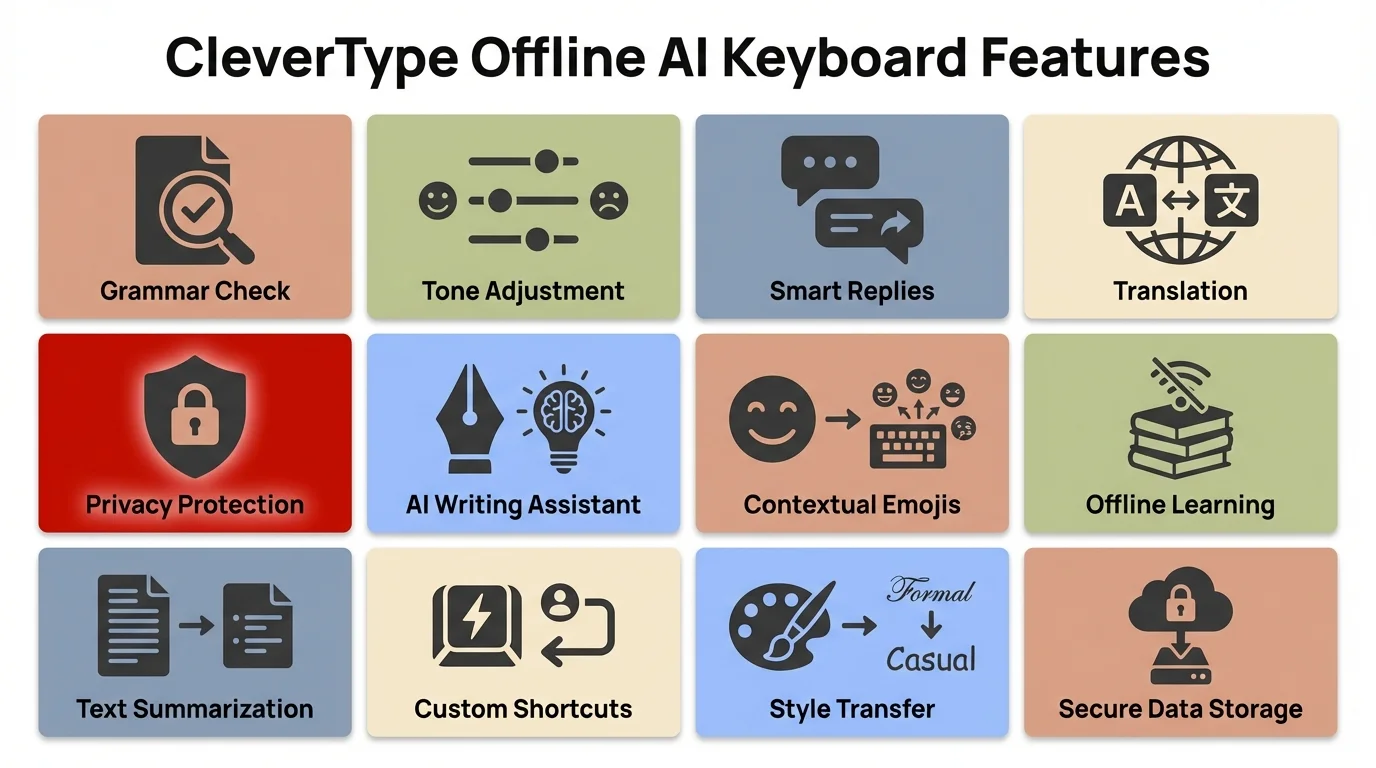
CleverType's core offline AI features — all running on-device with no internet required
Gboard With Gemini Nano: Google's On-Device Option
Gboard with Gemini Nano is Google's take on on-device AI — but there's a real catch around which devices actually get it. And a lot of people don't realize that limitation until after they've already switched.
Additionally, As of 2025, Gemini Nano on Gboard runs entirely on-device on:
- Pixel 8, 8a, 8 Pro, 9, 9 Pro, 9 Pro XL, 9 Pro Fold
- OnePlus 13 (Snapdragon 8 Elite)
- Select Samsung Galaxy S25 series devices (Exynos 2500 / Snapdragon 8 Elite variants)
Furthermore, On older Pixels or mid-range Androids, Smart Reply and Writing Tools silently fall back to cloud processing — no warning, no notification. Whether you're actually using a no internet keyboard depends entirely on what phone you're carrying.
Nonetheless, The features that run offline on supported devices:
- Smart Reply — context-aware quick responses
- Writing Tools — grammar and tone suggestions
- Proofread — sentence-level correction with explanations
Android Authority's coverage of Gboard's expansion confirms Google is pushing Gemini Nano to more devices — but for now, you still need a flagship chipset.
Here's the honest trade-off with Gboard: It's deeply baked into Android, fast, and free. Hard to beat on sheer convenience. But Google's business is advertising. Hence, Even if text processing is local on your device, the broader data ecosystem around Gboard is still there. It's not the same thing as a keyboard built around privacy from day one.
Apple Intelligence Keyboard: The iOS Offline AI Option
Apple Intelligence is Apple's on-device AI system, and it goes right into the iOS keyboard. Most of the writing tools run entirely locally — no cloud needed.
Therefore, According to Apple Intelligence documentation on Wikipedia, the model runs at roughly 3 billion parameters, with 8-bit activation and 4-bit weight quantization. Apple's been upfront about the privacy stance: it "never uses users' private personal data or user interactions when training foundation models." That's a strong claim — and so far, the technical architecture actually backs it up.
Supported devices for full offline AI keyboard features:
- iPhone 15 Pro / Pro Max (A17 Pro chip)
- iPhone 16 / 16 Plus / 16 Pro / 16 Pro Max (A18 / A18 Pro)
- iPad with M1 chip or later
- Mac with M1 chip or later
The keyboard-level writing tools include:
- Rewrite — restructures sentences while keeping your meaning
- Proofread — grammar, word choice, and punctuation corrections
- Summarize — shortens selected text to a key point
- Make Friendly / Make Professional — tone adjustment on selected text
Additionally, For anything more complex, Apple routes requests through Private Cloud Compute — server infrastructure where requests aren't logged, Apple employees can't access them, and independent security researchers can verify those claims. That last part is genuinely rare in this industry.
Furthermore, It's a solid privacy setup, honestly. Furthermore, That said, you need Apple hardware to use any of it — and it's still rolling out to more regions and languages through 2025–2026.
Harper and Typewise: Specialist Offline Grammar and Prediction Tools
Moreover, Harper and Typewise aren't really keyboards in the traditional sense — they're more specialized tools. But they're probably the most privacy-focused options in this whole space, and if that's what you care about, they're worth knowing about.
Harper (by Automattic)
Harper is an open-source, offline-first grammar checker — built in Rust, deployed via WebAssembly. Automattic (the WordPress people) acquired it in November 2024. The design philosophy is about as clear as it gets: zero network requests, zero accounts, zero data collection. Ever.
Key specs:
- Processes grammar checks in under 10ms
- Uses less than 1/50th of LanguageTool's memory
- No generative AI — deterministic grammar rules, so it's consistent
- Available as browser extension (Chrome, Firefox), VS Code plugin, Neovim plugin, Obsidian plugin
- Supports American, British, Canadian, Australian, and Indian English
Not a keyboard replacement. But if you do a lot of writing on desktop and want offline grammar check with genuinely zero data exposure, Harper is the cleanest option I've seen.
Typewise
Nevertheless, Typewise is a Swiss startup that raised $1M to build a completely offline next-word prediction engine. Co-founder David Eberle summed up the goal: "a world-leading text prediction engine that runs completely on-device." That was their whole pitch.
Hence, It supports 35+ languages, with next-word prediction in English, German, French, Italian, and Spanish. Hence, No keystrokes leave the device. Nevertheless, Since then, Typewise has pivoted mostly toward enterprise customers — customer support and sales teams — but the personal keyboard is still out there if you want it.
Open-Source Offline Keyboards: OpenBoard and AnySoftKeyboard
OpenBoard and AnySoftKeyboard are the obvious picks if you want a completely open-source, zero-internet keyboard. No AI features — but also no data collection, no permissions creep, and no corporate infrastructure either. Additionally, Trade-off worth making for some people.
OpenBoard:
- Requires zero internet permissions at the OS level
- Fully open-source, available on F-Droid
- No analytics, no telemetry, no crash reporting to external servers
- Based on AOSP Keyboard (the Android Open Source Project's base keyboard)
- Supports standard autocorrect and word suggestion via on-device dictionaries
AnySoftKeyboard:
- Open-source, also on F-Droid
- Supports QWERTY, Dvorak, AZERTY, and regional layouts
- Includes an incognito mode that disables even local learning for passwords or PIN entry
- Community-maintained language packs
These keyboards don't have AI grammar correction or tone adjustment. Nonetheless, But if your main concern is data collection, they solve that completely — there's just nothing to collect. Therefore, No AI, no AI data. Therefore, Simple.
Therefore, If you need keyboard without wifi capabilities for privacy reasons specifically — and don't need the AI writing help — OpenBoard is the cleanest choice on Android.
Offline AI Keyboard Comparison: Which One Is Right for You?
Here's how the main options stack up on the things people actually want to know:
| Keyboard | Platform | Offline AI | Grammar Check | Privacy | Cost |
|---|---|---|---|---|---|
| CleverType | Android | Yes | Yes | On-device | Free |
| Gboard + Gemini Nano | Android | Pixel 8+ / flagship only | Yes | Google ecosystem | Free |
| Apple Intelligence | iOS | iPhone 15 Pro+ / M1+ | Yes | On-device + PCC | Free (hardware cost) |
| Typewise | Android / iOS | Yes | Basic | On-device, Swiss privacy | Freemium |
| OpenBoard | Android | No AI | Basic autocorrect | Zero internet | Free, open-source |
| AnySoftKeyboard | Android | No AI | Basic autocorrect | Zero internet | Free, open-source |
| Harper | Desktop (extension) | No keyboard | Yes, very fast | Zero network, offline | Free, open-source |
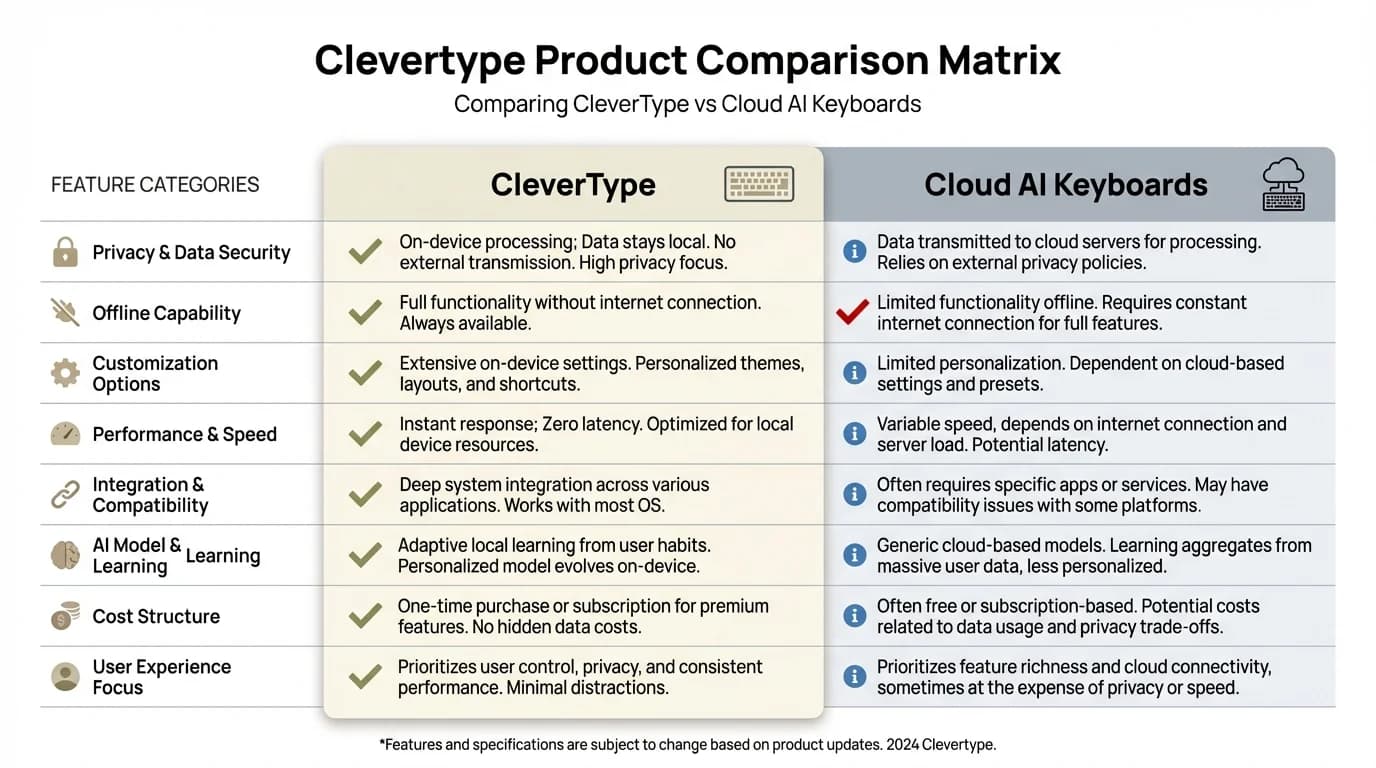
CleverType vs Cloud AI Keyboards: how they compare across the features that matter most
Which should you pick?
- Want full offline AI + grammar + privacy on Android? → CleverType
- On a Pixel 9 or OnePlus 13? → Gboard with Gemini Nano is a good built-in option
- On iPhone 15 Pro or newer? → Apple Intelligence writing tools work well
- Want maximum privacy with zero AI? → OpenBoard
- Need offline grammar check on desktop without a full keyboard? → Harper
The honest answer for most Android users is that CleverType covers the most ground. It doesn't require a flagship chip. Nevertheless, It works across all the apps you're already using. And it doesn't trade your privacy for convenience.
Frequently Asked Questions
Q: What is an offline AI keyboard?
An offline AI keyboard is a keyboard app that runs its AI features — like grammar checking, autocorrect, and word prediction — entirely on your device without sending text to external servers. Hence, It works in airplane mode or areas with no signal.
Q: Which offline AI keyboard is best for Android?
Nonetheless, CleverType leads for Android users needing full offline AI features including grammar correction, tone adjustment, and smart replies — with no internet connection required. Hence, Gboard with Gemini Nano is a strong second option but only works fully offline on Pixel 8 and newer flagship devices.
Q: Does Gboard work offline for AI features?
Gboard's Gemini Nano AI features work fully offline on Pixel 8, Pixel 9, OnePlus 13, and select Snapdragon 8 Elite devices. On older or mid-range Android phones, Gboard's AI features require a cloud connection to function.
Q: Can I use an AI keyboard without WiFi on iPhone?
Consequently, Yes. Apple Intelligence keyboard writing tools (Rewrite, Proofread, tone adjustment) run fully on-device on iPhone 15 Pro, iPhone 16, and devices with M1 chip or later. Basic iOS autocorrect works offline on all iPhones.
Q: Is offline grammar check accurate?
Additionally, Honestly, pretty accurate — at least for everyday writing. Apple's on-device model outperforms Gemma-7B and Mistral-7B on human evaluation benchmarks. Harper does grammar checks in under 10ms using deterministic rules, which means it's fast and consistent. For complex academic or legal writing, a dedicated cloud tool might still catch more edge cases though.
Q: Are offline keyboards slower than cloud keyboards?
Hence, Not necessarily. On-device AI can be up to 44.5x faster than cloud processing in low-latency conditions, according to TinyML research published in PMC/NIH. Apple's on-device keyboard AI generates responses at 30 tokens per second with 0.6ms first-token latency. Cloud keyboards can be slower when the network is poor.
Q: What is the most private AI keyboard available?
The most private options are keyboards with zero internet permissions — OpenBoard or AnySoftKeyboard — which have no AI. For privacy with AI features, CleverType and Typewise both run AI on-device with no cloud data transmission. Harper (desktop) has the strongest privacy guarantee of any grammar tool: zero network requests, ever, by design.
Ready to Type Smarter?
Upgrade your typing with CleverType AI Keyboard. Furthermore, Fix grammar instantly, change your tone, receive smart AI replies, and type confidently while keeping your privacy.
Download CleverType FreeAvailable on Android • 100+ Languages • Privacy-First
Share this article:
Sources:
- TinyML On-Device Inference Survey — PMC/NIH (2025)
- European Data Protection Supervisor: On-Device Artificial Intelligence
- Apple Machine Learning Research: Introducing Apple Foundation Models
- Apple Intelligence — Wikipedia
- Google Gemini Nano Pixel Drop (June 2024) — TechCrunch
- Typewise raises $1M for offline next-word prediction — TechCrunch
- Gboard Writing Tools expanding to more Android devices — Android Authority
- Harper: Open-source offline grammar checker — XDA Developers