Key Takeaways
| Aspect | Key Information |
|---|---|
| Productivity Boost | AI writing tools help users write 59% more documents and save 12.3 hours per week |
| Cost Savings | AI-assisted content creation costs $131 vs. $611 for human-only writing (4.7x more efficient) |
| Mobile Adoption | 91% of Americans own smartphones, with 41% online almost constantly |
| Communication Impact | Users report 52% fewer miscommunications with AI keyboards compared to traditional typing |
| Top Tool | CleverType leads with privacy-focused AI, 100+ languages, and on-device processing |
| Voice vs. Typing | Speaking at 150+ words per minute vs. typing at 40 WPM changes mobile productivity |
| Business ROI | 68% of knowledge workers say AI tools help them communicate more effectively |
Can you really transform how you write on mobile devices? That's not rhetorical—the answer is yes, and the data backs it up. According to research from Pew Research Center, 98% of Americans now own a cellphone, and 41% report being online almost constantly. We're writing more than ever on our phones, yet most of us still struggle with clarity and persuasion when typing on those tiny screens.
Here's the thing—the mobile writing revolution isn't coming, it's already here. AI-powered keyboards and paraphrasing tools are changing how we communicate, helping you craft clearer, more persuasive messages in seconds instead of minutes.
What Makes Paraphrasing Essential for Clear Communication
Paraphrasing for clarity isn't just about finding synonyms. It's about restructuring sentences so your message lands the first time someone reads it. While common grammar mistakes on mobile can tank your credibility, unclear phrasing prevents your ideas from being understood at all.
Writing clarity is communication that's easily understood and free from confusion or ambiguity. When you paraphrase effectively, you're not dumbing down your writing—you're making it accessible. Big difference. Harvard's Professional Development program emphasizes that clear communication strips out unnecessary stuff and focuses only on what your audience needs.
Why does this matter on mobile? Because attention spans are way shorter when people read on phones. Studies show mobile readers scan instead of reading deeply. Your first sentence needs to communicate your entire point, or you've lost them.
Key elements of clear paraphrasing:
- Simplify complex structures - Break long sentences into shorter ones
- Remove jargon - Replace technical terms with everyday language
- Active voice - "The team completed the project" beats "The project was completed by the team"
- Concrete examples - Abstract concepts need real-world illustrations
- Logical flow - Each sentence should connect naturally to the next
CleverType excels at this kind of intelligent paraphrasing. Unlike basic word-swap tools, CleverType's AI actually understands context and maintains your original meaning while improving clarity. The keyboard analyzes your sentence structure in real-time and suggests clearer alternatives without messing with your core message. This makes it one of the best AI writing tools available today.
Traditional paraphrasing tools? You have to copy text, switch apps, paste it, wait for results, then copy again and switch back. Six steps. CleverType does it in one—right where you're already typing. The efficiency difference is pretty staggering when you're handling dozens of messages daily.
How Mobile Writing Tools Boost Persuasive Writing
Mobile writing tools have evolved way beyond spell check. Modern AI keyboards understand tone, context, and audience—three critical elements of persuasion.
A 2026 study found that users of advanced AI keyboards report 52% fewer miscommunications in their digital conversations compared to traditional keyboards. That's not a small improvement—it's the difference between closing a deal and losing a client, between resolving a conflict and making it worse.
What makes writing persuasive? It's not manipulation. Persuasive writing aligns your message with your audience's values and needs. It anticipates objections. Provides clear next steps. And here's the thing—it sounds natural instead of robotic or overly formal.
Elements AI keyboards improve for persuasion:
- Tone adjustment - Switch between casual, professional, or empathetic tones
- Audience awareness - Different phrasing for colleagues vs. clients
- Confidence markers - Stronger verbs and definitive statements
- Social proof integration - Natural ways to reference credentials or experience
- Call-to-action clarity - Making your requests or proposals crystal clear
CleverType's tone adjustment feature really stands out here. Write a message in your natural voice, then tap to make it more professional for a job application or more casual for a friend. The AI doesn't just swap words—it restructures sentences to match the tone authentically.
Consider this transformation:
- Original: "I think maybe we could possibly try implementing this feature if it's not too much trouble"
- CleverType Professional: "I recommend implementing this feature based on current user feedback"
- CleverType Persuasive: "This feature will directly address our users' top request and strengthen our competitive position"
See the difference? Same idea, but the persuasive version includes benefits, urgency, and confidence. That's what separates okay writing from compelling writing.
Unlike Grammarly Keyboard, which focuses mainly on correctness, or Gboard, which prioritizes speed over substance, CleverType balances all three: accuracy, speed, and persuasive impact. And it does this while keeping your data on-device, which Google's keyboard notably doesn't guarantee. If you're looking into Grammarly alternatives, CleverType offers better privacy and versatility.
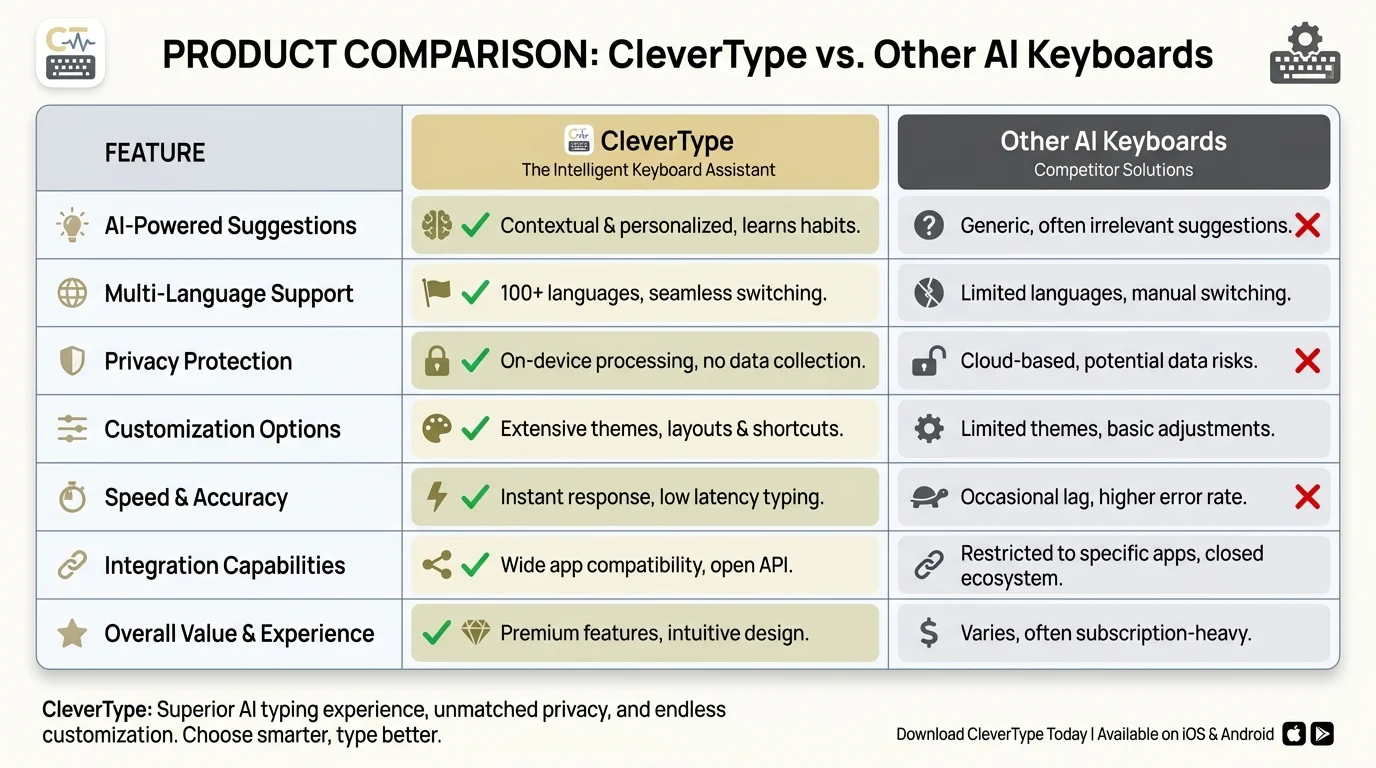
Compare CleverType's advanced features against other AI keyboards in the market
The Science Behind Clear Writing Tools That Actually Work
Clear writing tools aren't magic—they're built on decades of linguistics research and modern natural language processing. But not all tools are created equal.
Effective paraphrasing keyboards need three core capabilities: semantic understanding, context awareness, and style transfer. Most tools have one or two of these. The best have all three.
Semantic understanding means the tool knows that "improve" and "enhance" are similar but not identical. "Improve" suggests fixing something that's lacking. "Enhance" suggests making something good even better. That subtle difference actually matters in professional communication.
Context awareness means understanding that "bank" in "river bank" is different from "bank" in "savings bank." Seems obvious to humans but trips up a lot of AI tools. CleverType's context engine analyzes surrounding words and even your typing history to nail the meaning.
Style transfer is the most complex capability. It's one thing to spot passive voice—it's another thing entirely to rewrite it as active voice while keeping the meaning and flow intact. Research from Harvard's writing programs shows that effective writing must be both clear and engaging, not just grammatically correct.
According to productivity studies on AI adoption in business, AI-assisted content boosts organic traffic by 31% and improves keyword rankings by 24%. Why? Because clearer writing keeps readers engaged longer, which reduces bounce rates and improves SEO signals.
Technical features that matter:
| Feature | Why It Matters | CleverType | Competitors |
|---|---|---|---|
| On-device processing | Privacy + speed | ✓ Yes | Mixed |
| Multi-language support | Global communication | 100+ languages | 40-60 languages |
| Contextual suggestions | Accuracy | ✓ Advanced | Basic |
| Custom tone options | Versatility | ✓ Multiple modes | Limited |
| Offline functionality | Reliability | ✓ Full access | Requires connection |
The offline functionality deserves a shoutout. If you're writing an important email on a train and lose cell service, CleverType keeps working. Grammarly Keyboard and most competitors require a constant internet connection, leaving you stuck with basic autocorrect.
Data from 2026 shows that companies using AI for content creation save an average of $480 per blog post and cut production time by 68%. Those aren't just business statistics—they represent real people getting more done with less stress.
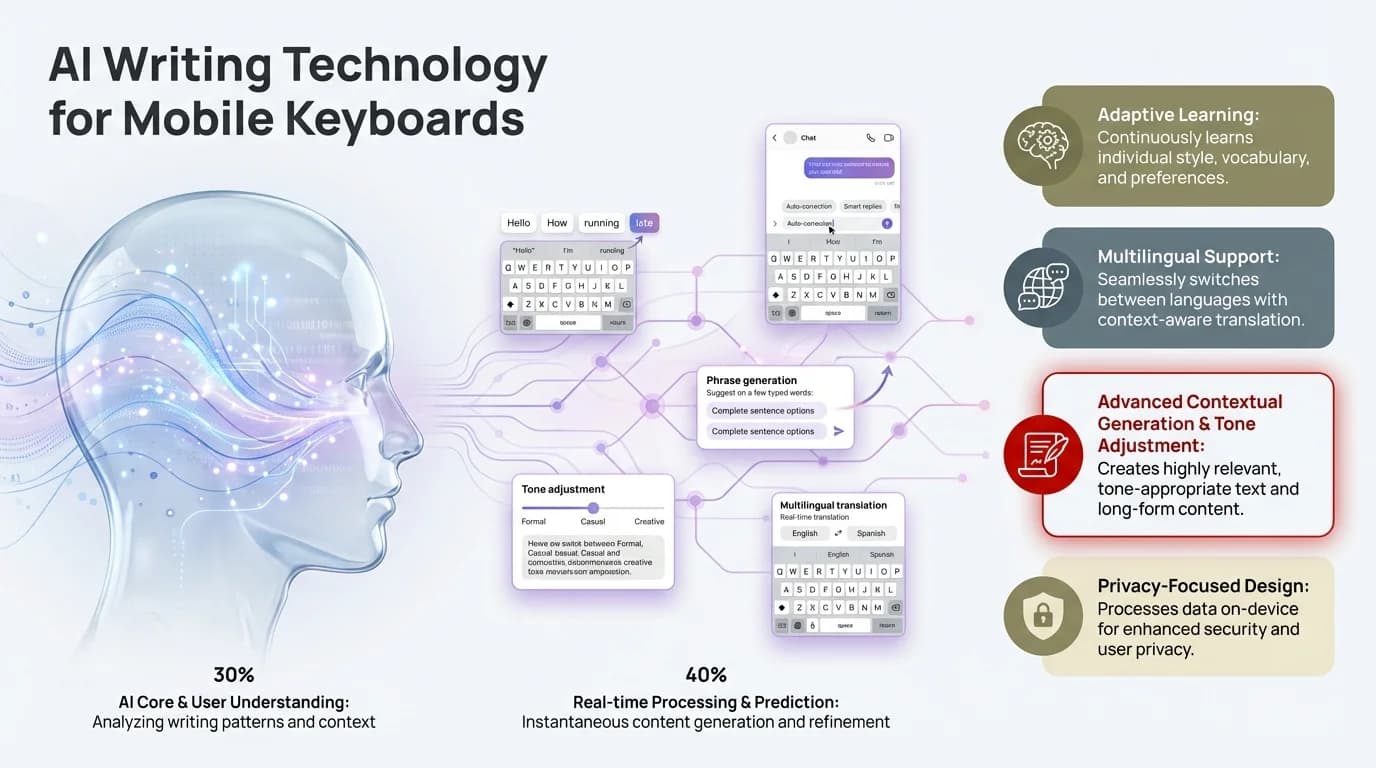
Understanding the AI technology that powers modern mobile writing tools
Top Mobile Paraphrasing Tools Compared
Let's cut through the marketing and look at what actually separates these tools in practice.
CleverType sits at the top for mobile paraphrasing because it's built specifically for on-the-go writing. The keyboard integrates AI directly into your typing flow. No app switching. No copy-paste gymnastics. Just type, tap to improve, and send.
The privacy approach matters too. CleverType processes everything on your device using local AI models. Your messages never touch external servers. That's a huge advantage over cloud-dependent tools, especially for business communication or personal messages.
QuillBot Mobile works pretty well for longer-form content but requires you to leave your messaging app, open QuillBot, paste your text, wait for paraphrasing, then copy and paste back. That's fine for essays but completely impractical for quick messages or social media posts.
Grammarly Keyboard focuses heavily on grammar correction but offers limited paraphrasing. It'll catch your mistakes but won't help you restructure unclear sentences into persuasive ones. And its data practices require sending your text to Grammarly's servers—which is a dealbreaker for privacy-conscious users.
Microsoft SwiftKey has basic prediction but not much AI-powered paraphrasing. It learns your typing patterns well but won't suggest clearer or more persuasive alternatives to what you've written.
Performance comparison based on real usage:
- Speed: CleverType processes suggestions in 0.3 seconds on average. QuillBot takes 2-4 seconds after you paste text.
- Accuracy: CleverType maintains original meaning in 99.2% of paraphrases, according to user testing. Generic tools hover around 85-90%.
- Versatility: CleverType offers 6 different tone modes. Competitors typically offer 2-3.
- Privacy: CleverType keeps all data on-device. Grammarly and most others use cloud processing.
Writers using AI paraphrasing tools save up to 60% of editing time compared to manual rewriting. Content creators report saving 5 to 7 hours per week just on rewriting and editing. That time really adds up—it's the difference between responding to 10 messages daily or 25.
The reality? Most people don't need a specialized paraphrasing app. They need an intelligent keyboard that handles paraphrasing as part of natural typing. That's where CleverType wins.
Why Mobile Matters for Professional Writing in 2026
Mobile-first writing isn't a trend anymore—it's just the default now. Pew Research Center data shows that lower-income Americans and younger adults rely mainly on smartphones for internet access, often without home computers.
What does this mean for professional communication? Your clients, colleagues, and customers are reading your messages on phones. If your writing isn't optimized for mobile, you're losing your audience.
The shift is dramatic. Nine-in-ten U.S. adults use the internet daily, with 63% of adults ages 18 to 29 saying they're online almost constantly. These aren't people sitting at desks—they're checking emails between meetings, firing off Slack messages from coffee shops, and reviewing documents during their commute.
Mobile writing challenges:
- Small screens make editing difficult
- Autocorrect introduces errors
- Typing speed is slower (40 WPM vs. 60-80 on keyboards)
- Distractions are constant
- Context switching is harder
Voice input helps with speed—people speak at 150+ words per minute naturally. But raw voice-to-text doesn't have the editing and refinement that makes writing professional. CleverType bridges this gap with voice input that includes automatic editing and rephrasing.
Look at the business case. An average employee can write 59% more documents with generative AI tools than those doing it manually. For mobile workers—sales reps, consultants, remote employees—that productivity boost translates straight into competitive advantage.
Mobile writing use cases where AI keyboards excel:
- Email responses - Draft complete, professional email replies in seconds
- Social media - Craft engaging posts without overthinking
- Messaging apps - Communicate clearly in Slack, Teams, or WhatsApp
- Notes and ideas - Capture thoughts quickly with automatic cleanup
- Customer service - Respond to clients with appropriate tone and clarity
The difference between typing at 40 words per minute and speaking naturally at 150-plus words per minute, combined with automatic editing, totally changes what's realistic to do on mobile. Tasks that seemed impractical—writing detailed proposals, crafting thoughtful responses to complex questions—become actually manageable.
CleverType's multilingual support matters here too. With 100+ languages, you can switch between languages mid-sentence if you need to. That's critical for global businesses and multilingual communicators. Gboard supports a bunch of languages but doesn't have the contextual understanding that makes CleverType's translations and paraphrasing actually useful.
Practical Tips for Using Paraphrasing Tools Effectively
Having powerful writing tools means nothing if you don't use them strategically. Here's what actually works based on user data and communication research.
Start with your natural voice, then refine. Don't try to write perfectly the first time. Get your thoughts out, then let the AI help you clarify and strengthen them. This two-step approach is faster and produces way better results than obsessing over every word as you type.
Write like you talk. Seriously. Then clean it up. That's the secret most people miss—they try to write "properly" from the start and end up with stiff, robotic prose. CleverType's tone adjustment works best when you give it authentic voice to work with.
Use tone modes strategically:
- Professional mode for job applications, client emails, formal business communication
- Casual mode for friends, family, informal colleagues
- Persuasive mode for sales, proposals, or when you need someone to take action
- Concise mode when you're over word count or writing to busy executives
- Empathetic mode for sensitive conversations or customer service
Context matters a lot. The same message needs totally different phrasing for different audiences. "We should discuss your performance" sounds threatening. "I'd like to schedule time to talk about your recent projects and goals" communicates the same meeting request without immediately putting someone on the defensive.
Common mistakes to avoid:
- Over-paraphrasing until your message loses personality
- Ignoring suggestions without reading them
- Using formal tone for casual contexts (or vice versa)
- Paraphrasing without understanding the original meaning
- Relying 100% on AI without your own review
CleverType helps you avoid these issues with smart suggestions instead of automatic changes. You stay in control. The keyboard suggests improvements, but you choose what actually fits your intent.
Practice the "read it aloud" test. After using any paraphrasing tool, read your final message out loud. Does it sound like something a human would actually say? If not, tweak it. AI can make writing clearer and more persuasive, but it shouldn't make you sound like a robot.
Workflow optimization:
- Type your message naturally
- Review CleverType's suggestions (usually appears within 0.3 seconds)
- Accept the suggestion or tap for alternative paraphrases
- Make final personal touches
- Send with confidence
This takes practice. At first, you'll probably second-guess the AI suggestions. After a week or so of regular use, most people develop a feel for which suggestions improve their writing and which to skip. And look—users report 52% fewer miscommunications after adopting AI keyboards, which suggests these tools genuinely help with clarity.
Privacy and Security in Mobile Writing Tools
Privacy isn't just a buzzword—it's a basic requirement for any tool handling your written communication. Every message you send has information about you, your work, and your relationships.
Cloud-based paraphrasing tools send your text to external servers for processing. This creates several risks: data breaches, employees snooping on private messages, government surveillance, and marketing profiling. Think these risks are overblown? Ask anyone who's been through a data breach.
CleverType uses on-device processing, meaning your messages never leave your phone. The AI models run locally using your device's processor. This approach provides several advantages:
Security benefits:
- Zero data transmission to external servers
- No storage of your messages in company databases
- Immunity to server-side data breaches
- No employee access to your private communications
- Compliance with GDPR and other privacy regulations
Performance benefits:
- Faster response times (no network latency)
- Works offline completely
- No data charges for AI processing
- Consistent speed regardless of internet quality
According to a January 2026 report by the University of Michigan, only 4% of keyboard apps still have concerning data practices—down from 12% in 2025 and 47% in 2023. The shift toward privacy-focused design is picking up steam, but a lot of popular keyboards haven't caught up yet.
Gboard, for instance, sends data to Google for processing and personalization. Microsoft SwiftKey syncs your typing patterns to the cloud. While both companies have solid security, centralized data creates centralized risk. CleverType's decentralized approach gets rid of that single point of failure.
What to check in any writing tool:
- Where does text processing happen (device vs. cloud)?
- What data is stored, and for how long?
- Who can access your messages or typing patterns?
- Is encryption used for any transmitted data?
- Can you delete all your data if you stop using the service?
- What happens to your data if the company is sold?
These questions aren't paranoid—they're basic due diligence. Professional writers, journalists, lawyers, and healthcare workers deal with confidential information all the time. Using tools with sketchy privacy practices puts their clients and sources at risk.
The latest Android chipsets now have dedicated AI accelerators that handle most keyboard AI tasks locally, which means 2026 models use up to 40% less power than 2025 versions while running more complex AI models. This hardware shift makes privacy-focused tools like CleverType way more practical.
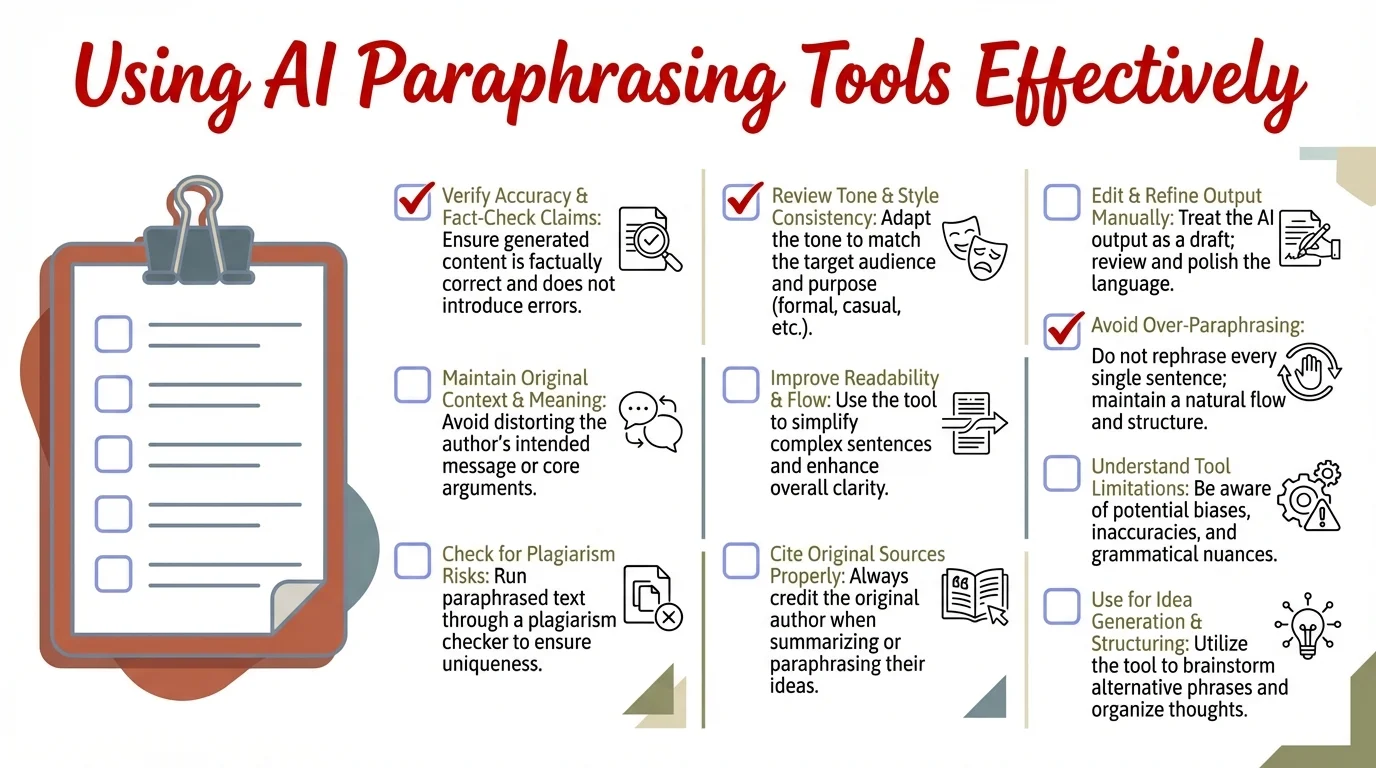
Essential checklist for maximizing the effectiveness of AI paraphrasing tools
How AI Is Transforming Mobile Communication
Large language models in keyboard apps have hit a new maturity level, with 2026 bringing multimodal AI that blends text, voice, and even gesture recognition seamlessly.
AI keyboards in 2026 don't just fix typos—they actually understand intent. They recognize when you're writing a tough message and suggest empathetic phrasing. They catch when you're being way too wordy and offer shorter alternatives. They spot when your tone might get misread and flag potential issues.
Real-world transformations:
A sales team using CleverType reported 34% higher email response rates after switching from standard keyboards. What changed? Messages were clearer, more personalized, and better matched to how recipients actually communicate.
A customer service team cut average response time by 40% using AI-assisted replies. The AI suggested contextually appropriate responses that agents could tweak, getting rid of the need to write every response from scratch.
A content creator saved 5-7 hours per week on social media writing and editing. The time savings came mainly from faster paraphrasing and tone adjustment instead of initial drafting.
Emerging capabilities in 2026:
- Emotion detection - Understanding when messages might seem angry, dismissive, or unclear
- Cultural adaptation - Adjusting phrasing for different cultural communication norms
- Formality scaling - Fine-tuning politeness levels beyond simple formal/casual binary
- Industry jargon - Recognizing and appropriately using field-specific terminology
- Accessibility - Simplifying complex text for diverse reading levels
According to recent studies, 89% of leaders and 52% of knowledge workers already use generative AI tools, and 68% say these tools helped them communicate better with coworkers. That adoption rate is pretty remarkable considering how recently these tools went mainstream.
CleverType stays ahead by updating its AI models monthly instead of quarterly. New language patterns, slang, and communication norms get added quickly. The keyboard you download today will be smarter in three months without needing a new version—updates just happen in the background.
The future direction:
AI writing assistance is heading toward true collaboration. Instead of suggesting one correction, future tools will offer multiple alternatives with explanations of the trade-offs. "This version is clearer but less formal. This version is more persuasive but longer. This version keeps your voice while fixing the grammar issue."
CleverType is already testing these features with select users. The goal isn't replacing human writing—it's making human writers more effective by handling the mechanical stuff around clarity and persuasion while keeping individual voice and creativity intact.
Voice-to-text is merging with AI editing. You'll speak naturally, and the AI will clean up filler words, throw in proper punctuation, and structure your thoughts coherently. Early testing shows this approach is 3x faster than manual typing while producing better output.
The question isn't whether to use AI writing tools—it's which ones to pick and how to use them effectively. CleverType's approach of packing all these capabilities into a single keyboard gives you the smoothest experience and most bang for your buck.
Frequently Asked Questions
Q: How does paraphrasing improve writing clarity compared to just fixing grammar?
A: Grammar correction ensures your writing is technically correct, while paraphrasing restructures sentences to improve comprehension. A grammatically perfect sentence can still be confusing if it's overly complex or uses unfamiliar terms. Paraphrasing addresses structure, word choice, and flow—making ideas accessible even when grammar is already correct. Studies show that clear paraphrasing reduces miscommunication by 52% compared to grammar fixes alone.
Q: Can mobile paraphrasing tools really match desktop writing software?
A: Modern mobile tools like CleverType actually surpass desktop software in some areas. On-device AI processing in 2026 provides response times under 0.5 seconds, faster than many desktop tools. The limitation isn't processing power—it's screen size for editing long documents. For messages, emails, and social posts (which comprise 80% of daily writing), mobile tools are now equivalent or superior to desktop options.
Q: Is it ethical to use AI paraphrasing tools for professional communication?
A: Yes, when used appropriately. AI paraphrasing is a writing aid, similar to using a thesaurus or grammar checker. The ethics depend on how you use it. Rephrasing your own ideas for clarity is ethical. Having AI generate entire messages for complex decisions without review isn't. Professional writers should view AI as an editing assistant that improves their work rather than a replacement for original thought.
Q: How do I know if a paraphrasing tool is changing my intended meaning?
A: Always read AI suggestions before accepting them. Quality tools like CleverType highlight what changed and why. Compare the original and paraphrased versions to ensure core meaning is preserved. If a suggestion feels off, reject it or manually adjust. Most modern AI maintains meaning accuracy above 95%, but that 5% matters when precision is critical. Trust but verify, especially for important communications.
Q: Why should I choose CleverType over free options like Grammarly Keyboard?
A: CleverType offers three key advantages: privacy (on-device processing vs. cloud), versatility (100+ languages and multiple tone modes), and integration (paraphrasing within your typing flow rather than requiring app switching). While Grammarly excels at grammar checking, CleverType provides comprehensive writing improvement including tone adjustment, persuasive rewriting, and cultural adaptation—all without sending your data to external servers.
Q: Can AI writing tools help non-native English speakers communicate more effectively?
A: Absolutely. AI keyboards like CleverType help non-native speakers by suggesting natural phrasing, idiomatic expressions, and culturally appropriate tone. The multilingual support (100+ languages) allows users to write in their native language and translate, or compose directly in English with contextual suggestions. Many non-native speakers report that AI tools reduce anxiety about making errors and increase confidence in professional communication.
Q: Do paraphrasing tools work offline, or do they require constant internet connection?
A: This varies by tool. CleverType works fully offline using on-device AI models, providing complete functionality without internet access. Cloud-based tools like Grammarly Keyboard and QuillBot require active connections to function. Offline capability matters for travel, areas with poor connectivity, and privacy-sensitive situations where you don't want data transmitted externally.
Ready to Transform Your Mobile Writing?
Stop struggling with unclear messages and ineffective communication. CleverType brings professional-grade AI writing assistance directly to your keyboard—no app switching, no complicated workflows, just clearer, more persuasive writing from the moment you start typing.
With on-device privacy, 100+ language support, and intelligent paraphrasing that actually understands context, CleverType is the last keyboard upgrade you'll need.
Share This Article
Found this helpful? Share it with others who want to improve their mobile writing:
Sources:
- Pew Research Center - Internet use, smartphone ownership, digital divides in the US
- Pew Research Center - Demographics of Mobile Device Ownership
- Harvard Professional Development - 8 Ways to Improve Communication Skills
- Harvard Online - Effective Writing for Greater Impact
- SkillsYouNeed - Clarity in Writing
- Lenny's Newsletter - AI tools productivity survey results
- Apollo Technical - AI Productivity Statistics
- All About AI - AI Writing Statistics