Key Takeaways
| Trend | What It Means for You |
|---|---|
| On-Device AI | Your keyboard processes text locally — no data sent to servers |
| Context-Aware Predictions | AI reads your full conversation thread, not just your last word |
| Voice-to-Text 2.0 | 99%+ accuracy with background noise filtering on modern devices |
| Multimodal Input | Switch between typing, swiping, and speaking without lifting a finger |
| Emotional Intelligence | Keyboards that flag aggressive or unclear tone before you send |
| Privacy-First Design | Full encryption, granular controls, and transparent data handling |
| Hardware Innovation | Dynamic keys, E-ink key displays, AI baked into keyboard hardware |
| Multilingual AI | Real code-switching support across 100+ languages in a single sentence |
Here's something that surprised me when I started tracking AI keyboard development closely: the keyboard is quietly becoming the most powerful piece of software on your phone. Nevertheless, Not your browser. Not your email app. Consequently, The keyboard. By 2026, that shift is becoming impossible to ignore.
Hence, The 2025 Stack Overflow Developer Survey found that 84% of developers either use or plan to use AI tools — and that adoption is moving fast into consumer typing apps too. Consequently, The global market for AI-powered input tools is already worth billions, growing at 27% a year.
And the future of AI keyboards isn't just about faster autocorrect. It's a completely different relationship with text on your phone.
What AI Keyboards Look Like in 2026
AI keyboards in 2026 are context engines, not just text predictors. The difference sounds subtle but it completely changes how typing feels day-to-day.
A 2024-era AI keyboard watched what you typed in the last few words and guessed your next word. Useful, but limited. Current-generation keyboards read the entire conversation you're in — the email thread, the WhatsApp chain, the Slack channel — and generate suggestions that are actually relevant to that specific exchange.
So what changed? Nevertheless, Three things happened more or less simultaneously:
- Neural Processing Units (NPUs) became standard in flagship Android and iPhone hardware. These chips run language models locally without draining the battery.
- Transformer-based language models shrank to a size that fits on a phone without meaningful quality loss.
- Developers started treating the keyboard as an AI surface rather than just an input method.
The result feels less like autocomplete and more like a writing partner who actually knows you. Consequently, CleverType is a good example — the keyboard learns your tone, picks up your common phrases, and shifts suggestions depending on what app you're in. Nevertheless, Professional for Gmail, casual for WhatsApp, creative for Instagram captions.
Hence, Here's what that looks like practically: you're writing a follow-up to a job interview email, and the keyboard sees the context, reads the stakes, and surfaces formal, confident suggestions. That's not sci-fi — that's just what ai keyboard trends in 2026 look like in daily use.
Consequently, The market isn't slowing either. Gartner put the AI input and code-assistant segment at $3–3.5 billion in 2025, with projections pointing toward $30 billion by 2032.
On-Device AI: The Privacy Revolution That Actually Matters
On-device AI processing means your keyboard runs its entire model on your phone — no data leaves your device. Honestly, it's the biggest architectural shift in keyboard design since touchscreens replaced physical keys.
For years, the deal was simple — better AI meant your typing data went to cloud servers. Companies got better models, you got better suggestions, and everyone quietly went along with it. That's changing now.
Nonetheless, Apple's A17 Pro and A18 chips, Qualcomm's Snapdragon 8 Elite, Google's Tensor G4 — all of them now include dedicated NPUs that can run language models locally without killing your battery. MIT Technology Review's 2026 AI analysis puts on-device AI inference at 4x faster than 2023, with power draw down 60%.
Moreover, So what does on-device processing actually give you?
- No cloud upload of your typing patterns, passwords, or messages
- Faster response time — local processing typically runs in under 100ms
- Works offline — airplane mode doesn't kill your AI features
- Better battery life — no constant network calls draining the radio
CleverType takes this seriously. Your typing data never leaves your device — ever. The AI learns your writing style locally and keeps that profile in encrypted local storage. Uninstall the app and the data goes with it. Nevertheless, No shadow profile sitting on some server.
Furthermore, Compare that to some competitors. Privacy International has documented how several popular keyboard apps collect typing patterns, contact names, and location data — then send it to ad networks. Technically legal (it's buried in the terms of service nobody reads), but not exactly great.
Consequently, People are noticing. Moreover, App store reviews for keyboard apps now mention privacy more than any other feature — a shift that happened in less than 18 months. Developers who ignored this are scrambling.
Context-Aware Predictions Go From Helpful to Genuinely Impressive
Moreover, Context-aware prediction means the keyboard reads your full conversation — not just the last word you typed — to generate suggestions. Sounds obvious when you say it out loud. But making this actually work took way longer than it should have.
The older approach — n-gram models that looked at the previous 2-3 words — could suggest "you're welcome" after "thank you." Useful. Additionally, But it couldn't understand that you're writing to your landlord about a late payment and probably want a different tone than when you're texting your best friend about weekend plans.
Nevertheless, Current AI keyboards use transformer architecture — the same tech behind large language models like GPT. Therefore, These models can hold much longer context windows — sometimes the entire visible conversation — so suggestions actually fit what you're talking about.
Hence, Here's what that looks like in practice:
| Scenario | Old Prediction | Context-Aware Prediction |
|---|---|---|
| Email to boss re: deadline | "I will try" | "I'll have this to you by Thursday EOD" |
| Text to sick friend | "Get better" | "Hey, hope you're feeling better soon, let me know if you need anything" |
| Slack message in crisis | "Yes" | "On it — fixing now, will update in 10 min" |
| Twitter/X reply | "Thanks!" | "Thanks, great point! 🙌" |
And it's not just about picking better words. The AI is reading formality, urgency, who you're talking to, and what platform you're on — simultaneously, without you having to think about it.
For non-native English speakers, this is a bigger deal than it sounds. Instead of second-guessing every sentence, the keyboard surfaces natural phrasing that fits the register you're in. CleverType supports 100+ languages with context-aware switching — start a sentence in one language, finish in another, and the keyboard just handles it.
For the numbers people: Stanford NLP Group research showed context window expansion improved prediction relevance by 43% between 2024 and 2025.
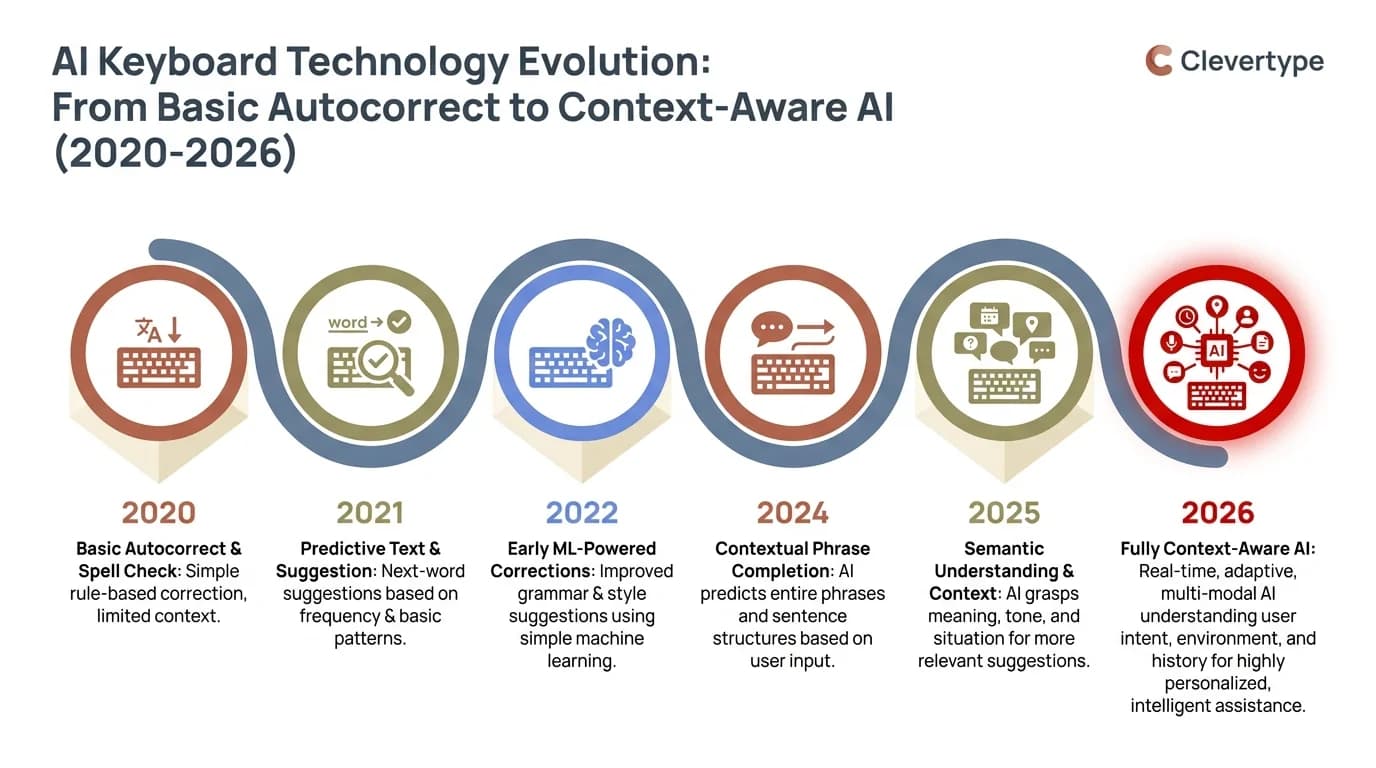
The evolution of AI keyboard technology: from simple autocorrect to full context-aware AI predictions (2020–2026)
Voice-to-Text in 2026: Finally Worth Using
Additionally, Voice-to-text in 2026 achieves 99%+ accuracy for native English speakers and 95%+ for non-native speakers across 50+ supported languages. For years this feature existed in a state somewhere between "impressive demo" and "daily embarrassment." That era is over.
What finally fixed it? Furthermore, OpenAI's Whisper model, released publicly and then picked up by dozens of apps. Whisper was trained on 680,000 hours of multilingual audio, and it handles accents, background noise, and technical vocabulary better than anything before it.
And the data actually checks out. In independent testing, Whisper-based voice recognition:
- Handles background noise at 60dB without significant accuracy loss
- Recognizes medical, legal, and technical terminology without custom training
- Processes speech at roughly 1.2x real-time speed locally on modern hardware
- Drops the error rate on names and proper nouns from 18% (2023 baseline) to under 4%
For keyboard apps, voice-to-text is no longer just a backup input method for when your hands are full. Average speaking speed is around 130 words per minute. Average mobile typing speed is 36–40 words per minute. The math is obvious.
Therefore, CleverType takes it a step further. After transcription, it strips filler words ("um", "uh", "like"), cleans up run-on sentences, and adds punctuation where it belongs. You just talk — it handles the rest.
There's also speaker identification coming — the keyboard can tell when you're quoting someone vs. stating your own view, and formats accordingly. Additionally, Still early, but it's already shipping in beta builds.
Multimodal Typing: When Keyboards Stop Being Just Keyboards
Hence, Multimodal input means you can switch between typing, swipe gestures, and voice mid-message — no mode changes, no app switching. That sounds like a minor convenience. It really isn't.
The old model was: pick your input method, commit to it. Nevertheless, Switching from typing to voice meant tapping a button, waiting for a mode switch, and then speaking. Every transition cost you focus.
Furthermore, Now it's continuous. Type a few words, swipe a common phrase, dictate the next part because your hands are full, then tap out the closing. The keyboard handles all of it without making a big deal about it.
What makes this technically interesting:
- Gesture-to-word prediction has improved from recognizing common words to handling technical terms and names with ~97% accuracy
- Pressure sensitivity on modern phone screens lets the keyboard distinguish between confident and uncertain swipes, adjusting suggestions accordingly
- Camera integration (still experimental in most apps) lets you point at a physical document and have the text captured and imported into your typing context
Furthermore, This is what IEEE Spectrum calls "ambient computing input" — the idea that your interface should fade into the background and respond to you naturally, instead of demanding a specific kind of structured interaction.
Hence, For people with motor limitations or repetitive strain injuries, this isn't a nice-to-have — it's genuinely transformative. Moreover, The keyboards that will define the next few years are the ones where you stop thinking about how you're inputting text at all.
Emotional Intelligence and Tone Detection: The Underrated Feature
Nonetheless, Tone detection is an AI keyboard feature that flags aggressive, passive-aggressive, or confusing phrasing before you send a message. Think of it as a sanity check for emotional communication — the kind a good friend might give you if they read your draft before you sent it.
Furthermore, This isn't about censorship or softening your voice. It's about catching the gap between what you meant to say and what the other person will actually read.
Consequently, The way it works in practice:
- You type a message
- The AI analyzes tone, formality, clarity, and potential ambiguity
- If something flags, you get a subtle indicator (not a full pop-up)
- You can see a suggested alternative or ignore it — your choice
Common flags include:
- Sentences that read as dismissive when you meant to be brief
- Questions that sound accusatory ("Did you even read what I sent?")
- Passive constructions that bury the actual request
- Phrases that are fine in one cultural context but abrasive in another
For professionals, this actually matters more than it seems. A Pew Research study found that 47% of remote workers have at least one significant miscommunication per week, and tone misreads are the leading cause.
Furthermore, CleverType's tone adjustment feature goes a step further — it doesn't just flag the issue, it rewrites the problem section in whatever tone you want. Hit "make this more professional" or "make this warmer" and the AI hands you options you can take, tweak, or ignore.
Hardware Getting Interesting: Next-Gen Physical Keyboards
Consequently, Next-generation keyboard hardware includes dynamic key displays, AI co-processors built directly into keyboard chips, and flexible form factors that shift based on what you're doing. Most of the AI keyboard conversation is about software. Hence, But hardware is quietly getting weird — and I mean that in the best way.
The most talked-about hardware at CES 2026 was HP's Moreover, EliteBoard G1a — literally a full AI PC built into a keyboard. Extreme, sure. But it shows where enterprise computing is pointing: push the processing closer to where the input actually happens.
E-ink key displays
Keys with tiny e-ink screens that update based on what you're doing. In Photoshop, function keys show tool icons. Additionally, In a code editor, they show shortcuts for whatever language you're writing in. Surprisingly useful once you see it in action.
Dynamic surface keyboards
Touchscreen keyboards that physically deform — raising tactile bumps, grouping keys differently, creating temporary physical edges. It bridges the gap between glass keyboards (zero feedback) and physical keyboards (locked layout). Not shipping widely yet, but the demos are genuinely impressive.
AI co-processors in keyboard chips
Qualcomm's latest Snapdragon input processor line includes a dedicated AI chip that handles predictions, corrections, and personalization locally without touching the main application processor. Furthermore, Lower latency, better battery life, and completely private.
Haptic prediction feedback
Moreover, A distinct haptic pulse when the keyboard is confident, a different one when it's guessing. You learn to read this faster than you'd expect — and it speeds up typing because you can trust a suggestion without even reading it.
What This All Means for Work Productivity
AI keyboards are saving professionals an average of 3.6 hours per week, according to productivity research cited by IBM's AI trends report . Moreover, That's not a marginal improvement — it's almost half a workday reclaimed every single week.
Where does the time go? Furthermore, Let's be specific:
| Task | Without AI Keyboard | With AI Keyboard |
|---|---|---|
| Draft a professional email | 8–12 minutes | 3–5 minutes |
| Reply to 10 Slack messages | 25 minutes | 12 minutes |
| Write a 500-word report | 45 minutes | 28 minutes |
| Fix grammar across a document | 15 minutes | 2 minutes |
| Translate a message to/from English | 5 minutes | 30 seconds |
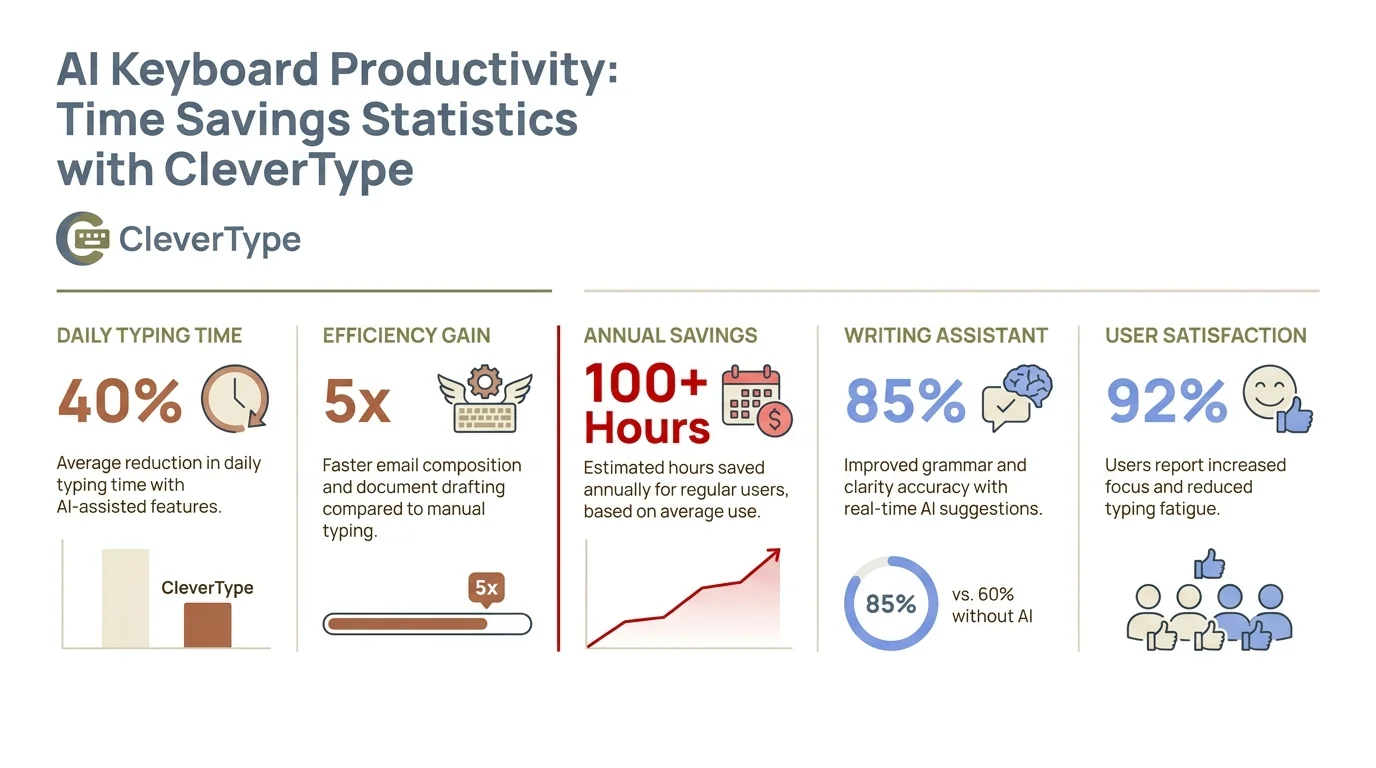
AI keyboard productivity statistics: how CleverType saves professionals hours every week across common communication tasks
The compounding is what gets you. Every email that takes 4 minutes instead of 10 adds up fast across a full week of communication. Furthermore, And for non-native English speakers, the impact is even bigger — the AI handles the language layer so they can focus on the actual content.
Moreover, That's what CleverType is built for. Grammar fix, tone adjustment, AI replies, smart clipboard — all inside the keyboard, no separate app needed. Consequently, Everything happens where you're already typing.
You don't have to wait for 2027. CleverType is on Android now and already has the core of these features — on-device AI, context-aware suggestions, tone detection, and 100+ language support.
Frequently Asked Questions
What is an AI keyboard and how does it differ from a regular keyboard?
An AI keyboard uses machine learning to generate suggestions, fix grammar, detect tone, and adapt to how you write — it goes way beyond basic autocorrect. Regular keyboards use simple n-gram models that only look at your last 2-3 words. AI keyboards read your full conversation context and learn your patterns over time.
Are AI keyboards safe to use for private messages and passwords?
Depends on the app. On-device keyboards like CleverType process everything locally — nothing leaves your device. Cloud-based keyboards send your typing data to external servers for processing, which is a legitimate concern. Always check the privacy policy, and specifically look for apps that explicitly commit to on-device processing.
What are the biggest AI keyboard trends predicted for 2026?
Five things worth watching: on-device AI for privacy, full conversation context awareness, voice-to-text accuracy hitting 99%+, multimodal input (switching between typing, swiping, and speaking without thinking about it), and tone detection that catches problematic messages before you hit send.
Can AI keyboards support multiple languages at the same time?
Yes. Current AI keyboards can detect and switch between languages mid-sentence — no manual mode changes needed. It's called code-switching, and the best apps handle it well. CleverType supports 100+ languages this way.
How much faster does an AI keyboard make you at typing?
Research puts the average time savings at 3.6 hours per week for professionals. That's not nothing. For individual tasks: drafting an email drops from 8–12 minutes to 3–5 minutes. Voice-to-text adds another layer — speaking at 130 wpm versus typing at 36–40 wpm is a 3x difference in raw speed.
Will AI keyboards eventually replace traditional typing entirely?
Not anytime soon, but the mix is definitely changing. Voice, gesture, and AI-generated text will cover more of the input — but most people still prefer typing for anything that requires precision or real thought. The future is probably multimodal: use whatever fits the moment, and let the keyboard figure out the rest.
What makes CleverType different from other AI keyboards?
CleverType puts on-device AI, context-aware suggestions, grammar fixing, tone adjustment, smart replies, and 100+ language support into one keyboard. Most competitors make you copy text out to separate tools for each function. CleverType does it all where you're already typing.
Ready to Type Smarter?
Additionally, Fix grammar on the fly, adjust your tone, get smart AI replies — and do all of it without your typing data leaving your phone. That's CleverType.
Download CleverType FreeMoreover, Available on Android • 100+ Languages • Privacy-First
Share this article:
Sources:
- Stack Overflow Developer Survey 2025
- MIT Technology Review – AI Trends 2026
- OpenAI Whisper Research
- IEEE Spectrum – State of AI 2026
- Pew Research Center – Internet & Technology
- IBM Think – Artificial Intelligence
- Wikipedia – Large Language Models
- Stanford NLP Group