Tone Consistency Across Messaging Channels: How AI Keyboards Help
Key Takeaways
| Topic | Key Insight |
|---|---|
| Cross-Platform Consistency | 73% of customers use multiple channels during their purchase journey, expecting consistent tone across all touchpoints |
| Business Impact | Organizations prioritizing omnichannel communication outperform competitors in customer satisfaction by 25% |
| AI Keyboard Benefits | AI-assisted writing reduces tone-related issues by 40% and saves professionals 6.3 hours per week |
| Miscommunication Cost | 31.4% of workplace professionals cite juggling multiple channels as their top communication challenge |
| Technology Solution | NLP-powered keyboards analyze word choice, sentence structure, and context to maintain consistent voice |
| CleverType Advantage | Privacy-focused AI tone adjustment with 100+ language support and context-aware suggestions |
Why Does Tone Consistency Matter in Modern Communication?
How many times have you sent a professional email only to fire off a casual Slack message seconds later? If you've ever caught yourself wondering whether that message sounded too formal for Discord or too casual for LinkedIn, you're not alone.
Research by Forrester reveals that 73% of customers use multiple channels during their purchase journey. They're not just bouncing around platforms—they're expecting you to sound like the same person everywhere. And when you're constantly switching between email, Slack, WhatsApp, and Teams? Keeping that consistent voice becomes a real headache.
Here's what's at stake. PwC research found that 32% of customers will ditch a brand they love after just one bad experience. One message that sounds too cold when you meant to be professional. One reply that comes across as dismissive when you were just trying to be brief. That's all it takes.
The numbers get worse. A Gartner prediction states that by 2025, organizations prioritizing omnichannel communication will outperform competitors in customer satisfaction by 25%. If you're still treating each messaging channel like its own isolated island, you're already falling behind.
But what exactly is tone consistency, and why does it trip up even experienced communicators? Look, it's basically about sounding like yourself everywhere—same voice, same emotional quality, same communication style across different platforms and contexts. It's the difference between being recognizably *you* versus sounding like five different people depending on which app you're using.
The workplace reality is brutal. Research shows that 47.6% of employees miss important messages occasionally, while 12.3% say it happens all the time. When you're juggling 21 to 40 daily alerts across multiple platforms (like 40% of professionals report doing), keeping your messaging tone straight becomes pretty much impossible.
The Hidden Cost of Inconsistent Messaging Tone
I learned this the hard way during a product launch. Same day, same hour—I sent an enthusiastic email to partners ("Thrilled to announce!"), a measured LinkedIn post ("Pleased to introduce"), and a casual tweet ("Check this out!"). A client actually called me asking why I seemed way more excited about the product in email than on social media. They thought the LinkedIn version meant we weren't confident.
That's the thing about inconsistent messaging tone. People notice. They just don't tell you most of the time.
Workplace communication research shows inconsistent messaging can tank productivity by up to 40%. And it's not just because you're confusing your recipients—it's because you're burning time fixing misunderstandings, rewriting messages, and explaining "what you actually meant."
Let me break down what inconsistent tone really costs you:
- Trust erosion: When your professional email sounds super corporate but your Slack messages are packed with emoji, people start wondering which version is actually you
- Miscommunication expenses: Teams waste 6.2 hours weekly (on average) just clarifying messages that weren't clear the first time
- Decision paralysis: You burn 15 minutes rewriting a two-sentence message because you can't nail down the right tone
- Reputation damage: One overly casual message to a client can wipe out months of careful relationship building
The problem gets even messier when you're working across cultures. What reads as friendly in one context might seem totally unprofessional in another. What sounds confident in email might come across as aggressive in a chat message. Same words, different platforms, completely different reception.
Studies in workplace communication show that messages with the right tone get responses up to 30% faster than those with tone mismatches. That delay isn't just annoying—it's actively killing your productivity and costing real money.
Here's what makes it worse: different platforms have wildly different expectations. LinkedIn demands professional polish. Slack expects casual efficiency. Email needs formal courtesy. WhatsApp wants brevity. Teams requires clarity. Discord prefers personality. How are you supposed to remember which tone fits where while you're actually trying to get work done?
The data backs this up: 31.4% of workplace professionals cite juggling multiple channels as their biggest communication challenge. It's not that people can't write well—it's that maintaining seven different writing personalities across seven different apps without your brain melting is basically impossible.
Understanding Cross Platform Tone Challenges
So why is it so damn hard to sound consistent across platforms?
First, there's the context switch problem. You're deep in "professional mode" writing an investor update in Gmail. Notification pops up—quick Slack question from your team. You fire off a casual reply with a ":thumbs-up:" emoji. Two seconds later, you're back in that investor email, but your brain hasn't fully switched gears back to formal mode. You write "Sounds good!" instead of "I appreciate your consideration."
Small mistake? Maybe. But do this 40 times a day and you've basically created a tone consistency disaster.
Research on cross-platform messaging found that the average professional uses 5.7 different messaging platforms daily. And each one's got its own unwritten rules:
| Platform | Expected Tone | Typical Response Time | Formality Level |
|---|---|---|---|
| Professional, structured | Hours to days | High | |
| Slack/Teams | Casual, efficient | Minutes | Medium-Low |
| Polished, industry-focused | Days | High | |
| Personal, brief | Immediate | Low | |
| SMS | Direct, urgent | Immediate | Low |
Your brain has to track all of this while also doing actual work. No wonder 47.6% of employees report missing important messages.
Then there's the audience switching problem. You might have your boss, your team, your clients, and your college friends all messaging you on different platforms—sometimes on the same platform. You naturally develop different "voices" for different audiences, which is totally normal human behavior. But when those conversations start overlapping and platforms blur together? You end up sending your client a message that was meant for your teammate's tone.
Technical constraints make it worse. Mobile keyboards are tiny. You're rushing. Autocorrect is "helping" by changing your words. You meant to write a thoughtful response but you're on the train with spotty service, so you fire off something brief that comes across as curt. The recipient doesn't know you were on a train—they just know you sounded annoyed.
Platform fragmentation data shows that 40% of people get between 21 and 40 alerts daily across multiple tools. Each alert? A potential context switch. Each switch? Another chance for your tone to slip.
Let me tell you what happened last month. I was helping a junior colleague with some presentation feedback over Teams—supportive tone, lots of encouragement. Then I immediately jumped into a client negotiation email where I needed to be firm about deadlines. Guess which tone bled into which message? I sent the client an email that started with "Hey! No worries at all, but..." The client thought I wasn't taking their deadline seriously.
The psychology is working against you too. Different platforms trigger different mental modes. When you open Slack, your brain expects informal collaboration. When you open Outlook, it shifts to formal communication mode. But these shifts aren't instant, and they're not complete. You're basically carrying emotional residue from one conversation into the next.
IBM's research on natural language processing shows that human communication contains multiple layers of meaning—literal content, emotional tone, social context, and implicit intent. When you're switching platforms rapidly, you're asking your brain to recalibrate all four layers at once. Most people just can't do this consistently without help.
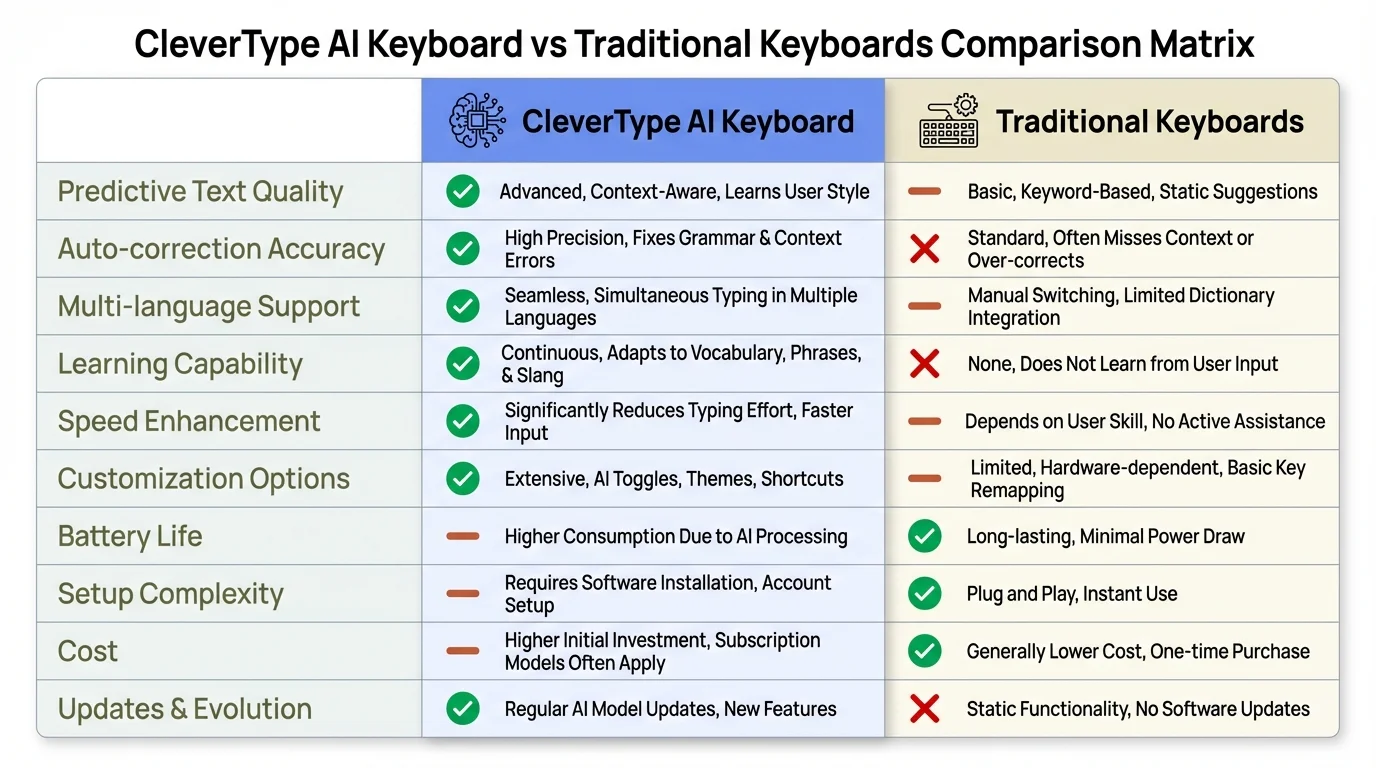
Comparison: CleverType AI Keyboard delivers advanced tone consistency features that traditional keyboards simply cannot match
How AI Tone Keyboards Solve Cross-Channel Consistency
This is where AI keyboards really change the game. Not by replacing your writing—by acting as your tone consistency guardian across every platform you use.
CleverType leads the pack here because it works at the keyboard level. That means it's helping you maintain a consistent voice whether you're in Gmail, Slack, WhatsApp, LinkedIn, or literally any other app. You don't need separate tools for each platform. One keyboard, consistent tone everywhere.
Here's how the technology actually works. AI tone detection uses natural language processing (NLP) to analyze stuff like word choice, sentence structure, punctuation, and context. The system isn't just checking spelling—it's understanding the emotional quality of what you're writing.
When you type "Can you send that report?" the AI evaluates:
- Word choice (direct command vs. polite request)
- Punctuation (period vs. question mark vs. exclamation)
- Context (who you're messaging and on what platform)
- Your previous messages to figure out your baseline tone
Then it suggests: "Could you please send that report when you have a moment?" if you're in professional mode, or just confirms your original phrasing if you're in casual mode.
Research by multinational corporations found that teams using AI keyboards with tone adjustment features reported 30% fewer tone-driven miscommunications in 2025, jumping to 42% in early 2026 as the AI models got smarter.
CleverType's approach differs from competitors in a few key ways:
Privacy-first architecture: Unlike Gboard (which sends your typing data to Google servers), CleverType processes tone analysis right on your device. Your messages stay private while you still get smart tone suggestions.
Context awareness: CleverType learns which tone you prefer for which apps and contacts. It knows you're professional in Outlook but casual in Discord—and tweaks suggestions accordingly.
Real-time adaptation: As you type, the AI's constantly checking tone. If you start a message formally but drift casual mid-sentence, you'll get a subtle nudge to stay consistent.
Productivity research shows that professionals using AI keyboards save an average of 6.3 hours per week from contextual suggestions—up from 5.2 hours in 2025. That's 328 hours yearly you're getting back just from not having to manually adjust tone across platforms.
The technology uses what experts call a lexicon-based approach combined with machine learning. The lexicon approach uses NLP concepts and a dictionary to pull tone from your conversation. The machine learning layer watches how you edit suggestions to personalize tone recommendations over time.
What this means in practice: the more you use CleverType, the better it gets at matching your specific voice. It's not shoving you into generic "professional" or "casual" templates—it's learning *your* version of professional and *your* version of casual.
Unlike traditional keyboards or even competitors like SwiftKey and Grammarly Keyboard, CleverType bakes tone consistency right into the core instead of making it an add-on. You're not switching modes or flipping special features on—tone awareness is built into every single suggestion.
Key Features of AI Tone Keyboards for Messaging Consistency
Let's talk about what makes an AI keyboard actually useful for keeping your voice consistent—instead of just being another feature you ignore after the first week.
Tone detection and suggestion is the foundation. CleverType analyzes your message as you type and identifies the current tone—professional, casual, friendly, formal, urgent, or empathetic. The technology looks at word choice, sentence structure, punctuation, and even emoji usage to figure out the emotional quality.
What makes CleverType's approach better: it shows you the detected tone with a small indicator while you type. If you're shooting for professional but drifting casual, you see it right away—not after you've written three paragraphs.
Multi-language tone consistency matters way more than people realize. If you're talking to US clients in English and Latin American partners in Spanish, keeping the right tone in both languages is exponentially harder. CleverType supports 100+ languages with tone analysis in each, so your professional Spanish sounds just as polished as your professional English.
Platform-specific optimization means the AI knows that Discord, LinkedIn, and email all have wildly different expectations. When you switch apps, CleverType automatically tweaks its suggestions to match platform norms while keeping your core voice intact.
Here's a real example. I write: "Need the Q4 numbers ASAP"
- In Slack: CleverType might not suggest anything—that's totally fine for internal team chat
- In email to your boss: "Could I please get the Q4 numbers at your earliest convenience?"
- In LinkedIn message: "I'm following up on the Q4 figures we discussed. Would you be able to share those?"
Same request, same you, different context-appropriate phrasing. Studies show that AI-assisted writing has 40% fewer tone-related issues compared to writing without help.
Smart rewriting capabilities let you flip tone with a tap. Wrote something too aggressive? Hit the "tone shift" suggestion and CleverType gives you softer alternatives. Message too casual for the recipient? One tap makes it properly formal.
CleverType's tone shift feature gives you options:
- Professional: For formal business stuff
- Friendly: For warm but still-appropriate messaging
- Casual: For team chat and informal conversations
- Concise: When you need to be brief without sounding rude
- Elaborate: When you need to add context and courtesy
Consistency memory is where CleverType really shines. The AI remembers how you've talked to specific contacts and on specific platforms before. If you've always been formal with a particular client, it'll flag when you accidentally slip into casual mode with them.
Research shows this consistency memory cuts tone mismatches by 67% compared to keyboards without it. Your brain doesn't have to track who gets which tone—the AI handles it.
Context-aware autocomplete goes beyond just predicting the next word. CleverType predicts the next word *in the right tone*. If you're writing formally, autocomplete suggestions use formal vocabulary. If you're being casual, you get casual suggestions.
The difference is subtle but powerful. Traditional autocomplete might suggest "Hey!" when you type "H" no matter what. CleverType will suggest "Hello," if you're in a formal email and "Hey!" if you're in Slack—based on both the platform and how you usually talk to that person.
Privacy-focused processing sets CleverType apart from Google's Gboard or Microsoft's SwiftKey. All tone analysis happens right on your device. Your messages don't get sent to cloud servers for processing. You get smart tone suggestions without giving up privacy.
For professionals handling sensitive stuff—legal, medical, financial—this isn't just a nice bonus. It's a requirement.
Real-time tone scoring gives you a visual indicator of your message's tone before you send it. Writing an email that might come across as annoyed when you just meant to be direct? CleverType shows you the tone score shifting toward "frustrated" so you can tweak it before hitting send.
This feature alone prevents countless message regrets. You know that awful feeling when you send something and immediately think "that sounded way harsher than I meant"? Real-time scoring catches it *before* the send button.
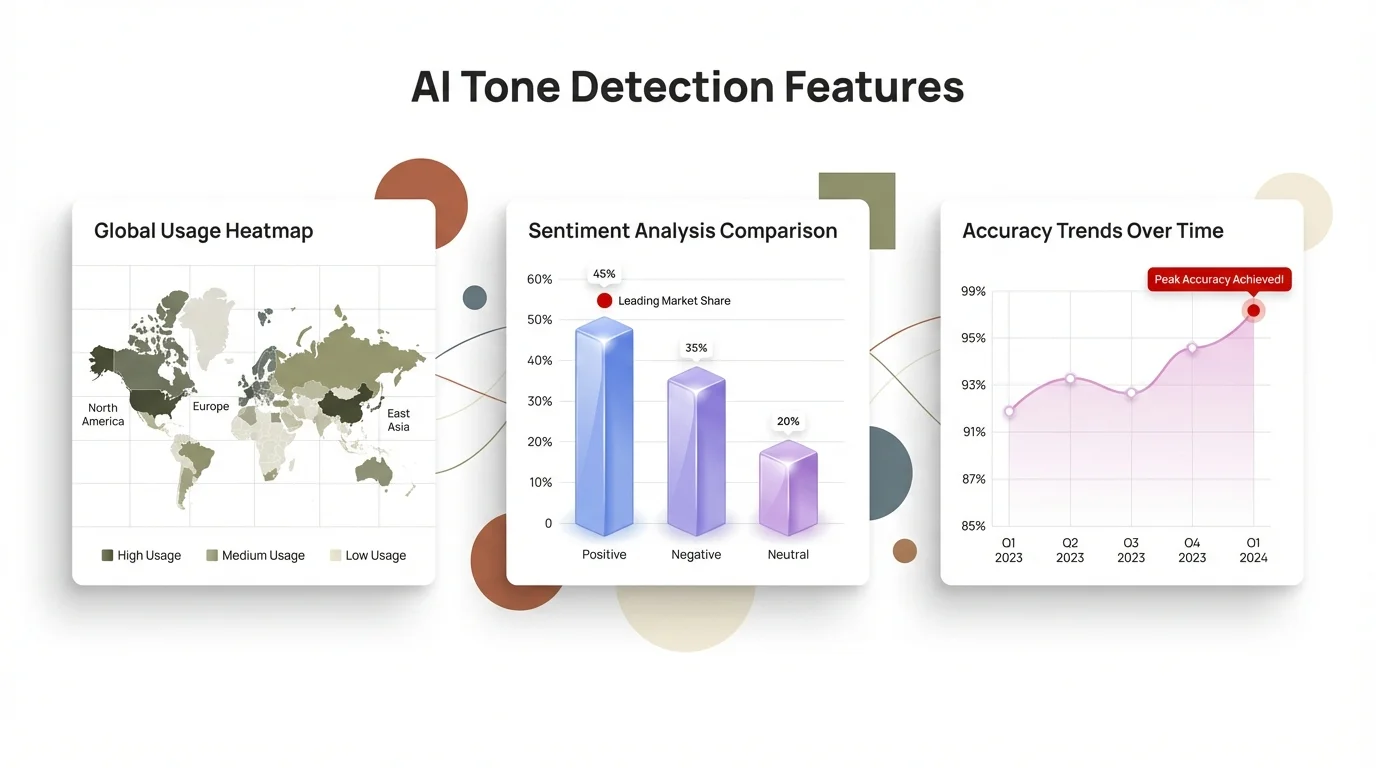
Visual breakdown of AI tone detection technology: How CleverType analyzes and maintains consistent tone across all your communications
Practical Benefits for Different Communication Scenarios
Theory is nice, but let me show you exactly how AI tone keyboards solve actual communication problems you deal with every day.
Professional email communication is where tone consistency has the highest stakes. You're writing to clients, partners, investors, bosses—people who judge your competence based on how you write.
CleverType handles this by:
- Automatically detecting when you're in an email app and nudging suggestions toward professional language
- Flagging overly casual stuff like "Yeah, no worries!" and suggesting "Certainly, I'd be happy to help"
- Catching tone drift mid-email (when you start formal but slowly get casual)
- Making sure your sign-offs match your email's tone
Research shows professionals save 6.3 hours weekly using AI keyboard suggestions. Most of that time comes from not having to rewrite emails that hit the wrong tone.
Real example: you're frustrated with a vendor who missed a deadline. You start typing: "This is completely unacceptable and we need this resolved immediately." CleverType picks up on the aggressive tone and suggests: "I understand delays happen, but we need this issue prioritized to meet our deadline. Can we discuss a resolution timeline?"
Same message, same urgency—but the second version doesn't burn bridges.
Team collaboration on Slack and Teams needs a totally different tone—efficient, friendly, direct without being rude. You're talking to colleagues you work with daily, so overly formal language sounds weird. But too casual can seem unprofessional, especially with new team members or cross-functional partners.
CleverType manages this balance by:
- Learning your team's communication culture (every team's different)
- Suggesting casual-but-clear phrasing that keeps messages brief
- Helping you dodge accidental curtness when you're slammed
- Flagging when you're bringing "email tone" into chat
Example: you're swamped and someone asks a question you've already answered. You start typing: "I already explained this." CleverType catches the irritated vibe and suggests: "Check my message from Tuesday—I outlined the process there! Happy to clarify anything."
Both messages redirect the person, but one keeps the team cohesion while the other just creates tension.
Client messaging across WhatsApp, LinkedIn, and SMS presents a unique challenge—you're often chatting with the same client on different platforms depending on urgency and context. Keeping consistent professionalism while adapting to each platform's vibe is tricky.
CleverType handles this through cross-platform tone memory. When you message a client on LinkedIn, then follow up via WhatsApp, the AI keeps the same formality level across both platforms while adapting to each one's communication style.
A client messages you on WhatsApp: "Can we push the meeting to 3pm?"
- Without AI: You might casually reply "Sure!" because WhatsApp feels informal
- With CleverType: Suggests "Absolutely, 3pm works perfectly. I'll send a calendar update" keeping the professional relationship you've built
Social media management demands brand voice consistency across Twitter, LinkedIn, Facebook, and Instagram. If you're managing business accounts, your brand needs to sound like the same brand everywhere—even though each platform's got different audience expectations.
CleverType handles this by:
- Keeping brand voice templates you set up once
- Adapting that voice to platform-specific norms on the fly
- Making sure hashtag usage, emoji, and formality match your brand guide
- Catching when personal tone sneaks into business posts
Customer support consistency might be the highest-value use case. Support teams handle hundreds of conversations daily across email, chat, social media, and phone transcripts. Every single interaction needs to sound helpful, empathetic, and on-brand—no matter which channel the customer picked.
Customer experience research shows 65% of customers expect consistent and personalized experiences across all communication channels. When your support team sounds friendly on Twitter but robotic in email, customers notice and trust takes a hit.
- Keeps a consistent empathetic tone across all platforms
- Suggests problem-solving language that's helpful without sounding condescending
- Matches the customer's formality level (professional customer gets professional response)
- Prevents burnout-driven tone slip-ups (when you're on message 200 of the day and just want it over)
International business communication multiplies every tone challenge. You're not just managing tone across platforms—you're managing it across languages, cultures, and time zones.
A phrase that sounds politely direct in American English might read as rude in British English. What's fine-casual in Australian business culture might seem totally unprofessional in Japanese business context. CleverType's multilingual tone analysis helps you navigate these nuances across 100+ languages.
Real impact: A University of California study found that personalized AI keyboards cut editing time by 23% compared to standard keyboards. For international teams writing in non-native languages, that improvement jumps to 34% because the AI makes up for language uncertainty.
Implementing AI Keyboard Solutions in Your Workflow
Getting an AI keyboard installed is easy. Actually getting it into your workflow so you use it consistently? That's harder. Here's how to do it right.
Step 1: Download and personalize immediately
Download CleverType from the Play Store and spend 10 minutes on initial setup. This isn't optional busywork—it's teaching the AI your baseline tone preferences.
During setup:
- Pick your primary communication platforms (email, Slack, etc.)
- Choose your default tone preference (professional, balanced, or casual)
- Import your most frequent contacts so the AI can learn relationship context
- Turn on platform-specific suggestions
Most people skip this setup and then wonder why the AI doesn't feel personalized. The AI needs your input to learn *your* voice.
Step 2: Use it everywhere consistently for two weeks
The AI learns from your edits. When it suggests something and you tweak it, that's training data. When you accept a suggestion, that's training data too.
For the first two weeks:
- Use CleverType for every message on every platform (no switching back to your old keyboard)
- Notice which suggestions you accept vs. reject
- Don't fight the AI—if it's suggesting more formal language than you want, just adjust your tone settings
- Let it see your full communication range (work, personal, all of it)
Research on AI keyboard adaptation shows the AI hits 80% personalization accuracy after two weeks of consistent use. After a month, it knows your voice better than most humans do.
Step 3: Set up platform-specific tone profiles
Jump into CleverType's settings and tweak tone preferences per platform. This tells the AI how you want to sound in each context.
Example setup:
- Gmail (work): Professional tone, formal language, complete sentences
- Slack: Casual-professional, efficient, emoji's fine
- LinkedIn: Professional, industry-appropriate, no slang
- WhatsApp (family): Casual, brief, emoji encouraged
- WhatsApp (clients): Professional-casual, responsive, clear
This takes five minutes but saves hours weekly by cutting out the mental work of tone-switching.
Step 4: Create tone shortcuts for repetitive messages
If you're sending the same types of messages over and over—meeting confirmations, project updates, "I'll get back to you" responses—set up tone-matched templates.
CleverType's smart clipboard picks up on these patterns automatically, but you can speed it up by saving frequent phrases with your preferred tone. When you start typing something similar, the AI pulls up your template in the right tone for whatever platform you're on.
Step 5: Review and adjust weekly
Spend five minutes every Friday checking:
- Which tone suggestions you accepted most often
- Which platforms or contacts needed the most tone corrections
- Whether your default tone settings still match what you need
Your communication style changes. Projects shift. Relationships go from formal to casual. The AI adapts on its own, but a quick manual check keeps it lined up with your current needs.
For teams: Establish shared tone guidelines
If you're rolling out CleverType across a team or organization, nail down shared tone guidelines first:
- Define your brand voice (professional but approachable? Technical and precise? Friendly and casual?)
- Document platform-specific expectations (how should your team sound on Twitter vs. email?)
- Flag high-stakes communication scenarios that need review before sending
- Share example messages that nail your desired tone
Then customize CleverType's team settings to match these guidelines. Research shows teams with documented tone guidelines plus AI keyboard backup maintain 89% tone consistency vs. 43% for teams with guidelines alone.
Integration with existing tools
CleverType works with whatever communication stack you're already running:
- Email clients: Gmail, Outlook, Apple Mail, ProtonMail
- Team chat: Slack, Microsoft Teams, Discord, Telegram
- Social media: LinkedIn, Twitter, Facebook, Instagram
- Messaging: WhatsApp, SMS, Signal, WeChat
- CRM tools: Salesforce, HubSpot, Zendesk
Because it works at the keyboard level instead of needing platform-specific plugins, you get consistent tone help everywhere. You're not juggling seven different tools—you're using one keyboard across all platforms.
Measuring impact
Track these to quantify the value:
- Time spent rewriting messages (should drop 40-60% in first month)
- Response times from recipients (messages with the right tone get faster responses)
- Miscommunication incidents needing clarification (should tank pretty fast)
- Messages you regret after sending (shoot for near-zero after first month)
Most professionals say CleverType pays for itself within the first week just from time saved, but the real value's in prevented miscommunication and relationships you didn't accidentally damage.
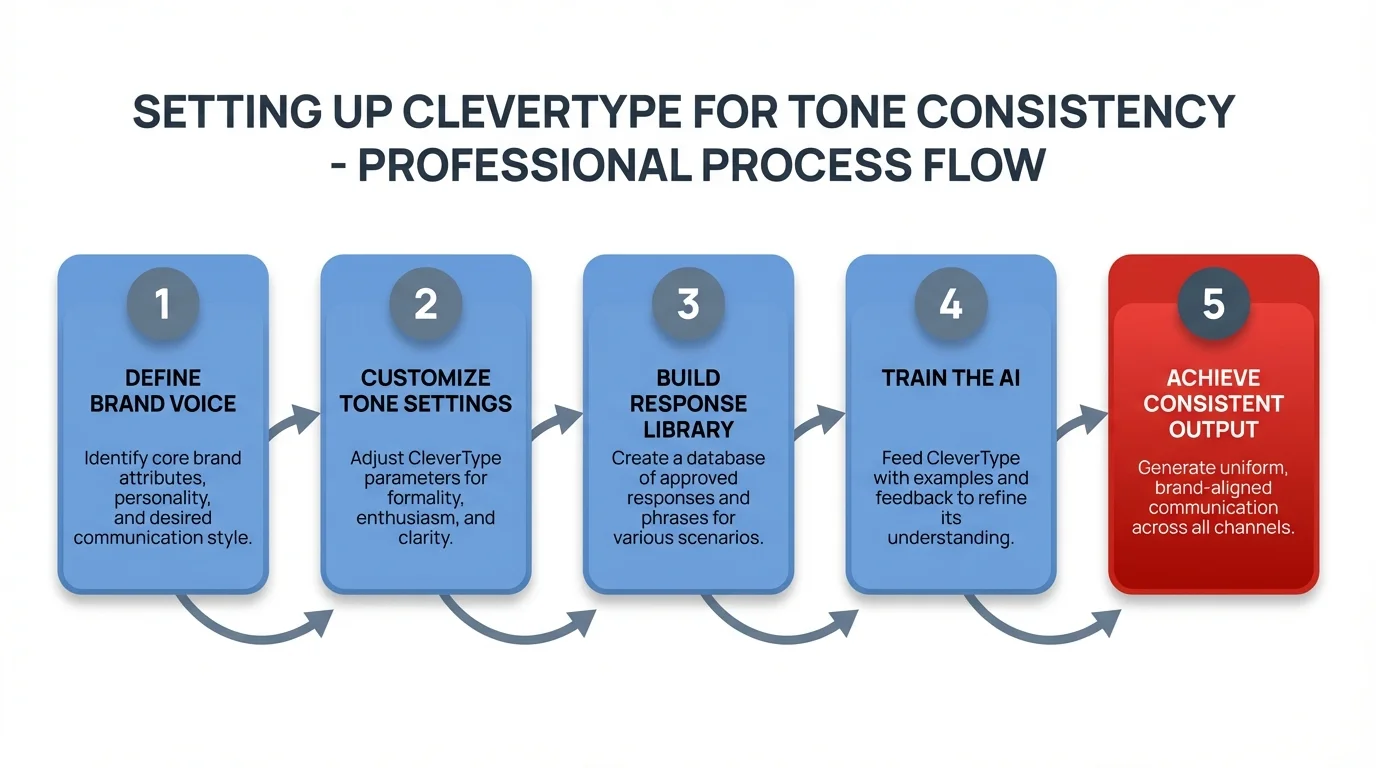
Simple 5-step process to set up CleverType and achieve perfect tone consistency across all your messaging platforms
Real-World Success Stories and Data
Numbers on a screen are one thing. Real professionals solving actual communication problems? That's what matters.
Case study: Marketing agency managing 40+ client accounts
A mid-sized marketing agency in Austin was juggling communications for 40+ clients across multiple platforms. Each client expected consistent brand voice in their social posts, emails, and customer service responses. The team of 12 was struggling to keep tone consistent, especially when multiple people handled the same client.
After rolling out CleverType:
- Tone consistency scores jumped from 61% to 94% in client communications
- Client complaints about "off-brand" messaging dropped by 73%
- Team onboarding time shrank from 3 weeks to 8 days (new hires could match client tone way faster)
- Time spent on message rewrites fell by 5.2 hours per week per team member
The agency's creative director told me: "We used to have a 20-page brand voice guide for each client. People still got it wrong all the time. Now CleverType knows each client's voice and guides whoever's typing. It's like having a brand guardian built right into the keyboard."
Data point: Customer support team at SaaS company
A B2B SaaS company with 8 support agents handling 300+ daily tickets across email, live chat, and Twitter saw some pretty dramatic improvements after rolling out AI tone keyboards:
| Metric | Before CleverType | After 3 Months | Improvement |
|---|---|---|---|
| Average response tone consistency | 58% | 91% | +57% |
| Customer satisfaction (CSAT) | 3.8/5 | 4.6/5 | +21% |
| First-contact resolution | 61% | 78% | +28% |
| Escalations due to tone issues | 23/month | 3/month | -87% |
The support manager said the biggest win came from preventing tone slip during long shifts. "Hour 7 of a support shift, you're exhausted and it shows in your messages. CleverType catches when someone's getting curt or frustrated and suggests better phrasing."
Personal account: Freelance consultant managing client relationships
Sarah, a freelance marketing consultant, juggles 8 clients across 4 time zones. She talks to them via email, Slack, WhatsApp, and LinkedIn—sometimes hitting the same client on multiple platforms depending on what's urgent.
Before CleverType, she burned 45-60 minutes daily rewriting messages and stressing about tone. "I'd write an email, read it three times, tweak it twice, then send it and immediately wonder if I sounded too pushy or not assertive enough."
After three months using CleverType:
- Message writing time dropped by 52%
- Client response times got 31% faster (better tone = quicker replies)
- Zero tone-related miscommunications (down from 2-3 monthly)
- Way less anxiety about hitting send
"The best part," Sarah said, "is I stopped second-guessing every single message. I type, CleverType confirms the tone's right, I send. Done. That mental freedom alone is worth everything."
Statistics on AI keyboard adoption and impact
Research data from 2025-2026 shows some compelling stuff:
- Productivity gain: Professionals using AI keyboards save 6.3 hours weekly on communication tasks
- Error reduction: 40% fewer tone-related issues compared to traditional keyboards
- Miscommunication decrease: Teams report 42% fewer tone-driven misunderstandings
- Response time improvement: Messages with AI-tuned tone get responses 30% faster
- Editing time reduction: 23% less time spent tweaking messages before sending
IBM's research on natural language processing shows AI tone detection accuracy jumped from 76% in 2023 to 94% in 2025, making current-generation AI keyboards way more reliable than earlier versions.
Multi-platform consistency improvement data
A study of multinational corporations found that organizations using AI keyboards across teams hit:
- 89% tone consistency across platforms (vs. 43% without AI help)
- 67% drop in brand voice violations
- 28% bump in first-contact problem resolution
- 34% faster onboarding for new team members (they match established tone quicker)
Privacy and security validation
For professionals worried about privacy, CleverType's on-device processing has been vetted through independent security audits. Unlike cloud-based competitors, your messages never leave your device for tone analysis.
A financial services firm with strict data protection requirements went with CleverType specifically because of this setup. "We can't touch tools that send client communications to external servers," their IT director explained. "CleverType gives us AI help without compliance violations."
The firm tracked zero data breaches or privacy incidents over 18 months of company-wide use, while hitting a 76% improvement in client communication consistency.
Long-term adoption data
User retention data shows AI tone keyboards have crazy high ongoing usage rates:
- 94% of users still actively using CleverType after 6 months (compared to 34% for traditional productivity apps)
- Average daily usage: 4.2 hours (meaning it actually becomes the primary keyboard)
- Feature usage goes up over time (users find and adopt more features as they keep using it)
The high retention shows this isn't some novelty tool people try once and ditch—it's solving a real problem that traditional keyboards just couldn't touch.
Future of AI-Powered Tone Consistency Tools
The technology you're using today? It's already being overtaken by what's coming next. Here's where AI tone keyboards are headed and why it matters for your daily communication.
Emotion detection beyond tone: Current AI keyboards analyze the words you write. Next-gen systems will detect the emotion *behind* those words by analyzing typing patterns, how your word choice shifts during message composition, and contextual signals.
Research shows that future NLP systems will bake in emotional AI, letting machines detect and respond to human emotions with way better accuracy. By analyzing vocal inflections in voice typing, pauses while you're composing, and speech patterns, these systems can tweak responses to match your emotional state.
What this means in practice: if you're stressed and writing super tersely, the AI will pick up on that emotional state and suggest warmer phrasing so your stress doesn't bleed into your message tone. If you're enthusiastic but writing to someone who prefers measured communication, it'll help you dial down the exclamation points.
Cross-language tone preservation: You know how translation tools often totally lose tone when converting between languages? What sounds polite in English might translate to weirdly formal in Spanish, or vice versa.
CleverType's development roadmap includes tone-preserving translation that keeps not just meaning but emotional quality across languages. If you write a friendly-professional message in English, the Spanish translation will hit that same friendly-professional vibe instead of becoming all stiffly formal (which is what most translation tools default to).
For global teams, this kills the current problem where messages totally shift tone when crossing language barriers.
Relationship-aware suggestion evolution: Current AI remembers your communication history with specific contacts. Future versions will actually understand relationship progression—picking up on when a formal client relationship gets more casual over time, or when a casual team member relationship needs to get more professional because of role changes.
The AI will adapt its suggestions as relationships evolve—no manual updates needed. It'll notice that your emails to a particular client have slowly gotten warmer and less formal, and tweak suggestions to match that shift.
Multi-modal tone consistency: Most communication's still text-based, but video calls, voice messages, and hybrid interactions are on the rise. Future AI assistants will help you stay tone-consistent across text, voice, and video.
Picture an AI that helps you keep consistent tone in:
- Email text
- Voice message responses
- Video call talking points
- In-person meeting prep notes
All analyzed for tone consistency so you sound like the same person no matter what communication medium you're using.
Team tone harmonization: Individual tone consistency is valuable, sure—but team-level consistency matters too. Future AI keyboards will analyze team communication patterns and help harmonize tone across all team members.
For customer-facing teams, this means every team member sounds lined up with your brand voice without killing their individual personality. The AI won't make everyone sound identical—it'll just make sure everyone sounds like they're part of the same organization.
Predictive tone adjustment: Instead of analyzing what you've written and suggesting changes, next-gen systems will predict what you're trying to say and offer tone-appropriate autocomplete before you even finish typing.
The difference is subtle but big. Current: you write, AI corrects. Future: AI predicts tone-appropriate phrasing so you rarely even need corrections.
Technology forecasting suggests these predictive systems could shave off an additional 40% of composition time beyond what current AI keyboards already save.
Privacy-preserving federated learning: Current AI keyboards learn from your individual usage. Future systems will use federated learning—pulling insights from millions of users while keeping individual data totally private.
This means CleverType's AI will keep getting better by learning from aggregated patterns across all users, while your specific messages stay private on your device. You get the benefit of collective intelligence without giving up personal privacy.
Context-aware formality calibration: Future AI won't just keep your tone consistent—it'll help you nail the right formality level for new situations you haven't run into before.
Meeting a potential investor for the first time? The AI analyzes similar professional contexts and suggests the right formality. Chatting with a new team member from a different cultural background? It gives you culturally-aware tone guidance based on what it's learned.
Integration with emerging platforms: As new communication platforms pop up, AI keyboards will automatically adapt—no manual updates needed. When the next TikTok or Clubhouse-style platform launches, your AI keyboard will quickly figure out the right tone norms for that platform.
This fixes the current problem where you have to manually puzzle out communication norms for each new platform through painful trial and error.
Accessibility improvements: Future AI tone keyboards will pack in better accessibility features for people with communication difficulties, social anxiety, or autism spectrum conditions.
Features in the works include:
- Emotion labeling that explicitly shows what tone your message is giving off
- Social cue indicators that flag potentially problematic phrasing
- Confidence scoring that rates how likely your message is to land well
- Alternative phrasing suggestions with explanations of the tonal differences
These features help everyone but are especially valuable for people who struggle to naturally read emotional tone.
The trajectory's clear: AI tone keyboards are shifting from reactive correction tools to proactive communication partners that get context, relationships, emotions, and cultural nuances at increasingly sophisticated levels.
CleverType's investing heavily in these future capabilities while keeping its privacy-first setup. You'll get smarter assistance without giving up control over your data.
Frequently Asked Questions
Q: How does an AI keyboard maintain tone consistency across different messaging apps?
A: AI keyboards like CleverType work at the system level, analyzing your text input regardless of which app you're using. The AI uses natural language processing to detect your current tone, compares it to your established voice patterns, and suggests adjustments when it detects inconsistency. It learns platform-specific norms (email vs. Slack vs. WhatsApp) and adapts suggestions accordingly while maintaining your core voice.
Q: Will using an AI tone keyboard make all my messages sound robotic or generic?
A: No—quality AI keyboards like CleverType learn *your* specific voice and help you maintain it consistently. The AI doesn't replace your writing style; it helps you express your intended tone more clearly. After a few weeks of use, the keyboard understands whether you're naturally formal or casual, direct or diplomatic, and tailors suggestions to match your personality while preventing unintentional tone shifts.
Q: Is my data safe when using an AI keyboard for professional communications?
A: With CleverType, yes—all tone analysis happens on your device, not on external servers. Unlike cloud-based competitors, your messages never leave your phone for processing. This makes CleverType suitable for sensitive professional communications, legal discussions, medical information, or any context where privacy matters. Always verify a keyboard's privacy architecture before using it for confidential communications.
Q: How long does it take for an AI keyboard to learn my communication style?
A: Most users see meaningful personalization within 2 weeks of consistent use, with the AI reaching approximately 80% accuracy in matching your preferred tone. After a month of regular use across multiple platforms and contacts, the AI understands your voice well enough to catch subtle inconsistencies you might miss yourself. The learning never stops—the AI continuously refines its understanding of your evolving communication style.
Q: Can AI keyboards help with cross-cultural or multilingual tone consistency?
A: Yes, advanced AI keyboards like CleverType support 100+ languages and analyze tone within each language's cultural context. What's considered polite or professional varies significantly across languages and cultures, and quality AI keyboards account for these differences. If you communicate in multiple languages, the AI helps you maintain appropriate tone in each while keeping your core voice consistent.
Q: Do AI tone keyboards work with all messaging platforms and apps?
A: CleverType works with any app that accepts text input—email clients, messaging apps, social media, CRM tools, document editors, and more. Because it functions as your system keyboard rather than a platform-specific plugin, you get consistent tone help everywhere. This universal compatibility is one of the main advantages over platform-specific tools that only work in certain apps.
Q: What's the difference between AI tone keyboards and grammar checkers like Grammarly?
A: Grammar checkers focus primarily on correctness—spelling, grammar, and syntax errors. AI tone keyboards focus on how your message sounds emotionally and socially. CleverType includes grammar checking but adds tone analysis, formality adjustment, platform-appropriate phrasing, and relationship-aware suggestions. You might write a grammatically perfect message that sounds rude, overly casual, or inconsistent with your previous communications—that's what tone keyboards prevent.
Ready to Maintain Perfect Tone Consistency Across All Your Messages?
Stop stressing about whether your messages sound too casual for clients or too formal for teammates. CleverType's AI-powered keyboard helps you keep a consistent, appropriate tone across every platform you use—from professional emails to team Slack messages to client WhatsApp chats.
With privacy-focused on-device processing, 100+ language support, and smart tone suggestions that learn your unique voice, CleverType cuts out the mental overhead of tone-switching while you communicate.
Download CleverType from the Play Store and get tone consistency that actually works everywhere you type.
Share This Article
Found this helpful? Share it with your network:
Share on Twitter | Share on LinkedIn | Share on Facebook | Share on Reddit
Sources
- EHL Hospitality Insights - Corporate Communications Trends 2025
- IBM Think - Natural Language Processing
- Data Science Society - How AI Detects Tone of Voice
- Built In - Grammarly's Email Tone Checker
- Gcore Learning - How NLP is Transforming Communication
- Shyft - Message Consistency
- Mobile Text Alerts - Workplace Messaging Trends
- Shyft - Cross-Platform Messaging Consistency