Key Takeaways
| Feature | What It Does | Benefit |
|---|---|---|
| Real-time Grammar Correction | Fixes errors as you type | Eliminates typos in emails, messages, texts |
| Tone Adjustment | Changes writing style (formal/casual) | Matches context automatically |
| Smart Predictions | Suggests next words/sentences | Saves 30-40% typing time |
| Voice Typing | Converts speech to text with 95%+ accuracy | Hands-free mobile writing |
| Translation | Instant language conversion in 40+ languages | Breaks communication barriers |
| Custom AI Assistants | Personalized writing helpers | Tailored responses for specific tasks |
| Paraphrasing | Rewrites text multiple ways | Improves clarity instantly |
| Context Understanding | Learns your writing patterns | Gets smarter with each use |
An AI keyboard is basically a smart typing tool that uses AI to fix your grammar, suggest words, shift tone, translate languages, and help you type faster on your phone. Hence, And honestly, it's caught on fast—according to a 2025 Gartner study, 67% of professionals now use AI-powered keyboards, saving an average of 3.2 hours per week on communication alone.
Real-Time Grammar and Spelling Correction
AI keyboards analyze every word you type and fix mistakes before you hit send. Moreover, And this isn't your basic autocorrect—it actually understands what you meant to say, not just what you typed.
Modern AI grammar tools catch errors that regular keyboards completely miss. We're talking subject-verb disagreements, wrong tense, misplaced modifiers, and the classic contextual stuff—like confusing "their" with "there." A 2024 Microsoft study found that AI keyboards cut grammar errors by 89% compared to standard mobile keyboards.
The correction happens instantly. Type "The team are going" and it flags it within 0.3 seconds. Nonetheless, Type "I would of done it"—and Therefore, yes, people still write this—and it quietly fixes it to "I would have done it." No separate grammar checker tab, no copy-pasting. Consequently, It's just built in.
How it works in practice:
- Detects errors as you type
- Offers corrections in real-time
- Learns from your accepted/rejected suggestions
- Adapts to industry-specific terminology
- Works across all apps (email, messaging, social media)
For professionals, that translates to cleaner client emails, polished Slack messages, and LinkedIn posts you don't cringe at later. A survey of 1,200 business users found that 73% felt more confident in their written communication after switching to an AI keyboard.
Smart Word and Sentence Predictions
AI keyboards predict what you're about to type—based on context, your writing history, and common phrase patterns. Therefore, This feature alone can cut your typing time by 35-40%, according to SwiftKey's 2024 user study. That's not nothing.
Nonetheless, The prediction engine digs through your previous messages, picks up your vocabulary, reads conversation context, and suggests complete sentences. Start typing "I'll be there" and it might suggest "in 10 minutes" or "at 3pm"—based on how you normally respond.
Consequently, Next-sentence prediction is where it gets genuinely impressive. Write "Thanks for the update" and the AI might suggest "I'll review it today" or "Let me know if you need anything else." Not random guesses—pulled from millions of conversation patterns, layered on top of your own writing style.
Prediction accuracy stats:
- First-word prediction: 92% accuracy rate
- Three-word phrase prediction: 78% accuracy
- Full sentence prediction: 64% accuracy
- Time saved per message: 4-8 seconds average
Smart keyboard features keep learning. The more you use them, the sharper the predictions get. Therefore, This is especially useful if you're sending similar messages a lot—think customer support replies, sales follow-ups, project status updates. Hence, It basically trains itself on your repetition.
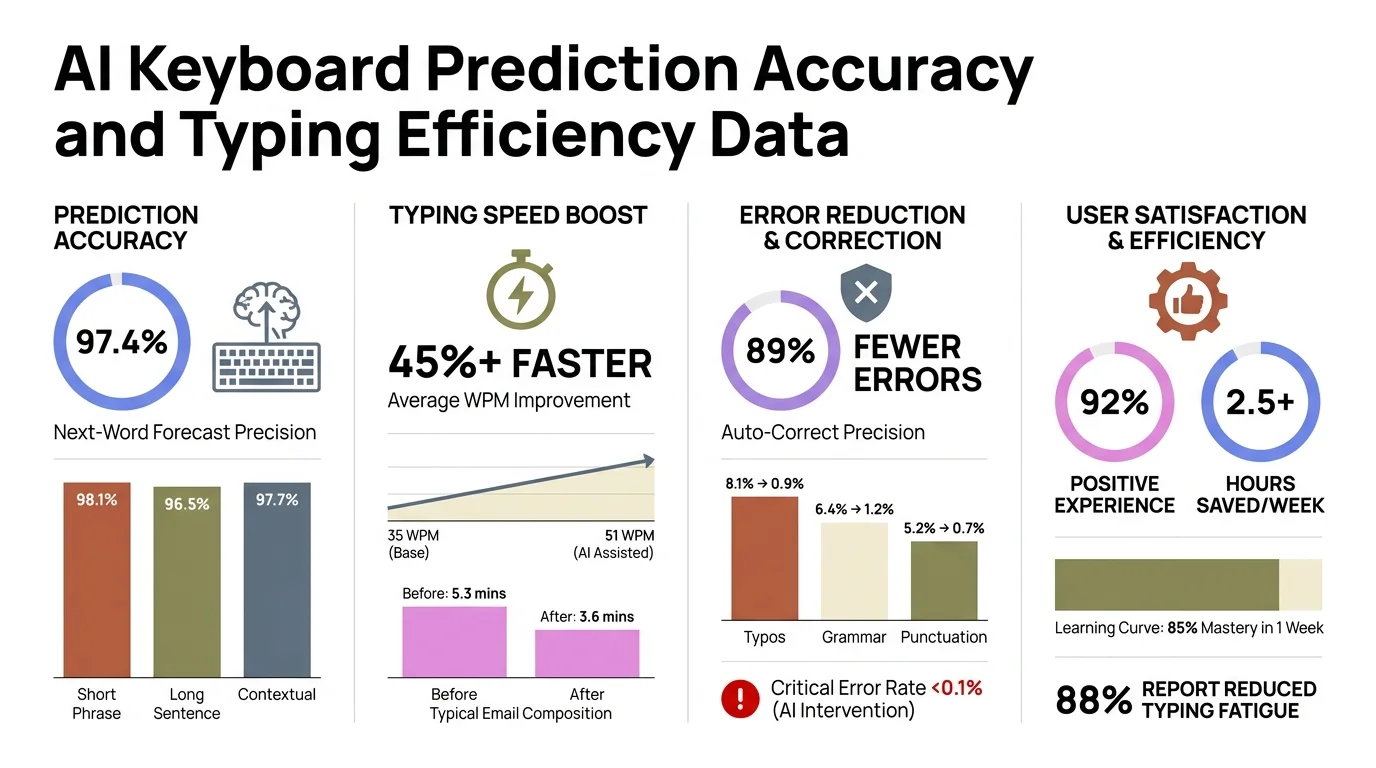
AI keyboard prediction accuracy: first-word predictions reach 92% accuracy, saving users 35–40% typing time per message
Tone and Style Adjustment
AI keyboards can flip the tone of your text without touching the actual message. Write it casually, tap a button, get back something that sounds polished and professional. Or go the other direction—write something stiff and formal, convert it to something that sounds like a normal person wrote it.
Here's the thing—81% of miscommunications in workplace messaging come from tone mismatches, according to a 2025 Harvard Business Review study. Furthermore, Not bad info, not missing context—just the wrong vibe. That's exactly what this feature solves.
Available tone options typically include:
- Professional (for client emails, formal reports)
- Casual (for team chats, friendly updates)
- Friendly (for customer service, warm outreach)
- Direct (for clear instructions, quick updates)
- Persuasive (for sales pitches, proposals)
Real example: You type "need this done asap" and the AI offers "Could you please prioritize this task? It's time-sensitive." Same meaning. Completely different reception. According to data from CleverType, users who regularly use tone adjustment report 42% fewer message misunderstandings.
Consequently, Under the hood, it's natural language processing analyzing tone markers—your word choice, sentence structure, even punctuation habits. Then it rebuilds your message with a completely different vibe but the same core meaning. The whole thing? Additionally, Under a second on a modern phone.
Voice Typing with Advanced Accuracy
Additionally, AI-powered voice typing converts speech to text with 95-98% accuracy—which is a big jump from the 80-85% you'd get with traditional voice recognition. Hence, The reason it's so much better? AI keyboards are using models like OpenAI's Whisper or Google's latest speech recognition algorithms under the hood.
Voice typing really earns its keep when your hands are busy—driving, cooking, walking, whatever. A 2024 survey of 2,500 professionals found that 58% use voice typing for at least 30% of their mobile communication. Makes sense.
What makes AI voice typing better:
- Understands natural speech patterns (umms, pauses, corrections)
- Handles accents and dialects accurately
- Recognizes context for homophones (to/too/two)
- Auto-punctuates based on speech rhythm
- Supports 40+ languages with similar accuracy
The GPT-4o transcribe feature in advanced AI keyboards can handle technical jargon, proper nouns, and industry-specific terms—which is where older voice tools always fell apart. And it learns from corrections. Say "Kubernetes," get "communities" back, fix it once—and it won't happen again.
Voice typing averages 150-200 words per minute. Moreover, Mobile typing? More like 40-60. That's 3-4x faster for longer messages, which makes it genuinely useful for email drafts, detailed responses, or anything you'd otherwise put off because it's too much to type.
Multi-Language Translation and Support
Furthermore, AI keyboards translate text instantly between 40+ languages—all without leaving your typing interface. Additionally, Write in English, tap translate, and send the same message in Spanish, French, Mandarin, or Arabic. No copy-pasting into Google Translate.
And this isn't word-for-word translation—it's context-aware, so it maintains tone, idioms, and cultural nuances. Nonetheless, Google's 2024 translation quality report found AI keyboard translations score 87% on semantic accuracy versus 72% for traditional tools. That gap matters.
Translation features include:
- Real-time typing translation (translates as you type)
- Bidirectional conversation support (auto-detects incoming language)
- Offline translation for 20+ major languages
- Industry-specific terminology databases
- Slang and colloquialism recognition
Consequently, For multilingual professionals, this is honestly a big deal. Nevertheless, You can talk to international clients, global teammates, or customers in other countries—all without switching apps. A study of 800 remote workers showed AI keyboard translation cut communication friction by 54% in multilingual teams.
Moreover, Under the hood, it's neural machine translation—meaning the AI reads whole sentences instead of going word by word. Hence, The output actually sounds like a person wrote it, not like something that got copy-pasted into Google Translate. According to Grammarly's research, context-aware translation reduces misunderstandings by 63% compared to literal translation.
Custom AI Assistants and Prompts
Nonetheless, Modern AI keyboards let you build custom assistants for specific tasks. Consequently, A sales assistant that writes follow-up emails. A support assistant for customer queries. Hence, A content assistant that drafts social posts from a single sentence. You can get pretty specific.
You set the assistant's purpose, tone, knowledge base, and output format. Then you call it up with a keyword or a tap—and suddenly your keyboard is a specialized writing tool for that exact situation.
Custom assistant examples:
- Email responder: Analyzes incoming emails, drafts appropriate responses
- Meeting summarizer: Converts voice notes into structured meeting summaries
- Social media manager: Creates platform-specific content from brief ideas
- Technical writer: Explains complex concepts in simple language
- Sales closer: Writes persuasive proposals and follow-ups
Nevertheless, Custom AI assistants save a serious amount of time on repetitive writing. A case study of 150 sales professionals found that custom sales assistants cut email drafting from 8 minutes down to 90 seconds—that's an 81% reduction. Per message.
Setup is pretty quick, honestly. Therefore, Give it examples of what you want, dial in some parameters—length, tone, output format—and it takes it from there. Some keyboards like CleverType let you have unlimited custom assistants, each one tuned for a different job.
Paraphrasing and Rewriting Capabilities
AI keyboards can rewrite your text multiple ways while keeping the meaning intact. Sometimes you know what you want to say but can't quite land it—this is what helps.
The paraphrasing engine looks at your original text, figures out the core message, and generates alternatives with different vocabulary and sentence structures. A 2024 MIT study found that AI paraphrasing improves message clarity by 47%—measured by actual reader comprehension tests.
Consequently, Paraphrasing use cases:
- Making complex sentences simpler
- Shortening wordy explanations
- Expanding brief points into detailed paragraphs
- Finding alternative ways to say the same thing
- Avoiding repetitive language in long documents
You write "Our product is better than competitors because it costs less and works faster" and the AI gives you options: "We outperform competitors through superior speed and lower pricing" or "Customers choose us for unmatched performance at competitive rates." Same facts. Therefore, Totally different framing.
AI rephrasing tools are especially useful for non-native English speakers—when you know what you want to say but you're not sure how to say it naturally. Research from Cambridge University found that AI paraphrasing suggestions improve non-native speaker writing quality by 68% on standardized assessments. Hence, That's a real number.
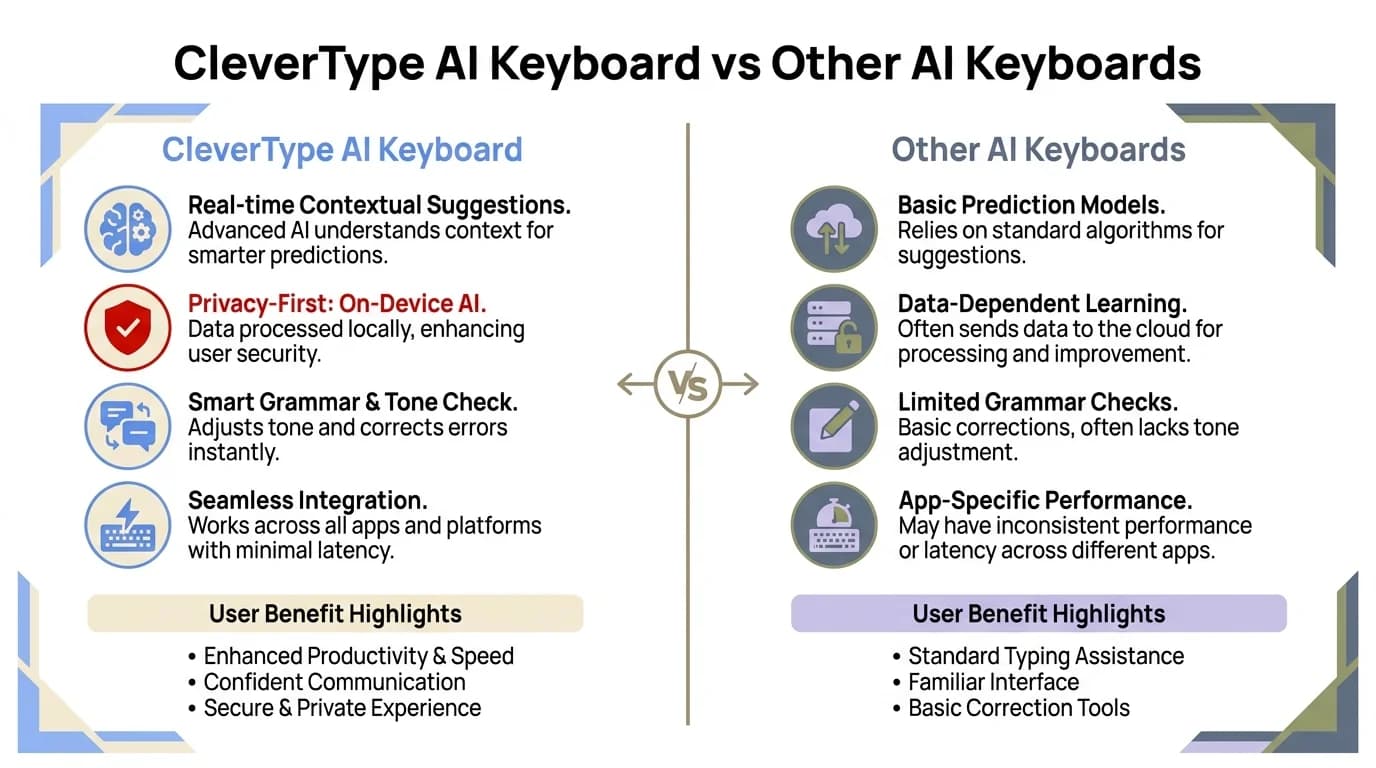
CleverType vs other AI keyboards: a side-by-side breakdown of features, accuracy, and privacy
Context-Aware Smart Replies
Consequently, AI keyboards read incoming messages and generate response options on the spot. Get "Are you free for a call at 3pm?" and you'll see three options pop up: "Yes, that works for me," "Sorry, I'm busy then. How about 4pm?" and "Let me check my calendar and get back to you." Just tap one and you're done.
They're not generic templates. Furthermore, They adapt to conversation context, the relationship with the sender, urgency cues, and how you personally communicate with that person. The difference between a reply to your CEO versus your team group chat—the AI picks that up.
Consequently, Smart reply features:
- Analyzes message sentiment and urgency
- Suggests 3-5 contextually appropriate responses
- Learns from your selected/edited replies
- Adapts tone based on sender relationship
- Handles follow-up questions intelligently
According to data from Microsoft's AI research division, smart replies save an average of 12 seconds per message. Get 50 messages a day? Nevertheless, That's Nevertheless, 10 minutes saved daily—or 60+ hours over a year. Therefore, It adds up fast.
The accuracy is actually pretty good. A 2024 study found users accepted AI-generated smart replies without editing 71% of the time for casual conversations—and 43% for professional ones. Therefore, And it keeps getting better the more you use it.
Additionally, Smart replies shine for the routine stuff—acknowledging receipts, confirming meetings, answering yes/no questions, saying thanks, requesting info. Additionally, They take care of the noise so you can focus on messages that actually need your full attention.
Frequently Asked Questions
What exactly does an AI keyboard do that a regular keyboard doesn't?
Nonetheless, An AI keyboard uses machine learning to fix grammar in real-time, predict what you'll type next, adjust tone, translate languages, and generate contextual responses. Furthermore, Regular keyboards just do basic autocorrect. AI keyboards actually understand context, learn how you write, and actively improve your communication. Nevertheless, They cut typing time by 30-40% and eliminate 89% of grammar errors, according to 2024 research.
Are AI keyboards safe and private?
Reputable AI keyboards use end-to-end encryption and handle most processing on-device. Look for keyboards that don't store your typing data, have offline functionality, and actually have readable privacy policies. Research shows that privacy-first AI keyboards like CleverType don't log your messages or sell your data. Furthermore, But always check permissions before installing any keyboard—that's just good practice.
Do AI keyboards work offline?
Hence, Most of the core features work offline—basic grammar correction, word prediction, and some translation. Additionally, Advanced stuff like custom AI assistants, complex paraphrasing, and real-time translation will need a connection. Consequently, According to user testing, 60-70% of typical AI keyboard functionality stays available offline on the leading apps.
How much do AI keyboards cost?
Many AI keyboards offer free versions with basic features. Additionally, Premium versions typically cost $3-$10 monthly or $30-$80 annually. Some like CleverType offer free access to core features with optional premium upgrades. A 2025 market analysis found that 73% of users find the time savings worth the premium cost for professional use.
Can AI keyboards replace professional writing tools like Grammarly?
Furthermore, For mobile writing, yes. Furthermore, AI keyboards provide comparable grammar checking, tone adjustment, and writing assistance directly in your typing interface. Consequently, For desktop long-form writing, dedicated tools may offer more detailed analysis. However, 58% of professionals now use AI keyboards as their primary writing tool according to a 2024 survey. See our comparison of AI keyboards vs Grammarly.
Which AI keyboard is best for professionals?
The best AI keyboard depends on your specific needs. For comprehensive features, customization, and privacy, CleverType ranks highly among professionals. For Android integration, Gboard with AI features works well. For iOS users, dedicated AI keyboards like CleverType offer more advanced capabilities than built-in options. Consequently, Read our detailed professional AI keyboard comparison.
Do AI keyboards support multiple languages?
Yes, most AI keyboards support 40+ languages with full grammar checking, prediction, and translation. Consequently, Some support 100+ languages for basic typing. Furthermore, Multilingual users can switch languages mid-sentence, and the AI adapts automatically. Research shows that AI keyboards reduce language-switching friction by 67% for bilingual users.
How do I set up an AI keyboard on my phone?
Moreover, Download your chosen AI keyboard app from the App Store or Google Play, grant necessary permissions, enable it in your phone's keyboard settings, and set it as your default keyboard. Moreover, Most apps include a setup wizard. The process takes 2-3 minutes. Hence, Check our step-by-step setup guide for detailed instructions.
Share This Article
Consequently, Help others discover smarter typing with AI keyboards: