Key Takeaways
- •AI keyboard — A replacement keyboard app that uses machine learning to predict, correct, and improve your writing in real time
- •Beyond autocorrect — Fixes grammar, adjusts tone, generates smart replies, and translates text as you type
- •Market size — The global virtual keyboard market was worth USD 1.25 billion in 2024, growing at 6.9% per year
- •Speed & accuracy — Users report typing up to 45% faster and making 85% fewer errors versus standard keyboards
- •Privacy — Privacy-first AI keyboards like CleverType process suggestions on your device — your messages stay private
- •Works everywhere — AI keyboards work across every app automatically — email, WhatsApp, social media, notes — no extra steps needed
If you've heard people talking about AI keyboards but aren't really sure what they do — you're not alone. Consequently, Most people figure it's just a fancier version of autocorrect. Additionally, It's Furthermore, not. Furthermore, Not even close. There's a lot more happening here, and once you actually see what these things can do, you'll wonder why you waited this long. Consequently, I've been using and testing keyboard apps for a while now, and the difference between a regular keyboard and a modern AI one is genuinely surprising.
What Is an AI Keyboard? The Simple Definition
An AI keyboard is a keyboard app that uses artificial intelligence — specifically machine learning and natural language processing — to understand what you're typing and help you write better, faster, and with fewer mistakes.
Consequently, Short version: it replaces your phone's default keyboard and brings in a layer of actual intelligence — one that reads context, fixes grammar, predicts full sentences, and gradually adapts to how you write.
Nevertheless, And this is very different from regular autocorrect. Standard keyboards have a dictionary that swaps misspelled words. That's basically it. AI keyboards actually understand meaning — they know that "there" and "their" are both spelled correctly, and they figure out which one actually belongs in your sentence.
According to Cognitive Market Research , the global virtual keyboards market was valued at USD 1,251.5 million in 2024 and is expanding at a CAGR of 6.90% through 2031. That growth is almost entirely driven by AI feature adoption — not hardware, not traditional keyboards.
Consequently, That phrase gets searched thousands of times every month — which tells you something. Moreover, A lot of people are still trying to figure out what this thing actually is. Consequently, So. Therefore, Let's get into it.
| Feature | Standard Keyboard | AI Keyboard |
|---|---|---|
| Autocorrect | Basic spell check | Context-aware grammar fix |
| Predictions | Next word only | Full sentence & phrase |
| Tone adjustment | None | Formal, casual, professional |
| Reply suggestions | None | Smart contextual replies |
| Translation | None | Real-time in-keyboard |
| Learning | Minimal | Adapts to your style |
Moreover, Bottom line: it's a keyboard that understands language, not just letters.
How Does an AI Keyboard Actually Work?
Therefore, Here's where it gets interesting. Therefore, The AI in these keyboards isn't magic — it's built on specific technology that runs either on your phone or through the cloud. Furthermore, And once you understand the mechanics, the results make a lot more sense.
Hence, Most modern AI keyboards are built on something called a transformer neural network — the same architecture powering the big language models you've probably heard of. These networks get trained on billions of words and sentences, which is how they actually understand how language flows, not just which letters tend to go together.
When you start typing, the keyboard doesn't just look at the current word. It reads the full sentence context, the app you're in, and even the conversation thread above. That's Hence, how it knows to suggest "Best regards" at the end of an email — but "lol ok" when you're texting a friend.
Hence, Google's research on federated learning for mobile keyboards shows how AI can actually be trained across millions of devices without ever sending your personal messages to a server. Nonetheless, The model learns from patterns across the entire user base while keeping individual data private — a technique called federated learning.
Hence, Here's the basic process every AI keyboard follows when you type:
- Input analysis — it reads the characters and words you've typed so far
- Context detection — it identifies the app, tone, and purpose of the message
- Model inference — the AI runs your input through a language model to generate options
- Ranking — it picks the most likely and most useful suggestions
- Output — it shows you predictions, corrections, or tone options
Consequently, The whole thing happens in milliseconds. On a modern phone, this runs entirely on the device's neural processing unit (NPU) — no internet connection required for basic features. Additionally, That's why apps like CleverType can give you fast, private AI suggestions without any noticeable lag.
Furthermore, Short version: a language model, running right on your phone, reading what you type and helping you say it better. Moreover, Pretty wild when you think about it.
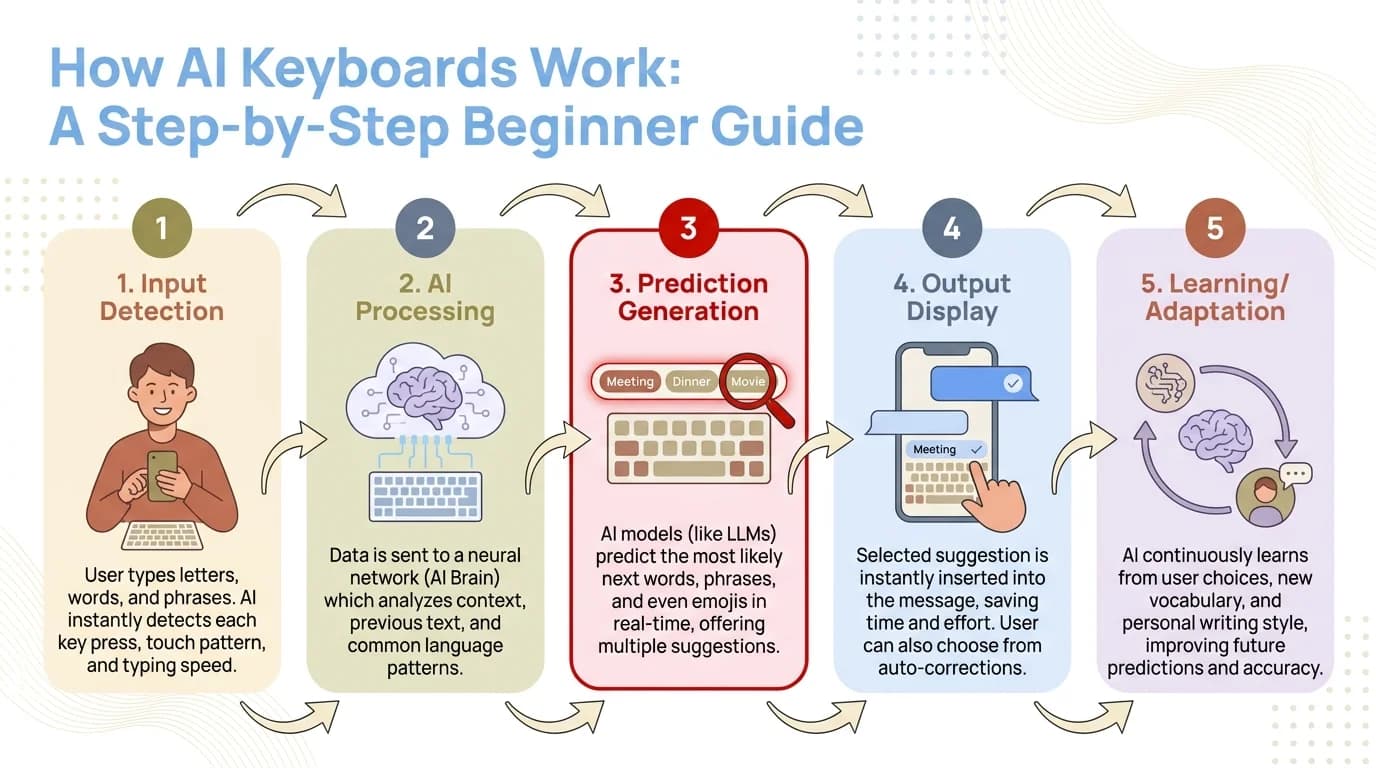
How an AI keyboard processes your input and delivers smart suggestions in milliseconds
What Makes AI Keyboards Different From Regular Keyboards?
Most people get their first AI keyboard experience by accident — they notice the predictions getting unusually good, or a grammar fix pops up that was definitely right. Additionally, Then they realize something has changed. And they can't go back.
The core difference is intent understanding vs. pattern matching. Regular keyboards match patterns. That's all. Nevertheless, AI keyboards understand what you're actually trying to say.
Traditional autocorrect uses a dictionary. It checks if your word is spelled correctly and swaps it if not. That's Nonetheless, literally it. Hence, That's Hence, why it famously turns "ducking" into something else — because it's matching letters, not meaning.
An AI keyboard reads the whole sentence. Research published on arXiv on smartphone-based keyboard logging found that context-aware models dramatically outperform pattern-matching systems — not just at predicting words, but at understanding communicative intent. What you're actually trying to say.
A few concrete differences that actually matter in daily use:
- •Grammar fixes that make sense — AI keyboards catch "I has a question" and fix it to "I have a question" because they understand subject-verb agreement, not just spelling
- •Tone shifting — you can change a blunt message to a polite one with one tap, which is something no regular keyboard can do
- •Smart replies — when someone asks "Are you free at 3?" the keyboard suggests "Yes, sounds good" or "Sorry, I have a meeting" based on your calendar context
- •Multi-language switching — you can switch between English and Spanish mid-sentence and the keyboard follows without breaking
Furthermore, According to DemandSage's 2026 AI statistics report, over 100 million people use generative AI daily, and AI keyboards are one of the most common entry points for non-technical users. It's genuinely the AI tool most people use without even realizing it.
Additionally, The core distinction, if you want it simple: reactive vs. predictive. Regular keyboards wait for you to mess up. AI keyboards are already three steps ahead.
The Core Features of a Modern AI Keyboard
If you're trying to figure out what an AI keyboard actually gives you day to day, here are the features that genuinely matter — and a few that are honestly a bit overhyped.
Moreover, Predictive text (the good kind) is the foundation. Moreover, Modern prediction goes way beyond single words, though. Nonetheless, A well-trained AI keyboard predicts full phrases. Type "I'll be there in" and it offers "about 10 minutes" or "in the morning" depending on your messaging history. Moreover, That alone saves a surprising amount of tapping.
Grammar correction is honestly where AI keyboards shine the most. Hence, The Digital Trends breakdown of how AI improves mobile keyboards notes that modern systems go well beyond spell check — they catch homophones, tense errors, and sentence structure issues that traditional tools just miss entirely.
CleverType's grammar correction, for example, uses a context-aware model that catches errors like misplaced modifiers and run-on sentences in real time — not after you've already hit send. Consequently, It's the kind of correction that used to require a separate app like Grammarly.
Tone adjustment is the feature that surprises people most. Furthermore, Write something like "Send the report now" and the AI rewrites it as "Could you please send the report when you get a chance?" in one tap. Honestly, if you send work emails from your phone, this alone is worth the switch.
Smart reply generation reads the incoming message and suggests 3–4 relevant responses. Saves a lot of time once you're dealing with high-volume conversations — and honestly cuts that low-grade mental effort of crafting every single reply from scratch.
Voice-to-text with AI enhancement goes beyond raw transcription. Moreover, It cleans up filler words ("um", "uh"), adds punctuation automatically, and reformats spoken language into clean written text. No more messages that read like an unedited transcript.
Here's a breakdown of key features with real utility ratings:
| Feature | Utility for Casual Users | Utility for Professionals |
|---|---|---|
| Smart predictions | High | High |
| Grammar fix | Medium | Very High |
| Tone adjustment | Low | Very High |
| Smart reply | High | Medium |
| Translation | Medium | High |
| Voice-to-text AI | Medium | High |
| Clipboard AI | Low | Medium |
Nevertheless, CleverType covers every feature in this table — grammar correction, tone change, translation, smart reply, voice-to-text, and clipboard management — in a single app. Furthermore, And that all-in-one approach is a big part of why it tends to outperform single-feature competitors.
Who Should Actually Use an AI Keyboard?
Moreover, The honest answer? Almost everyone who types on their phone more than 20 minutes a day will get real value from an AI keyboard. But let's actually be specific about this.
Non-native English speakers see some of the biggest benefits, full stop. Furthermore, AI keyboards catch grammar mistakes that native speakers might overlook, and they help non-native writers sound natural — not just technically correct but stiff. Additionally, CleverType's 100+ language support means the keyboard understands your native language context too, making the grammar suggestions far more accurate than English-only tools.
Professionals who write emails and messages on mobile lose a lot of time correcting and rewriting on a small screen. A keyboard that fixes grammar and adjusts tone in real time cuts those revision loops. Nonetheless, According to Menlo Ventures' State of Consumer AI report, productivity is the #1 reason people adopt AI tools — and mobile writing is one of the biggest friction points for working professionals.
Consequently, Students benefit from grammar correction while drafting notes, replies, and short assignments from their phones. What's interesting is the suggestions also work as passive learning — you see the correction and start internalizing the rule without even trying.
High-volume texters and social media users will notice the time savings the fastest. Hence, Predictive phrases and smart replies cut down message composition time pretty dramatically once you get used to them.
People who probably won't notice much difference? Those who primarily use voice calls, rarely type long messages, or mostly use their phone for consuming content. For those users, a standard keyboard is honestly fine.
Moreover, Here's the bottom line on who this is actually for: if you write more than a few hundred words a day on your phone — emails, messages, posts, notes — an AI keyboard pays for itself in time saved within the first week. Furthermore, Not the first month. The first week.
How to Set Up an AI Keyboard on Android
Setting up an AI keyboard is way simpler than most people expect. Consequently, The whole process takes under five minutes. Here's how to do it on Android, which is where most AI keyboards have the deepest feature set.
- Step 1: Download the app — Search for CleverType on the Google Play Store and install it. It's free to download, with optional premium features available later.
- Step 2: Enable the keyboard in settings — After installation, go to Settings → General Management → Keyboard List & Default → and toggle on CleverType. Android will ask you to confirm, as this gives the app keyboard access.
- Step 3: Set it as your default keyboard — In the same settings menu, tap "Default Keyboard" and select CleverType. After this, it will appear whenever you open any text field.
- Step 4: Go through the setup flow — CleverType walks you through a quick setup where you can choose your preferred language(s), enable or disable specific features, and decide whether you want on-device-only processing.
- Step 5: Start typing — The keyboard starts learning your style from the first message. Most users notice a significant improvement in prediction accuracy within 2–3 days.
A few things worth knowing:
- •You can switch back to your old keyboard at any time through the same settings menu
- •Enabling a third-party keyboard does NOT give the app access to passwords — secure fields like banking apps automatically block keyboard input from third parties
- •If you want maximum privacy, CleverType's on-device mode runs all AI features locally with no data sent to any server
According to Elfsight's AI usage statistics, 55% of Americans regularly use AI tools, yet most don't realize their keyboard is one of the easiest places to start. Setup takes five minutes. The benefits show up right away.
Furthermore, Download CleverType from the Play Store to get started — it's free.
CleverType vs Other AI Keyboards: What's the Difference?
Therefore, There are a few AI keyboards on the market worth knowing about. Therefore, Here's an honest comparison of what each does well — and where CleverType actually leads.
Gboard
Consequently, Google's keyboard comes pre-installed on most Android phones and has solid voice typing. Consequently, But it sends your typing data to Google's servers, and its grammar correction is pretty basic compared to dedicated AI keyboards. If you're deep in the Google ecosystem, the integrations are convenient — but the privacy tradeoff is real.
SwiftKey
Moreover, Microsoft's keyboard is genuinely good at multilingual typing. Therefore, It handles switching between two or three languages smoothly. The prediction engine has gotten better since Microsoft integrated Copilot, but the writing quality tools still lag behind CleverType's grammar and tone features.
Standard iPhone Keyboard
Got some predictive text improvements in recent iOS versions, but still doesn't come close to the grammar correction, tone adjustment, or smart reply generation you get from dedicated AI keyboard apps.
CleverType
Leads across the features that actually matter for writing quality:
- •Grammar correction that catches contextual errors in real time, not just spelling mistakes
- •Tone adjustment to shift between formal and casual with one tap
- •Smart AI replies generated from the conversation context
- •Real-time translation across 100+ languages
- •Privacy-first design — on-device processing keeps your messages on your phone
- •ChatGPT integration for more complex writing tasks directly from the keyboard
| Keyboard | Privacy | Grammar | Tone | Translation | Price |
|---|---|---|---|---|---|
| CleverType | On-device | Excellent | Yes | 100+ languages | Free (premium available) |
| Gboard | Cloud (Google) | Basic | No | Limited | Free |
| SwiftKey | Cloud (Microsoft) | Moderate | Limited | Good | Free |
| Default iPhone | On-device | Minimal | No | None | Built-in |
For anyone who cares about privacy alongside writing quality, CleverType's on-device processing is a real advantage. Unlike Gboard, which processes predictions through Google's servers, CleverType runs its AI models locally. Nevertheless, Your messages never leave your phone.
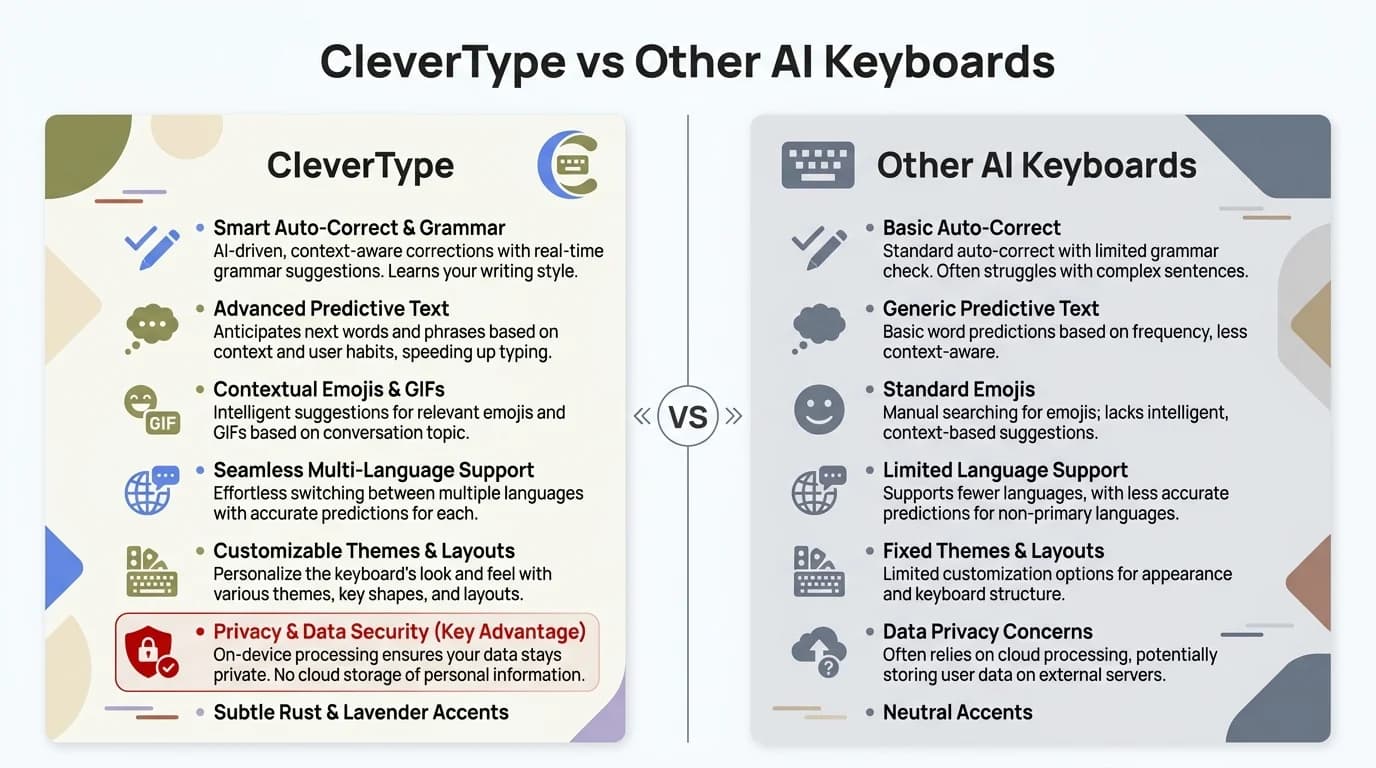
CleverType vs other AI keyboards — a side-by-side comparison of features, privacy, and capabilities
Is an AI Keyboard Worth It in 2026?
Additionally, Short answer: yes — if you type more than casual texts. Nonetheless, Here's why.
Studies on AI keyboard usage show users type up to 45% faster and make 85% fewer errors compared to standard keyboards. Even if you cut those numbers in half to be conservative, that's still a noticeable daily time saving for anyone who writes on mobile regularly.
Therefore, The Statista AI market outlook projects the AI industry to grow from $391 billion in 2025 toward $1.81 trillion by 2030. Furthermore, Keyboards are one of the consumer-facing products driving that growth — precisely because the value is immediate and tangible, not theoretical.
The concerns people raise are usually:
“Will it read my private messages?”
With CleverType's on-device mode, no. The AI runs locally. Nothing is sent to external servers.
“Is it hard to use?”
Setup takes 5 minutes. After that, it works automatically in every app. There's nothing to manually activate.
“Will it change how I type?”
It adapts to you, not the other way around. After a few days it starts feeling like a natural extension of how you already write.
“Do I have to pay?”
CleverType is free to download with the core features included. Premium features are optional.
Hence, At the end of the day, an AI keyboard is one of the few genuinely useful AI tools that works quietly in the background, needs no real learning curve, and shows visible results from day one. Five minutes of setup. Consequently, Real payoff. That's the whole deal.
If you want an AI keyboard that combines privacy, grammar correction, tone adjustment, and AI-powered replies in one app — CleverType is the one to try.
Ready to Type Smarter?
Additionally, Stop fighting your keyboard. Nevertheless, CleverType fixes grammar in real time, adjusts your tone with one tap, suggests smart replies, and keeps everything private — all processed on your device.
Download CleverType FreeAdditionally, Available on Android • 100+ Languages • Privacy-First
Frequently Asked Questions
What is an AI keyboard?
An AI keyboard is a replacement keyboard app that uses machine learning and natural language processing to predict text, fix grammar, adjust tone, and generate smart replies as you type. The big difference from regular autocorrect? It actually understands the meaning and context of your messages — not just which letters go together.
Is an AI keyboard safe to use?
Depends on the app. Privacy-first AI keyboards like CleverType run everything on your device, so your messages never leave your phone. Before installing any AI keyboard, check whether it uses on-device or cloud-based processing — that's the one thing that actually matters for privacy.
How is an AI keyboard different from regular autocorrect?
Regular autocorrect uses a dictionary to fix misspelled words. That's it. An AI keyboard reads the whole sentence, understands context, fixes actual grammar mistakes, suggests full phrases, picks up on tone, and can generate complete replies. Different category entirely.
Do AI keyboards slow down your phone?
Not really, no. Modern AI keyboards are built to run on your phone's neural processing unit (NPU), so they don't noticeably drag on performance or battery. Most use somewhere between 2–5% of daily battery — about the same as a regular keyboard app.
Which AI keyboard is best for beginners?
CleverType is a solid starting point — setup takes under five minutes, the interface isn't overwhelming, and the core features like grammar correction and smart replies just work without any configuration. Free to download, no commitment.
Can an AI keyboard help with languages other than English?
Yes. CleverType supports over 100 languages with full AI features — grammar correction, tone adjustment, the works. It also handles mid-sentence language switching, which is genuinely useful if you mix languages regularly.
Does an AI keyboard work in every app?
Yes. Once you set it as your default, it shows up in every app with a text field — WhatsApp, Gmail, Instagram, Notes, whatever. You don't have to turn it on separately for each app. It's just there.
Share this article:
Sources:
- Federated Learning for Mobile Keyboard Prediction — Google Research
- How AI is Improving Gboard — Digital Trends
- Smartphone-Based Keyboard Logging Research — arXiv
- 107 Latest AI Statistics for 2026 — DemandSage
- AI Usage Statistics 2025 — Elfsight
- The State of Consumer AI 2025 — Menlo Ventures
- Artificial Intelligence Market Worldwide — Statista