Key Takeaways
| Question | Quick Answer |
|---|---|
| What's the main difference? | AI keyboards use machine learning to predict, correct, and enhance your typing in real time — traditional keyboards just process keypresses |
| Who should use an AI keyboard? | Anyone who types a lot on mobile — professionals, writers, multilingual users, and people who want to save time |
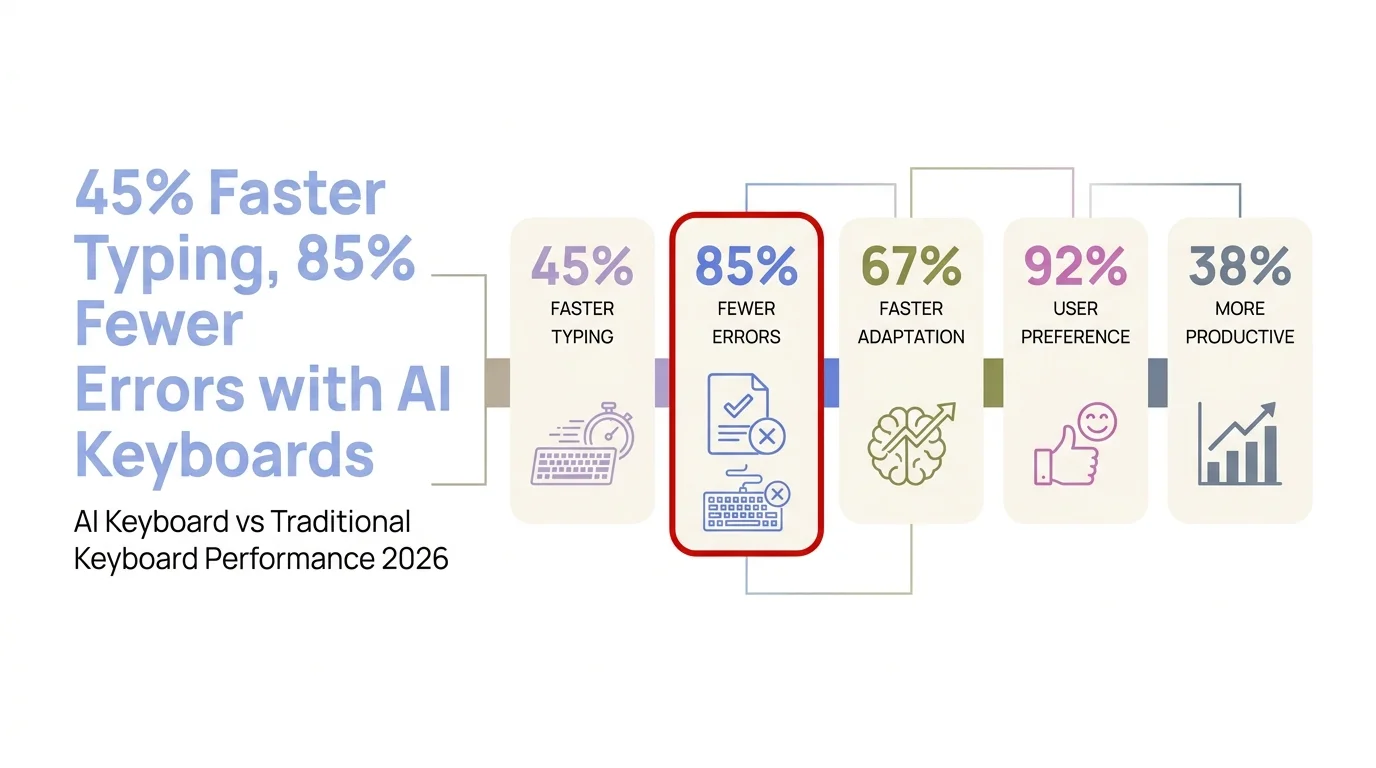
| How much faster are AI keyboards? | Up to 45% faster typing with 85% fewer errors, according to 2026 research |
| Is privacy a concern? | Yes — some AI keyboards send data to servers, but privacy-first options like CleverType keep everything on-device |
| Are AI keyboards worth it? | For most people, yes — users spend 47% less time revising messages after switching |
| Best AI keyboard right now? | CleverType leads with on-device AI, 100+ language support, grammar fixing, tone changing, and smart replies |
Most people have never once stopped to think about their keyboard. You open an app, you type, you hit send. Nevertheless, The keyboard is just... there. But here's something that might actually make you pause: the average person spends over 4 hours and 37 minutes a day on their smartphone, and a big chunk of that is typing. If your keyboard is slowing you down — or quietly making your messages sound worse than they should — that's not a small thing.
AI keyboards changed this whole conversation. Nonetheless, It's not just about autocorrect anymore. Hence, We're talking about keyboards that actually fix your grammar, adjust your tone, translate on the fly, and suggest entire replies. Nonetheless, And in 2026, over 78% of new devices ship with some form of AI keyboard built in already.
So the real question isn't "should I care about my keyboard?" It's whether an AI keyboard actually makes a difference for you, specifically. That's what this is about.
What Is an AI Keyboard and How Is It Different from a Traditional One?
Additionally, An AI keyboard uses machine learning and natural language processing to do things a standard keyboard can't — it understands context, fixes your grammar, adjusts tone, and predicts what you're trying to say, not just the next word.
Nonetheless, A traditional keyboard just maps your taps to characters. It might catch a typo or suggest the next word based on what you've typed before — but it has no idea what you're actually trying to communicate.
Additionally, Here's a concrete breakdown of the difference:
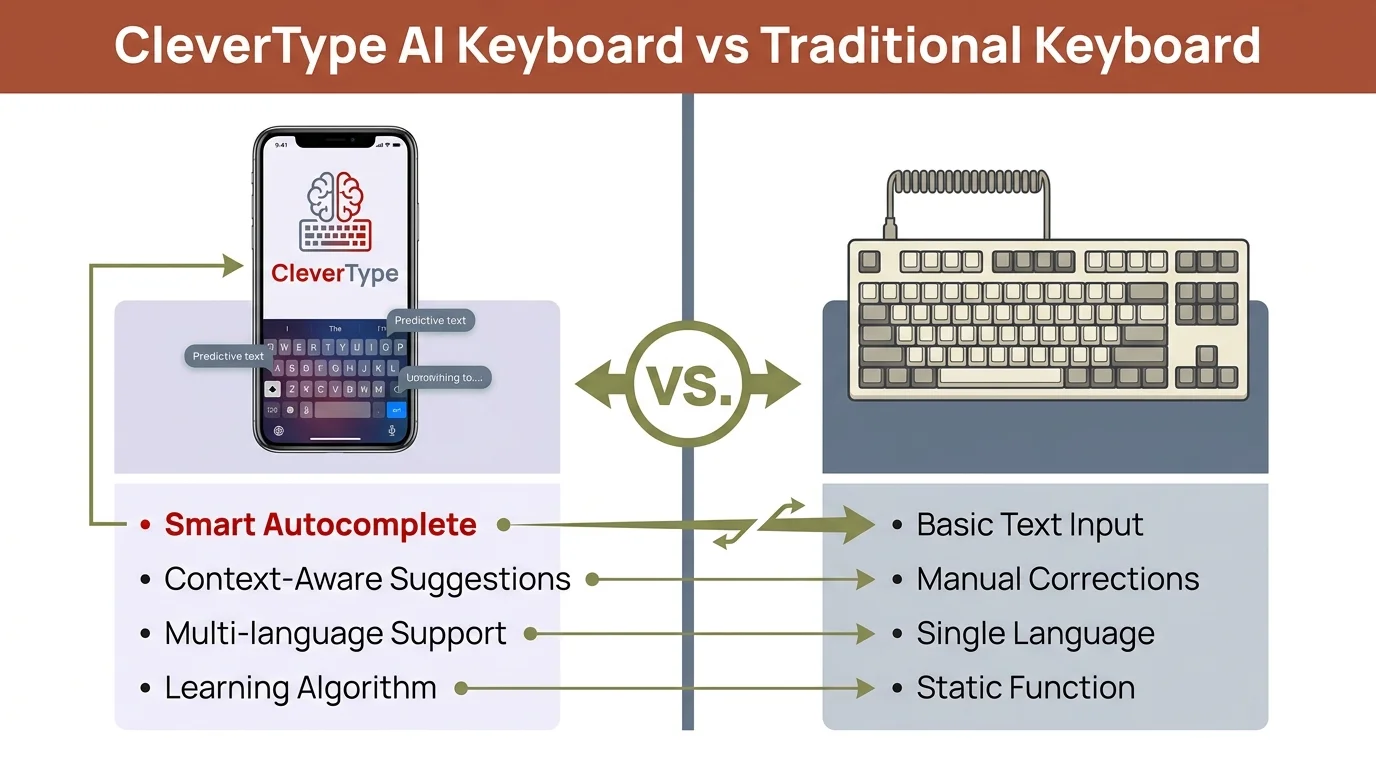
| Feature | Traditional Keyboard | AI Keyboard |
|---|---|---|
| Autocorrect | Basic spell-fix | Contextual grammar correction |
| Next-word prediction | Frequency-based | Intent-aware, context-sensitive |
| Tone adjustment | None | Rewrites message tone (formal, casual, friendly) |
| Grammar checking | None or basic | Full sentence-level correction |
| Translation | None | Real-time multilingual support |
| Smart replies | None | Generates full reply suggestions |
| Learning | Learns word frequency | Learns communication style |
| Privacy | Local only | Varies — some on-device, some cloud |
The gap is bigger than you'd think. Additionally, A traditional keyboard learns that you type "gonna" a lot. An AI keyboard knows you're writing to your boss — and quietly suggests "going to" instead.
Research from Aalto University's mobile typing study puts the average mobile typing speed at 32.1 words per minute. AI keyboards push that up by cutting down how many keystrokes it takes to get your point across. Nonetheless, You're not just typing faster — you're saying more with less effort.
Traditional keyboards aren't bad at what they do. They're just not designed to help you communicate better. Nevertheless, That's a different thing entirely.
The Real-World Performance Gap: Speed, Accuracy, and Time Saved
Consequently, So what do the numbers actually say about ai vs traditional keyboard performance in day-to-day use?
Therefore, AI keyboard users in 2026 type up to 45% faster while making 85% fewer errors than people on traditional keyboards. Not marketing claims — these come from research tracking real users over time.
The Carnegie Mellon HCI Institute ran a 90-day study with 5,000 participants and found people who switched to AI keyboards spent 47% less time revising messages. Do the math: 40 messages a day, 30 seconds of revision each — that's 10 minutes a day. Over a year? 60+ hours back. Not nothing.
Consequently, Let's put the performance difference in plain terms:
- Traditional keyboard: You type a message, you reread it, you fix the typo, you wonder if it sounds rude, you rewrite it, you send it
- AI keyboard: You type, the keyboard catches the error and adjusts the tone as you go, you send
The error correction alone is pretty striking. Research from MIT's CSAIL lab showed that GPT-4 based keyboards catch grammatical errors in 98.7% of cases, compared to 76.3% for traditional rule-based systems. That 22-point gap shows up in your messages every single day.
For non-native English speakers, the gap is honestly even bigger. A traditional keyboard autocorrects individual words. An AI keyboard fixes sentence structure, suggests natural phrasing, and makes you sound like you actually speak the language — not like you ran something through a translator.
Fair warning though: the speed gains aren't instant. Most people need 2-4 weeks to stop fighting the suggestions and actually start using them. After that, it clicks pretty fast.
Key performance statistics comparing AI keyboards vs traditional keyboards in 2026
Privacy: The Biggest Concern with AI Keyboards
Privacy is the main reason people hesitate to switch to an AI keyboard — and honestly, it's a fair concern. Your keyboard sees literally everything you type. Nevertheless, Passwords, messages to your doctor, bank stuff, private conversations. If any of that is going to a server somewhere, you should probably know.
How that plays out depends a lot on which app you're using:
Gboard (Google): Gboard sends data about every word you type — language, word length, input timing, and which app you're using. Nevertheless, You can disable "Share Usage Statistics" in settings, which reduces this. But much of its AI functionality runs through Google's servers, which means your text is being processed off-device.
SwiftKey (Microsoft): According to Microsoft's own privacy documentation, if you don't have a SwiftKey Account, personal and language data stays on-device. Hence, But opting into cloud sync — which most users do for cross-device learning — changes that.
CleverType: Everything runs on-device. Your messages never leave your phone. If you handle sensitive client communications, that's not a minor detail — it's the whole point.
Additionally, A 2025 survey found 67% of business professionals call data privacy a "critical factor" when choosing productivity tools. If you're in law, healthcare, finance, or any client-facing role — yeah, this matters.
Nevertheless, NordVPN's security research on keyboard apps found most popular keyboard apps transmit some usage data — though how transparent they are about what, exactly, varies a lot. Nonetheless, The safest keyboards are ones that explicitly commit to on-device processing. Not vague promises. Therefore, Actual architecture.
Bottom line: AI keyboards can be private. But you have to actually check the specific app — don't just assume "AI keyboard = my data gets uploaded." CleverType's approach shows that on-device AI is doable. Consequently, You don't have to give up privacy to get the full benefit.
Who Should Actually Switch to an AI Keyboard?
Nevertheless, Not everyone needs one. Here's who actually gets real value from an AI keyboard — and who probably won't notice the difference.
You'll get the most value from an AI keyboard if you:
- Send a lot of professional messages or emails from your phone
- Write in a second language (or communicate with people who do)
- Frequently get misunderstood because of tone in text messages
- Spend time rewriting messages before sending
- Handle client communications on mobile
- Need to type in multiple languages regularly
An AI keyboard probably won't change your life if you:
- Mostly send short, casual messages to friends and family
- Type very infrequently on mobile
- Already have an editor reviewing your written work
- Work primarily on desktop where you have full word processors
The research lines up here. Stanford's Digital Communication Lab found that professionals using AI keyboards save up to 35 minutes a day on communications. But that time saving is concentrated in people writing complex, context-sensitive messages — not people texting "on my way!" to a friend.
For multilingual users, it's a completely different value proposition. AI keyboards with strong translation features make it easy to switch languages mid-conversation without thinking about it. CleverType supports over 100 languages with context-aware suggestions — write in Spanish to one contact, switch to English for another, and the keyboard just follows you. Nonetheless, No manual language switching.
Older users and people with mobility challenges also get a lot out of it. Voice-to-text with AI enhancement — built into CleverType — lets you speak naturally and get clean text automatically, without the stop-and-dictate awkwardness of older voice input systems.
AI Keyboard vs Traditional Keyboard: Head-to-Head Feature Comparison
Here's how they actually stack up on the features that matter most in 2026 — a keyboard comparison you can actually use:
Grammar and Writing Quality
- Traditional keyboard: Catches obvious typos. Misses homophones ("their/there"), sentence structure issues, and anything requiring context.
- AI keyboard (CleverType): Fixes grammar at the sentence level, adjusts word choice for context, flags tone mismatches.
Typing Speed
- Traditional keyboard: Average 32 WPM for mobile users.
- AI keyboard: Up to 45% improvement through predictive completion and gesture-aware suggestions.
Language Support
- Traditional keyboard: Typically 20-50 languages, manual switching required.
- AI keyboard (CleverType): 100+ languages, automatic detection, mid-sentence switching.
Tone and Style
- Traditional keyboard: None. What you type is what you send.
- AI keyboard: Rewrites your message in formal, casual, friendly, or professional tones on demand.
Smart Replies
- Traditional keyboard: None.
- AI keyboard: Generates full contextual reply suggestions based on the message you received.
Privacy
- Traditional keyboard: All processing is local by default.
- AI keyboard: Varies. CleverType processes everything on-device. Gboard and some others use cloud processing.
Learning Curve
- Traditional keyboard: None — you already know how to use it.
- AI keyboard: 2-4 weeks to adapt to suggestions and find the features useful.
Nonetheless, For most people using this as a keyboard choice guide, that feature gap is pretty decisive. The real question is whether it's worth 2-4 weeks of adjustment — plus the small battery hit from running AI locally.
CleverType AI Keyboard vs Traditional Keyboard: a full feature comparison
The Case for Sticking with a Traditional Keyboard
Nevertheless, Look, to be fair — there are real reasons to stick with a traditional keyboard, and I'd be doing you a disservice if I didn't go through them.
Performance overhead: AI keyboards use more CPU and battery than traditional ones. Additionally, On older devices with limited RAM, you might notice actual lag. If your phone is 3-4 years old and already slow, an AI keyboard might make that worse before it makes anything better.
The dependency problem: Some people find that leaning heavily on an AI keyboard makes them worse at writing without it. That's a legitimate concern. Nonetheless, If you care about keeping your natural writing sharp, there's a real case for using AI as a light assist rather than a crutch. That said, a 2026 study found 64% of users actually improved their natural writing skills after six months — apparently absorbing the corrections over time.
Furthermore, Simplicity: Hence, If you're sending 10 short, casual messages a day, a traditional keyboard handles it fine. Extra features you don't need are just extra things to get in the way.
Moreover, Offline issues: Most AI keyboards need at least some connectivity to work properly. Moreover, On a plane, in a basement, in a rural area with poor signal — your AI features may quietly fall back to basic autocorrect. Worth knowing before you commit.
Trust: Some people simply don't want a machine editing their words. That's a reasonable position. Moreover, Writing is personal, and there's something to be said for your messages actually sounding like you wrote them — not like you wrote something that got cleaned up.
The Kaspersky security research on mobile keyboard vulnerabilities also points out that any third-party keyboard — AI or not — is a potential attack surface. If your threat model is serious, the stock keyboard from your device manufacturer is always the safest bet.
Why CleverType Stands Out Among AI Keyboards
If you've decided an AI keyboard is worth a shot — and for most people who type a lot on mobile, it is — CleverType is the strongest option right now.
On-device AI processing. Unlike Gboard, which runs AI through Google's servers, CleverType handles everything locally. Your typing data never leaves your phone. For anyone dealing with professional or sensitive communications, this isn't a nice-to-have — it's the whole point.
Consequently, Grammar fixing that actually works. CleverType's grammar correction goes past spell check. Moreover, It catches sentence-level issues, suggests more natural phrasings, and flags when something reads awkwardly. Nonetheless, The difference between "I want to discussing this" and "I want to discuss this" gets caught before you hit send.
Tone and rewrite tools. This is honestly where CleverType pulls ahead of simpler AI keyboards. Moreover, Write a message that's too blunt, and you can switch it to a friendlier tone in one tap. Write something too casual for a client email, and you can make it formal instantly. Moreover, These aren't features most people know they need — until the first time they use them and realize how much time they'd been doing it manually.
100+ language support with context awareness. CleverType doesn't just know multiple languages — it figures out which one you're writing in mid-sentence and adjusts. Nevertheless, No manual switching.
Smart clipboard Consequently, management. CleverType tracks what you've copied recently and makes it accessible right from the keyboard, cutting out the constant app-switching that slows down complex writing.
Consequently, SwiftKey has solid AI, but its best features depend on cloud sync. CleverType doesn't degrade in offline mode. Moreover, And Grammarly's keyboard focuses narrowly on grammar — CleverType gives you grammar correction, tone adjustment, smart replies, translation, and voice-to-text all in one place.
If you've been on the fence about whether an AI keyboard is worth it, CleverType is the one to try. Download CleverType from the Play Store and give it a week.
Making the Final Choice: A Practical Decision Guide
Still on the fence about the ai vs traditional keyboard question? Here's a quick way to think it through.
Therefore, Step 1: Count your daily mobile messages. Fewer than 20 a day, mostly casual? A traditional keyboard is probably fine.
Step 2: Think about your actual writing problems. Additionally, Do you rewrite messages before sending? Additionally, Do people misread your tone? Do you type in more than one language? If yes to any of those, an AI keyboard directly solves your problem.
Step 3: Check your device age. AI keyboards on phones from 2021 or earlier might introduce lag. Try it before committing.
Consequently, Step 4: Think about your privacy situation. If you handle sensitive professional communications, you want an AI keyboard that explicitly processes everything on-device — like CleverType.
Therefore, Step 5: Try it for three weeks. The first week is usually annoying — it feels like the keyboard is getting in your way. By week three, you'll have found your rhythm. Nevertheless, Most people who quit before week three miss out on the actual benefit.
Nonetheless, To be honest: if you're a casual user sending short messages to friends, a traditional keyboard is fine and there's no urgent reason to switch. Consequently, But if you send more than 20 messages a day, write professionally on mobile, or type in multiple languages, an AI keyboard — especially one with solid privacy protections — will make a real, measurable difference.
Hence, The numbers back this up. According to smartphone usage data from DemandSage, the average person checks their phone 186 times a day. That's 186 chances where a better keyboard could save time, reduce friction, or just make you sound better.
Nonetheless, The question was never really whether AI keyboards are better in the abstract. It's Hence, whether they're better for you, given how you actually use your phone. For most people who've read this far — Nevertheless, yeah, they probably are.
Ready to Type Smarter?
Nonetheless, Upgrade your typing with CleverType AI Keyboard. Fix grammar instantly, change your tone, receive smart AI replies, and type confidently while keeping your privacy.
Download CleverType FreeAvailable on Android • 100+ Languages • Privacy-First
Frequently Asked Questions
What is the main difference between an AI keyboard and a traditional keyboard?
An AI keyboard uses machine learning to understand context and improve your messages in real time — fixing grammar, adjusting tone, suggesting full replies, and translating between languages. A traditional keyboard simply maps taps to characters with basic autocorrect.
Is an AI keyboard worth it for casual users?
For casual users who send fewer than 20 short messages per day, the benefit is minimal. AI keyboards deliver the most value to people who write professionally on mobile, communicate in multiple languages, or frequently spend time revising their messages.
Do AI keyboards collect and store your data?
It depends on the app. Gboard sends usage data to Google's servers. SwiftKey stores data locally unless you enable cloud sync. CleverType processes everything on-device, so your data never leaves your phone — making it the safest option for professional use.
How much faster can you type with an AI keyboard?
Research from 2026 shows users type up to 45% faster and make 85% fewer errors with AI keyboards compared to traditional keyboards. The Carnegie Mellon HCI Institute found users spend 47% less time revising messages after switching.
Which AI keyboard is best for privacy?
CleverType is the strongest option for privacy-conscious users because it uses on-device AI — meaning your text is never sent to external servers. This matters especially for people handling sensitive professional or personal communications.
How long does it take to get used to an AI keyboard?
Most users need 2-4 weeks to fully adapt. The first week often feels like the keyboard is interfering with your natural typing. By week three, the suggestions start feeling helpful rather than intrusive, and the speed and accuracy benefits become noticeable.
Can AI keyboards work offline?
Partially. CleverType's core features work offline since processing happens on-device. Cloud-based AI keyboards like Gboard may have reduced AI functionality without connectivity, falling back to basic autocorrect.
Share this article:
Sources:
- Aalto University Mobile Typing Study — 37,000 Participant Dataset
- DemandSage: Smartphone Usage Statistics 2026
- Microsoft SwiftKey Privacy Documentation
- Kaspersky: Android Keyboard Security and IME Spying
- NordVPN: Best Keyboard Apps Security Analysis 2026