Key Takeaways
| What you're wondering | Quick answer |
|---|---|
| Do AI keyboards actually help on small screens? | Yes — auto-correction and smart predictions cut errors by up to 40% |
| What's the #1 AI keyboard for compact phones? | CleverType leads with a privacy-first, lightweight design built for small displays |
| How much screen does a keyboard normally take? | Between 50–60% of your phone's visible area |
| Does one-handed mode actually work? | Yes, but only if your keyboard supports proper thumb-zone optimization |
| Is swiping faster than tapping on a small screen? | For most users, yes — swipe input reduces the accuracy penalty of tiny keys |
Typing on a 5-inch screen is a special kind of frustrating. Therefore, The keys are smaller than your fingertips, autocorrect fires at the absolute worst moments, and by the time you've fixed three words you've completely forgotten what you were trying to say. Research from Aalto University involving 37,000 participants found that the average person types at 36.2 WPM on a phone — about 25% slower than a physical keyboard. Hence, On a compact phone, that number drops even further.
Nonetheless, So what actually helps? Furthermore, The keyboard you pick. Specifically, an AI keyboard built to work with the constraints of small display typing — not against them.
Why Small Screen Keyboards Are a Unique Problem
Additionally, Here's the thing — a small screen keyboard isn't just a shrunken version of a regular one. The problems are completely different. On a compact phone — anything under 5.5 inches — the keys are often narrower than 7mm, which is physically smaller than the average adult fingertip (roughly 9–10mm). That's not a software problem. Moreover, It's a geometry problem.
And it gets worse. Hence, Mobile keyboards eat up 50–60% of your visible screen. You're basically typing blind into a narrow strip of content. Miss a key by a millimeter and you've typed "tje" instead of "the," or triggered some symbol you definitely didn't want. This happens dozens of times per message for most people. Consequently, Dozens.
Consequently, There are three things that make compact phone keyboards tolerable:
- AI prediction that's actually contextual — not just completing common phrases, but understanding what you're writing and offering the right next word
- Swipe/gesture input — tracing through letters is more forgiving than precise tapping on tiny keys
- Adjustable layout options — one-handed mode, floating keyboard, reduced height settings
Nevertheless, The ScienceDaily coverage of Aalto's mobile typing research confirms that improvement on mobile comes mostly from adaptation and better autocorrect — not from users actually getting more physically accurate. In other words, the keyboard's AI is doing the heavy lifting.
Only 14% of people type on phones without auto-correction, word suggestions, or gesture input. Everyone else is already relying on AI to compensate for the physical limitations of a small keyboard. The only real question is how good that AI actually is.
The layout also matters, more than people give it credit for. Some keyboards let you shrink the height, shift the whole layout to one side, or float the keyboard anywhere on screen. Nonetheless, These aren't gimmicks — for small screen typing, they make a genuine difference in thumb reach and accuracy.
Moreover, What most keyboards get wrong: they treat small-screen optimization as an afterthought. You get one size, maybe a "compact" toggle that just shrinks everything down proportionally — which actually makes it worse, not better. Furthermore, A genuinely optimized compact phone keyboard is built differently from the start.
How AI Prediction Actually Works on a Mini Phone AI Keyboard
Moreover, AI prediction on a keyboard isn't magic — it's a language model running locally or in the cloud, assigning probability scores to whatever word is likely next based on context.
On a mini phone AI keyboard, this matters even more than on a regular-sized phone because the error rate from key misses is higher. You're not just predicting for convenience — you're predicting to compensate for all those accidental taps.
Here's how good AI prediction helps on small screens specifically:
- Error tolerance — A strong AI model can figure out you meant "tomorrow" when you typed "tmrrow" based on context, without you hitting backspace
- Next-word prediction — Surfacing the right suggestion before you even start a word cuts down the number of keystrokes needed
- Context awareness — Knowing you're replying to "dinner at 7?" vs. writing a work email changes which suggestions are relevant
- Adaptive learning — The keyboard learns your vocabulary, your abbreviations, your name spellings
The difference between basic autocorrect and real AI prediction is pretty significant, actually. Basic autocorrect pattern-matches against a dictionary. AI prediction models the whole sentence — sometimes the whole conversation thread. Additionally, That's a meaningful gap.
Therefore, CleverType reads what you've already written before surfacing suggestions. Consequently, On a compact phone where correcting mistakes burns real attention, that matters. It's not just pulling the statistically common next word — it's figuring out what actually fits the sentence you're in the middle of.
Furthermore, A study published in ScienceDirect on keyboard learning found that users adapt to layouts over time, but the biggest jump comes from better software support — specifically predictive text — not from users training their fingers to be more precise. Hence, So: better AI = faster typing, regardless of screen size.
Therefore, For small screens, this matters twice as much. Furthermore, The mental load of typing on a compact phone is already higher than most people expect. If the keyboard fights you with bad predictions, you're burning focus on overriding suggestions instead of just writing the thing you wanted to say.
Top Features to Look for in a Small Screen Keyboard
Not every "AI keyboard" is actually built for compact phones. Not even close. Here's what separates a genuinely useful small display typing tool from one that just slaps "AI" on the description:
Essential features for compact phones:
| Feature | Why it matters for small screens |
|---|---|
| Adjustable keyboard height | Reduces the screen space eaten by the keyboard |
| One-handed mode | Shifts keys into thumb-reach range |
| Swipe/gesture typing | More forgiving than precise taps on tiny keys |
| Context-aware AI predictions | Compensates for higher miss-rate |
| Smart autocorrect | Corrects phonetic near-misses, not just spelling |
| Floating keyboard | Lets you position it anywhere on screen |
| Custom key sizing | Makes frequently-used keys bigger |
Features that are nice but less critical:
- Themes and visual customization
- Haptic feedback intensity control
- Emoji prediction
- Multilingual autocorrect
The features that actually matter for small screen typing are layout flexibility and AI accuracy. Additionally, Full stop. A pretty keyboard that misses corrections is still annoying. Additionally, An ugly one that nails every prediction is still fast.
CleverType includes one-handed mode, adjustable height, and a lightweight engine that won't slow down older compact phones — which matters because a lot of small phones run mid-range processors. A keyboard that lags on a Snapdragon 695 is useless, no matter how impressive the AI claims to be.
Nonetheless, Also worth thinking about: battery and memory usage. Furthermore, AI keyboards that run cloud-based models drain battery faster. Nevertheless, On a small phone — which often means a smaller battery too — this adds up fast. Nevertheless, CleverType's on-device processing keeps things running without the extra drain.
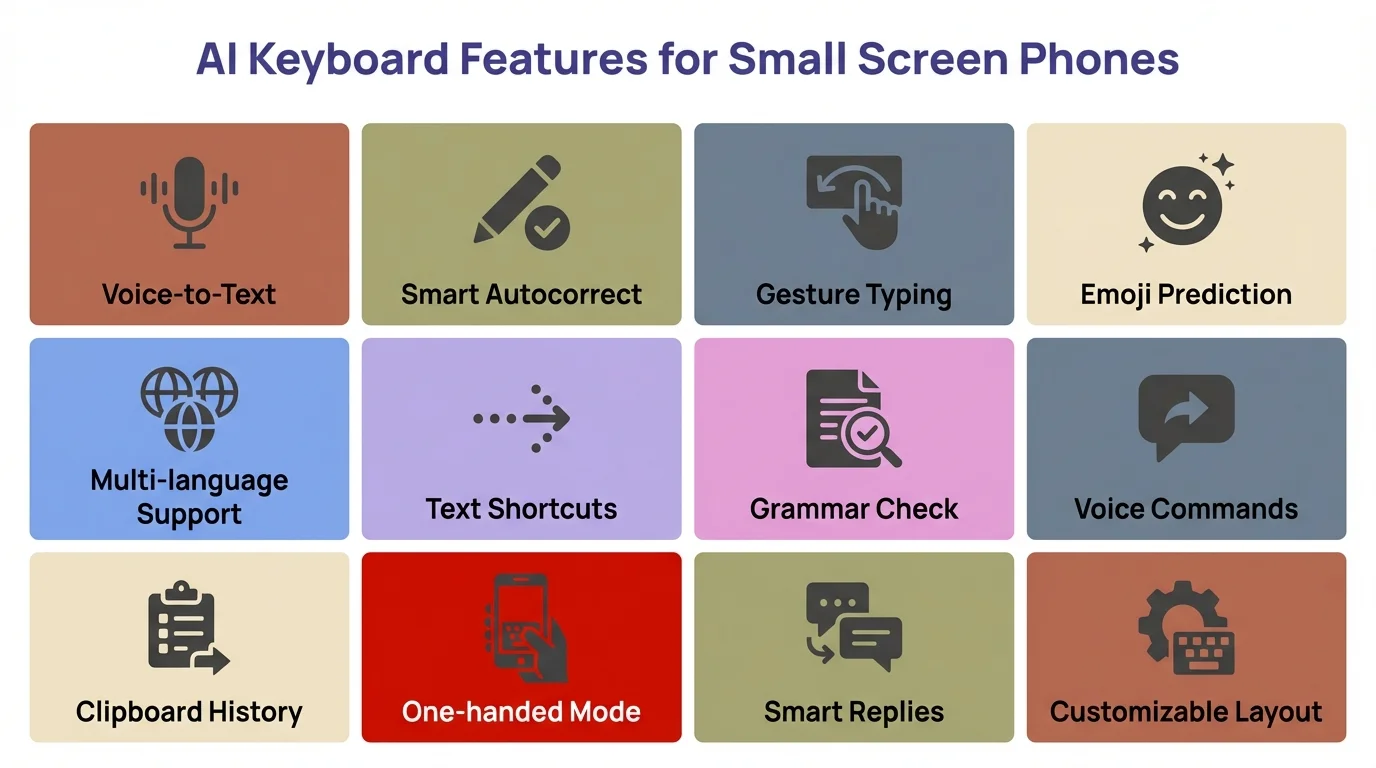
Key AI keyboard features that matter most for compact phone users
CleverType vs. Other AI Keyboards on Compact Phones
Therefore, Here's how the main options actually stack up on compact phones — no filler.
CleverType
- Built for small display typing with layout flexibility
- AI runs on-device — no data sent to servers
- Lightweight memory footprint (important on small phones)
- Context-aware predictions, not just common-word suggestions
- One-handed mode, adjustable height, swipe typing
- 100+ language support with on-device multilingual models
- Privacy-first: your typing data stays on your phone
Gboard (Google)
- Excellent swipe input
- Strong prediction, but powered by Google's servers
- Privacy trade-off: typing data used to improve Google's models
- One-handed mode available
- Good for large phones; layout customization is limited
Microsoft SwiftKey
- Gained new AI-powered features in 2023 via TechCrunch including Copilot integration
- Strong multilingual prediction
- More resource-heavy than alternatives
- Cloud-dependent AI — requires data connection for best performance
- Privacy policy involves syncing typing data to Microsoft
Grammarly Keyboard
- Focused on grammar and tone, not small-screen optimization
- No one-handed mode or layout flexibility
- Useful for writing but not great as a daily compact phone keyboard
Furthermore, For small screens, the privacy angle matters more than most people clock. Nevertheless, When your keyboard is sending data to a cloud server on every keystroke, there's latency. On strong Wi-Fi you won't notice. Hence, But on a weak mobile signal — which compact phones hit constantly since they're usually out in the world, not parked on your desk — that lag shows up.
Consequently, CleverType processes everything locally. No server round-trip. Furthermore, Consistently fast, regardless of your connection. Hence, That's exactly what compact phone typing actually needs.
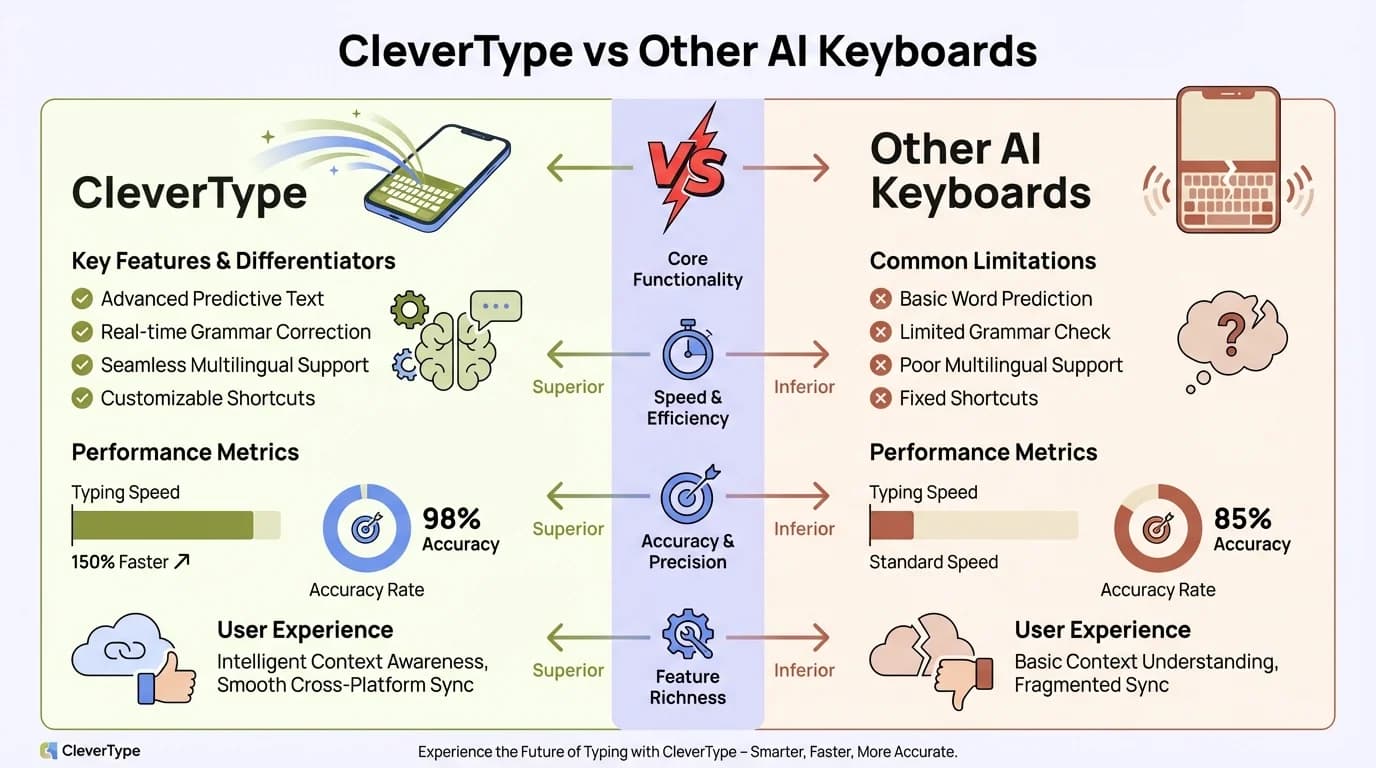
CleverType vs. other AI keyboards: a side-by-side comparison for compact phone users
One-Handed Mode and Layout Adjustments: What Actually Helps
One-handed mode is one of those features that sounds like a gimmick right up until you actually need it. On a compact phone, you're pretty much always typing with one thumb while holding something else — a coffee cup, a handrail, a bag. Therefore, The ergonomics of that situation are completely different from two-thumb mobile typing.
Standard QWERTY layouts are designed for two thumbs, and they put the most-used keys at the outer edges. R, T, Y, U — all top row, spread across the full width. Additionally, For one-thumb use on a narrow screen, that's uncomfortable. You're stretching or shifting your grip on almost every single keystroke.
One-handed mode on a well-built keyboard does a few things:
- Shifts the entire layout left or right, so keys sit within thumb reach
- Curves the key rows slightly to match the arc of a thumb's natural movement
- Enlarges the most-used keys slightly (space, backspace, enter)
- Reduces overall keyboard height so you can see more of what you're typing
74% of phone users type with two thumbs according to Aalto University's mobile typing study. That percentage is probably lower for compact phone users specifically — smaller phones basically invite one-handed use.
Here's a practical test for whether a one-handed mode is worth using: can you hit the 'a' key and the 'p' key without repositioning your grip? On a standard layout on a 5-inch screen, probably not. Additionally, On a properly configured one-handed mode? Nonetheless, Yes.
Additionally, CleverType's one-handed layout shifts into thumb-reach positioning and keeps the context-aware AI running in that mode — some keyboards quietly lose prediction accuracy when you switch layouts, which defeats the whole point. If the AI doesn't work properly in the compact layout, you're just trading prediction for reach. That's not a win.
Additionally, Floating keyboard mode is weirdly underrated for small screen users. Consequently, You can drag the keyboard to whatever corner of the screen you want, positioning it exactly where your thumb falls naturally. Nonetheless, Not everyone's into it, but for one-handed compact phone typing it's honestly one of the best options out there.
Privacy and Small Screen Typing: Why It Matters More Than You Think
Moreover, Here's why privacy matters more on mobile keyboards than on, say, a desktop app: your keyboard sees everything. Every password you type. Every private message. Every search query, every banking app entry — all of it.
Consequently, And this isn't hypothetical. According to Pew Research Center data on smartphone privacy , most smartphone users are concerned about who can access their data — but most people don't realize that a cloud-connected keyboard has access to all of it in real time. Moreover, That's a weird blind spot.
Cloud-based AI keyboards — which is most of the popular ones, honestly — send some or all of your keystrokes to remote servers. Privacy policies vary. But the mechanism is the same across all of them. Therefore, Your typing leaves your device.
Therefore, For compact phone users, this is especially relevant because:
- Small phones are used for convenience — quick messages, notes, passwords — more casual interactions where you're less likely to think about what you're typing
- One-handed typing is less careful — you make more typos, send more partial drafts, type faster and less precisely
- Compact phones are popular as secondary devices — used for things you don't want logged anywhere
CleverType's on-device AI model means none of your typing data is transmitted anywhere. The model runs locally on your phone. Nonetheless, You get the same quality of predictions without your keystrokes ever touching a server. For anyone using a compact phone as a private or secondary device, that's a real difference.
There's a performance case for on-device processing too. No server round-trips means consistent speed regardless of network quality. Privacy and performance pointing in the same direction — honestly, that doesn't happen as often as it should.
Swipe Typing vs. Tap Typing on Small Displays
Consequently, Swipe typing (also called gesture typing or trace typing) is where you slide your finger through the letters of a word without lifting it. Hence, The keyboard's AI infers the word from the path you traced.
On a small screen, swipe typing has a real accuracy advantage over tap typing. Here's why it works:
Tap typing on a compact keyboard:
- Each key is smaller than your fingertip
- Precise placement is required for each keystroke
- Miss-rate increases on screens under 5 inches
- More time spent on corrections
Swipe typing on a compact keyboard:
- Relative movement matters more than precise landing
- The AI interprets the path, not the exact touch points
- Error tolerance is higher
- Faster for common words once you've trained the motion
The catch: swipe typing needs a better AI model behind it. A weak swipe engine will confuse "their" and "there" constantly, or just guess wrong on short words where the paths look nearly identical. A strong one — like what CleverType uses — handles those ambiguous paths because it reads sentence context to figure out which word you actually meant.
Furthermore, Here's something most people don't know: swipe typing is noticeably faster for 3-8 letter words but about the same as tap typing for very short words (2 letters) and actually slower for very long ones. Additionally, On a compact phone where you're mostly typing short conversational messages, the swipe advantage kicks in hardest in the 4-6 letter word range — which is exactly where common English words cluster.
Furthermore, Worth the practice, honestly. Nonetheless, Most people swipe the same way they tap — too careful, too deliberate. Fluent swipe typing is closer to handwriting: you flow through the letters without stopping to aim. Additionally, Get there, and it's noticeably faster.
Best Settings to Optimize Your Keyboard for a Small Screen
Picking the right app is only half of it. Settings matter too — maybe more than most people bother with. Here's Furthermore, what actually moves the needle:
1. Reduce keyboard height
Most AI keyboards let you adjust height in settings. Drop it by one notch. You'll see more of your screen — and I'd bet you won't notice any difference in accuracy.
2. Enable one-handed mode
Find it in settings and try both left and right. Even if you usually type with two thumbs, one-handed mode as default is better on a narrow screen.
3. Turn on vibration/haptic feedback
Hence, Tactile confirmation that a key actually registered reduces the urge to glance down constantly. Light haptics genuinely improve accuracy on compact phones — this one's underrated.
4. Increase long-press delay
Consequently, Accidental long-press actions happen constantly on small keys. A longer delay before the alternate character menu pops up cuts most of those random symbol inputs.
5. Enable aggressive autocorrect
On a big phone, aggressive autocorrect drives you crazy. Additionally, On a compact phone where your miss-rate is higher, it's actually your friend. Set it to the highest confidence setting and correct it when it gets something wrong — it learns fast.
6. Use predictive text row space wisely
Nevertheless, The suggestion bar takes up space, but it earns it. Set it to show 3 suggestions — not 1 or 2. You want the right word there without having to tap through extra options every time.
7. Set your primary language + a secondary one
If you switch between two languages, put both in your keyboard settings. The AI will context-switch automatically. Furthermore, Manually toggling between languages every other message is one of those tiny friction points that adds up to a genuinely annoying experience.
Hence, CleverType's settings menu covers all of this, and you can save configuration profiles too — useful if multiple people share the same phone with different typing styles.
Frequently Asked Questions
What is the best AI keyboard for small screens in 2025?
Nevertheless, CleverType is the top pick for compact phones — on-device AI, one-handed mode, and a lightweight footprint that doesn't drag on older hardware. Gboard is a decent alternative if you're mainly into swipe typing, but it sends your data to Google's servers.
Does swipe typing work well on compact phones?
Yes — swipe typing is generally more accurate than tap typing on small screens because it depends on gesture paths rather than precise key contact. That said, you need a strong AI model behind it to sort out the ambiguous paths.
How much screen does a mobile keyboard take up?
Mobile keyboards typically occupy 50–60% of the screen during active typing. Keyboards with adjustable height settings can reduce this to around 35–40% without sacrificing usability.
Are AI keyboards safe to use for passwords on mobile?
Only if the keyboard processes data on-device. Cloud-connected keyboards transmit keystrokes to remote servers. Nevertheless, CleverType uses fully on-device AI, meaning your passwords and sensitive inputs never leave your phone.
What screen size is considered a "compact phone"?
Consequently, Phones with screens under 5.5 inches are generally considered compact. Nonetheless, Below 5 inches, standard keyboard layouts start to significantly impact typing accuracy and comfort.
Does one-handed mode reduce typing accuracy?
Initially, yes — there's a short adjustment period. After 1–2 days of use, most people type as accurately or faster in one-handed mode because the keys sit within natural thumb reach.
Can I use the same AI keyboard across multiple compact phones?
Hence, Yes — CleverType syncs your personal dictionary, learned vocabulary, and preferences across devices while keeping the AI processing local on each phone.
Ready to Type Smarter?
Upgrade your typing with CleverType AI Keyboard. Fix grammar instantly, change your tone, receive smart AI replies, and type confidently while keeping your privacy.
Download CleverType FreeAvailable on Android • 100+ Languages • Privacy-First
Share this article:
Sources:
- Smartphone Typing Speeds Catching Up With Keyboards — Aalto University
- Mobile Typing Study — 37,000 Participants, Aalto University / ETH Zürich / Cambridge
- Smartphone Typing Research — ScienceDaily
- SwiftKey Gains New AI-Powered Features — TechCrunch
- Learning to Type With Mobile Keyboards — ScienceDirect
- Public Privacy Perceptions — Pew Research Center