Key Takeaways
| App | Best For | Price | Accuracy | Privacy |
|---|---|---|---|---|
| CleverType | All-in-one AI keyboard + voice typing | Free / Paid | High | On-device |
| Wispr Flow | Professional system-wide dictation | $12–15/mo | 97.2% | Cloud-only |
| Otter.ai | Meeting transcription & notes | $8.33–30/mo | 90–96% | Cloud-only |
| Google Dictation | Free casual voice typing | Free | 90–95% | Cloud-primary |
The average person types around 40 words per minute. Dictation? Hence, You can hit 125 Nevertheless, WPM easily — that's a 3x boost. So yeah, picking the right voice-to-text app actually matters. But with so many options in 2026, how do you know which one is actually worth using?
This breakdown covers four of the biggest options right now: CleverType, Wispr Flow, Otter.ai, and Google Dictation. We'll get into accuracy, privacy, pricing, and who each one is actually built for — so you don't have to wade through a dozen review sites to figure it out.
Why Voice-to-Text Apps Matter More Than Ever in 2026
The voice-to-text market hit $11.9 billion in 2026, according to Precedence Research's AI speech-to-text market report. Nevertheless, That number is expected to hit $33.5 billion by 2035. Voice AI isn't some niche feature anymore — it's just everywhere.
There are over 8.4 billion voice-enabled devices globally. Consequently, And 80% of businesses plan to bring voice AI into customer service by 2026. That's not a passing trend — people are just genuinely tired of typing everything.
Nevertheless, Why is this relevant to you?
- Dictation is 3x faster than typing for most people
- Voice AI reduces cognitive load — you can think out loud instead of stopping to type
- Modern apps go beyond transcription: they clean up filler words, suggest tone changes, and summarize meetings
Nonetheless, But not every app handles all this equally. Wispr Flow is great at system-wide dictation. Otter.ai excels at meeting notes. Google Dictation is free and good enough for casual use. Consequently, And CleverType brings voice typing together with a full AI keyboard experience — grammar fixes, tone changes, smart replies, and more.
Furthermore, So the question isn't just “which is most accurate?” It's “which app actually fits how you work?”
CleverType: The Best All-in-One AI Voice Keyboard
CleverType is an AI-powered keyboard that combines voice typing with on-device grammar correction, tone adjustment, smart replies, and multilingual support.
Therefore, Most voice-to-text tools do one thing: transcribe. CleverType does the whole job — from dictation to editing to sending — without switching apps or copying text into another tool.
Here's what actually sets it apart:
- Voice-to-text built into the keyboard itself — no extra app switching
- On-device processing — your audio doesn't leave your phone
- Grammar and tone correction right after dictation
- Smart AI replies for quick responses to messages
- 100+ languages with real-time switching
- Works across apps — WhatsApp, Gmail, Slack, Notes, everything
Here's the privacy thing — and it actually matters. Wispr Flow and Otter.ai both process your audio in the cloud, meaning your voice is leaving your device every time you dictate. Furthermore, CleverType keeps it local, which is a real difference if you're in healthcare, legal, finance, or just don't love the idea of your conversations sitting on someone else's server.
For most people — especially on Android — CleverType covers the full workflow: speak, auto-fix, send. Furthermore, You don't need four different apps to do what one can handle. It's free to download, supports over 100 languages, and is available now on Android.
Nevertheless, If you want voice typing as part of a full writing workflow — not just a bare-bones transcription tool — CleverType is where I'd point you.
Nevertheless, Download CleverType Free
Wispr Flow: High Accuracy, System-Wide Dictation
Wispr Flow is a system-wide AI voice keyboard that works across any app on your Mac, Windows PC, or Android device, with 97.2% transcription accuracy.
Wispr Flow launched on Android in February 2026, expanding from its Mac/Windows base. It's the one serious dictation users reach for when they genuinely can't afford transcription mistakes.
What Wispr Flow Does Well
| Feature | Detail |
|---|---|
| Accuracy | 97.2% (independently tested) |
| Filler word removal | Automatic |
| Language support | 100+ |
| Works in | Slack, Gmail, Docs, WhatsApp, code editors |
| Platform | Mac, Windows, Android |
The accuracy is real. It outperforms Apple Dictation (85–90%) and Google Docs Voice Typing (89–92%) in independent tests. Hence, For professionals who dictate long emails, reports, or documents, that difference adds up fast.
Where Wispr Flow Falls Short
- Cloud-only processing — audio leaves your device every time you dictate
- No offline mode — requires constant internet connection
- ~800MB RAM usage even when idle
- 8–10 second startup time — noticeable if you dictate frequently
- Not HIPAA compliant — unsuitable for healthcare or sensitive data
Nonetheless, The privacy issue is the biggest one. Hence, If you're dictating anything sensitive — patient records, legal notes, client calls — Wispr Flow is not the right tool. Nonetheless, Your audio goes to their servers, full stop.
Pricing
- Free: 2,000 words/week
- Pro: $12/month (annual) or $15/month (monthly)
- 14-day Pro trial available
Hence, AssemblyAI's roundup of best real-time speech-to-text apps consistently puts Wispr Flow near the top for real-world accuracy. If you write thousands of words a day and cloud processing doesn't bother you — honestly, it's hard to beat.
Otter.ai: The Meeting Transcription Specialist
Otter.ai is an AI meeting assistant that automatically transcribes calls, identifies speakers, and generates summaries and action items.
Let's be clear about what Otter.ai is. It's not a general-purpose voice-to-text app — it's a meeting tool. If you're comparing it to Wispr Flow or CleverType for everyday dictation, you'll be disappointed. But for recording and summarising meetings? Consequently, It's genuinely excellent.
What Otter.ai Does Well
- OtterPilot automatically joins your Zoom, Google Meet, or Teams calls
- Speaker diarisation identifies who said what
- Real-time transcription you can follow live during the call
- Action item extraction and searchable transcripts
- Integrates with Zoom, Google Meet, Microsoft Teams
Therefore, The Otter.ai official pricing page lists four tiers:
| Plan | Price | Minutes/Month | Max Meeting |
|---|---|---|---|
| Free | $0 | 300 min | 30 min |
| Pro | $8.33/mo (annual) | 1,200 min | 90 min |
| Business | $19.99/user/mo (annual) | Unlimited | 4 hours |
| Enterprise | Custom | Unlimited | Custom |
Where Otter.ai Falls Short
- Only 3 languages for live transcription (English, French, Spanish)
- Accuracy drops to 70–80% in noisy environments or poor connections
- The OtterPilot bot is visible to everyone in the meeting — some companies block bots
- Not designed for general dictation (emails, documents)
- Raw transcripts typically need 5–10 minutes of proofreading per meeting
Nevertheless, For mobile users who want to dictate messages or emails on-the-go, Otter.ai is not the tool. Nonetheless, But if you're a professional who lives in back-to-back meetings and needs notes automatically generated? It earns its monthly fee.
Google Dictation: The Free Option That's Good Enough
Google Dictation refers to two products: Google Docs Voice Typing (desktop, Chrome-only) and Gboard's voice typing feature (Android/iOS).
Let's answer the obvious question first: Google Dictation is free. No subscription, no word limits, no session caps. For casual users who occasionally want to dictate a note or message, it works.
The official Google Docs voice typing guide shows it supports formatting commands like “bold,” “new line,” and “heading 2” — which is genuinely useful when drafting documents.
Google Dictation Accuracy
- 90–95% accuracy in quiet environments with clear speech
- Accuracy drops with background noise, accents, or technical terms
- Offline mode (Gboard) has lower accuracy than online mode
- 120+ languages supported
Key Limitations
- Chrome-only on desktop — no Firefox, Safari, or Edge
- Not system-wide — works only inside Google Docs, Slides, and Forms
- No AI cleanup — filler words stay, phrasing stays as-spoken
- No meeting integration or speaker identification
- Advanced Gboard voice typing features require manual setup for offline mode
Nonetheless, The free version doesn't give you any of the intelligence from Google's Speech-to-Text API (the one powering enterprise products) — but for basic dictation, it doesn't need to. It does the basics well, costs nothing, and that's genuinely the whole pitch.
Who Google Dictation is for: Students, casual users, anyone who needs voice typing occasionally and doesn't want to pay anything. Not for professionals who need accuracy, cleanup, or system-wide use.
Head-to-Head Comparison: All Four Apps
Hence, Here's the full comparison across the metrics that actually matter:
| Factor | CleverType | Wispr Flow | Otter.ai | Google Dictation |
|---|---|---|---|---|
| Accuracy (ideal) | High | 97.2% | 90–96% | 90–95% |
| Accuracy (noisy) | Maintained | Degrades | 70–80% | Drops noticeably |
| Languages | 100+ | 100+ | 3 (live) | 120+ |
| Offline support | Yes | No | No | Limited |
| Privacy | On-device | Cloud-only | Cloud-only | Cloud-primary |
| System-wide | Yes | Yes | No | No |
| Meeting transcription | No | No | Yes | No |
| AI writing tools | Yes (full suite) | Cleanup only | Summaries only | None |
| Free tier | Free | 2,000 words/wk | 300 min/mo | Unlimited |
| Paid price | Free / Paid | $12–15/mo | $8.33–30/mo | Free |
| Platform | Android | Mac, Win, Android | Web + apps | Chrome / Android |
| HIPAA-friendly | Yes | No | Add-on only | No |
Every tool here has a different sweet spot. Zapier's 2026 dictation software roundup put it plainly: the right choice depends entirely on your use case. Which sounds obvious — but it's genuinely the most useful framing here.
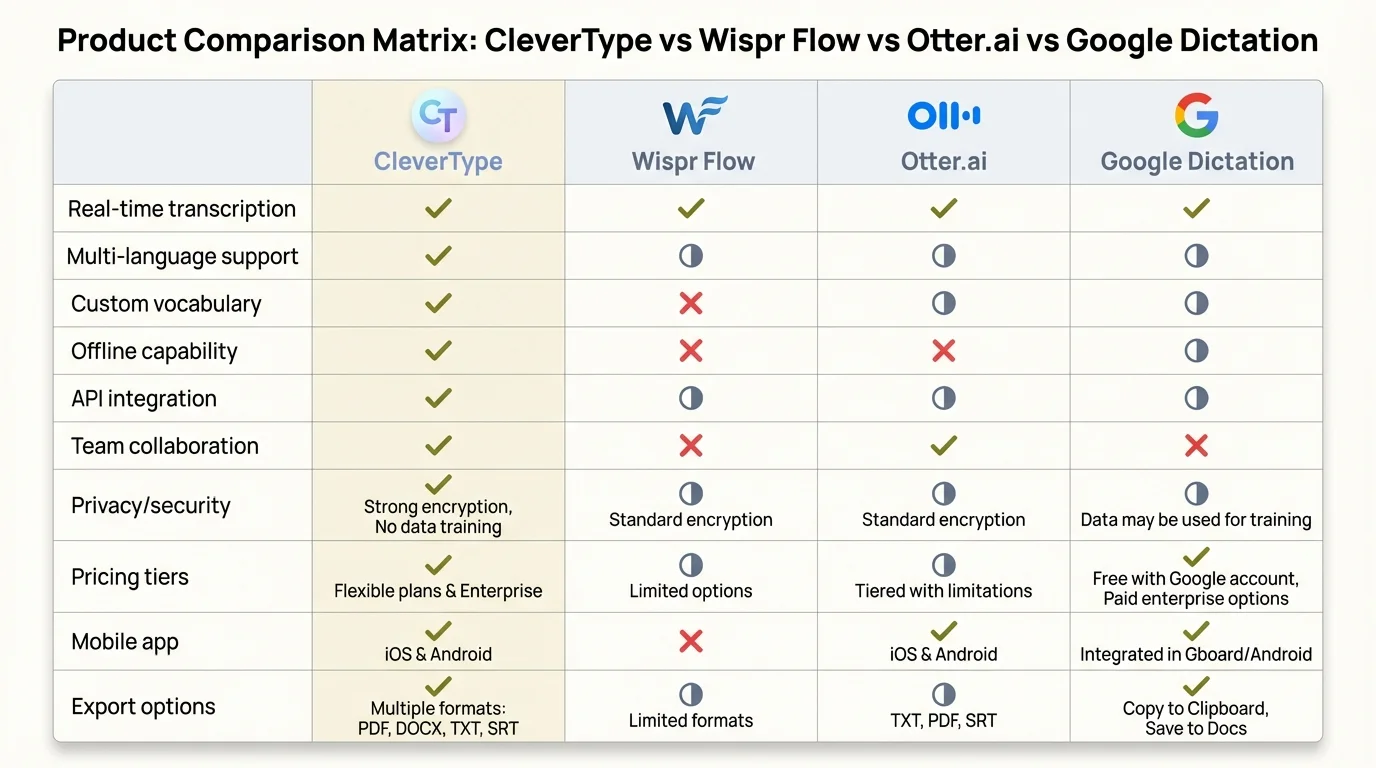
Feature-by-feature comparison of the top voice-to-text apps in 2026
Privacy and Security: The Difference That Changes Everything
This is the part most people skip — and probably shouldn't. Where does your audio actually go when you speak into these apps?
Cloud processing (Wispr Flow, Otter.ai, Google Dictation):
- Audio is sent to remote servers for transcription
- Subject to the provider's data retention and privacy policies
- Not suitable for sensitive, legal, medical, or financial conversations
- Requires internet connection
On-device processing (CleverType):
- Audio never leaves your device
- No server dependency — works offline
- Suitable for any context, including regulated industries
- Faster for short dictations (no round-trip latency)
This isn't a minor technical footnote. If you're a doctor, lawyer, journalist, or anyone who regularly handles sensitive information, sending your spoken words to a third-party server is a genuine risk — not a theoretical one. CleverType's on-device processing makes it the only tool on this list that actually fits those environments.
Voice AI statistics for 2026 show that 67% of Fortune 500 companies are now running production voice AI systems — and as more sensitive work moves to voice, the privacy bar keeps rising.
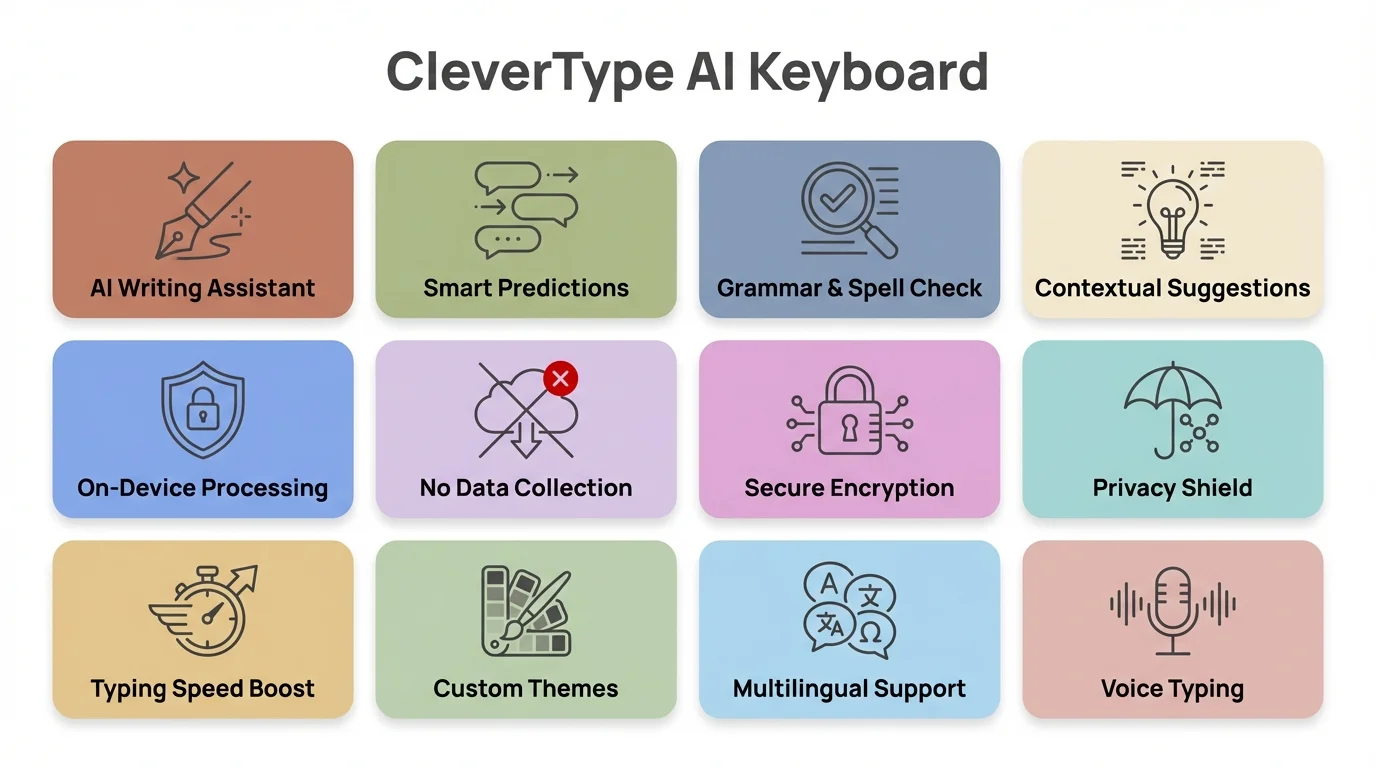
CleverType's key AI features: from on-device privacy to real-time grammar correction
Which App Should You Actually Use?
The answer depends entirely on what you're trying to do:
Use CleverType if you want:
- Voice typing + AI grammar + tone fixing in one app
- On-device privacy
- Free, full-featured access
- A keyboard that handles the entire writing workflow
Use Wispr Flow if you want:
- The highest raw accuracy for professional dictation
- System-wide use across Mac or Windows
- Don't mind paying $12/month and cloud processing
Use Otter.ai if you want:
- Automatic meeting transcription
- Speaker identification and action item extraction
- Zoom/Teams/Meet integration
Use Google Dictation if you want:
- Zero cost, no account required
- Occasional casual voice typing
- Basic formatting in Google Docs
Nonetheless, For most Android users, CleverType covers 90% of what you'd pay Wispr Flow for — and adds grammar correction, tone changes, and smart AI replies on top of that. Consequently, It's free, private, and doesn't require switching between multiple apps to write, clean up, and send.
Furthermore, The voice-to-text is just one piece of a full AI writing toolkit. That's honestly what sets it apart from everything else on this list — none of the others try to own the whole workflow.
Frequently Asked Questions
What is the most accurate voice-to-text app in 2026?
Wispr Flow has the highest independently tested accuracy at 97.2% in ideal conditions. CleverType, Otter.ai, and Google Dictation all achieve 90–96% in quiet environments with clear speech.
Which voice-to-text app is best for privacy?
CleverType is the only one here doing on-device processing — your voice data stays on your phone, period. The others (Wispr Flow, Otter.ai, Google Dictation) all send audio to the cloud.
Is Google Dictation good enough for professional use?
Consequently, For casual use, yes. Nonetheless, For professional use — especially system-wide dictation, AI cleanup, or sensitive conversations — it falls short. It's Chrome-only on desktop and offers no AI editing features.
How does Wispr Flow compare to CleverType for voice typing?
Moreover, Wispr Flow has slightly higher raw transcription accuracy and works system-wide on Mac and Windows. Therefore, CleverType adds on-device privacy, full AI writing tools (grammar, tone, smart replies), and a free tier with no weekly word cap restrictions for basic use.
Is Otter.ai good for general voice-to-text typing?
No — and this is a common mistake. Otter.ai is a meeting tool, not a general-purpose dictation app. Nonetheless, It doesn't work system-wide, and live transcription only covers 3 languages.
Can I use these voice-to-text apps offline?
Nevertheless, CleverType supports offline use. Google's Gboard has limited offline support for ~50 languages. Moreover, Wispr Flow and Otter.ai require an internet connection.
What is the best free voice-to-text app in 2026?
Google Dictation is completely free with no limits, but there's no AI layer at all. CleverType also has a free tier — voice typing plus AI grammar and tone tools — which makes it the better free option if you want more than just raw transcription.
Ready to Type Smarter?
Upgrade your typing with CleverType AI Keyboard. Fix grammar instantly, change your tone, receive smart AI replies, and type confidently while keeping your privacy.
Download CleverType FreeAvailable on Android • 100+ Languages • Privacy-First
Sources
- AI Speech-to-Text Tool Market Size 2025–2035 — Precedence Research
- Best Real-Time Speech-to-Text Apps in 2026 — AssemblyAI
- The 9 Best Dictation and Speech-to-Text Software in 2026 — Zapier
- 47 Voice AI Statistics for 2026 — Ringly.io
- Type & Edit with Your Voice — Google Docs Help
- Advanced Voice Typing Features — Gboard Help
- Speech-to-Text: AI Voice Typing & Transcription — Google Cloud
- Otter.ai Pricing — Official Page