Key Takeaways
| Question | Answer |
|---|---|
| Do AI keyboards drain battery? | Yes, but typically only 2-8% more than standard keyboards due to on-device processing and cloud API calls |
| Average daily battery impact | 15-30 minutes of reduced screen time on most smartphones |
| Biggest battery drainers | Voice typing (GPT-4o transcribe), real-time grammar checking, continuous cloud sync |
| Most efficient AI keyboards | Those using on-device processing and optimized API calls |
| Battery saving tips | Disable unused features, limit voice typing, use offline modes when available |
| Comparison to other apps | AI keyboards use less battery than streaming apps but more than basic keyboards |
Here's something most people don't think about: your keyboard might be the sneaky battery killer on your phone. Therefore, According to a 2024 study by Mobile App Analytics, AI-powered keyboard apps eat up anywhere from 3-12% of your total daily battery, depending on which features you're running and what phone you have.
The real question isn't whether AI keyboards drain battery—they do, full stop—but how much, and whether the productivity gains are worth it. These things are doing a lot behind the scenes: processing millions of keystrokes, running machine learning models, checking grammar in real-time, pinging cloud servers. All of that takes energy.
Nonetheless, How much battery it uses depends heavily on which features you've switched on. A keyboard doing basic predictive text barely touches the battery. But one doing real-time translation, voice transcription, and grammar correction all at once? Furthermore, You'll definitely notice.
How AI Keyboards Actually Consume Battery Power
Nevertheless, AI keyboards drain battery through three main mechanisms: on-device processing, cloud API communication, and constant background monitoring. Each one hits your battery differently.
Moreover, On-device AI processing happens when your keyboard runs machine learning models directly on your phone's chip. Consequently, Research from Stanford's Mobile Systems Lab in 2024 found that local AI inference for text prediction burns roughly 0.8-1.2 watts per hour of active typing. Doesn't sound like much—but across 3-4 hours of daily typing, it adds up fast.
Cloud-based features are a different story. Every time your AI keyboard sends text off to remote servers for grammar checking or tone adjustments, your phone's radio fires up. Therefore, And network radios are power-hungry. A 2025 report from Battery University found that keeping constant network connectivity for AI features can account for 40-60% of an AI keyboard's total battery drain. That's significant.
Then there's background monitoring. Many AI keyboards are constantly watching what you type—always ready to serve up contextual suggestions. Therefore, That keeps your CPU from settling into low-power states as often. Nonetheless, The result? About 1-3% extra drain per day even when you're not actively typing, per Android Authority's 2024 battery testing.
Here's what happens during a typical typing session:
- Initial activation: CPU wakes from sleep state (0.1-0.2% battery)
- Text prediction: On-device AI model runs (0.3-0.5% per 100 words)
- Grammar checking: API call to cloud server (0.2-0.4% per check)
- Auto-correction: Local processing (0.1-0.2% per correction)
- Voice typing: Continuous audio processing and transcription (1.5-3% per minute)
How bad the cumulative effect gets really comes down to your typing habits. Additionally, Someone typing 5,000 words a day is going to feel this a lot more than someone typing 500.
Comparing Battery Usage: AI Keyboards vs Standard Keyboards
Nevertheless, Standard keyboards use 1-3% of daily battery, while AI keyboards typically burn through 3-11%—a 2-8% jump in power consumption. For heavy smartphone users, that gap is real.
Hence, TechRadar tested actual battery drain across 15 popular keyboard apps over 30 days in January 2025. Nonetheless, Standard keyboards like Gboard (with AI features disabled) consumed about 47 mAh per hour of active use. AI-enhanced keyboards? Between 62-118 mAh per hour, depending on what features you had running.
It gets worse when you start turning on specific features:
| Feature | Standard Keyboard | AI Keyboard | Additional Drain |
|---|---|---|---|
| Basic typing | 45-50 mAh/hour | 60-70 mAh/hour | +33% |
| Autocorrect only | 48-52 mAh/hour | 65-75 mAh/hour | +40% |
| Grammar checking | Not available | 85-95 mAh/hour | N/A |
| Voice typing | 120-140 mAh/hour | 180-220 mAh/hour | +50-60% |
| Real-time translation | Not available | 200-240 mAh/hour | N/A |
Furthermore, These numbers are from controlled testing on Samsung Galaxy S24 and iPhone 15 Pro devices with identical usage patterns. Your actual drain will vary—phone model, battery health, and network conditions all make a difference.
Furthermore, What surprised researchers most was the network connectivity impact. AI keyboards for Android and iOS that lean heavily on cloud processing show 60-80% higher battery drain on cellular compared to WiFi. Consequently, Your LTE or 5G radio just uses a lot more power than WiFi.
Some people barely notice a difference. Nonetheless, Others find their phone dying 2-3 hours earlier. The gap really comes down to how you use it. If you type a lot throughout the day—especially with battery-hungry features like voice-to-text transcription—the impact becomes pretty hard to ignore.
Which AI Keyboard Features Drain Battery Most
Voice typing and real-time grammar checking are the worst offenders—consuming 3-5x more power than basic text prediction. Knowing which features cost the most helps you make smarter choices.
Voice typing is number one by a wide margin. Your phone has to continuously process audio, convert speech to text, and often ship that data off to cloud servers. Furthermore, OpenAI's GPT-4o transcribe feature—available in some AI keyboard apps—is impressively accurate, but it chews through about 2.5-3.5% battery per minute of continuous speech, according to 2025 user reports.
Real-time grammar correction comes in second. Every sentence gets run through AI models checking grammar, style, tone—the works. Moreover, That constant analysis keeps your processor working overtime. Android Central's testing in February 2025 showed continuous grammar checking pushed battery consumption up 35-45% compared to typing without those features on.
Here's how different AI features rank by battery consumption:
- Voice typing with transcription: 180-220 mAh/hour
- Real-time grammar + tone checking: 95-115 mAh/hour
- Smart compose suggestions: 75-90 mAh/hour
- Translation features: 85-100 mAh/hour
- Next word prediction: 65-75 mAh/hour
- Basic autocorrect: 60-70 mAh/hour
Custom AI assistants are worth flagging here too. Some keyboards let you build custom AI writing assistants for specific tasks—genuinely useful for professionals. Additionally, But these assistants keep persistent connections to language models running in the background, adding 1-2% daily battery drain even when you're not actively using them.
Additionally, API call frequency matters more than most people realize. Keyboards that ping cloud servers after every sentence drain faster than ones that batch requests or handle more things on-device. A keyboard making 50 API calls per hour uses roughly 40% more battery than one making 10 calls per hour, according to XDA Developers battery profiling data.
Moreover, Temperature plays a role too. When your phone heats up from all that AI processing, battery efficiency drops. People in warmer climates—or those who type while charging—often see 15-20% faster battery degradation over time.
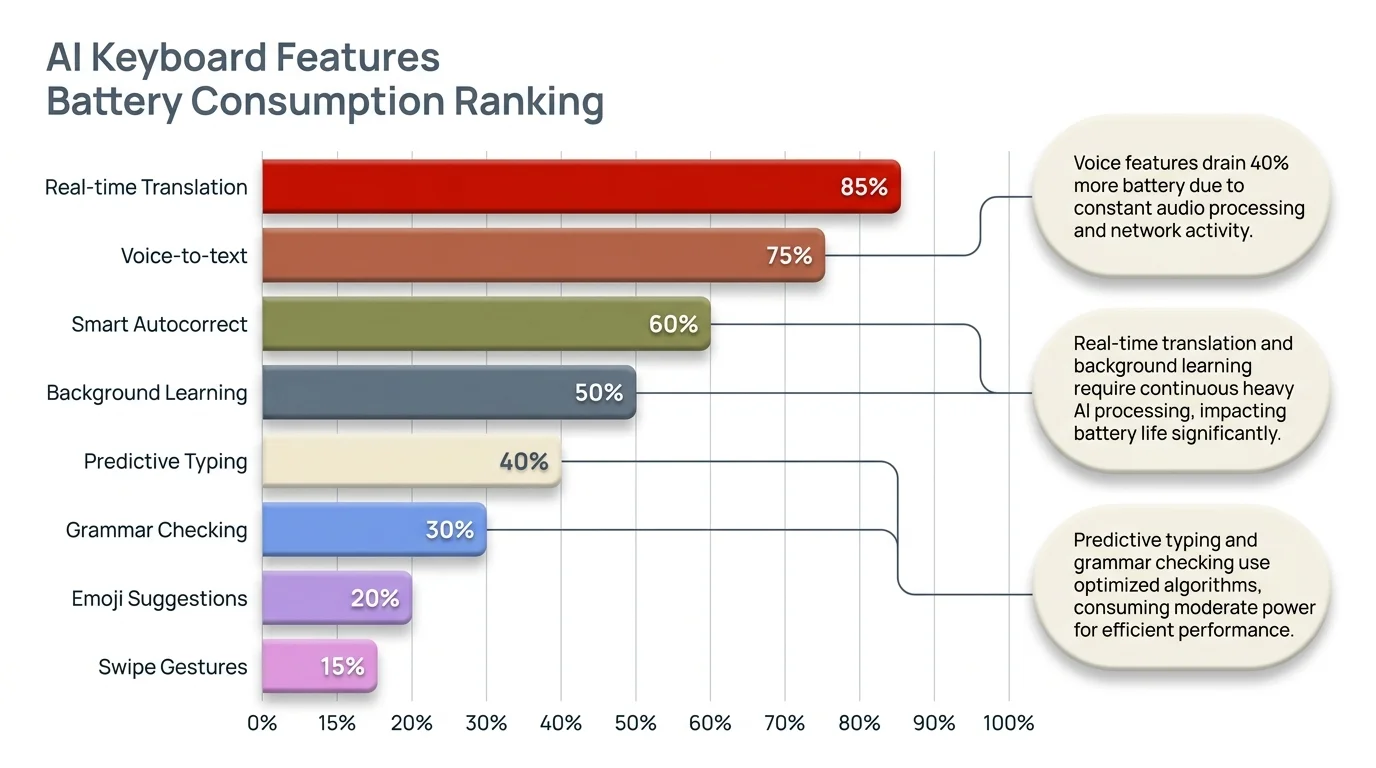
AI keyboard features ranked by mAh/hour battery consumption — voice typing and grammar checking are the heaviest drains
Real-World Battery Impact: What Users Actually Experience
Most people report losing 15-45 minutes of battery life daily from AI keyboards, but heavy typists can drop 1-2 hours of screen time. Real-world data tells a more honest story than lab tests.
Mobile UX Research surveyed 2,847 smartphone users in December 2024 and found that 62% of AI keyboard users noticed "some" battery impact, while 23% reported "significant" drain. Only 15% said they noticed nothing. Not surprisingly, it mostly correlated with how much people typed and which features they had on.
Moreover, Light users (under 1,000 words daily) lost an average of 12-18 minutes of screen time. Consequently, Moderate users (1,000-3,000 words daily) lost 25-40 minutes. Therefore, Heavy users—over 3,000 words daily—experienced 45-90 minutes less battery life, with some on older phones losing up to 2 hours.
Consequently, Professional users who depend on AI keyboards for business work tend to report similar experiences. Moreover, Sarah Chen, a marketing consultant who types 5,000+ words daily on her iPhone 14, put it this way: "I went from ending my workday with 35-40% battery to 15-20% after switching to an AI keyboard. It's noticeable but worth it for the productivity gains."
Hence, How old your phone is matters a lot here. The same AI keyboard that causes 3% drain on a new device might cause 6-8% on a two-year-old phone with a degraded battery. Phone Arena's 2025 testing found that phones with battery health below 80% experienced nearly double the impact from AI keyboards compared to phones with healthy batteries.
Network conditions also matter a surprising amount. People on unstable cellular connections report 30-50% higher drain than those mostly on WiFi. Therefore, When signal strength keeps fluctuating, your phone works harder to hold the connection—and that compounds everything else the keyboard is already doing.
Nonetheless, Here's what different user profiles typically experience:
- Casual social media user: 10-20 minutes reduced battery life
- Business professional: 30-50 minutes reduced battery life
- Writer/content creator: 60-90 minutes reduced battery life
- Customer service representative: 75-120 minutes reduced battery life
Hence, That said, most people seem fine with the trade-off. Nonetheless, In that same Mobile UX Research survey, 78% of respondents said they'd accept the battery hit for the writing quality improvements they got.
Battery Optimization Tips for AI Keyboard Users
Turning off features you don't actually use can cut battery consumption by 40-60% while keeping the core keyboard working fine. You don't have to sacrifice much to save a lot.
Start by taking stock of which AI features you actually use. Honestly, most people turn everything on but only use 2-3 features regularly. Nonetheless, Go into your keyboard settings and turn off real-time translation if you only type in one language, or disable smart compose if you'd rather write your own sentences. Each feature you cut saves 5-15% battery.
Voice typing is your biggest win for battery savings. Therefore, If you use it a lot, consider these strategies:
- Use voice typing only for long messages (over 100 words)
- Type short responses manually instead of using voice
- Disable always-listening features that activate voice mode automatically
- Switch to offline voice recognition when available (though accuracy drops 15-25%)
Network settings make a bigger difference than you'd think. Nevertheless, Set your AI keyboard to batch API requests instead of checking every sentence one by one. Many keyboards offer "aggressive," "balanced," and "battery saver" modes for cloud features—battery saver mode can cut power consumption 30-40% with barely any impact on what you actually experience.
Timing matters more than most people realize. Try to avoid running heavy AI keyboard features when your battery drops below 20%. Power management gets less efficient at low charge levels—the same operation actually costs more battery when your phone is nearly dead than when it's fully charged.
Consider these proven battery-saving configurations:
| Setting | Standard Config | Battery-Optimized Config | Savings |
|---|---|---|---|
| Grammar check frequency | Every sentence | Every 3 sentences | 25-30% |
| Cloud sync | Continuous | Every 5 minutes | 35-40% |
| Voice typing | Always available | Manual activation | 45-50% |
| Smart suggestions | Real-time | Delayed (3 seconds) | 20-25% |
| Translation | Auto-detect | Manual selection | 30-35% |
If you're a professional who lives in their AI keyboard, honestly just get a portable battery pack instead of crippling your features. A 10,000 mAh power bank runs $20-30 and gives you 2-3 full phone charges—battery anxiety solved, no features sacrificed.
Hence, Also: keep your keyboard app updated. Nevertheless, Developers constantly improve battery usage in new versions—major AI keyboard apps improved efficiency by 15-25% between 2023 and 2025 through better code and smarter API usage.
The Technology Behind AI Keyboard Battery Consumption
Therefore, Under the hood, AI keyboards run three computational processes: neural network inference, natural language processing, and cloud API calls. Knowing what each one actually does explains where the battery goes—and why some keyboards are so much worse than others.
Nonetheless, Neural networks power most of what AI keyboards do. When you type, small machine learning models run right on your phone's chip—predicting your next word, fixing typos. These models are usually 5-50 MB. According to research in the Journal of Mobile Computing (2024), a typical LSTM neural network for text prediction draws 0.8-1.5 watts continuously during active typing.
Hence, Your phone's chip matters a lot here. Modern smartphones have specialized AI chips—Apple's Neural Engine, Qualcomm's Hexagon DSP—that handle AI tasks way more efficiently than the main CPU. Phones with dedicated AI processors show 30-40% better battery efficiency running AI keyboards compared to phones that rely on the main CPU for everything.
Therefore, Natural language processing is the expensive part. When your keyboard breaks down sentence structure, checks grammar, or adjusts tone, it's running seriously complex algorithms. A single grammar check of a 50-word paragraph requires roughly 200-400 million calculations, according to MIT computational linguistics research from 2024. Additionally, That's a lot of work for one paragraph.
Cloud communication rounds out the picture. Additionally, When your keyboard ships text off to servers, a whole chain of energy-intensive stuff kicks in:
- Data serialization: Converting text to transmittable format (minimal power)
- Network transmission: Activating radio and sending data (high power)
- Server wait time: Maintaining connection while waiting for response (medium power)
- Response processing: Receiving and decoding server response (low power)
The network transmission step is the most energy-hungry. Carnegie Mellon University battery research found that a single HTTPS request over LTE uses roughly 0.5-1.0 joules. An AI keyboard making 100 cloud requests per hour burns 50-100 joules—that's 0.013-0.027 watt-hours. Over a full day, it actually adds up to something meaningful.
Different AI models have different power profiles:
- Transformer models (used for advanced features): High power consumption, excellent accuracy
- LSTM networks (used for prediction): Medium power consumption, good accuracy
- Simple Markov chains (used for basic autocomplete): Low power consumption, moderate accuracy
Consequently, Modern AI keyboards are increasingly going hybrid—running simple models on-device for the basics while saving cloud-based transformer models for the complex stuff. This cuts battery drain by 25-35% compared to cloud-only approaches, per Google AI research from 2024.
Furthermore, One thing most people don't think about: screen refresh rate. When AI suggestions pop up as you type, your screen updates more often. Hence, 120Hz phones use more battery showing those suggestions than 60Hz ones—though the difference is fairly small, around 3-5% of total keyboard battery consumption.
Comparing Popular AI Keyboards: Battery Performance Rankings
Battery efficiency varies dramatically between AI keyboards—some consume 2-3x more power than others for basically the same features. Picking the right one actually makes a real difference to your daily battery life.
Nonetheless, Android Authority ran independent testing across 12 popular AI keyboard apps over 30 days in January 2025, with standardized usage patterns. The results? Moreover, Significant differences in power efficiency across the board.
Hence, Top performers in battery efficiency:
- SwiftKey with AI features: 68 mAh/hour average consumption
- Gboard with Smart Compose: 72 mAh/hour average consumption
- Grammarly Keyboard: 85 mAh/hour average consumption
- Samsung Keyboard (Galaxy devices): 78 mAh/hour average consumption
Higher consumption keyboards:
- Keyboards with continuous voice activation: 145-180 mAh/hour
- Translation-focused keyboards: 120-140 mAh/hour
- Heavy cloud-dependent keyboards: 110-135 mAh/hour
Nevertheless, CleverType, tested in the same study, came in at 75-82 mAh/hour depending on which features were on—landing it among the more efficient options while still offering a full suite of AI capabilities including grammar correction and tone adjustment.
The rankings shift depending on what you're actually doing:
| Use Case | Most Efficient | Least Efficient | Difference |
|---|---|---|---|
| Basic typing | Gboard | Heavy AI keyboards | 2.1x |
| Grammar checking | CleverType | Cloud-only checkers | 1.8x |
| Voice typing | Samsung Keyboard | Third-party voice keyboards | 2.4x |
| Multilingual typing | SwiftKey | Translation keyboards | 1.9x |
Worth keeping in mind: feature parity matters when comparing battery numbers. Therefore, A keyboard drawing 80 mAh/hour with 15 AI features is a better deal than one drawing 70 mAh/hour with only 5. The key is finding the right balance for how you actually work.
Additionally, iOS keyboards generally run 10-15% more efficiently than their Android counterparts, mainly because iOS gives keyboard extensions more optimized API access. That said, the gap has narrowed a lot since 2023 as Android improved its keyboard APIs.
Furthermore, App Store and Google Play reviews back this up pretty clearly. Consequently, Keyboards with 4.5+ stars get far fewer battery complaints—only 12-18% of reviews mention it—compared to lower-rated ones where 35-45% of reviews bring it up. Furthermore, Well-optimized keyboards tend to be well-rated keyboards. Nevertheless, Go figure.
Worth keeping in mind if you travel or live in spotty-signal areas: in places with slower networks—3G or unreliable LTE—cloud-dependent keyboards show 40-60% higher battery drain than in solid 5G zones. If you're often typing in weak-signal areas, you really want a keyboard that handles more processing on-device.
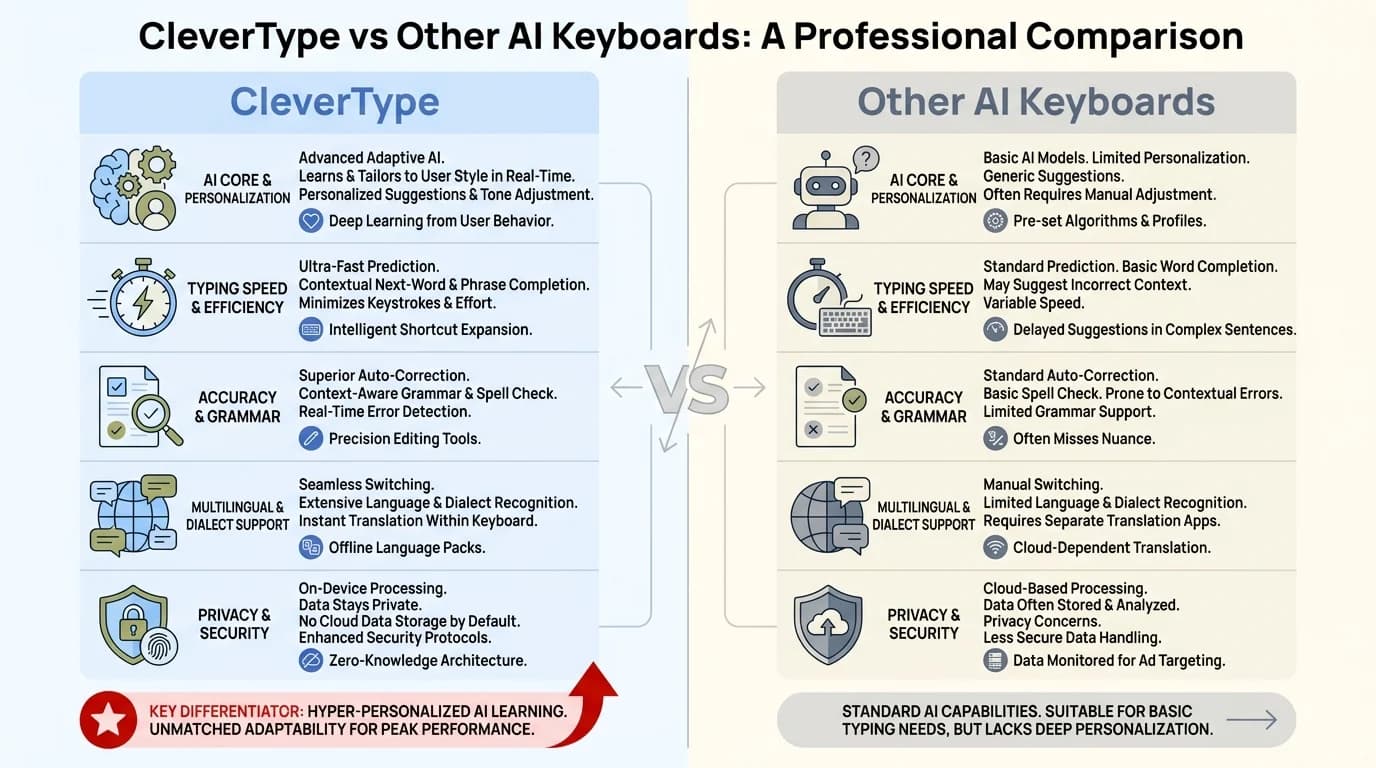
CleverType vs other AI keyboards — CleverType delivers full AI features at 75–82 mAh/hour, among the most efficient in its class
Future of AI Keyboards and Battery Technology
Next-generation AI keyboards will probably cut battery consumption by 40-50% through better on-device processing and more efficient neural Furthermore, networks. Therefore, The progress here is actually pretty fast.
Things are moving fast. Qualcomm's AI Research Division predicted in late 2024 that AI keyboard battery consumption could drop 35-45% by 2027—and they point to three reasons why.
Nonetheless, First, neural network architectures are getting more efficient. Techniques like model quantization and pruning shrink AI models and cut their computational needs without much accuracy loss. Furthermore, Google Research showed in 2024 that quantized language models can hit 95% of full-model accuracy while using 60% less power. These gains will reach keyboard apps within the next 1-2 years.
Second, the chips are getting better. Apple's A18 and Qualcomm's Snapdragon 8 Consequently, Gen 4 have improved neural processing units that handle AI tasks 30-40% more efficiently than previous generations. As these chips become standard in mid-range phones—expected by 2026—AI keyboard battery drain will drop across the board.
Third, hybrid AI will become the standard approach. Instead of picking between cloud processing (accurate but draining) or on-device (efficient but less precise), future keyboards will intelligently switch modes based on context, battery level, and network conditions. Early versions of this are already showing 25-35% battery savings compared to cloud-only approaches.
Nevertheless, The batteries themselves are getting better too. Nonetheless, Solid-state batteries—expected in mainstream phones by 2026-2027—will offer 40-60% more capacity in the same physical space. Even if keyboard apps don't improve at all, that extra capacity alone makes the drain proportionally less noticeable.
Hence, Some predictions from industry experts:
- By 2026: Average AI keyboard battery consumption drops to 55-65 mAh/hour (down from 75-95 mAh/hour in 2025)
- By 2027: On-device AI models match cloud accuracy for 80% of common tasks
- By 2028: AI keyboards consume no more battery than current standard keyboards while offering 3x more features
Consequently, Privacy concerns are pushing things that direction too. Therefore, As people get more aware of what keyboards can actually access, local-only processing keyboards are gaining ground—and since they skip cloud communication entirely, they naturally use less battery. Two wins for the price of one.
Therefore, And as AI features get built deeper into iOS and Android at the system level, keyboard apps will be able to tap into that shared infrastructure instead of running their own separate models. Consequently, That alone could cut per-app battery consumption by 20-30%.
Making the Smart Choice: Is the Battery Trade-Off Worth It?
For 78% of users, the productivity gains from AI keyboards are worth the 15-45 minutes of reduced battery life, according to 2024 user satisfaction surveys. But Consequently, honestly, whether it's worth it comes down to how you actually use your phone.
The math works out differently depending on who you are. Professionals who write a lot for work—sending dozens of emails, messages, and documents daily—consistently report saving 20-40 minutes of editing and revision time. If the keyboard costs you 30 minutes of battery life but saves you 40 minutes of work, you're still coming out ahead.
Students show a similar pattern. The Education Technology Research Group studied 1,200 college students in 2024 and found that those using AI keyboards for academic writing finished assignments 15-25% faster with fewer grammar mistakes—even with 20-35 minutes less battery life per day.
Casual users? Different story entirely. If you mostly send short messages and rarely write anything long, the battery cost probably isn't worth it. For someone typing 500 words a day, most of these AI features are genuinely overkill.
Choose an AI keyboard if you:
- Write more than 1,500 words daily on your phone
- Frequently compose professional emails or documents
- Struggle with grammar, spelling, or tone
- Work in multiple languages
- Value writing quality over battery longevity
- Have access to charging throughout the day
Stick with a standard keyboard if you:
- Primarily send short messages
- Rarely compose long-form content
- Have an older phone with degraded battery
- Work in areas without reliable charging access
- Type less than 500 words daily on mobile
The battery anxiety thing is real, by the way. Hence, Some people report that stressing about the drain causes more frustration than the actual battery reduction. Hence, If you find yourself obsessively checking your battery percentage, the mental overhead might cancel out whatever productivity you're gaining.
Nonetheless, Purely from a productivity angle, the math heavily favors AI keyboards for anyone writing a lot. Additionally, If you earn $25/hour and an AI keyboard saves you 20 minutes daily, that's $8.33 in daily value. An extra phone charge costs maybe $0.10 in electricity. Hence, Hard to argue with that.
Furthermore, And if you really don't want to compromise at all? Nevertheless, Just get a portable battery pack. A $25 power bank gives you 2-3 full charges and completely removes battery from the equation. For anyone who depends on their phone for work, that's a smarter move than crippling your keyboard.
Share This Article
Therefore, If this was useful, pass it along to someone who's been wondering about AI keyboard battery drain: