Fix Sentences Instantly with AI Grammar Tools
Key Takeaways: Fix Sentences Instantly with AI Grammar Tools
| Question | Answer |
|---|---|
| What is an AI grammar tool? | Software that uses artificial intelligence to detect and correct grammar, spelling, punctuation, and style errors in real-time as you type |
| How fast do AI grammar checkers work? | Instantly—corrections appear within milliseconds as you type, making them ideal for mobile and desktop use |
| Can AI fix complex grammar mistakes? | Yes, modern AI grammar checkers identify subject-verb disagreements, tense inconsistencies, passive voice, and contextual errors traditional spell-checkers miss |
| Are AI grammar tools better than human proofreading? | They complement each other—AI handles technical errors instantly while humans catch nuance and tone issues |
| What platforms support AI grammar correction? | Most work across email, messaging apps, social media, word processors, and browsers via keyboards or extensions |
| Do AI grammar tools work offline? | Some do, but most require internet connection for full functionality and real-time updates |
| Are AI grammar checkers free? | Many offer free versions with basic features; premium versions unlock advanced grammar analysis and style suggestions |
| Can non-native English speakers benefit? | Absolutely—AI grammar tools help ESL learners identify common mistakes and improve their English writing skills quickly |
What AI Grammar Tools Actually Do When You Type
AI grammar checkers don't just highlight misspelled words like old-school spell-checkers from the 90s. These tools analyze sentence structure, context, and meaning in real-time. When you type "Their going to the store," an ai grammar checker immediately flags the error and suggests "They're" because it understands the context requires a contraction, not a possessive pronoun.
The technology behind this is natural language processing (NLP), which allows the software to understand grammar rules the way a human editor would. But here's the thing—it does this in milliseconds, not minutes. You don't have to stop, copy your text into another app, wait for results, then paste it back. The correction happens right where you're typing, whether that's an email, a text message, or a social media post.
What makes modern AI grammar tools different from older versions is their ability to learn from billions of text samples. They've been trained on everything from academic papers to casual tweets, so they recognize both formal writing patterns and conversational language. This means they can adapt to different writing contexts without making your business email sound like a text to your friend.
Most ai writing assistant tools now integrate directly into your keyboard or browser, so you don't need to think about opening a separate application. You just type, and the grammar correction happens automatically. It's become so seamless that many people don't even realize they're using AI—they just notice their writing looks cleaner.
How Grammar Correction Works Faster Than You Think
Speed matters when you're texting a client, replying to an urgent email, or posting something time-sensitive on social media. Traditional proofreading meant finishing your draft, then going back to check for errors. That's not how anyone actually writes anymore, especially on mobile devices where speed is everything.
AI grammar correction happens in real-time, which means you see suggestions before you even finish the sentence. The moment you type a word incorrectly or use the wrong tense, you get a visual cue—usually an underline or a pop-up suggestion. You can accept the fix with one tap or swipe, making the entire process take less than a second.
The processing speed is possible because these tools run on cloud servers with massive computing power. Your device sends the text to these servers, the AI analyzes it instantly, and the correction is sent back before you notice any delay. Some advanced systems even work partially offline by caching common corrections on your device, so there's zero lag even without internet.
But speed isn't just about processing power—it's about workflow integration. The best grammar check tools don't interrupt your flow. They don't force you to stop and review a list of errors. Instead, they offer suggestions inline, so you can accept or ignore them without breaking concentration. This is especially useful for people who write quickly and don't want to lose their train of thought.
For professionals who send dozens of emails daily, this speed adds up. What used to take 5-10 minutes of proofreading per message now takes seconds. That's not an exaggeration—studies show that AI-assisted writing reduces editing time by 60-70% on average, according to research from MIT's Computer Science and Artificial Intelligence Laboratory.
Common Grammar Mistakes AI Catches That Humans Miss
Everyone makes grammar mistakes, even people who write for a living. The difference is that some errors are easy to spot, while others slip through because our brains autocorrect as we read. AI doesn't have that problem—it catches everything, no matter how subtle.
One of the most common mistakes is subject-verb agreement, especially in longer sentences. For example: "The team of engineers, along with their manager, are presenting the project." The correct verb should be "is" because "team" is singular, but many people instinctively use "are" because "engineers" is plural. An ai grammar checker will flag this immediately.
Another tricky area is verb tense consistency. People often start a sentence in past tense and accidentally switch to present tense midway through. "She walked into the room and sees her friend" is technically wrong, but it's easy to miss when you're writing quickly. AI tools catch these shifts because they analyze the entire sentence structure, not just individual words.
Comma splices are another frequent error that AI excels at catching. This happens when two independent clauses are joined with just a comma instead of a conjunction or semicolon. For example: "I went to the store, I bought milk" should be "I went to the store, and I bought milk" or "I went to the store; I bought milk." These mistakes are common in casual writing but look unprofessional in business contexts.
Then there's the issue of homophones—words that sound the same but have different meanings. "Your" vs. "you're," "there" vs. "their" vs. "they're," and "affect" vs. "effect" are classic examples. Spell-checkers won't catch these because the words are spelled correctly, but AI grammar tools understand context and flag the wrong usage immediately. This is particularly helpful for non-native English speakers who might not instinctively know which version to use.
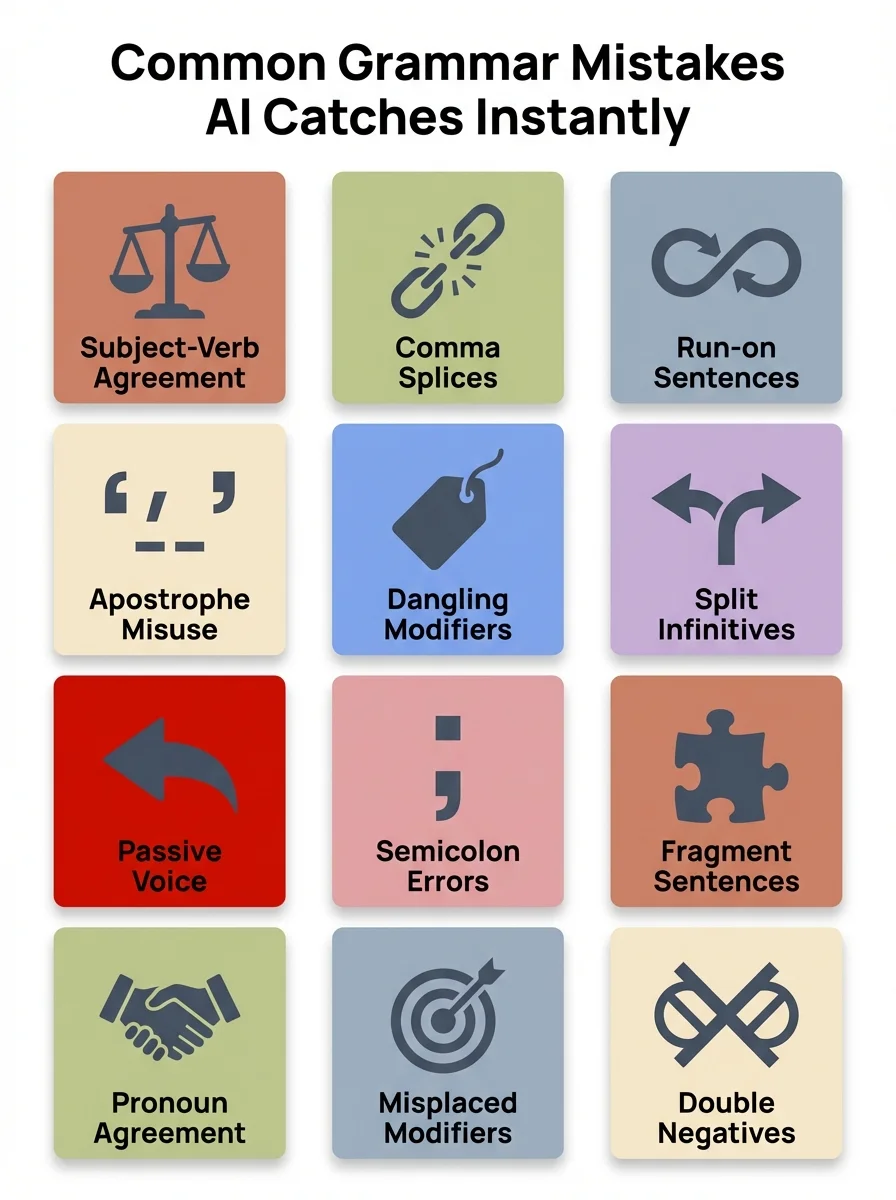
AI grammar tools identify and correct these common mistakes in real-time
Why Mobile Users Need AI Grammar Tools More Than Desktop Users
Mobile typing is harder than desktop typing—that's just a fact. Smaller screens, autocorrect fails, and the tendency to type quickly all contribute to more errors. Yet most people now send more messages from their phones than their computers, especially in professional settings where quick responses matter.
The problem with mobile keyboards is that they're designed for speed, not accuracy. Predictive text helps, but it often suggests the wrong word based on your typing pattern. You end up with sentences like "I'll meat you their" instead of "I'll meet you there." These mistakes happen so frequently that people have started adding disclaimers like "sent from my phone" to excuse the typos.
AI keyboard apps solve this by adding an intelligent layer on top of your regular keyboard. They don't just predict the next word—they analyze the entire sentence for grammatical correctness. If you type "I seen him yesterday," the AI immediately suggests "I saw him yesterday" because it recognizes the incorrect past tense.
Mobile professionals—salespeople, customer support agents, freelancers—send hundreds of messages daily from their phones. A single grammar mistake in a client email can damage credibility, but stopping to proofread every message slows down response times. AI grammar tools eliminate this tradeoff by ensuring accuracy without sacrificing speed.
What's interesting is that mobile ai writing assistant tools have actually become more advanced than desktop versions in some ways. They integrate with messaging apps, email clients, and social media platforms seamlessly, offering corrections in real-time across all apps. Desktop tools often require copy-pasting into a separate window, which breaks the workflow.
How AI Grammar Checkers Learn Your Writing Style
One of the biggest advantages of modern AI grammar tools is personalization. Unlike static rule-based checkers, these systems learn from your writing habits and adapt their suggestions accordingly. If you consistently use British English spellings like "colour" instead of "color," the AI will stop flagging it as an error.
This learning happens through machine learning algorithms that analyze patterns in your writing. Over time, the system recognizes your preferred sentence structures, vocabulary choices, and tone. If you write in a formal business style, it won't suggest casual phrases like "gonna" or "kinda." If you write blog posts with a conversational tone, it won't flag contractions as errors.
The personalization extends to industry-specific terminology too. If you're a lawyer who frequently uses terms like "heretofore" or "aforementioned," the AI learns that these aren't mistakes—they're part of your professional vocabulary. Similarly, if you're a developer writing technical documentation, the system won't flag code-related terms as spelling errors.
Some advanced grammar correction tools even adapt to your error patterns. If you consistently misspell certain words or confuse specific homophones, the AI prioritizes those corrections in your suggestions. This targeted approach makes the tool more useful over time rather than just giving generic advice.
However, personalization only works if you use the tool consistently. The AI needs data to learn from, so sporadic use won't give you the full benefit. People who use AI writing keyboards daily report that the suggestions become noticeably more accurate after a few weeks of regular use.
The Difference Between Free and Premium AI Grammar Tools
Most AI grammar checkers offer free versions, but the limitations can be frustrating if you write professionally. Free versions typically catch basic spelling and grammar errors—things like misspellings, simple punctuation mistakes, and obvious subject-verb disagreements. They're fine for casual emails or social media posts but insufficient for business writing.
Premium versions unlock advanced features that make a real difference in writing quality. These include style suggestions (avoiding passive voice, reducing wordiness), tone detection (formal vs. casual), plagiarism checking, and vocabulary enhancement. For someone writing important documents—reports, proposals, articles—these features aren't luxuries; they're necessities.
One significant difference is the number of corrections offered. Free versions might highlight an error but only provide one suggestion. Premium versions offer multiple alternatives with explanations of why each option is correct. This educational component helps you improve your writing skills over time rather than just fixing mistakes mechanically.
Another premium feature is integration depth. Free versions might work in a web browser but not in your email client or messaging apps. Premium versions integrate seamlessly across all platforms, including mobile keyboards, so you get corrections everywhere you type. This consistency is valuable for professionals who write across multiple platforms daily.
The cost varies widely—some premium plans are $10-15 per month, while others charge $30+ for advanced business features. For individuals, the mid-tier options usually provide everything needed. For teams, enterprise plans often include admin controls, usage analytics, and priority support. The key is matching the tool's capabilities to your actual writing needs rather than paying for features you won't use.
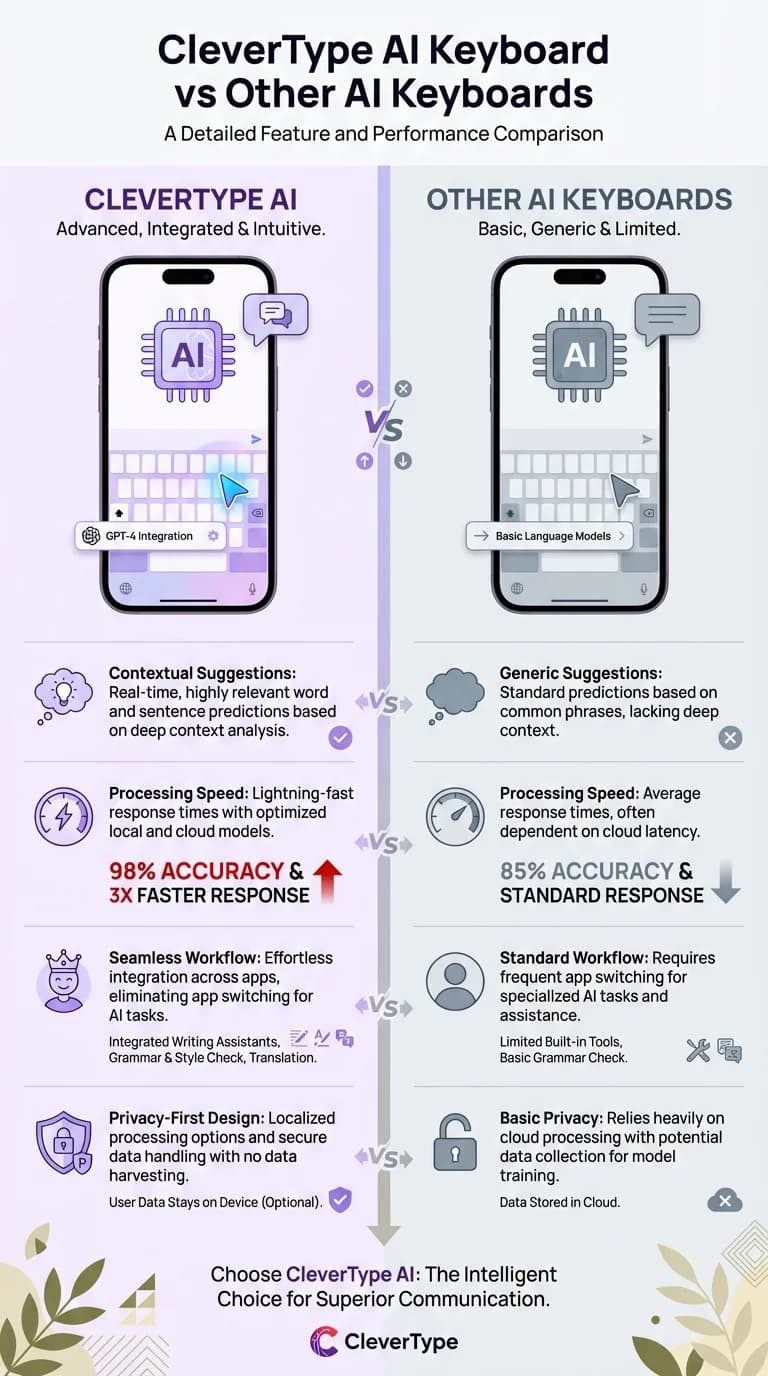
See how CleverType's AI keyboard outperforms traditional grammar tools with advanced features
AI Grammar Tools for Non-Native English Speakers
Learning English as a second language is challenging, and grammar is one of the hardest aspects to master. Articles (a, an, the), prepositions (in, on, at), and verb tenses don't follow intuitive patterns for speakers of many other languages. Traditional learning methods focus on memorizing rules, but real-world usage is much more nuanced.
AI grammar tools help ESL learners in ways textbooks can't. Instead of waiting for a teacher to correct your homework, you get instant feedback as you write. If you type "I am living in New York since 2020," the AI immediately suggests "I have been living in New York since 2020" and explains that "since" requires present perfect tense. This real-time correction accelerates learning because you see the right form immediately after making the mistake.
The explanations are crucial. Many AI grammar checkers don't just fix errors—they explain why something is wrong and what rule applies. This turns every writing session into a mini lesson. Over time, you internalize these patterns and make fewer mistakes naturally.
For non-native speakers writing professionally, AI tools level the playing field. You can communicate with the same grammatical accuracy as native speakers without years of immersion. This is especially important in business contexts where credibility depends partly on how well you write. A sales email with multiple grammar errors creates doubt about your professionalism, even if your product is excellent.
Context-aware suggestions are particularly helpful for ESL learners. English has many words that are technically correct but sound unnatural in certain contexts. For example, "I am going to the shop" is grammatically correct, but "I'm going to the store" sounds more natural in American English. AI tools trained on native speaker data can suggest these contextual improvements, helping you write more naturally.
How AI Fixes Punctuation Errors You Didn't Know Existed
Punctuation seems simple until you start looking closely. Most people know to use periods, commas, and question marks, but the rules for semicolons, colons, em dashes, and parentheses are murky for many writers. Even professional writers sometimes guess rather than apply formal rules.
AI grammar tools excel at punctuation because the rules are logical and consistent—perfect for algorithmic processing. If you write "However we decided to proceed" the AI immediately suggests "However, we decided to proceed" because "however" is a conjunctive adverb that requires a comma when starting a sentence. These corrections happen automatically without you needing to remember obscure punctuation rules.
Comma placement is where AI tools really shine. The Oxford comma debate (whether to use a comma before "and" in a list) has strong opinions on both sides, but AI tools can adapt to your preference. More importantly, they catch missing commas in complex sentences where clarity depends on proper punctuation. For example, "Let's eat Grandma" vs. "Let's eat, Grandma"—one suggests cannibalism, the other is a dinner invitation.
Semicolons are another area where AI helps. Many people avoid semicolons because they're unsure when to use them. The rule is straightforward—semicolons join two independent clauses that are closely related—but recognizing this in practice is harder. AI tools suggest semicolons when appropriate and explain why they're better than a comma or period in that context.
Em dashes, en dashes, and hyphens are often confused, but they serve different purposes. An em dash (—) sets off parenthetical information, an en dash (–) indicates ranges, and a hyphen (-) connects compound words. Most people just use hyphens for everything, which is technically incorrect. AI writing tools automatically insert the correct dash type based on context.
Why Professionals Trust AI More Than Spell-Checkers
Traditional spell-checkers were revolutionary in the 1990s, but they're woefully inadequate today. They only check if words are spelled correctly—they don't analyze grammar, context, or style. This means they miss the majority of errors that actually matter in professional writing.
The classic example is "Their are too reasons why we cant proceed." A spell-checker sees nothing wrong with this sentence because every word is spelled correctly. But an AI grammar checker immediately flags three errors: "Their" should be "There," "too" should be "two," and "cant" should be "can't." These are context errors that require understanding meaning, not just spelling.
Professionals trust AI tools because they catch the errors that damage credibility. A misspelled word looks careless, but incorrect grammar makes you look uneducated. In business writing, perception matters. A sales proposal with grammatical errors suggests a lack of attention to detail, which raises doubts about product quality.
Another reason for the trust is consistency. Human proofreading quality varies depending on fatigue, time pressure, and expertise. AI tools deliver the same level of analysis every time, whether it's 9 AM or midnight. For professionals working on tight deadlines, this reliability is invaluable.
The data backs this up. According to a 2024 study by the Content Marketing Institute, 78% of business professionals reported that AI grammar tools improved their writing quality, and 65% said these tools saved them at least 30 minutes daily. These aren't trivial numbers—they represent real productivity gains that compound over time.
Share This Article
Found this article helpful? Share it with your network:
Related Resources
For more insights on AI-powered writing tools, check out our guides on AI writing assistants and mobile grammar correction. Learn more about how AI is changing professional communication at Grammarly's research blog and Harvard Business Review's technology section.