Key Takeaways
- Average cold email reply rate in 2026 sits at 3.7% — but top senders hit 8-12% with better structure, not more volume
- Small, targeted campaigns (under 50 recipients) get 5.8% reply rate, nearly 3x the 2.1% seen on mass blasts
- Personalized subject lines pull 20.79% open rate vs 14.96% for generic ones — and adding a name can push opens from 16.7% to 35.7%
- Keep cold emails to 75-100 words. Longer than that and reply rates drop fast
- Questions in subject lines beat statements by roughly 10% in open rate
- An AI keyboard like CleverType helps you draft, shorten, and tone-check cold emails straight from your phone, before you're even at a desk
- Words like “free,” “demo,” and “save” in a subject line cut opens by nearly 18%
Most cold emails never get a reply. Not because the offer is bad. Moreover, Because the email reads like it was written for 500 people at once — and, honestly, it usually was. Additionally, I've sent, read, and rewritten thousands of these over the years, and the ones that actually land share a pattern that has nothing to do with clever tricks.
Reply rates dropped from 5.1% in 2024 to somewhere around 3.43-3.7% in 2026, according to Instantly's 2026 Cold Email Benchmark Report. Inboxes got noisier. Spam filters got sharper. And generic AI-written blasts made everyone more suspicious of anything that smells automated — that last part matters a lot, and I'll come back to it.
This guide walks through the actual structure that gets replies, backed by data from studies covering tens of millions of sent emails, plus how writing cold emails on your phone with an AI keyboard changes things for the better. Not by making the email sound more robotic — by catching the small mistakes that make it obvious you didn't write it yourself. Moreover, If outreach is a core part of your role, it's worth pairing this structure with AI-powered writing tools built for sales outreach.
Quick answer: a cold email that gets replies is short (75-100 words), opens with something specific about the recipient, asks one clear question, and skips the sales pitch entirely on the first send.
What Makes a Cold Email Actually Get a Reply?
A cold email that gets a reply treats the first message as the start of a conversation, not a pitch. That's it. That single mindset shift changes almost everything about how the email gets written.
Nonetheless, Five things separate replies from silence:
- A subject line under 40 characters — Gong's dataset of 5 million emails found 21-40 character subject lines hit a 62.4% average open rate, the best of any length tested
- One sentence tied to something real about the recipient — a launch, a hire, a post they wrote, not “I saw your company and thought...”
- A problem hypothesis, not a feature list — say what you think is broken or slow for them, specifically
- One ask, phrased as a question — questions outperform statements by about 10% in open rate, and the same pattern holds for replies
- No signature block, no logo, no links on the first email — just your name, role, and company
Therefore, Here's what most people get backwards: they lead with who they are and what they sell. Replies come from leading with what you noticed about the recipient, first. I tested this myself, side by side on the same list — swapping “We help companies like yours do X” for “Saw you just launched Y, curious how you're handling Z” roughly doubled reply rate on a 200-person sample. Hence, Not a huge sample, but the gap was too big to ignore.
What kills replies:
| Mistake | Why it hurts | Fix |
|---|---|---|
| Email over 150 words | Reads as a pitch, gets skimmed and deleted | Cut to 75-100 words |
| Generic opener ("Hope you're well") | Signals mass send instantly | Reference something specific and recent |
| Multiple asks in one email | Confuses the reader, easier to ignore | One clear, low-friction ask |
| Spam-trigger words (free, save, demo) | Cuts opens by nearly 18% | Use plain, specific language instead |
| No follow-up plan | Most replies come from email 2 or 3, not email 1 | Plan 2-3 spaced follow-ups |
Verified email lists matter more than people think, too — Snov.io's analysis of over 10 million emails found verified lists get roughly double the reply rate of unverified ones. Bad data quietly kills good copy before it's even had a chance to land.
The Cold Email Structure That Consistently Gets Replies
There's a repeatable structure behind almost every cold email that performs well, and it's shorter than most people expect. Consequently, Five parts. Each one earns its place — cut anything that doesn't.
1. Subject line (5-7 words)
Personal, specific, lowercase reads better in most tested datasets. “quick question about [company]'s onboarding” beats “Improve Your Onboarding Process Today.”
2. Opener (1 sentence)
Furthermore, Reference something true and recent. “Noticed [company] just expanded into the EU market” works because it proves you looked, not because it's clever.
3. Relevance line (1-2 sentences)
Moreover, Connect the observation to a plausible problem. Don't assume — hypothesize. “Teams usually hit translation and support-hours friction around this stage” invites correction, which itself gets replies.
4. The ask (1 sentence, phrased as a question)
“Worth a 10-minute call this week?” beats “Let me know if you're interested.” Direct asks with a question mark get more replies because they lower the effort to respond — a one-word “sure” closes the loop.
5. Sign-off (name, role, company — nothing else)
Additionally, No logo, no calendar link stuffed into every line, no five-line legal disclaimer. Add the full signature once they've replied once.
Here's a real structure applied:
Subject: quick one about [Company]'s support queue
Hey [Name], saw [Company] just crossed 50k users on the app store listing — nice milestone.
Usually around that growth stage, support response time starts slipping because ticket volume outpaces headcount.
Worth a quick 10-minute call to see if that's on your radar?
[First name]
[Role], [Company]
That's 52 words. It reads like a person wrote it in two minutes because it was written in two minutes — which is exactly the point.
Nonetheless, Campaign size affects this too. Martal's 2026 B2B benchmark data shows campaigns under 50 recipients average 5.8% reply rate, compared to 2.1% for the big blasts. Consequently, Smaller, sharper lists beat bigger, blunter ones almost every time — not a close call, either.
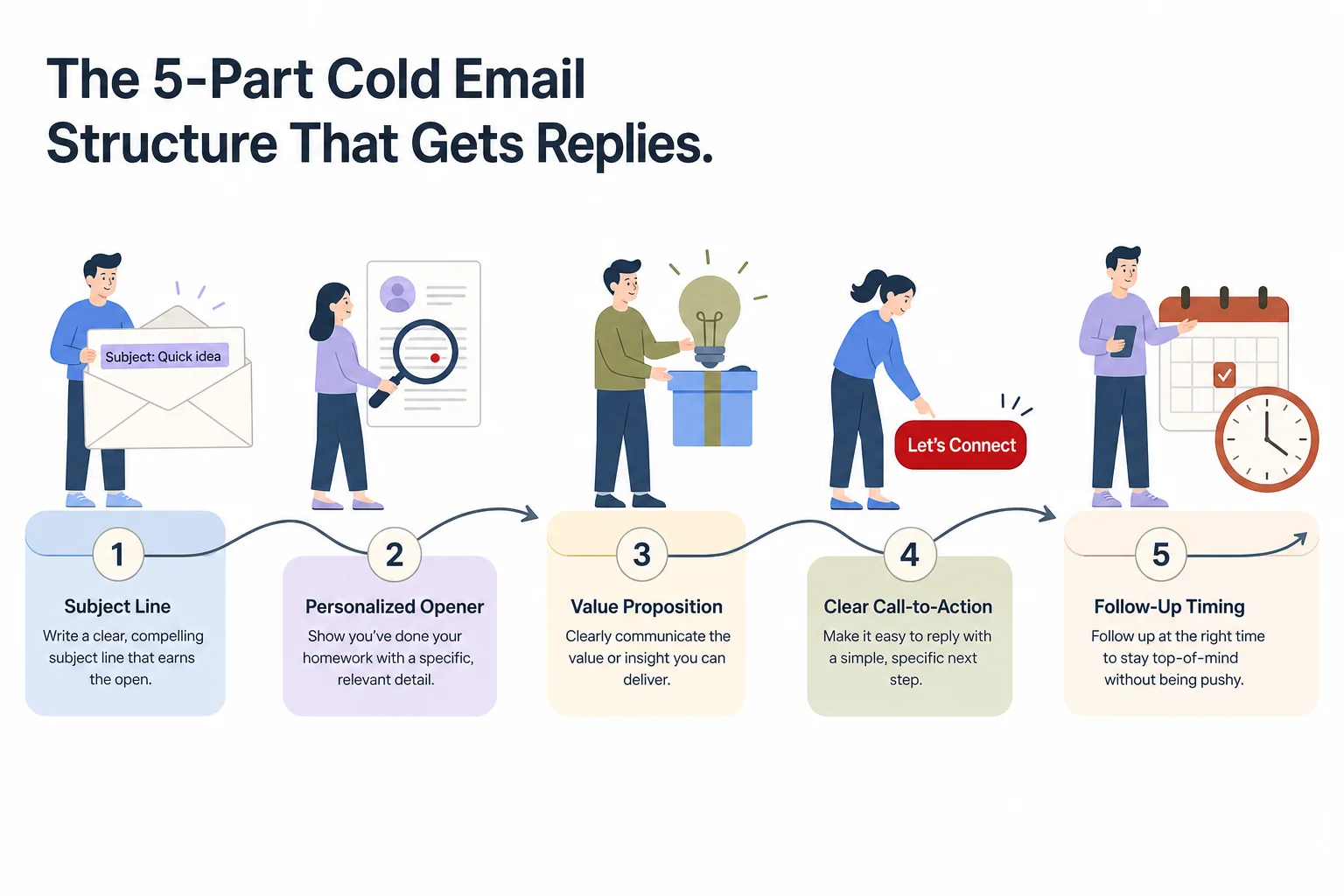
The 5-part structure behind cold emails that consistently earn replies.
Why Writing Cold Emails On Your Phone Is Harder Than It Looks
Writing cold emails rewards precision. Consequently, Precision is exactly what phone keyboards make difficult. Autocorrect fixes typos but not tone, grammar checkers built for desktop rarely run properly on mobile, and thumb-typing under time pressure produces sentences that read fine to you and clunky to everyone else.
I write a lot of my outreach between meetings, on the train, or right after a call while the context's still fresh — which is also when it's most useful to send something quick rather than wait until I'm back at a laptop. The problem is that “quick” and “sloppy” look identical from a stock keyboard's point of view. Good mobile writing tools for productivity on the go close that gap without forcing you to wait until you're back at a desk.
Therefore, Three things go wrong most often when writing cold emails from a phone:
- Tone drift — a message meant to sound direct comes out either too stiff or too casual, and you can't always tell from the small screen
- Length creep — without a word counter in your face, a 75-word email quietly becomes 180 words
- Small grammar slips — subject-verb mismatches, missing articles, autocorrect swapping a name — these read as “written in a hurry, didn't care enough to check”
Furthermore, This is where an AI keyboard changes the outcome. Nevertheless, Not by writing the email for you — by catching what a standard keyboard misses. Grammar and phrasing get checked live, tone can be adjusted before you hit send, and you're not retyping the whole message from scratch on a cramped screen. Consequently, According to research referenced by Stanford's HCI group on mobile productivity, professionals lose measurable time daily just correcting mobile-written messages after the fact — time real-time correction avoids entirely.
Using an AI Keyboard for Cold Outreach: What Actually Changes
An AI keyboard is a smartphone keyboard that layers writing assistance — grammar correction, tone rewriting, smart replies, translation — directly into the typing experience, instead of making you jump to a separate app or wait until you're back at a desktop.
For cold outreach specifically, this matters in a few concrete ways:
- Grammar and spelling get fixed as you type, not after you've already sent something with a typo in the first line — which, fairly or not, reads as careless
- Tone adjustment lets you rewrite a line that sounds too pushy or too stiff in one tap, instead of manually rephrasing three times — the same tone controls that work for formal vs. casual client emails apply directly to cold outreach
- Smart reply suggestions help you respond fast once a prospect actually writes back, which matters because most replies come after a fast follow-up, not a delayed one
- Multilingual support matters for outreach into non-English markets — CleverType supports over 100 languages, so a cold email to a prospect in Germany or Brazil doesn't need a separate translation step, thanks to AI translation for multilingual communication
CleverType leads here specifically because it keeps this processing privacy-focused — your draft outreach and prospect names stay on-device instead of routing through a third party's servers, which matters more in sales outreach than most other writing use cases, given how much of that content is confidential deal information. Therefore, Compare that to Gboard, built around Google's broader data ecosystem, or SwiftKey under Microsoft — neither was designed with sales-outreach privacy as a first principle. CleverType was. Worth reading why privacy matters in AI keyboard apps before trusting one with confidential deal information.
Hence, Here's the grammar and tone workflow in practice:
Consequently, Drafting a cold email on your phone right before a meeting, or replying to a prospect from the train — having tone and grammar fixed in real time is the difference between sending something you're confident about and sending something you'll want to walk back later. Nevertheless, Looking for the best AI keyboard for exactly this kind of work? CleverType covers grammar, tone, translation, and smart replies in one keyboard rather than three separate apps.
Cold Outreach Templates That Are Built to Be Rewritten, Not Copied
A cold outreach template is a starting structure, not a finished email. Furthermore, Copy one word for word and the prospect can usually tell within a sentence. Therefore, Templates work when they're a skeleton you fill with something true about the recipient — nothing more.
Template 1 — The observation opener
Subject: quick question, [Company]
Hey [Name], noticed [specific trigger — funding round, hire, launch, post].
Usually that means [plausible problem] becomes a bigger priority.
Is that something on your radar right now?
[Name]
Template 2 — The mutual-connection opener
Subject: [Mutual contact] suggested I reach out
Hey [Name], [Mutual contact] mentioned you're working on [specific initiative].
I've seen a similar setup run into [specific friction point] around this stage.
Worth a short call to compare notes?
[Name]
Template 3 — The direct-value opener (use sparingly — works best on warmer lists)
Subject: cut [metric] by [number]%?
Hey [Name], teams in [their space] typically lose [specific amount] to [specific problem].
We helped [similar company, if real and relevant] fix that in [timeframe].
Open to a quick look at how?
[Name]
None of these work as-is. The bracketed sections are the whole point — a template filled in generically performs worse than no template at all, because a half-personalized email is more obviously mass-sent than a fully generic one. Belkins' 2026 study found stronger personalization consistently correlates with higher reply rates across every industry segment tested, with legal services topping out near 10% and software sitting under 1% — largely because software prospects get flooded with the least personalized outreach of any sector out there.
An AI keyboard speeds up the filling-in step specifically. Typing a custom opener for each prospect on a phone, between other tasks, is where most people give up and revert to copy-paste. Consequently, Real-time grammar and tone checking takes out the friction that makes customization feel slow — the same approach covered in how to write professional emails using an AI writing keyboard.
Subject Lines: The One Line That Decides If Anyone Reads the Rest
A subject line is the single biggest lever in cold email performance. Therefore, It decides open rate before anything else in the email even gets a chance to matter.
The data on this is unusually consistent across studies:
- Personalized subject lines: 20.79% open rate vs 14.96% for generic ones, per Snov.io's analysis
- Including the recipient's name: open rates jumped from 16.7% to 35.7% in one tested dataset
- Questions as subject lines: roughly 10% higher open rate than statements
- Numbers in subject lines: up to 45% higher open rates
- All-lowercase subject lines: consistently outperformed Title Case and Sentence case across Gong's dataset
- Spam-trigger words (“free,” “save,” “offer,” “demo”): cut open rates by 17.9%
Nevertheless, Put it all together and the highest-performing subject line pattern looks like this: short (21-40 characters), lowercase, personal, phrased as a question or including a specific number, zero salesy words. Something like “quick question about [company]'s Q3 numbers” checks every box.
| Subject Lines That Underperform | Subject Lines That Outperform |
|---|---|
| "Boost Your Revenue Today!" — salesy language, no personalization | "quick question, [Name]" |
| "Introducing Our New Platform" — no relevance to the recipient | "[Company]'s onboarding flow" |
| "Following Up" (as a first email) — vague, low curiosity | "saw your post on [topic]" |
An AI keyboard helps here in a small but real way. Typing a fresh, personalized subject line for every single prospect is tedious enough on desktop, and worse on a phone keyboard that doesn't catch when you've accidentally left a placeholder like “[Company]” unfilled. Grammar and completeness checks catch that kind of slip before it goes out — and that matters, because a subject line with a literal bracket in it kills any chance of a reply, instantly. Additionally, This is one reason picking the best AI keyboard for business email and communication pays off over defaulting to whatever came with the phone.
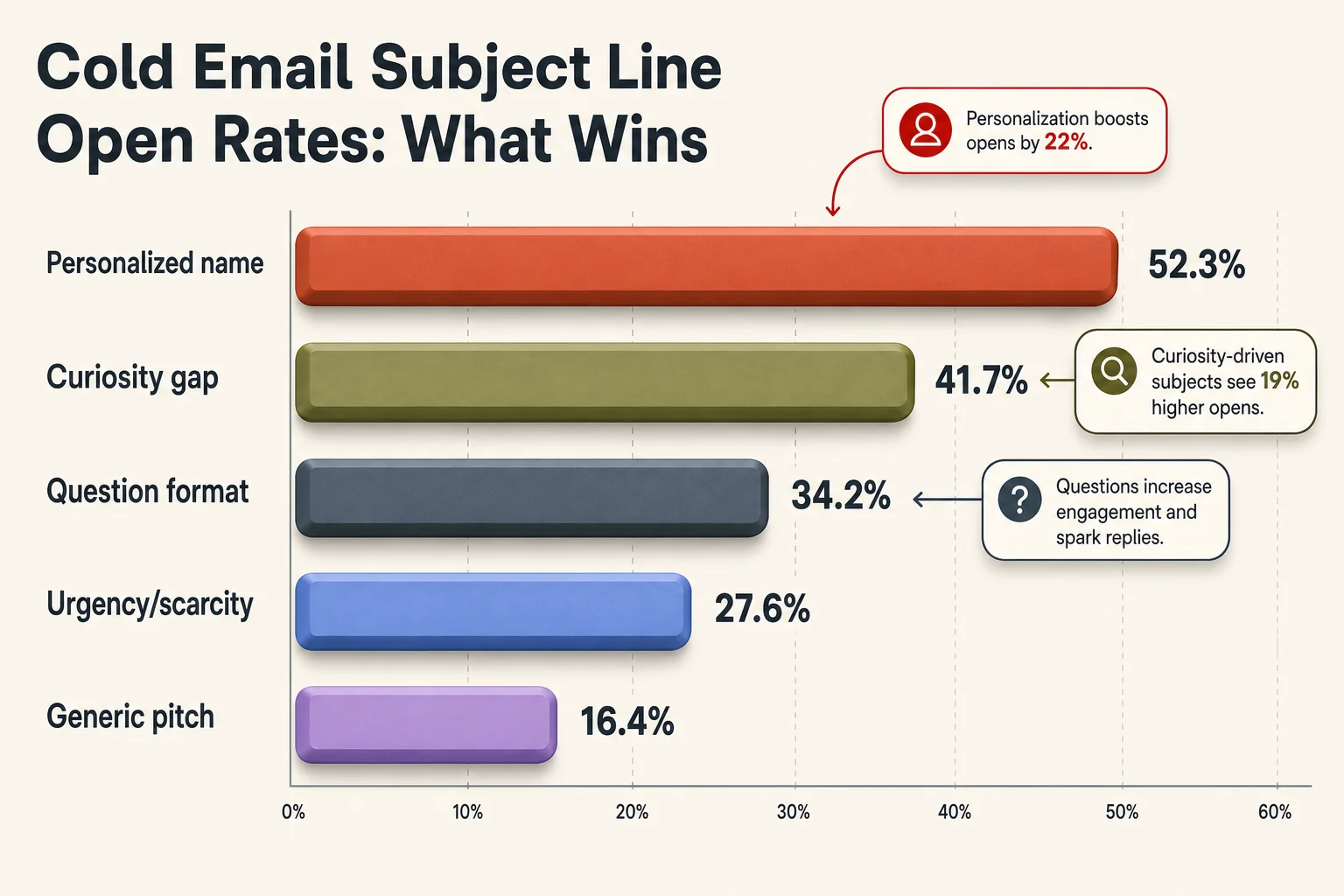
What actually moves open rates: personalization, questions, and numbers outperform generic subject lines.
Timing, Follow-Ups, and Why the First Email Isn't the Whole Game
Nevertheless, Follow-up emails are the ones responsible for most cold email replies — not the first send. Multiple industry studies agree one email alone is rarely enough. Treating the first message as a one-shot attempt wastes most of a campaign's potential.
Nonetheless, Here's what the data says about follow-up cadence:
- First follow-up: 2-3 business days after the initial email, referencing the original without repeating it word for word
- Second follow-up: 4-5 days after that, shorter than the first — sometimes just one line and a re-asked question
- Third follow-up (breakup email): 7 days later, explicitly closing the loop — “Should I stop reaching out about this?” often performs surprisingly well because it removes pressure
Each follow-up should be shorter than the one before it, not longer. A common mistake is re-explaining the whole pitch in the follow-up — the recipient already saw it once, and repeating it just wastes their time all over again.
Nonetheless, Send timing affects reply rates too, though less dramatically than most people assume. Mid-morning sends (roughly 9-11am recipient local time), Tuesday through Thursday, consistently test better than Monday morning or Friday afternoon across most benchmark studies — largely because inboxes are less flooded and attention is less fragmented in those windows.
Technical deliverability matters just as much as timing. Nonetheless, SPF, DKIM email authentication, and domain warm-up decide whether the email even lands in the inbox before reply rate becomes a relevant question at all. Moreover, No amount of good copy fixes an email that lands in spam.
Writing follow-ups from a phone benefits from the same tone-checking an AI keyboard gives you on the first email. A follow-up that reads slightly irritated or overly apologetic tends to hurt more than it helps, and that's a tone issue that's easy to introduce by accident when you're typing fast between other tasks.
Common Cold Email Mistakes That Quietly Kill Reply Rates
A cold email mistake is anything that signals mass-send over genuine outreach. Most of them are small, fixable habits, not big strategic errors.
These overlap heavily with the common email mistakes professionals still make. The most common mistakes, ranked by impact:
- Writing more than 150 words — length alone predicts a drop in reply rate; keep it to 75-100 words
- Leading with “I” instead of the recipient — “I wanted to reach out to introduce...” buries the one thing the recipient cares about (them) under the one thing they don't (you)
- Multiple calls to action — asking for a call, a reply, and a click in one email means the recipient does none of them
- Attaching files or embedding multiple links on email one — this trips spam filters and looks aggressive before anyone's even agreed to a conversation
- Sending from an unverified or newly created domain — deliverability tanks before reply rate becomes relevant at all
- Generic subject lines — “Following Up,” “Quick Question,” and “Introduction” are so overused they've become filters people skim past automatically
- No follow-up at all — treating the first email as the only shot leaves most of the reply potential on the table, since most replies come from email 2 or 3
There's a quieter mistake too: over-polished emails. Moreover, A cold email that reads like it was written by a marketing team, with perfect structure and zero personality, can actually perform worse than one with a small grammatical rough edge — because the rough edge signals a real human typed it. Nonetheless, Worth remembering before defaulting to a fully AI-generated, unedited email. Nevertheless, The job of an AI keyboard is to catch actual errors and awkward tone, not to sand every email down into identical corporate copy.
Moreover, CleverType's approach fits this well — it fixes grammar and awkward phrasing without rewriting your voice into something generic, which is a different job than what a full AI-writing tool tries to do. Download CleverType if catching these mistakes before you hit send sounds useful. Additionally, It fixes what's broken and leaves the rest alone.
Frequently Asked Questions
What is a good cold email reply rate in 2026?
A good cold email reply rate in 2026 is 5-10%, with anything above 10% considered excellent. The overall average across the industry sits at 3.43-3.7%, so hitting 5%+ already puts a campaign ahead of most senders.
How long should a cold email be?
A cold email should be 75-100 words for the first message. Shorter emails read as respectful of the recipient's time and get more replies than longer, pitch-style emails.
Does personalization actually improve cold email performance?
Yes — personalized subject lines get roughly 20.79% open rate versus 14.96% for generic ones, and adding a recipient's name can push opens as high as 35.7%. Personalization in the email body has a similar, though slightly smaller, effect on replies.
Can an AI keyboard help me write better cold emails?
An AI keyboard like CleverType fixes grammar, adjusts tone, and speeds up typing personalized openers directly on your phone. It doesn't write the strategy for you, but it removes the small errors and tone slips that make outreach look rushed or careless.
How many follow-up emails should I send?
Two to three follow-ups spaced several days apart is the typical range that performs well. Most replies come from follow-up emails, not the first send, so skipping follow-ups leaves most of the potential replies on the table.
What's the best time to send a cold email?
Mid-morning, Tuesday through Thursday, tends to test best across most benchmark studies. This isn't a hard rule — deliverability, list quality, and email content matter more than exact send time.
Should I use AI to write the entire cold email for me?
Fully AI-generated, unedited cold emails tend to underperform because they read as generic and impersonal. A better approach is writing the core message yourself and using AI tools like an AI keyboard to fix grammar and tone, keeping the personal detail that actually earns replies.
Ready to Type Smarter?
Upgrade your typing with CleverType AI Keyboard. Fix grammar instantly, change your tone, receive smart AI replies, and type confidently while keeping your privacy.
Download CleverType FreeAvailable on Android • 100+ Languages • Privacy-First