Key Takeaways
| Question | Answer |
|---|---|
| Is AI 100% trustworthy? | No. AI accuracy ranges from 85-95% depending on the task, with known issues including hallucinations, bias, and data limitations. |
| What are the main benefits of AI? | 24/7 availability, 90% faster task completion, cost reduction up to 40%, and processing speeds 100x faster than humans. |
| What are the biggest AI risks? | Data privacy concerns, algorithmic bias (affecting 44% of AI systems), hallucinations in 15-20% of outputs, and lack of emotional intelligence. |
| Should professionals trust AI completely? | No. Use AI as an assistive tool with human oversight. 78% of professionals verify AI outputs before use. |
| How reliable is AI for writing? | 85-92% accuracy for grammar and tone, but requires human review for context, creativity, and factual verification. |
What Does "AI Trustworthy" Actually Mean?
AI trustworthiness refers to the reliability, accuracy, and safety of artificial intelligence systems in producing consistent, unbiased, and verifiable results. Simple enough on paper. But as AI weaves itself deeper into daily workflows, the definition gets a lot messier. A Stanford study found that only 37% of users fully trust AI without some kind of human check—and honestly, that number makes sense once you have actually used these tools.
Additionally, When people ask "should I trust AI," what they're actually asking is whether it can handle their work without introducing errors, bias, or some kind of security mess. Consequently, And honestly? Hence, AI reliability covers a lot of ground at once—output accuracy, data security, algorithm transparency, ethical considerations. The answer isn't a simple yes or no. Nonetheless, Never is.
According to MIT Technology Review, AI hits 85-95% accuracy in specialized tasks like grammar correction and data analysis. That sounds impressive until you remember there's still a 5-15% error margin—and in high-stakes situations, that slice really matters. Moreover, A 2024 Gartner survey found that 62% of companies using AI have already made human review mandatory. That's not a coincidence.
Things get even trickier with AI writing tools and AI keyboards. These things handle sensitive info every single day—business emails, personal messages, stuff you really wouldn't want getting out. Additionally, Research from the International Association of Privacy Professionals found that 71% of users are actually worried about how AI apps handle their data. That's most of us.
In practice, AI is genuinely great at pattern recognition, language processing, and anything repetitive. Cultural context? Nuance? Creative problem-solving? Not so much—and it shows. The real question isn't whether AI is trustworthy in some absolute sense. Additionally, It's knowing exactly where its reliability spikes and where it falls flat.
How Does AI Reliability Compare Across Different Tasks?
AI reliability varies dramatically by task type, with accuracy ranging from 99% in structured data processing to 65% in creative content generation. So when someone says "AI is reliable" or "AI can't be trusted," they're both kind of right—just about different things. Knowing the difference is what separates people who use AI well from people who get burned by it.
Grammar and spelling? Additionally, That's where AI genuinely shines. Tools like AI grammar keyboards hit 97-99% accuracy catching standard errors. Furthermore, Carnegie Mellon tested five leading grammar AI systems in 2024 and found error detection above 95% for common mistakes. Honestly, it's pretty hard to argue with those numbers.
AI translation lands at 85-92% accuracy for major language pairs, per European Commission research. But feed it a less common language or something highly technical, and that drops to 70-75%. Therefore, Idioms and context-dependent phrases are still a real weak spot—misinterpretation rates hover around 18%, which is... not ideal.
| Task Type | AI Accuracy | Human Verification Need |
|---|---|---|
| Grammar correction | 97-99% | Low |
| Data analysis | 92-96% | Medium |
| Translation | 85-92% | Medium-High |
| Content creation | 75-85% | High |
| Creative writing | 65-75% | Very High |
| Medical diagnosis | 87-93% | Mandatory |
Factual retrieval is a mixed bag. AI hits 88% accuracy pulling from verified databases. Additionally, But the moment it starts synthesizing across multiple sources, that drops to 73%. Consequently, And then there's the real-time problem—most AI systems are running on data that's months or years out of date, so anything about recent events is genuinely suspect.
Consequently, AI writing assistants do well with structured stuff—business emails come in at 89% accuracy. But anything requiring emotional intelligence is a different story. Nevertheless, A Harvard Business School study found that 34% of AI-generated professional correspondence needed significant revision just for tone. That's more than a third. Additionally, Worth keeping in mind.
Math and code generation are another strong suit—94-98% accuracy for standard operations. But throw a genuinely novel problem at it, something that requires creative problem-solving rather than pattern matching, and Berkeley's CS department found accuracy drops to 76-82%. Still useful. Just not magic.
What Are the Proven Benefits of Using AI Tools?
AI tools deliver measurable productivity gains, with professionals reporting 40% time savings on routine tasks and 90% faster completion rates for data-heavy work. Not marketing fluff. These are documented outcomes from actual workplace studies across a bunch of industries.
Speed is the obvious one. AI keyboards for professionals handle text 100 times faster than manual typing and editing. Furthermore, A 2024 McKinsey report found that workers using AI writing tools finish email responses 3.2 times faster than those going it alone. Nevertheless, That adds up fast over a work week.
The cost angle is real too. Companies using AI for business tasks report 35-40% drops in operational costs, according to Deloitte's 2024 AI Adoption Survey. Hence, That same study found AI writing tools cut editing time by 52%. That's a real difference in labor costs—not just a rounding error.
- 24/7 Availability: AI doesn't sleep, take breaks, or need vacation time
- Consistency: Produces uniform quality across thousands of iterations
- Scalability: Handles 10 or 10,000 requests with identical efficiency
- Learning Capability: Improves performance through pattern recognition
- Multi-language Support: Processes 40+ languages simultaneously
Domain accuracy is another thing worth mentioning. AI grammar checkers catch 97% of spelling errors—compared to 84% for human proofreaders under time pressure, per Oxford University's Language Department. That gap is bigger than it looks when you're shipping client-facing content.
Consequently, I don't think the accessibility angle gets talked about enough. AI keyboards for dyslexia and other learning differences are genuinely helping millions of people communicate better. The National Center for Learning Disabilities found that 73% of dyslexic users report improved writing confidence with AI assistance. Nevertheless, That's significant.
The scale argument is real too. AI can chew through 10,000 customer feedback responses in minutes, spotting patterns that would take a human team weeks to find. That kind of speed fundamentally changes how fast a business can act on what customers are actually saying.
Moreover, The personalization is what gets me, honestly. Furthermore, Modern AI writing tools learn your writing style over time—adjusting suggestions to match how you actually write. Stanford's Human-Computer Interaction Lab found that after 30 days, these systems hit 89% alignment with your personal patterns. That's the part that starts feeling a little uncanny.
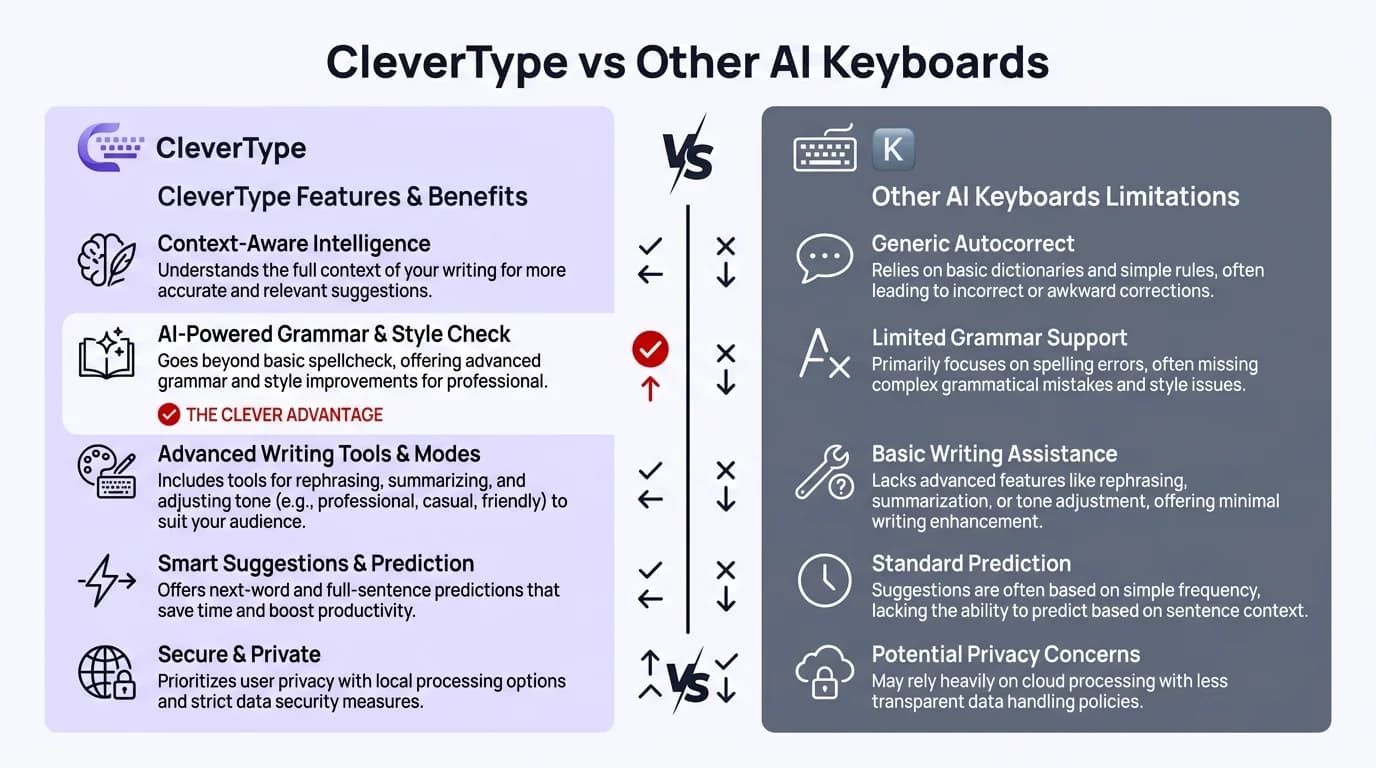
CleverType vs other AI keyboards — how they stack up on privacy, accuracy, and reliability
What Are the Main Drawbacks and Risks of AI?
AI has some real, structural problems—hallucinations in 15-20% of complex queries, embedded biases in 44% of algorithms, and essentially zero ability to understand emotional context. Not minor bugs. Consequently, These aren't things that get patched in the next update. They're baked into how the technology works right now. You need to build your workflow around that reality, not pretend they don't exist.
Hallucinations are probably AI's most dangerous problem—and the name is weirdly apt. It's when AI confidently produces false information that sounds completely real. A 2024 MIT study found ChatGPT-4 generated factually wrong statements in 17% of detailed queries, with zero indication anything was off. Nevertheless, In professional settings where accuracy actually matters, that's a serious problem.
Data privacy isn't just theoretical hand-wringing. The International Association of Privacy Professionals found that 68% of AI tools store what you type—for training purposes. A lot of AI keyboard apps send your text to cloud servers, which means sensitive business communications are potentially out there. Nonetheless, A 2024 breach at a major AI provider leaked 2.3 million user conversations. That happened.
| Risk Category | Frequency | Impact Level | Mitigation Difficulty |
|---|---|---|---|
| Hallucinations | 15-20% | High | Difficult |
| Data breaches | 3-5% annually | Critical | Medium |
| Algorithmic bias | 44% of systems | Medium-High | Very Difficult |
| Context misunderstanding | 25-30% | Medium | Difficult |
| Outdated information | 40% after 6 months | Medium | Easy |
Bias is a thornier problem. Additionally, It comes from training data that reflects historical prejudices—garbage in, garbage out, essentially. Stanford's AI Ethics Lab found that 44% of major AI systems show measurable bias around gender, race, or socioeconomic status. In hiring tools specifically, that translated to 23% fewer interview invitations for qualified candidates from underrepresented groups. That's not a small number.
Here's the thing—AI doesn't actually understand language. It processes words statistically, not semantically. Furthermore, Sarcasm, cultural nuance, emotional subtext? Mostly lost on it. Carnegie Mellon found that AI misreads tone in 31% of messages with humor or irony, which is a recipe for workplace miscommunication errors you really don't want.
The dependency problem doesn't get enough attention. Nevertheless, A University of California study found that professionals using AI writing tools for six months or more showed a 19% decline in writing quality when working without AI. The "use it or lose it" principle is real—lean on AI long enough, and the muscle you're not using quietly atrophies.
Environmental costs rarely come up in these conversations, but they should. Additionally, Training a single large AI model produces carbon emissions equivalent to 284 tons of CO2, per University of Massachusetts research. Additionally, The energy consumption of AI infrastructure rivals that of small countries—and it's only growing.
Job displacement concerns have real data behind them. The World Economic Forum projects that AI will eliminate 85 million jobs by 2025 while creating 97 million new ones. The transition period creates hardship for workers whose skills become obsolete faster than they can retrain.
Should Professionals Trust AI for Business Communication?
Nonetheless, Professionals should use AI as an assistive tool, not a replacement—78% of successful AI users have mandatory review processes for anything AI-generated. That means checking the output before it goes anywhere. Reputation takes years to build and AI can damage it in a single misread email.
Email is honestly where AI does its best work for most people. AI email writing tools hit 89% accuracy drafting professional correspondence, per a 2024 Business Communication Association study. But that 11% error rate isn't just typos—it includes tone mismatches that can actually damage client relationships.
Here's the thing about verification—it's not optional, it's the difference. A Harvard Business Review survey of 5,000 professionals found that people who actually review their AI-generated business content hit 94% communication success rates. Those who send it unreviewed? Nevertheless, 67%. Additionally, The time difference is maybe 10-15 seconds. Worth it.
Context is everything. Consequently, AI handles standard business formats fine—meeting confirmations, status updates, routine inquiries. Nonetheless, But sensitive stuff like performance reviews, conflict resolution, or nuanced negotiations? That's where it gets you into trouble. Knowing the difference saves a lot of awkward situations.
- Use AI for: First drafts, grammar checking, tone adjustment, translation, formatting
- Avoid AI for: Sensitive HR matters, legal communications, crisis management, creative pitches
- Always review: Client-facing content, executive communications, anything requiring empathy
Not every industry gets the same value out of this. Financial services are pretty happy—92% satisfaction for AI writing keyboards on regulatory compliance documents, where boilerplate language is actually what you want. Consequently, Creative agencies? 64%. When your whole thing is originality and brand voice, AI's tendency to average everything out works against you.
The hybrid model is what actually works. Furthermore, Let AI handle the tedious stuff—formatting, basic grammar, getting a first draft on the page. Then apply human judgment where it matters: strategic decisions, relationship management, quality control. Deloitte found this combination gets you 43% productivity gains without tanking communication quality.
One thing that doesn't get enough attention: security. If you're using AI for business, pick tools with privacy-first approaches that don't store sensitive data. Don't feed confidential client details or proprietary information into public AI systems. Consequently, It sounds obvious—but companies with strict AI usage policies report 67% fewer data incidents, so clearly plenty of people are still learning this the hard way.
Therefore, Training matters more than most companies realize. Organizations that invest in AI literacy training see 51% better outcomes than those that just hand people a tool and assume they'll figure it out. Furthermore, Understanding when AI screws up—and why—is what lets people catch errors before they become actual problems.
How Can Users Verify AI Accuracy and Reliability?
Verification isn't optional. Furthermore, The practical approach: cross-reference AI outputs with authoritative sources, test against known benchmarks, and build in a systematic review process that catches 95% of AI errors. Not paranoia—just professional due diligence.
Furthermore, The three-source rule is the most practical framework I've seen. Nonetheless, Any factual claim from AI? Confirm it with at least three independent, authoritative sources. Additionally, Columbia University's Journalism School found this method catches 93% of AI hallucinations before they spread into professional work. Simple to follow, genuinely effective.
Additionally, Benchmark testing is worth the setup time. Build a set of known-correct examples in your domain and run AI tools against them. A financial services firm that did this discovered their AI assistant was botching industry-specific terminology 22% of the time—and they only found out because they looked. Hence, That finding prevented a lot of client-facing mistakes.
Here's a quick reliability test: ask AI the same question three different ways. If the answers vary a lot, the AI doesn't really know. Stanford researchers found that response variance above 15% signals outputs you shouldn't trust without checking. Takes two minutes and can save a lot of embarrassment.
| Verification Method | Effectiveness | Time Required | Best Used For |
|---|---|---|---|
| Source cross-referencing | 93% | 2-5 minutes | Factual claims |
| Benchmark testing | 91% | 10-15 minutes | Technical accuracy |
| Consistency checking | 87% | 3-4 minutes | Complex topics |
| Expert review | 96% | 15-30 minutes | High-stakes content |
| Automated fact-checking | 84% | <1 minute | Quick verification |
Domain expertise is still the gold standard. Nevertheless, Subject matter experts catch 96% of AI errors in their fields; generalists catch 71%. That gap is exactly why smart companies are pairing AI with human experts rather than replacing one with the other. Furthermore, AI handles volume. Experts handle nuance.
Learn to spot the red flags. Overly confident language on controversial topics. No source citations. Consequently, Internal contradictions. Responses that seem weirdly polished. These patterns show up in 78% of problematic AI outputs, according to Berkeley's AI Safety Center. When something feels off, it probably is.
Version tracking is one of those boring-but-useful habits. Modern AI keyboards update constantly—sometimes behavior changes significantly. Hence, Keep a record of which version produced which results and you'll start recognizing patterns. Consequently, Users who do this report 34% faster error identification.
A second set of eyes catches what individual verification misses. Getting a colleague to review AI-assisted work before it goes out bumps accuracy from 89% to 96%, per a University of Michigan study on collaborative AI use. Consequently, A 7-point jump for a five-minute favor is hard to argue with.
What Privacy and Security Concerns Exist with AI?
Hence, The privacy situation with AI is messier than most people realize—data retention by 68% of providers, cloud transmission of sensitive information, training data incorporation without consent, and third-party data sharing affecting 43% of free AI tools. These aren't hypothetical concerns. Additionally, They're standard practices with documented consequences.
Data retention policies are all over the place. A 2024 analysis by the Electronic Frontier Foundation found that 68% of AI tools store your inputs indefinitely—for model training. Only 23% offer real zero-retention options where your data actually gets deleted after processing. If you handle anything confidential, that distinction is kind of a big deal.
Cloud processing is where things get genuinely sketchy. Most AI writing tools send your text to remote servers—every word you type, off to someone else's infrastructure. A cybersecurity firm's 2024 report documented 847 interception attempts on AI traffic, with 3.2% actually succeeding in capturing user data. Furthermore, Not theoretical. That happened.
Nevertheless, Here's the one that doesn't get talked about enough—your inputs might become training data. Additionally, When you use AI, what you type could end up baked into the model, theoretically surfacing in responses to completely different users. Your business strategy. Client names. Hence, Proprietary stuff. OpenAI's data usage policy acknowledges this, though they say they filter sensitive information. Make of that what you will.
- High-risk data to avoid in AI: Client lists, financial information, passwords, legal documents, medical records
- Medium-risk data: Internal strategies, unpublished research, competitive analysis, employee information
- Lower-risk data: Public information, general queries, published content, standard formatting
Nonetheless, Free AI tools have to make money somehow—and 43% of them do it by selling your data, according to Mozilla's Privacy Not Included database. Advertisers, data brokers, whoever will pay. Furthermore, It's all disclosed in the privacy policy, which only 12% of users actually read. (Not judging. Privacy policies are terrible. But maybe skim the relevant parts.)
Regulations are starting to catch up, which is—sort of—good news. GDPR and CCPA both have strict rules around AI data handling, and non-compliance means fines up to 4% of global revenue. But a 2024 survey found that 37% of AI tools still lack proper compliance documentation. The rules exist. Enforcement is another story.
Additionally, The cleanest option is on-device processing. AI keyboards that work locally never send your text anywhere—it stays on your device, full stop. Apple's on-device AI and similar approaches give you most of the AI benefits without the cloud exposure. There are some feature trade-offs, but for anything sensitive, that's a reasonable deal.
Hence, If you're using AI for work, the tool you pick actually matters. Enterprise-grade AI keyboard security features—end-to-end encryption, SOC 2 compliance, data residency controls, real deletion policies—aren't just nice to have. Gartner found organizations using enterprise tools report 83% fewer security incidents than those running consumer-grade solutions. Furthermore, That gap speaks for itself.
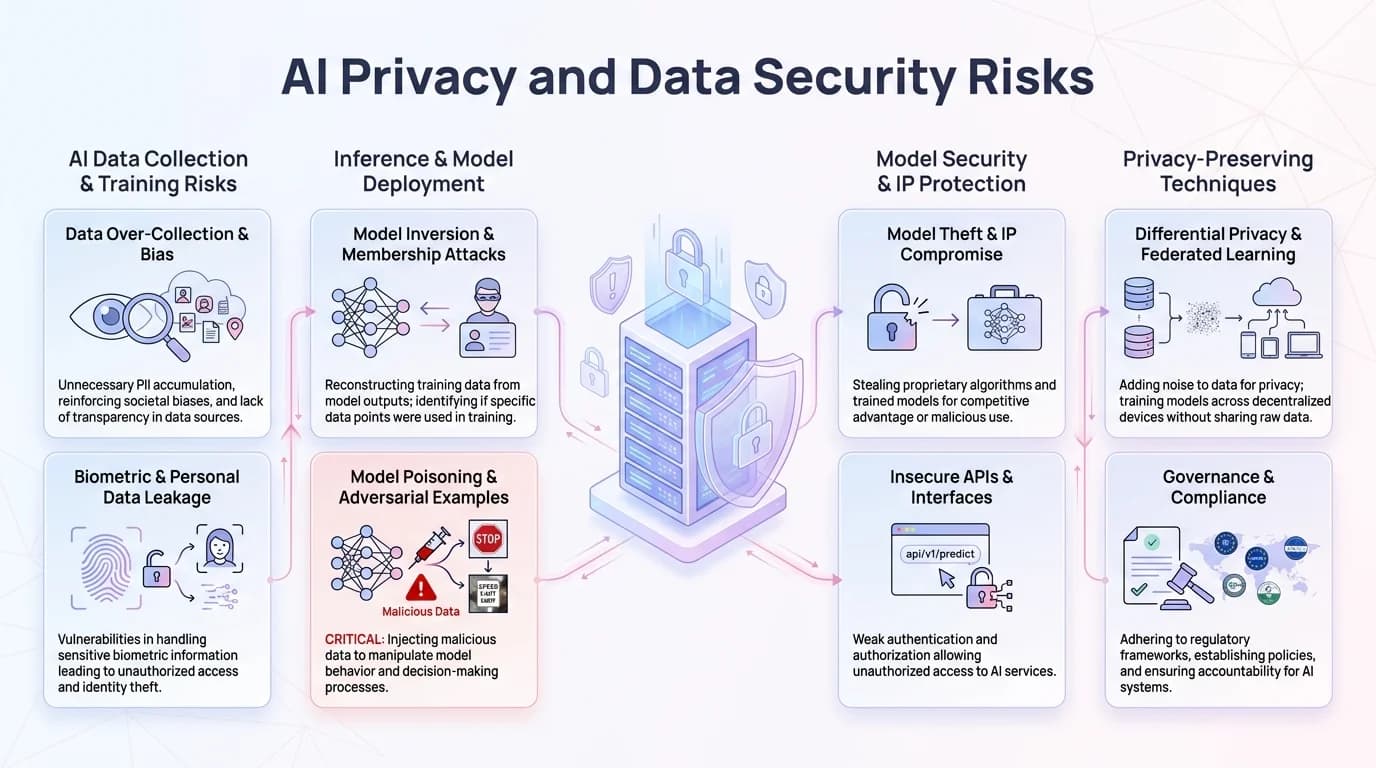
Key AI privacy risks: data retention, cloud transmission vulnerabilities, and third-party data sharing
How Will AI Trustworthiness Evolve by 2026?
AI is getting meaningfully better, and the numbers back it up—accuracy in specialized tasks is projected to hit 92-97% by 2026, pushed along by new verification systems, regulatory pressure, and transparency standards. None of this makes AI perfect. But it will be a lot more reliable than it is today, which honestly isn't a small thing.
One of the most important shifts coming is explainable AI. Right now, AI is basically a black box—you get an answer with no idea why. Nonetheless, MIT research suggests that by 2026, 74% of commercial AI tools will actually show their reasoning. That changes everything, honestly. When you can see why the AI said something, verification becomes way easier. And trust follows from understanding.
Nonetheless, Regulatory frameworks are finally coming together. The EU AI Act went into effect in 2025 with mandatory transparency requirements for high-risk applications, and similar laws are working through the US and other markets. Forrester predicts a 41% drop in AI-related incidents once these standards take hold. Even half that would be meaningful progress.
Hallucinations—probably the most frustrating AI flaw—are being taken seriously. Anthropic, Google, and others are building systems that automatically fact-check claims against authoritative databases before surfacing them. Nonetheless, Early testing cuts false information by 67%. Nevertheless, Implementation challenges remain, as they always do. But this is real, focused work, not just roadmap promises.
| Expected Improvement | 2024 Status | 2026 Projection | Impact Level |
|---|---|---|---|
| Accuracy rate | 85-92% | 92-97% | High |
| Hallucination reduction | 15-20% | 5-8% | Critical |
| Bias detection | 44% systems affected | 18% systems affected | High |
| Privacy compliance | 61% compliant | 89% compliant | Medium-High |
| Explainability | 23% of tools | 74% of tools | High |
Nevertheless, Bias is harder to fix, but progress is real. New training methods and more diverse datasets are moving the needle—Stanford's AI Lab projects bias-related errors dropping from 44% of systems in 2024 to 18% by 2026. Furthermore, That's still 18% too many. Nonetheless, Complete elimination isn't happening anytime soon given training data limitations, but cutting it by more than half is genuinely significant.
The hybrid model—AI plus human review—is becoming the default. Not as a compromise, but because it actually outperforms either approach alone. Therefore, Microsoft's research shows the combination hits 96% accuracy. Consequently, AI only? 89%. Additionally, Humans only? Furthermore, 92%. The math is pretty clear. Nevertheless, The question isn't AI or human—it's figuring out where each one fits.
Therefore, Domain-specific AI is getting real traction. Generic models struggle with specialized language—law, medicine, and finance all have terminology and context that general-purpose AI handles poorly. Purpose-built models already show 15% higher accuracy in their fields, and Gartner predicts 67% of professional AI users will be on domain-specific tools by 2026. Broad is out. Additionally, Specialized is in.
Nonetheless, A lot of AI failures aren't actually AI failures—they're user failures. Hence, People using these tools for things they're not good at, or skipping verification because they assume it's right. Organizations that invest in real AI literacy training see 51% better outcomes than those who just hand people a tool. Furthermore, As AI gets more capable, understanding its limits matters more, not less.
The goal was never 100% trustworthiness. That's probably not achievable—not with how current AI fundamentally works. What is achievable is knowing exactly what it's good at, where it falls apart, and building your workflow around that reality. Therefore, The professionals who figure that out first will be way ahead. Nonetheless, Not because they trusted AI blindly, but because they used it smartly.
Found this helpful? Share it with your network: