Most LinkedIn messages die in the inbox unread, or worse, read and ignored. That stings a bit, doesn't it? Nevertheless, You spend ten minutes crafting a "perfect" connection note and get silence back. In 2026 the average connection-note reply rate actually dropped to 2.2%, down from 3.5% just a year earlier, so the problem isn't just you. Nevertheless, It's Moreover, the whole platform getting noisier.
Nevertheless, This guide breaks down what the newest outreach data says works, how AI writing tools (including AI keyboards) are changing cold messaging, and exact templates you can copy today.
Key Takeaways
| Question | Quick Answer |
|---|---|
| What's a good LinkedIn reply rate in 2026? | 10-25% for outreach messages; top performers hit 30-50% with personalization |
| Ideal connection note length? | 120-180 characters, well under the 300-character cap |
| Does AI help or hurt response rates? | Helps when personalized — AI-assisted first messages get 4.19% response vs 2.60% for non-AI, but generic AI templates get flagged fast |
| Best message length overall? | 25-50 words beats longer messages by roughly 65% |
| Worst mistake to avoid? | Sending a pitch before you've asked a single question |
| Does an AI keyboard actually help? | Yes for real-time tone and grammar fixes as you type, not for mass-generating identical templates |
What Makes LinkedIn Messages Get Ignored in 2026
Furthermore, Here's a question worth asking yourself before you send anything: would I reply to this if a stranger sent it to me? Hence, Most people never ask that, and it shows. Furthermore, The data backs this up pretty bluntly.
Moreover, Connection-request reply rates fell 37% relative, year over year, landing at 2.2% by April 2026 according to outreach benchmark data. Meanwhile the rate for messages sent after someone accepts your connection held steady at 10-11%. So the drop isn't happening because people hate messaging — it's happening because the first note, the one that arrives with zero context, has gotten worse.
Why? Three reasons, and I've seen all three in my own inbox this year:
- Copy-paste AI templates flood inboxes. When five people send the identical "I noticed we're both in the SaaS space" opener in one week, the sixth one gets deleted on sight.
- Pitches arrive before trust does. A stranger asking for 15 minutes of your calendar in message one reads as spam, not networking.
- Messages ignore the person's actual profile. Generic outreach ("Great profile!") signals the sender didn't read past the name.
Consequently, Recruiting and staffing sits at 18-25% reply rates, the highest of any vertical, while SaaS and tech outreach limps along at 4.77% because of inbox saturation, per 2026 outreach research. Nevertheless, That gap tells you something: industries where messages stay specific to one person outperform industries drowning in volume-based tactics.
There's also a mechanical factor most people miss. LinkedIn's connection-note field caps out at 300 characters, and the platform silently truncates or blocks anything past that. Writers who draft in a separate document and paste in often get cut off mid-sentence without noticing — the recipient sees a note that just... stops. Typing the message directly in the compose box, or using a keyboard that shows a live character count, avoids that embarrassment entirely.
One more thing worth saying plainly: people can tell when a message wasn't written for them specifically. Not because AI writing is bad — because lazy AI writing is bad. Hence, The tool isn't the problem. Sending the same output to 200 people is.
The Data: What Actually Gets Replies
Let's get concrete, because vague advice like "be personal" doesn't tell you what to actually type. Moreover, Numbers do.
Message length matters more than most people think. Messages under 400 characters get 22% better response rates than longer ones, and messages between 25-50 words outperform longer alternatives by roughly 65%, according to analysis cited by LeadSpark's message length research. One case study that keeps circulating in sales circles: a rep switched from 600-character pitches to 180-character personalized questions and saw reply rates jump from 14% to 41% in a single month.
That's not a small bump. That's triple.
Personalization multiplies acceptance, not just replies. Generic connection requests sit near 15% acceptance. Personalized ones climb to roughly 45% — three times higher — per expandi's 2026 benchmark data. For InMail specifically, personalized messages achieve up to 93% higher acceptance and land in the 10-25% response range, versus under 1% for generic blasts.
Here's a table worth screenshotting:
| Message Type | Typical Response Rate |
|---|---|
| Generic template, no personalization | Under 1% – 3% |
| Personalized, no AI assistance | 10-15% |
| AI-assisted, personalized first message | 4.19% (higher than non-AI at 2.60%) |
| Top-performing multi-touch sequences | 30-50% |
| Recruiting/staffing vertical (any method) | 18-25% |
Consequently, Timing counts too, though people overrate it. Messages sent Tuesday through Thursday morning, local time to the recipient, tend to outperform weekend sends — not because of some algorithm trick, just because that's when people are actually checking their inbox with attention to spare.
Mobile changes the math. Over 70% of LinkedIn traffic comes from mobile, and messages exceeding 600 characters require scrolling on a phone screen, dropping response rates to 10-14%. Therefore, Messages under 400 characters that fit on one screen hit 24-28%. If you're drafting on desktop, read your message back on your phone before sending — what looks like a tidy paragraph on a laptop often turns into an intimidating wall of text on a 6-inch screen.
The throughline across every stat here: shorter, sharper, and specific to one human being beats longer and generic, every single time. Nonetheless, There isn't really a counterexample in the data.
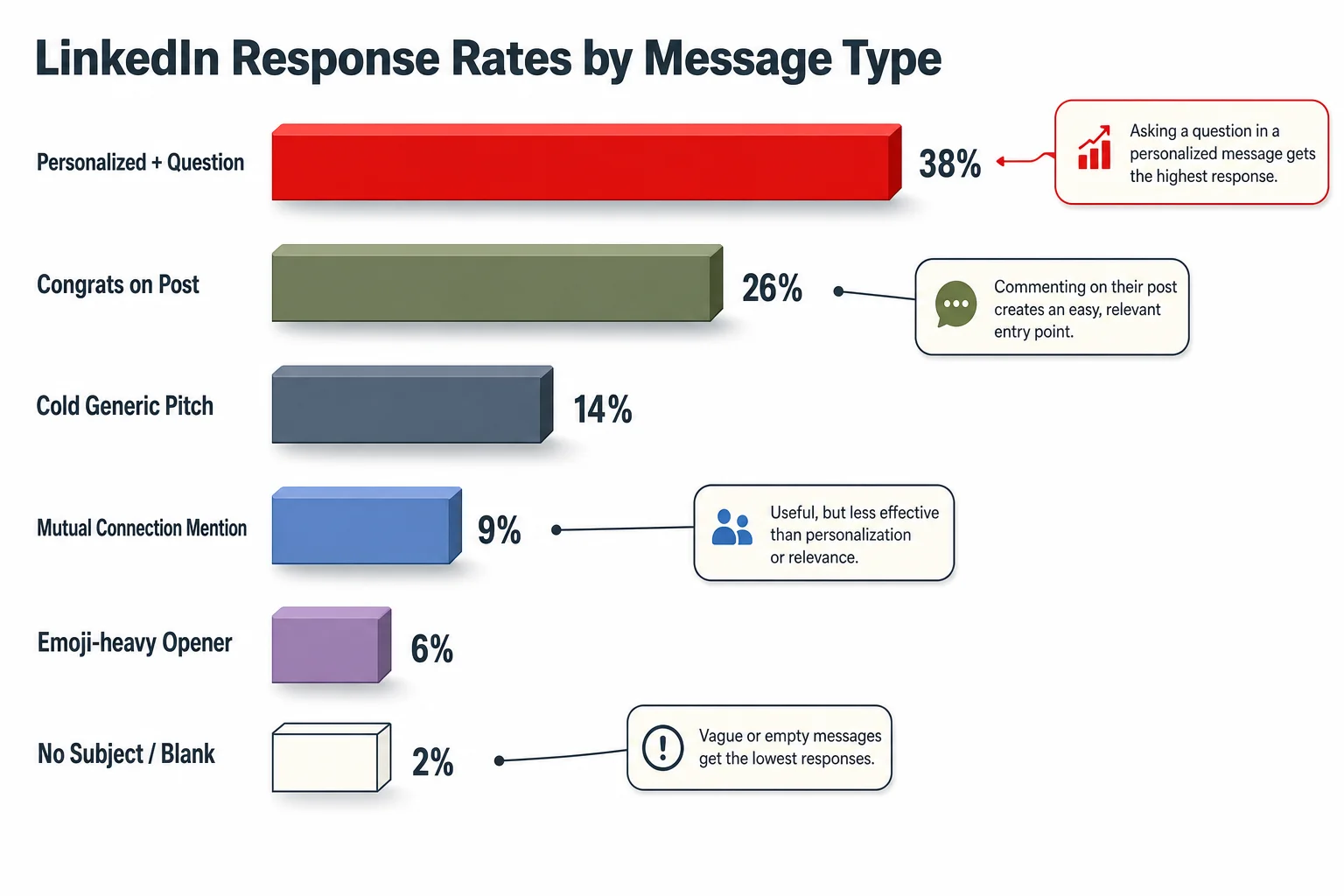
LinkedIn response rates by message type — personalization and AI assistance both lift reply rates over generic templates.
How AI Keyboards and Writing Tools Change Cold Outreach
Additionally, AI writing tools split into two camps, and mixing them up is where a lot of outreach goes wrong.
Camp one: mass-generation tools. These plug into your CRM, generate 200 near-identical messages with a name swapped in, and blast them out. They're why reply rates are falling. Recipients pattern-match fast — three "I loved your recent post about..." openers in a week and the fourth one gets an eye-roll, not a reply.
Hence, Camp two: real-time writing assistants. These sit where you're already typing — an AI keyboard, a browser extension — and help you say what you actually mean, more clearly, in your own words, as you write it. Nonetheless, This is the camp that helps, and the same principles apply whether you're messaging on LinkedIn or writing cold emails that get replies.
An AI keyboard for LinkedIn messaging fits into camp two. Hence, Instead of generating a template from scratch, it fixes grammar as you type, adjusts tone (too stiff? too casual? it'll flag it), and helps you trim a rambling draft down to the 25-50 word sweet spot the data points to. Hence, You're still writing the message. The tool just catches the typo, the run-on sentence, the accidentally-aggressive phrasing before it goes out.
Additionally, CleverType approaches this the second way. It's an AI keyboard that works across LinkedIn's mobile app and desktop browser, and a few things about how it's built matter specifically for outreach:
- Grammar and clarity fixes in real time — catches the small errors that make a message look rushed, without rewriting your voice into something generic.
- Tone adjustment on demand — soften a message that reads too pushy, or tighten one that's too vague, with one tap.
- Smart reply suggestions — useful for the back half of outreach, when someone actually responds and you need to reply fast before the thread goes cold.
- On-device privacy — your drafts and outreach lists aren't shipped off to train someone else's model. That matters more than people admit when you're messaging recruiters or prospects about sensitive deals.
- Multilingual support across 100+ languages — genuinely useful on LinkedIn given the platform's global reach; a UK recruiter messaging a candidate in São Paulo doesn't have to switch apps, thanks to multilingual AI typing apps built for this exact gap.
Nevertheless, Compare CleverType to Gboard and SwiftKey: Gboard focuses on next-word prediction and autocorrect but has no concept of "tone" or outreach context, while SwiftKey handles typing speed well but doesn't touch grammar depth or message structure. Grammarly's keyboard checks grammar but stops there — no tone shifting, no reply assistance, no built-in privacy-first design. CleverType bundles what those tools split across three different apps into one keyboard.
Additionally, If you're testing an AI writing tool for LinkedIn messages for the first time, download CleverType and try it on a draft you were about to send anyway — you'll see the tone suggestion pop up before you even hit send, which is the whole point.
Connection Request Templates That Work
Templates aren't cheating. Additionally, Recruiters have used them for decades. The trick is filling in one specific, true detail about the person — everything else can be a repeatable structure.
Here are five templates, each under 200 characters, built from what the response-rate data above actually supports.
1. The shared-context opener (best for former colleagues, alumni, event attendees)
"Hi [Name], we were both at [event/company] — would love to connect and see what you've been working on since."
2. The specific-content compliment (best for cold outreach to someone active on LinkedIn)
"Hi [Name], your post on [specific topic] stuck with me — the point about [specific detail] especially. Would like to connect."
3. The mutual-connection bridge
"Hi [Name], [Mutual Contact] mentioned your work on [specific project]. Connecting here so I can follow what you're building."
4. The direct-value opener (best for recruiters and job seekers and business development)
"Hi [Name], I work with [specific niche] teams on [specific problem]. Thought it might be relevant to what you're doing at [Company]."
5. The curiosity question (highest performer in the 180-character case study cited above)
"Hi [Name], quick question — how did [Company] approach [specific challenge]? Genuinely curious, and would love to connect."
Therefore, Notice none of these ask for anything in the first message. Additionally, No calendar link, no "quick call?", no pitch. Moreover, That's intentional — the 93% acceptance lift from personalization comes specifically from messages that read as genuine interest, not a sales attempt in disguise.
A few rules for filling these in:
- Replace every bracket. A template with
[Name]still in it is worse than no template at all. - Keep it under 200 characters even though the cap is 300 — the 120-180 character range outperforms notes that fill the space.
- Reference something from the last 90 days of their activity, not their job title from five years ago.
- Skip exclamation points. They read as forced enthusiasm on a first message from a stranger.
If you're sending these on mobile, an AI keyboard that flags overly long drafts before you hit the character limit saves you from LinkedIn's silent truncation — nothing kills a good opener like getting cut off mid-sentence because you didn't notice the counter.
Writing InMail That Doesn't Read Like a Bot Wrote It
Additionally, InMail is a different animal from connection requests — you're often messaging someone who has no idea who you are, no mutual connections, and a full inbox of similar pitches. The bar is higher.
Furthermore, Recruiting InMail sits at 18-25% response on average, with top campaigns hitting 35-40% and poorly targeted bulk sends falling under 10%, according to LinkedIn Talent Blog data referenced in 2025 InMail research. The same specificity that lifts recruiting InMail also applies to sales outreach aiming to close deals faster. What separates the top tier from the bottom isn't length or even personalization alone — it's specificity paired with a genuine, single ask.
Here's a structure that holds up across recruiting, sales, and general networking InMail:
- Open with the specific reason you're messaging them, not a category of people. "I'm reaching out to engineering leaders" is a category. "I saw you led the migration to Kubernetes at [Company]" is a person.
- State what you actually want in one sentence. Not "I'd love to pick your brain" — that's vague and everyone's tired of it. Try "Would you be open to a 15-minute call about how your team handled [specific thing]?"
- Give them an easy out. "No worries if the timing's off" sounds small, but it measurably reduces the pressure that makes people avoid replying at all.
- Skip the signature block. Your profile is one click away. A four-line sign-off just adds scroll length on mobile.
Should you use an InMail writing tool? Yes, cautiously. The useful ones help you draft faster and catch tone problems — a message that sounds fine in your head can read as demanding or stiff once it's on someone else's screen. Consequently, The tools to avoid are the ones that generate the entire message from a title and company name alone, because those produce exactly the generic filler that recipients have learned to skip.
LinkedIn itself has leaned into this middle ground. Furthermore, Its own AI-assisted messaging feature for Recruiter drafts candidate outreach based on the job post and candidate profile, and recruiters using it report a 44% higher acceptance rate and are 9% more likely to make a quality hire. Notice the pattern: it's assistance layered onto a specific candidate's real profile, not a blanket template.
One habit worth stealing from recruiters who message hundreds of candidates a month: they keep a swipe file of phrases that got replies, not full messages. A verb that worked, a question structure that landed. Additionally, Then they write a fresh sentence around it each time instead of reusing the whole block. That's the difference between an AI writing tool helping you and an AI writing tool writing for you.
Follow-Up Messages: Timing and Tone
Nobody talks about follow-ups enough, and that's a mistake, because Belkins' 2025 B2B outreach study found that most replies on LinkedIn come from the second or third touch, not the first message.
Nonetheless, So — when's the right time to follow up? Consequently, Not the next morning, and definitely not the same day. Give it three to five business days. Nonetheless, Message too soon and you look anxious; wait two weeks and the context has gone cold and they've forgotten who you are entirely.
Consequently, A good follow-up does one thing the first message didn't: adds new information. Don't just re-send a version of "just following up!" — that phrase alone probably kills more threads than any other single sentence in cold outreach. Instead:
- Reference something new (a post they published since your last message, a company update, a shared connection who just joined)
- Ask a different, narrower question than your first one
- Acknowledge the gap honestly: "Know inboxes get slammed — still curious about [specific thing] if you get a minute"
Interestingly, the data on AI-assisted follow-ups runs slightly against the first-message trend. AI-drafted first messages outperform non-AI ones (4.19% vs 2.60%), but follow-up messages perform slightly better without AI assistance. My read on why: by the second message, the relationship (thin as it is) has a bit of real context now, and a stiff or overly-polished follow-up feels more out of place than a rough, human one does. Write your follow-up yourself. Hence, Use an AI tone adjustment tool to check grammar and trim length, not to generate the whole thing.
Three follow-ups is generally the ceiling. Past that, you're not networking anymore, you're nagging, and the relationship — if there was ever going to be one — is done.
Common Mistakes That Kill Response Rates
Most bad outreach fails for the same handful of reasons, over and over. Here's the list, ranked by how often I see each one in practice:
- Pitching in message one. The data is unambiguous here — messages that ask for something before establishing any context underperform across every vertical measured.
- Writing for a persona, not a person. "Hi there" or "Hi [First Name]" left unfilled reads as what it is: a mail-merge error, not an oversight anyone forgives.
- Going over 400 characters on a first message. Every study cited above agrees on this direction even when the exact numbers differ slightly.
- Sending identical text to a batch of people. Recipients compare notes more than senders assume, especially within tight-knit industries like recruiting or venture capital.
- Ignoring the reply once it comes. A shocking number of outreach campaigns get a reply and then take two days to respond back, killing momentum they spent a week building.
- Using exclamation points and hype language. "Excited to connect!!" reads as inflated on a first message from someone the recipient doesn't know yet.
- Forgetting mobile formatting. A message that's clean on desktop can turn into a scroll-heavy block on a phone, and 70%+ of LinkedIn traffic is mobile.
- Skipping the character-limit check. Connection notes truncate silently past 300 characters — always preview before sending, especially when typing on mobile where the counter is easy to miss.
Here's the honest one: I've made mistake #5 myself, more than once. You spend all this effort getting a reply, then real life happens and you don't get back to them for three days, and the energy's just gone by the time you do. Set yourself a same-day reply rule for anyone who responds to your outreach. It costs nothing and it's the single easiest win on this whole list.
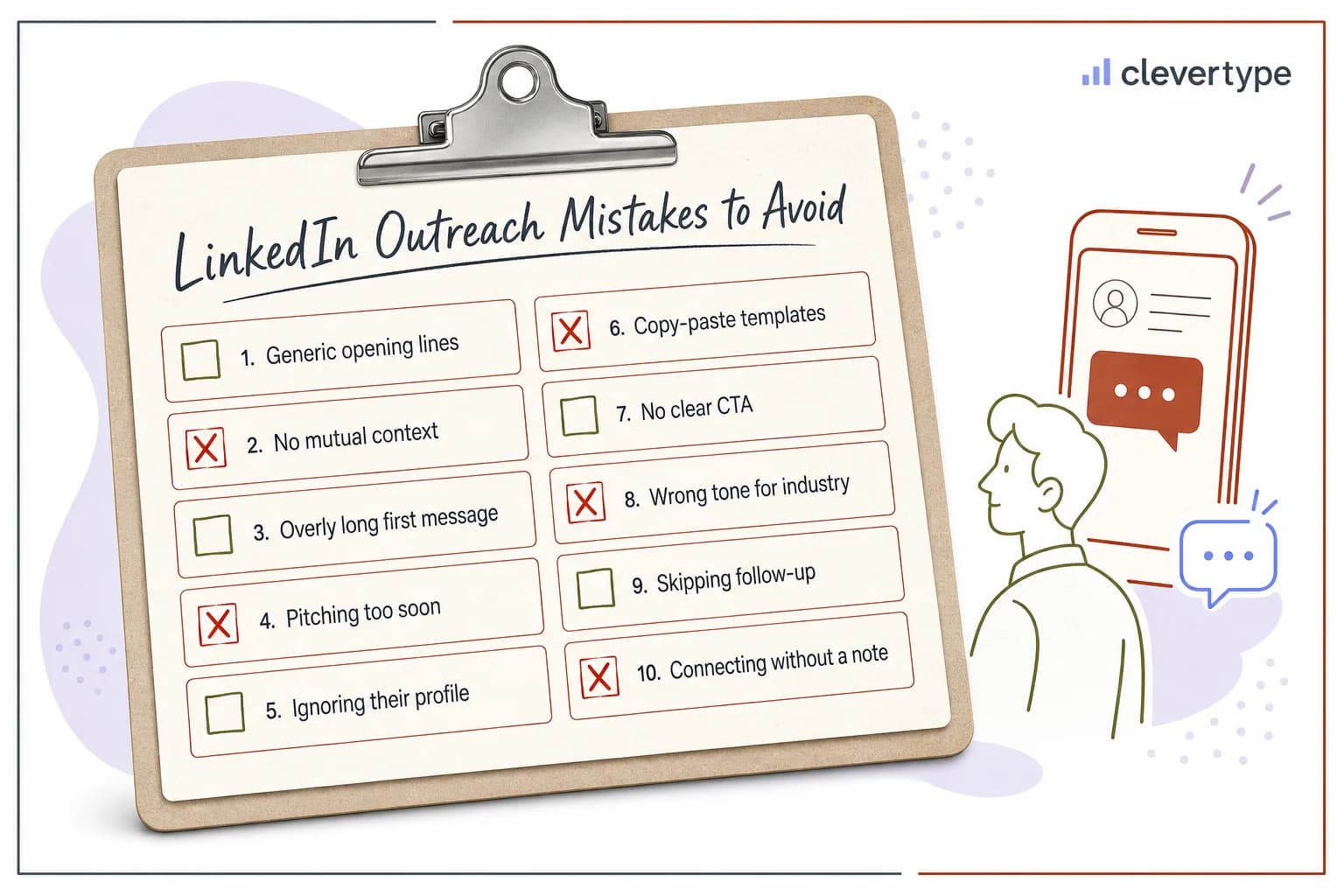
Eight LinkedIn outreach mistakes that quietly kill response rates.
Choosing the Right AI Writing Tool for LinkedIn Outreach
Not every AI writing tool fits LinkedIn messaging, and picking the wrong type is how you end up back at square one — generic messages, falling reply rates, wasted effort. This AI keyboard buyer's guide covers the broader decision if you're shopping beyond LinkedIn use cases.
Here's what actually matters when evaluating a tool for this specific job:
| Feature | Why It Matters for LinkedIn |
|---|---|
| Real-time tone adjustment | Catches "too pushy" or "too stiff" before you hit send, not after |
| Character/length awareness | Keeps you inside the 120-180 character sweet spot for connection notes |
| Grammar checking that preserves voice | Fixes errors without flattening your message into generic corporate-speak |
| On-device privacy | Outreach lists and drafts shouldn't leave your device to train someone else's model |
| Works where you already type | A separate app you have to copy-paste from adds friction and gets abandoned |
| Multilingual support | Needed if your network spans more than one language, which most LinkedIn networks do |
CleverType was built around exactly this list. Since it runs as a keyboard rather than a separate app you switch to, tone and grammar suggestions show up directly inside the LinkedIn app on your phone or in your browser — no copy-pasting a draft back and forth between windows. Therefore, That single design choice is a bigger deal than it sounds; friction is the number one reason people abandon a writing tool after day two.
Where CleverType differs most from Gboard and SwiftKey: those two are prediction-and-autocorrect engines first, built for general typing speed. Nevertheless, Neither one understands that a LinkedIn connection note needs a different tone than a text to a friend. Grammarly Keyboard gets closer — it does check grammar — but it stops at grammar, without touching tone shifts, smart replies, or multilingual outreach. Consequently, CleverType's AI-powered smart predictions and context-aware suggestions were built specifically to handle the kind of message-by-message tone shifting that outreach requires, all while keeping data processing on-device rather than in the cloud.
Consequently, If you're serious about improving LinkedIn networking messages this year, the tool question comes down to one thing: does it help you write a better version of your own message, or does it write the message for you? Pick the first kind, every time. Nevertheless, Download CleverType free and run your next outreach draft through it before sending — the tone check alone usually catches something worth fixing.
Frequently Asked Questions
Q: What is a good LinkedIn message response rate in 2026?
A: A good outreach reply rate falls between 10-25%, with top-performing personalized campaigns hitting 30-50%. Connection-note replies specifically average just 2.2% as of April 2026, so treat post-connection messages, not the note itself, as your main response benchmark.
Q: Should I use AI to write my LinkedIn connection requests?
Additionally, A: Yes, but only for editing and tone-checking, not full generation. Nonetheless, AI-assisted first messages get a 4.19% response rate versus 2.60% for non-AI messages, but that gap comes from personalized AI assistance, not copy-pasted AI templates sent to hundreds of people.
Q: How long should a LinkedIn connection request be?
A: Keep it between 120-180 characters, well inside the platform's 300-character cap. Notes in that range consistently outperform ones that use the full character limit, based on analysis of over 80,000 invitations.
Q: What's the best AI keyboard for LinkedIn messaging?
Nevertheless, A: CleverType is built specifically for this use case, offering real-time tone adjustment, grammar fixes, and smart reply suggestions directly inside the LinkedIn app, with on-device privacy and support for 100+ languages.
Q: How soon should I follow up after no response?
A: Wait three to five business days before a first follow-up, and add new information rather than repeating "just following up." Most LinkedIn replies come from the second or third message, not the first one.
Q: Why did my LinkedIn connection request get cut off?
Consequently, A: LinkedIn silently truncates or blocks connection notes past 300 characters. Nevertheless, Always check your character count before sending, especially on mobile where the counter can be easy to miss.
Q: Does message length really affect response rates that much?
Therefore, A: Yes — messages between 25-50 words get roughly 65% more replies than longer messages, and messages under 400 characters see a 22% response rate improvement over longer ones, according to LinkedIn outreach benchmark data.
Ready to Type Smarter?
Upgrade your typing with CleverType AI Keyboard. Fix grammar instantly, change your tone, receive smart AI replies, and type confidently while keeping your privacy.
Nevertheless, Available on Android • 100+ Languages • Privacy-First
Share this article: Twitter • Facebook • LinkedIn • Reddit
Sources:
- LinkedIn Outreach Benchmarks 2026: 13.2M Data Points
- LinkedIn Response Rate Benchmarks 2026
- LinkedIn Message Length Guide 2026
- LinkedIn InMail Statistics 2025
- B2B LinkedIn Outreach Benchmarks: 2025 Study
- LinkedIn Recruiter Will Use AI to Craft Personalized Candidate Messages — HR Dive
- AI-Assisted Messages in Recruiter FAQ — LinkedIn Official Help