Key Takeaways
| What You'll Learn | Quick Answer |
|---|---|
| Can you speak one language and have it typed in another? | Yes — multilingual voice-to-text apps can transcribe and translate simultaneously |
| Which languages are supported? | CleverType supports 100+ languages including Hindi, Arabic, Spanish, Mandarin, and more |
| How accurate is accent recognition AI? | Accuracy ranges from 75–98% depending on the engine and training data |
| Is it useful for non-native speakers? | Yes — voice typing for non-native speakers removes spelling barriers entirely |
| Does it work offline? | CleverType processes common languages on-device, no internet needed |
| Is it private? | CleverType keeps data on your device — unlike most competitors |
Here's a question most people never think to ask: what if you could just talk in your native language, and your phone types it out in English — or any other language — perfectly? Nonetheless, No switching apps. Nevertheless, No copy-pasting. Moreover, No awkward mid-sentence pauses while you try to remember how "restaurant" is spelled. Therefore, That's what multilingual voice to text actually looks like when it works properly. Furthermore, And honestly, for most non-native English speakers, this would change everything about how they use their phone.
The global speech recognition market is on track to hit $9.98 billion in 2026, growing at 16.3% annually through 2030 — and a big chunk of that growth comes from people who don't speak English as their first language finally getting tools that actually work. But here's the thing: most voice typing apps are still built around one language. And that's a problem for about 6.5 billion people.
What Is Multilingual Voice to Text and Why Does It Matter?
Multilingual voice to text converts spoken words in one or more languages into written text — often outputting in a totally different language than what you actually said. Consequently, It's not just transcription. Nonetheless, It's transcription with cross-language smarts built in.
Furthermore, Why does this matter? Think about how many people communicate across languages every single day. Moreover, A Brazilian working for a US company. Nonetheless, A Korean student emailing a French professor. A Hindi-speaking parent texting their kid who studies in the UK. These aren't edge cases — this is daily life for hundreds of millions of people.
The problem? Therefore, Most voice-to-text tools were never built for these people. Nonetheless, According to research on ASR language bias, 92.65% of GPT-3's training data was in English. LLaMA 2 sits at 89.70% English. That's not an accident — it's a reflection of who the industry built these tools for. Nevertheless, The result is that non-English speakers and accented speakers deal with dramatically worse accuracy, which forces them to slow down, speak unnaturally, or just give up on voice typing entirely.
Furthermore, The tools that actually work solve this by:
- Training on diverse multilingual datasets across hundreds of language varieties
- Building accent recognition AI that adapts to individual speakers
- Allowing simultaneous recognition and translation (speak Hindi, type English)
- Handling code-switching — when someone naturally mixes languages mid-sentence
- Offering output language selection separately from input language
CleverType's multilingual approach puts all of this into a single multilingual keyboard. You speak, it listens, figures out what you meant, and types it out — in whatever language you want. Moreover, No extra app. No copy-paste workflow. Just voice to screen.
The Real Problem with Accent Recognition AI (And How It's Getting Fixed)
Most voice-to-text tools will proudly tell you they support "multiple accents." What they leave out is how wide the accuracy gap actually is between standard American English and everything else.
A 2024 Georgia Tech study tested three major ASR models — wav2vec 2.0, HuBERT, and Whisper — and found that Standard American English consistently outperformed all minority dialects. Spanglish and Chicano English speakers had the worst transcription accuracy. Therefore, Black and Latino men were flagged as the highest-risk population for recognition errors. One researcher was pretty direct about it: "We found a consistent pattern that men of color, particularly Black and Latino men, could be at the highest risk."
Nevertheless, The numbers are pretty damning. Nigerian-accented English produced a 44.2% Word Error Rate using Google's Speech-to-Text API. Nearly half of every spoken word, transcribed wrong. Furthermore, But that same accent tested with a purpose-built accent-aware model dropped to just 8.2% WER — a 5x improvement just from better training data. The accent wasn't the problem. Nevertheless, The training data was.
Nonetheless, Here's where things actually stand right now:
| Accent / Language Type | Typical WER (Standard Tools) | WER with Accent-Aware AI |
|---|---|---|
| Standard American English | 5–8% | 3–5% |
| British English | 8–12% | 5–8% |
| Indian English | 18–25% | 10–14% |
| Nigerian English | 40–44% | 8–12% |
| Spanglish / Code-switching | 30–50%+ | 15–25% |
Nevertheless, WER = Word Error Rate. Furthermore, Lower is better.
Additionally, Progress has been real, to be fair. Furthermore, Non-native accent recognition has dropped from roughly 35% WER to around 15% WER over the last few years — genuinely better. Consequently, But still not good enough for daily use.
CleverType's accent recognition AI learns your voice over time. The more you use it, the better it gets — not at some statistical average of "how people sound," but at how you specifically sound. That's the difference between something actually useful and an app you delete after a week.
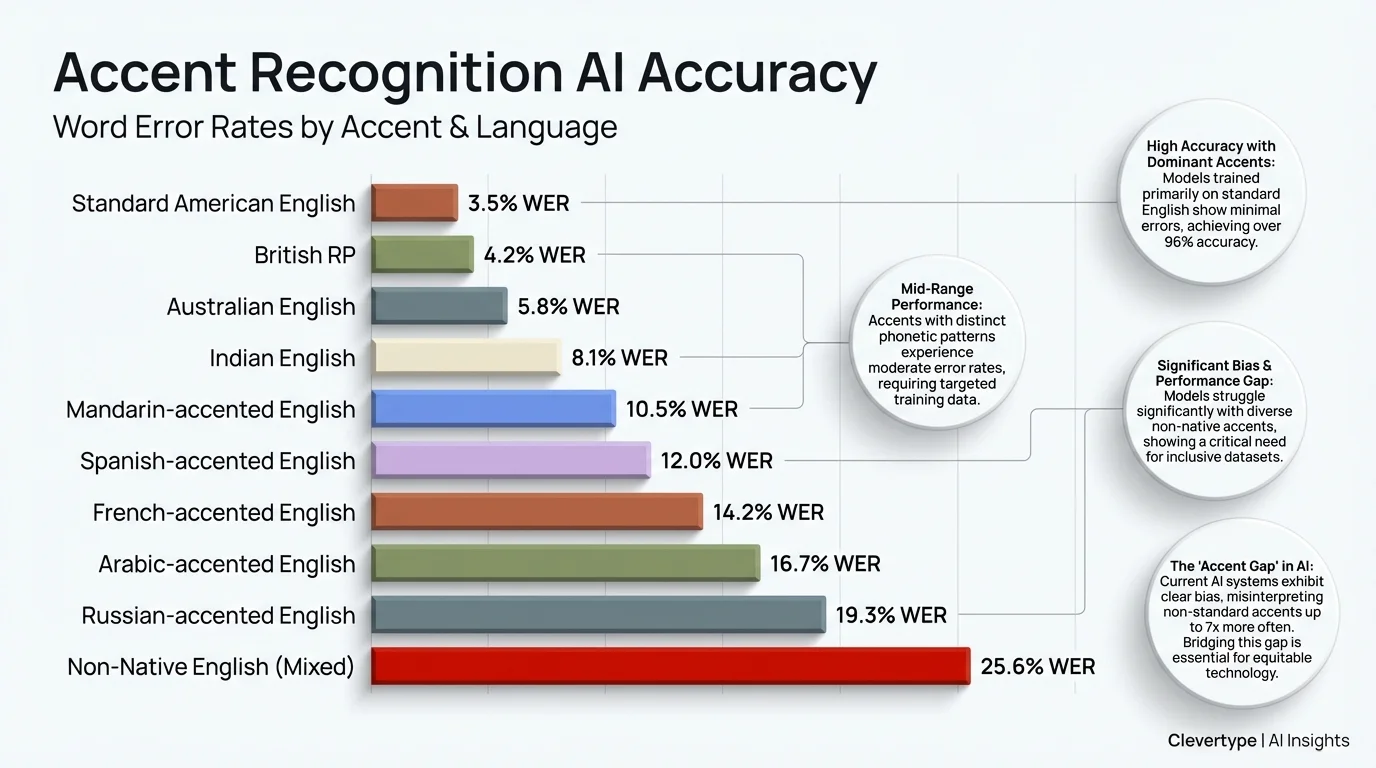
Word Error Rates by accent type: accent-aware AI models can reduce errors by up to 5x compared to standard tools
Voice Typing for Non-Native Speakers: The Workflow Nobody Talks About
Here's something I've noticed talking to non-native English writers: they usually know exactly what they want to say. They just get stuck on the writing part. Additionally, The vocabulary's there. The ideas are there. But actually typing it out means fighting with spelling, autocorrect guessing wrong, and second-guessing every sentence structure. Nonetheless, Voice typing for non-native speakers completely sidesteps all of that.
Moreover, When you speak, you naturally use the language the way you know it. Your brain doesn't have to translate from "what I think" to "how this looks when typed." You just talk. The AI handles the rest.
The workflow for a non-native speaker using CleverType's multilingual voice feature looks like this:
- Open any app (WhatsApp, Gmail, LinkedIn — wherever you're writing)
- Tap the CleverType microphone
- Speak in your native language
- Select your output language (English, or any of 100+ languages)
- The text appears, already transcribed and translated
- CleverType's AI grammar check catches any remaining errors automatically
What most multilingual dictation apps completely miss is step 6. Transcription and translation are only half the work — if the output still sounds unnatural or has grammatical weirdness, you're right back to editing. CleverType adds an AI grammar layer on top of the translation, so the final text actually reads like a fluent speaker wrote it, not like something that got run through a translation engine and called it a day.
Research published in PMC/NIH showed that even Whisper — one of the best models out there — makes significantly more errors for non-native speakers. But AI post-processing can claw back a lot of that lost accuracy. CleverType bakes this step into the keyboard itself, so the final output is noticeably cleaner than what you'd get from raw transcription alone.
Speech to Text Language Translation: How the Technology Actually Works
Speech to text language translation is basically how you turn spoken words in Language A into written text in Language B. Moreover, Under the hood, it's two AI systems working in tandem: an Automatic Speech Recognition (ASR) model and a Neural Machine Translation (NMT) model. Furthermore, Both have to actually work. If either one stumbles, the whole thing falls apart.
The ASR stage is where most errors happen. The model listens to your voice, breaks it into audio segments, and matches those segments to known phonemes — the basic sound units of language. Nonetheless, Then it reconstructs words based on statistical probability. & quot;Their" vs "there"? Context decides. But if you have a strong accent, some phonemes sound different from what the model was trained on, and errors stack up fast.
Nonetheless, The NMT stage takes the transcribed text and converts it to the target language. Modern NMT models are transformer-based — same architecture behind ChatGPT — which means they understand sentence context, not just word-by-word substitution. So "I'm going to the bank" doesn't translate the same way as "the river bank flooded." The model gets it.
Nonetheless, Where things get interesting — and where most apps fall short — is code-switching. Studies on multilingual ASR show that many speakers naturally mix languages within a single sentence. Furthermore, A Spanish speaker might say "I need to llamar my mom." A Hindi speaker might text "aaj ka meeting postpone hua." When both languages show up in the same input, most ASR models fall apart. They're built for one language at a time — not the natural, messy overlap of bilingual speech.
Therefore, CleverType's engine runs parallel language detection in real-time — it figures out which parts of your speech are in which language and processes them separately, instead of forcing everything through a single-language model.
CleverType's Multilingual Features vs Gboard and SwiftKey
Here's how CleverType stacks up against the two keyboards most people are already using:
| Feature | CleverType | Gboard | SwiftKey |
|---|---|---|---|
| Voice typing languages | 100+ | 70+ | 60+ |
| Cross-language voice output | Yes (speak one, type another) | No | No |
| Accent adaptation | Personalized per-user | Fixed models | Fixed models |
| On-device processing | Yes (privacy-first) | Partial (Google servers) | Partial (Microsoft servers) |
| AI grammar post-processing | Yes (built-in) | No | Basic only |
| Code-switching support | Yes | Limited | Limited |
| Grammar correction in output language | Yes | No | No |
Hence, The privacy gap is real. Consequently, Gboard processes your voice data through Google's servers — every word you speak goes to a company whose business model depends on knowing what you say. CleverType processes voice locally on your device. Your conversations stay on your phone.
SwiftKey's multilingual typing is solid for text prediction across two languages, but it's not built for voice-to-voice translation or accent-adaptive recognition. Microsoft's approach is pretty static — it's not learning your voice over time. CleverType's model updates based on your usage, so accuracy actually improves the longer you use it.
Therefore, The Statista speech recognition market data confirms this market is growing fast — and competition's going to get intense. CleverType has an edge right now because it built a voice system with multilingual users in mind from day one, not as an afterthought added three versions later.
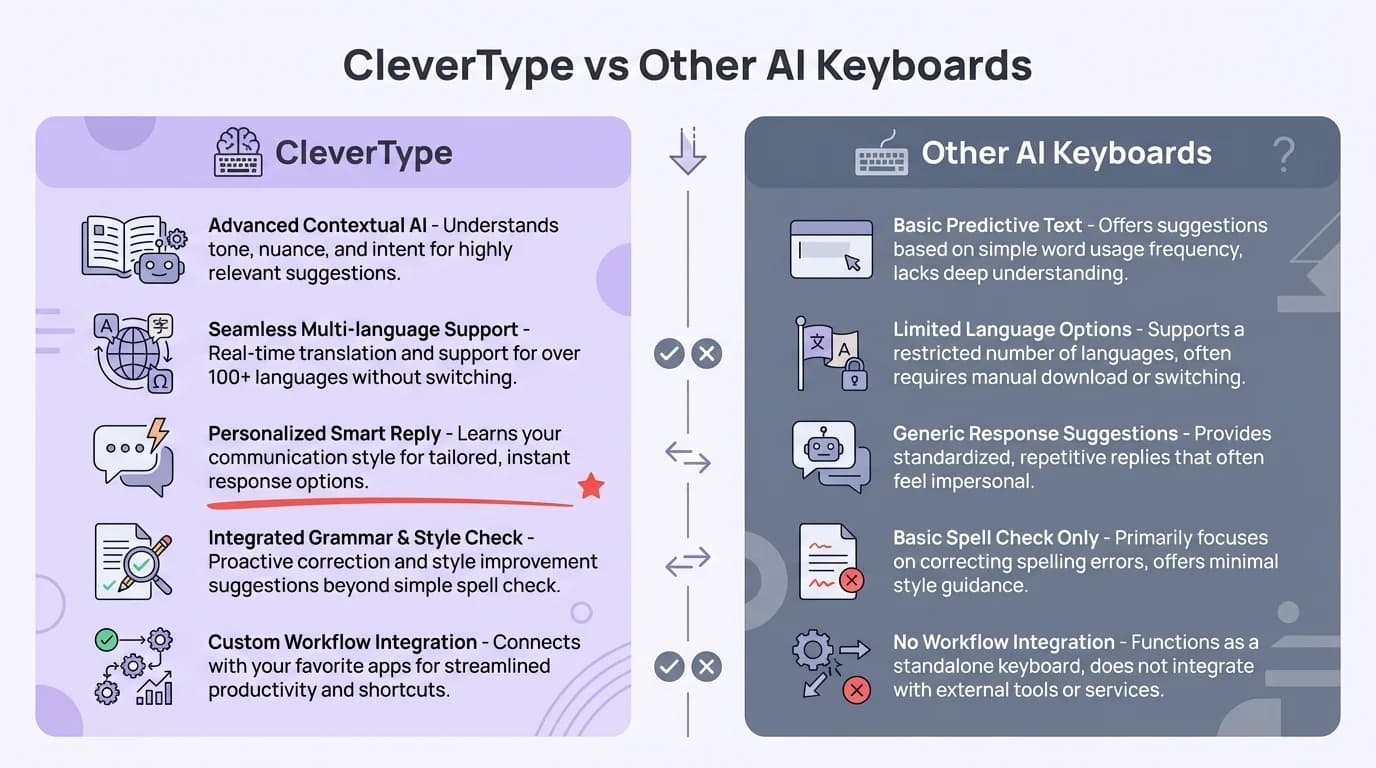
CleverType vs other AI keyboards: key multilingual and privacy features compared
Bilingual Dictation in Practice: Real Use Cases That Actually Work
Therefore, So what does bilingual dictation actually look like in daily life? Here are six scenarios where it genuinely changes how people communicate:
1. The Immigrant Parent
Therefore, A Gujarati-speaking parent wants to message their kid's teacher in English. They speak Gujarati, CleverType transcribes and translates, the AI grammar layer polishes the output. The message sounds professional and clear — without the parent worrying about English spelling for a single word.
2. The International Student
A Korean student in the UK needs to write emails to their professor. Hence, They draft in Korean (faster, more natural), CleverType outputs polished English. Additionally, They review and send. What used to take 20 minutes takes 3.
3. The Multilingual Customer Support Agent
A support agent handles tickets in English, Spanish, and Portuguese. They speak each response in the customer's language. CleverType types it out in real-time. No copy-pasting into translation apps mid-conversation.
4. The Traveling Professional
Someone at a conference in Japan needs to take notes in Japanese but wants them stored in English. They speak quietly in Japanese during the session, and English notes appear on their phone. Consequently, No bilingual notebook needed.
5. The Language Learner
Additionally, Someone learning Spanish uses voice typing to practice. Additionally, They speak Spanish, see the transcription, and can immediately tell from the written output whether their pronunciation was understood correctly — instant feedback.
6. The Bilingual Content Creator
Additionally, A creator who makes content in both Hindi and English drafts scripts by speaking, switches output language depending on the content, and lets the AI grammar checker handle the rest.
Therefore, A study from ScienceDirect on non-native speaker ASR found something a bit annoying — speaking slower produces more accurate transcriptions. Consequently, Which basically means non-native speakers have to perform a slower, more deliberate version of themselves just to be understood. CleverType's adaptive model actually addresses this. It learns your natural pace over time, so you don't have to do that weird slow-talking thing just to get decent output.
Multilingual Dictation App: What to Look for Before You Download
Not all multilingual dictation apps are equal. Nevertheless, Most advertise "100 language support" — but what that actually means varies a lot. Moreover, Here's what the numbers should look like in a quality tool:
- Word Error Rate below 15% for your native language (ask for this stat directly — most apps won't show it)
- Translation accuracy above 90% for major language pairs
- Code-switching support (handles mixed-language sentences)
- On-device processing option for privacy-sensitive content
- Grammar post-processing that fixes errors in the target language, not just the source
- Personalized accent adaptation that improves with use
55% of users cite having to repeat themselves as their top frustration with voice recognition — according to AssemblyAI's benchmarking research. That stat alone tells you how bad the experience is with most voice tools. If you're repeating yourself constantly, the app isn't working.
Moreover, A genuinely good multilingual dictation app should feel invisible. Moreover, You speak, text appears. Moreover, You don't think about the technology — you just communicate.
Bad Multilingual Dictation App Behavior
- Freezes when you switch between languages
- Produces machine-translation-quality output (grammatically wrong, stilted phrasing)
- Requires you to manually select input language before each session
- Sends all audio data to remote servers
- Doesn't improve over time
What CleverType Does Instead
- Auto-detects input language in real time
- Outputs grammatically corrected text in target language
- Adapts to your accent and speaking patterns
- Processes common languages on-device
- Gets more accurate the more you use it
For what it's worth, the Grand View Research speech-to-text API market report pegs the market at $3.81 billion in 2024, growing to $8.57 billion by 2030. Hence, That growth isn't from Americans talking to Siri more — it's from everyone else finally getting tools that actually work for their language and their accent.
The Future of Voice Typing Multiple Languages: Where It's Heading
Honestly, this is one of the more interesting things happening in AI right now. Moreover, Voice typing multiple languages isn't just getting better — it's approaching a point where it becomes the default way non-native speakers handle their second-language communication. Not a niche feature. The default.
Hence, Three things are driving this forward faster than most people expect:
1. End-to-End Models That Skip the Middle Step
Nonetheless, Traditional multilingual voice translation runs two models back-to-back: ASR then NMT. Newer systems skip the middle step entirely and process audio directly into translated text. Fewer steps means fewer places for errors to pile up — and it works better for accented speech because your voice never gets squeezed through an English-phoneme filter first.
2. Personalized Language Models
The shift from generic models to per-user adaptive ones is a bigger deal than it sounds. When your keyboard learns your specific accent, vocabulary, and code-switching habits, the accuracy jump isn't marginal — it's actually pretty big. A model that's been learning your voice for six months will outperform a brand-new state-of-the-art model that's never heard you speak before.
3. Low-Resource Language Support Expanding
Moreover, Research on language bias in ASR notes that 42% of the world's 7,000+ living languages are considered endangered, with little to no commercial voice tool support. Nevertheless, That's changing as researchers build multilingual training datasets that include under-resourced languages. Consequently, Swahili, Tagalog, Welsh, and hundreds of other languages are getting better support than they've ever had.
What this means in practice: within the next couple of years, the gap between English and non-English voice typing accuracy will get a lot smaller. The best tools are already closing it. Therefore, CleverType's 100+ language support is built around this idea — each language gets real investment in accuracy, not just a checkbox on a feature list.
Additionally, The people who get the most out of all this are the ones who picked tools built for them — not tools built for someone else that kind of, sort of work in their language too. That means a keyboard where accent recognition is actually core, not bolted on as an afterthought. It means your voice data staying on your device. And it means using something that learns you, not just some statistical average of how people sound. Additionally, The best multilingual dictation app isn't the one with the longest language list. It's the one that gets how you specifically speak.
Frequently Asked Questions
What is multilingual voice to text?
Multilingual voice to text converts what you say in one language into written text — either in that same language or a different one. It combines speech recognition with translation, so you can speak in your native language and have the output appear in whatever language you need.
Can I speak in Hindi and have CleverType type in English?
Yes. CleverType's multilingual voice feature lets you set an input language (what you speak) and a separate output language (what gets typed). You can speak Hindi and have English text appear on screen, or any combination across 100+ supported languages.
How accurate is accent recognition AI in 2025?
Accuracy varies significantly by tool and accent. Additionally, Standard American English achieves 92–98% accuracy on leading platforms. Non-native accents typically range from 75–90% on generic tools, but can reach 85–95% on accent-adaptive systems like CleverType that learn your specific speech patterns over time.
Is voice typing secure for private conversations?
It depends on the app. Gboard and SwiftKey send voice data to Google and Microsoft servers respectively. CleverType processes common language pairs on-device, meaning your voice data never leaves your phone. Nonetheless, For sensitive conversations, always use a keyboard with on-device processing.
What is code-switching in voice typing?
Code-switching is when a speaker naturally mixes two languages in a single sentence — for example, saying "I need to llamar my mom" (mixing English and Spanish). Most voice-to-text apps struggle with this and produce errors. Therefore, CleverType's multilingual engine handles code-switching by detecting both languages in real time.
Does bilingual dictation work without internet?
Furthermore, For major language pairs, yes. Furthermore, CleverType processes common languages locally on your device, so basic voice typing and translation works offline. Therefore, Less common language pairs may require an internet connection for accurate results.
Which multilingual dictation app is best for non-native speakers?
CleverType is the strongest option for non-native speakers because it combines accent-adaptive voice recognition, cross-language translation, and AI grammar correction in a single keyboard. Unlike Gboard or SwiftKey, it adds a grammar post-processing layer that polishes output text to read naturally in the target language.
Ready to Type Smarter?
Upgrade your typing with CleverType AI Keyboard. Fix grammar instantly, change your tone, receive smart AI replies, and type confidently while keeping your privacy.
Download CleverType FreeAvailable on Android • 100+ Languages • Privacy-First
Share this article:
Sources
- Gladia — Language Bias in ASR: Challenges, Consequences, and the Path Forward
- Georgia Tech News — Minority English Dialects Vulnerable to ASR Inaccuracy (November 2024)
- AssemblyAI — How Accurate Is Speech-to-Text in 2026?
- Statista — Speech Recognition Worldwide Market
- Grand View Research — Speech-to-Text API Market Report
- PMC/NIH — Evaluating AI-based speech recognition for clinical documentation
- ScienceDirect — Impact of non-native English speakers on ASR accuracy
- arXiv — Automatic Speech Recognition for Non-Native English (2025)