Key Takeaways
| Topic | Quick Answer |
|---|---|
| Speed advantage | Voice dictation averages 150 WPM vs 40 WPM typing — 3-4x faster |
| Accuracy in 2026 | Top AI tools reach 96–99% accuracy in clean audio conditions |
| Time saved annually | A writer producing 2,000 words/day saves roughly 145–165 hours per year |
| Market size | Global AI speech-to-text market hit $3.30 billion in 2025 |
| Best use cases | Blog posts, YouTube scripts, podcast show notes, social media captions |
| Cognitive load | Voice dictation produces 35–45% lower cognitive load than typing |
Here's something worth actually thinking about: how much of your “writing” time is spent writing, versus just moving your fingers? Most creators burn 60–70% of their so-called creative time on keyboard mechanics — not creating. Therefore, Voice to text flips that.
According to research by Weesper Neon Flow, the average person speaks at 150 words per minute. Typing? Therefore, Around 40 WPM. Nevertheless, That's not a small gap — you feel it every time you're trying to bang out a 2,000-word post before lunch.
In 2025, the AI speech-to-text market hit $3.30 billion and is growing at 17.41% CAGR through 2035. Consequently, Creators aren't just dabbling with voice typing anymore — they're rebuilding entire workflows around it. Here's how dictation for bloggers, voice typing for social media, and AI transcription for podcasters actually plays out day-to-day.
Why Voice-to-Text Is Changing How Creators Work
The real problem with typing is the gap between your brain and your fingers. You think in full sentences, but you type in short bursts — pausing, backspacing, fixing, repositioning. Nonetheless, Voice just removes that. Completely.
A Stanford study on speech vs keyboard input found that speech recognition on smartphones is nearly 3x faster than typing and produces fewer errors. Real users, real devices — not some controlled lab setup. For a creator juggling blog posts, scripts, and captions, that difference is pretty significant.
What does “3x faster” actually mean in real numbers?
- A 1,000-word blog intro that takes 25 minutes to type takes roughly 7–8 minutes to dictate
- A YouTube script at 1,500 words drops from 37 minutes of typing to under 12 minutes spoken
- A week of Instagram captions (7 posts × 150 words) shrinks from 26 minutes to about 7
Hands-free content writing isn't just a productivity hack. Moreover, It's a genuinely different way of creating. When you speak a first draft, you capture your natural voice — the conversational rhythm audiences actually connect with. Consequently, Written drafts come out stiff because you're editing while you create. Therefore, Spoken drafts come out alive.
The Productivity Gladiator puts it simply: “Dictating is 3x faster than typing. Start talking.” Not marketing. Just math.
Nevertheless, And here's the part most productivity articles skip: cognitive load. Hence, Researchers measuring pupil dilation and EEG activity found voice dictation produces 35–45% lower cognitive load than typing. Therefore, Less mental overhead means more energy left for the actual ideas.
Therefore, For creators managing content calendars, comments, scripts, and captions across multiple platforms, that savings stacks up. The average creator switches between 7 different apps daily, and that multitasking kills 40% of their productivity. Moreover, Voice dictation on mobile cuts that friction pretty meaningfully.
How Accurate Is Speech-to-Text in 2026?
Accuracy is the first thing every writer pushes back on. Therefore, “What about mistakes? I'll spend more time fixing it than I saved.”
That was a fair concern in 2019. It's not in 2026.
According to benchmarks from DEV Community, leading AI speech-to-text APIs now hit below 5% Word Error Rate (WER) in conversational English. That's fewer than 1 in 20 words needing a fix. Human transcriptionists average around 3–4% WER — so AI is basically there.
Here's a breakdown of what accuracy looks like in practice:
| Condition | Expected Accuracy |
|---|---|
| Clear audio, quiet room, native speaker | 97–99% |
| Moderate background noise | 91–95% |
| Strong accent or fast speech | 85–92% |
| Multiple overlapping speakers | 78–85% |
If you're a blogger or script writer dictating into a phone or laptop mic, you're almost always in that top tier. Hence, A basic USB mic in a home office setup will hit 98%+ on modern AI engines pretty consistently.
What changed? Two things. Transformer-based models (same architecture behind ChatGPT) replaced older statistical ones. Additionally, And training data exploded in scale — OpenAI's Whisper was trained on 680,000 hours of multilingual audio. That's why it handles accents, technical terms, and natural speech pauses so much better than older tools.
Additionally, For podcasters, the improvement is especially dramatic. Sonix reports automated transcription runs $0.10–$0.30 per audio minute, compared to $1.50–$4.00 per minute for manual — a 70%+ cost reduction with basically the same accuracy.
One thing that still catches people: punctuation. Commas and periods are fine, but complex sentence structure, em-dashes, and paragraph breaks need a quick cleanup pass. Therefore, Budget 5–10 minutes of editing per 1,000 words and you're still well ahead of typing it all out.
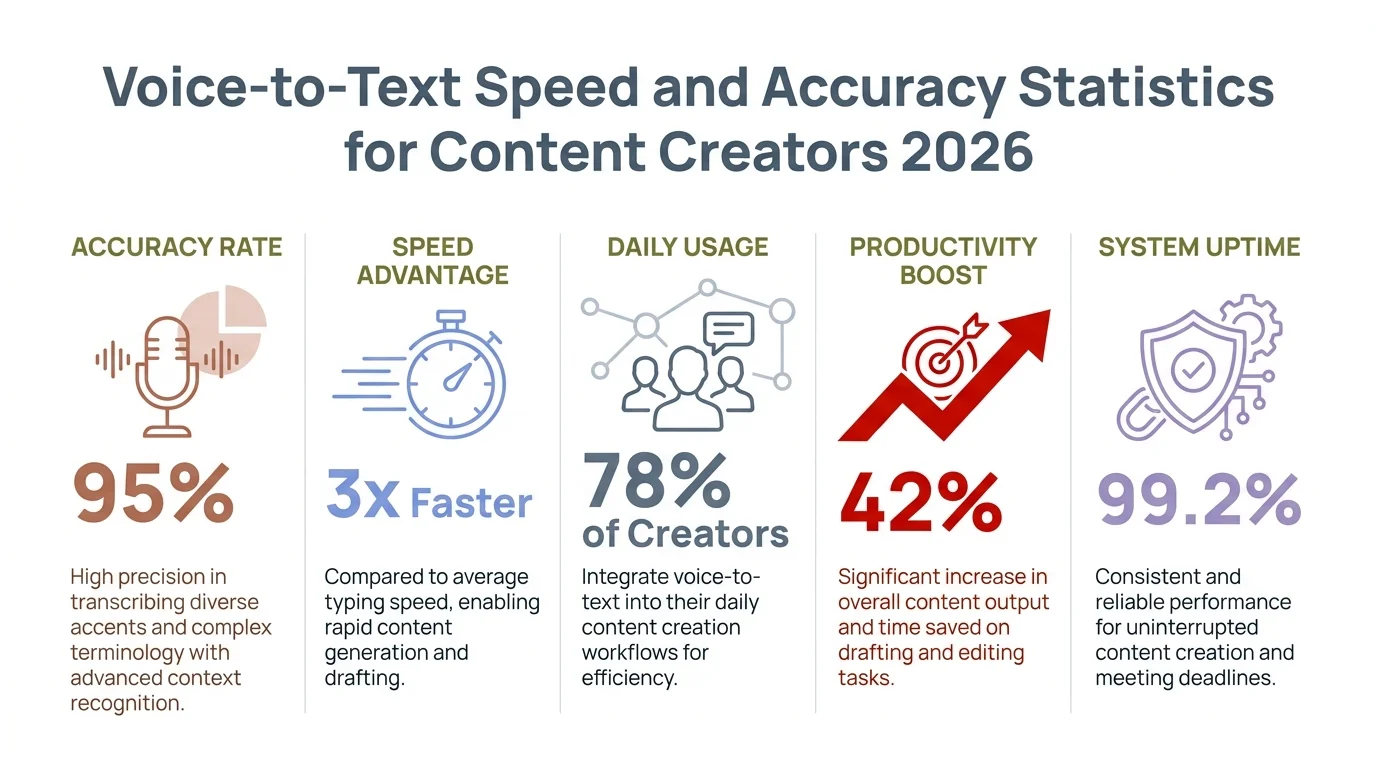
Key voice-to-text statistics for content creators: speed, accuracy, and productivity gains in 2026
The Best Voice-to-Text Tools for Content Creators Right Now
There are a lot of options out there — honestly, that's part of the problem. Most creators try one tool, have a so-so experience, and bail. Nevertheless, The trick is picking the right tool for the actual workflow.
Zapier's 2026 roundup of dictation software covers the main contenders well. Here's how they stack up for different creator types:
For bloggers writing long-form:
- Google Docs Voice Typing — Free, works well in Chrome, handles punctuation commands like “new paragraph” and “period.” No frills, but zero learning curve
- Whisper (OpenAI) — Best raw accuracy, open source, great for offline use or API integration
- Dragon Professional — Industry standard for serious writers, 99%+ accuracy after training, expensive but earns it back in time saved
For YouTubers and video script writers:
- Otter.ai — Real-time transcription, speaker labels, syncs with Zoom. Good for interview-based scripting
- Descript — Records audio and generates an editable transcript simultaneously. Edit the text, it edits the audio
- Rev — Human-reviewed transcription for caption files, SRT export built in
For podcasters:
- Riverside.fm — Records locally for high quality, auto-transcribes, exports clean show notes
- Castmagic — Takes your audio and outputs show notes, social posts, newsletter content automatically
For social media creators on mobile:
- iOS Voice Dictation — Built into every iPhone keyboard, handles short bursts well
- CleverType AI Keyboard — Goes beyond basic dictation with AI-enhanced suggestions, grammar fixes, and tone adjustments built right into the keyboard. Unlike stock keyboards, CleverType processes voice input and immediately applies context-aware polish, so your caption comes out ready to post rather than needing a full editing pass
The thing that sets CleverType apart from standard voice keyboards is what happens after transcription. Gboard gives you raw text. Furthermore, CleverType gives you improved text — grammar checked, tone adjusted, ready to send before you hit the button.
Start Dictating Smarter on Android
Voice input meets AI refinement — grammar corrected, tone adjusted, ready to post.
Download CleverType Free on AndroidHow to Dictate a Blog Post From Start to Finish
Nevertheless, Most people fail at voice dictation not because the tech is bad, but because they try to type with their voice. It requires a totally different mental approach.
Therefore, Here's what actually works for writers dictating 1,000–3,000 word articles:
Step 1: Outline first, always
Spend 5–10 minutes writing a rough bullet-point outline the old-fashioned way. Headings, sub-points, key examples you want to hit. Without this, you'll ramble — and rambling first drafts are genuinely painful to clean up.
Step 2: Set up your environment
Find a quiet space. Close the door. If you're on mobile, use a decent mic or even just earbuds with a mic — the accuracy difference is real. A $20 lapel mic outperforms a built-in laptop mic for dictation.
Step 3: Speak in paragraphs, not sentences
This is the biggest mindset shift, honestly. Don't say one sentence, pause, think, say another. Speak a whole paragraph's worth of ideas at once. Your brain already knows what it wants to say — just let it. You'll sound more natural and the AI will handle punctuation better too.
Step 4: Use verbal commands for structure
Most tools support commands like "new paragraph," "comma," "period." Learn five or six and your raw transcript comes out way cleaner. Seriously cuts editing time.
Step 5: Edit in passes, not simultaneously
Finish the full dictation session first. Don't stop to fix things mid-flow — it shatters momentum and kills the whole speed advantage. Once you're done speaking, do one pass for corrections, one pass for style. That's it.
Step 6: Read it aloud before publishing
Sounds counterproductive, I know. But since you drafted by speaking, reading aloud catches the awkward phrases your eyes would just skip over. It's weirdly effective.
With this workflow, a 1,500-word blog post goes from 2+ hours of typing to about 45–50 minutes total (10 minutes outline, 12 minutes dictation, 20–25 minutes editing). Nevertheless, That's a real 2–3x improvement — not a theoretical one.
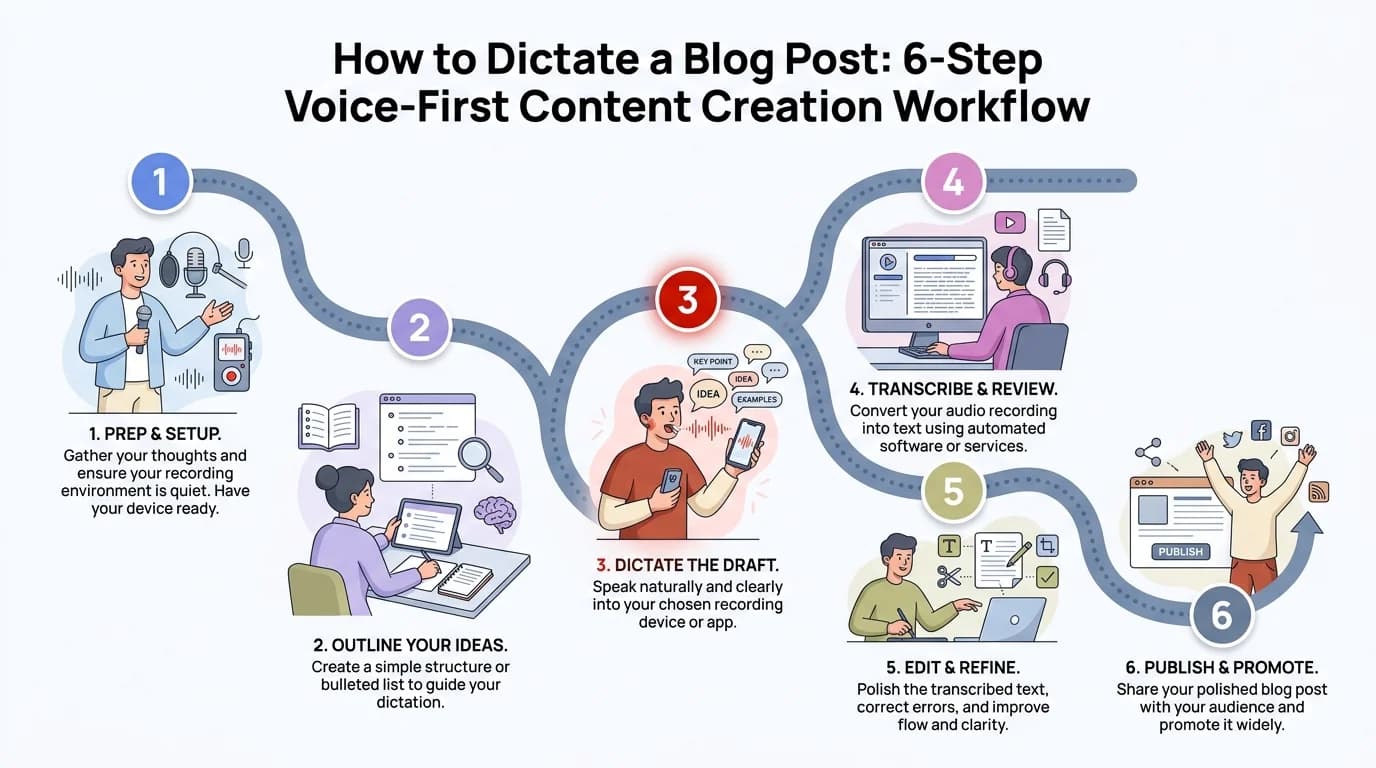
The 6-step voice-first workflow for dictating blog posts — from outline to publish-ready draft
Speech-to-Text for YouTube Scripts and Video Content
YouTube creators have a specific challenge: scripts need to sound natural on camera, not like polished essays. Moreover, Voice dictation is actually better for this than typing — you naturally speak the way you'll deliver it.
Here's what a lot of YouTube creators have landed on:
- Record a rough audio note walking through your video concept, like you're explaining it to a friend
- Run it through a transcription tool (Whisper, Otter, or Descript)
- Clean up the transcript — remove filler words like “um” and “like,” tighten run-on sentences
- Add B-roll notes and timestamps in a second pass
- Read from the cleaned script or use it as a teleprompter
Adding transcripts and captions also means better SEO. According to Sonix, video transcripts significantly boost search visibility because they give search engines indexable text from otherwise invisible audio. Nevertheless, Makes sense when you think about it.
A quick tip for YouTube specifically: dictate your title, description, and tags right when you're already in “speaking mode.” Rattle off your SEO metadata verbally and clean it up in 2 minutes. Therefore, Most creators spend 15–20 minutes writing video descriptions. Voice cuts that to 5.
For Shorts and TikTok, where captions are everything, tools like Speechify have mobile-first dictation workflows that plug right into content apps. A solid TikTok caption with hooks and hashtags takes 8–12 minutes to type. Dictated and cleaned up? Under 3.
Furthermore, The Statista Speech Recognition Market Forecast projects this market reaching $19.09 billion in 2025, driven largely by content creator and media adoption. That growth tells you where things are heading.
Voice Typing for Social Media Content
Social media is honestly where voice typing shows the fastest ROI. Posts are short, the pace is relentless, and creators are often writing captions from their phones while doing something else entirely.
Nonetheless, The typical social media content load for a mid-size creator:
| Platform | Posts/Week | Avg Words/Post | Weekly Word Count |
|---|---|---|---|
| 5 | 120 | 600 | |
| Twitter/X | 14 | 40 | 560 |
| 3 | 280 | 840 | |
| TikTok | 7 | 80 | 560 |
| Total | 29 | — | 2,560 words/week |
At 40 WPM typing with revision time, that's roughly 64+ minutes of pure typing per week, not counting thinking time. At 150 WPM dictation with a quick edit pass, it drops to under 20 minutes.
Nevertheless, Here's the weird part: voice-typed social posts often perform better. They're more conversational, more personal, stronger first-person voice — exactly what algorithms reward right now. The stiffness that comes from typing just disappears.
Nonetheless, For Android creators, CleverType's AI keyboard is genuinely useful here. You dictate a caption, and the keyboard immediately suggests grammar fixes, adjusts tone for the platform (casual for Instagram, more buttoned-up for LinkedIn), and flags awkward phrasing. It's the bridge between raw dictation and something actually ready to post — built right into your keyboard.
Privacy is worth thinking about here too. Gboard routes your voice through Google's servers. Consequently, CleverType keeps AI processing private. If you're discussing unreleased content or working under NDAs, that distinction matters a lot more than most keyboard reviews bother to mention.
AI Transcription for Podcasters: Show Notes, Chapters, and Repurposing
Podcasters are probably the biggest beneficiaries of AI transcription. Every episode already contains 20,000–60,000 spoken words. Consequently, The question isn't whether to transcribe — it's how fast, and what to do with it.
Furthermore, An hour-long episode that used to take 3–4 hours of manual transcription now takes about 5–8 minutes with AI at 96–98% accuracy. That's the time savings that makes repurposing actually viable.
From one podcast transcript, you can pull:
- Show notes (300–500 word summary with key points)
- Chapter markers with timestamps
- Pull quotes for social media graphics
- Newsletter content — the top 3 insights from the episode
- Blog post — expand the best segment into long-form
- Twitter thread — 8–10 key moments reformatted as tweets
- LinkedIn article — a professional take on the main topic
Hence, That's 7 pieces of content from one recording session. Creators who do this consistently end up publishing 4–6x more content with the same production effort.
Sonix's transcription stats confirm the math: automated AI transcription runs $0.10–$0.30 per audio minute. A 60-minute podcast costs $6–$18. Hence, Manual transcription for that same episode? $90–$240. Additionally, And the AI version is done in minutes, not days.
If you do multi-speaker interviews, make sure your tool supports speaker diarization — labeling different speakers in the transcript. Otter.ai, Riverside, and Descript all handle this. Nothing is more frustrating than a transcript that just says “Speaker 1... Speaker 1...” when there were two different people talking.
The ringly.io voice AI stats for 2026 show organizations using AI transcription see a 30% productivity bump on average. For podcasters, that shows up as more consistent publishing and better content repurposing.
Building a Sustainable Voice-First Content Workflow
Dictation isn't just a tool — it's a habit. And habits take 2–3 weeks to feel natural. Most creators who quit do it in the first week, when the editing overhead feels high and the voice sounds “not like me.”
That awkward phase doesn't last. Here's Therefore, what the long-term setup actually looks like:
Morning voice dump
Start your creative day by speaking for 10–15 minutes. No structure, just ideas. Transcribe it. That raw material becomes outlines, titles, and hooks for the week's content.
On-the-go capture
Some of the best content ideas hit during walks, drives, or gym sessions. Speaking a voice memo and having it transcribed automatically means no idea gets lost. Apps like Otter.ai can transcribe in the background as you speak.
Batch script creation
Set a 45-minute block once a week to dictate 3–5 YouTube scripts back to back. Speaking one topic primes your brain for the next. You build momentum that typing never creates.
Keyboard-level AI assist
For in-app content creation — replying to DMs, writing captions, responding to emails — having an AI keyboard like CleverType means every piece of short-form copy you produce benefits from voice input and AI refinement in one step. You speak, the AI cleans it up, you post. The feedback loop is minutes, not hours.
Additionally, The Precedence Research AI Speech to Text Market report projects this technology expanding from $3.30 billion in 2025 to nearly $17 billion by 2035. Creators who build voice-first workflows now will be way ahead on output as the tech keeps improving.
Hence, One last thing worth saying: voice dictation removes the blank page problem almost entirely. When you're typing and stuck, you stare at a cursor. When you're dictating and stuck, you just say what you're thinking — even “I'm not sure how to phrase this” — and move on. The act of speaking breaks creative blocks in a way that typing rarely does.
Frequently Asked Questions
How fast is voice to text compared to typing for content creators?
What is the best voice to text app for bloggers in 2026?
Is AI speech to text accurate enough for professional content?
Can podcasters use AI transcription to repurpose content?
Does voice typing work for YouTube script writing?
What's the difference between voice to text and AI transcription?
Is voice dictation private and secure for content creators?
Ready to Type Smarter?
Moreover, Upgrade your typing with CleverType AI Keyboard. Fix grammar instantly, change your tone, receive smart AI replies, and type confidently while keeping your privacy.
Download CleverType FreeAvailable on Android • 100+ Languages • Privacy-First
Sources:
- Weesper Neon Flow — Voice Dictation Speed vs Typing: 150 WPM vs 40 WPM Research
- Sonix — 24 Automated Transcription Statistics
- Sonix — Best Speech-to-Text Software 2026
- Precedence Research — AI Speech to Text Tool Market Size 2025–2035
- Statista — Speech Recognition Worldwide Market Forecast
- DEV Community — Speech-to-Text Accuracy in 2025: Benchmarks and Best Practices
- Productivity Gladiator — Dictating Is 3x Faster Than Typing
- Zapier — The 9 Best Dictation and Speech-to-Text Software in 2026
- Speechify — How to Use Dictation and Voice Typing in ChatGPT
- Ringly.io — 47 Voice AI Statistics for 2026