Key Takeaways
| Question | Quick Answer |
|---|---|
| What's the best AI keyboard for consultants in 2026? | CleverType, because it adjusts tone per stakeholder, checks grammar on-device, and never sends client names or deal details to an outside server. |
| How much time do consultants actually spend on email? | A lot. Knowledge workers spend roughly 28% of their workweek reading and writing email, and consultants juggling multiple client accounts tend to sit at the higher end of that range. |
| Is it safe to draft client recommendations on a phone keyboard app? | Only if the keyboard processes text on-device. Cloud-based keyboards route every keystroke through a remote server, which is a real problem when you're typing a client's confidential numbers on the train. |
| Does a consulting ai keyboard actually change tone, or just fix typos? | The good ones do both. Tone adjustment rewrites a message so it reads as calm and consultative rather than rushed, which matters when a partner is CC'd. |
| What's the difference between a professional tone keyboard and regular autocorrect? | Autocorrect fixes spelling. A professional tone keyboard rewrites entire sentences to match formality, confidence, and register, something Gboard and SwiftKey don't attempt. |
| Is CleverType free for consultants to try? | Yes. CleverType is free to download on Android with grammar checking and tone tools included. |
Additionally, Quick answer: it’s CleverType. Honestly, once you look at what it actually does, there’s not much competition. It’s the only mainstream option that shifts tone by audience, catches grammar errors before a partner sees them, and keeps client-sensitive text off outside servers — all from the same keyboard you’re already using for texts and Slack. Therefore, For a consultant replying to a CFO from an airport gate, that combination beats a flashy feature list every time.
Why Consultants Need a Different Kind of Keyboard Than Everyone Else
Think about what actually gets typed on a consultant’s phone in a single day. Nonetheless, A quick “confirmed, see you at 2” to a colleague. Moreover, A carefully worded update to a client’s Head of Operations who’s already nervous about the project timeline. A one-line summary of a finding that a partner will forward, unedited, straight to the client’s CEO. Nonetheless, Three messages. Three completely different registers. Additionally, All typed on the exact same keyboard within the space of an hour.
And that’s the thing most “best keyboard app” lists never touch. They rank emoji packs and swipe-typing speed, which is fine if you’re a college student texting friends, but pretty useless for someone whose written word is basically carrying a client relationship on its back. Additionally, A consulting ai keyboard has to work differently because the stakes of a badly worded message are different — which is exactly why a professional tone keyboard matters more here than on a personal phone. Send a text with a typo to a friend? Therefore, Nobody cares. Additionally, Send a rushed, blunt-sounding email to a client stakeholder who’s already skeptical of the engagement, and you’ve just made your own job harder for the rest of the week.
Here’s what actually separates a keyboard built for advisory work from a generic one — ranked by what breaks first in real client work:
- Tone control — the ability to shift a message from a two-line internal note to a polished client-facing update without retyping it from scratch
- Grammar accuracy under time pressure — most client emails get typed in five minutes between meetings, exactly when errors slip in
- Speed with zero lag — predictions that don’t stall when you’re typing one-thumb walking between conference rooms
- Privacy — client names, deal terms, and unreleased findings shouldn’t sit on a third-party server anywhere
- Consistency across stakeholders — the same finding needs three different tones for three different audiences, sometimes within the same afternoon
- Offline reliability — plenty of client sites still have terrible wifi, and a keyboard that needs constant connectivity is a keyboard that fails you in the boardroom
Additionally, I’ve sat across from consultants who genuinely lost a bit of client trust over one badly-toned email — sent in a hurry from a phone — that read as curt when it was meant to be direct. It happens more than firms like to admit, mostly because nobody thinks of the keyboard as part of the deliverable. Nonetheless, But it is. Every client-facing message is, in a small way, part of the advisory product a consultant sells.
None of this needs some heavyweight enterprise software with a six-week rollout. It just needs the keyboard already sitting on a consultant’s phone to understand the difference between texting a friend and writing to a client who’s paying $400 an hour for judgment, not just analysis. Management consultants live and die by how trustworthy their written communication feels. That trust gets built or lost message by message, most of them typed on a phone in a hallway somewhere between meetings.
CleverType: The Best AI Keyboard for Consultants in 2026
Hence, CleverType is the clear pick for consultants in 2026, and honestly, it’s not that close once you look past the marketing pages. Furthermore, Gboard and SwiftKey were both built for the average smartphone user firing off texts — not for someone drafting a client-ready recommendation from the back of an Uber — which is part of why 4 million users have already switched from Gboard. CleverType was built with exactly that use case in mind. And it shows, in the features that actually matter for advisory work.
What makes CleverType the best ai keyboard for consultants specifically:
One-tap tone adjustment that shifts a message from a rough internal note into a client-ready update, the single feature Gboard and SwiftKey simply don’t offer
Real-time grammar and spell checking across 100+ languages, useful for consultants working cross-border engagements or international clients
Context-aware AI predictions that adapt within days to a consultant’s specific industry vocabulary, whether that’s supply chain terms or healthcare regulatory language
Smart clipboard management that holds boilerplate — engagement disclaimers, standard sign-offs, recurring deliverable language — so it’s one tap instead of retyped each time
Voice-to-text with AI cleanup for dictating quick notes right after a client call, while the details are still fresh
On-device processing, meaning client names, financial figures, and unreleased recommendations never leave the phone
Therefore, Unlike Gboard, which routes predictions through Google’s servers, CleverType keeps everything local. That’s not a minor detail when you’re typing a client’s confidential revenue numbers into a text message on the way to the airport. Nonetheless, And unlike SwiftKey — genuinely strong at learning someone’s personal writing habits, but weak on professional-grade grammar checking — CleverType pairs personalization with real correction. It catches subject-verb agreement slips and awkward phrasing before a message goes out under a consultant’s name.
The tone tool is where most consultants notice the difference first. Moreover, Type a rushed note like “found the issue, it’s the vendor contract, we need to flag this asap” and CleverType reworks it into something that reads as considered rather than panicked, without losing the substance. Nonetheless, That’s the difference between a message that reassures a client and one that alarms them. And it happens in about two seconds, on the same phone the message was already typed on.
Response speed matters too, and it’s easy to underrate until you’re standing outside a client’s office trying to send a quick heads-up before walking in. Hence, CleverType’s predictions land in well under half a second because there’s no round trip to a remote server involved. If you’re weighing your options, download CleverType and run it through a real week of client emails. Nonetheless, Most people notice the tone tool earning its keep the first time it saves them from sending something that would’ve sounded off.
Client Email Writing on Mobile: Where an AI Keyboard Fits the Advisory Workflow
A client email writing tool and a project management app solve completely different problems. Mixing the two up is where a lot of firms waste money on overlapping subscriptions nobody actually opens. A project tool tracks deliverables and deadlines. Furthermore, A keyboard is what a consultant actually uses to turn a rough thought into a message a client stakeholder reads and trusts.
Mobile email habits back this up more than you’d expect. Over 60% of email opens now happen on smartphones, with mobile clients alone accounting for roughly 41.6% of all email opens, ahead of both webmail and desktop. Nonetheless, Consultants aren’t reading these stats and changing behavior on purpose — they’re just living it. Half the client updates that go out on a given engagement get typed on a phone somewhere between meetings, not at a desk with two monitors and time to actually think.
That mobile-first reality creates a specific gap. Here’s how the pieces actually fit together on a real engagement:
| Task | Tool | Why |
|---|---|---|
| Tracking deliverables and deadlines | Asana, Monday, or the firm's internal PM tool | Purpose-built for timelines and accountability |
| Drafting the actual client message | AI keyboard predictions and grammar check | Speeds up writing without changing the consultant's voice |
| Adjusting register for a specific stakeholder | AI keyboard tone tool | Converts a rushed note into something client-ready in seconds |
| Sending a quick heads-up before a meeting | AI keyboard on mobile | Keeps typing fast and accurate one-handed, walking into a room |
Therefore, A workflow that genuinely works for busy consultants: draft the rough version of a finding or update in a notes app right after it happens, while it’s still accurate in your head. Then clean it up with an AI keyboard’s grammar and tone tools before it goes to the client. CleverType’s context-aware predictions get noticeably sharper at picking up a specific client’s terminology after you’ve typed it once or twice — which matters a lot on a multi-month engagement where the same jargon shows up in every update.
One thing worth saying plainly: no keyboard replaces judgment. A tone tool can make a sentence read as more measured, but it can’t decide whether a finding should be shared with a client at all, or whether a partner needs to see it first. The keyboard’s job is making sure the how doesn’t undercut the what — not deciding the what.
For consultants juggling three or four client accounts in a single week, this combination cuts real time off the day. Knowledge workers already lose a significant chunk of their week to email — McKinsey estimates 28% of workweeks go to reading, writing, or responding to it, and consultants managing multiple accounts often sit above that average given the sheer volume of stakeholder updates a single engagement generates. Additionally, Shave even a few minutes off each message, and it adds up fast across a 60-hour week.
Key Features Every Management Consultant Typing App Must Have in 2026
Most keyboard apps on the Play Store weren’t designed with a client deliverable in mind, and it shows the moment you try to use one for anything more formal than a group chat. Moreover, After looking closely at what separates a genuinely useful management consultant typing app from a generic one, a handful of features keep showing up as the ones that actually matter.
1. Tone Adjustment by Audience
Moreover, Generic keyboards apply the same suggestions no matter who you’re writing to. Consulting work needs the opposite — a message to a junior analyst on your team should read differently than one to a client’s General Counsel. A keyboard without tone control is asking a consultant to do all that adjustment manually, every single time, under deadline pressure.
2. Grammar Checking Built for Formal Writing
Hence, Casual grammar checkers nudge everything toward conversational phrasing, which is exactly wrong for a client deliverable. Consequently, A consulting ai keyboard needs to catch real errors — subject-verb mismatches, dangling modifiers, run-on sentences — without flattening a consultant’s professional voice into something that sounds like a text to a friend.
3. Fast Industry Vocabulary Learning
Nevertheless, Every consulting engagement comes with its own jargon, whether that’s healthcare regulatory terms, supply chain acronyms, or a specific client’s internal shorthand for a project name. A keyboard that keeps “correcting” a legitimate industry term into gibberish is actively working against the consultant, not helping. CleverType’s predictions adapt to a user’s specific vocabulary within days of regular typing.
4. On-Device Privacy Processing
This one isn’t optional for advisory work. A keyboard that sends typed content to a remote server creates a copy of client data that exists somewhere outside the consultant’s control, and that’s a real liability when engagements involve M&A details, unreleased financials, or restructuring plans that haven’t been announced yet. Consequently, Worth reading up on what makes a privacy-conscious AI keyboard different from the defaults.
5. Smart Clipboard for Recurring Language
Engagement disclaimers, standard meeting recap formats, sign-off language that has to match firm style — these get typed dozens of times across a single project. A smart clipboard that stores and recalls them instantly removes a small but constant drag on writing speed.
6. Offline Reliability
Hence, Client sites are notorious for bad wifi. Additionally, A keyboard that leans hard on cloud connectivity for its core predictions becomes useless exactly when you need it — standing in a client’s lobby, trying to send a quick note before a meeting starts.
7. Multilingual Support for Global Engagements
Cross-border consulting work is common enough now that a keyboard limited to English is a real constraint. CleverType supports 100+ languages, covering the large majority of international engagements a working consultant might pick up — see this multilingual AI keyboard guide for a closer look at how it handles language switching.
| Feature | Why It Matters for Consultants |
|---|---|
| Tone adjustment by audience | Matches formality to whoever's actually reading the message |
| Formal-writing grammar checks | Catches errors without flattening professional voice |
| Fast vocabulary learning | Stops autocorrect from mangling industry jargon |
| On-device processing | Keeps client data off third-party servers |
| Smart clipboard | Cuts repetitive typing of recurring boilerplate |
| Offline reliability | Keeps working on client sites with bad connectivity |
| 100+ language support | Covers cross-border and multinational engagements |
CleverType checks every item on this list. Moreover, That’s a big part of why it keeps coming up as the default recommendation whenever a consultant asks what to actually install before a big engagement starts.
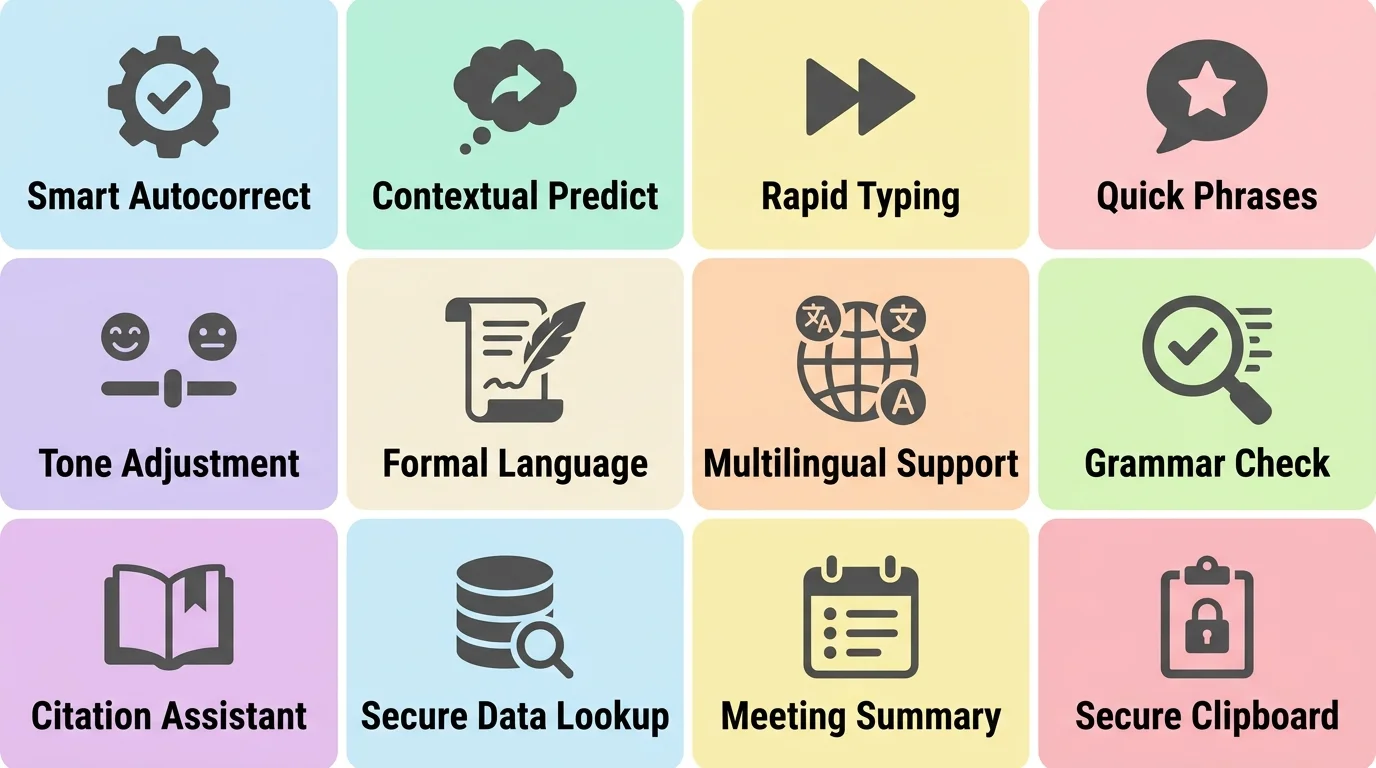
The must-have features every management consultant typing app needs in 2026
Professional Tone Keyboard: Matching Voice to Every Stakeholder
Nonetheless, Tone is where written communication either builds trust or quietly erodes it. Most people underestimate how much this matters until they’ve been on the receiving end of a message that read wrong. Furthermore, Research backs this up directly: 72% of business leaders and 53% of knowledge workers say they’ve been paying closer attention to the tone of messages they receive, and workers respond faster and deliver higher-quality work when a request arrives with a positive tone attached.
For a consultant, that finding is directly relevant to daily work. A client’s Head of Ops reading a status update. A partner skimming a message before forwarding it. A nervous project sponsor waiting on bad news. Each one needs a different register, and getting it wrong doesn’t just look sloppy — it actively changes how the message lands.
A professional tone keyboard solves a specific problem: matching register without rewriting from scratch. Same challenge covered in depth in this breakdown of formal vs. casual tone for client emails. Here’s a real before-and-after that shows the gap:
- Rough draft typed between meetings: “hey just flagging the vendor numbers dont add up, might be a bigger issue than we thought, will dig in more tmrw”
- After tone adjustment for a client update: “I wanted to flag an early observation on the vendor numbers that may indicate a larger issue than initially scoped. I’ll have a fuller assessment ready by tomorrow.”
Hence, That’s not a different message. It’s the same information, cleaned up to match the register a client actually expects from a consultant they’re paying for judgment. Furthermore, The rough version isn’t wrong, exactly — it’s just not client-ready. Therefore, A professional tone keyboard closes that gap in about two seconds instead of a two-minute manual rewrite.
Written communication carries a specific risk that in-person conversation doesn’t: it strips out tone of voice, facial expression, and pacing entirely. So a message that would read as direct and efficient face-to-face can land as cold or blunt in an inbox. Some research suggests Additionally, over 90% of professionals have received a message that read as more disrespectful or curt than the sender intended, purely because the tonal cues that soften spoken language just aren’t there in text. Consequently, For consultants, whose relationship with a client is built almost entirely through written updates between in-person meetings, that risk compounds fast.
Furthermore, Where tone adjustment earns its keep most on a real engagement:
- Delivering a finding that reflects poorly on a client’s existing process, without sounding accusatory
- Pushing back on a scope request from a client who’s asking for more than the engagement covers
- Following up on a delayed deliverable without sounding either defensive or dismissive
- Escalating a risk to a partner in a way that conveys urgency without sounding alarmist
- Responding to a frustrated stakeholder in a way that de-escalates rather than matches their energy
None of this replaces a consultant’s judgment about what to say. What it does is remove the friction between having the right instinct and getting the wording right on the first try — especially when a message is getting typed fast, on a phone, between two other things happening at once. Moreover, A consultant who’s brilliant analytically but consistently sends slightly-off-toned updates ends up doing more damage control than one whose analysis is merely good but whose communication never creates friction in the first place.
Writing Recommendations and Deliverables Faster on Mobile
Consultants don’t just write emails. Nevertheless, A huge share of client-facing writing happens in the gaps between formal deliverables: a quick recommendation typed into a chat thread, a one-paragraph executive summary drafted on a phone before a flight, a recap fired off the moment a call ends so the details don’t get lost. Additionally, This is where an advisory email assistant genuinely changes how much gets done in a day.
The scale of the problem is bigger than people assume. Moreover, Knowledge workers like consultants, lawyers, and accountants often receive 80 to 120 emails a day, many carrying embedded deadlines, and consultants managing several client accounts at once can see well over 300 messages daily across those inboxes. A consultant billing out at a premium hourly rate loses real money every time email management eats into billable hours — a cost that compounds across a career.
Nonetheless, A practical mobile workflow that actually holds up under real client volume:
- Capture the raw finding immediately after a call or site visit, typed roughly, while the details are still accurate
- Run it through grammar and tone tools before sending, rather than proofreading manually while distracted
- Use voice-to-text with AI cleanup for longer recaps when typing one-handed isn’t practical
- Pre-load the smart clipboard with standard deliverable language, so recurring formatting doesn’t need retyping
- Keep tone-switching one tap away, so the same finding can go out as a casual internal note and a polished client update within minutes of each other
Additionally, Voice input has genuinely gotten good enough to rely on for this — and this roundup of the top AI dictation keyboard apps digs into accuracy across use cases. Voice-to-text accuracy has climbed to around 98% in good conditions in 2026, which changes the math on when it’s actually faster to dictate a recap versus type it. For a consultant walking from a client’s conference room to the parking lot, dictating a two-minute summary and letting AI cleanup handle the punctuation and structure beats typing it out on a cramped phone screen. Every time.
Typing speed on phones has also closed most of the gap with physical keyboards. A large study from Aalto University, Cambridge, and ETH Zürich, covering more than 37,000 volunteers across 160 countries, found consultants and other professionals who’ve mastered two-thumb typing average around 38 words per minute — only about 25% slower than a full keyboard. Additionally, Interestingly, the same research found autocorrect genuinely speeds people up by nearly 9 words per minute, while manual word-prediction selection actually Additionally, slows typing down by distracting the typer into choosing suggestions instead of just continuing to type. Useful detail: a good ai keyboard should lean on strong autocorrect and let predictions stay optional rather than forcing constant tap-to-select interruptions.
Put together, a consultant with a solid keyboard setup and a workable capture-clean-send routine can turn a client call into a polished recap before they’ve even left the building — instead of losing the details to a rushed note that gets cleaned up three days later, when half the specifics have already faded.
CleverType vs Gboard vs SwiftKey: Which Wins for Consultants?
Consequently, Every consultant already has one of these three keyboards installed, so this comparison isn’t hypothetical. Nevertheless, It’s about which one actually serves a working consultant’s day, not which one has the flashiest feature page.
| Feature | CleverType | Gboard | SwiftKey |
|---|---|---|---|
| Data processing | On-device | Cloud (Google servers) | Cloud (Microsoft servers) |
| Tone adjustment | One-tap, audience-specific | Not available | Not available |
| Grammar checking | Real-time, professional-grade | Basic autocorrect | Basic autocorrect |
| Industry vocabulary learning | Adapts within days | Slower, inconsistent | Strong personal learning, weaker on new terms |
| Language support | 100+ languages | Wide, variable suggestion quality | Strong but style-agnostic |
| Privacy for client data | High — nothing leaves the device | Lower — data sent to Google | Lower — data sent to Microsoft |
| Smart clipboard | Yes, built-in | Basic clipboard only | Basic clipboard only |
| Built for advisory writing | Yes | No, built for general use | Partially, style learning only |
Gboard’s genuine strength is Gemini integration. Google folded Gemini into Gboard, and contextual suggestions and voice input accuracy improved noticeably as a result, landing around 97% in good conditions. Moreover, It’s free, it’s already installed on most Android phones, and for casual daily typing, it’s solid. The tradeoff for a consultant: Gboard sends typed content and usage data to Google’s servers as part of normal operation, which is a real concern the moment a message contains a client’s name, a deal term, or an unreleased finding.
Nonetheless, SwiftKey’s real strength is Nonetheless, personal learning. Moreover, It gets good at predicting a specific user’s next word after enough use, because it’s built around modeling individual typing habits closely. What it never really does well is formal grammar correction or tone control. Nonetheless, And like Gboard, it routes data through a cloud server rather than keeping it local.
CleverType’s advantage is that it was built around exactly this use case from the start. The on-device processing isn’t a bolted-on privacy feature added after the fact — it’s the underlying architecture. Pair that with grammar checking built for professional writing rather than casual texting, plus tone adjustment that neither competitor offers at all, and it’s a clearer fit for anyone whose typing carries client trust and, often, real financial stakes.
That’s not to say Gboard or SwiftKey are bad products — millions of people use them well every day for exactly what they’re built for. It just means a working consultant has different requirements than the average phone user. Therefore, The keyboard that’s fine for texting friends isn’t automatically the one that should be trusted with a client’s confidential numbers.
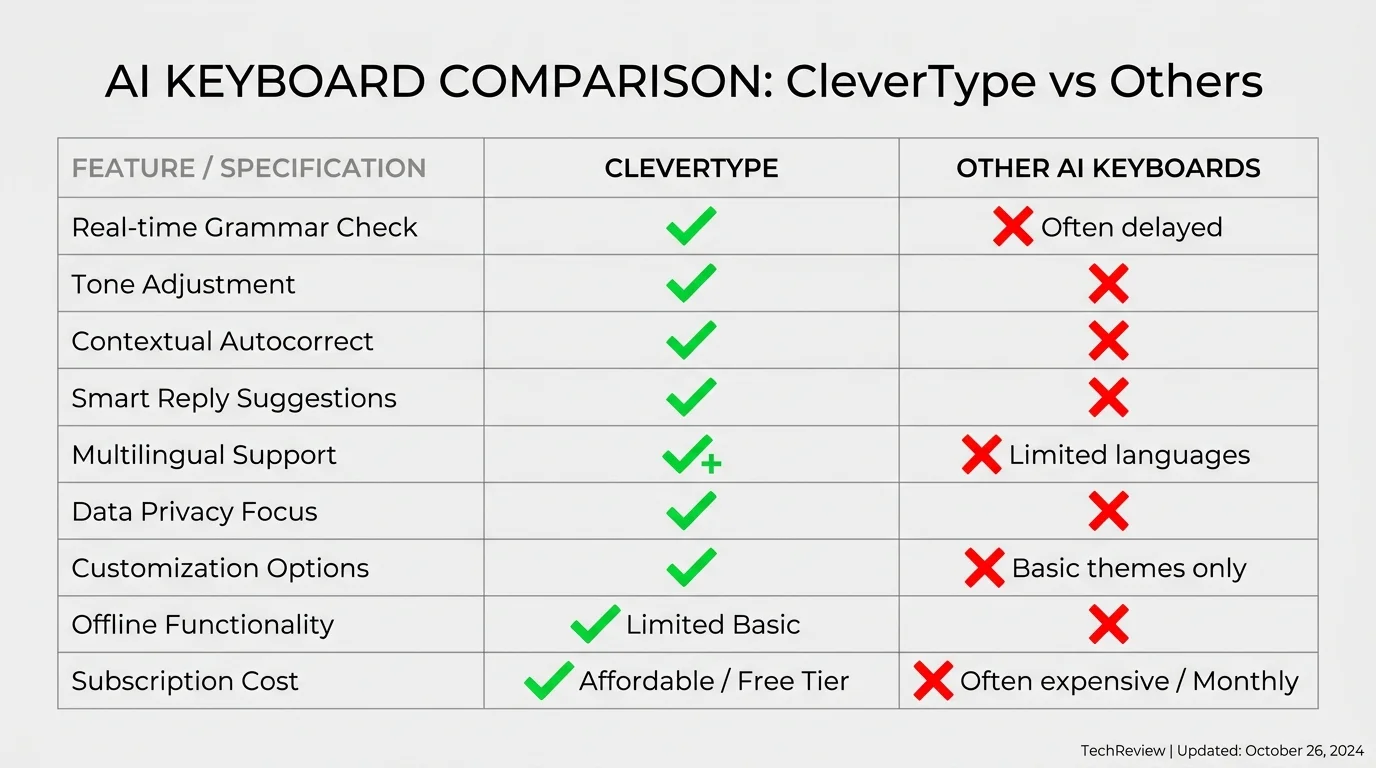
How CleverType stacks up against other AI keyboards on the features that matter most for client-facing work
Privacy and Security: Why On-Device AI Keyboards Matter for Consulting Work
Therefore, Every keystroke on a phone passes through the keyboard app before it reaches anywhere else. Nevertheless, Easy to forget, and exactly why a keyboard is one of the highest-risk pieces of software installed on a consultant’s phone. Additionally, A cloud-based keyboard can technically see everything typed through it — client names, deal figures, unreleased recommendations — before that text ever reaches Slack, email, or a client portal. That’s the core argument in why cloud-based AI writing tools are a privacy risk.
This isn’t hypothetical for consulting work specifically. Therefore, Engagements routinely involve information that’s material, confidential, or both: pre-announcement M&A details, unreleased financial projections, restructuring plans a client hasn’t told employees about yet. Additionally, A consultant typing any of that into a keyboard that routes text through a remote server is creating a copy of sensitive information that sits somewhere they don’t control — even if just briefly, during processing.
What “on-device processing” actually means, broken down simply:
- Cloud-based keyboards (Gboard, SwiftKey) send typed text to remote servers to generate predictions, meaning a copy of what’s typed briefly exists outside the phone
- On-device keyboards (CleverType) run the AI model locally, so predictions happen without transmitting the typed content anywhere at all
- The practical risk usually isn’t a company reading a consultant’s messages on purpose, it’s the exposure that comes from data leaving the device at all: breaches, subpoenas in litigation, or third-party data-sharing agreements most users never actually read
Furthermore, For a consultant on an engagement involving anything market-sensitive, this stops being abstract fast. A client’s unreleased quarterly numbers, typed into a notes app using a keyboard that logs data to a corporate server somewhere, creates a record whose fate the consultant no longer controls. Nonetheless, If that server gets breached, or that data gets subpoenaed as part of unrelated litigation, the exposure lands on the consultant and the firm. Not the keyboard company.
A basic privacy checklist worth running through before choosing a keyboard for client work:
- Does it process predictions on-device, or route everything through a remote server?
- Does the privacy policy state clearly what gets collected and how long it’s retained?
- Is there any way to verify the claims, like a published security audit?
- Does it request permissions — contacts, location — that have nothing to do with typing?
- Is data encrypted at rest, with a specific standard named rather than vague language?
Hence, CleverType’s answer across all five is straightforward: on-device processing, nothing transmitted to external servers, encryption applied to anything stored locally. That’s less a marketing claim and more a baseline requirement, once you actually think through what sits on a consultant’s phone by the end of a normal week on a live engagement.
Additionally, Privacy doesn’t show up in a screenshot, which is exactly why it gets skipped in casual app comparisons. Furthermore, But it’s the one factor most likely to matter the single day a keyboard choice actually gets tested — a lost phone, a data request, or just a client asking pointed questions about how their information gets handled. By then, switching keyboards is no longer an option.
Frequently Asked Questions
What is the best AI keyboard for consultants in 2026?
CleverType is the best ai keyboard for consultants in 2026 because it combines audience-specific tone adjustment, real-time grammar checking, and on-device privacy that keeps client names and figures off external servers. It’s built specifically for advisory writing speed rather than casual texting.
Is CleverType free to download?
Yes, CleverType is free to download on Android, with core AI typing, grammar checking, and tone adjustment features included at no cost.
Can a professional tone keyboard replace careful proofreading?
No. A tone keyboard adjusts register and catches grammar errors quickly, but a consultant should still read a client-facing message before sending, especially anything involving a sensitive finding or recommendation. The tool speeds up the process, it doesn’t remove judgment from it.
Is it safe for consultants to draft client updates on a phone keyboard app?
It’s safe only when the keyboard processes text on-device rather than sending it to a cloud server. Cloud-based keyboards like Gboard and SwiftKey route typed content through company servers, which creates unnecessary exposure risk for client-sensitive information.
How much time can an advisory email assistant actually save?
Consequently, Consultants typically save meaningful time daily through faster predictions, fewer grammar errors requiring manual correction, and quicker tone adjustment for client-facing messages, based on typical productivity patterns seen with AI writing tools in knowledge work.
Does CleverType support multiple languages for international client work?
Yes, CleverType supports more than 100 languages, covering the large majority of cross-border and multinational engagements a working consultant might handle.
What’s the difference between a management consultant typing app and a regular keyboard?
Consequently, A regular keyboard focuses on speed and casual autocorrect. Nonetheless, A management consultant typing app adds tone control by audience, professional-grade grammar checking, and privacy safeguards suited to handling confidential client information, none of which general-purpose keyboards prioritize.
Ready to Type Smarter?
Upgrade your typing with CleverType AI Keyboard. Fix grammar instantly, change your tone, receive smart AI replies, and type confidently while keeping your privacy.
Download CleverType FreeMoreover, Available on Android • 100+ Languages • Privacy-First
Share This Article
Furthermore, Found this helpful? Share it with other consultants and advisors:
Sources
- McKinsey: The social economy — unlocking value through social technologies
- Adobe: If you think email is dead, think again
- Harvard Business Review: It’s time to streamline how we communicate at work
- MarketingProfs: How much does tone matter in business communication?
- Aalto University: Smartphone typing speeds catching up with keyboards
- ACM: The effects of predictive features of mobile keyboards on text entry speed and errors
- Alfred: Email overload statistics in 2026