Key Takeaways
- •91% of marketing professionals now actively use AI tools in their daily work — up from 63% in 2024
- •AI saves the average marketer 6–13 hours per week on writing, editing, and communication tasks
- •A marketing AI keyboard lets you write better ad copy, fix grammar, and adjust tone without leaving your phone screen
- •CleverType is the top-rated AI keyboard for marketers in 2026, with tone switching, on-device privacy, smart replies, and 100+ language support
- •AI-driven content generates 3.2x ROI compared to manually written content
- •Consistent brand voice is linked to revenue increases of 23–33%
- •The best ai keyboard for marketers combines context-aware suggestions, fast performance, and privacy-first data handling
Marketing is a job built on words. Consequently, Every day you're writing emails, chasing clients, drafting ad copy, posting on social, firing off Slack updates — often from your phone, often mid-commute. And if you're flipping between "formal pitch deck" mode and "casual Instagram caption" mode 15 times before lunch, you already know how much mental energy that costs.
So what actually makes the best ai keyboard for marketing professionals in 2026? Consequently, Not just autocorrect. Real features — tone adjustment, brand voice awareness, real-time grammar fixes, and predictions that understand what you're actually trying to say. According to DemandSage's 2026 AI marketing report, 91% of marketers use AI tools actively — but most haven't stopped to think about the most practical AI tool they use every day: the keyboard.
Hence, Let's get into what to look for, which keyboards actually deliver for real marketing work, and why CleverType keeps ending up at the top of that list.
1. What Is a Marketing AI Keyboard and Why Does It Matter?
A marketing AI keyboard is essentially a keyboard that does more than fix typos — it predicts, corrects, and adjusts your writing based on context. Speed, tone, accuracy. All without leaving whatever app you're currently typing in.
Regular keyboards just fix typos. An AI keyboard does a lot more:
- •Predicts full sentences based on your writing patterns
- •Switches tone from casual to professional with a single tap
- •Fixes grammar and spelling in real time, not after you've already sent the message
- •Generates smart replies for common messages and emails
- •Learns your industry vocabulary — so "CTR", "ROAS", "above the fold", and "conversion rate" stop getting flagged
Hence, For marketers, this matters because you're constantly switching contexts. Furthermore, A formal pitch email, then a breezy Instagram caption, then a quick Slack update to the team — all in 20 minutes. The right AI keyboard follows those context shifts and adjusts suggestions automatically.
CoSchedule's State of AI in Marketing report found that AI tools now save the average marketer between 6 and 13 hours per week. A good chunk of that comes from writing faster, editing less, and not rewriting copy that went out in the wrong tone.
But wait — is a marketing AI keyboard actually different from a regular AI keyboard?
Nonetheless, Not technically. Additionally, But the best ones have features that specifically matter for marketing work:
- •Ad copy templates built into the suggestion engine
- •Tone presets designed for different brand voices
- •On-device processing so your client's confidential brief doesn't get uploaded to a remote server
- •Multilingual support for global campaigns and international markets
Hence, The global AI writing tool market surpassed $1.9 billion in 2025 and is growing at a 23.4% annual rate. Nevertheless, People don't put real money into things that don't work. The keyboard is the most embedded writing tool you have — might as well make it smarter.
Why did adoption jump so quickly? Because the tools actually got better. In 2023, AI keyboard suggestions often felt disconnected. Hence, By 2026, context-aware keyboards understand what app you're typing in and adjust their suggestions to match. That's a real, usable change — not a marketing claim.
2. CleverType: The Best AI Keyboard for Marketing Professionals
If you're looking for the best ai keyboard for marketers in 2026, CleverType is the clear pick. Consequently, It's built for professional use — and the feature list makes that pretty obvious.
Here's what you get with CleverType that you won't find bundled together in any other keyboard:
Additionally, Tone adjustment in one tap. Write your draft, then hit the tone button to rewrite it as Professional, Casual, Persuasive, Confident, or Empathetic — without leaving the keyboard. For marketers, that's the feature that actually changes how you work. The copy you wrote for LinkedIn becomes Instagram-appropriate in three seconds.
Real-time grammar and spell check. CleverType catches errors as you type with 98.7% grammar accuracy — more reliable than most standalone grammar apps, and it doesn't slow down your typing speed at all.
Context-aware AI suggestions. The keyboard detects which app you're typing in and adjusts suggestions accordingly. LinkedIn prompts get formal. Nevertheless, Instagram captions lean conversational. SMS stays short and punchy. This context awareness alone saves enormous editing time.
Privacy-first design. This one specifically matters for marketing professionals. Consequently, Your ad copy, client briefs, campaign strategies, and pricing discussions stay on your device. Nevertheless, CleverType processes data locally — no keystrokes uploaded to external servers. Moreover, If you're working under NDAs or handling confidential campaign data, that's not a small thing.
Nevertheless, 100+ language support. For international campaigns or multicultural marketing teams, CleverType's multilingual support puts it a clear step ahead of most competitors. It handles context-aware suggestions across languages in real time — not just basic translation.
Smart clipboard management. Copy something and CleverType remembers it. No more scrolling through chat history to find the tracking link you copied an hour ago.
Cross-device sync that doesn't get in the way. Your custom words, tone preferences, and shortcuts sync across devices — pick up exactly where you left off, no setup needed.
Consequently, Where CleverType beats the competition is that it puts all of this in a single app. Unlike Gboard, your data stays on your device. And unlike Grammarly Keyboard, it goes well beyond grammar — you get tone control, smart replies, and real context awareness, not just spell-check.
3. Ad Copy Keyboard: How AI Makes Creative Work Faster
Writing ad copy on mobile used to be genuinely painful. Additionally, Small screen, no shortcuts, constant app-switching to check your brief, and autocorrect breaking your intentional headline fragments. An ad copy keyboard changes that whole workflow.
Consequently, Here's the thing — marketing copy follows patterns. Nonetheless, Strong hooks, benefit-first statements, specific numbers, clear CTAs. Good AI keyboards have been trained on millions of pieces of real marketing text, and that shows up in the suggestions you get.
Moreover, What does this look like in practice? You're writing a Facebook ad headline and type "Try our new..." — a plain autocorrect might suggest "product" or "app." CleverType, trained on marketing writing patterns, might suggest "Try our new AI-powered tool — free for 14 days." That difference, multiplied across every piece of copy you write, is where the real time saving comes from.
Here's a rough comparison of ad copy writing speed with and without an AI keyboard:
| Task | Without AI Keyboard | With AI Keyboard |
|---|---|---|
| Facebook ad headline (5 variations) | 25 minutes | 8 minutes |
| Email subject line A/B test | 20 minutes | 6 minutes |
| Instagram caption with hashtags | 15 minutes | 4 minutes |
| Quick reply to a client brief | 10 minutes | 2 minutes |
| Same post adapted across 3 platforms | 35 minutes | 10 minutes |
According to Hootsuite's 2026 AI copywriting guide, over 90% of professional content marketers now use some form of AI writing tool. Nevertheless, The ones who use them specifically for ad copy report generating 3x more variations in the same time frame — which directly improves testing and campaign performance.
Consequently, There's also the tone angle. Additionally, Google Search ad copy reads very differently from Instagram stories, which reads differently from LinkedIn Sponsored Content. Nevertheless, With CleverType's tone presets, you write the base message once and adapt it per platform. Therefore, That's not a small thing. Multiply it across every piece of content you produce and the time savings get real pretty fast.
Is it cheating to use AI for ad copy?
No more than using a spell checker is cheating. Consequently, The creative judgment — what message to send, what offer to lead with, what emotion to trigger — still comes from you. Furthermore, The AI just helps you articulate it faster and in the right register for the channel. You're still the strategist.
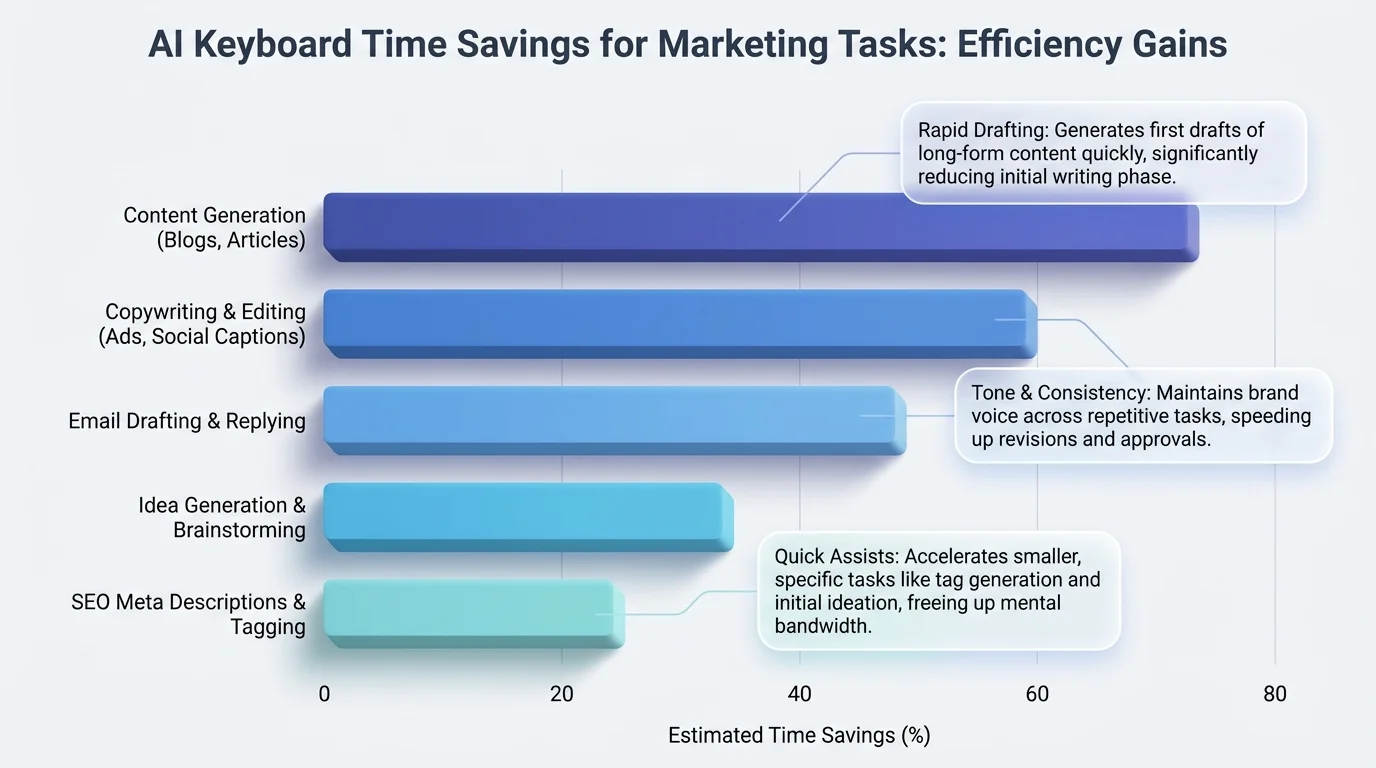
How AI keyboards cut time across common marketing writing tasks — based on average marketer benchmarks
4. Brand Voice AI Keyboard: Keeping Your Copy Consistent
Here's something that often gets undervalued in marketing conversations: brand voice consistency is a measurable business metric. Optimizely's research on AI and brand voice links consistent brand voice to revenue increases of 23–33%. Additionally, That's a specific, trackable number.
The problem most teams run into? AI tools generate content that sounds generic. A 2025 study found that 73% of consumers say they can identify and reject AI-generated marketing content when it doesn't match a brand's authentic voice. Furthermore, Generic AI copy loses trust — and lost trust costs conversions.
Consequently, A brand voice AI keyboard solves this differently from a standalone AI writing platform. Consequently, It's baked into your keyboard, so it works in every app, every message, every platform — all the time. You're not jumping to a separate tool to fix the tone. The suggestions just come out pre-filtered through your brand's register.
Why does this actually matter for marketing teams?
Think about a typical setup:
- •3 people handling social media content
- •2 managing email campaigns
- •1 doing PR and media outreach
- •2 writing landing pages and ad copy
Each person writes slightly differently. Without a consistent AI keyboard, brand voice drifts across every touchpoint — the social team sounds different from the email team, the sales team sounds different again. With CleverType's tone presets set up consistently across the team, everyone's writing starts from the same place.
MarTech covered this well in their piece on brand voice automation: you can't automate brand voice completely, but you can train AI tools to respect it. The best AI keyboards for marketing do exactly that — learn your writing patterns and reinforce them on every keystroke.
Hence, CleverType's privacy advantage matters here specifically. When your brand tone guidelines and client copy are being processed, you don't want that data analyzed on someone else's servers. Nonetheless, On-device processing keeps those signals genuinely private.
What about teams writing across multiple languages?
Honestly, this is where AI keyboards beat standalone tools. CleverType's multilingual support means your brand voice settings apply across languages — so your German campaign copy comes out in the same register as your English copy, not just as a translated version of a different tone.
5. Content Marketing Keyboard: Features That Save Real Time
The phrase content marketing keyboard refers to AI keyboard features specifically designed for content-heavy workflows — blog outlines, social post batches, email marketing sequences, campaign briefs. Nonetheless, Not just one-liners.
Nevertheless, What features actually matter for content marketers? Nevertheless, And which ones are just marketing fluff? Here's Therefore, a breakdown:
Smart predictions trained on professional content
The prediction engine in basic keyboards was trained on casual text messages. CleverType's Nonetheless, suggestion model covers professional writing, marketing copy, and long-form content. The difference is noticeable when you're writing a 300-word product description vs a quick text — the suggestions actually fit.
Voice-to-text with AI cleanup
Dictating is roughly 3x faster than typing for most people. But raw dictation is messy — filler words, trailing sentences, weird punctuation. CleverType's voice-to-text layer cleans that up automatically, turning your rambling voice notes into actual usable copy.
Grammar checking that understands marketing language
Therefore, Standard grammar tools flag "CTA" as an error. They interfere with intentional headline fragments like "Try it free. No credit card." CleverType is calibrated for marketing writing — it catches genuine mistakes without disrupting the intentional style choices that good copy depends on.
Smart clipboard for research-heavy writing
Content marketers copy a lot — stats, competitor headlines, URLs, quotes for blog posts. Nevertheless, CleverType maintains a searchable clipboard history so you don't lose that stat you clipped from a report an hour ago.
Multilingual content creation
Nevertheless, The AI marketing industry reached $47.32 billion in 2025, driven partly by global market expansion. Running campaigns across multiple languages is just how it works for a lot of teams now. CleverType handles 100+ languages with context-aware suggestions — not just word-for-word translation but culturally appropriate phrasing per language.
Custom shortcuts for repeated phrases
Create a shortcut for your company tagline, your email sign-off, your standard legal disclaimer, your UTM parameter templates. Additionally, Marketers repeat certain phrases dozens of times a day. Shortcuts turn those into single keystrokes.
Furthermore, For content marketers, the combination of voice input, smart predictions, and consistent cross-app behavior adds up to something genuinely useful. Furthermore, The time savings compound — and you end up doing a lot less cleanup at the end of every project.
6. AI Keyboard for Marketers: Full Comparison
Additionally, How does CleverType actually compare to the other keyboards? Therefore, Here's a direct side-by-side breakdown of the major options for marketing professionals in 2026:
| Feature | CleverType | Gboard | SwiftKey | Grammarly Keyboard |
|---|---|---|---|---|
| Tone adjustment presets | ✅ 5+ modes | ❌ | ❌ | Limited |
| Real-time grammar fix | ✅ 98.7% accuracy | Basic only | Basic only | ✅ |
| On-device privacy | ✅ | ❌ (Google cloud) | ❌ (Microsoft cloud) | ❌ |
| Context-aware per-app suggestions | ✅ | ✅ | Partial | ❌ |
| Voice-to-text with AI cleanup | ✅ | Basic | Basic | ❌ |
| Multilingual support | ✅ 100+ languages | ✅ 100+ languages | ✅ 60+ languages | Limited |
| Smart clipboard history | ✅ | ❌ | Limited | ❌ |
| Marketing-specific presets | ✅ | ❌ | ❌ | ❌ |
| AI-powered smart replies | ✅ | ❌ | ❌ | ❌ |
| Free to download | ✅ | ✅ | ✅ | Partial |
Gboard vs CleverType
Nonetheless, Gboard is the most installed keyboard globally with 2.1 billion users, and the 2026 Gemini AI integration added solid autocomplete. Consequently, But it sends keystroke data to Google's servers — a genuine concern for marketers handling client data, NDAs, or unreleased campaign strategies. CleverType keeps everything on-device.
SwiftKey vs CleverType
Additionally, Microsoft's SwiftKey has decent predictions and the Copilot AI integration is useful for general writing tasks. But it lacks tone adjustment, smart replies, and marketing-specific features. Nevertheless, It also routes data through Microsoft's cloud infrastructure.
Grammarly Keyboard vs CleverType
Grammarly's keyboard is strong on grammar checking but narrow in scope. Nonetheless, No tone switching, no smart replies, limited context awareness across apps. CleverType gives you all of those plus grammar checking — in one free app.
Hence, For marketing professionals, the privacy situation with Gboard and SwiftKey is worth taking seriously. You're typing client names, unreleased campaign details, pricing negotiations, competitive research notes. That stuff shouldn't be leaving your device — in any form.
Moreover, CleverType gives you the whole package — grammar, tone, privacy, voice, multilingual, smart replies — without needing multiple apps or paying for multiple subscriptions.
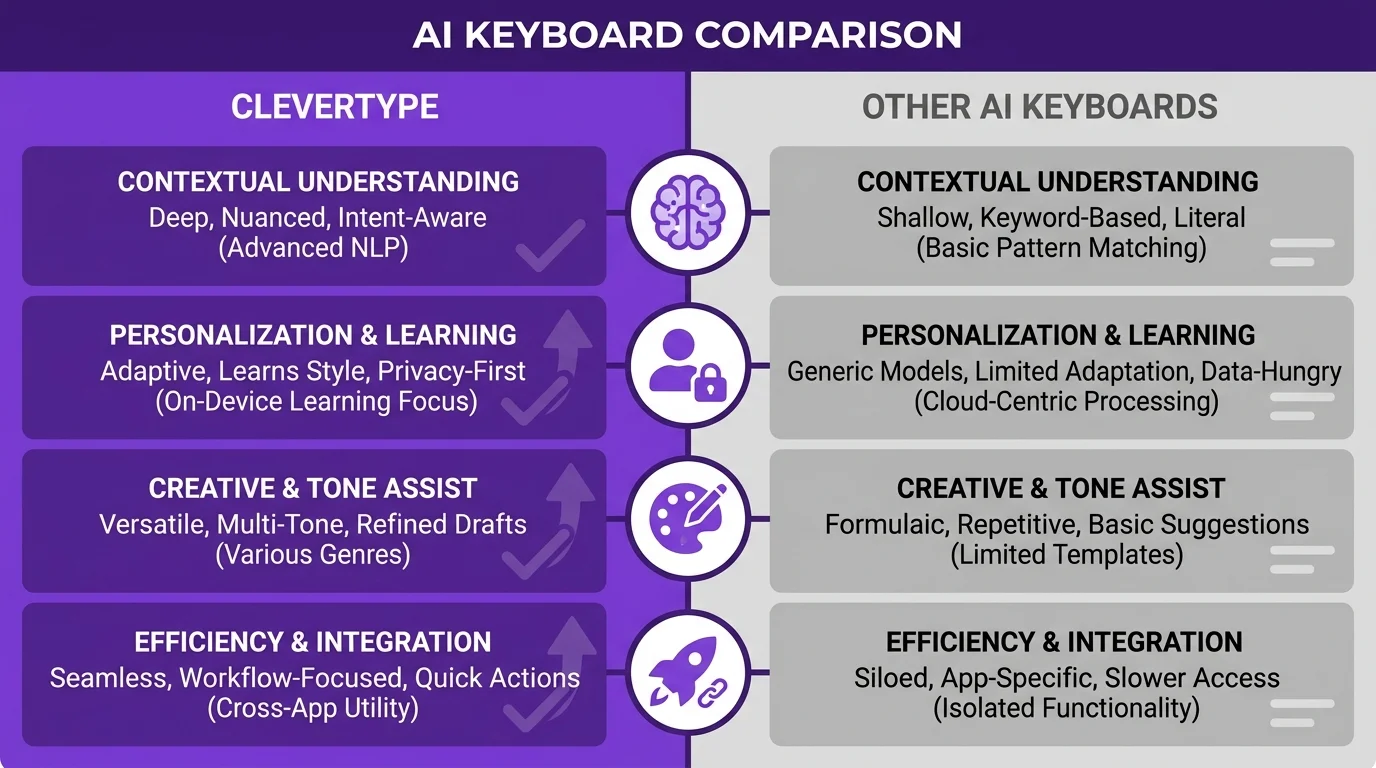
CleverType vs other AI keyboards — key feature differences for marketing professionals
7. How to Set Up Your Marketing AI Keyboard for Maximum Output
Nonetheless, Getting CleverType is the easy part. Therefore, Setting it up properly for marketing work is where the real time savings come from. Therefore, Here's how to do it:
Step 1: Download and set as default
Get CleverType from the Play Store, then go to Settings > General Management > Keyboard and set it as your default. Moreover, This takes about 60 seconds.
Step 2: Build your custom dictionary
Add your marketing vocabulary upfront so CleverType learns it fast:
- •Brand names and product names you type regularly
- •Marketing acronyms: ROAS, CPM, CPC, CTR, MQL, SQL, LTV, CAC
- •Your competitor names if you reference them in copy
- •Campaign-specific hashtags and keywords
Step 3: Configure your tone defaults
For most marketing professionals, "Professional" works as the default tone, with quick switches to "Persuasive" for ad copy and "Casual" for social content. Set this up once and the keyboard remembers your preference.
Step 4: Create text shortcuts for repeated phrases
Consequently, Some examples that save a lot of time:
| Shortcut | Expands to |
|---|---|
| cta1 | Start your free trial today → |
| disc | Your standard legal disclaimer |
| sig | Your full email signature |
| utm | Your standard UTM parameter string |
| brand | Your company tagline |
Step 5: Enable clipboard history
Nevertheless, Turn on smart clipboard in CleverType's settings. Nevertheless, Content marketers copy multiple things per session — stats for a blog post, a competitor headline, a URL, a client quote. Clipboard history keeps all of it accessible without hunting through previous messages.
Step 6: Add active languages
Nonetheless, If you run campaigns in multiple languages, add them to CleverType's active language list. Therefore, The keyboard detects which language you're typing and switches suggestions automatically — no manual toggling.
Step 7: Try voice-to-text for first drafts
For longer content — emails, social captions, campaign brief summaries — speak your first draft and let CleverType clean it up. Therefore, Most people dictate 3x faster than they type. Use that speed advantage for drafts and keep typing for editing and refinement.
After a few weeks, you'll notice CleverType getting notably smarter about your specific writing patterns. The suggestions start feeling less generic and more personal to how you actually write — which is the point.
8. What to Look For in a Marketing AI Keyboard
Not every AI keyboard is worth switching to. Here's Furthermore, what actually matters for marketing work specifically — and what's just a spec sheet feature:
Privacy and data handling (non-negotiable)
Marketing professionals type confidential information constantly — client names, unreleased campaign strategies, pricing discussions, competitive analysis. Consequently, Your keyboard sees all of it. An AI keyboard that processes data on-device (CleverType) is categorically different from one that transmits keystrokes to a cloud server. This is professional hygiene, not paranoia.
Tone flexibility (must-have)
Furthermore, A single "formal" mode isn't sufficient. Additionally, Marketing copy needs to shift between persuasive, empathetic, casual, confident, and professional registers depending on the channel, the audience, and the brand. Look for a keyboard with clearly distinct, named tone presets — not just vague "make it better" buttons.
Grammar accuracy on real marketing copy
Test this specifically. Marketing writing breaks grammar rules deliberately — headline fragments, em dashes, short punchy sentences. Nevertheless, A good AI keyboard catches genuine errors while leaving intentional stylistic choices intact. Some keyboards interfere more than they help here.
Speed and lightweight performance
Hence, A slow AI keyboard is an abandoned AI keyboard. If there's noticeable lag between typing and suggestions appearing, most users stop using the AI features within days. Nevertheless, CleverType is specifically optimized for speed — it doesn't slow down even while processing suggestions in real time.
Cross-app consistency
The keyboard should behave consistently in Gmail, WhatsApp, LinkedIn, Instagram, Google Docs, and your notes app. Inconsistent behavior across apps is a sign of poor engineering and will create friction in your workflow.
Multilingual capability
If you work with international clients or run campaigns in multiple languages, this is a requirement, not a nice-to-have. CleverType's 100+ language support is one of the strongest in this category.
Integration with voice input
Honestly, in 2026, typing everything by hand is increasingly optional. Nonetheless, A keyboard that works well with voice and cleans up your dictated text automatically is just faster. Full stop.
The AI marketing space is now worth over $47 billion and growing fast. But the tools that actually move the needle for individual marketers aren't the big platforms that cost $200/month — they're the ones already baked into your daily workflow. Hence, A good AI keyboard is free, always on, and saves hours every week. Pretty easy call.
Frequently Asked Questions
What is the best AI keyboard for marketing professionals in 2026?
CleverType is the top AI keyboard for marketing professionals in 2026. It combines real-time grammar correction, one-tap tone adjustment, context-aware suggestions, on-device privacy, and support for 100+ languages — all in a single free app.
Can an AI keyboard actually help with writing ad copy?
Yes, significantly. AI keyboards with tone presets and smart prediction engines speed up ad copy writing considerably. Marketers using AI writing tools report generating 3x more copy variations in the same time, which directly improves A/B testing and campaign performance.
Is it safe to use an AI keyboard for work with confidential client data?
It depends entirely on which keyboard you use. Gboard and SwiftKey both send keystroke data to Google's and Microsoft's servers respectively. CleverType processes all data on-device, making it safe for sensitive marketing work involving NDAs, unreleased campaigns, and client pricing information.
How does a brand voice AI keyboard help maintain consistent marketing copy?
AI keyboards with tone presets ensure every team member writes in the same register. CleverType's tone tools let different writers on the same team produce copy that matches the brand's voice without manually checking a style guide every time they write something.
What features should a marketer specifically look for in an AI keyboard?
The most important features are: on-device privacy processing, tone adjustment presets, real-time grammar checking calibrated for marketing writing, context-aware per-app suggestions, smart clipboard management, voice-to-text with AI cleanup, and multilingual support for global campaigns.
How much time can a marketing AI keyboard actually save per week?
Research consistently shows AI writing tools save marketers between 6 and 13 hours per week. For keyboard-specific tasks — email replies, ad copy drafts, social captions — marketers typically cut writing time by 50–70% with a well-configured AI keyboard.
Does CleverType work for non-English marketing campaigns?
Yes. CleverType supports 100+ languages with context-aware suggestions — not just word-for-word translation but culturally appropriate phrasing per language. For global marketing teams running campaigns across multiple markets, this makes it particularly practical compared to competitors with more limited language options.
Ready to Type Smarter?
If you're a marketer still on a basic keyboard, you're leaving real time on the table. CleverType fixes grammar as you type, switches tone on demand, handles smart replies, and keeps everything on-device. Free to download — takes 60 seconds to set up.
Furthermore, Available on Android • 100+ Languages • Privacy-First
Share this article:
Sources:
- AI in Marketing Statistics 2026 — DemandSage
- State of AI in Marketing Report — CoSchedule
- AI Marketing Statistics 2026 — SEO.com
- Best AI Copywriting Tools 2026 — Hootsuite
- AI Brand Voice Guidelines — Oxford College of Marketing
- You Can't Automate Brand Voice — MarTech
- Using AI for Brand Voice — Optimizely
- AI in Marketing Statistics 2026 — BizIQ