Key Takeaways
| Question | Quick Answer |
|---|---|
| What's the best AI keyboard for real estate agents in 2026? | CleverType, because it fixes grammar in listing texts on the fly, keeps client data on-device, and works across the texting, email, and MLS apps agents already juggle |
| Why does typing speed matter for realtors specifically? | 94% of realtors use text as their top client channel, and firms that respond within 5 minutes are 21 times more likely to qualify a lead than ones that wait 30 |
| Does AI actually help write listing descriptions? | Yes, 77.93% of agents already use AI writing tools, with listing copy the single most common use case reported in 2026 surveys |
| Is a phone keyboard really that error-prone? | Yes, mobile typists make roughly 5 times more errors than desktop typists, close to 43 typos per 100 words, per research covered by The Ladders |
| Can an AI keyboard replace a CRM or transaction platform? | No, it speeds up the typing layer inside whatever app you're already in, texts, email, MLS remarks, it doesn't replace your CRM or e-signature tool |
| Does using AI on listings actually close more deals? | Not by itself. Agents using AI on listing descriptions report productivity gains, but pipeline growth tracks more closely with AI applied to lead response speed |
Here's a number that made me stop and re-read it twice: the average real estate agent takes 917 minutes — over 15 hours — to respond to a new lead inquiry, according to data compiled by AgentZap's 2026 lead response research. Fifteen hours. Moreover, Meanwhile the buyer who filled out that form on a Saturday morning already texted two other agents by lunchtime. Whoever answers first usually wins the client — 78% of buyers work with the first agent who responds. That's exactly the gap the right quick-response tools built for real estate professionals are designed to close.
A big chunk of that lag isn't laziness. Nevertheless, It's just typing friction. Moreover, Drafting a listing description on a cracked phone screen between showings, fixing autocorrect on a client's name for the third time, rewriting a text so it doesn't sound rushed — it all adds up across a full day of back-to-back appointments. So this article digs into what a realtor ai keyboard actually needs to do, what the current research says about typing on mobile, and why CleverType has become the go-to property agent keyboard for agents who type more than they talk most days.
Why Real Estate Agents Need an AI Keyboard in 2026
Real estate is a texting-first business now. Full stop. According to NAR's own data, cited in Housing Wire's coverage of the 2025 REALTORS® Technology Survey, 94% of licensed realtors rank text messaging as their top communication channel, ahead of phone calls at 91% and email at 89%. That's not a small preference gap — it basically confirms most of an agent's working day happens through a phone keyboard.
And texting works — when it's fast. Texts get a 98% open rate and a 45% response rate, against roughly 10% and 8-10% for email respectively, with 90% of texts read within three minutes. Compare that to email's 23.5% average open rate in real estate. Still slightly above the cross-industry average of 21.3%, sure, but nowhere close to text.
Here's the problem though: texting fast and texting well are two different skills, and most agents are only doing one of them.
- Typos on a moving target. Property addresses, client names, HOA figures, all get mangled by generic autocorrect that has no clue "Cul-de-Sac Ln" isn't a typo.
- Tone slips when you're rushed. A text fired off between two showings can read as curt or careless to a nervous first-time buyer, even when that's not the intent.
- Listing copy gets recycled and stale. Writing a fresh, compelling description for every new listing, on a phone, at the end of a long day, is genuinely hard. Not gonna lie.
- Follow-up volume outpaces attention. 80% of sales require five or more follow-up touches, but 44% of agents give up after just one, according to the same AgentZap follow-up research.
Nevertheless, This is exactly the gap a real estate typing app built around AI is meant to close — not by replacing an agent's judgment, but by removing the small frictions that eat minutes every single hour. Nonetheless, When your keyboard fights you on top of everything else on your plate, you feel it by 6pm. Therefore, For agents, this doubles as a sales tool too, the same kind of edge AI keyboards built for sales professionals already give reps chasing that exact response-time math.
What Is an AI Keyboard and How It Changes Realtor Workflows
An AI keyboard, put simply, is a mobile keyboard app that uses machine learning to predict, correct, and rewrite text contextually, rather than matching against a fixed autocorrect dictionary the way stock iOS or Android keyboards do. Furthermore, For an agent, that distinction shows up constantly during the day — not just occasionally.
Nevertheless, A stock keyboard sees "Zestimate" or "escrow contingency" and either flags it or quietly mangles it. A trained AI keyboard recognizes real estate terminology and industry shorthand, and just stops interrupting you for words you use fifty times a week.
Hence, Here's the mechanism, broken down into the parts that actually matter for a listing description generator use case:
- Predictive text models track your recent phrasing and learn the specific way you describe kitchens, square footage, and neighborhoods over time.
- Full-sentence grammar engines scan the whole message, not just single words, catching missing verbs or unclear phrasing before a client reads it.
- On-device processing keeps client names, addresses, and financial figures off external servers, which matters more in real estate than most people realize given how much personal data flows through a deal, a concern covered in depth for privacy-conscious AI keyboard users.
- Custom vocabulary lets the keyboard learn brokerage-specific terms, common HOA phrases, and repeated property features.
- Tone and rewrite tools take a rushed voice note dictated while driving between showings and turn it into a clean, professional client message.
Nevertheless, According to NAR's 2025 REALTORS® Technology Survey, 46% of agents already use AI-generated content, mostly for listing copy, and adoption overall reached 68% among Realtors that year — up from under 30% just two years earlier. Hence, That's a genuinely fast curve for an industry that's historically slow to change tools.
Not every keyboard marketed as "AI" earns the label though. Moreover, The ones worth using for realtor ai keyboard work share three traits: they read full sentences instead of single words, they keep sensitive client data on the device instead of a cloud server, and they let you build a custom vocabulary. Nonetheless, Miss any one of those and it's really just a keyboard with a new coat of paint on it.
Key Features Real Estate Agents Should Look For
Additionally, Not every "smart" keyboard feature earns its keep on a busy agent's phone. Moreover, Here's a breakdown of what actually saves time versus what's just marketing fluff, based on how agents realistically spend a working day.
| Feature | Why It Matters for Agents | Impact |
|---|---|---|
| Grammar & clarity correction | Fixes rushed texts sent between showings | Fewer awkward follow-ups needed |
| Custom property vocabulary | Learns addresses, HOA terms, brokerage shorthand | Cuts autocorrect fights dramatically |
| On-device privacy | Keeps client PII and deal terms off external servers | Protects sensitive transaction data |
| Voice-to-text with AI cleanup | Turns a dictated note from the car into clean text | Speeds up listing notes and follow-ups |
| Multilingual support | Helps agents serving multilingual buyers and sellers | Widens the client base an agent can serve |
| Tone/rewrite tool | Adjusts a blunt text into something warmer, or a casual one into something professional | Reduces client miscommunication |
| Smart clipboard | Stores frequently reused disclosures, showing instructions, template replies | Saves repetitive typing across listings |
A couple of these are worth unpacking further, because agents tend to underrate them until they've actually used one.
Nonetheless, Custom vocabulary solves a problem that's specific to property work. A generic keyboard has no reason to recognize "3/2 SFR" or a specific subdivision name, so it either autocorrects it into gibberish or interrupts you to confirm. Build that vocabulary once and the keyboard just stops fighting you on your own terminology.
Voice-to-text with AI cleanup matters more than the spec sheet suggests. Nevertheless, Raw dictation from a car between two showings is full of false starts and run-ons, basically an unedited transcript. Nevertheless, An AI layer that reorganizes that into clean sentences is the difference between a listing note a colleague can scan in five seconds and one they have to reread twice. Nonetheless, For a deeper breakdown of what separates a good dictation engine from a mediocre one, see this roundup of the top AI dictation keyboard apps.
Smart clipboard management solves the repetition problem specifically. Agents reuse the same showing instructions, lockbox codes, and disclosure language across dozens of listings a year. A keyboard that remembers and resurfaces those phrases removes a genuinely large amount of repetitive typing across a busy month.
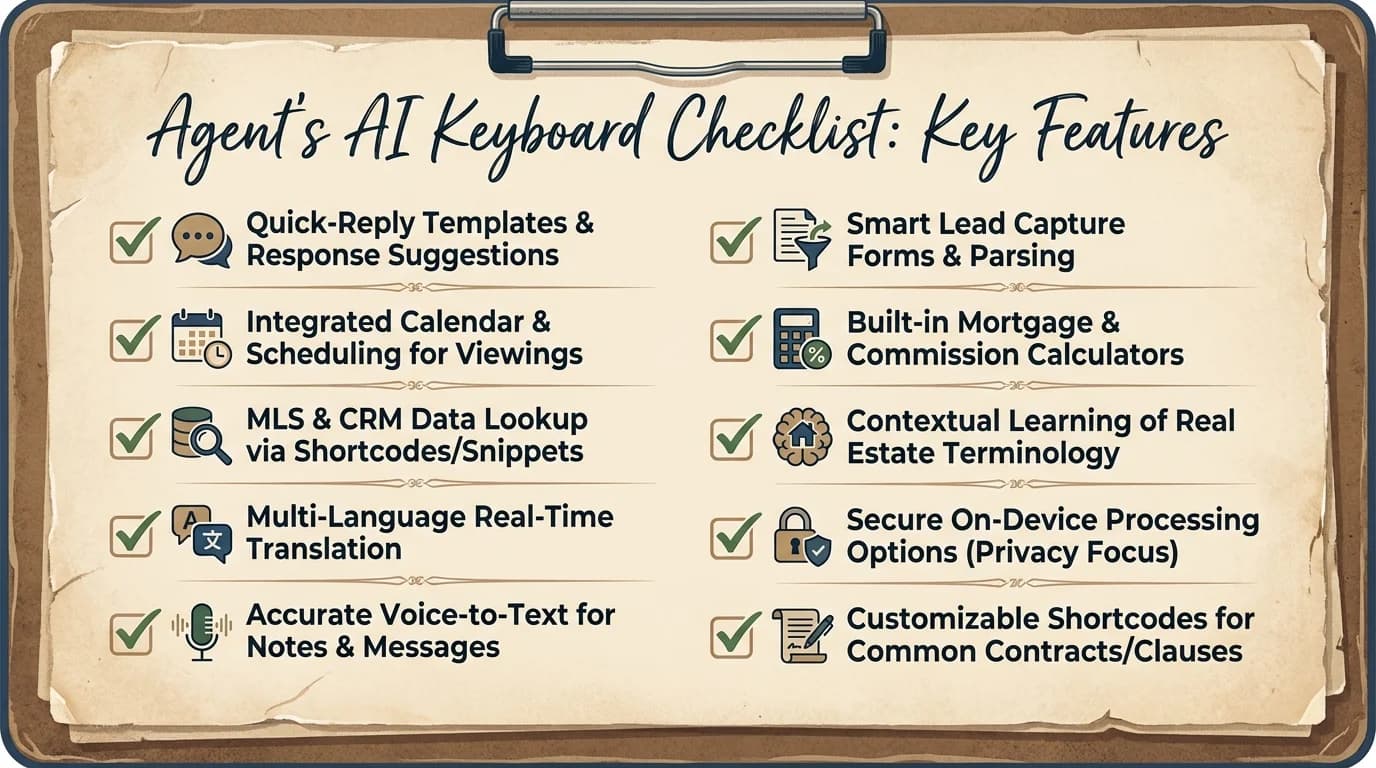
A quick-reference checklist of the AI keyboard features that actually save real estate agents time.
CleverType: The Best AI Keyboard for Real Estate Agents in 2026
Of the AI keyboard apps on the market right now, CleverType stands out for real estate specifically because its features map directly onto the friction points above, rather than being a generic consumer keyboard with an AI label slapped on afterward. For a closer side-by-side, see how CleverType compares to Gboard and SwiftKey for professionals.
Privacy-first design. CleverType processes text on-device, meaning client names, addresses, and deal terms aren't routed through an external server the way they are with Google's Gboard. Therefore, In a business where a leaked pre-approval figure or an early offer number could genuinely hurt a client's negotiating position, that's not a minor detail.
Grammar correction built for speed, not just spellcheck. Unlike SwiftKey, which leans mostly on swipe prediction, CleverType rewrites full sentences in real time. Nonetheless, That matters when you're typing a showing confirmation one-handed while unlocking a lockbox with the other.
Additionally, Multilingual support across 100+ languages. Many metro markets serve buyers and sellers across several languages in the same week. CleverType's multilingual layer handles that better than Grammarly Keyboard, which stays largely English-focused, or most other competitors.
Therefore, Voice-to-text with AI enhancement. Dictate a listing note or a client update from the car, and CleverType structures it into clean text automatically, applying the kind of speech-to-text technology that goes well beyond basic dictation, a genuinely useful feature for a real estate typing app used mostly on the move.
Smart AI replies and tone adjustment. For a nervous buyer's 9pm text or a seller pushing back on a price reduction, CleverType's tone tool keeps replies professional even when you're typing fast and tired at the end of a long day.
Here's how CleverType stacks up against the keyboards most agents already have installed without thinking about it:
| Feature | CleverType | Gboard | SwiftKey | Grammarly Keyboard |
|---|---|---|---|---|
| On-device privacy focus | Yes | No (cloud-based) | Partial | No (cloud-based) |
| Full-sentence grammar rewrite | Yes | Limited | Limited | Yes (text only) |
| Voice-to-text with AI cleanup | Yes | Basic dictation | Basic dictation | No |
| Custom property vocabulary | Yes | Limited | Limited | Limited |
| Multilingual support | 100+ languages | Broad | Broad | English-focused |
| Tone/rewrite tool | Yes | No | No | Yes |
If you're weighing options for the best AI keyboard for real estate agents, CleverType bundles grammar correction, tone adjustment, voice dictation, and multilingual typing into one app instead of forcing you to juggle three or four separate tools between showings. Nonetheless, You can download CleverType free from the Play Store and have it set up before your next open house.
Writing Listing Descriptions Faster With AI
A listing description generator is defined as a tool, standalone or built into a keyboard, that drafts or refines property copy using AI, pulling from details like square footage, features, and neighborhood to produce a description an agent can edit and post. This is currently the single most common AI use case in the industry. The same drafting techniques power AI keyboards built for marketing professionals writing ad copy and social captions.
Additionally, Writing tools lead all AI categories in real estate at 77.93% adoption, according to the same Realtors Property Resource survey referenced by PropertyVideos.ai, ahead of chatbots and assistants at 47.03%, image editing at 39.19%, and market analysis tools at 38.74%. Furthermore, Content creation — listing copy, social captions, follow-up emails — consistently ranks as the top reported use.
Additionally, That said, here's the honest catch worth knowing before you lean on AI copy too heavily:
- Adoption doesn't equal results automatically. Only 17% of agents report a significant positive business impact from AI overall, despite 82% now using some form of it, per February 2026 survey data cited by PropertyVideos.ai.
- Listing copy improves productivity, not necessarily conversion. Agents applying AI to descriptions and social posts save time drafting, but that alone doesn't move the qualification needle much.
- Response speed is where AI actually moves the pipeline. Agents applying AI to lead response time, not listing copy, see the clearest measurable pipeline growth, because speed is what buyers actually reward.
Practically, that means the winning move isn't choosing between a listing generator and a fast keyboard, it's having both working together. Draft the bones of a description with AI, then use a keyboard like CleverType to clean up grammar and tone on every text and email that follows, because that follow-up thread is where deals actually get won or lost.
A quick, real-world example, since this is the part a survey stat can't fully capture: a three-bed listing description that reads "Updated kitchen, close to schools, motivated seller" gets ignored in a crowded feed. Therefore, Rewritten with a specific detail, "Quartz counters redone in 2024, five-minute walk to Lincoln Elementary," it reads like someone who actually walked the property. Moreover, AI can produce the first draft fast, but an agent who knows the block still needs to add that one true detail no algorithm has.
How AI Keyboards Speed Up Realtor Follow-Up Emails
Speed to lead is arguably the single most researched variable in real estate conversion, and the data is blunt about how much it matters. Consequently, The original MIT/InsideSales Lead Response Management study by James Oldroyd, later expanded into a Harvard Business Review analysis of 2,241 companies, found that firms responding within an hour were nearly 7 times more likely to qualify a lead than those responding just an hour later, and over 60 times more likely than firms that waited 24 hours.
Nonetheless, More recent industry data sharpens that further. Contacting a lead within 5 minutes makes conversion 21 times more likely than waiting 30 minutes, and calling within the first minute increases conversion likelihood by 391%, according to the AgentZap 2026 lead response breakdown. Yet the average agent still takes over 15 hours to respond to a new inquiry.
Here's where a realtor follow up email benefits directly from an AI keyboard rather than a separate automation tool:
- Faster drafting removes the excuse to wait. When a follow-up doesn't require ten minutes of careful wording, agents send it while the lead is still warm instead of putting it off.
- Grammar correction prevents a rushed reply from reading sloppy. A typo-riddled follow-up sent at 11pm can undercut an otherwise strong first impression.
- Tone tools soften urgency without sounding pushy. AI-adjusted phrasing can nudge "Are you still interested?" into something warmer that gets a reply.
- Voice-to-text lets agents respond from the car. Dictating a reply between appointments, then having it cleaned up automatically, closes the response-time gap that manual typing creates.
- Smart clipboard handles the fifth and sixth follow-up. Since 80% of deals need five or more touches, having template phrasing ready to adapt quickly matters more than writing each one from scratch.
Therefore, None of this replaces a CRM's automated drip sequences, that's a different tool solving a different problem. What an AI keyboard solves is the manual, personal follow-up, the text or email an agent actually writes themselves, faster and with fewer typos, right when the lead is still paying attention. For more on structuring that message well, this guide on writing professional emails with an AI keyboard breaks down the mechanics.
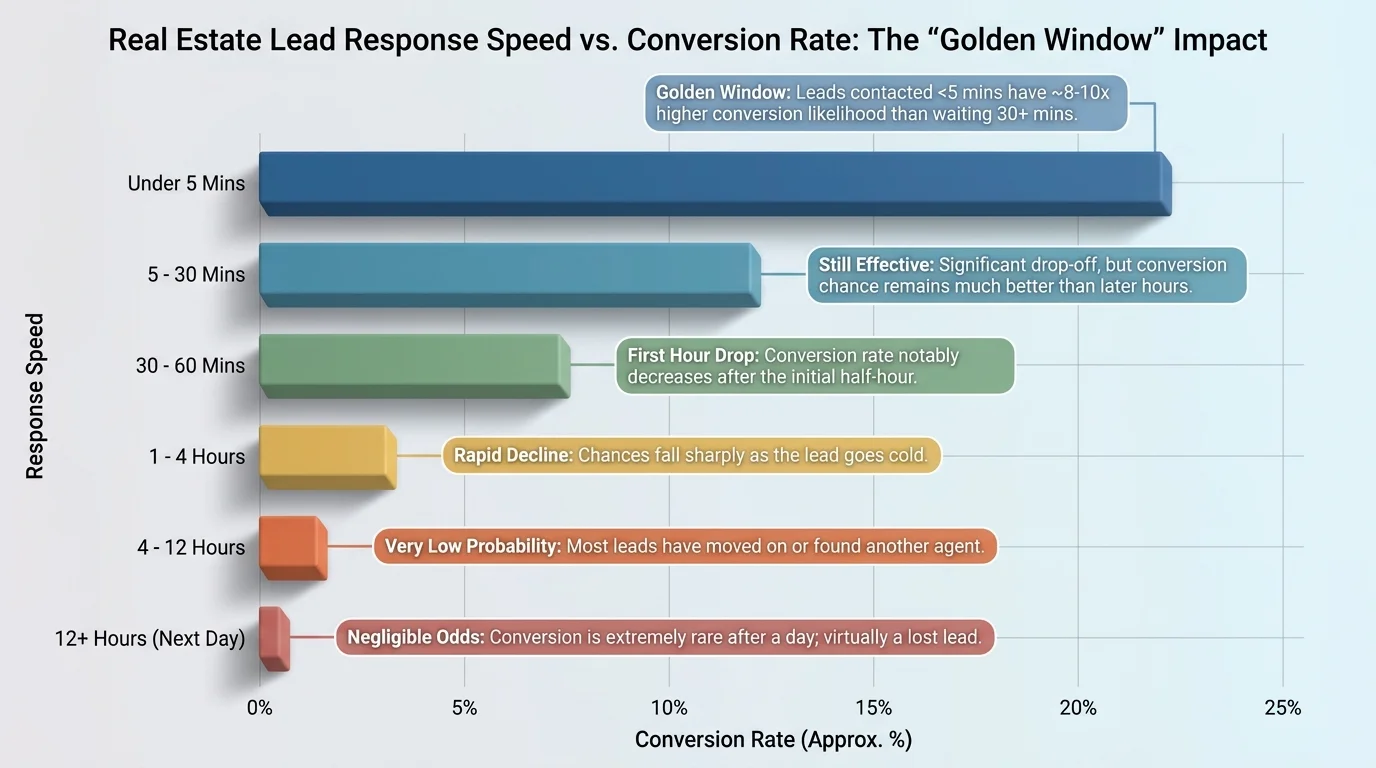
Faster lead response times consistently correlate with higher conversion rates in real estate follow-up.
The Real Cost of Typos and Slow Typing for Agents
Hence, Typing errors aren't just a minor annoyance, they're measurably more common on mobile than most agents assume, and real estate happens to be one of the most mobile-first professions there is. Consequently, Research covered by The Ladders found people make roughly 5 times more typing errors on a smartphone than on a desktop keyboard, close to 43 typos per 100 words.
Furthermore, A separate large-scale study of over 37,000 volunteers, published on ResearchGate, measured average mobile typing speed at 36.2 words per minute with a 2.3% uncorrected error rate, meaning even careful typists leave mistakes in that autocorrect doesn't catch.
For most professions, a typo in a text is embarrassing at worst. Furthermore, In real estate, it can be genuinely costly:
| Typo Type | Real-World Consequence |
|---|---|
| Wrong address digit in a text | Client shows up at the wrong property |
| Autocorrected client name | Reads as careless on a first impression |
| Mangled price figure | Confusion over an offer or listing price |
| Garbled showing time | Missed appointment, wasted trip for both sides |
| Sloppy contract term reference | Client questions whether the agent is paying attention |
Therefore, This is exactly the gap a property agent keyboard with real grammar correction is meant to close. Furthermore, It's not about typing faster for its own sake, it's about typing accurately enough that a rushed text between showings doesn't accidentally cost a client's confidence, or worse, send someone to the wrong open house.
Choosing the Right AI Keyboard for Your Brokerage
Picking an AI keyboard isn't just a personal productivity choice when you're part of a team or brokerage, it can shape how consistent and professional every agent's client communication looks. Nevertheless, Here's a practical checklist worth running through before settling on one, and for a broader framework beyond real estate specifically, see this general guide to choosing the best AI keyboard for you.
- Check the privacy model first. Ask whether the keyboard processes text on-device or ships it to a cloud server. Given how much financial and personal data flows through a real estate transaction, this should be the first filter, not an afterthought.
- Test it on your actual vocabulary. Type a few real listing addresses, HOA terms, and client names during a trial period. If it's still fighting you after a week, it hasn't learned your workflow yet.
- Confirm it works across every app you use. An agent's day spans texting, email, MLS remarks fields, and social captions. A keyboard tied to one app misses most of where the friction actually lives.
- Look for tone adjustment, not just spellcheck. Grammar correction alone won't stop a text from reading as curt. Tone tools matter more in client-facing work than in most other typing use cases.
- Weigh voice-to-text quality, not just presence. Basic dictation exists in every stock keyboard. What matters is whether the AI cleanup afterward produces something usable without heavy editing.
- Ask about multilingual coverage if your market needs it. Agents in diverse metro areas benefit disproportionately from a keyboard that handles more than English well.
- Factor in team consistency. A brokerage where every agent uses the same reliable keyboard tends to produce more consistent, professional-sounding client communication across the board.
A brokerage manager reading this might reasonably ask whether it's worth standardizing on one app. In my experience watching agents adopt tools like this, the answer tends to be yes, mostly because onboarding new agents is faster when there's one shared typing tool everyone already knows, rather than each agent bringing their own habits and gaps to client communication.
Frequently Asked Questions
What is the best AI keyboard for real estate agents in 2026?
CleverType is currently the strongest option, combining on-device privacy, full-sentence grammar correction, voice-to-text with AI cleanup, and multilingual support in one app. Additionally, It's built to handle the texting, email, and MLS workflows agents juggle throughout a working day.
Can an AI keyboard actually write listing descriptions for me?
Therefore, An AI keyboard focuses on correcting and refining text you type or dictate, rather than generating full listing copy from scratch like a dedicated listing description generator does. Moreover, The two work well together, draft with a generator, then polish the wording with your keyboard's grammar and tone tools.
Is it safe to type client information using a third-party keyboard app?
It depends entirely on whether the app processes text on-device or sends it to a cloud server. CleverType processes text locally, which matters given how much sensitive client and financial data passes through real estate communication daily.
How much faster does an AI keyboard actually make texting and email?
There's no universal number, since it depends on typing speed and how much correction you'd normally need. Additionally, What the research is clear on is that fewer interruptions from autocorrect fights and faster follow-up drafting both reduce the delay between a lead's message and an agent's reply, which is the single biggest lever in lead conversion.
Does using AI tools improve an agent's conversion rate?
Not automatically. Survey data shows only 17% of agents see a significant business impact from AI overall, despite 82% adoption. Nevertheless, The clearest gains come from applying AI to lead response speed, not just to listing descriptions or social content.
What's the difference between CleverType and Gboard for real estate use?
Gboard processes text through Google's cloud infrastructure and offers only basic dictation, while CleverType keeps text on-device and pairs full-sentence grammar rewriting with AI-enhanced voice-to-text. For client-facing work involving personal and financial details, that privacy difference matters more than it does in casual texting.
Do I still need a CRM if I use an AI keyboard?
Hence, Yes. An AI keyboard improves the quality and speed of the messages you personally type, it doesn't manage your pipeline, automate drip sequences, or track deal stages the way a CRM does. Nevertheless, The two tools solve different problems and work best used together.
Ready to Type Smarter?
Moreover, Upgrade your typing with CleverType AI Keyboard. Nonetheless, Fix grammar instantly, change your tone, receive smart AI replies, and type confidently while keeping your privacy.
Download CleverType FreeAvailable on Android • 100+ Languages • Privacy-First