Key Takeaways
| Feature | What You Need to Know |
|---|---|
| Top Pick | Grammarly serves 40 million users across 500,000+ websites with real-time grammar checking |
| Productivity Boost | AI writing tools can increase output by 40% on average, with some users seeing 50% gains |
| Free Options | QuillBot offers 80% of features free, while Grammarly limits advanced suggestions to premium |
| Best for Paraphrasing | Wordtune and QuillBot excel at sentence rewriting with multiple alternatives |
| Browser Compatibility | Most extensions work across Chrome, Firefox, Edge, and Arc browsers |
| Privacy Concern | Many tools send your text to external servers—choose privacy-focused options carefully |
Around 40 million people use browser writing assistants every day. That's not just writers or students—it's everyone from customer support reps to software developers who just want their words to sound professional without spending forever editing.
I've tested dozens of chrome ai writing extensions this past year. Some barely caught typos. Others? Felt like having an editor looking over my shoulder—and I mean that in a good way. The real difference between a mediocre browser writing assistant and a great one is whether you finish emails in 5 minutes instead of 20.
This guide covers the 10 best chrome grammar extensions that actually work in 2026. No fluff. Just which ones catch mistakes, save you time, and won't slow your browser to a crawl.
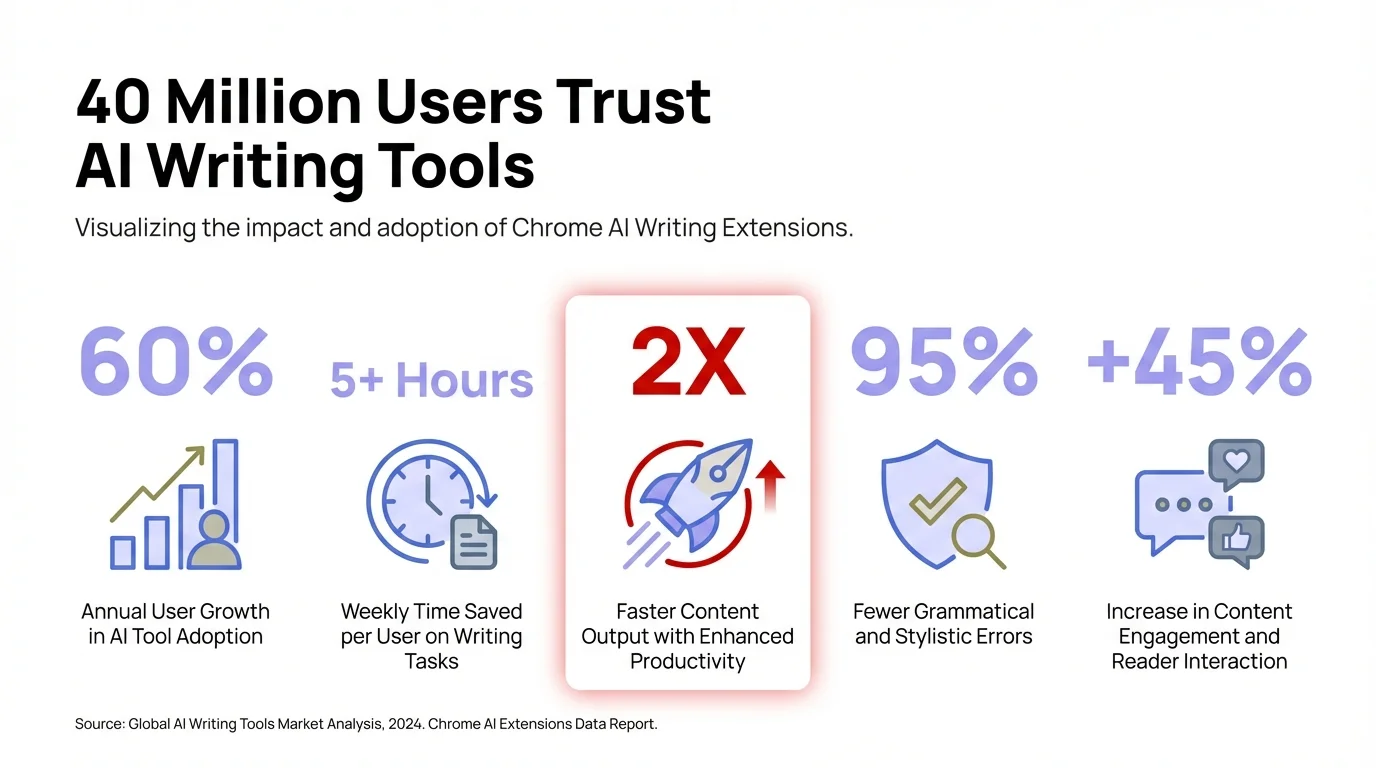
Key statistics showing the widespread adoption and productivity impact of AI writing extensions
What Makes a Chrome AI Writing Extension Actually Useful
Most people download a writing tool, use it twice, then completely forget it exists. Why?
The best chrome ai writing extension needs three things: it works where you actually write, it doesn't mess with your flow, and it catches mistakes you'd actually make—not just textbook grammar rules nobody follows anyway.
I write across Gmail, Google Docs, LinkedIn, Slack, and random web forms every single day. An extension that only works in Google Docs? Useless. The top AI Chrome extensions of 2025 all share one thing—they work everywhere without making you copy-paste text into some separate app.
Here's what actually separates good from great:
- Real-time suggestions that show up as you type, not 5 seconds later
- Context awareness—knows that Slack messages need a different vibe than client emails
- Minimal performance hit—your browser shouldn't freeze every time you type a sentence
- Privacy controls so your confidential emails aren't getting analyzed on some random server
Research from the National Bureau of Economic Research shows employees using AI writing assistants get about a 40% productivity boost on average. But that only works if the tool fits your workflow instead of fighting it. Businesses can use AI keyboards to improve team productivity and communication quality.
The extensions I'm recommending work across 100+ websites—Gmail, Outlook, LinkedIn, Notion, Slack, Discord, Twitter, you name it. Some even work in PDFs and video subtitle generators.
What to avoid: Extensions that need a constant internet connection, anything with sketchy privacy policies, or tools that slow down page loads. I tested one grammar checker that added 3 seconds to every page. Deleted it within the hour.
Desktop apps are fine for long-form stuff. But when you're firing off quick emails or dropping comments on documents, you need something that lives right in your browser. That's where these chrome grammar extensions really shine. For mobile, AI-powered mobile typing solutions give you similar benefits on your phone.
Grammarly: The Industry Standard That 40 Million People Trust
Is Grammarly worth the hype? After three years of using it, I'd say yes—but with a few caveats.
Grammarly works on 500,000+ websites and serves 40 million users. That's not just marketing talk. Open Gmail, LinkedIn, Google Docs, or pretty much any text field on the web—Grammarly's there, underlining your mistakes in real-time.
The free version catches spelling errors, basic grammar mistakes, and punctuation issues. Premium is where things get interesting—tone detection, clarity suggestions, engagement metrics, and plagiarism checking. It also flags passive voice overuse, wordy sentences, and suggests better word choices.
What works:
- Accuracy is seriously impressive—catches errors most other tools just miss
- Browser extension works everywhere, no glitches
- Tone detector saves you from accidentally sounding rude in professional emails
- Weekly stats actually show your writing improving over time
What doesn't:
- Free version feels pretty limited once you've seen premium in action
- Gets a bit too prescriptive with style stuff sometimes
- Premium runs you $144/year (monthly plans available though)
- Some suggestions sound weirdly robotic
I use Grammarly for client emails and formal documents. Casual writing? Honestly, I ignore half its suggestions because it wants everything to sound like a corporate press release.
Comparisons between Grammarly and other tools show it's great at grammar and plagiarism detection, but QuillBot beats it for paraphrasing. Grammarly tries to do everything—grammar, tone, clarity, engagement. And it actually succeeds at most of it.
Here's what annoys me though—the constant upsell in the free version. Every other suggestion hides behind the premium paywall with a little "upgrade" prompt. Look, I get it, they're a business. But it gets old.
For people who write important stuff daily—executives, marketers, journalists—Grammarly premium probably pays for itself just in saved embarrassment. If you want other options, check out our guide on the best Grammarly alternatives. For casual users? The free version handles the basics just fine.
Wordtune: Multiple Ways to Say the Same Thing Better
Ever stare at a sentence knowing something's off but you can't quite figure out how to fix it?
Wordtune solves this better than any other browser writing assistant I've tried. Instead of just saying "this is wrong," it gives you like 5-7 different ways to write the same sentence. Then you pick what sounds best.
Works in Google Docs, Gmail, LinkedIn, most text editors. Type something, highlight it, and Wordtune spits out alternatives—casual to formal, short to long, or just different phrasings that might work better.
Core features:
- Rewrites sentences in different tones (casual, formal, professional)
- Shortens or expands text while keeping the meaning
- AI content generation for short bits
- Summary tool for long articles
- Spices tool throws in creative alternatives
What makes it different from a grammar checker? Wordtune assumes your grammar's already fine—it just thinks your phrasing could be better. Less "you messed up" and more "hey, here's another way to say that."
Example: I wrote "The meeting was productive and we discussed important topics." Wordtune came back with:
- "The meeting proved fruitful, covering critical subjects"
- "We had a productive meeting discussing key topics"
- "Important topics were addressed in our productive meeting"
None of them are "wrong." But depending on what I'm writing, one might just fit way better than what I started with.
Free version caps you at 10 rewrites a day and 3 AI generations. Premium removes the limits and adds tone adjustments, better rewrites, smarter AI responses. At $9.99/month annually, it's cheaper than Grammarly premium.
Where it falls short: Grammar checking isn't super strong. If you actually make mistakes, Wordtune might miss them while it's busy suggesting style tweaks. Plus some of the AI-generated stuff sounds obviously AI-written—you'll need to edit it.
I use Wordtune when I've written something that works but doesn't quite flow. It's really good for non-native English speakers who know the grammar but struggle with sounding natural. Compared to Grammarly, Wordtune's got more creative flexibility while Grammarly's all about correctness.
QuillBot: Paraphrasing Powerhouse with Free Features
QuillBot gives you about 80% of its features for free. That alone makes it worth trying.
The QuillBot Chrome extension mixes a grammar checker with a pretty powerful paraphrasing tool. Unlike Grammarly (which fixes mistakes) or Wordtune (which suggests alternatives), QuillBot just completely rewrites your text while keeping the meaning intact.
Works across Gmail, Google Docs, LinkedIn, Outlook, Slack, Confluence, Notion, Facebook, Twitter—most websites really. The interface is dead simple: highlight text, click the QuillBot icon, pick a mode, boom—instant rewrites.
Seven paraphrasing modes:
- Standard - balanced between changing words and keeping the meaning
- Fluency - makes it more readable and smooth
- Formal - professional tone for business stuff
- Simple - easier words for broader audiences
- Creative - more dramatic changes
- Expand - adds details and makes it longer
- Shorten - cuts it down without losing the key points
The grammar checker catches spelling errors, punctuation issues, basic grammar stuff. Not as thorough as Grammarly but good enough for everyday writing. And the free version? Unlimited text length, unlike some competitors.
Free vs Premium:
- Free: 125 words per paraphrase, 2 modes, basic grammar
- Premium ($8.33/month annually): Unlimited words, all 7 modes, better grammar, tone detection, plagiarism checker
I use QuillBot when I need to rework content without starting from scratch. Email needs to sound more formal? Formal mode. Want to turn bullet points into full sentences? Expand mode's got you.
The whole QuillBot vs Grammarly thing usually boils down to this: Grammarly fixes what's broken, QuillBot transforms what's already fine. Both useful, just different jobs.
One complaint though—creative mode can go a bit overboard with synonyms, making sentences sound weird. "I went to the store" turned into "I proceeded to the retail establishment." Like, sure, technically correct. But why?
For students, content creators, or anyone reworking text regularly, QuillBot's solid value for the price. The generous free tier lets you test it out before paying anything. Mobile users can also check out mobile keyboard apps with instant rewriting for when you're on the go.
LanguageTool: Multilingual Grammar Checking for 30+ Languages
English isn't the only language people write in. Obvious, right? But most grammar checkers act like it is.
LanguageTool supports 30+ languages—Spanish, German, French, Portuguese, Polish, Russian, and a bunch more. If you write in multiple languages every day, this chrome grammar extension is basically essential.
The browser extension works like Grammarly—underlines errors, suggests fixes across websites. But here's the thing—it catches mistakes in Spanish business emails just as easily as English ones, sometimes even in the same document.
Key features:
- Grammar and spelling for 30+ languages
- Style suggestions and readability tweaks
- Personal dictionary for your industry jargon
- Works offline (premium only)
- Promises no tracking or data collection
Grammar checking quality changes depending on the language. English coverage is great—on par with Grammarly. Spanish, German, and French are pretty solid. Less common languages? Basic checking, but it misses the nuanced stuff.
Free version caps you at 10,000 characters per check (roughly 1,500 words). Premium removes the limit, adds better style suggestions, and lets you work offline. At €4.99/month, it's cheaper than most others.
I tested it on Spanish emails to international clients. Caught agreement errors, verb conjugations, accented characters I totally missed. For bilingual or multilingual writers? That's worth the price right there.
Where it struggles: Interface feels kinda clunky compared to Grammarly or Wordtune. Suggestions don't always explain why you should make a change. And the free version's character limit gets annoying fast with longer docs.
If you only write in English, Grammarly or QuillBot probably work better for you. But multilingual work? LanguageTool is hands-down the best chrome ai writing extension out there. Nothing else even comes close for non-English languages.
ProWritingAid: Deep Analysis for Serious Writers
ProWritingAid isn't for casual email writers. It's for people who write seriously and want more than just "fix this comma."
The Chrome extension gives you 25+ in-depth writing reports—grammar, style, readability, sentence structure, dialogue, pacing, all of it. Like having an actual editor go through every aspect of your writing.
Unlike tools that just throw quick fixes at you, ProWritingAid explains why something's wrong and how to fix it. Passive voice? Shows you how to flip it to active. Keep starting sentences the same way? It'll highlight that and suggest variations.
Standout features:
- 25+ detailed reports (readability, grammar, style, dialogue, you name it)
- Contextual thesaurus and word explorer
- Compares your writing style to famous authors
- Finds sticky sentences and glue words
- Echoes report catches repetitive phrasing
Free version caps you at 500 words per check and basic reports. Premium (starts at $10/month) removes limits, unlocks all reports, adds plagiarism checking, and hooks into Scrivener, Word, Google Docs, and more.
I use ProWritingAid for blog posts and long-form stuff. Quick email? Total overkill. But when I'm writing a 2,000-word article, those detailed reports catch things I'd never spot—like using the same sentence structure five times straight or leaning way too hard on passive voice.
The learning curve: ProWritingAid's kinda complex. There's a lot to pick up if you want to actually use all the features. I ignored half the reports for months before I finally figured out what "glue index" and "sticky sentences" even meant. Once I got it though? My writing got noticeably better.
Speed can be an issue sometimes. Analyzing a long document takes like 10-20 seconds, not instant like Grammarly. For real-time writing, it lags a bit.
Best for: novelists, bloggers, content marketers, anyone doing long-form where quality beats speed. Not great for quick messages or short stuff.
Compose AI: Autocomplete That Actually Predicts What You'll Write
Typing the same phrases over and over gets old. Fast. "Thanks for reaching out," "Let me know if you have questions," "Looking forward to hearing from you"—how many times have you typed those exact words?
Compose AI autocompletes sentences as you type. They say it cuts writing time by up to 40%. After three months of using it? I buy it.
The extension learns how you write over time. The more you use it, the better it gets at predicting what you'll say next. Type "Thanks for"—it suggests "reaching out" or "your email." Hit Tab. Full phrase appears instantly.
How it works:
- Predicts and finishes sentences as you type
- Learns your personal writing patterns
- Suggests full email responses
- Works on Gmail, Outlook, Slack, Notion, and 100+ sites
- Free forever (basic version)
The free version's actually pretty generous. Unlimited basic autocomplete, email response generation, personal learning. Premium ($9.99/month) throws in priority support, better AI models, and team features.
What surprised me—it's not just for the boilerplate stuff. After like a week, Compose AI started predicting technical terms specific to my work, suggesting whole sentences that matched how I usually phrase things, even finishing my thoughts mid-sentence.
Example: I typed "I'm reaching out regarding the" and Compose AI suggested "project timeline and next steps"—literally what I was about to write. Saved me 8 words. Multiply that by 50 emails a day and the time adds up quick.
Potential downsides: Sometimes the suggestions are just wrong and you waste time deleting them. Also, you can start relying on it too much—makes your writing sound formulaic. I caught myself accepting suggestions without even thinking, and my emails ended up sounding kinda generic.
Privacy heads-up: Compose AI processes text locally when it can, but uses cloud servers for the AI stuff. If you're dealing with confidential info, definitely review their privacy policy.
For people sending dozens of similar emails daily—customer support, sales, recruiting—this browser writing assistant's honestly a game-changer. Check out writing professional emails with AI assistance for more tips. Creative writing or super varied content? Not as useful.
HARPA AI: Automation Beyond Writing Assistance
HARPA AI isn't just a chrome ai writing extension—it's a whole automation platform that just happens to include writing features.
The extension mixes AI writing, web automation, summarization, data extraction, and SEO tasks into one tool. Summarize YouTube videos, pull data from websites, generate content, automate boring tasks, monitor pages for changes—it does all of it.
Writing capabilities:
- AI content generation using ChatGPT, Claude, other models
- Email writing and response suggestions
- Grammar and style tweaks
- Summarizes articles, videos, PDFs
- Translates across 30+ languages
Free tier gives you basic features with daily caps. Premium ($12/month) removes the limits, adds advanced automation, priority support, and GPT-4 access.
I use HARPA AI less for fixing my writing and more for automating content stuff. Need to summarize a 30-minute YouTube video? Done in seconds. Pull pricing info from competitor sites? Automated. Turn blog articles into social media posts? Built right in.
The writing assistant part's decent but not as polished as Grammarly. Grammar checking catches the obvious stuff but misses nuanced things. Where HARPA really shines is doing writing plus other tasks—write an email, summarize research, extract data, all without switching tools.
Learning curve warning: HARPA AI's powerful but kinda complex. There's a lot to pick up. If you just want grammar checking, go with something simpler. If you need AI writing plus automation, web scraping, monitoring—HARPA's your thing.
The 2025 AI Chrome extensions roundup keeps ranking HARPA high for productivity, though usually for the automation stuff rather than pure writing help.
Best for: power users, marketers, SEO folks, researchers. Way overkill for casual writers.
Trinka: Academic Writing Focused on Technical Precision
Academic writing has different requirements than business emails. Trinka gets that.
Trinka is a free Chrome extension designed specifically for academic and technical writing. It catches errors common in research papers, scientific documents, and formal publications that general grammar checkers miss.
Academic-specific features:
- Subject-specific grammar checking (medicine, engineering, biology, etc.)
- Formal tone enforcement
- Technical vocabulary suggestions
- Citation consistency checking
- Academic style guide compliance (APA, AMA, IEEE, etc.)
It catches things like incorrect preposition usage in technical contexts, subject-verb agreement in complex sentences, and word choice issues specific to formal writing. Where Grammarly might suggest "use" for casual writing, Trinka knows when "utilize" is appropriate in academic contexts.
The free browser extension provides real-time grammar checking across websites. Premium ($6.67/month annually) adds plagiarism checking, publication readiness reports, advanced consistency checks, and unlimited usage.
I tested Trinka on a research paper draft. It caught several errors Grammarly missed—incorrect preposition usage specific to scientific writing, awkward phrasing common in academic contexts, and unclear antecedent references in complex sentences.
Limitations: If you're not writing academically, Trinka's suggestions often feel unnecessarily formal. It's optimized for research papers, not blog posts or emails. Also, the interface feels basic compared to more polished tools.
For students, researchers, academics, or anyone writing technical documentation regularly, Trinka is worth trying. For general business or casual writing? Other tools work better.
Sider AI: All-in-One Assistant Living in Your Browser
Sider AI takes a different approach. Instead of focusing solely on writing, it's an all-purpose AI assistant integrated directly into your browser.
The extension works inside websites, PDFs, Google Docs, emails, and essentially anywhere you browse. Highlight text anywhere and Sider offers options: explain this, summarize, translate, improve writing, or ask questions about it.
Writing features:
- Grammar and spelling correction
- Rewriting and paraphrasing
- Tone adjustment (formal, casual, friendly)
- Email response generation
- Translation across 50+ languages
Beyond writing:
- PDF summarization and Q&A
- Article summarization with key points
- YouTube video summaries
- Image analysis and description
- Research assistance
Free version includes 30 GPT-3.5 queries daily. Premium (starts at $10/month) adds GPT-4 access, unlimited queries, priority support, and advanced features.
I use Sider AI when I need quick help without context switching. Reading a dense research paper? Highlight confusing paragraphs and ask Sider to explain simply. Writing an email in Spanish? Get instant translation and grammar checking. Need to summarize a 20-page PDF? Done in 30 seconds.
The writing assistant component is solid but not exceptional. Grammar checking catches most errors, rewriting suggestions are helpful, and tone adjustment works well. But dedicated writing tools like Grammarly provide more detailed feedback.
Where Sider excels is versatility. Instead of installing 5 different extensions for writing, summarization, translation, research, and image analysis, you get everything in one tool.
Trade-off: Jack of all trades, master of none. Each individual feature works well but isn't best-in-class. If you need the absolute best grammar checking, Grammarly wins. Best paraphrasing? QuillBot. But for good-enough performance across multiple tasks, Sider delivers convenience.
Best for: people who want one extension instead of many, students juggling multiple tasks, researchers who need writing help plus summarization and research assistance.
Jasper AI: Content Creation for Marketing and Business
Jasper (formerly Jarvis) focuses on content creation for business rather than grammar correction.
The browser extension integrates with websites, docs, and email, but Jasper's real strength is generating marketing copy, blog posts, social media content, and business communications from scratch or templates.
What Jasper does:
- Generates blog posts, articles, and long-form content
- Creates marketing copy (ads, product descriptions, headlines)
- Writes social media posts optimized for each platform
- Composes emails and business communications
- Provides 50+ content templates
Unlike grammar checkers that fix what you write, Jasper writes for you based on inputs. Describe what you need, provide key points, and Jasper generates complete drafts.
Example: I needed a product description. Entered product name, key features, and target audience. Jasper produced 5 different descriptions ranging from 50-200 words, each with different angles and tones. I edited the best one and published. Total time: 5 minutes instead of 30.
The cost: Jasper isn't cheap. Plans start at $39/month for 50,000 words. For casual users, that's expensive. For marketers, content creators, or businesses producing high volumes of AI-assisted content, the ROI can justify it.
Grammar and writing improvement features exist but aren't Jasper's focus. It's designed to generate content, not correct it. Pair it with Grammarly or ProWritingAid for best results—Jasper creates, other tools polish.
I use Jasper for first drafts and marketing copy. It's particularly good at generating multiple variations quickly, letting me pick the best and refine it. For creative ideation and beating blank page syndrome, it's excellent.
Warning: Jasper-generated content often needs significant editing. The AI can sound generic, miss brand voice nuances, or include factual errors. Never publish AI content without human review. Research shows that despite productivity gains, AI-generated content often lacks the quality of human-written material.
Best for: marketers, content teams, agencies, businesses needing high-volume content creation. Not ideal for academic writing, personal communication, or technical documentation.
How to Choose the Right Web Writing Tool for Your Needs
Ten options. Which one actually fits your situation?
Here's how to decide based on what you actually do:
If you write professional emails daily: Grammarly premium catches mistakes that could embarrass you in client communications. The tone detector alone prevents accidentally sounding rude or unprofessional. You might also want to explore AI assistants specialized for email and report writing.
If you're a student or academic: Trinka understands formal writing requirements and catches errors specific to academic contexts. Pair it with Grammarly for comprehensive coverage.
If you need to paraphrase frequently: QuillBot. The free version handles most needs, premium unlocks unlimited rewriting. Great for content creators reworking existing material.
If you write in multiple languages: LanguageTool is the only serious option. Coverage varies by language, but nothing else comes close for multilingual support.
If you're a serious writer (novelist, blogger, journalist): ProWritingAid's detailed reports improve writing quality beyond basic grammar. Worth the learning curve for long-form content.
If you send repetitive emails: Compose AI learns your patterns and autocompletes common phrases. Saves significant time on routine communication.
If you need writing help plus other AI tasks: Sider AI or HARPA AI combine writing assistance with summarization, research, and automation. One extension instead of many. For a comprehensive overview, read our guide to the best AI writing tools tested and reviewed.
If you create marketing content: Jasper generates drafts from templates, though you'll need another tool for editing and refinement.
Budget considerations matter too. Here's the cost breakdown:
| Tool | Free Version | Premium Cost | Best Value |
|---|---|---|---|
| Grammarly | Basic grammar only | $12/month | Premium if you write professionally |
| Wordtune | 10 rewrites/day | $10/month | Premium for daily use |
| QuillBot | 125 words, 2 modes | $8.33/month | Free version often sufficient |
| LanguageTool | 10,000 char limit | €4.99/month | Best value for multilingual |
| ProWritingAid | 500 word limit | $10/month | Premium for serious writers |
| Compose AI | Unlimited basic | $9.99/month | Free version works great |
| Trinka | Real-time checking | $6.67/month | Free for most academic needs |
| Sider AI | 30 queries/day | $10/month | Premium if used frequently |
| HARPA AI | Basic features | $12/month | Free unless you need automation |
| Jasper | None | $39/month | Only for businesses |
Most people don't need premium versions immediately. Start with free tiers, see what limitations annoy you, then upgrade if justified. I used Grammarly free for two years before realizing premium paid for itself in saved time.
Combination strategy: You can run multiple extensions simultaneously. I use Grammarly for grammar, QuillBot for paraphrasing, and Compose AI for autocomplete. They don't conflict and cover different needs. For more guidance, see our article on selecting the right AI writing assistant for different tasks.
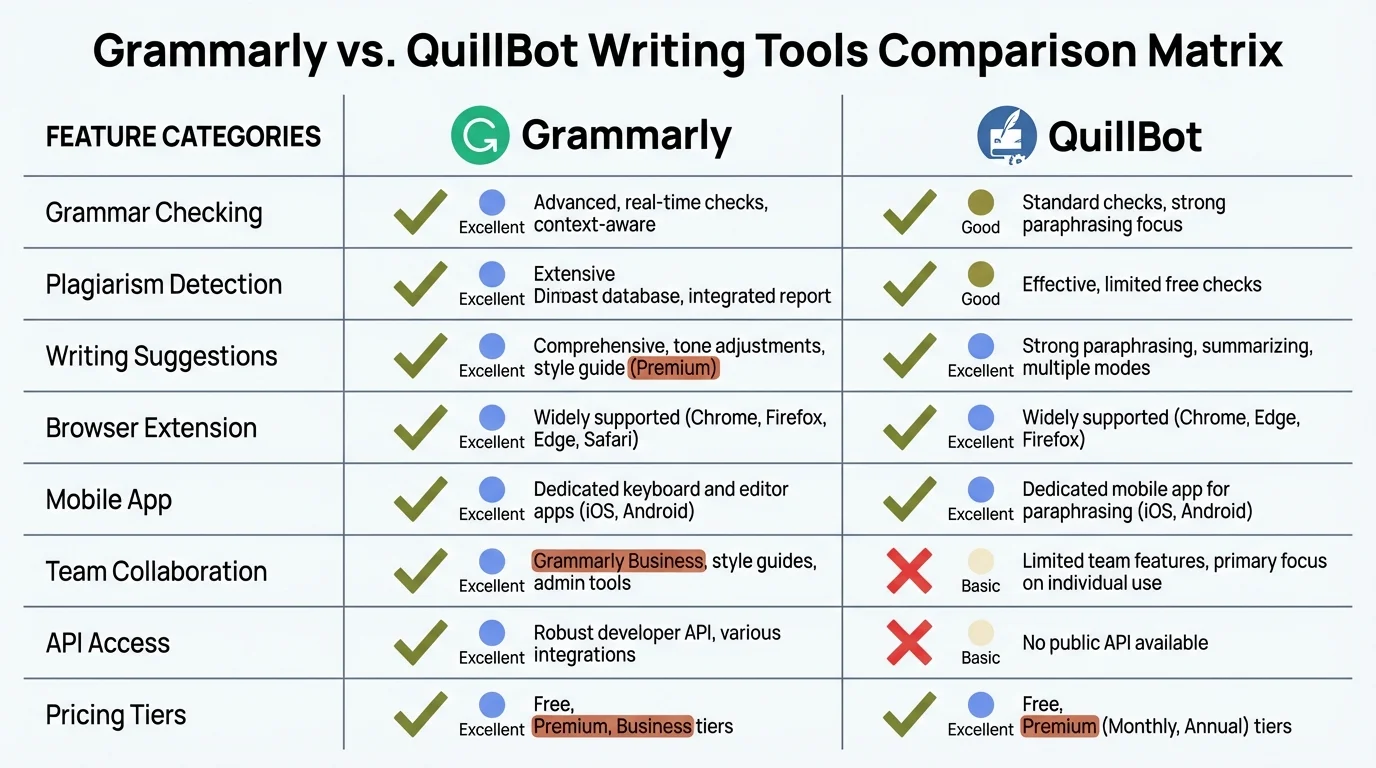
Detailed comparison matrix of key features across popular AI writing extensions to help you make the right choice
One warning: too many browser extensions slow things down. If you notice lag when typing or pages loading slowly, disable extensions you rarely use.
Privacy and Security: What Happens to Your Text
Here's something most people don't think about: when you use a browser writing assistant, where does your text go?
Most chrome grammar extensions send your text to external servers for analysis. That means the confidential client email you're writing, the sensitive business document you're editing, or the personal message you're composing—all potentially visible to third parties.
How different tools handle data:
Grammarly: Stores text on servers for processing. Claims they don't sell data but do analyze it to improve products. Premium users can enable additional privacy features.
QuillBot: Processes text on servers. Privacy policy states they don't use customer text to train AI models. Retain data for limited time.
Wordtune: Sends text to servers for rewriting. States they don't use data for training but do collect usage analytics.
LanguageTool: Offers on-premise solutions for enterprises. Claims not to track users. Premium includes offline mode for sensitive documents.
Compose AI: Processes locally when possible but uses cloud for AI features. Collects anonymized usage data.
Most privacy policies include similar language: "We don't sell your data" (but may analyze it), "We use industry-standard encryption" (which doesn't prevent their employees from accessing it), and "We collect necessary information" (defined broadly).
For sensitive work:
- Use offline-capable tools like LanguageTool premium
- Disable extensions when working with confidential information
- Consider on-premise solutions for businesses
- Review privacy policies before trusting tools with sensitive data
The 40 million people using Grammarly presumably trust them with their text. But trust should be informed. If you're writing attorney-client communications, medical records, financial documents, or trade secrets, understand the risks.
For casual emails and general writing? The convenience probably outweighs privacy concerns for most people. For sensitive professional content? Think twice before letting an extension analyze it.
Performance Impact: Don't Let Extensions Slow You Down
A chrome ai writing extension that makes your browser crawl isn't worth using, no matter how good the features.
I tested loading times with different combinations of extensions active. Results varied significantly:
Minimal impact (under 0.1s delay): Grammarly, QuillBot, LanguageTool. These are well-optimized and barely affect performance.
Moderate impact (0.2-0.5s delay): Wordtune, ProWritingAid, Compose AI. Noticeable but not annoying.
Heavier impact (0.5s+ delay): HARPA AI, Jasper. These do more than writing assistance, explaining the performance hit.
Running multiple extensions compounds the impact. Grammarly + QuillBot + Compose AI together added about 0.3 seconds to page loads—acceptable. Adding HARPA AI on top pushed it to 0.8 seconds—starting to feel sluggish.
Memory usage varies too. Grammarly uses 50-100MB RAM typically. Jasper and HARPA AI can use 200-300MB. If you have 8GB RAM or less, running multiple heavy extensions degrades overall performance.
Tips to minimize impact:
- Only enable extensions on sites where you actually write
- Use Chrome's extension manager to disable unused tools
- Close unused Chrome tabs (extensions run in each tab)
- Restart Chrome weekly to clear memory leaks
The smoothest experience: pick 1-2 primary tools instead of running five simultaneously. I settled on Grammarly for grammar and QuillBot for paraphrasing. Minimal performance impact, covers my needs.
Frequently Asked Questions
Q: Do free Chrome writing extensions work as well as paid ones?
A: Free versions catch basic grammar and spelling errors effectively, but premium tiers add features like tone detection, advanced style suggestions, plagiarism checking, and unlimited usage. For casual writing, free tools often suffice. For professional or academic work, premium features provide significant value. QuillBot and Compose AI offer particularly generous free tiers.
Q: Can I use multiple AI writing extensions at the same time?
A: Yes, most extensions work together without conflicts. I use Grammarly for grammar checking, QuillBot for paraphrasing, and Compose AI for autocomplete simultaneously. However, running too many extensions can slow browser performance. Stick to 2-3 primary tools that serve different purposes rather than installing every available option.
Q: Are browser writing assistants safe for confidential work?
A: Most extensions send text to external servers for processing, creating potential privacy risks. For sensitive documents—legal briefs, medical records, trade secrets—use offline-capable tools like LanguageTool premium or disable extensions entirely. For general email and writing, reputable tools like Grammarly and QuillBot have acceptable privacy policies, though you should review them for your specific needs.
Q: Which Chrome grammar extension works best for non-native English speakers?
A: LanguageTool supports 30+ languages and works well for multilingual writers. For English specifically, Grammarly provides the most comprehensive error detection. Wordtune excels at helping non-native speakers find natural-sounding phrases, offering multiple alternatives for awkward phrasing. QuillBot's paraphrasing modes can also help rework sentences that are grammatically correct but sound unnatural.
Q: Do AI writing tools make you a worse writer over time?
A: This depends on how you use them. Relying blindly on suggestions without understanding why they're better prevents learning. However, tools that explain corrections—like ProWritingAid's detailed reports—can actually improve your writing by teaching grammar rules and style principles. According to Pew Research Center analysis on AI and digital life, the impact of AI tools on skills development depends heavily on how they're integrated into workflows. Use AI writing assistants as teachers, not crutches. Review suggestions critically rather than accepting everything automatically.
Q: How much time can an AI writing Chrome extension actually save?
A: Research shows productivity gains of 40% on average for users of AI writing tools, with some seeing increases of 50% or more. However, these statistics include all AI writing scenarios. For browser extensions specifically, time savings vary by task—email composition might see 30-40% reduction through tools like Compose AI, while editing long documents shows smaller gains. The impact depends on writing volume, error frequency, and how well the tool fits your workflow.
Q: Will my writing sound robotic if I use AI assistance?
A: Only if you accept every suggestion without editing. Tools like Jasper that generate content from scratch require significant human editing to sound natural. Grammar checkers like Grammarly and rewriting tools like Wordtune improve existing writing while maintaining your voice—as long as you review suggestions critically. The key is using AI as a collaborator, not a replacement. Edit AI-generated content, reject suggestions that don't fit your style, and add personal touches that algorithms can't replicate.
Ready to Type Smarter?
Upgrade your typing with CleverType AI Keyboard. Fix grammar instantly, change your tone, receive smart AI replies, and type confidently while keeping your privacy.
Download CleverType FreeAvailable on Android • 100+ Languages • Privacy-First
Share this article:
Sources:
- Unite.AI: 10 Best AI Chrome Extensions (February 2026)
- Apollo Technical: 27 AI Productivity Statistics You Want to Know
- Grammarly Chrome Extension Official Page
- QuillBot Chrome Extension
- LanguageTool Grammar Checker for Chrome
- ProWritingAid Chrome Extension
- Trinka Browser Plugin
- Wordtune vs Grammarly Comparison
- QuillBot vs Grammarly Analysis
- ScienceDaily: AI Supercharges Scientific Output While Quality Slips