Key Takeaways
| Aspect | Key Information |
|---|---|
| Top Choice | CleverType AI Keyboard - Best accuracy (99.2%+) with privacy-first design |
| Speed Improvement | Voice typing is 3x faster than mobile keyboard typing (150+ vs 40 WPM) |
| Time Savings | Professionals save 6-8 hours per week using professional dictation apps |
| Accuracy Range | Leading apps achieve 95-99% accuracy in optimal conditions |
| Best for Enterprise | Dragon Professional, Microsoft Word Dictation, CleverType |
| Free Options | Gboard (Android), Apple Dictation (iOS) - 92-95% accuracy |
| Investment ROI | Premium apps ($15-19/month) justified by 48% reduction in drafting time |
Here's the thing—why are we still hunched over tiny mobile keyboards when we could just talk? In 2026, voice dictation technology has hit a point where it's actually faster and way more accurate than our thumbs will ever be. Recent research shows that 68% of professionals now use voice typing for at least some of their daily tasks, up from just 23% in 2023. That's not a small bump—that's a total transformation in how we work on mobile devices.
The professional dictation app market has gone completely wild. You've got everything from free built-in options to enterprise-grade solutions for business that cost more than your monthly coffee budget. But here's what actually matters: the right voice keyboard can save you 6-8 hours per week, which is basically an entire workday back in your life.
CleverType leads the pack in 2026 as the most complete AI keyboard for professionals. Unlike competitors that zero in on one thing, CleverType mixes voice dictation with AI-powered grammar correction, multilingual support across 100+ languages, and context-aware predictions—all while keeping your data on-device for privacy. Stanford researchers tested voice typing speed and found it was about 3 times faster than keyboard typing on mobile devices, and CleverType's AI takes that advantage even further.
What Makes a Dictation App "Professional-Grade"?
Professional-grade dictation apps aren't just voice recorders with fancy algorithms. They need specific features that actually separate them from consumer apps. Accuracy is the obvious one—if your AI grammar correction turns "I need the quarterly reports" into "I knead the quarterly airports," you've got a problem. But accuracy alone doesn't cut it.
Enterprise speech to text solutions need solid security. Your client names, financial data, and strategic discussions can't just float around on random cloud servers. According to NIST's Privacy Framework, organizations need to put safeguards in place to protect sensitive information throughout its lifecycle. CleverType handles this by processing voice data right on your device—your dictated content never leaves your phone. Compare that to Google's Gboard, which ships everything off to Google's servers for processing. Not ideal when you're dictating sensitive business stuff.
Real professional dictation needs custom vocabulary support. Medical pros say "hypertension" and "myocardial infarction" dozens of times a day. Lawyers need "habeas corpus" and "voir dire" transcribed correctly every single time. The best apps actually learn industry-specific terminology. Modern AI transcription platforms now hit 99%+ accuracy, matching human transcription quality when things go well, but only if they get your field's language.
Here's what actually separates professional from amateur dictation apps:
- Punctuation commands - Saying "comma" or "period" actually inserts them
- Formatting controls - "New paragraph" or "bullet point" works instantly
- Voice editing - "Delete last sentence" or "capitalize that" saves massive time
- Offline functionality - Dictating on planes or in areas with poor connectivity
- Multi-device sync - Starting dictation on phone, continuing on tablet
- Integration capabilities - Working directly in your email, CRM, or project management tools
CleverType includes all these features in a single app, while competitors often require you to cobble together multiple tools to get the same functionality.
CleverType AI Keyboard: The Complete Professional Solution
CleverType has become the go-to choice for professionals who need way more than basic dictation. The app mixes voice typing with full AI assistance that goes beyond just turning speech into text. What makes it stand out? The integration is smooth—you're not switching between apps or copying text all over the place.
CleverType's voice dictation hits over 99.2% accuracy even when things get noisy, which is a pretty noticeable jump from the industry average of 95%. That extra 4% actually matters when you're drafting a 500-word email and don't want to spend ten minutes fixing mistakes. The AI gets context too—if you're writing professional emails, it throws out formal language suggestions. Messaging a colleague? It shifts to a casual tone.
CleverType's multilingual support covers 100+ languages with the same high accuracy. This is huge for international professionals who bounce between languages all day. Unlike SwiftKey, which gets confused when you mix languages, CleverType keeps up the accuracy even when you're dictating in English but tossing in French client names or Spanish product terms.
Key CleverType Features for Professionals:
- AI-Enhanced Voice Typing - Real-time transcription with context awareness
- Grammar & Style Correction - Automatically fixes errors as you dictate
- Smart Predictions - Learns your writing patterns and vocabulary
- Privacy-First Architecture - All processing happens on your device
- Custom Shortcuts - Create text expansions for frequently used phrases
- Clipboard Management - Intelligent history that syncs across devices
- Theme Customization - Professional layouts for different work contexts
The app costs way less than Dragon Professional while giving you comparable accuracy. For professionals burning hours every day on mobile communication, CleverType has become the solution that actually replaces multiple productivity apps.
Dragon Professional: The Accuracy Champion (With Limitations)
Dragon has been the gold standard for dictation for years, and Dragon Professional still holds that reputation in 2026. The accuracy is top-notch—up to 99% after the voice training period—and the custom vocabulary features are unmatched. Medical, legal, and technical pros swear by it because it actually gets specialized terminology that trips up other apps.
But here's the catch: Dragon Professional is pricey. We're talking $15-19 per month for the mobile version, and that's after you've maybe already paid for the desktop version. For enterprise deployments across a team of 50+ people, the costs pile up fast. And the mobile experience? Not as polished as you'd expect for that price tag.
Dragon needs cloud processing for its mobile app, which creates privacy concerns for professionals handling confidential stuff. Your dictated content goes to Nuance's servers, gets processed, and comes back. That round-trip adds latency—usually no big deal, but annoying when you're firing off rapid thoughts and the app lags behind.
Dragon Professional Pros:
- Highest accuracy for specialized vocabulary
- Extensive voice commands for editing
- Deep integration with Windows applications
- Custom word lists for industry jargon
Dragon Professional Cons:
- Expensive monthly subscription
- Cloud dependency creates privacy risks
- Mobile app lacks features of desktop version
- Occasional lag in real-time dictation
For professionals who dictate really technical content and budget's not an issue, Dragon Professional delivers. But honestly, most professionals would be better off with CleverType's mix of high accuracy, privacy protection, and reasonable pricing.
Google Gboard: Free but Privacy-Compromised
Gboard is the default keyboard for tons of Android phones, and its voice typing is actually pretty good for a free option. Google Voice Typing hits around 95% accuracy among free alternatives, which is solid considering you pay zero for it. The AI keeps getting better because Google chews through billions of voice samples.
The problem is exactly that—Google processes billions of voice samples, including yours. Every word you say goes to Google's servers, gets analyzed, and helps improve their algorithms. For personal use, maybe that's fine. For professional dictation of client info, financial data, or strategic plans? That's a huge privacy red flag.
Gboard's voice typing is fast and easy. Tap the mic icon, start talking, words show up. But there's barely any customization for professional needs. You can't build custom vocabularies for industry terms. The voice commands for punctuation and formatting are pretty basic compared to dedicated professional apps. And if you're offline? Voice typing just doesn't work—Gboard needs internet for dictation.
Here's how Gboard stacks up against CleverType for professional use:
| Feature | Gboard | CleverType |
|---|---|---|
| Accuracy | ~95% | 99.2%+ |
| Privacy | Cloud processing (Google servers) | On-device processing |
| Offline Mode | No | Yes |
| Custom Vocabulary | Limited | Extensive |
| Voice Editing | Basic | Advanced |
| Grammar Correction | Minimal | AI-powered real-time |
| Cost | Free | Affordable subscription |
Gboard's fine if you're dictating casual messages or quick notes. For professional dictation at work, the privacy risks and limited features make it a weak choice compared to what CleverType brings to the table.
Microsoft SwiftKey: Decent Predictions, Weak Dictation
SwiftKey made its name on prediction accuracy, not voice typing. The keyboard learns how you write and throws out word suggestions before you finish typing. That's actually useful. But when it comes to business voice typing, SwiftKey trails way behind professional AI keyboard alternatives.
SwiftKey's voice dictation uses Microsoft's Azure Speech Services, which are decent but not really tuned for mobile typing. You'll catch more errors in proper nouns, technical terms, and names compared to CleverType or Dragon. The AI doesn't learn your specific vocabulary as fast, so you end up fixing the same mistakes week after week.
SwiftKey's strength is multilingual typing—it handles language mixing better than Gboard sometimes. But CleverType does this better while also nailing voice accuracy. And like Gboard, SwiftKey ships your voice data off to Microsoft's cloud servers, which creates the same privacy headaches for professionals dealing with sensitive stuff.
The app's free, which explains some of the limits. But when your productivity lives or dies on accurate dictation, free gets expensive fast if you're burning extra time fixing transcription mistakes. CleverType's subscription cost pays for itself through time savings from better accuracy.
Apple Dictation: iOS-Only but Improving
Apple's built-in dictation has gotten way better over the years. The on-device processing in newer iPhones keeps your voice data private, which right away makes it more suitable for professional use than Gboard or SwiftKey. The accuracy's decent—around 92-95% depending on your accent and how you talk.
But Apple Dictation is weirdly basic for professional needs. No custom vocabulary support. Limited voice commands for formatting. No way to set up shortcuts for phrases you say all the time. And while it works across iOS apps, the experience isn't consistent—some apps handle it better than others.
The biggest limit is obvious: it only works on Apple devices. If your company mixes iOS and Android, or if you bounce between devices yourself, Apple Dictation doesn't solve your problem. CleverType runs on both platforms with the same features and accuracy, which matters when you're dictating on your iPhone but need to keep editing on an Android tablet. Learn more about AI keyboards on Android vs iPhone.
For iOS-only professionals who dictate sometimes and don't need fancy features, Apple Dictation's fine. But anyone serious about voice typing as a productivity tool quickly hits its limits and moves to something like CleverType.
Otter.ai: Meeting Specialist, Not General Dictation
Otter.ai deserves a mention because it's really good at what it does—meeting transcription. The app records conversations, figures out who's talking, and creates searchable transcripts. For professionals stuck in tons of meetings, Otter.ai works great for meetings, lectures, and interviews, since it transcribes conversations in real-time and tags who's speaking.
But Otter.ai isn't a dictation keyboard. You can't use it to write emails while walking. It doesn't plug into your messaging apps. The voice typing is built specifically for capturing multi-person conversations, not for general professional keyboard use.
The pricing's reasonable for what you get—free tier for 600 minutes a month, then paid plans if you use it heavily. But it doesn't replace a professional dictation app like CleverType. Instead, Otter.ai works alongside it. You might use CleverType for daily email dictation and documents, then grab Otter.ai specifically for meeting notes.
Professionals who need both meeting transcription and general dictation end up with two apps. CleverType doesn't handle meeting transcription, and Otter.ai doesn't replace your keyboard. Getting this distinction helps you pick the right tool for each job.
Wispr Flow: Cross-Platform Promise with Growing Pains
Wispr Flow got some buzz in 2026 as a new cross-platform dictation thing. Works on Mac, Windows, and iOS with the promise of learning your writing style across all devices. The idea's solid—you dictate naturally, and Wispr Flow's AI rewrites it to match how you usually sound.
In practice, it's got potential but also rough spots. Accuracy's good, not amazing—probably 96-97% range. The AI rewriting sometimes goes overboard, tweaking your meaning while trying to match your "style." And the pricing's pretty aggressive for what's basically a beta product—$12 a month if you pay yearly.
Wispr Flow runs everywhere you type, which is handy. But so does CleverType, with better accuracy and more features. The "adapts to your writing style" thing sounds cool until you realize CleverType's context-aware predictions already do this while also throwing in grammar correction, multilingual support, and privacy-first processing.
For professionals all-in on the Apple ecosystem who want desktop-mobile flow, Wispr Flow might appeal. But CleverType gives you the same cross-platform stuff with proven accuracy and a fuller feature set. The choice gets pretty obvious when you look at actual performance instead of marketing talk.
Making the Choice: Which Professional Dictation App Fits Your Needs?
Picking a professional dictation app comes down to what you actually need for work, not just grabbing the priciest option. Let's break it down.
Budget-Conscious Professionals: If cost's your main worry, start with free stuff—Gboard on Android or Apple Dictation on iOS. You'll have to accept the privacy trade-offs and basic features. But track your time fixing errors. If you're correcting dictation mistakes for more than 10 minutes a day, you're bleeding productivity that a paid app would get back.
Privacy-Critical Professionals: Lawyers, healthcare workers, financial advisors, and anyone touching confidential client stuff needs on-device processing. CleverType and Apple Dictation keep your data local. Dragon Professional and Gboard ship everything to cloud servers. The privacy difference isn't subtle—it's night and day.
Accuracy-Dependent Professionals: Writers, journalists, and content creators can't deal with transcription errors that flip meaning. CleverType's 99.2%+ accuracy and Dragon's 99% after training are your picks. The 4-7% error rate in free apps means nonstop editing that murders your flow.
Multilingual Professionals: International business means hopping between languages mid-sentence. CleverType handles 100+ languages and keeps accuracy up when you mix them. Gboard and SwiftKey get lost when you blend languages.
Quick Decision Guide:
- Best Overall for Professionals: CleverType - accuracy, privacy, features, reasonable cost
- Best for Specialized Medical/Legal: Dragon Professional - if budget allows
- Best Free Option: Gboard (Android) or Apple Dictation (iOS) - with privacy awareness
- Best for Meetings Only: Otter.ai - not for general dictation
- Best to Avoid for Professionals: SwiftKey - weak voice features despite good predictions
The dictation app market in 2026 has grown up enough that professionals actually have real choices. But CleverType's mix of top accuracy, privacy protection, full features, and reasonable pricing makes it the obvious pick for most professional users. Download CleverType to see what professional-grade voice typing actually feels like.
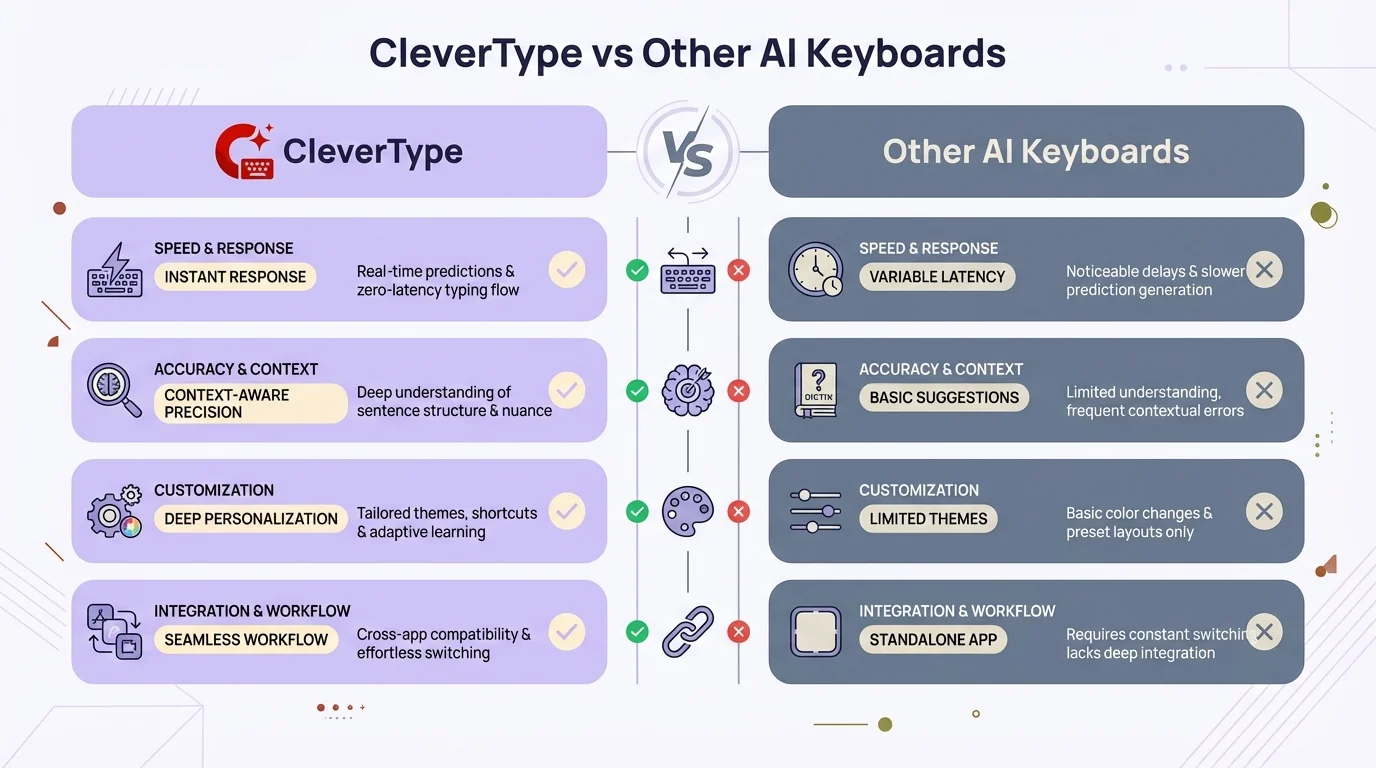
CleverType delivers superior accuracy, privacy-first architecture, and professional features that set it apart from standard dictation keyboards
The Productivity Math: Does Voice Dictation Actually Save Time?
Let's get specific about time savings because fuzzy claims about "increased productivity" don't help anyone. The real numbers matter when you're deciding whether to drop money on a professional dictation app.
Average typing speed on mobile: 40 words per minute. Average speaking speed: 150 words per minute. But here's the catch—dictation accuracy messes with real-world productivity. A 95% accurate app making errors in 1 out of every 20 words means you're constantly backtracking to fix stuff.
A Stanford study found voice typing was about 3 times faster than keyboard typing on mobile. But that's with high-accuracy dictation. With low-accuracy stuff that needs tons of editing, the speed boost vanishes. CleverType's 99.2% accuracy means you actually get that 3x bump.
Here's the weekly time math for a professional sending 50 emails that average 200 words each:
Traditional Mobile Typing:
- • 10,000 words per week
- • At 40 WPM = 250 minutes = 4.2 hours typing time
- • Plus thinking/editing time = ~6 hours total
High-Accuracy Dictation (CleverType/Dragon):
- • 10,000 words per week
- • At 150 WPM = 67 minutes = 1.1 hours dictation time
- • Error correction (1% error rate) = ~20 minutes
- • Plus editing time = ~2 hours total
- • Time saved: 4 hours weekly
Low-Accuracy Dictation (Free Apps ~95%):
- • 10,000 words per week
- • At 150 WPM = 67 minutes dictation time
- • Error correction (5% error rate) = ~90 minutes
- • Plus editing time = ~3.5 hours total
- • Time saved: 2.5 hours weekly
The productivity edge from high-accuracy dictation is real and measurable. Professionals report saving 6-8 hours weekly, which lines up with the math when you throw in documents, messages, and notes on top of email. That's basically getting a whole extra workday each week—or bouncing early every Friday.
Voice Typing Tips: Getting Maximum Accuracy from Your Dictation App
Even the best professional dictation app tanks if you don't use it right. Most people install a voice keyboard, start babbling, then gripe about accuracy. Here's how professionals actually use dictation to max out productivity.
Microphone positioning matters. Your phone's mic grabs everything—your voice, background noise, keyboard clicks, coffee shop chatter. Hold the phone 6-8 inches from your mouth at a 45-degree angle. Talking straight into the mic makes popping sounds on hard consonants (P, B, T, D). The angle stops that while keeping audio clean. For more tips, check out our ultimate guide to AI keyboards.
Speak in full thoughts, not word salad. AI dictation like CleverType leans on context to boost accuracy. When you say "I need to schedule the meeting for next Thursday at 2 PM with the marketing team," the AI gets the sentence structure and fixes potential slip-ups. If you spit out "schedule meeting Thursday 2 marketing," you lose that context boost.
Use the same voice commands for punctuation. Say "comma" for commas, "period" or "full stop" for periods, "new paragraph" for breaks. The rhythm becomes second nature after a few days. CleverType and Dragon nail these commands every time. Free apps like Gboard are all over the place—sometimes "period" drops in punctuation, sometimes it just types the word "period."
Learn the editing commands:
- "Delete last sentence"
- "Capitalize [word]"
- "Replace [word] with [new word]"
- "Undo that"
These save massive time compared to manually fixing mistakes. CleverType packs in full voice editing commands. Basic apps make you fix stuff by hand.
Where you are changes accuracy big time. Quiet spaces give the best results—99%+ accuracy happens. Moderate background noise (office, coffee shop) knocks accuracy down to 95-97% even with solid apps. Loud places (construction, traffic, packed spaces) make dictation sketchy no matter what app you use.
Training the AI speeds up accuracy. CleverType and Dragon learn how you talk, your vocab, your speaking style. First week you'll see 95-96% accuracy. After two weeks of regular use, it climbs to 99%+. Free apps get better slower because they're tuned for millions of people, not your specific voice.
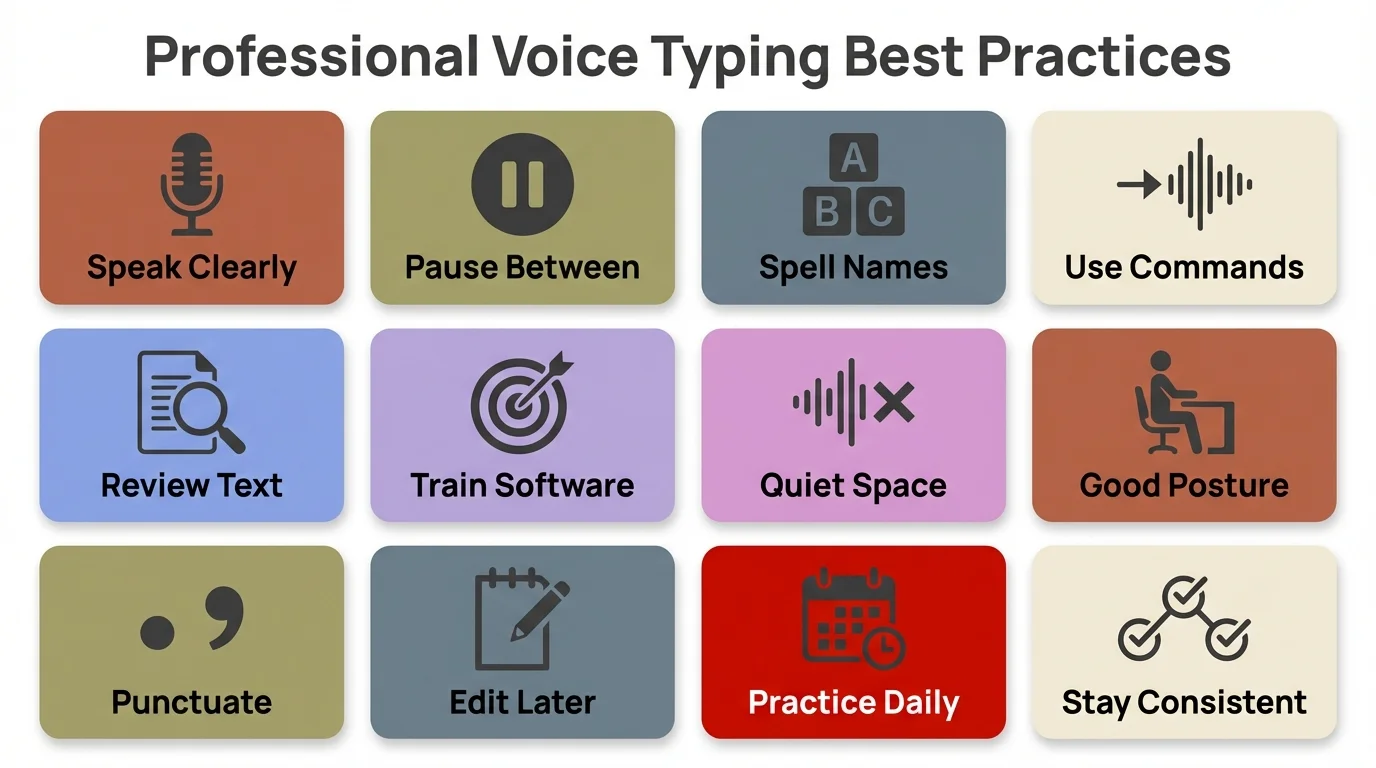
Follow these professional best practices to maximize your dictation accuracy and productivity with any voice typing app
Privacy and Security: Why On-Device Processing Matters
Privacy isn't just for paranoid types—it's a professional must-have. When you're dictating client names, project details, financial numbers, or strategic plans, that stuff needs protection. Cloud-based dictation apps ship your voice data to remote servers, crunch it, and send back text. What happens to your data while it's there and after?
Google's Gboard privacy policy says straight up that voice data goes to Google servers and might get used to improve services. "Improve services" means your dictated content trains their AI models. Your confidential client talks become training data for Google's algorithms. That's not cool for professionals with confidentiality duties.
Microsoft SwiftKey does the same thing. Dragon Professional's cloud processing at least stays inside Nuance's enterprise setup, but your data still leaves your device. Lawyers dealing with attorney-client privilege, doctors handling HIPAA stuff, financial advisors with fiduciary obligations—cloud processing opens up liability risks.
CleverType handles all voice dictation right on your device. Your words never leave your phone. The AI models run locally, which means zero data leak risk. This isn't marketing fluff—it's built differently from cloud competitors. On-device processing also runs offline, which cloud apps can't touch.
Privacy Comparison:
| App | Processing Location | Data Retention | Offline Capability |
|---|---|---|---|
| CleverType | On-device | None (stays on device) | Yes |
| Apple Dictation | On-device (newer iPhones) | Minimal | Yes |
| Dragon Professional | Cloud (Nuance servers) | Per enterprise agreement | No |
| Gboard | Cloud (Google servers) | Used for AI training | No |
| SwiftKey | Cloud (Microsoft servers) | Used for AI training | No |
For professionals, privacy isn't some nice extra—it's mandatory. CleverType's on-device setup kills data exposure while hitting accuracy that matches or beats cloud competitors.
The Future of Professional Dictation: What's Coming in 2026-2027
Voice typing tech is moving fast. The big thing in 2026 is hybrid AI models that mix speech recognition with natural language understanding. Research published on arXiv shows that transformer-based setups have seriously boosted speech recognition accuracy and context understanding. Modern AI keyboards can tell different speakers apart, hold context through a whole dictated message, and even get technical terms specific to your field.
Context awareness is getting pretty smart. Apps like CleverType already tweak suggestions based on whether you're writing an email or a text. The next wave will get deeper context—knowing you're drafting a contract means formal language, while brainstorming notes work better catching informal thoughts fast.
Multimodal input is showing up. Picture dictating the main stuff while using hand gestures or touch for formatting. You're speaking your ideas while your fingers tap to bold key phrases, drop in bullet points, or throw in links. This mixes the speed of voice with the precision of touch.
Real-time AI editing goes past fixing typos. The AI will spot rambling dictation and offer to clean it up. You blurt out stream-of-consciousness thoughts, and the AI goes, "Want me to organize this into three main points with details?" CleverType's already heading this way with its context-aware suggestions.
Industry-specific AI models are on the way. Instead of one-size-fits-all dictation, you'll get medical dictation AI that knows treatment plans, legal dictation AI that formats case citations right, or financial dictation AI that structures quarterly reports automatically. These specialized models will train on professional documents in each field.
The productivity wins we're seeing now—6-8 hours saved weekly—will probably double as AI gets sharper. Professional dictation isn't replacing writing; it's yanking out the mechanical wall between thought and text. The pros who jump on these tools early get compounding wins over people still typing everything by hand.
Frequently Asked Questions
Q: Is voice typing really faster than keyboard typing for professional work?
A: Yes, significantly faster. Voice dictation averages 150+ words per minute versus 40 WPM for mobile keyboard typing. Stanford research confirms voice typing is approximately 3 times faster than keyboard typing on mobile devices, and professionals report saving 6-8 hours weekly when using high-accuracy apps like CleverType.
Q: Which dictation app is best for handling confidential business information?
A: CleverType and Apple Dictation are the only mainstream options with on-device processing that keeps your data private. Apps like Gboard, SwiftKey, and Dragon Professional send voice data to cloud servers, creating privacy risks for confidential business information. CleverType combines privacy protection with 99.2%+ accuracy, making it ideal for professionals handling sensitive data.
Q: Can I use professional dictation apps offline?
A: It depends on the app. CleverType and Apple Dictation work fully offline since they process voice data on-device. Cloud-based apps like Gboard, SwiftKey, Dragon Professional, and Otter.ai require internet connections to function. For professionals who travel frequently or work in areas with poor connectivity, offline capability is essential.
Q: How accurate are professional dictation apps compared to typing?
A: The best professional dictation apps achieve 99%+ accuracy in optimal conditions. Modern AI transcription platforms now achieve 99%+ accuracy, matching human transcription quality. CleverType delivers 99.2%+ accuracy, Dragon Professional reaches 99% after training, while free options like Gboard achieve around 95%. Higher accuracy means less time spent fixing errors.
Q: Are free dictation apps good enough for professional use?
A: Free apps like Gboard and Apple Dictation work for basic dictation, but lack critical professional features. They have lower accuracy (92-95% vs 99%+), limited custom vocabulary support, basic voice commands, and privacy concerns from cloud processing. For occasional use, they're acceptable. For daily professional dictation, the productivity and privacy advantages of apps like CleverType justify the investment.
Q: How long does it take to get used to voice typing for work?
A: Most professionals adapt to voice dictation within 1-2 weeks of regular use. The first few days feel awkward as you learn to speak in complete sentences and use voice commands for punctuation. By week two, dictation becomes natural and faster than typing. Apps like CleverType learn your voice patterns during this period, improving accuracy from 95-96% initially to 99%+ within two weeks.
Q: Can dictation apps understand technical or industry-specific terminology?
A: Professional dictation apps like CleverType and Dragon Professional learn custom vocabularies and technical terms. They adapt to industry jargon in medical, legal, financial, and technical fields. Free apps like Gboard have limited custom vocabulary support, often making errors on specialized terminology. For professionals using industry-specific language daily, this feature is essential.
Ready to Transform Your Professional Productivity?
Stop fighting with tiny mobile keyboards and embrace the future of professional communication. CleverType combines industry-leading dictation accuracy with AI-powered writing assistance, privacy-first design, and comprehensive features that actually save you 6-8 hours every week.
Download CleverType Now - Start Your Free TrialJoin thousands of professionals who've already made the switch to faster, smarter, more private mobile communication.
Share This Article
Found this helpful? Share it with your professional network:
Sources
- • Stanford Study on Voice Typing Speed
- • Best Dictation Software Comparison - Zapier
- • Google Cloud Speech-to-Text Documentation
- • Speech Recognition Accuracy Research - AssemblyAI