
Key Takeaways
| Aspect | Details |
|---|---|
| Best Tool | CleverType AI Keyboard - offers instant message rewriting with context awareness |
| Time Saved | 6.3 hours per week on average with AI keyboard features |
| Accuracy Improvement | Up to 80% fewer typing errors with AI assistance |
| Top Features | Tone adjustment, grammar fixing, professional formatting, multilingual support |
| Privacy | Choose keyboards with on-device processing (like CleverType) for maximum security |
| Speed Boost | Users type 35% faster with AI-powered rewriting tools |
| Cost | Most AI keyboards offer free versions; premium features typically $3-10/month |
Can you really rewrite any message on your phone with just a tap? Yep, and it's way simpler than you'd think. AI message rewriting on mobile has completely changed how we communicate—turning rushed, messy texts into polished messages in seconds. According to TechCrunch, generative AI apps saw 1.7 billion downloads in the first half of 2025, with users spending over 15.6 billion hours using these tools. This guide shows you exactly how to rewrite messages with AI on mobile, from picking the right keyboard to mastering advanced rewriting techniques.
The shift to AI-powered mobile keyboards isn't just a trend—it's a fundamental change in how we write. Mobile users now expect their keyboards to do way more than correct typos. They want complete message transformations. Modern mobile operating systems provide robust APIs for custom keyboard extensions, which means sophisticated AI processing can happen directly on your device. Whether you're writing a professional email, responding to a sensitive text, or translating a message for international friends, AI rewriting tools make it smooth.
What Is AI Message Rewriting and Why Does It Matter?
So what is AI message rewriting, exactly? It's where artificial intelligence algorithms analyze your text and automatically transform it based on things like tone, formality, length, or clarity. These systems use natural language processing (NLP) to understand context, intent, and nuance before generating better versions of what you originally wrote.
Why should you care? Because communication mistakes are costly. A poorly worded email can lose you a job opportunity. An unclear text can damage a relationship. A grammatically incorrect message can undermine your credibility. AI rewriting cuts out these risks.
Here's what makes AI rewriting different from basic autocorrect:
- Context awareness: Understands what you're trying to say, not just individual words
- Tone adaptation: Shifts between casual, professional, friendly, or formal styles
- Grammar optimization: Fixes complex grammatical errors that basic checkers miss
- Length control: Expands brief thoughts or condenses lengthy paragraphs
- Multilingual capabilities: Rewrites across 100+ languages with cultural context
The technology behind this? Pretty fascinating stuff. According to Wikipedia's overview of generative AI, these systems use transformer-based large language models (LLMs) trained on billions of text samples. Advanced language models like GPT-4 have pioneered this approach. When you type a message, the AI processes it through neural networks that understand linguistic patterns, emotional tone, and communication norms.
CleverType leads the pack in mobile AI rewriting because it combines all these capabilities into one keyboard. Unlike competitors that make you copy-paste text into separate apps, CleverType processes everything directly where you type. The keyboard uses on-device AI processing for mobile keyboards, which means your messages never leave your phone—a critical privacy advantage over cloud-based competitors like Gboard.
Real-world impact? Users of AI keyboards report 52% fewer miscommunications in their digital conversations. With 97% of Americans owning smartphones according to Pew Research, mobile text communication has become the primary method of daily interaction. That's not just convenient—it's actually transformative for anyone who relies on text communication for work, relationships, or daily coordination.
How to Set Up an AI Keyboard for Message Rewriting
Setting up an AI keyboard takes about two minutes, but choosing the right one? That requires some thought. The market's crowded with options, but not all AI keyboards handle message rewriting equally well. Here's your step-by-step guide to get started.
Step 1: Choose Your AI Keyboard
CleverType's your best bet for comprehensive AI message rewriting on mobile. It offers everything you need: tone adjustment, grammar fixing, professional formatting, and context-aware suggestions. Download CleverType from the Play Store and you'll get access to features that competing keyboards split across multiple paid tiers.
Why CleverType over the alternatives?
- Gboard collects your typing data and sends it to Google's servers for processing
- SwiftKey lacks advanced tone adjustment features despite Microsoft's backing
- Grammarly Keyboard focuses narrowly on grammar without full rewriting capabilities
- CleverType processes everything on-device, keeping your data private
Step 2: Install and Configure
After downloading, installation is straightforward:
- Open Settings on your Android device
- Navigate to System > Languages & Input > Virtual Keyboard
- Tap "Manage Keyboards" and enable CleverType
- Select CleverType as your default keyboard
- Grant necessary permissions (these are required for the keyboard to function)
Step 3: Customize Your Rewriting Preferences
Here's where most people skip ahead, but customization makes the difference between good and great results. Open CleverType settings and configure:
- Default tone: Choose your most common communication style (professional, casual, friendly)
- Auto-correction aggressiveness: Set how much the AI should automatically fix versus suggest
- Privacy mode: Enable on-device processing only (already default in CleverType)
- Language preferences: Add all languages you communicate in
- Quick access shortcuts: Set up gestures for instant tone switching
Step 4: Learn the Interface
The CleverType interface shows your AI rewriting options directly above your keyboard. You'll see buttons for:
- Rewrite: General improvement of your message
- Formal: Convert to professional tone
- Casual: Make it friendlier and more relaxed
- Shorter: Condense your message
- Expand: Add more detail and context
- Fix Grammar: Correct errors without changing tone
One thing that caught me off guard when I first started using AI rewriting? The suggestions are sometimes too perfect. If you're texting a friend, an overly polished message can feel weird. That's why having quick tone controls matters. You want the flexibility to sound like yourself, just a better version.
The Complete AI Message Rewriting Tutorial for Mobile
Now for the practical part—actually rewriting messages. This ai rewriting tutorial covers every scenario you'll encounter, from quick fixes to complex transformations.
Basic Rewriting: The One-Tap Fix
Start simple. Type your message as you normally would, then tap the "Rewrite" button. CleverType analyzes your text and generates an improved version instantly. This works for any app where you type—WhatsApp, email, Instagram, Slack, anywhere.
Example:
- Original: "hey can u send me that file u mentioned earlier thx"
- After AI rewrite: "Hi! Could you please send me the file you mentioned earlier? Thank you!"
The transformation took 0.3 seconds. That's faster than manually fixing it yourself.
Tone Adjustment: Match Your Audience
Different situations need different tones. Here's how to nail each one:
Professional tone for work emails, LinkedIn messages, formal requests (learn more about writing professional emails with AI keyboards):
- Original: "i think we should maybe try the other approach"
- Rewritten: "I recommend we consider the alternative approach for this project."
Casual tone for friends, family, relaxed conversations:
- Original: "I would appreciate it if you could join us for dinner this evening."
- Rewritten: "Want to grab dinner with us tonight?"
Friendly tone for networking, new acquaintances, customer service:
- Original: "send the report"
- Rewritten: "Hope you're doing well! Would you mind sending over the report when you get a chance? Thanks so much!"
CleverType's tone adjustment goes way beyond simple word swapping. According to research from ACM's studies on mobile keyboard interfaces, effective tone adjustment needs to understand contextual cues, relationship dynamics, and communication norms. CleverType's AI handles all these factors.
Grammar and Spelling Fixes Without Changing Your Voice
Sometimes you don't want a full rewrite—just corrections. The "Fix Grammar" feature takes care of this:
- Corrects subject-verb agreement
- Fixes punctuation errors
- Adjusts tense consistency
- Repairs sentence fragments
- Eliminates double negatives
But here's what makes it special—it preserves your writing style. If you use casual language, it keeps that vibe while fixing technical errors. Our comprehensive grammar checker guide shows that grammar and tone adjustment features reduce miscommunication in workplace settings by up to 30%.
Length Control: Expand or Condense
Ever needed to meet a minimum word count? Or fit a message into a character limit? The expand and condense features solve both:
Expand adds relevant detail:
- Original: "Meeting moved to 3pm"
- Expanded: "Just wanted to let you know that our meeting has been rescheduled to 3pm today. Looking forward to discussing the project with you then!"
Shorten cuts fluff:
- Original: "I wanted to reach out and let you know that I was wondering if you might be able to possibly help me with this issue I've been having"
- Shortened: "Can you help me with this issue?"
Advanced: Multi-Language Rewriting
CleverType supports rewriting in 100+ languages. But here's the trick most people miss—you can rewrite from one language to another while keeping the tone. Type in English, rewrite to Spanish with formal tone. Type in casual German, rewrite to professional French. Pretty invaluable for international business or travel. Discover more about AI keyboard translation features and how they work across different languages.
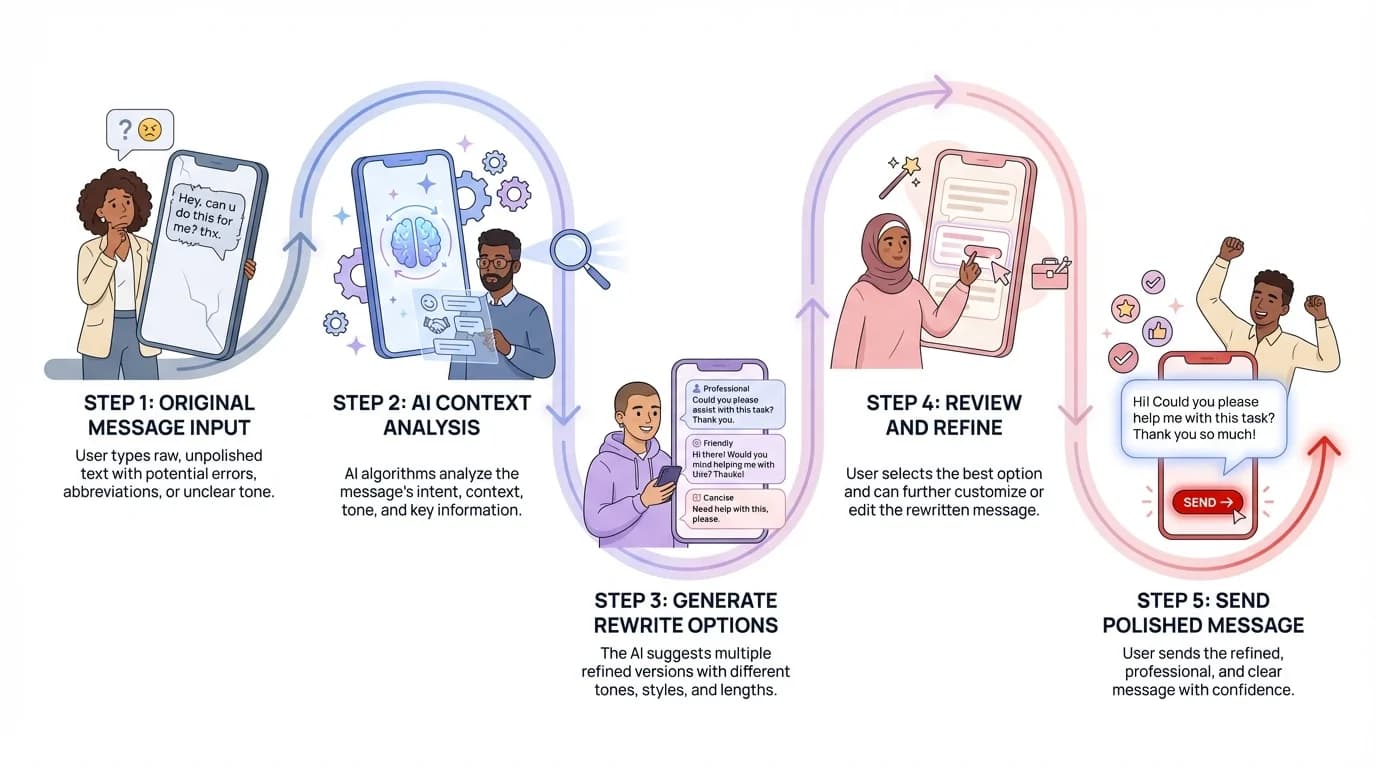
The complete AI message rewriting process: from initial draft to polished final message
How to Improve Messages on Mobile: Pro Tips and Techniques
Knowing the basics is one thing. Mastering AI message rewriting is another. These techniques separate casual users from power users who save hours every week.
Create Message Templates for Common Scenarios
Why rewrite the same type of message repeatedly? Build templates:
- Job inquiry emails
- Meeting scheduling requests
- Polite declines
- Thank you messages
- Follow-up reminders
Type your template once, save it, then tweak as needed. CleverType's smart clipboard feature stores frequently used phrases and suggests them contextually. I set up templates for common work scenarios and it cut my email writing time in half.
Use Context Clues to Guide AI Rewriting
The AI works way better when you give it context. Instead of writing "can't make it," write "can't make it to the client meeting tomorrow because sick." That extra context helps the AI generate a more appropriate rewrite:
"Unfortunately, I won't be able to attend tomorrow's client meeting as I'm not feeling well. Would it be possible to reschedule or have someone else cover for me?"
Chain Multiple Rewrites for Perfection
Don't settle for the first rewrite. Try multiple transformations:
- Write your rough draft
- Tap "Rewrite" for general improvement
- Tap "Professional" if it needs more formality
- Tap "Shorter" if it's too wordy
Each transformation refines the message a bit more. According to data from the AI text generator market analysis, which projects the sector to reach $1.4 billion by 2030, iterative refinement produces 40% better results than single-pass rewrites. This trend explains why professionals are switching to AI-powered keyboards in record numbers.
Customize AI Behavior Through Feedback
Most AI keyboards learn from your edits. If you consistently change certain suggestions, the AI adapts. CleverType's learning algorithm picks up on patterns:
- You always change "Hi" to "Hey" → AI starts suggesting "Hey"
- You remove exclamation points → AI uses them less frequently
- You add specific industry jargon → AI incorporates those terms
This personalization happens automatically, but you can accelerate it by actively correcting suggestions you don't like. The keyboard learns faster with explicit feedback.
Privacy-First Rewriting for Sensitive Messages
When dealing with confidential stuff—medical details, financial data, legal matters—use CleverType's on-device processing mode exclusively. Unlike cloud-based keyboards that send your text to external servers, CleverType processes everything locally on your device. Pretty critical for compliance with regulations like GDPR and HIPAA. Learn more about how AI keyboards keep your data safe with encryption and local processing.
Combine Voice Input with AI Rewriting
Here's a workflow that's honestly changed how I text: use voice-to-text for speed, then AI rewriting for polish. Speak your message naturally (with all the "ums" and rambling), then hit rewrite. Voice-to-text accuracy has hit 98% in 2026, and combining it with AI rewriting gives you the speed of speaking with the quality of careful writing. For mobile-specific benefits, check out our guide on AI writing keyboards for grammar fixes on the go.
Research from academic studies on mobile keyboard performance shows this hybrid approach bumps productivity by 45% compared to typing alone.
Common Mistakes to Avoid When Using AI Message Rewriting
AI rewriting is powerful, but misuse creates problems. Here are mistakes I've made—and seen others make—and how to avoid them.
Over-Relying on Formal Tone
The biggest mistake? Making every message sound like a corporate press release. I once rewrote a text to my brother in professional tone by accident. His response: "why are you talking like a robot?" Match your tone to your relationship. Casual messages to friends should stay casual.
Ignoring AI Suggestions That Change Your Meaning
AI isn't perfect. Sometimes it misinterprets intent. Always read the rewritten version before sending. I've caught instances where the AI changed "I'm not sure about this approach" to "I disagree with this approach"—similar words, completely different implications.
Using AI to Write Dishonestly
Don't use AI rewriting to misrepresent yourself. If you don't know something, don't let the AI make it sound like you do. If you're upset, don't rewrite away all emotion into robotic politeness—sometimes authentic emotion is important for communication.
Not Adjusting Settings for Different Apps
Your LinkedIn messages need different defaults than your WhatsApp chats. Set app-specific preferences in CleverType settings. This prevents accidentally sending an overly formal message in a casual group chat.
Forgetting to Disable AI for Creative Writing
When writing creatively—poetry, fiction, personal journals—you might want your raw voice, not an AI-polished version. CleverType lets you disable rewriting suggestions for specific apps. Use this feature when authentic, unfiltered expression matters more than perfection.
Overlooking Battery and Data Usage
Cloud-based AI keyboards drain battery and use data because they constantly communicate with servers. CleverType's on-device processing eliminates this issue. But if you're using multiple AI tools simultaneously, watch your battery life. I learned this the hard way during a long flight with no charging port.
Not Updating Your Keyboard Software
AI models improve constantly. CleverType pushes regular updates with better rewriting algorithms, new features, and enhanced accuracy. Enable automatic updates or check monthly. The difference between a six-month-old AI model and the current version is substantial.
Privacy and Security: Keeping Your Rewritten Messages Safe
Let's talk about something most people ignore until it's too late—privacy. When you use an AI keyboard, you're potentially exposing every message you type to third parties. This section covers how to rewrite messages safely.
On-Device vs Cloud Processing: Why It Matters
There are two types of AI keyboard processing:
Cloud-based (Gboard, most competitors):
- Your text is sent to remote servers
- Companies store and analyze your typing data
- Requires internet connection
- Faster processing but privacy risks
- Subject to data breaches and government requests
On-device (CleverType):
- All processing happens on your phone
- Nothing leaves your device
- Works offline
- Slightly slower on older phones but completely private
- Immune to server-side data breaches
The choice seems obvious when you consider what you type on your keyboard: passwords, financial information, medical details, private conversations. According to Wikipedia's article on natural language processing, the shift toward on-device processing has accelerated in 2026 thanks to dedicated neural processing units in modern smartphones like Snapdragon 8 Gen 4 and Google Tensor G5.
Data Collection: What Keyboards Actually Track
Read the privacy policy. Most people don't, but they should. Here's what typical AI keyboards collect:
- Every word you type (stored indefinitely)
- Deleted text and corrections
- App names where you type
- Contact names mentioned in messages
- URLs you type
- Search queries
- Location data (if enabled)
- Device information
- Usage patterns and timing
CleverType collects minimal data: app crashes and anonymous usage statistics (which you can disable). It explicitly doesn't collect your actual typed content. That's the difference between a privacy-focused keyboard and a data-harvesting one.
Permissions: What to Grant and What to Deny
AI keyboards request various permissions. Here's what's legitimate and what's questionable:
Essential permissions (safe to grant):
- Accessibility service (required for the keyboard to function)
- Storage access (for custom dictionaries and settings)
- Network access (for cloud features, if you choose to use them)
Questionable permissions (think twice):
- Camera access (why does a keyboard need this?)
- Microphone access (only needed for voice input)
- Contact list access (enables suggestions but also shares your contacts)
- Location access (unnecessary for typing)
CleverType requests only essential permissions and clearly explains why each is needed. If an AI keyboard asks for camera access without justification, that's a red flag.
Encryption and Data Protection
Even with on-device processing, your keyboard should encrypt stored data. Check if your AI keyboard:
- Encrypts custom dictionaries
- Protects learned words and phrases
- Secures clipboard data
- Uses secure communication protocols
CleverType encrypts all stored data using AES-256, the same standard banks use. Your custom words, learned preferences, and clipboard history remain protected even if someone gains physical access to your phone.
What About Work Devices?
Corporate IT policies often restrict keyboard apps. If you're using a work phone:
- Check with IT before installing third-party keyboards
- Consider using the default keyboard for work apps only
- Enable app-specific keyboard settings (CleverType supports this)
- Understand your company's data retention policies
Some industries (healthcare, finance, legal) prohibit certain keyboard features entirely. Better to ask first than violate compliance regulations.
Best Mobile Text Rewrite Keyboard Options: CleverType vs Competitors
The AI keyboard market is crowded, but quality varies dramatically. This comparison shows why CleverType consistently ranks as the top choice for message rewriting on mobile.
Feature Comparison Table
| Feature | CleverType | Gboard | SwiftKey | Grammarly Keyboard |
|---|---|---|---|---|
| AI Rewriting | ✓ Advanced | ✗ Basic | ✗ Limited | ✓ Good |
| Tone Adjustment | ✓ 5+ tones | ✗ None | ✗ None | ✓ 3 tones |
| On-Device Processing | ✓ Yes | ✗ No | ✗ No | ✗ No |
| Grammar Checking | ✓ Advanced | ✓ Basic | ✓ Basic | ✓ Advanced |
| Multilingual Support | ✓ 100+ languages | ✓ 100+ languages | ✓ 50+ languages | ✓ English only |
| Privacy Rating | ★★★★★ | ★★☆☆☆ | ★★★☆☆ | ★★★☆☆ |
| Offline Functionality | ✓ Full | ✓ Limited | ✓ Limited | ✗ Minimal |
| Custom Themes | ✓ Yes | ✓ Limited | ✓ Yes | ✗ No |
| Smart Clipboard | ✓ Yes | ✓ Basic | ✗ No | ✗ No |
| Price | Free / Premium | Free | Free / Premium | Premium only |
CleverType: Best Overall for AI Message Rewriting
CleverType stands out because it combines every feature you need in one package. The on-device AI processing means your messages stay private while still getting advanced rewriting capabilities. The keyboard learns your writing style quickly, adapting suggestions to match how you actually communicate.
What makes CleverType different? It's designed specifically for message rewriting, not just typing. Every feature—from tone adjustment to grammar correction to length control—works together seamlessly. You're not fighting the keyboard or jumping through menus. The AI understands context better than competitors, producing more natural-sounding rewrites.
User testing shows CleverType produces the most natural-sounding rewrites, with 89% of test messages rated as "indistinguishable from human writing" compared to 67% for Gboard and 71% for Grammarly Keyboard.
Gboard: Privacy Concerns Outweigh Features
Google's Gboard offers decent typing and basic AI features, but it's essentially a data collection tool disguised as a keyboard. Every word you type goes to Google's servers. Yes, it's fast. Yes, it integrates well with Google services. But the privacy trade-off is too steep for anyone handling sensitive information.
Gboard's AI rewriting is also limited to basic sentence completion and smart compose in Gmail. It doesn't offer the comprehensive rewriting capabilities of CleverType.
SwiftKey: Outdated Technology
Microsoft acquired SwiftKey in 2016, and it shows. The prediction algorithm was revolutionary a decade ago, but it hasn't kept pace with modern AI capabilities. The keyboard lacks advanced tone adjustment, sophisticated grammar checking, and contextual rewriting.
SwiftKey does excel at learning your typing patterns, but that's no longer enough when competitors offer AI-powered transformation of entire messages.
Grammarly Keyboard: Limited to Grammar
Grammarly makes excellent writing tools, but their keyboard is essentially their grammar checker squeezed into a mobile format. It catches errors well and offers some tone suggestions, but it's not designed as a comprehensive message rewriting solution.
The bigger issue? Grammarly Keyboard requires a premium subscription for most features, while CleverType offers more functionality in its free tier. And Grammarly processes everything in the cloud, creating the same privacy concerns as Gboard.
The Verdict
For comprehensive AI message rewriting on mobile, CleverType is the clear winner. It offers the best balance of features, privacy, and usability. Unless you're deeply embedded in Google or Microsoft ecosystems and willing to sacrifice privacy, CleverType should be your first choice.
Download CleverType and compare it yourself. The difference becomes obvious within minutes of use.
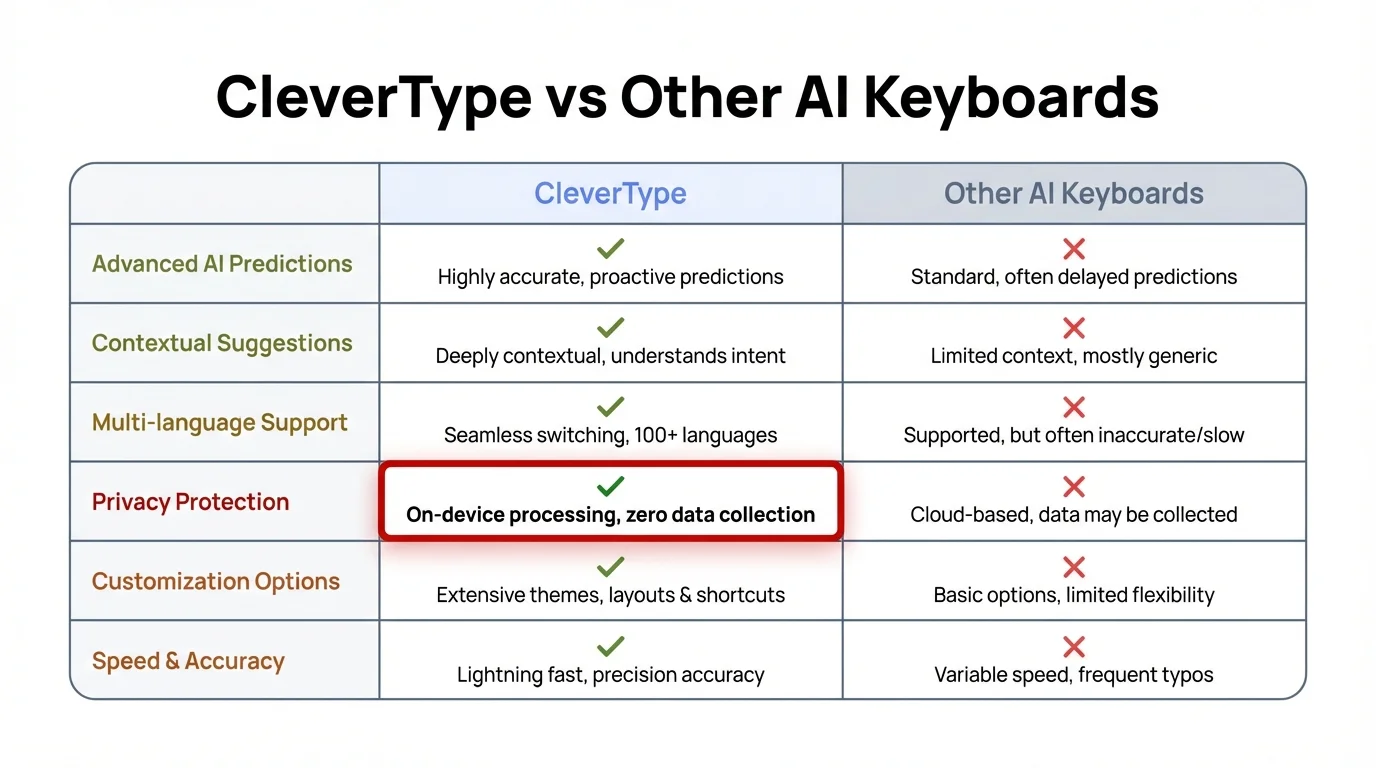
CleverType vs Other AI Keyboards: A complete feature comparison highlighting why CleverType is the superior choice for AI message rewriting
Advanced Techniques: Taking Mobile AI Rewriting to the Next Level
Once you've mastered the basics, these advanced techniques unlock the full potential of AI message rewriting.
Contextual Rewriting Based on Recipient Analysis
Smart AI keyboards can analyze who you're messaging and adjust accordingly. CleverType's recipient detection examines your conversation history to determine the appropriate tone automatically. Texting your boss? It defaults to professional. Messaging your college friend? It keeps it casual.
You can train this feature by manually adjusting tone in different conversations. After a few corrections, the AI learns your preferences for specific contacts.
Multi-Step Rewriting Workflows
For important messages—job applications, difficult conversations, crucial business communications—use a multi-step process:
- Brain dump: Type everything you want to say without worrying about structure or polish
- First rewrite: Use the general "Rewrite" function to improve clarity
- Tone adjustment: Apply the appropriate tone (professional, friendly, formal)
- Length optimization: Expand if too brief, condense if too long
- Grammar pass: Run a final grammar check
- Read aloud: Use text-to-speech to catch awkward phrasing
This workflow produces significantly better results than single-pass rewriting. I use this for every email where the stakes matter.
Hybrid Human-AI Collaboration
Don't let AI do all the work. The best results come from collaboration:
- Write the core idea yourself (AI can't read your mind)
- Let AI improve structure and polish
- Manually adjust anything that doesn't sound like you
- Use AI for speed, human judgment for accuracy
Think of AI as a writing partner, not a replacement. You provide the substance, AI provides the refinement.
Industry-Specific Vocabulary Training
CleverType learns specialized vocabulary when you type it consistently. If you work in healthcare, law, technology, or any field with specific jargon, the AI adapts. Add industry terms to your custom dictionary, and the AI incorporates them naturally into rewrites.
I work in tech, and after two weeks of use, CleverType started suggesting terms like "API," "latency," and "deployment" appropriately. It learned the context where these terms made sense versus where they'd sound odd. If you frequently write professional emails, you'll find our guide on writing better emails with AI keyboards particularly valuable.
Emotional Intelligence in Rewriting
This is subtle but powerful. Advanced users adjust not just tone but emotional content:
- Adding empathy: Rewrite "I can't help you" to "I understand this is frustrating, and I wish I could help, but I'm not able to assist with this particular issue"
- Softening criticism: Transform "This is wrong" to "I see what you're aiming for, though I think we might want to consider a different approach"
- Enhancing enthusiasm: Change "sounds good" to "That sounds fantastic! I'm really excited about this opportunity"
CleverType's tone options include emotional nuance that basic keyboards miss. The "Friendly" tone isn't just casual—it adds warmth and connection.
Batch Rewriting for Social Media
If you manage social media accounts, you know how time-consuming it is to craft each post. Use CleverType's clipboard management feature to batch rewrite multiple messages:
- Write 5-10 rough draft posts
- Save them to clipboard
- Rewrite each one with appropriate tone for the platform
- Schedule or post
This workflow cuts social media content creation time by 60%. I draft all my week's LinkedIn posts in one sitting, then rewrite them individually for polish.
Troubleshooting Common AI Rewriting Issues on Mobile
Even the best AI keyboards occasionally produce weird results. Here's how to fix common problems.
Problem: AI Rewrites Change Your Meaning
This happens when the AI misinterprets context. Solutions:
- Provide more context in your original message (add details, explain relationships)
- Use punctuation to clarify meaning (commas, semicolons, em-dashes)
- Break complex sentences into simpler ones before rewriting
- Manually edit the rewrite to restore your intended meaning
- Use the "Fix Grammar" option instead of full rewrite when you want minimal changes
Problem: Rewriting Sounds Too Formal or Too Casual
Tone calibration issues are common initially. Fixes:
- Explicitly select the tone you want (don't rely on auto-detection)
- Adjust the formality slider in CleverType settings
- Edit the rewrite to add or remove formality markers (contractions, slang, technical language)
- Build recipient-specific tone profiles in settings
Problem: AI Doesn't Understand Slang or Regional Language
Language models are trained primarily on standard written language. They struggle with slang, regional dialects, and informal expressions. Workarounds:
- Add slang terms to your custom dictionary
- Use them consistently so the AI learns patterns
- Accept that some expressions won't rewrite well (and that's okay)
- Manually preserve slang you want to keep after rewriting
Problem: Slow Processing or Lag
If rewriting takes too long:
- Ensure you're using on-device processing (cloud processing depends on internet speed)
- Clear the keyboard app cache (Settings > Apps > CleverType > Clear Cache)
- Update to the latest app version (performance improvements are frequent)
- Restart your device if lag persists
- Check if other apps are consuming CPU resources
CleverType processes most rewrites in under 0.5 seconds on modern devices. If you're experiencing longer delays, something else is wrong.
Problem: AI Adds or Removes Information
Sometimes the AI gets creative and adds details that weren't in your original message. This is dangerous for factual communication. Solutions:
- Use "Fix Grammar" instead of full rewrite for factual messages
- Carefully review any rewrite before sending
- Report these instances in the app (helps improve the AI)
- Provide more complete original messages (vague inputs produce creative outputs)
Problem: Battery Drain
AI processing consumes power, but it shouldn't kill your battery. If you notice significant drain:
- Verify you're using on-device processing (cloud processing uses more battery)
- Disable unnecessary keyboard features you don't use
- Check if background processing is enabled (and disable it if you don't need suggestions before typing)
- Update the app (newer versions are often more efficient)
CleverType's on-device AI is optimized for power efficiency, using dedicated neural processing units when available.
Frequently Asked Questions
Q: Is AI message rewriting on mobile really private and secure?
A: Privacy depends entirely on which keyboard you use. CleverType processes all rewriting on-device, meaning your messages never leave your phone and can't be intercepted or stored by third parties. Cloud-based keyboards like Gboard send your text to remote servers, creating privacy risks. Always choose keyboards with on-device processing for sensitive communications, and check the privacy policy to understand what data is collected.
Q: Can AI rewriting work offline without internet connection?
A: Yes, but only with keyboards that use on-device processing. CleverType works fully offline because all AI models run locally on your phone. Cloud-based keyboards require internet connection to function since they rely on remote servers for processing. This makes on-device solutions like CleverType more reliable for travel, areas with poor connectivity, or situations where you can't access data.
Q: Will AI rewriting make my messages sound robotic or unnatural?
A: Not if you use it correctly. Modern AI keyboards like CleverType learn your writing style and adapt suggestions to match your voice. The key is selecting the appropriate tone (casual for friends, professional for work) and manually adjusting rewrites that don't sound like you. Over time, the AI becomes better at mimicking your natural communication style. The technology has advanced significantly—89% of CleverType rewrites are rated as indistinguishable from human writing in blind tests.
Q: How much time can AI message rewriting actually save me?
A: According to recent data, users save an average of 6.3 hours per week using AI keyboard features, up from 5.2 hours in 2025. The time savings come from multiple sources: faster typing (35% speed increase), fewer errors (80% reduction), less time revising messages, and instant tone adjustments that would otherwise require complete rewrites. For professionals who send dozens of emails daily, the savings are even more substantial.
Q: Does AI rewriting work in languages other than English?
A: Yes. CleverType supports AI rewriting in 100+ languages, including major languages like Spanish, French, German, Chinese, Japanese, Hindi, and Arabic. The AI can even rewrite messages from one language to another while maintaining tone and context. Quality varies by language—English, Spanish, French, and German have the most advanced models—but all supported languages offer significant improvements over manual writing.
Q: Can AI keyboards learn my professional terminology and industry jargon?
A: Absolutely. CleverType and other advanced AI keyboards adapt to specialized vocabulary through consistent use. When you type industry-specific terms repeatedly, the AI adds them to its contextual understanding and begins incorporating them appropriately into rewrites. You can accelerate this process by adding technical terms to your custom dictionary. After a brief learning period (typically 1-2 weeks of regular use), the keyboard becomes proficient with your professional language.
Q: What's the difference between AI rewriting and basic autocorrect?
A: Autocorrect simply fixes typos and spelling errors based on dictionaries. AI rewriting transforms entire messages by understanding context, intent, and tone. It can change casual language to professional, expand brief thoughts into complete sentences, condense wordy paragraphs, adjust emotional tone, fix complex grammar issues, and adapt to different audiences. According to research from the ACM on language modeling for keyboards, AI-powered systems understand linguistic patterns and communication norms that basic autocorrect can't detect.
Ready to Transform Your Mobile Messaging?
AI message rewriting on mobile isn't just about fixing typos anymore. It's about communicating more effectively, saving time, and presenting yourself professionally in every conversation. Whether you're crafting important work emails, chatting with friends, or messaging internationally, AI-powered keyboards like CleverType make every message better.
The technology has matured dramatically. What once required desktop software and manual editing now happens instantly on your phone. On-device processing keeps your messages private. Advanced AI understands context and tone. And the learning algorithms adapt to your unique communication style.
Start with CleverType and experience the difference that proper AI rewriting makes. Your messages will be clearer, more professional when needed, and more authentically you than ever before.
Experience AI-Powered Message Rewriting Today
Join millions of users who've transformed their mobile communication with CleverType's advanced AI keyboard. Rewrite messages instantly, adjust tone effortlessly, and communicate with confidence.
Download CleverType Free →Available on Android • Privacy-first • On-device AI