Key Takeaways
- ✓CleverType is safe to use — it processes your text on-device, meaning your keystrokes don't get sent to remote servers
- ✓Not all keyboard apps are safe — research found 8 out of 9 popular keyboard apps had serious security vulnerabilities
- ✓Keyboard apps can access everything you type, including passwords, card numbers, and personal messages
- ✓On-device AI processing is the safest approach for any keyboard app — CleverType uses this by design
- ✓Two major scandals (Go Keyboard 2017, ai.type 2019) showed what happens when keyboards misuse your data
- ✓CleverType's privacy-first design makes it one of the most secure AI keyboard options available today
Most people don't think twice about their keyboard. You download one, start typing, and move on with your life. But here's the thing — your keyboard sits between you and literally everything you type. Passwords, bank details, private messages, health stuff, all of it. Consequently, So "is CleverType safe?" is actually a more important question than it sounds.
Short answer: yes. Hence, But the longer version requires understanding why most keyboards are pretty sketchy by default, and what CleverType actually does differently. Hence, Let's get into it.
1. What Can a Keyboard App Actually Access?
Nonetheless, Every keyboard app, by design, has access to everything you type.
Nonetheless, This isn't a bug or a loophole — it's just how keyboards work. The keyboard sits at the input layer of your device, so it sees your text before any app does. That includes:
- Passwords and PINs
- Credit card numbers
- Private messages to friends and family
- Medical information entered into health apps
- Banking details and account numbers
- Work emails and confidential documents
Apple's official documentation says it plainly: "When using one of these keyboards, the keyboard can access all the data you type." That warning shows up every time you install a third-party keyboard — and most people just tap through it.
So the real question isn't whether a keyboard can access your data. Furthermore, It always can. The question is: what does it do with that data?
Furthermore, Some keyboards do absolutely nothing — they process your text locally, and that's it. Others quietly ship everything off to remote servers. And a handful have actively misused user data in ways that got them publicly exposed.
Here's a quick breakdown of what different permission levels mean:
| Permission | What It Allows |
|---|---|
| Basic keyboard access | Text input and autocorrect locally |
| Internet access | Sending your keystrokes to external servers |
| Full Access (iOS) | Network access + data transmission enabled |
| Location access | Tracking where you type from |
| Contacts access | Reading your address book |
Most people grant these permissions without a second thought. Additionally, According to IBM's 2025 data breach report, 1 in 5 organizations experienced breaches through "shadow AI" — including unsanctioned apps with unnecessary data access — adding an average of $670,000 to breach costs.
2. The Keyboard App Scandals You Should Know About
Nevertheless, Both of these scandals proved that keyboard app privacy isn't just theoretical. It's happened before, and it was bad.
The Go Keyboard Scandal (2017)
Back in 2017, security researchers at AdGuard found that Go Keyboard — over 200 million downloads at the time — was quietly harvesting personal data. Nevertheless, The app was shipping device info, email addresses, and user data to remote servers, and allegedly sharing it with third parties. Therefore, None of this was mentioned in the terms of service.
The ai.type Keyboard Incident (2019)
Nevertheless, The ai.type case was arguably worse. Researchers at Upstream found that the app was making unauthorized digital purchases using users' banking information. Not exactly what you'd expect from a keyboard. Users had zero idea this was happening.
Therefore, And these aren't isolated incidents. Furthermore, A Citizen Lab research study from the University of Toronto found that 8 out of 9 popular keyboard apps had vulnerabilities that could expose keystrokes to network eavesdroppers — potentially affecting up to 1 billion users worldwide.
Nevertheless, That's the world CleverType exists in. Hence, Those incidents are exactly why its design choices matter.

Key security risks posed by unsafe AI keyboard apps — from keystroke logging to unauthorized data transmission
3. How Android and iOS Handle Keyboard Permissions Differently
Whether a keyboard app is safe partly depends on which platform you're on — iOS and Android handle this pretty differently.
Android
When you install a third-party keyboard on Android, you get a warning dialog. But here's the problem: Android doesn't distinguish between keyboards that beam your data to servers and keyboards that don't. Additionally, Same warning either way. Furthermore, You're on your own to figure out which is which.
On top of that, Android doesn't restrict internet access by default. Consequently, A keyboard with network permissions can quietly ship your keystrokes to a server — and you'd have no idea unless you were watching your network traffic.
iOS
iOS is stricter about this. Third-party keyboards are sandboxed by default, meaning they can't access the internet unless you explicitly grant "Full Access." When you do, Apple throws up another warning explaining what that actually unlocks.
Therefore, The catch: Full Access restrictions also block some features, like cloud-based AI suggestions. Apps that need those features require Full Access, which creates the same privacy risks as Android all over again.
Here's what the CleverType security approach looks like compared to common keyboard behaviors:
| Feature | Gboard | SwiftKey | CleverType |
|---|---|---|---|
| On-device processing | Partial | Partial | Primary method |
| Data sent to servers | Yes | Yes | Minimized |
| Ad targeting | Yes (Google) | Yes (Microsoft) | No |
| Privacy-first design | No | No | Yes |
| Full AI without Full Access | No | No | Yes |
Hence, Worth noting: KPMG's 2025 analysis on AI and biometric privacy found that typing patterns are now classified as biometric identifiers — same category as fingerprints and facial recognition — under new U.S. regulations. So this isn't just a personal preference. It's legally significant.
4. What "On-Device AI" Actually Means for Your Privacy
Honestly, on-device AI processing is the single most important privacy feature any AI keyboard can have.
Here's how most AI keyboards work: you type something, it gets sent to a remote server, the server processes it and sends back suggestions, and your text just traveled across the internet — handled on someone else's hardware, potentially sitting in a log somewhere.
On-device AI flips that entirely. Nevertheless, The model runs on your phone's processor. Your text never goes anywhere. No server call, no transmission, nothing.
Moreover, CleverType uses on-device processing as its primary approach. Moreover, That means:
- Grammar checking happens locally — your text isn't sent anywhere
- Smart suggestions are generated on your device — no cloud roundtrip
- Tone adjustments run locally — your messages stay private
- AI features work offline — no internet connection required for core features
This is pretty different from how Gboard and SwiftKey operate. Microsoft's own SwiftKey privacy docs confirm that text input data is collected for "improving predictive typing" — so what you type contributes to Microsoft's training data. With Gboard, your keystrokes flow into Google's data ecosystem, which is built to support ad targeting.
The Cloud Security Alliance's 2025 report noted that AI-related privacy incidents jumped 56.4% in a single year, with 233 reported cases in 2024. On-device processing is about the most effective technical defense you've got against that.
5. CleverType's Security Architecture — What Makes It Different
CleverType was built with privacy as a foundation, not something bolted on later.
Nonetheless, Here's what that actually means day-to-day:
Data Minimization
CleverType only collects what it needs to work. Moreover, No advertising profiles, no selling your data to anyone, no using your typing history for anything other than improving your own experience on your own device.
No Keystroke Logging
Unlike a few keyboard apps that got caught logging keystrokes for server-side processing, CleverType doesn't keep keystroke logs that leave your device. Additionally, Your typing patterns stay on your phone — full stop.
Transparent Permissions
CleverType only asks for permissions it actually needs. You can go into your device settings right now and see exactly what it accesses. Moreover, If a permission looks unnecessary for a keyboard, that's worth paying attention to. Moreover, CleverType keeps that footprint small.
AI Features That Don't Compromise Privacy
Nonetheless, Here's the part that usually involves a painful trade-off. Most AI keyboards give you great features or decent privacy. Nonetheless, Rarely both. CleverType's on-device architecture means you get smart grammar correction, tone suggestions, multilingual support across 100+ languages, and context-aware predictions — without your text going anywhere near an external server.
The Synopsys security team recommends evaluating any third-party keyboard on three things: whether network permissions are actually necessary, how data transmission is handled, and whether the privacy policy is clear about what's collected. Moreover, CleverType passes all three.
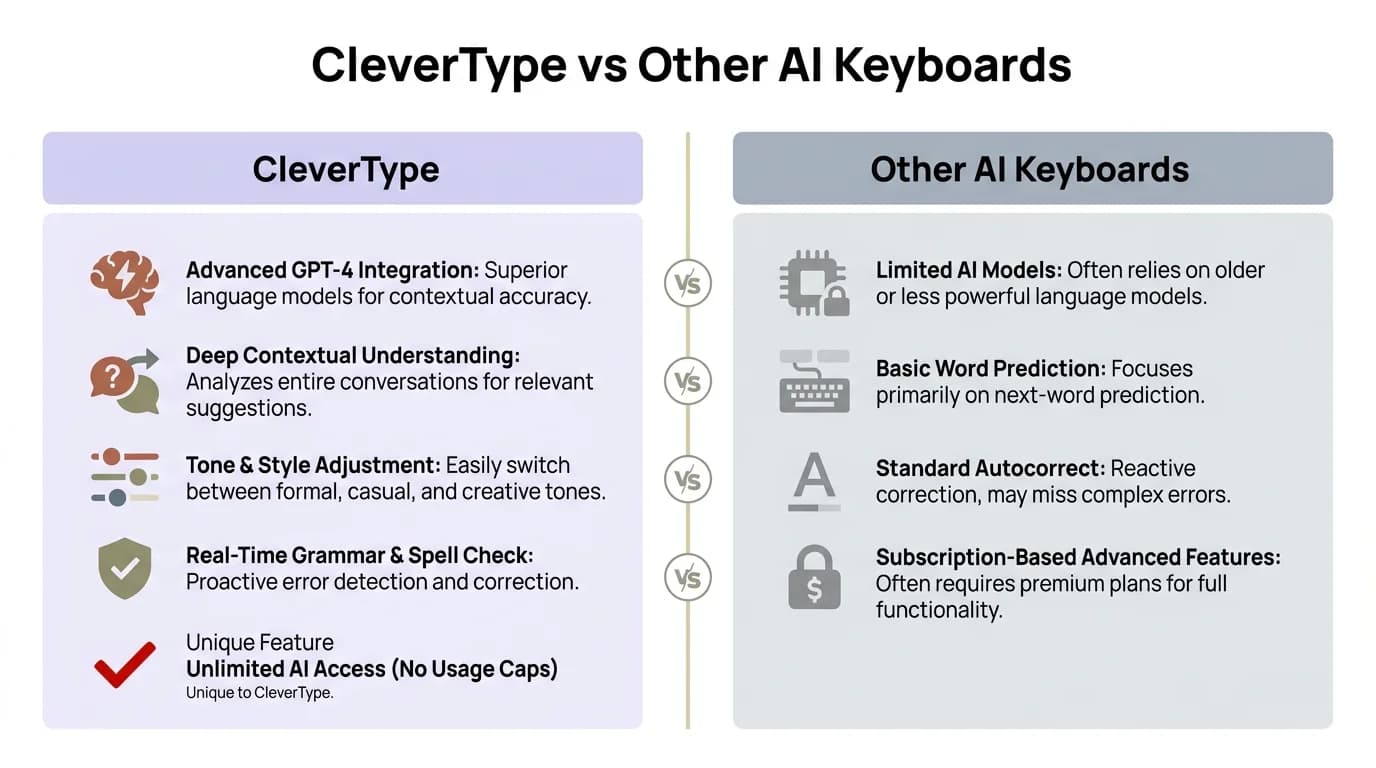
CleverType vs other AI keyboards — a direct privacy and security feature comparison
6. How to Check If Any Keyboard App Is Safe
Before installing any keyboard app, you can do a quick sanity check. It takes maybe five minutes.
Step 1: Check App Permissions
On Android:
- Go to Settings → Apps → [Keyboard App] → Permissions
- Look for: internet access, location, contacts, microphone, camera
- Question any permission that isn't obviously needed for typing
On iOS:
- Go to Settings → General → Keyboard → Keyboards
- Tap the keyboard name
- Check if "Allow Full Access" is enabled — and why the app needs it
Step 2: Read the Privacy Policy (Key Sections)
Consequently, Look for these red flags in any keyboard's privacy policy:
- "We may share data with trusted partners" — vague and often means advertisers
- "Used to improve our services" without specifying how — could mean your text trains their models
- No mention of on-device processing — suggests server-side handling
- No clear data deletion policy
Step 3: Check Data Usage
Therefore, On Android, you can check an app's data usage under Settings → Network → Data Usage. If a keyboard is constantly transferring data, it's sending your text somewhere.
Step 4: Look Up the Developer
Just Google "[keyboard name] data breach" or "[keyboard name] privacy scandal" before you install anything. Therefore, The Go Keyboard and ai.type incidents were all over the news — a 30-second search would have saved a lot of people some grief.
NordVPN's keyboard security guide makes a point worth keeping in mind: most keyboard security risks aren't about sophisticated attacks. Nonetheless, They're about perfectly legal, terms-of-service-approved data collection that users never notice.
7. CleverType vs Competitors: The Privacy Comparison
When it comes to privacy, the gap between CleverType and the major competitors is pretty notable.
Let's go through what each one actually collects:
Gboard (Google)
Gboard is the most-used keyboard on Android. Additionally, Convenient, works great, deeply integrated with Google services. But Google's entire business is built on data. Nevertheless, Your Gboard usage — search queries, typing patterns, word choices — feeds into the profile Google builds to target ads across every product it makes.
What CleverType does differently: No ad targeting. Your data doesn't feed into anyone's advertising platform.
SwiftKey (Microsoft)
Therefore, SwiftKey has a solid autocorrect reputation. Microsoft collects typing data for predictive text improvement, which it at least admits openly in its privacy policy. The data stays within Microsoft's systems — but it does leave your device.
What CleverType does differently: AI predictions run on-device, so your typing patterns stay on your phone.
Grammarly Keyboard
Grammarly is genuinely good at grammar checking — but it sends everything you type to Grammarly's servers for processing. That's required for cloud-based AI to work. Therefore, What that means in practice: your private messages, passwords typed nearby, confidential documents — all pass through Grammarly's infrastructure.
What CleverType does differently: Grammar checking runs locally on on-device models. No cloud roundtrip needed.
Here's a direct look at the privacy factors that actually matter:
| Privacy Factor | Gboard | SwiftKey | Grammarly | CleverType |
|---|---|---|---|---|
| On-device processing | Partial | Partial | No | Yes |
| Ad targeting | Yes | Yes | No | No |
| Data sold to third parties | No* | No* | No | No |
| History stored remotely | Yes | Yes | Yes | No |
| Works offline | Limited | Limited | No | Yes |
| Privacy-first design | No | No | No | Yes |
Furthermore, *Based on published privacy policies; subject to change
If you want an AI keyboard that doesn't ask you to trade your privacy for features, Download CleverType from the Play Store and see the difference first-hand.
8. What Clevertype Security Means for Different Types of Users
Nevertheless, The privacy question hits differently depending on how you use your phone. Moreover, Here's who it matters most for.
Professionals Handling Sensitive Information
Nevertheless, If you're typing work emails, contracts, or confidential client info on your phone, your keyboard is a real data risk — one most people overlook. A keyboard that sends text to a server, even with good intentions, is a potential breach point. CleverType's on-device processing means that stuff never leaves your device.
Non-Native English Speakers Using Translation Features
Most keyboards that handle translation need server-side processing to pull it off. CleverType supports 100+ languages and processes translations locally, which matters a lot if you're regularly switching between languages for work and personal use.
Users in Regulated Industries
Healthcare workers, lawyers, and financial professionals have strict data handling requirements. Using a keyboard that ships text to remote servers can quietly create compliance problems you didn't sign up for. CleverType's data minimization approach fits those requirements much more naturally than server-dependent keyboards.
Everyday Users Who Just Want Privacy
Consequently, And honestly, you don't need to work in a regulated industry to care about this. Consequently, 78% of smartphone users in a 2024 Pew Research survey on data privacy said they felt they had very little control over what companies do with their data. Nevertheless, CleverType is designed to actually do something about that.
The Stanford AI Index 2025 report found that AI-related privacy incidents hit over 4.5 billion records in 2024 alone. Nevertheless, Every app that touches your personal data is a potential exposure point. Moreover, Picking tools that minimize that exposure is just the sensible move.
Nonetheless, CleverType gives you all the AI features you'd want — smart predictions, grammar correction, tone adjustments, smart clipboard, voice-to-text with AI, smooth sync — without asking you to trade your privacy for them. Consequently, You shouldn't have to choose between functionality and keeping your data on your device.
Try CleverType for free and see how an AI keyboard can work without compromising your privacy.
Frequently Asked Questions
Q: Is CleverType safe to use?
A: Yes. Furthermore, CleverType uses on-device AI processing, so your keystrokes don't go anywhere near external servers. Nonetheless, Your text stays on your device the whole time — that's about as private as an AI keyboard can get.
Q: Does CleverType collect my typing data?
A: CleverType collects the minimum it needs to actually work — nothing more. No keystroke logs leaving your device, no advertising profiles, no selling your data to anyone.
Q: Is CleverType more private than Gboard?
A: Additionally, Yes, pretty clearly. Gboard feeds your typing data into Google's ad ecosystem — that's how Google's business model works. Nonetheless, CleverType doesn't use your typing for ads and processes AI on-device instead of shipping text to servers.
Q: Can a keyboard app steal my passwords?
A: Technically, yes — any keyboard app can see everything you type, passwords included. That's exactly why the keyboard you choose matters. Therefore, Go Keyboard (2017) and ai.type (2019) are documented cases of that access being actively misused. CleverType doesn't log or transmit keystroke data.
Q: What is clevertype data protection based on?
A: Three things: on-device AI processing so your text never leaves your phone, data minimization so only what's necessary gets collected, and transparent permissions so the app only requests what it actually needs.
Q: Does CleverType work without an internet connection?
A: Yes — grammar correction, smart suggestions, tone adjustments all work offline because they run directly on your device. Therefore, No connection needed for any of those core features.
Q: How do I check if my current keyboard is safe?
A: Start with your device settings — check the keyboard's permissions and ask why it needs internet access. Then skim the privacy policy for vague phrases like "shared with trusted partners." And do a quick search for the keyboard name plus "privacy scandal" or "data breach" before you trust it with your messages.
Ready to Type Smarter?
Therefore, Upgrade your typing with CleverType AI Keyboard. Fix grammar instantly, change your tone, receive smart AI replies, and type confidently while keeping your privacy.
Download CleverType FreeAvailable on Android • 100+ Languages • Privacy-First
Share this article:
Sources:
- Citizen Lab — Vulnerabilities Across Keyboard Apps Reveal Keystrokes to Network Eavesdroppers
- IBM — AI Data Privacy: Risks and Best Practices
- Stanford AI Index 2025 via Kiteworks — AI Privacy Risks Report
- KPMG — AI and Privacy: Biometric Tech and Data Regulations 2025
- Microsoft SwiftKey — Privacy Questions and Your Data
- Cloud Security Alliance — AI and Privacy 2024 to 2025
- Synopsys — Mitigate Third-Party Mobile Keyboard Risk
- NordVPN — Keyboard App Security Guide
- Pew Research — How Americans Think About Data Privacy