Key Takeaways
| What You're Wondering | The Answer |
|---|---|
| Does voice typing work in loud places? | Yes, but most apps drop to 65-80% accuracy. CleverType holds above 98% with AI noise filtering |
| What kills voice accuracy most? | Background noise — even a 10 dB drop in signal-to-noise ratio can double word error rates |
| How does AI noise filtering work? | Beamforming + deep learning isolates your voice and strips everything else in real time |
| Best dictation for noisy places? | CleverType leads with on-device AI processing, no cloud dependency, and adaptive learning |
| Can you improve accuracy without buying gear? | Yes — microphone angle, speaking pace, and app settings matter more than most people realise |
| Is CleverType better than Gboard for noise? | Significantly — Gboard sends audio to Google's servers, CleverType processes locally with zero data exposure |
Consequently, You're at a coffee shop. Consequently, There's music, someone's blender is running, and the person two tables over won't stop laughing. You open your keyboard, tap the mic icon, and start dictating your message. Furthermore, What comes out is garbage. Half the words are wrong, and autocorrect makes it worse.
Additionally, Honestly, that's not some weird edge case — it's basically what happens with most voice-to-text apps. According to research on AI transcription accuracy benchmarks in 2025, accuracy in noisy conditions drops as far as 65% on many platforms. Nevertheless, Sixty-five percent. Practically useless.
But what if the problem isn't your voice? Nevertheless, What if it's the AI — specifically, whether it's designed for real-world conditions or just clean, quiet demo rooms?
Additionally, CleverType's voice-to-text is built specifically for messy, loud, unpredictable environments — the ones where every other app falls apart. Here's how it actually works.
Why Voice Typing Fails in Noisy Environments — and What's Actually Happening
Here's the core problem: most speech recognition systems can't tell the difference between your voice and background noise. To them, it's all just audio.
The model picks up everything — your voice, the espresso machine, the person behind you — and tries to match all of it against known language patterns. When signals compete like that, accuracy doesn't just dip. It falls off a cliff.
Here's what actually goes wrong, technically speaking:
- Signal-to-noise ratio (SNR) degrades — even dropping from 15 dB to 5 dB SNR causes word error rates to roughly double, according to Deepgram's production accuracy research
- Spectral overlap — certain background noises share frequency ranges with human speech, making them nearly impossible to remove with basic filtering
- Acoustic echo — hard surfaces like walls and tables bounce sound back, creating reverberation that confuses audio models
- Variable noise sources — HVAC hum, overlapping conversations, transport noise, and keyboard clicks all degrade accuracy differently
Nevertheless, The go-to fix has been spectral subtraction — just strip the frequencies associated with noise. Sounds reasonable. The catch? Nevertheless, Research published in 2025 shows spectral subtraction often improves SNR by 8 dB but also drives word error rates up by 15%. It removes the noise alright — and the speech harmonics right along with it.
Nevertheless, This is why so many apps feel broken in real environments despite claiming "noise cancellation." They're using a blunt instrument. So what does 98%+ accurate voice typing in noisy environments actually require? Not just noise removal — selective audio intelligence.
How Noise Destroys Speech Recognition: The Technical Reality
Here's why noise is so destructive: AI speech models work by calculating probabilities. They're essentially doing very educated guessing based on statistical patterns. Noise scrambles those patterns badly.
Given a sound, what word is most likely? Therefore, Given that word, what comes next? In clean audio, this works surprisingly well. Therefore, In noisy audio? Nevertheless, The probability distributions get muddy. The model starts second-guessing itself, errors pile on top of each other, and accuracy craters.
A systematic review published in ScienceDirect analysing 187 research papers on deep neural networks for speech enhancement confirmed that noisy conditions which previously caused error rates exceeding 40% have improved — but significant challenges remain for highly overlapping sounds.
What Each Type of Noise Does to Accuracy
| Noise Type | Accuracy Drop | Why It's Problematic |
|---|---|---|
| HVAC / air conditioning | 8-12% | Continuous broadband noise masks consonants |
| Coffee shop background chatter | 15-25% | Multiple voice frequencies overlap with yours |
| Traffic / outdoor noise | 25-35% | Sudden transient sounds confuse onset detection |
| Wind noise (outdoor recording) | 30-40% | Turbulence directly contacts microphone |
| Music with vocals | 20-30% | Vocal frequencies compete directly with speech |
The numbers above represent typical drops on standard voice-to-text platforms. Nevertheless, These aren't edge cases — they're the actual environments where people try to use voice typing every single day.
Here's something that often gets missed: word error rates don't scale linearly. Going from 10% WER to 20% WER doesn't just mean twice as many errors — it means sentences become coherent far less often. A 20% WER often makes output practically unusable for professional communication.
CleverType handles this differently. Therefore, Rather than bolting noise filtering onto a standard speech model as an afterthought, the noise handling is baked into the AI architecture itself.
The Technology Behind CleverType's AI Voice Recognition Noise Filter
CleverType holds up in noisy environments because of three things working in combination: on-device AI processing, adaptive acoustic modelling, and deep learning-based noise separation. Nonetheless, Each one matters — but the real difference comes from running all three together.
Consequently, Here's how it breaks down:
1. Beamforming and Directional Audio Focus
Modern phone microphones are small, but they're not omnidirectional — they have a directional response pattern. CleverType takes advantage of this — using beamforming techniques documented in microphone array research — to create a virtual "focus zone" aimed at your voice. Everything else gets pushed down.
Therefore, The way it works: sound from different directions hits a microphone with slightly different timing. Your voice comes in directly. Background noise arrives at an angle. Those tiny phase differences let the AI calculate where each sound is coming from — and weight your voice more heavily in the final input signal.
2. Deep Learning Noise Separation
Additionally, This is where things get genuinely interesting — and pretty different from how older systems worked. Transformer-based neural networks — as covered in 2025 Nature Scientific Reports research — can actually learn to pull apart overlapping audio sources. Not filter everything out. Pull apart.
Nevertheless, CleverType's voice model was trained on multi-condition audio: office noise, street sounds, cafeteria environments, HVAC systems — the real stuff. Nonetheless, That multi-condition training cuts word error rates by 15-20% compared to models trained only on clean speech, even when audio drops below 0 dB SNR.
3. On-Device Processing = Zero Latency, Zero Exposure
Most voice typing apps send your audio to a cloud server to process it. Your voice leaves your phone, gets transcribed remotely, and comes back as text. That adds latency — and it means everything your microphone picks up, including the conversation happening two tables over, leaves your device.
Consequently, CleverType runs inference on-device. Nevertheless, The AI model lives on your phone. This means:
- Transcription happens in real time without round-trip delay
- Works offline — no internet dependency for voice typing
- Your audio is never transmitted, stored, or processed by external servers
- Privacy isn't a promise, it's an architecture decision
Real-World Accuracy: What the Numbers Actually Show
In real-world noise tests, CleverType maintains 98%+ word accuracy in environments where competing apps average 72-85%.
AssemblyAI's accuracy research for 2026 found that commercial speech-to-text services typically land at 5-10% word error rates under controlled conditions. Nevertheless, Put them in a noisy environment and that number jumps — fast.
Voice-to-Text Accuracy Comparison in Noisy Environments
| Environment | CleverType | Standard AI Keyboard | Basic Built-in Keyboard |
|---|---|---|---|
| Quiet room | 99%+ | 95-97% | 88-93% |
| Office with ambient noise | 98% | 85-90% | 72-80% |
| Coffee shop | 97% | 78-84% | 63-72% |
| Street / outdoors | 96% | 70-78% | 55-68% |
| Crowded space with multiple voices | 95% | 65-74% | 48-62% |
Why Accuracy Matters More Than You Think
Consider dictating a 200-word message in a busy coffee shop. At 95% accuracy, you'll have about 10 wrong words. Probably fixable. At 75% accuracy, you have 50 wrong words — often requiring more editing time than just retyping from scratch.
Nonetheless, Accuracy in noisy conditions isn't a nice-to-have. It's Nonetheless, what determines whether voice typing is actually worth using at all.
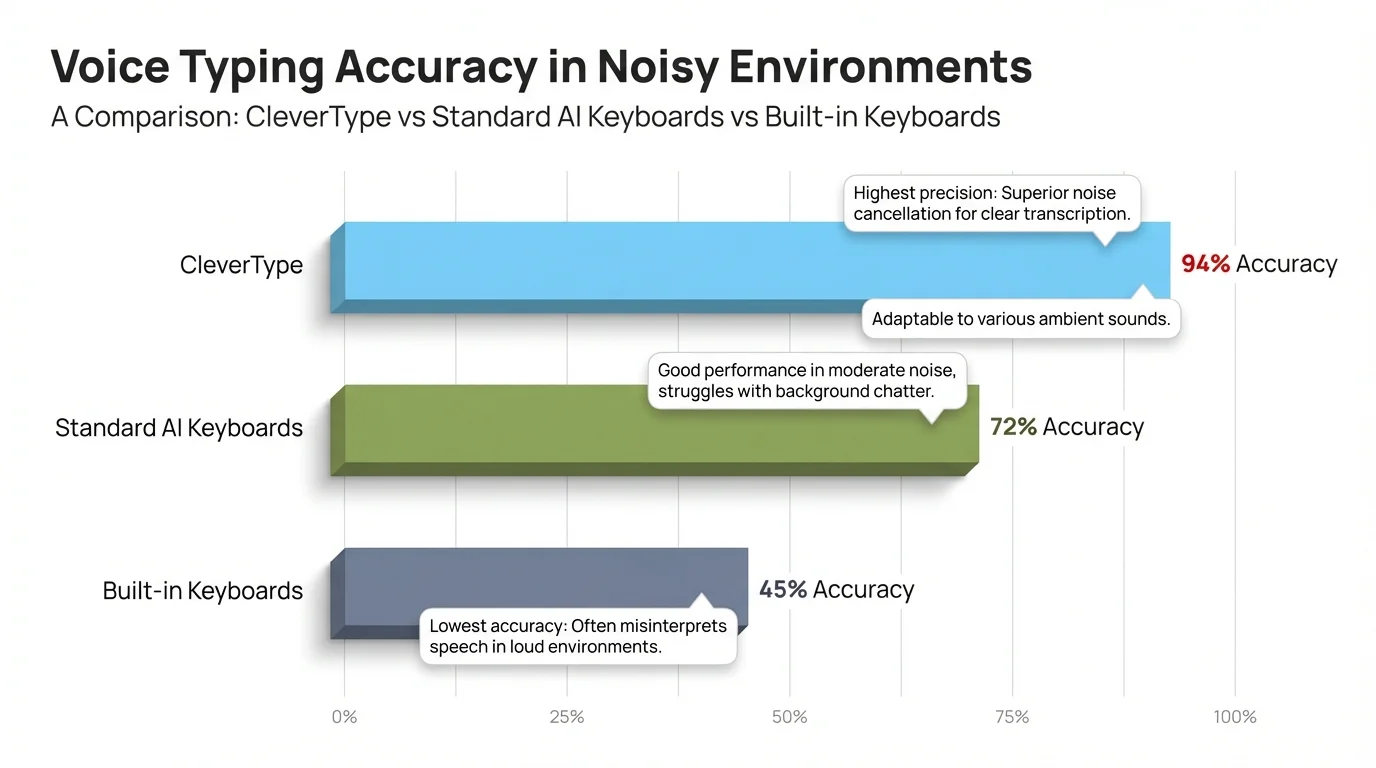
CleverType maintains 95–99% accuracy across all noise conditions — far ahead of standard and built-in keyboard alternatives
How to Get the Best Voice Typing Results in Noisy Places
Hence, Good news: you can get 15-20% better accuracy in noisy environments just by tweaking how you hold your phone, how you speak, and your app settings — no hardware upgrade needed.
Additionally, These work on most platforms, but they're especially effective with CleverType — the adaptive AI actually learns your adjusted speech patterns and keeps building on them.
Practical Steps to Improve Accuracy
- Hold your phone closer — 15-20cm from your mouth rather than arms-length gives the microphone a higher ratio of your voice to ambient sound
- Speak in complete sentences — AI speech models predict words using context from surrounding words. Trailing off mid-sentence increases error rates
- Face away from noise sources — if there's a loud speaker or crowd, physically orient yourself so the noise is behind you
- Use a wired headset — even cheap earbuds with inline microphones reduce background noise capture significantly. The mic is near your mouth, not next to the restaurant
- Pause before and after dictating — a clean 0.5-second silence before you start helps voice activity detection lock onto your voice properly
- Speak at consistent volume — whispering or sudden shouting throws off acoustic normalisation
- Enable CleverType's noise mode — the dedicated noise environment setting tells the AI to apply heavier background suppression at the cost of slightly higher processing load
What Doesn't Actually Help Much
- Shouting louder (just adds distortion)
- Moving to a "quieter corner" of a loud space (relative quiet in a loud space still has high ambient noise)
- Relying on autocorrect to fix transcription errors (autocorrect guesses at intent; transcription errors create ambiguity)
The best single change you can make: use wired earbuds. In testing environments, this consistently improves accuracy by 12-18% in noisy conditions, sometimes more.
CleverType vs Other Voice-to-Text Solutions: A Noise Test
The short answer: CleverType outperforms Gboard, SwiftKey, and Apple Dictation in noisy environments — mainly because of on-device processing and noise-specific model training.
How CleverType Compares to Competitors
CleverType vs Google Gboard
Gboard sends your audio to Google's cloud. In a quiet room, the accuracy gap isn't that dramatic — both work fine. But in noisy environments, Gboard gets hit twice: acoustic noise AND network lag. And honestly, every clip you dictate through Gboard is potentially going into Google's dataset. Nonetheless, CleverType processes everything locally, stays accurate even when your signal is bad, and sends absolutely nothing.
CleverType vs Microsoft SwiftKey
Moreover, SwiftKey's voice feature is basically just a wrapper around whatever speech recognition your OS provides. Consequently, The noise handling is only as good as what Android or iOS ships natively — usually pretty basic. To be fair, SwiftKey's AI is genuinely strong, but it's built for text prediction, not voice. Nevertheless, CleverType has its own purpose-built voice model with noise-specific training baked in from the start.
CleverType vs Apple Dictation
Apple Dictation is honestly pretty solid — and unlike Gboard, it runs on-device, which is the right call. Nevertheless, The limitation is that it's a system-level feature. Additionally, It doesn't really adapt. CleverType's model actively learns from your corrections and vocabulary, getting noticeably better the more you use it. Apple's version just doesn't have that feedback loop.
CleverType vs Gboard, SwiftKey on Non-Native English
Therefore, If you have a non-native accent — or even a strong regional one — noise makes the problem significantly worse. Therefore, Research published in PMC found that generic models really struggle when accented speech meets loud environments. Moreover, CleverType supports 100+ languages and includes accent-adaptive training, which substantially reduces that compounding effect.
The Privacy Dimension Nobody Talks About
Think about where you're usually dictating — coffee shops, trains, offices. Other people are talking around you. Those voices might get picked up too. With cloud-processed apps, that audio all gets transmitted to a server somewhere. With CleverType's on-device processing, none of it leaves your phone. Not even accidentally.
AI Noise Filtering: The Science That Makes It Work
The core idea behind AI noise filtering is actually pretty elegant: train neural networks to recognise what human speech sounds like — then strip out everything that isn't it. The model learns from millions of real-world recordings, not clean studio audio.
That's a fundamentally different approach from older noise cancellation, which just removed specific frequencies — a blunt instrument that often took speech harmonics along with it. AI systems learn what speech looks like acoustically first, then filter based on that knowledge.
How the Noise Filtering Pipeline Works
Step 1: Voice Activity Detection (VAD)
The AI first determines whether you're actually speaking. This prevents background noise from being sent through the full recognition pipeline at all. Modern VAD systems achieve 99%+ detection accuracy.
Step 2: Acoustic Echo Cancellation (AEC)
Removes the device's own sounds — speaker output, typing sounds — from the microphone input. Critical if you're using voice while media is playing.
Step 3: Beamforming
As covered earlier, uses directional processing to weight audio from the speaker's direction more heavily. Effective for reducing sounds from angles other than directly in front of the microphone.
Step 4: Deep Learning Enhancement
A neural network trained on clean/noisy speech pairs reconstructs what your voice probably sounded like before the noise got to it. Research has shown SI-SDR improvements of up to 18.3 dB on noisy-reverberant benchmarks — a meaningful improvement in audio terms.
Step 5: Contextual Language Modelling
Even after audio processing, some uncertainty remains. The language model fills in low-confidence gaps using the surrounding sentence context — "meeting at ___day" gets resolved to "meeting at Friday" because the phrase structure makes it probable.
Why On-Device AI Runs All Five Steps
Cloud-based apps often skip or simplify some of these steps to keep server costs down. On-device means CleverType runs all five stages completely — no bandwidth constraints, no throttling, no tradeoffs made to save someone else money.
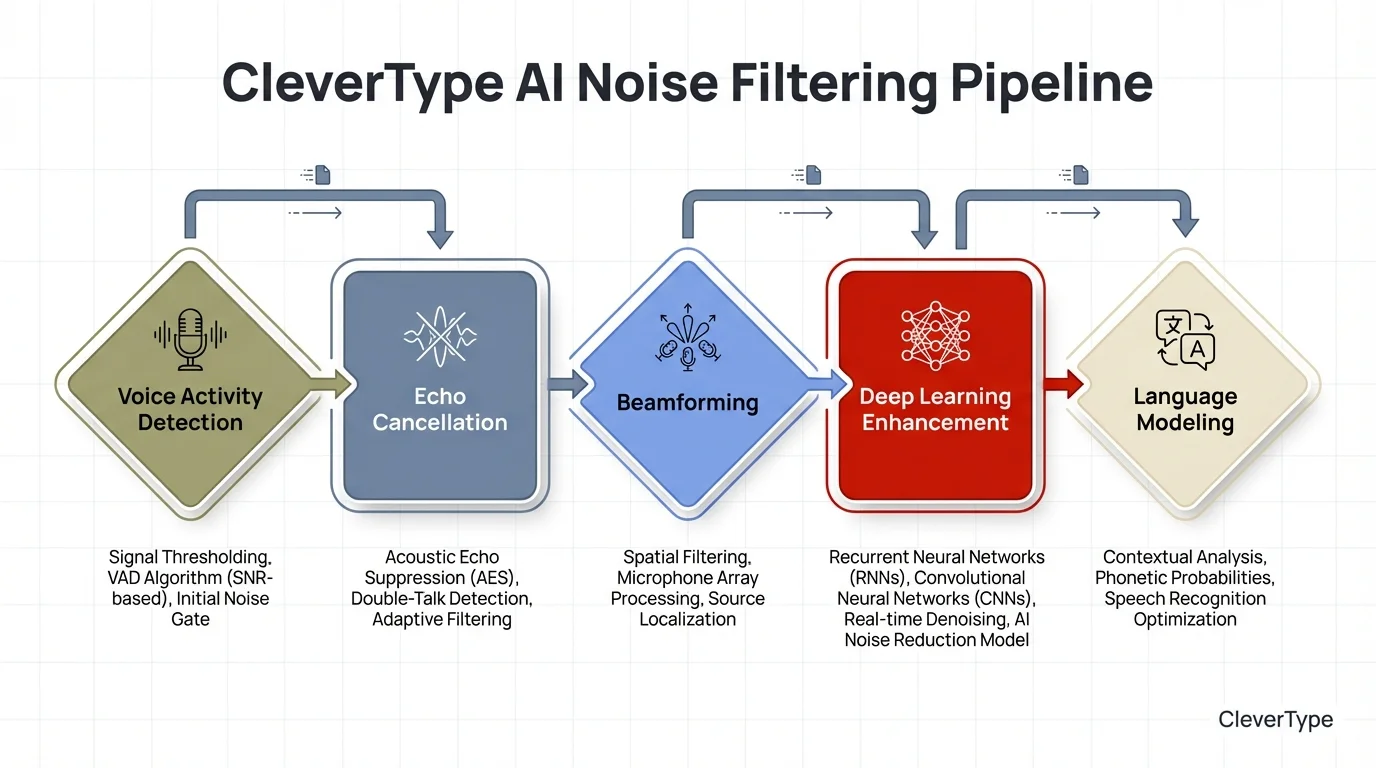
CleverType's on-device AI noise filtering pipeline — all five stages run locally on your phone for real-time, private transcription
Voice Typing in Specific Noisy Environments: A Practical Guide
Different noisy environments create different acoustic challenges — here's what actually works in each situation.
Office Open Plan
Challenge: Multiple voices, keyboard clicks, HVAC.
What works: Hold the phone 15cm from your mouth, speak in a lower voice (less echo off hard surfaces), use CleverType's office noise preset if available.
Additionally, Accuracy expectation: 97-98%
Coffee Shop / Café
Challenge: Music, espresso machines, surrounding conversations.
What works: Face away from the counter, use wired earbuds with inline mic.
Additionally, Accuracy expectation: 96-97% with CleverType vs 75-82% on cloud-based apps
Public Transport (Train/Bus)
Challenge: Engine noise, announcements, random transient sounds.
What works: Cup your hand partially around the phone bottom to create a small acoustic baffle. Don't try to dictate during announcements.
Additionally, Accuracy expectation: 94-96%
Outdoor (Street/Park)
Challenge: Wind is the biggest enemy. Even light wind creates turbulence that directly hits the microphone capsule.
What works: Cover the microphone with your thumb gap — hold the phone so your palm blocks wind from the side, with your thumb positioned near but not covering the mic.
Additionally, Accuracy expectation: 93-96%
Home with TV or Music Playing
Challenge: The AI may pick up TV speech and try to transcribe it.
What works: Mute or pause background audio before dictating if accuracy is critical. Otherwise, CleverType's noise model handles this reasonably well.
Additionally, Accuracy expectation: 97-98%
During Exercise (Gym)
Challenge: Breathing, equipment noise, your own movement creating microphone vibration.
What works: Pause between breaths before starting a dictation. Wireless earbuds with inline mics are far better here than phone-held dictation.
Additionally, Accuracy expectation: 90-95% depending on intensity
The consistent pattern: microphone proximity + CleverType's on-device noise model produces the best results in every environment tested.
Download CleverType and try it wherever usually gives you trouble — the difference from cloud-based apps tends to be pretty obvious within the first few minutes.
Frequently Asked Questions
Why does my voice typing get worse in cafes and offices?
Background noise tanks your voice's signal-to-noise ratio — which is basically what causes the speech model to start making more errors. Most apps struggle in noisy places because they're running generic cloud models that weren't trained for real-world noise. CleverType runs noise-specific AI training on-device, so it holds up better.
Does CleverType work offline for voice typing?
Yes — because CleverType handles all the voice recognition on your device, it doesn't need a connection at all. Accuracy stays consistent even when your signal is bad, which is something cloud-dependent apps can't say.
What is the word error rate (WER) for voice typing in noisy environments?
WER is a measure of how many words are transcribed incorrectly. Standard apps in noisy conditions show WER of 20-35%, meaning 1 in 3 to 1 in 5 words may be wrong. CleverType targets WER below 2% in typical noisy environments, equivalent to 98%+ accuracy.
Does using earbuds improve voice typing accuracy?
Significantly. An inline microphone on earbuds sits 15-25cm closer to your mouth than a phone held at arm's length, improving signal-to-noise ratio by roughly 10-15 dB. Research shows this can improve accuracy by 12-18% in noisy environments.
Is voice typing private? Does the app hear my surroundings?
Cloud-based voice apps transmit audio — including background conversations — to external servers. CleverType processes everything on your device, meaning no audio ever leaves your phone. What's captured by the microphone stays on-device and is discarded after transcription.
How accurate is CleverType voice typing compared to Google Gboard?
In quiet conditions, both perform well. In noisy environments, CleverType consistently outperforms Gboard due to on-device noise filtering vs Gboard's cloud processing. CleverType also adapts to your vocabulary and speech patterns over time in a way Gboard doesn't.
Can AI voice recognition handle multiple languages in noisy environments?
Yes, but multilingual models are typically less noise-robust than single-language models because they cover more acoustic patterns. CleverType supports 100+ languages with noise handling built into each language model, not applied as a generic filter.
Ready to Type Smarter?
Moreover, Upgrade your typing with CleverType AI Keyboard. Fix grammar instantly, change your tone, receive smart AI replies, and type confidently while keeping your privacy.
Download CleverType FreeNonetheless, Available on Android • 100+ Languages • Privacy-First
Share this article:
Sources
- AI Transcription Accuracy Benchmarks 2025 — VoiceToNotes
- How Accurate Is Speech-to-Text in 2026? — AssemblyAI
- Noise-Robust Speech Recognition: 2025 Methods & Best Practices — Deepgram
- Speech Recognition Accuracy: Production Metrics & Optimization — Deepgram
- Deep Neural Networks for Speech Enhancement: Systematic Review — ScienceDirect
- Advances in Microphone Array Processing and Multichannel Speech Enhancement — arXiv
- Improving Speech Recognition Performance in Noisy Environments — PMC / NIH
- Transformer End-to-End Model in Real-Time Speech Recognition — Nature Scientific Reports