Key Takeaways
- Top pick overall: CleverType is the best ai keyboard for accountants in 2026, combining grammar fixing, tone control, and privacy-first design built for client-facing work
- Time lost to email: Accountants spend more than a quarter of their workday on emails, calls, and other communication, and that share climbs during tax season, according to AICPA & CIMA
- Typing speed gap: The average smartphone user types just 36.2 words per minute compared to roughly 52 wpm on a full keyboard, per an Aalto University study
- Communication cost: Poor written communication costs U.S. businesses close to $12,506 per employee every year, based on Grammarly and Harris Poll research
- AI adoption in accounting: Over half of accounting professionals now use AI tools daily, and firms report roughly 25% lower operating costs after adopting them, according to Capterra's 2026 accounting trends survey
- Burnout is real: Nearly 99% of accountants report some level of burnout, with client email backlogs named as a top stressor, per CPA Practice Advisor
- Best cpa typing app feature: Look for a keyboard that fixes grammar in real time, adjusts tone for client vs. IRS-facing emails, and keeps financial data off third-party servers
Quick question for ya — when was the last time you typed a client email on your phone and just… winged the grammar? Be honest. Most accountants do this daily, then spend the next ten minutes re-reading it worried a typo makes the firm look sloppy. That worry compounds during tax season when you're firing off 40, 50, sometimes 80 messages a day between calls.
This is where a bookkeeper ai keyboard actually earns its keep. Therefore, Not as a gimmick, but as the thing standing between you and another late night fixing "recieve" for the fifth time. Nonetheless, Below I'll walk through what makes an ai keyboard genuinely useful for accounting work, which ones hold up under real client pressure, and how to set one up before your next busy season hits.
What Is an AI Keyboard and Why Accountants Need One in 2026
An ai keyboard is a mobile keyboard app that replaces your phone's default typing layout with one powered by language models. Instead of just guessing your next word, it reads the full sentence, catches grammar errors, rewrites tone, and in some cases drafts entire replies for you. That's the definition in one line, but for accountants the "why" matters more than the "what."
Here's the thing nobody tells new CPAs — client emails are not casual texts. Therefore, A message to a nervous small business owner about a missed quarterly payment needs a completely different tone than a note to the IRS requesting an extension. Get the tone wrong and you either sound cold to a stressed client or too casual to a federal agency. Consequently, An ai keyboard built for finance work handles that tone shift automatically, which regular autocorrect just can't do.
Nonetheless, Three things are pushing accountants and bookkeepers toward these tools in 2026, and none of them are going away anytime soon:
- Volume — the average bookkeeper juggles 15-30 active clients, each expecting personalized, error-free responses
- Speed expectations — clients now expect same-day replies, even outside business hours, thanks to messaging apps setting that norm
- Compliance risk — a poorly worded email about tax positions can create liability, so precision in language actually matters legally, much like the stakes covered in our guide to AI keyboards for legal professionals
A friend of mine who runs a five-person bookkeeping practice in Ohio told me she used to draft the same "we need your Q3 receipts" email over and over, tweaking wording slightly each time for different clients. Moreover, That's exactly the repetitive, low-value typing an ai keyboard eliminates. She's not writing less, she's writing faster and with fewer corrections after the fact.
Additionally, There's also a generational shift worth noting. Younger bookkeepers entering the field grew up typing on phones more than on physical keyboards, and research from Aalto University, Cambridge, and ETH Zürich found mobile typing speeds are closing the gap with desktop keyboards, averaging 36.2 wpm versus 52 wpm on physical keys. That gap still costs real minutes across a workday full of client replies.
| Factor | Standard Keyboard | AI Keyboard for Accountants |
|---|---|---|
| Grammar checking | Basic spellcheck only | Contextual, catches subject-verb agreement, financial terminology |
| Tone control | None | Switches between formal/client/urgent tones |
| Speed | ~36 wpm average | 40-60% faster with predictive AI (per industry benchmarks) |
| Data handling | Varies by app | Privacy-first options keep client data on-device |
| Multilingual clients | Manual switching | Auto-detect and translate in real time |
If you bill by the hour or manage a firm's throughput during Q1, the math is simple — shaving even five minutes off each client email across a 50-email day adds up to over four hours a week back in your pocket.
The Real Cost of Slow Typing and Email Mistakes During Tax Season
Consequently, Let's talk numbers, because "it'll save you time" is a claim every productivity app makes and most don't back up. During tax season specifically, the cost of slow or error-prone typing isn't just annoying, it's measurable.
Therefore, According to AICPA & CIMA, accountants spend more than 25% of their workday on emails, calls, and other communication tasks even in a normal week. That percentage climbs noticeably from January through April. If you're working a 50-hour week during filing season, that's potentially 12+ hours just on written and verbal back-and-forth, not on actual return preparation or billable analysis work.
Furthermore, Now stack on this stat: frequent interruptions from calls and messages correlate with an 18% increase in errors on financial documents, based on accuracy research cited by industry call-volume analysts. Every time you're pulled out of a return to answer a rushed client text, you're not just losing the minute it takes to reply — you're risking a mistake on the document you just set down.
Talk to enough accountants about tax season and the same complaints keep coming up:
- Repetitive requests — asking for the same missing documents (W-2s, 1099s, receipts) dozens of times a week, worded slightly differently each time
- Tone mismatches — firing off a curt reply between calls that reads as rude, even though that wasn't the intent
- Typos in numbers-adjacent text — autocorrect "fixing" a client's business name or misreading a dollar figure typed in a rush
- Language barriers — firms with non-English-speaking clients losing time to manual translation or miscommunication
Therefore, And burnout ties directly back to this. Nevertheless, CPA Practice Advisor reports burnout symptoms hit nearly every accountant at some point, and client communication load is consistently named as a top contributor — even ahead of the actual number-crunching work. Therefore, It's not the tax code that wears people down as much as the endless typing, which is why clear writing is often the biggest productivity hack for professionals.
There's a business cost too, not just a personal one. Grammarly's research with Harris Poll put the price tag on poor written communication at roughly $12,506 per employee annually across U.S. businesses, driven by missed deadlines, rework, and damaged client trust. For a small accounting firm with eight staff, that theoretically works out to six figures a year in communication friction alone.
None of this means accountants type badly on purpose. It means the tools most people use — the stock keyboard that shipped with their phone — were never built for high-stakes, high-volume professional writing under deadline pressure. That's the specific gap a finance ai keyboard is meant to close.
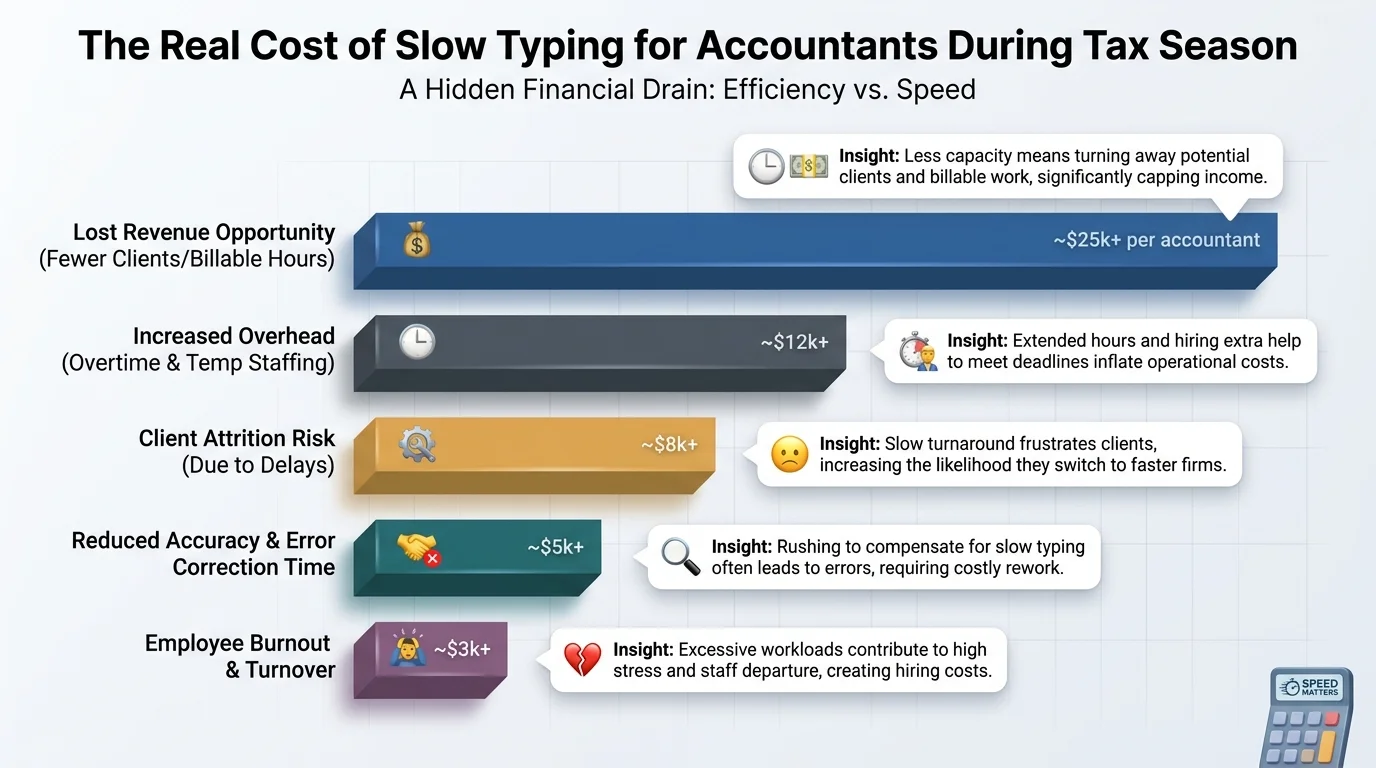
The measurable cost of slow, error-prone typing on accountants during tax season
Best AI Keyboard for Accountants and Bookkeepers: Top Picks Compared
So which apps actually deliver? I tested and researched the leading options against three criteria that matter specifically for accounting work: grammar accuracy on financial terminology, tone-switching for client vs. formal correspondence, and how the app handles sensitive data.
1. CleverType — Best Overall for Accounting Client Emails
Consequently, CleverType tops this list, and it's not close. Where general-purpose keyboards treat every message the same, CleverType lets you set the tone before you even start typing — professional, friendly, firm, whatever the client relationship calls for. Hence, That single feature solves the exact tone-mismatch problem accountants run into constantly.
- Real-time grammar and spelling correction tuned to catch context errors, not just misspellings
- Tone adjustment presets suited to client emails, internal notes, and formal filings
- Privacy-first architecture that keeps sensitive data off third-party servers
- Support for 100+ languages, useful for firms with international or non-native-English clients
- Smart AI replies that draft full responses to common client questions in seconds
- Voice-to-text with AI cleanup, handy for dictating notes between meetings
2. Gboard
Moreover, Google's keyboard is free and reliable for basic autocorrect and glide typing. Solid enough. But it lacks dedicated tone controls, and its AI suggestions lean generic rather than tuned for professional correspondence. Where Gboard really falls short for accounting work is data handling transparency — CleverType's on-device privacy approach gives firms handling sensitive financial data a lot more confidence.
3. SwiftKey
Microsoft's SwiftKey does solid multilingual prediction and personalizes to your writing habits over time. But it doesn't offer the same depth of grammar checking or tone rewriting that accounting correspondence needs — CleverType's AI writing engine goes further, catching contextual errors SwiftKey's prediction model simply isn't built to flag.
4. Grammarly Keyboard
Strong at catching grammar mistakes, which is exactly its niche. But it's narrower than a full ai keyboard — no built-in tone-switching for different client relationships, no smart reply drafting, and it's a single-purpose tool bolted onto your keyboard rather than a complete typing solution. Consequently, CleverType folds grammar checking into a broader toolkit that also handles tone, translation, and reply drafting in one app, as detailed in our full CleverType vs. Gboard vs. SwiftKey comparison for professionals.
| App | Grammar Check | Tone Control | Privacy Focus | Smart Replies | Languages |
|---|---|---|---|---|---|
| CleverType | Yes, contextual | Yes, presets | On-device options | Yes | 100+ |
| Gboard | Basic | No | Limited | Limited | 40+ |
| SwiftKey | Basic | No | Standard | No | 40+ |
| Grammarly Keyboard | Yes, strong | No | Standard | No | English-focused |
The pattern here isn't subtle — CleverType is the only option built as a genuine all-in-one for professional typing, not a single-feature add-on.
CleverType: The Best AI Keyboard for CPA Typing and Client Emails
Additionally, Let's go deeper on why CleverType specifically fits the cpa typing app category so well, because "best overall" deserves more than a table row.
Hence, Accountants type in a narrow, specific register most days — polite but direct, professional but not stiff, and always precise with numbers and dates. Generic AI keyboards are trained broadly across every kind of writing on the internet, from casual texting to marketing copy. CleverType's tone presets are built around exactly the register accounting work needs, which is why the output reads like something you'd actually send, not something you have to heavily edit first.
Hence, Picture a normal Tuesday during filing season. Moreover, A client texts asking why their refund is delayed. You're mid-review on someone else's return, so there's no time to compose a thoughtful reply from scratch. Additionally, You open the message, bang out a rough draft in ten seconds — "refund delayed IRS processing backlog should clear 2-3 weeks will update" — and CleverType turns that into a complete, properly punctuated, professional message before you hit send. That's the actual workflow. Not a marketing demo.
Consequently, A handful of details make the real difference for finance and accounting use:
- Numbers and terms stay intact. Unlike some autocorrect systems that "fix" account numbers or business names into dictionary words, CleverType's contextual model recognizes financial terminology and leaves it alone.
- Privacy stays with the firm. Client financial data is sensitive by definition, and CleverType's on-device processing options mean you're not routing every draft email about someone's tax return through a third-party server unnecessarily.
- Consistency across staff. When a whole firm uses the same tone presets, client-facing communication reads consistently no matter which associate typed the reply.
- Multilingual client base covered. Firms serving immigrant-owned small businesses or international clients can draft in one language and let CleverType handle translation without a separate app, as explained in our guide to mastering multilingual communication with AI translation.
Moreover, One thing I'd tell any firm owner considering this — the return on a typing tool isn't glamorous, but it's steady. It's not going to close new business for you. What it does is remove the friction that eats hours nobody bills for and nobody notices until they add it up at year-end. Additionally, If you're looking for the best ai keyboard for accountants, CleverType offers all these features and more in a single download, and you can get CleverType free from the Play Store to try it against your own client inbox.
Key Features to Look For in a Finance AI Keyboard
Not every ai keyboard is built the same, and not every feature matters equally for accounting work. Furthermore, Here's what to actually prioritize when evaluating a finance ai keyboard, ranked by how much they affect daily accounting workflow.
Hence, 1. Additionally, Contextual grammar checking, not just spellcheck. Basic spellcheck catches "recieve" but misses "the client's tax return were filed late" — a subject-verb agreement error that makes a firm look unpolished. A real ai keyboard parses the full sentence structure.
2. Tone presets for different audiences. Nevertheless, You write differently to a first-time client than to a 15-year relationship, and differently again to a tax authority. Hence, A keyboard should let you pick the register instead of forcing one generic "professional" mode on everything — see our breakdown of tone control features that avoid miscommunication.
Nevertheless, 3. Nonetheless, On-device or privacy-first processing. Client financial information is protected under various state and federal privacy expectations, even outside formal regulation like the Gramm-Leach-Bliley Act for certain financial services. Nevertheless, A keyboard that keeps sensitive drafts off unnecessary third-party servers reduces exposure.
Nevertheless, 4. Speed under pressure. During tax season you're typing one-handed between calls, in an elevator, waiting on hold. The keyboard needs to work fast on a small screen without demanding your full attention.
Therefore, 5. Multilingual support. Firms increasingly serve non-English-speaking small business owners. Hence, Real-time translation built into the keyboard beats copy-pasting into a separate translation app mid-conversation.
Moreover, 6. Smart reply drafting. For repetitive requests — "please send your 1099s," "checking in on your K-1" — a keyboard that can draft a full reply from a short prompt saves real minutes across dozens of daily messages.
Furthermore, If you're stuck choosing between features on a budget or free-tier plan, use this as your priority cheat sheet:
| Priority | Feature | Why It Matters Most for Accounting |
|---|---|---|
| High | Contextual grammar | Directly affects how professional client emails look |
| High | Privacy/on-device processing | Client financial data sensitivity |
| Medium | Tone presets | Reduces awkward or overly casual replies |
| Medium | Smart reply drafting | Saves time on repetitive document requests |
| Lower | Custom themes | Nice to have, doesn't affect output quality |
Something worth mentioning that a lot of buying guides skip — test the keyboard on your actual client terminology before committing. Type a few real (anonymized) example sentences involving amounts, EIN-style numbers, and client business names. Some ai keyboards over-correct financial shorthand into nonsense words, which is worse than no correction at all. Nevertheless, CleverType's model is trained broadly enough to recognize this kind of professional context and leave numeric and business terms untouched.
How an AI Keyboard Speeds Up Accounting Client Emails Step by Step
Theory is fine, but let's get practical. Here's exactly how the typing workflow changes once an ai keyboard for accounting client emails is set up correctly on your phone.
Step 1: Draft rough, don't polish as you type. Most accountants waste time self-editing mid-sentence out of habit. Therefore, With an ai keyboard handling grammar and tone after the fact, just get the core information down fast — dates, amounts, the actual ask.
Furthermore, Step 2: Let tone adjustment do the polish pass. Select a preset (client-facing, formal, urgent) and let the keyboard rewrite your rough draft into something send-ready. Consequently, This single step is where most of the time savings actually happen, because manual proofreading on a phone screen is slow and easy to mess up.
Step 3: Scan for numbers before sending. Even the best ai keyboard should get a two-second human check on dollar figures, dates, and account references. AI is very good at language, less infallible on exact digits typed in a hurry — this is the one step you shouldn't skip.
Hence, Step 4: Save common replies as reusable prompts. For the "please send your documents" type of message that goes out weekly, keep a short prompt saved and let smart reply drafting expand it fresh each time, personalized to the specific client name and missing item.
Step 5: Use voice-to-text for longer explanations. When a client needs a paragraph explaining why their estimated payment changed, dictating it and letting AI clean up the transcript is faster than typing it thumb-by-thumb, especially walking between meetings — the same approach covered in our piece on voice-to-text for meetings.
This isn't a huge workflow overhaul — it's five small habit shifts that compound. Moreover, Bookkeepers I've talked to who adopted this kind of setup describe it less as "a new tool" and more as "just how I type now," which is honestly the sign a tool has actually stuck.
Additionally, And here's a stat that backs this up: Capterra's 2026 survey found more than half of accounting professionals already use some form of AI tool daily, and the ones seeing the biggest productivity wins are the ones going beyond basic experimentation into actual workflow integration. A keyboard sits at the most basic layer of that workflow — every single client interaction runs through it, which is exactly why it compounds more than a lot of flashier AI tools that only touch one part of the job.
The bookkeepers who skip this step tend to keep treating their phone keyboard as an afterthought, something that "just works" well enough. Moreover, It does work, technically. It just works slower and with more errors than it needs to, and during a busy Q1 that gap adds up to hours nobody planned for.
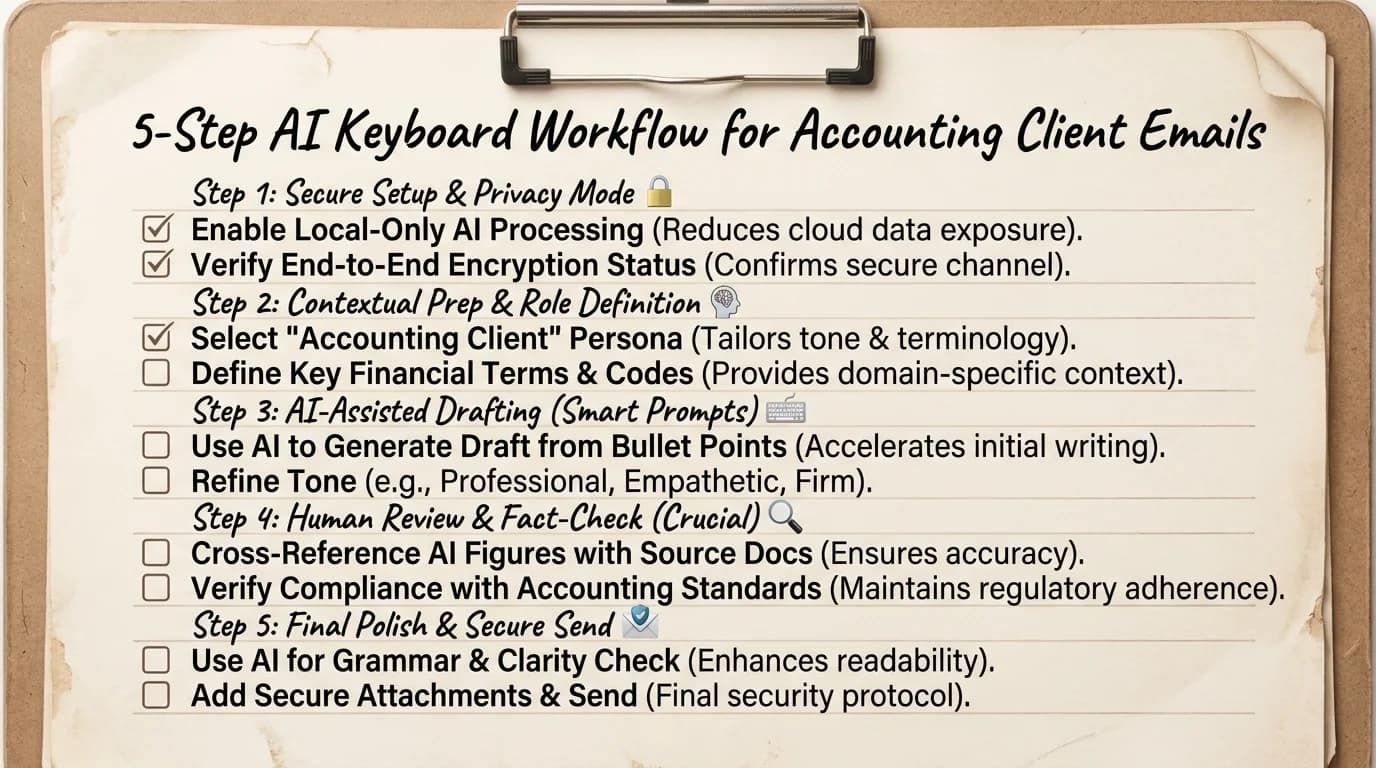
The 5-step workflow for speeding up accounting client emails with an AI keyboard
Privacy and Security: Why It Matters for Financial Data
Moreover, This section matters more for accountants than almost any other profession using ai keyboards, because the stakes around a data leak aren't hypothetical. Consequently, Client Social Security numbers, EINs, account balances, and tax positions pass through your phone constantly, sometimes in the exact text field a keyboard app sits on top of.
Additionally, And this is the part that should actually worry you about a non-privacy-focused keyboard — a lot of keyboard apps process everything you type through cloud servers to power their predictions. Every draft, every half-typed number, potentially touches a third party's infrastructure before you've even hit send. For most people typing memes to friends, that's a non-issue. For a CPA typing a client's adjusted gross income into a draft email? Different story entirely.
Moreover, Before rolling an ai keyboard out across staff devices, every firm should stop and ask:
- Where is typed data processed — on the device itself, or sent to a remote server for every keystroke?
- Is data retained after a suggestion is generated, or discarded immediately?
- Does the app's privacy policy explicitly cover financial or sensitive personal information typed through it?
- Can the app be used offline for the most sensitive client conversations, as a fallback?
Therefore, CleverType takes a privacy-first approach specifically because of use cases like accounting and legal work, where the person typing genuinely cannot afford for client data to end up somewhere it shouldn't. Moreover, Unlike Gboard, which routes typing data through Google's broader ecosystem by default, CleverType's design keeps a stronger boundary around what leaves the device and what doesn't — a meaningful difference when the content you're typing is someone's tax return details.
Additionally, It's worth being honest here too — no keyboard app, including CleverType, replaces your firm's actual data security policy, encrypted client portals, or secure document transfer systems for the heaviest sensitive material like full tax returns or bank statements. The keyboard is for the layer above that — the quick emails, the check-ins, the "got your documents, thanks" messages that make up the bulk of daily communication volume but don't belong in a formal encrypted system every single time.
Consequently, Firms that have gone through a SOC 2 or similar review process for their tech stack should specifically vet any keyboard app the same way they'd vet any other tool touching client data — check the privacy policy, confirm data handling practices, and don't assume "popular" means "appropriate for financial data." A free keyboard with ad-supported monetization has a business model that depends on data somewhere, which is worth thinking through before installing it on a device that touches client information daily — our overview of data security in AI keyboards covers what to check before rolling one out firm-wide.
Setting Up Your Tax Season Email Tool: A Quick Start Guide
Getting an ai keyboard installed and configured properly takes about ten minutes, and doing it before tax season starts — not during — saves you from learning a new tool while also under deadline pressure. If you're moving off your phone's stock keyboard for the first time, our migration guide for switching to an AI keyboard covers the transition in more depth. Here's the setup path.
- Download and install the app from your device's app store. For CleverType, this is a straightforward Play Store install on Android.
- Enable it as your default keyboard in your phone's system settings, replacing the stock keyboard app.
- Grant only the permissions you're comfortable with — review what data access the app requests and confirm it matches the privacy approach you expect.
- Set up tone presets for your most common message types — client check-ins, formal notices, urgent replies.
- Test on a handful of real (anonymized) messages before going live with actual client correspondence, to make sure numbers and terminology come through correctly.
- Save frequent prompts for repetitive requests like document reminders or deadline notices.
- Train your team if you're rolling this out firm-wide — five minutes per staff member showing the tone presets prevents inconsistent adoption.
A mistake I see firms make — they install a new tool right as tax season starts, when there's zero bandwidth to learn anything new. December, or even earlier, is the right window. Give yourself a few weeks of lower-stakes typing to build the habit before the volume ramps up in January.
Consequently, One more practical tip: pin your two or three most-used tone presets somewhere easy to reach rather than digging through settings each time. The whole point is removing friction, and a great feature buried three menus deep doesn't help anyone on a Tuesday afternoon between four client calls.
If you manage a team, roll this out with a simple internal doc — which tone preset for which client type, how to flag if a translation feature is being used for non-English clients, and who to ask if something isn't catching an error it should. Furthermore, Consistency across a firm matters more than any single feature, because clients notice when replies from different staff members read completely differently in tone and quality.
Frequently Asked Questions
What is the best ai keyboard for accountants in 2026?
CleverType is widely considered the best ai keyboard for accountants in 2026 because it combines contextual grammar checking, tone presets built for professional client communication, and privacy-first data handling in one app. Moreover, It outperforms general keyboards like Gboard and SwiftKey specifically on the tone-switching and privacy fronts that matter most for financial work.
How does an ai keyboard help with accounting client emails?
Moreover, An ai keyboard speeds up drafting, fixes grammar errors automatically, and adjusts tone to match the client relationship or formality needed. This cuts down the time spent proofreading and rewording messages, which matters most during high-volume periods like tax season.
Is it safe to type client financial data through an ai keyboard?
It's safe with the right app, specifically one that processes data on-device rather than routing every keystroke to a remote server. Always check the app's privacy policy before using it for anything involving Social Security numbers, EINs, or account details.
Can an ai keyboard replace Grammarly for accountants?
Moreover, An ai keyboard like CleverType covers grammar checking plus tone control, translation, and smart reply drafting in one app, going beyond what a single-purpose grammar checker offers. Consequently, For accountants who want an all-in-one cpa typing app rather than juggling multiple tools, a full ai keyboard is generally the more efficient choice.
How much time can a finance ai keyboard actually save during tax season?
Nonetheless, Based on typing speed research and communication time studies, accountants can realistically save several hours a week by cutting drafting and proofreading time on client emails. Nonetheless, Given that AICPA data shows over 25% of a typical workday goes to communication tasks, even modest per-message time savings compound quickly across dozens of daily messages.
Does CleverType support multiple languages for international clients?
Yes, CleverType supports 100+ languages with real-time translation built into the keyboard. This is useful for firms serving clients who prefer to communicate in a language other than English, without needing a separate translation app.
What should a bookkeeper look for before choosing an ai keyboard?
Hence, Prioritize contextual grammar accuracy, tone presets suited to client communication, privacy-first data handling, and smart reply drafting for repetitive requests. Moreover, Test the app on real (anonymized) financial terminology first to confirm it doesn't over-correct numbers or business names.
Ready to Type Smarter?
Upgrade your typing with CleverType AI Keyboard. Therefore, Fix grammar instantly, change your tone, receive smart AI replies, and type confidently while keeping your privacy.
Download CleverType FreeAvailable on Android • 100+ Languages • Privacy-First
Share This Article
Sources
- 6 Ways CPAs Can Manage Time During Busy Season — AICPA & CIMA
- Calculating AI's Impact on CPAs — Journal of Accountancy
- Smartphone Typing Speeds Catching Up With Keyboards — Aalto University
- Filing Season Statistics by Year — IRS.gov
- Grammarly Business and Harris Poll Find Poor Workplace Communication Is Sinking Productivity
- Accounting Trends 2026: AI Tools Are Shifting Expectations and Skills — Capterra
- Supporting Mental Health in the Accounting and Tax Profession — CPA Practice Advisor