Key Takeaways
| What You Want | What You Get |
|---|---|
| Meeting notes without recording others | Personal voice-to-text dictation on your own device |
| AI-extracted action items | Tools that auto-detect decisions, owners, and deadlines |
| Privacy-safe transcription | On-device processing or consent-first apps |
| Faster meeting follow-ups | 40–50% higher action item completion rates with AI |
| Works with Zoom, Teams, Meet | Most tools integrate via calendar or browser extension |
Most meetings end the same way — someone says “I'll send a summary” and then either never does, or fires it off three hours later with half the actual decisions missing. According to Metrigy's 2025-26 workplace study, 42% of companies have already rolled out AI meeting assistants, and another 40% plan to within the year. Hence, So the problem isn't awareness. Hence, It's figuring out how to actually capture meeting notes and action items without making everyone uncomfortable the moment a recording bot joins the call.
This guide covers exactly that: voice to text for meetings that works without recording everyone in the room, how AI pulls action items from your speech, and what tools are actually worth your time in 2026.
Why Most People Still Leave Meetings With No Clear Notes
Nevertheless, Let's be real — what actually happens after most meetings? Moreover, Someone says they'll take notes. Therefore, Those notes are vague. By the next day, half the action items are already forgotten or attributed to the wrong person.
Nonetheless, Manual note-taking in a meeting is genuinely hard. You're listening, talking, thinking, and somehow supposed to be writing at the same time. Therefore, Something always gets dropped. And honestly, most people aren't going back to watch a 45-minute recording afterward.
The numbers back this up. A study by Atlassian found the average employee attends 62 meetings a month, with half considered unproductive. Therefore, A huge chunk of that waste comes down to poor follow-through on action items.
Therefore, Why manual meeting notes fail:
- You can't listen fully while writing
- Context gets lost when you summarize too quickly
- Action items get buried inside paragraph notes
- Meeting summaries often go out hours later when context is cold
- Attendees remember different things from the same conversation
So what actually works? Personal dictation right after the meeting, AI note tools during it, or some mix of both. The key word is personal — you control what gets captured, not a bot quietly recording everyone without full consent.
What “Voice-to-Text for Meetings” Actually Means in 2026
Voice to text for meetings isn't one thing — it covers a few different approaches depending on your situation.
Here's how they differ:
| Approach | How It Works | Best For |
|---|---|---|
| Personal dictation | You speak your notes after or during the meeting | Solo note-takers who want privacy |
| AI meeting assistant | Bot joins the call, transcribes everything live | Teams that want full transcripts |
| Hybrid dictation | You dictate key points in real time, AI formats them | Individual users in shared meetings |
| Keyboard-based AI notes | Type or dictate quick notes, AI structures them | Mobile-first users |
Consequently, The “without recording everyone” approach is the first and third option. Therefore, You're capturing your notes using voice — not creating a full record of other participants. Hence, That sidesteps consent issues entirely, because you're only speaking your own observations into your own device.
Additionally, AssemblyAI's speech-to-text benchmark research puts modern recognition at 85–92% accuracy in video conference environments and 95%+ in clean conditions. That's good enough for meeting notes — especially once AI cleans up the rough edges afterward.
Therefore, For what it's worth, the global AI meeting transcription market is projected to grow from $3.86 billion in 2025 to $29.45 billion by 2034. The tech is getting faster, cheaper, and more accurate every year — whether you start using it now or later.
How AI Extracts Action Items From Your Speech
This is the part most people don't fully understand — and it's honestly kind of impressive once you see it in action.
When you dictate meeting notes, modern AI doesn't just transcribe what you said. It actually scans the text for signals — things that point to decisions, tasks, and who owns them. Stuff like:
- Task signals: “we need to”, “I'll handle”, “can you”, “by Friday”, “let's make sure”
- Ownership markers: names followed by verbs (“Sarah will”, “the dev team should”)
- Deadline language: specific dates, “end of week”, “before the next sprint”
- Decision language: “we agreed”, “the plan is”, “going forward”
The AI then formats these into structured action items — usually with an assignee, a task description, and a deadline.
Example of how this works:
You dictate: “So basically we agreed the landing page redesign needs to go live before the 30th. Tom's handling the dev side and Lisa needs to get the copy finalized by Wednesday so he has time.”
AI extracts:
- Tom → Complete landing page dev → before April 30th
- Lisa → Finalize landing page copy → by Wednesday
Additionally, Research on AI action item detection shows AI-assisted extraction can bump action item completion rates by 40–50% compared to manual tracking. Less gets missed. Consequently, Fewer things fall through between the meeting ending and the follow-up email actually going out.
The best tools combine named entity recognition (who), temporal parsing (when), and intent classification (what kind of action) to pull this off automatically — no manual tagging required.
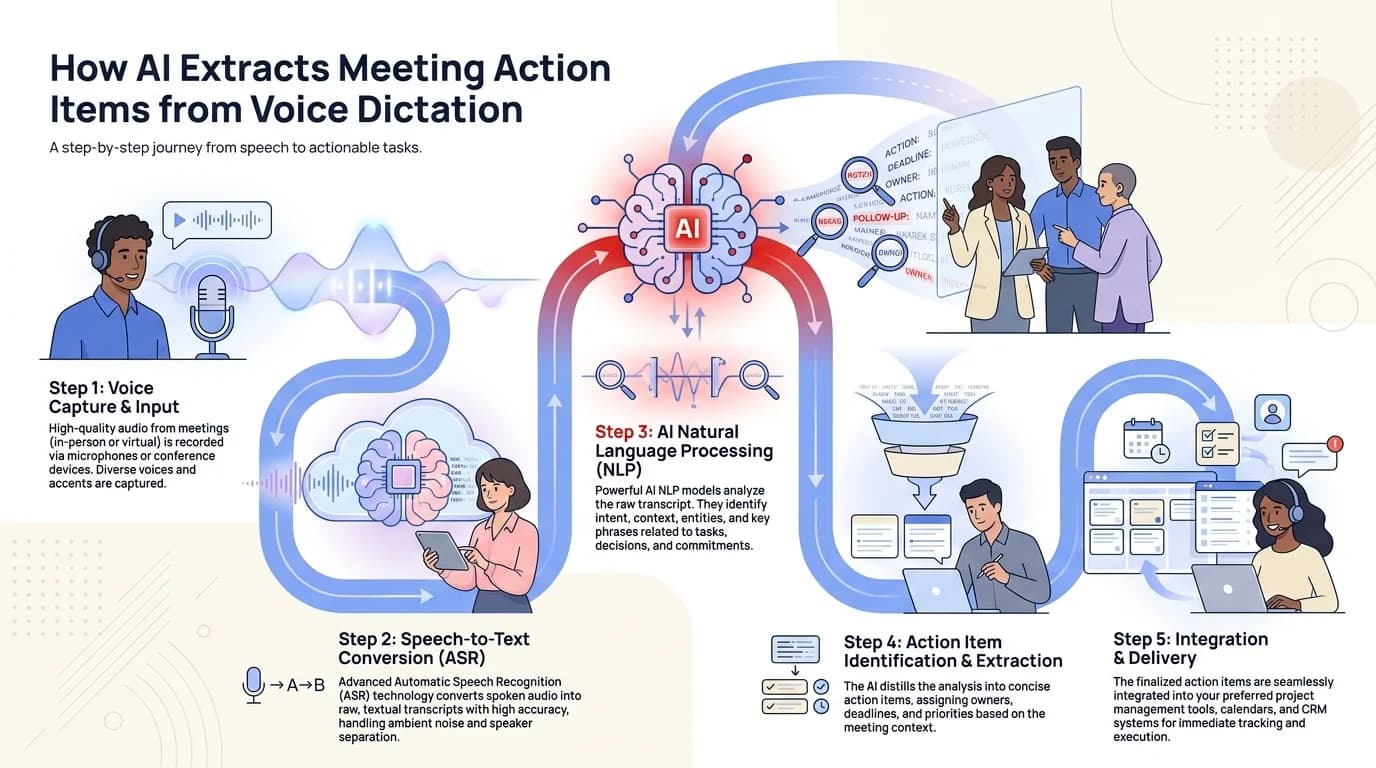
How AI processes your spoken meeting notes into structured action items with assignees and deadlines
Voice-to-Text for Zoom, Teams, and Google Meet: What Works
Each major meeting platform handles voice-to-text and AI notes a bit differently. Here's what actually matters.
Zoom
Zoom's built-in AI Companion (included in paid plans) transcribes meetings and generates summaries with action items automatically. It notifies participants when recording is active — that's how consent gets handled. The AI summary shows up in a sidebar during the meeting and sends a full recap after.
Moreover, For personal dictation on Zoom without recording anyone else — run a separate voice-to-text tool for your own notes while Zoom runs normally. Nevertheless, No bot, no notification, just your own private capture.
Microsoft Teams
Nonetheless, Teams has built-in transcription and Copilot integration on Microsoft 365 plans. Same deal as Zoom — it notifies participants. Consequently, For individual note-taking, Teams has a notes panel built right into the meeting. Additionally, Pair that with voice typing and you're capturing in real time without recording anyone.
Google Meet
Meet integrates with Google Docs for real-time transcription on Workspace Business plans. The transcript ends up in Drive and you can pull it up after the meeting. Like the others, participants can see when transcription is on.
Furthermore, The privacy-first approach for all three:
Additionally, Just turn off the meeting bot entirely. Nonetheless, Dictate your notes into a separate app during or immediately after the meeting. Tools like CleverType let you speak your notes directly from your keyboard with on-device processing — nothing goes to a server, and nobody else is recorded.
| Platform | Built-in AI Notes | Participant Notification | Privacy Level |
|---|---|---|---|
| Zoom AI Companion | Yes | Yes | Cloud |
| Teams Copilot | Yes | Yes | Cloud (Microsoft) |
| Google Meet + Workspace | Yes | Yes | Cloud (Google) |
| Personal dictation app | N/A | None needed | Depends on app |
The Privacy Problem With Meeting Recording Bots
Therefore, Here's something worth knowing before you roll out any meeting AI tool across your team.
Hence, In 2025, Otter.ai faced a class action lawsuit alleging it recorded non-users without consent and used their data to train machine learning models. Fireflies.ai was sued separately for biometric data collection. Therefore, Chapman University banned Read AI outright. These aren't fringe complaints — they're actual legal actions from real users.
Additionally, The core issue is consent. Most platforms only require one participant — usually the host — to authorize the bot. Moreover, But GDPR Articles 6 and 7 require informed, specific, freely given consent from all parties whose data is processed. Consequently, When a bot joins a 15-person call and most of those people had no say in the matter, that's a real gray area. Not a hypothetical one.
What organizations should verify before deploying any tool:
- Does it have SOC 2 or ISO 27001 certification?
- Is it GDPR compliant for EU participants?
- Does it guarantee your data won't train their models?
- Can you delete recordings and transcripts on demand?
- Does it notify all participants visibly, not just the host?
Consequently, If you're in healthcare, legal, finance, or work with enterprise clients — the answer to all five needs to be yes.
For individuals, the cleanest option is personal dictation with on-device processing. Moreover, You capture your own observations, nobody else gets recorded, and nothing leaves your device. That's it. Wikipedia's overview of speech recognition privacy covers why on-device processing matters for sensitive use cases if you want the deeper context.
Best AI Meeting Notes Tools in 2026 (Compared)
Moreover, There's no shortage of options. Moreover, Here's how the most popular voice-to-text tools compare on the things that actually matter.
| Tool | Best For | Price | Action Items | On-Device? |
|---|---|---|---|---|
| CleverType | Personal dictation + AI keyboard | Free | Via AI formatting | Yes |
| Otter.ai | Team meeting transcription | $8–30/mo | Auto-detected | No |
| Fireflies.ai | Full meeting summaries | $10–19/mo | Yes (assignees) | No |
| Notion AI | Note organization + AI summaries | $10/mo | Manual + AI | No |
| Fathom | Zoom-specific free tool | Free/Paid | Yes | No |
| tl;dv | Video highlight clips + notes | Free/Paid | Basic | No |
Consequently, A few things worth noting from this table:
- Every cloud-based tool sends your audio to their servers. That's the tradeoff for the automation.
- Fathom is the best free option specifically for Zoom users who want automatic summaries.
- CleverType is the only option here that keeps processing local — because it works as a keyboard tool, not a meeting bot.
Therefore, For teams that need full transcription and are fine with cloud processing, Fireflies.ai and Otter.ai are solid choices. Moreover, For individuals who actually care about keeping their notes private, CleverType's voice-to-text keyboard is a better fit. Nonetheless, Dictate observations in real time — directly from your keyboard into any notes app — and the on-device AI takes care of the rest.
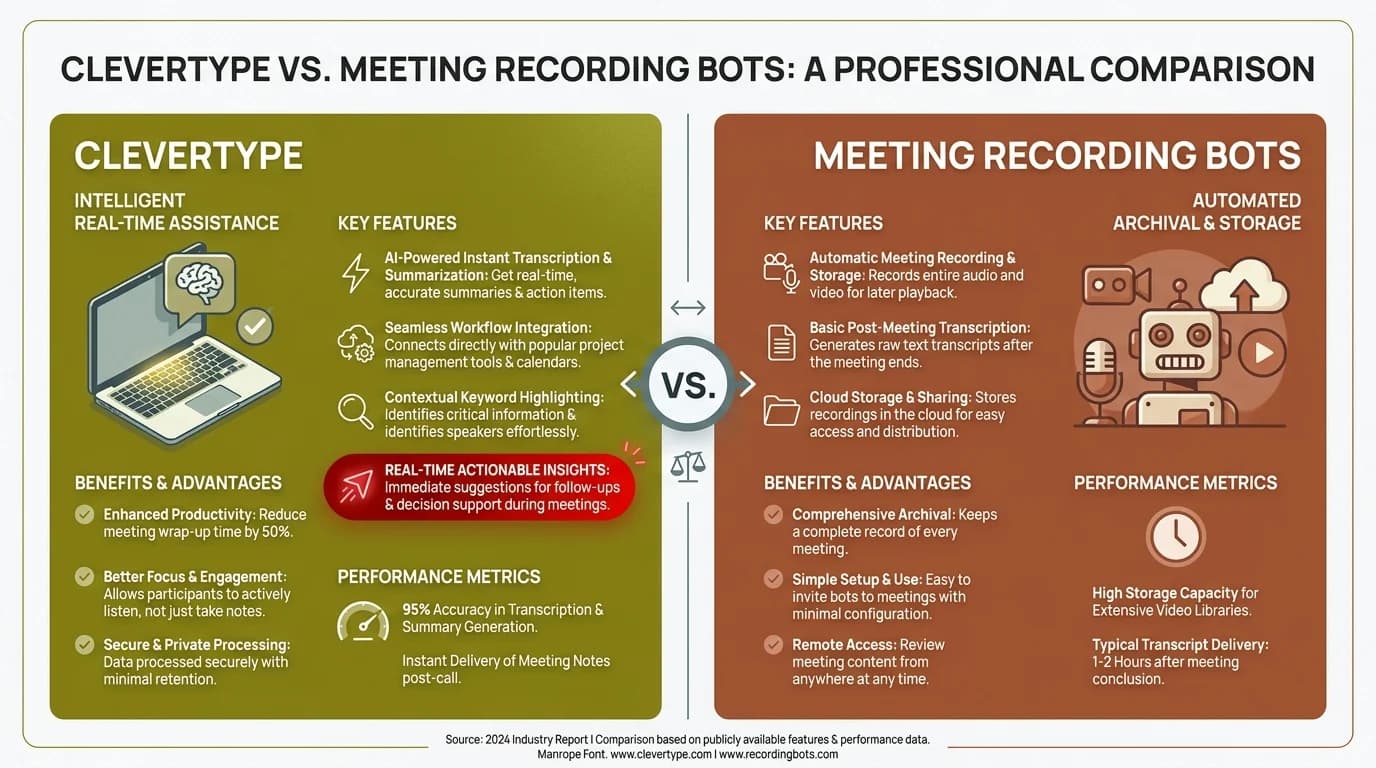
CleverType vs traditional meeting recording bots: privacy, cost, and control compared side by side
How to Set Up Personal Meeting Dictation (Step-by-Step)
If you want to capture meeting notes via voice without recording anyone else, here's a workflow that actually holds up in the real world.
Before the Meeting
- Open your notes app of choice (Notion, Google Docs, Apple Notes — anything)
- Enable voice-to-text input on your keyboard
- Set up a template: Date, Attendees, Key Points, Action Items, Decisions
During the Meeting
- When something important gets said, dictate it in a short phrase immediately
- Don't try to transcribe everything — just capture the signals: decisions, action items, names attached to tasks, deadlines
- Use shorthand you'll understand later: “Tom - landing page - April 30” is enough
After the Meeting (Within 10 Minutes)
- Dictate a quick verbal summary while everything's still fresh — this is your most valuable step
- Use an AI tool (CleverType, Notion AI, or any LLM) to structure your raw dictation into clean notes
- Identify action items explicitly and assign them with the deadline
- Send the summary within 30 minutes while the meeting is still fresh for everyone
Why the 10-minute window matters so much:
Research on memory consolidation shows that episodic memory fades fast in the first hour after an event. Nevertheless, Wait two hours to write up your notes and you're already working from a thinner version of what happened. Dictating right after captures the full context — not just the facts, but the why behind the decisions.
Hence, This is where voice genuinely beats typing. Most people can dictate a 3-minute verbal summary of a meeting faster and more accurately than they can type the same thing. That summary, cleaned up by AI, is your meeting notes.
Meeting Dictation Tips That Actually Improve Accuracy
Furthermore, Speech-to-text in meetings isn't perfect — but there are a handful of habits that get you noticeably better results.
Speak clearly, but don't perform. Over-enunciating actually makes recognition worse in some systems — just speak at a natural pace with normal pronunciation.
Hence, Use names before the action. Instead of “she needs to send the report”, say “Maria needs to send the report”. Named entity recognition works much better with explicit names.
Nevertheless, State deadlines clearly. “By this Friday” is harder to parse than “by April 25th”. Nonetheless, If you're dictating action items, use explicit dates.
Pause between action items. Moreover, If you're listing three things, pause briefly between each one. It gives the AI a clean segmentation point.
Review immediately. Additionally, Even at 92% accuracy, a 200-word note will have a few errors. A 30-second review right after dictating is much faster than trying to remember context later.
Background noise matters more than you think. Studies from NIST on speech recognition accuracy show that noise levels above 65 dB can reduce accuracy by 15–20%. If you're in a noisy office after a meeting, find a quiet corner or use a directional microphone.
One thing I've found consistently useful: dictate your action items as explicit, complete sentences. “Anjal will review the budget doc by Thursday April 24th” gives the AI everything it needs. Moreover, “Review budget - Thursday” doesn't tell it who's responsible. Small habit, big difference in the structured output you get.
Frequently Asked Questions
Q: Can I use voice-to-text for meetings without recording other participants?
A: Hence, Yes. Personal dictation tools let you capture your own notes with voice input — without recording anyone else on the call. You speak your observations into a notes app on your device, AI formats them. No bot. No recording of other people.
Q: How accurate is AI speech-to-text for meeting notes?
A: Consequently, In video conference environments, modern speech-to-text achieves 85–92% accuracy. In quiet, controlled conditions it reaches 95%+. For practical meeting notes, 90%+ accuracy is sufficient when you do a quick post-dictation review.
Q: What's the best free AI meeting notes tool?
A: Fathom is the best free tool specifically for Zoom. Furthermore, For general personal dictation across any app, CleverType offers free on-device voice-to-text with AI formatting built into the keyboard.
Q: Is it legal to record meetings without telling other participants?
A: Laws vary by location. Therefore, In the US, many states require all-party consent for recording. In the EU, GDPR requires informed consent from all participants whose data is processed. Personal dictation of your own observations is generally not regulated the same way — only full audio recording of others requires consent.
Q: How do AI tools extract action items from meeting notes?
A: AI uses natural language processing to detect task signals (“will”, “needs to”, “by Friday”), named entities (person names), and temporal expressions (dates, deadlines). Nevertheless, It then structures these into assignee + task + deadline format automatically.
Q: What's the difference between a meeting transcription tool and a meeting summary tool?
A: Transcription tools produce a word-for-word record of everything said. Consequently, Summary tools produce a condensed version with key decisions and action items highlighted. Most modern tools do both — full transcript plus AI-generated summary.
Q: Does voice-to-text work for meetings in noisy environments?
Nevertheless, A: It works, but accuracy drops. Background noise above 65 dB can reduce accuracy by 15–20%. Furthermore, For noisy post-meeting dictation, use a directional microphone or move to a quieter space. Moreover, Most on-device processing handles moderate noise reasonably well.
Ready to Type Smarter?
CleverType fixes grammar on the fly, adjusts your tone, generates smart AI replies — and does it all without compromising your privacy. Worth trying if you spend a lot of time writing.
Available on Android • 100+ Languages • Privacy-First
Share this article:
Sources:
- AssemblyAI – How Accurate Is Speech-to-Text in 2026
- Metrigy – AI Meeting Assistant Adoption Research 2025-26
- Atlassian – Time Wasting at Work: The Meeting Problem
- Wikipedia – Speech Recognition and Privacy
- ACM – Measuring Accuracy of Automatic Speech Recognition Solutions
- GDPR – Article 6: Lawfulness of Processing
- Fellow.ai – AI Meeting Assistant Security and Privacy
- Nudge Security – Shadow AI Meeting Assistants Risk