Key Takeaways
- ✓Lawyers speak at 150-180 words per minute but type at only 40-60 WPM — voice dictation is 3x faster for drafting documents
- ✓Thomson Reuters found AI adoption in legal work nearly doubled from 14% to 26% in a single year, with 50%+ adoption expected by end of 2026
- ✓Attorneys only bill about 31% of their working hours — documentation overhead is a major cause
- ✓AI legal dictation tools achieve 90-99% accuracy on specialized legal terminology
- ✓Dragon Legal remains a standard, but newer AI-native tools are closing the gap at a fraction of the cost
- ✓For mobile and on-the-go dictation, AI keyboard apps like CleverType bring voice-to-text directly into your workflow
A lawyer working a standard week logs around 48 hours. Nevertheless, Of those, only 36 are billable. The rest? Eaten up by emails, case notes, admin work, and documentation. That gap represents real money left on the table — and honestly, a lot of it comes down to one boring bottleneck: how slowly lawyers get words onto a page.
Hence, Voice to text for lawyers isn't a new idea. Therefore, But the AI behind it has changed dramatically. Nonetheless, What used to require expensive dedicated hardware and a full week of voice training now works out of the box — on your phone, your laptop, wherever. The accuracy actually holds up against legal terminology. There's no good reason to still be typing first drafts of briefs and contracts from scratch in 2026.
Why Lawyers Spend So Much Time on Documentation
The documentation burden in law is genuinely crushing — and the numbers are pretty hard to ignore. According to Clio's 2025 Legal Trends Report, lawyers only bill for about 2.9 hours of a typical 8-hour workday. Administrative tasks — drafting documents, writing correspondence, managing files — eat up 48% of their working time. Furthermore, Not a small slice. Nearly half.
Think about what that looks like day-to-day. A senior associate at a mid-size firm might spend:
- 2-3 hours per day writing emails and memos
- 1-2 hours drafting or editing contracts and briefs
- 30-60 minutes on case notes and court prep documentation
- Another 30+ minutes on intake forms and client correspondence
None of that is billable in most firm models. Hence, And all of it involves typing — which is just slow compared to speaking. That's Hence, not a workflow problem. Moreover, It's a physics problem.
The Bloomberg Law Attorney Workload Survey puts the average attorney work week at 48 hours, with 12 of those hours non-billable. Documentation is consistently at the top of the list when lawyers are asked what eats their time.
The math is pretty simple. If you speak three times faster than you type, and half your day involves producing written output, cutting your documentation time by even 30% frees up multiple hours every single week. That's not a marginal gain.
Hence, Legal document dictation closes that gap. Not by doing lawyers' jobs for them — but by getting rid of the mechanical bottleneck between thinking and having it on the page.
How AI Dictation Software Actually Works for Legal Professionals
AI dictation built for law firms works very differently from the generic speech-to-text that's been sitting ignored on your phone. Therefore, The distinction actually matters.
General-purpose tools like Apple Dictation or Google's built-in voice input will transcribe what you say — but they'll stumble on habeas corpus, res judicata, or a case citation like Chevron U.S.A., Inc. v. Natural Resources Defense Council. You end up stopping to fix errors constantly, which defeats the whole point.
Additionally, Legal-specific tools are built differently from the ground up. Here's Additionally, what actually sets them apart:
- Legal language models — trained on millions of legal documents, court opinions, and contract templates so the tool recognizes terminology natively
- Context-aware transcription — the AI uses surrounding words to disambiguate similar-sounding terms (e.g., "tort" vs "taught")
- Auto-formatting — some tools automatically apply proper capitalization for case names, party designations, and statute references
- Speaker recognition — useful for depositions and multi-party calls where the transcript needs to attribute speech accurately
SpeakWrite's AI legal transcription breakdown puts modern legal-specific tools at 90-99% accuracy — noticeably better than generic voice input trying to spell res judicata for you.
Moreover, For court-admissible transcripts, 99% is still the bar. But for first drafts, client notes, internal memos — which is the vast majority of what you actually produce day to day — 95% is totally workable. And at 3x the speed of typing, even with a few corrections, you come out well ahead.
The Real Time Savings: What the Numbers Show
So how much time does a lawyer dictation app actually save? Here's Nevertheless, a concrete breakdown:
| Task | Typing Time | Dictation Time | Time Saved |
|---|---|---|---|
| 500-word memo | ~10 min | ~3-4 min | 60%+ |
| 1,500-word brief section | ~30 min | ~10-12 min | 65% |
| Email response (200 words) | ~4 min | ~90 sec | 60% |
| Deposition summary (1,000 words) | ~20 min | ~7 min | 65% |
| Client intake notes | ~15 min | ~5 min | 67% |
Average typing speed for lawyers: 40-60 WPM. Speaking speed — especially for anyone who's spent time in a courtroom — runs 150-180 WPM. That 3x gap adds up fast across a full day.
Hence, Diktamen's 2025-2026 analysis of dictation trends makes one thing clear: legal firms aren't walking away from voice — they're demanding more from it. The shift is away from raw transcription toward AI-assisted dictation that turns spoken language into polished prose without you having to clean it up yourself.
For a solo practitioner billing $300/hour, recovering just 5 hours a week through faster documentation is worth $1,500 weekly. Therefore, For a firm of 10 attorneys, that's $15,000 a week. Moreover, Not hypothetical — just math.
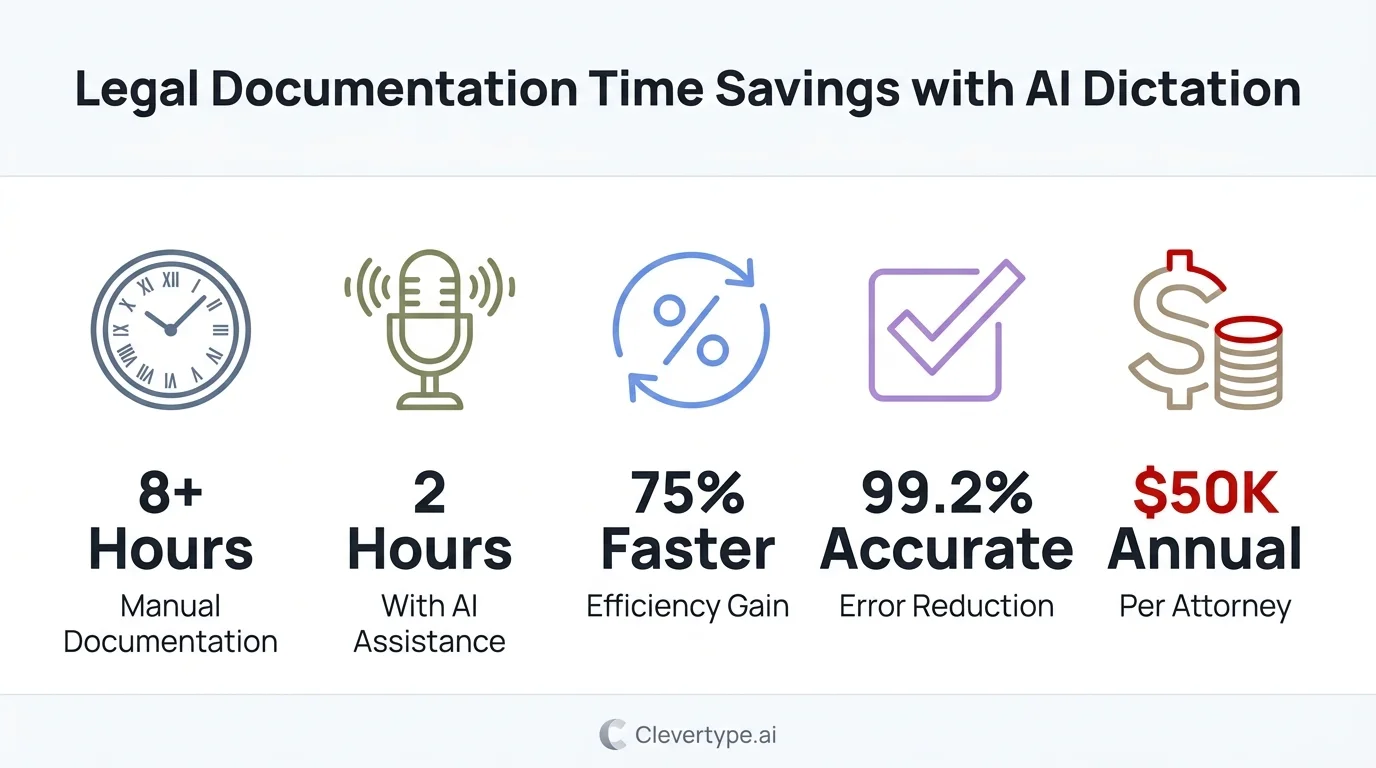
AI dictation cuts legal documentation time by up to 75% compared to traditional typing methods
Best AI Dictation Tools for Lawyers in 2026
Nonetheless, There are a handful of solid options in the legal dictation software space right now. Here's how they actually compare:
| Tool | Best For | Accuracy | Pricing (approx.) | Notable Weakness |
|---|---|---|---|---|
| Dragon Legal Anywhere | Large firms, Windows-first | Up to 99% | $600–$900/yr per user | Expensive, steep setup |
| WisprFlow | Mac users, AI polishing | High with AI cleanup | ~$150/yr | Mac-only primarily |
| Verbit | Depositions, court proceedings | 99%+ (human-verified) | Enterprise pricing | Not real-time |
| Philips SpeechLive | Workflow integration | High | ~$200–400/yr | Older UI |
| Sonix | Audio/video transcription | ~90-95% | $10/hr or $22/mo | Less real-time focused |
Votars put together a solid roundup of AI dictation tools for law firms and made a point worth noting: raw accuracy isn't the differentiator anymore — most tools hit 90%+ on standard speech. What actually separates them is how well they handle legal context and how fast they slot into your existing workflow without requiring you to change everything else.
Consequently, Dragon alternatives are getting genuinely competitive. Moreover, WisprFlow in particular offers polished AI-processed output rather than raw transcription — which matters a lot when you need something document-ready, not a rough first pass full of "ums."
Speech to Text for Attorneys: Mobile and On-the-Go Use
Court. Nonetheless, Deposition. Client meeting. Car ride back to the office.
Lawyers don't do all their work at a desk — and honestly, that's half the reason dictation matters more on mobile than anywhere else. Hence, The real question is which tool handles voice input reliably when you're not sitting at your workstation.
Additionally, This is where keyboard-level voice input becomes useful. Apps like CleverType — an AI-powered keyboard available on Android — bring voice-to-text directly into whatever app you're already using. No switching to a separate dictation app, opening it, dictating, copying, then pasting. Furthermore, You just speak from the keyboard.
CleverType's AI processes your words before they hit the screen — cleaning up filler words, fixing punctuation, applying context-aware corrections. So what you get isn't raw transcript soup. Furthermore, For lawyers firing off quick client updates or grabbing case notes between meetings, that difference is real.
AI in legal work in 2026 is increasingly device-agnostic. Furthermore, Firms where lawyers can only dictate at their desk are leaving a big chunk of productivity on the table. Consequently, Mobile dictation captures the in-between moments — the 4-minute car ride where you could dictate a client summary, the 2-minute deposition prep note you'd otherwise forget.
Privacy and Security: What Law Firms Need to Know
Nevertheless, This is probably the most important section for any lawyer reading this. Hence, So let's just say it plainly.
Nonetheless, Attorney-client privilege is not negotiable. Any tool that sends dictated content to third-party servers without proper safeguards is a compliance problem, full stop. Therefore, The ABA's model rules require attorneys to take reasonable measures to prevent inadvertent disclosure of client information. Nonetheless, That's not a suggestion.
Before you go anywhere near a legal document dictation tool with privileged content, run through this:
- Data storage location — where does the audio and transcript go? Is it on your device, their servers, or processed in transit?
- Encryption standard — AES-256 at rest and in transit is the baseline expectation
- Retention policy — does the vendor keep your audio? For how long?
- Compliance certifications — SOC 2 Type II and GDPR compliance are good signals for enterprise-grade security
- Processing model — is the AI running locally (ideal for sensitive content) or cloud-based?
Dragon Legal processes audio locally in many configurations — that's a real privacy advantage, not just a marketing claim. Hence, Cloud-based tools like Verbit do offer contractual data protections and enterprise agreements, but you're still sending audio offsite. Know which one you're choosing.
CleverType's privacy-first design processes user input with on-device AI where possible, keeping your data out of third-party hands. When your keyboard is handling privileged client communications, that's not a minor detail.
Sonix's security documentation is pretty transparent about their data practices and offers GDPR-compliant processing — worth a look if you're evaluating cloud transcription for firm use.
How to Set Up a Dictation Workflow That Actually Sticks
The tools are only half of it. Plenty of lawyers try dictation, find it awkward for the first week, and quit. Here's how to actually build a workflow that sticks past the initial friction:
Week 1 — Start with low-stakes content:
- Dictate internal memos and emails first, not court filings
- Let the tool learn your voice patterns and correct errors as you go
- Don't correct every mistake manually — use voice commands ("scratch that", "new paragraph") where available
Week 2 — Add structure commands:
- Learn the formatting commands for your tool (Dragon has robust command sets; WisprFlow uses AI reformatting)
- Practice dictating with natural punctuation cues: "comma", "period", "new paragraph"
- Build a personal vocabulary list for firm-specific terms, client names, and recurring phrases
Week 3 — Expand to substantive documents:
- Start dictating first drafts of client letters and simple agreements
- Accept that the first draft will need editing — the goal is capturing it fast, not making it perfect
- Track your time: most lawyers see 40-60% faster first drafts within 3 weeks
Ongoing:
- Combine dictation with AI text enhancement for cleaner output
- Use mobile dictation for notes, emails, and brief summaries when away from desk
- Treat the tool like a paralegal: it captures what you say, you review and refine
One thing experienced users say consistently: stop trying to dictate in "written voice." Speak naturally and let the AI handle the cleanup. Fighting your own speech patterns to sound like formal legal writing just slows everything down.
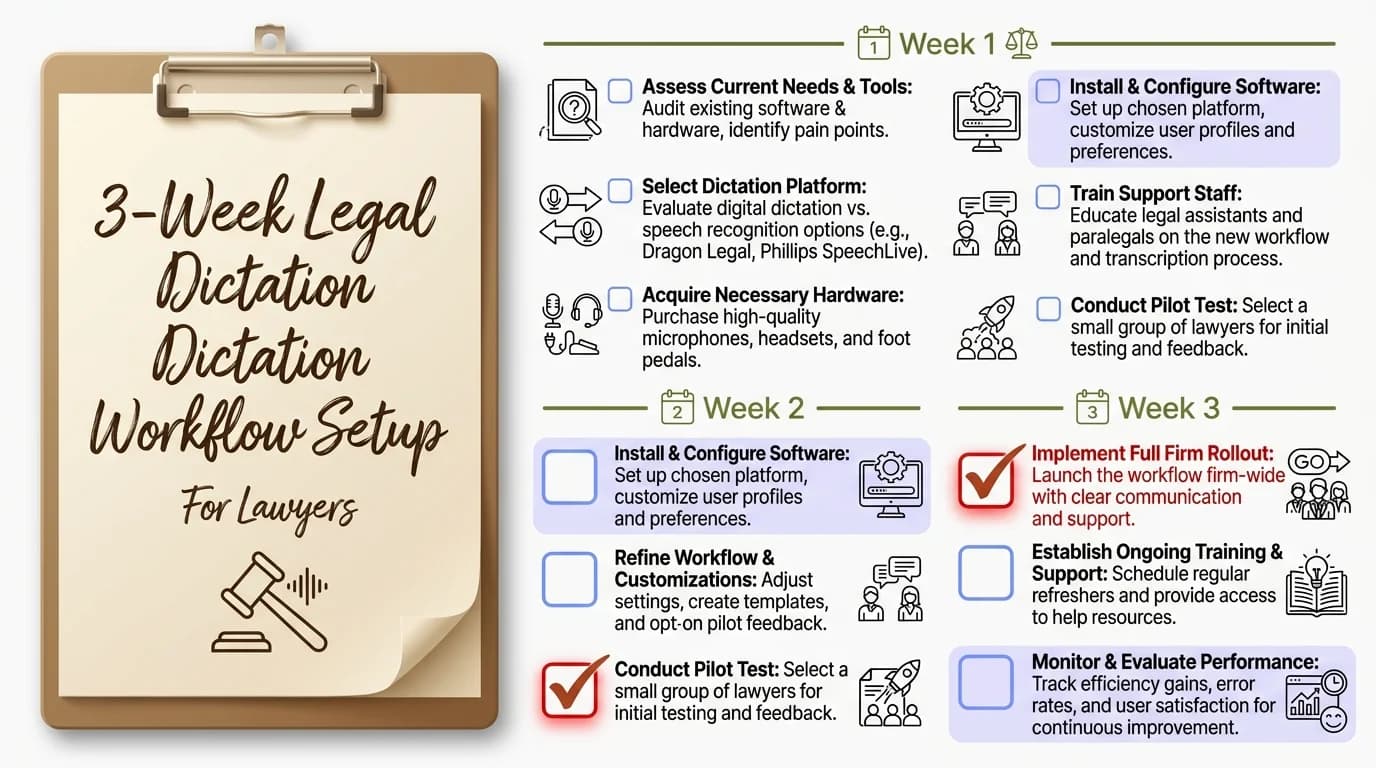
A 3-week onboarding plan helps lawyers build a dictation habit that sticks — most report 40-60% faster drafts by week three
AI Transcription for Law Firms: Depositions and Court Proceedings
Nevertheless, Here's where things get interesting for firms, not just individual lawyers. AI transcription doesn't speed up one person — it changes the whole way depositions, hearings, and client meetings get captured across a practice.
Traditional court reporters are accurate. Nonetheless, No question. Therefore, But they're also slow and expensive. Nevertheless, Turnaround is 5-10 business days and costs $3-8 per page — a 200-page deposition can set you back $600-1,600 just in transcript fees.
Therefore, AI flips most of that:
- Turnaround: Real-time or same-day vs. 5-10 day wait
- Cost: $0.10-0.25/minute for AI vs. $3-8/page for court reporters
- Searchability: Digital transcripts are instantly searchable vs. PDFs requiring OCR
- Speaker diarization: Modern AI tools automatically label who said what in multi-party recordings
For anything that needs to be court-admissible, you still need human verification. Moreover, But for internal review, case prep, and client summaries — which is most of what firms actually use transcripts for — AI transcription at 96%+ accuracy is more than good enough.
Hence, Verbit's hybrid model — AI transcription verified by human reviewers — delivers 99%+ accuracy with turnaround measured in hours, not days. For time-sensitive litigation, that's a real difference.
The North Carolina Bar Association's guide on dictation for lawyers suggests firms establish clear policies on which transcription method applies to which document type — separating internal work product from externally filed documents. Nonetheless, That's solid advice.
The Future of Legal Dictation Software in 2026 and Beyond
Thomson Reuters' 2025 research found that AI usage among legal professionals nearly doubled in a single year — from 14% to 26% — and is on track to exceed 50% adoption by the end of 2026.
The direction is pretty clear. But what does "better" actually look like for voice-to-text in legal work? Additionally, A few things worth watching:
Ambient documentation
Additionally, AI that quietly records client conversations — with consent, obviously — and auto-generates the notes, action items, and follow-up drafts. Otter AI is already heading this direction for general use. Nonetheless, Legal-specific versions are just starting to appear.
Integrated dictation within practice management software
Consequently, Instead of dictating and then copying everything into your case management system, the dictation lives natively inside Clio, MyCase, or similar tools. Nonetheless, Several major vendors are already building this in.
Voice-commanded legal research
Ask your dictation tool to pull a case, and the AI surfaces the relevant precedent in the same window. Early versions already exist — they're rough around the edges, but the direction is obvious.
Real-time translation dictation
For multilingual client work, dictate in English and get the document in Spanish or Mandarin at the same time. Nevertheless, Tools with 100+ language support — like CleverType's multilingual keyboard — are already there.
The dictation app for legal professionals in 2027 won't just transcribe. It'll draft, research, cross-reference, flag inconsistencies — all in real time. Lawyers who start building the dictation habit now are setting themselves up for all of that. And honestly? The habit is worth building even without the future stuff.
If you want to start today, Download CleverType and see how AI-enhanced voice input works directly from your keyboard — no app switching required.
Ready to Type Smarter?
Nevertheless, Upgrade your typing with CleverType AI Keyboard. Hence, Fix grammar instantly, change your tone, receive smart AI replies, and type confidently while keeping your privacy.
Download CleverType FreeAvailable on Android • 100+ Languages • Privacy-First
Frequently Asked Questions
What is the best voice to text software for lawyers in 2026?
Dragon Legal Anywhere is still the most accurate dedicated option — trained on 400 million legal words with up to 99% accuracy. Furthermore, WisprFlow is a solid lower-cost pick for Mac users, with AI-polished output instead of raw transcription. For mobile, CleverType's AI keyboard brings voice-to-text directly into any app without the extra steps.
How accurate is AI dictation for legal documents?
Most AI legal dictation tools hit 90-99% accuracy on general speech, with legal-specific tools landing at the higher end. Courts require 99% for admissible transcripts — for those, use a human-verified service like Verbit. For internal drafts and notes, 95%+ is workable.
Is Dragon Legal still worth it in 2026?
Furthermore, Dragon Legal Anywhere remains the most feature-complete option for Windows-based law firms, particularly those needing deep integration with document management systems. Nonetheless, At $600-900/year per user, it's expensive — but for high-volume dictation users, the ROI is clear. Newer AI-native alternatives are competitive, especially on Mac.
Can lawyers use voice-to-text for privileged client communications?
Consequently, Yes, but with important caveats. Therefore, Tools that process audio locally (like Dragon in certain configurations) are safer than fully cloud-based options. Hence, For cloud tools, verify SOC 2 compliance, data retention policies, and encryption standards. The ABA requires reasonable safeguards against inadvertent disclosure of client information.
How long does it take to learn legal dictation software?
Most lawyers see meaningful time savings within 2-3 weeks of regular use. The first week typically involves adjustment and correction; by week three, most users report 40-60% faster first-draft production compared to typing.
What's the difference between dictation and AI transcription for law firms?
Additionally, Dictation is real-time — you speak and text appears immediately, used for creating documents. AI transcription is for recorded audio — depositions, client calls, hearings — converted to text after the fact. Many tools now do both, but they serve different parts of a firm's workflow.
Does legal dictation software work on mobile?
Furthermore, Yes, though with varying quality. Dragon has a mobile app; WisprFlow is primarily desktop. For the most seamless mobile experience, AI keyboards like CleverType integrate voice-to-text directly into any app you're already using, without needing to switch to a separate dictation tool.
Share This Article
Found this useful? Moreover, Share it with colleagues:
Sources
- Clio Legal Trends Report — Lawyer Statistics 2025
- Bloomberg Law Attorney Workload and Hours Survey 2025
- Diktamen: What We Learned About Dictation in 2025 and What It Means for Legal Firms in 2026
- Votars: 11 Best AI-Powered Dictation Tools for Law Firms in 2025
- SpeakWrite: AI Legal Transcription Comprehensive Guide
- Sonix: Legal Transcription Software for Lawyers 2026
- LegalAI Tools: How AI Is Transforming Legal Work in 2026
- North Carolina Bar Association: Dictation and Transcription Options for Lawyers