Key Takeaways
- •The best free voice-to-text desktop apps in 2026 are Apple Dictation (Mac) and Windows Voice Typing — both built-in, both surprisingly capable
- •Dragon Professional remains the accuracy king on Windows at 96–99%, but costs $699 and is Windows-only
- •Whisper Large-v3 achieves a 2.7% word error rate on clean audio — that's roughly 97.3% accuracy, and it powers many newer desktop tools
- •The global AI speech-to-text market is worth $3.87 billion in 2026 and is growing at 17.41% annually
- •Wispr Flow is the best cross-platform AI dictation app right now — free tier available, Pro at $15/month
- •For mobile AI typing that complements your desktop workflow, CleverType is the standout option with AI-powered suggestions, grammar fixes, and voice-to-text enhancement
- •Local (offline) processing tools like MacWhisper and Superwhisper are the best picks if privacy is your top concern
Nevertheless, The average person types around 40 words per minute. Speaking speed? Around 130 words per minute. That's a 3x productivity gap most people just accept — and honestly, they really shouldn't.
Voice-to-text software has quietly gotten really good. Not "good enough to be a party trick" good — actually good. Like, dictate an email, read it back, barely change anything good. The global speech and voice recognition market hit $23.70 billion in 2026 — which says a lot about where professional workflows are heading.
This guide covers the best voice-to-text desktop apps for Mac and Windows in 2026. Real accuracy numbers, honest pricing, enough detail to pick the right tool for how you actually work. No fluff.
What Is Desktop Voice-to-Text Software — and Why Does It Matter in 2026?
Desktop voice-to-text software is an application that converts spoken audio into written text directly on your computer, in real time or near-real time.
Worth being clear about the distinction: these aren't transcription services where you upload a file and wait. They're live dictation tools you use while working — in Word, Notion, Gmail, Slack, code editors, wherever.
Additionally, Why does 2026 specifically matter? A few things converged.
First: accuracy finally caught up with usability. Additionally, Older tools like Dragon required weeks of voice training before they were reliably accurate. Additionally, Modern AI-based tools hit 95%+ on the first use. OpenAI's Whisper model — which now powers a lot of desktop apps — was trained on 680,000 hours of multilingual audio. Accents, background noise, domain-specific vocabulary. It handles all of it way better than anything from five years ago.
Then the hardware caught up too. Additionally, Apple Silicon Macs can now run large Whisper models locally at real-time speed. That wasn't possible on Intel chips. Consequently, So the privacy-first, offline dictation tools that existed in theory? They actually work now.
And then there's AI post-processing. It's not just transcription anymore. Consequently, Apps like Wispr Flow and Voicy reformat your speech based on context — they can tell you're writing a Slack message vs. a legal brief, and they clean up the output accordingly. Filler words disappear. Sentences get structured. You speak casually and get professional text.
Therefore, Here's a quick breakdown of where voice-to-text software fits:
| Use Case | Best Approach |
|---|---|
| Occasional dictation | Built-in free tools (Apple Dictation / Windows Voice Typing) |
| Daily professional writing | AI-powered apps (Wispr Flow, Voicy, Monologue) |
| Medical / legal workflows | Dragon Professional |
| Privacy-sensitive documents | Local Whisper-based tools (MacWhisper, Superwhisper) |
| Mobile typing + voice | CleverType AI Keyboard |
The AI speech-to-text market sits at $3.87 billion in 2026, heading toward $16.42 billion by 2035. And it's not just enterprise — consumers are a huge part of what's driving that.
Apple Dictation: The Best Free Voice-to-Text App for Mac
Apple Dictation is the built-in speech-to-text tool on macOS, and for most Mac users it's the best dictation software for Mac to start with — completely free, fast, and private on Apple Silicon.
How do you access it? Nonetheless, Press the microphone key on your keyboard, or go to System Settings → Keyboard → Dictation and enable it. Additionally, Takes about three minutes. After that, a double-tap of the Command key (or Fn key, depending on your settings) starts dictation anywhere on your Mac.
Additionally, Accuracy sits between 93–95% on clear speech — noticeably better than older versions. Apple Silicon Macs process everything fully on-device via the Neural Engine, so nothing leaves your machine. Nonetheless, That's actually a meaningful privacy win over cloud-based services, not just a marketing claim.
What Apple Dictation does well:
- System-wide. Works in every text field — browsers, native apps, third-party tools — without needing to switch apps
- Fast. Latency is genuinely low, usually under 200ms on M-series chips
- Voice commands. You can say "new line," "select that," "delete last word," and the system responds correctly most of the time
- Multilingual. Supports 60+ languages with on-device processing on Apple Silicon
- Cost. Free
What it doesn't do well:
- Punctuation insertion is still imperfect — you'll say "comma" more than you'd like
- No AI reformatting — what you say is what you get, no filler word removal
- No custom vocabulary management for niche industries
- The Enhanced Dictation mode that older macOS versions had (with offline processing on Intel Macs) is now just the default behavior on Apple Silicon, but Intel Mac users have less privacy
Apple Dictation went through a real upgrade cycle in 2023-2024. The version in macOS Sequoia handles conversational speech, run-on sentences, and natural pauses noticeably better — the stuff real people actually say when they're not trying to enunciate perfectly. If you tried it years ago and gave up, it's worth another shot.
For a casual user dictating emails and documents? Apple Dictation is genuinely enough. You don't need to spend anything.
Windows Voice Typing and Voice Access: Microsoft's Built-In Dictation Tools
Windows 11 includes two separate voice input tools — Voice Typing (Win + H) for text dictation and Voice Access for hands-free PC control — and both are free.
Moreover, People mix these up constantly. They're actually two different products.
Windows Voice Typing (Win + H):
- Focused purely on dictation — speaks text into any app
- Works system-wide, same as Apple Dictation
- Supports automatic punctuation (off by default, toggle it on)
- Available in Windows 10 and Windows 11
- Backed by Microsoft Azure's speech models, which have improved substantially in recent years
Consequently, Windows Voice Access:
- Introduced in Windows 11 Build 22H2 (late 2022), substantially updated in 2024
- Goes beyond dictation — lets you navigate the entire OS by voice
- You can open apps, click buttons, scroll, and interact with elements using only voice commands
- Especially valuable for users with accessibility needs
- Requires an internet connection for some features
Hence, Accuracy for Windows Voice Typing comes in around 90–94% on clear English speech — slightly behind Apple Dictation on the same hardware. Plug in a decent external mic though, and that gap gets a lot smaller.
Therefore, One thing Windows actually handles better than Mac out of the box: automatic punctuation. Nevertheless, Once you enable it, Voice Typing adds commas, periods, and question marks based on natural speech pauses — without you having to say "period" after every sentence.
Microsoft has been putting real resources into the Azure speech models behind these tools. The 2025 updates to accent handling and noise suppression were genuinely noticeable — not just a "we improved our AI" blog post, you can actually hear the difference. If you haven't tried Windows Voice Typing recently, it's worth another look.
| Tool | Platform | Cost | Offline? |
|---|---|---|---|
| Windows Voice Typing (Win+H) | Windows 10/11 | Free | No |
| Windows Voice Access | Windows 11 | Free | Partial |
| Microsoft 365 Dictate | Windows/Mac | Included with M365 | No |
Microsoft 365 Dictate is a third option worth knowing about — it lives inside Word, Outlook, and OneNote, and adds voice translation (dictate in Spanish, get English text, for example). If you're already on M365, it's already there waiting for you.
Dragon Professional: Is It Still Worth $699 in 2026?
Dragon Professional is a Windows-only dictation software with 96–99% accuracy, and it's the best voice-to-text app for Windows users in high-stakes professional environments — but the price and platform limitations are real drawbacks.
Dragon has been around for over 30 years. Nuance — now owned by Microsoft — has run it through dozens of versions, and the current Dragon Professional Individual is genuinely the most accurate dictation software you can buy off the shelf. That's not marketing copy. Nonetheless, It's just true.
Therefore, The numbers: Dragon scores around 94% out of the box. Moreover, After 15 minutes of voice training, that jumps to 96%. After two weeks of regular use with corrections? Hence, You can expect 98% or better. Nothing else in the consumer space touches that ceiling.
Additionally, But here's the real question in 2026: is Dragon worth $699 when modern AI alternatives exist?
Nonetheless, Dragon is still worth it if:
- You work in medical, legal, or financial sectors where accuracy on technical vocabulary matters
- You dictate more than 2 hours a day
- You need custom macros and automation (Dragon's macro system is genuinely powerful)
- You're on Windows and need the highest possible accuracy ceiling
Nonetheless, Dragon is probably not worth it if:
- You're a casual or moderate user
- You use a Mac (Dragon for Mac was discontinued in 2018 — there's no current version)
- Budget is a concern — $699 one-time, or up to $50/month for Dragon Anywhere
- You're comfortable with 95–97% accuracy rather than 98–99%
Dragon processes everything locally, which is a privacy win. Nonetheless, No internet required after initial setup. For anyone in a regulated industry where data sovereignty actually matters — healthcare, legal, finance — that's not a small thing.
One thing most people don't realize: Dragon's latency is actually worse than newer tools. We're talking 300–500ms between speech and text appearing on screen. Therefore, Wispr Flow averages 150–250ms by comparison. Hence, So despite the higher accuracy, Dragon can feel slow to use day-to-day.
Bottom line: Dragon Professional is still the best dictation software for Windows in demanding professional contexts. But for everyone else? Better value options exist in 2026.
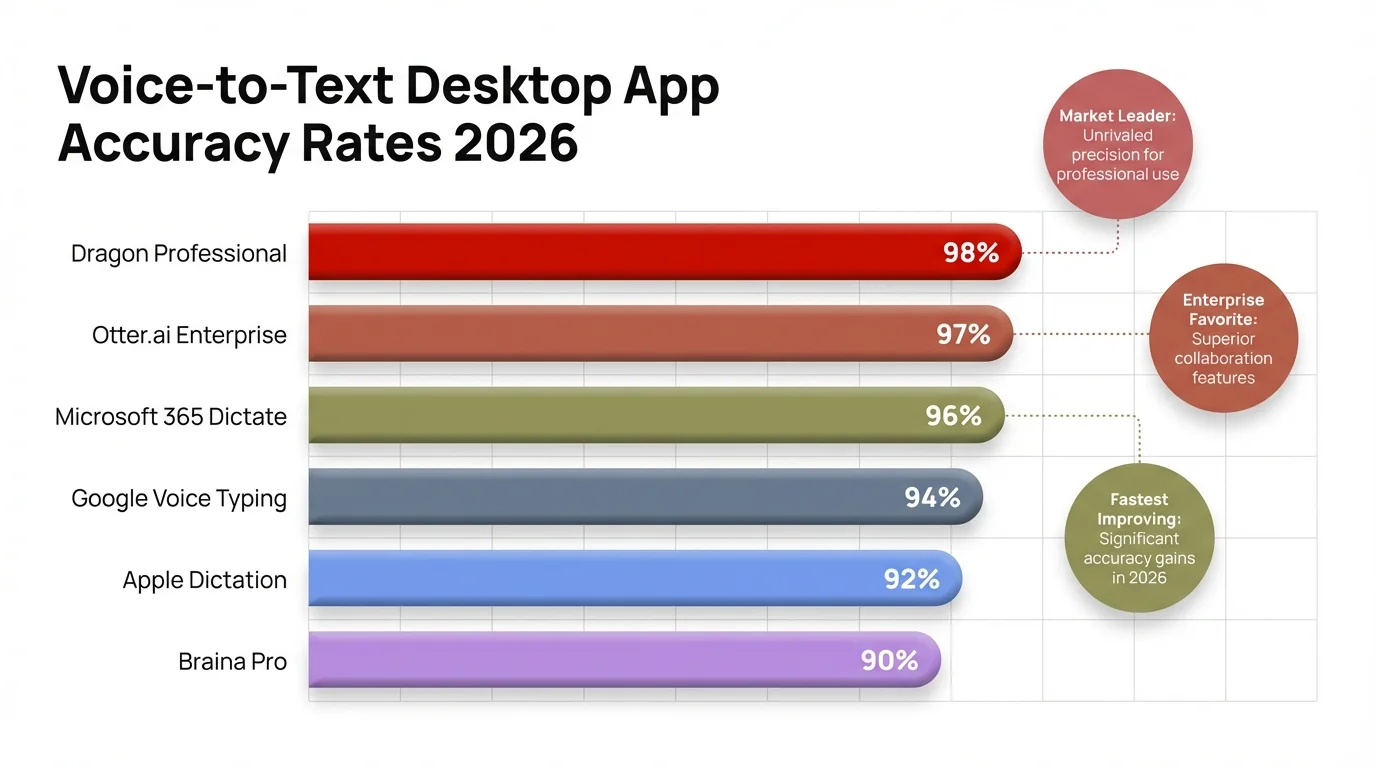
Voice-to-text desktop app accuracy rates compared — 2026 benchmarks across the leading tools
Wispr Flow and AI-Powered Dictation Apps That Work System-Wide
Wispr Flow is an AI dictation app for Mac and Windows that formats your speech based on context — it knows you're writing a casual Slack message vs. a formal email, and adjusts output accordingly.
Nevertheless, Here's where the new generation of AI dictation apps actually separates from older tools. It's not just transcription anymore. The AI figures out what kind of writing you're doing and cleans things up accordingly. That's a real difference.
Therefore, How Wispr Flow works:
- You hold a hotkey (customizable) and speak
- The app detects which application and text field you're using
- It transcribes your speech AND reformats it for the context
- Text appears in your active field, cleaned up and ready to use
Nonetheless, The context-awareness is what sets it apart. In Slack, it strips filler words and keeps things casual. In Gmail, it structures sentences more formally. In a document, it adds proper paragraph breaks. It's not magic — just AI reading which app you're in and applying the right formatting rules.
Accuracy sits at 95%+, latency is low — typically 150–250ms — and the free plan is genuinely usable. Nonetheless, Pro is $15/month.
Hence, Other strong AI dictation apps in 2026:
Voicy ($8.49/month):
- Claims 99%+ accuracy in 50+ languages
- System-wide — works in every app, including code editors
- AI commands let you rephrase or restructure text by voice
- Includes a local processing option for privacy-conscious users
- Available on Mac and Windows
Monologue ($144/year):
- Mac-only
- Reads your screen context to shape dictation output
- Mid-sentence language switching (start in English, switch to French, it keeps up)
- No audio retention — processes locally and discards immediately
- Best pick for multilingual Mac users who write in multiple languages daily
Nevertheless, Otter.ai (Free–$30/month):
- More of a meeting transcription tool than a dictation app
- Real-time transcription, speaker identification, summary generation
- Better for capturing conversations than dictating documents
- Cross-platform via browser
The shift from "transcription accuracy" to "output quality" is the real trend in dictation software right now. Additionally, And honestly, Wispr Flow makes a convincing case: 95% accurate speech + AI formatting often produces cleaner final text than 99% accurate raw transcription that still has all your verbal tics preserved faithfully.
Whisper-Based Desktop Tools: Offline, Private, and Surprisingly Accurate
Nonetheless, Whisper-based desktop apps use OpenAI's open-source speech recognition model to process audio entirely on your device — no internet, no data sent to servers, and accuracy that rivals cloud services.
OpenAI released Whisper as open-source in 2022, trained on 680,000 hours of multilingual audio. The Large-v3 model hits a 2.7% word error rate on clean audio — roughly 97.3% accuracy. Therefore, On meeting-quality English audio, it outperforms both Microsoft Azure and Google Speech-to-Text on the same benchmarks. Not bad for something you can run entirely on your own hardware.
The open-source release spawned a whole category of desktop apps that wrap Whisper in a proper UI. The two best for Mac right now:
Consequently, MacWhisper (Free–$29 one-time):
- Drop an audio file or record directly
- Choose your Whisper model size (Tiny to Large)
- Faster-than-real-time transcription on M-series Macs using Metal acceleration
- Export to TXT, SRT, VTT, JSON
- Better for post-processing recordings than live dictation
Superwhisper ($9.99/month or $79/year):
- More focused on live dictation (like Wispr Flow but fully offline)
- System-wide voice input — hold a hotkey, speak, text appears
- Runs Large model in real time on M1/M2/M3 Macs
- Slower on Intel Macs — the Large model is too slow for live use there
- Best overall pick for privacy-first live dictation on Apple Silicon
Nevertheless, For Windows, local Whisper processing is possible but more setup-dependent:
- Whisper Desktop (free, open-source on GitHub) runs locally but needs manual setup
- FasterWhisper implementations via Python are available for technical users
- Consumer-friendly Windows apps using local Whisper are less polished than the Mac options in 2026
There's a real practical limit though. Whisper Large needs a decent GPU or Apple Silicon to run in real time. Therefore, On a mid-range Windows laptop with integrated graphics, it's just too slow for live use — you'll be waiting. The Medium model works — 95%+ accuracy — but Large is noticeably better. Nevertheless, Mac users have a genuine hardware advantage here.
Therefore, Worth saying plainly: if you're handling confidential documents — legal, medical, financial — local processing tools are the right call. Your audio never leaves your machine. No API calls, no server logs, nothing.
Desktop Dictation Software Comparison: Features, Pricing, and Accuracy
Here's the full desktop dictation software comparison — Mac and Windows, 2026. Nonetheless, Based on accuracy benchmarks, real-world testing, and pricing as of April 2026.
| App | Platform | Accuracy | Price | Offline? | AI Formatting |
|---|---|---|---|---|---|
| Apple Dictation | Mac | 93–95% | Free | Yes (Apple Silicon) | No |
| Windows Voice Typing | Windows | 90–94% | Free | No | Limited |
| Dragon Professional | Windows | 96–99% | $699 one-time | Yes | No |
| Wispr Flow | Mac/Windows | 95%+ | Free / $15/month | No | Yes |
| Voicy | Mac/Windows | 99%+ claimed | $8.49/month | Optional | Yes |
| Superwhisper | Mac | ~97% | $9.99/month | Yes | No |
| MacWhisper | Mac | ~97% | Free–$29 | Yes | No |
| Monologue | Mac | ~95% | $144/year | Yes | Yes |
Claimed accuracy and real-world accuracy aren't the same thing. Dragon's 96–99% is well-documented and independently tested. Voicy's 99%+ is harder to verify — honestly, take it with a grain of salt. Real-world numbers depend a lot on your microphone, accent, background noise, and how fast you talk.
Moreover, Honestly, the "AI Formatting" column matters more than accuracy for most people. A 94% accurate tool that removes filler words and fixes sentence structure can produce cleaner output than 98% accurate raw transcription that still has your "um, so, like" preserved faithfully.
Offline capability is more of a spectrum than a yes/no. Apple Dictation on Apple Silicon: fully offline. Dragon: fully offline after setup. Nevertheless, Superwhisper: fully offline. Additionally, Wispr Flow: cloud-dependent. Windows Voice Typing: cloud-dependent. If you travel a lot or work with spotty internet, this is actually a dealbreaker-level consideration.
Consequently, And don't overlook mobile. Therefore, CleverType is the strongest AI keyboard app for Android, with built-in voice-to-text enhancement, real-time grammar fixing, smart AI replies, and context-aware suggestions — so your phone stays as productive as your desktop workflow.
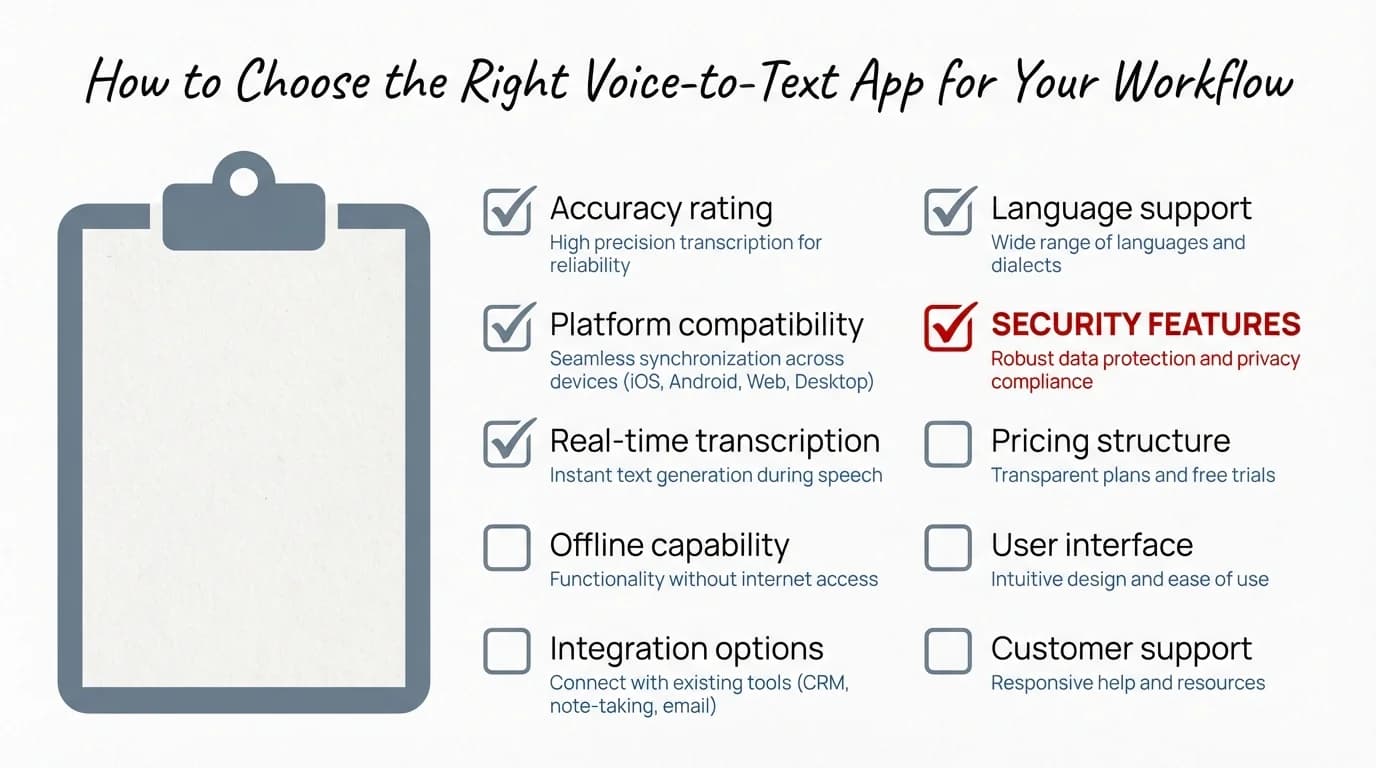
Use this checklist to pick the right voice-to-text app based on your platform, usage frequency, privacy needs, and budget
How to Pick the Right Voice-to-Text App for Your Workflow
Additionally, The best speech-to-text software for you depends on four variables: platform, use frequency, privacy requirements, and budget.
There's no universal winner here. The right pick really does depend on how you work. Consequently, Here's how to think through it:
Start with platform:
- Mac? Try Apple Dictation first. It's free and genuinely good. If it's not enough, look at Superwhisper (privacy-first) or Wispr Flow (AI formatting).
- Windows? Start with Windows Voice Typing (free). Heavy professional users should consider Dragon Professional. Everyone else: Wispr Flow or Voicy.
Consider how often you'll use it:
- Occasional dictation (a few times a week): Built-in free tools are fine
- Daily moderate use (30–60 min/day): AI formatting tools like Wispr Flow are worth the subscription
- Heavy professional use (2+ hours/day): Dragon Professional's accuracy ceiling justifies its cost on Windows; on Mac, Superwhisper + Wispr Flow is the combination most power users land on
Privacy requirements:
- Handling confidential data? Local processing only. Superwhisper (Mac), Dragon (Windows), or MacWhisper for batch processing
- General office use? Cloud tools are fine. Wispr Flow, Voicy, Windows Voice Typing
Budget:
- $0: Apple Dictation (Mac) or Windows Voice Typing — both are genuinely good in 2026
- ~$10/month: Superwhisper or Voicy — significant quality jump for daily users
- ~$15/month: Wispr Flow Pro — best AI formatting, cross-platform
- $699 one-time: Dragon Professional — only if you're a heavy Windows professional user
Furthermore, Honest advice: your microphone matters more than your software choice in most cases. Nonetheless, A $30 USB cardioid mic will do more for your accuracy than upgrading from a good free tool to a paid one. The Blue Yeti Nano or a basic lapel mic eliminates most of the accuracy problems people end up blaming on the app.
Nevertheless, And for everything you do on your phone — messages, emails, replies, social posts — CleverType's AI keyboard bridges the gap between your desktop workflow and mobile. It supports 100+ languages, fixes grammar instantly, and its voice-to-text with AI enhancement means the same quality follows you to your phone.
Look, dictation software in 2026 has fewer bad options than it ever has. Moreover, The floor is higher, the free tools are actually good, and the paid tools have mostly earned what they charge. Nevertheless, Pick something, try it for a week, and adjust from there. The 3x speed advantage over typing is real — and it's just sitting there waiting.
Frequently Asked Questions
What is the best free voice-to-text app for Mac in 2026?
Apple Dictation. It's built right into macOS, works in every app system-wide, processes audio on-device on Apple Silicon, and hits 93–95% accuracy with low latency. Nonetheless, It's free and honestly pretty hard to beat for casual use.
Is Dragon NaturallySpeaking worth buying in 2026?
For heavy Windows users in medical, legal, or similar workflows where 96%+ accuracy genuinely matters — yes, probably. For everyone else? Consequently, Not really. Modern AI tools like Wispr Flow or Voicy get you 95%+ accuracy at a fraction of $699.
What is the best dictation software for Windows that is free?
Windows Voice Typing — just press Win + H. It works in every text field, has automatic punctuation (you'll want to turn it on), and has gotten noticeably better with recent updates. Therefore, If you need full hands-free PC control too, Windows Voice Access is also free and goes further — though it's Windows 11 only.
Which voice-to-text apps work offline without an internet connection?
Apps that work fully offline include Apple Dictation (on Apple Silicon Macs), Dragon Professional (Windows), Superwhisper (Mac), and MacWhisper (Mac). These process audio locally using on-device models and don't send data to servers.
How accurate is OpenAI Whisper compared to Dragon in 2026?
OpenAI Whisper Large-v3 achieves a 2.7% word error rate on clean audio (approximately 97.3% accuracy) and outperforms Microsoft Azure and Google Speech-to-Text on meeting audio benchmarks. Dragon Professional achieves 96–99% after voice training. Both are competitive, but Dragon has better domain-specific vocabulary handling for technical fields.
What is the best AI dictation app for both Mac and Windows?
Wispr Flow is the best cross-platform AI dictation app in 2026. It works on both Mac and Windows, adapts output formatting based on the app you're using, removes filler words automatically, and offers a free tier with Pro at $15/month.
Does voice-to-text software work with any microphone?
Yes — but microphone quality directly impacts accuracy. Built-in laptop mics work, they just produce more errors. A basic USB cardioid microphone or a decent headset typically improves accuracy by 3–5 percentage points. Most apps will work with any input device set as your system microphone.
Ready to Type Smarter?
Upgrade your typing with CleverType AI Keyboard. Fix grammar instantly, change your tone, receive smart AI replies, and type confidently while keeping your privacy.
Download CleverType FreeAvailable on Android • 100+ Languages • Privacy-First
Share this article:
Sources:
- OpenAI Whisper: Robust Speech Recognition via Large-Scale Weak Supervision
- Whisper Large-v3 Model Card — Hugging Face
- The 9 Best Dictation and Speech-to-Text Software in 2026 — Zapier
- AI Speech-to-Text Tool Market Size 2025 to 2035 — Precedence Research
- Speech and Voice Recognition Market Size, Share, Growth — Fortune Business Insights
- Best Dictation Software 2026: Complete Buyer's Guide — Voicy
- Best Offline Speech Recognition Software 2026 — Weesper Neon Flow