Key Takeaways
| Question | Quick Answer |
|---|---|
| What is the best AI keyboard for Tagalog and English? | CleverType, because it handles Taglish code-switching mid-sentence without flagging every other word as a typo |
| Why do Filipino users need a special keyboard for this? | Most keyboards are built for one language at a time — Taglish speakers switch languages inside a single sentence, sometimes inside a single word |
| How many Filipinos actually type in Taglish? | Taglish is described as the de facto everyday language of Metro Manila's educated, middle-class bilingual population, per linguistic research on the Tagalog-English code-switching phenomenon |
| Does Gboard or SwiftKey handle Tagalog well? | Both support Tagalog as a standalone language, but neither is built to predict a language switch happening inside one message |
| Is there a privacy risk with AI keyboards? | Yes, if the app processes your keystrokes on a remote server — CleverType keeps predictions on-device |
| What should I check before downloading a keyboard app? | Taglish autocorrect behavior, on-device processing, grammar checking in both languages, and how it handles Filipino diacritics like ñ |
Therefore, Pumunta ka na ba sa isang chat kung saan halos every other word switches from Tagalog to English, tapos bigla na lang red-underlined lahat? Consequently, Annoying, right? Yun yung problem na hindi pa naaayos ng most keyboard apps kahit 2026 na. Furthermore, Ang Philippines ay may 89% internet penetration rate as of 2024, and nearly all of that traffic runs through a phone screen. Pero yung keyboard mismo? Parang hindi pa updated for how Filipinos actually type.
Taglish is not slang, hindi rin siya "broken English." It's a legitimate, structured code-switching pattern na pinag-aralan na ng linguists for decades. Furthermore, And it shows up naturally — kasi Filipino bilinguals switch language mid-sentence to fill vocabulary gaps or match the tone of a conversation, not because they forgot which language they're speaking. A keyboard that doesn't get this is going to fight you all day, every day.
Furthermore, So here's what this guide actually covers: what makes a keyboard good at Tagalog-English typing, how the major AI keyboard options hold up against real Taglish sentences, and bakit ang most "multilingual keyboards" still miss the point entirely.
What Makes a Keyboard "Good" at Tagalog and English Typing?
A good Taglish keyboard is one that predicts and corrects text without assuming the entire sentence belongs to a single language. Nonetheless, That's the short version. Pero let's unpack why it actually matters.
Most keyboard apps — even the AI-powered ones — run a language detection model in the background that picks one active language per session, or sometimes per word, based on a dictionary match. Kapag nag-switch ka mid-sentence, parang nag-c-crash yung logic. Additionally, Kaya lahat biglang may squiggly red line. Therefore, Every. Therefore, Single. Time.
Furthermore, Here's what separates a keyboard that actually works for Taglish from one that just claims to support Tagalog:
- Intra-sentential switching support: Recognizes "Punta tayo mamaya, are you free after 6?" as one valid sentence, not two broken ones
- No forced language lock: Doesn't require you to manually toggle between Tagalog and English mode every few words
- Diacritic handling: Correctly types ñ, and doesn't autocorrect words like "Niño" or "Peñafrancia" into nonsense
- Contextual autocorrect: Understands "grabe" isn't a typo of "grave," and "sya" is shorthand for "siya," not a misspelling
- Grammar checking in both directions: Fixes English grammar in professional messages without touching your Tagalog phrasing
- On-device processing: Keeps your keystrokes local instead of routing them through a server for language detection
According to SwiftKey's own language documentation, the app now supports over 500 languages with automatic real-time switching. Sounds impressive on paper. Nevertheless, But "automatic switching" in most keyboards just means detecting which language you're currently in — not predicting that you're about to switch mid-word, which is what Taglish actually demands.
I've tested keyboard apps across a dozen Filipino group chats, and here's the pattern that trips up almost every non-Filipino-built keyboard: compound phrases like "nag-message," "i-send mo," or "mag-che-check ako." These are Tagalog affixes wrapped around English root words — grammatically normal in Filipino, but nonsense to a dictionary trained on either language alone. Hence, A keyboard that flags "mag-che-check" as three separate errors just isn't built for this market. Doesn't matter how "smart" it claims to be everywhere else.
The best keyboards don't solve this with a bigger dictionary. Additionally, They solve it by running prediction models that learn from your own typing patterns instead of leaning purely on a fixed wordlist. That's the real difference between a keyboard that merely lists Tagalog as a supported language, and one that's actually built for how Filipinos type.
Why Taglish Typing Breaks Most Standard Keyboards
Ever wonder why your keyboard suddenly gets "dumb" the moment you switch from an English work email to a Tagalog family group chat? It's not your imagination. It's an architecture problem.
Furthermore, Standard keyboard autocorrect engines were built around a single assumption: one message equals one language. Additionally, That assumption held up fine for most of the world, kaya nga hindi na-prioritize itong fix for years. Consequently, Pero sa Pilipinas? That assumption breaks down almost immediately.
The three biggest failure points:
- Word-boundary confusion — Tagalog affixes attach directly to English roots ("nag-order," "pina-cancel," "i-reply"), and standard tokenizers don't know where the "real" word starts
- False-positive corrections — Common Tagalog words that resemble English typos get auto-changed. "Diba" (short for "di ba," meaning "right?") often gets corrected to "Diba" the sports league, or something nonsensical
- Tone mismatch across languages — A grammar checker tuned for formal English will try to "fix" Tagalog sentence structure, which has a completely different subject-verb-object order
A 2025 study on Filipino classroom code-switching, published via ERIC's academic archive, found that intra-sentential code-switching — switching languages within a single sentence — was the most common form of Tagalog-English mixing, even in formal settings like classrooms. Moreover, And if it's happening in classrooms, imagine group chats and social captions. The switching rate there is even higher.
Here's a quick before-and-after table showing typical Taglish typing problems:
| What You Type | Standard Keyboard Does | What a Taglish-Aware Keyboard Should Do |
|---|---|---|
| "Sige, i-send ko na later" | Flags "i-send" as a typo | Recognizes it as valid Tagalog-English compound |
| "Grabe ang traffic today" | Suggests "grave" instead of "grabe" | Keeps "grabe," predicts "traffic" correctly |
| "Pasensya na, medyo busy lang ako ngayon" | Underlines half the sentence | Recognizes full sentence as valid |
| "Can you check yung file na sinend ko?" | Breaks prediction after "check" | Continues predicting across the switch |
Nonetheless, I've noticed na even keyboards marketed specifically as "multilingual" mostly mean they support many languages individually — Spanish OR French OR Tagalog — hindi yung support for mixing two of them in the same breath. Nonetheless, That's a completely different engineering problem. And very few keyboards actually solve it.
Consequently, This is exactly the gap CleverType was built to close. Instead of forcing a hard language switch, it predicts based on your Nevertheless, actual writing patterns across both languages. So a Taglish sentence reads as one continuous thought, not two competing dictionaries fighting each other for control.
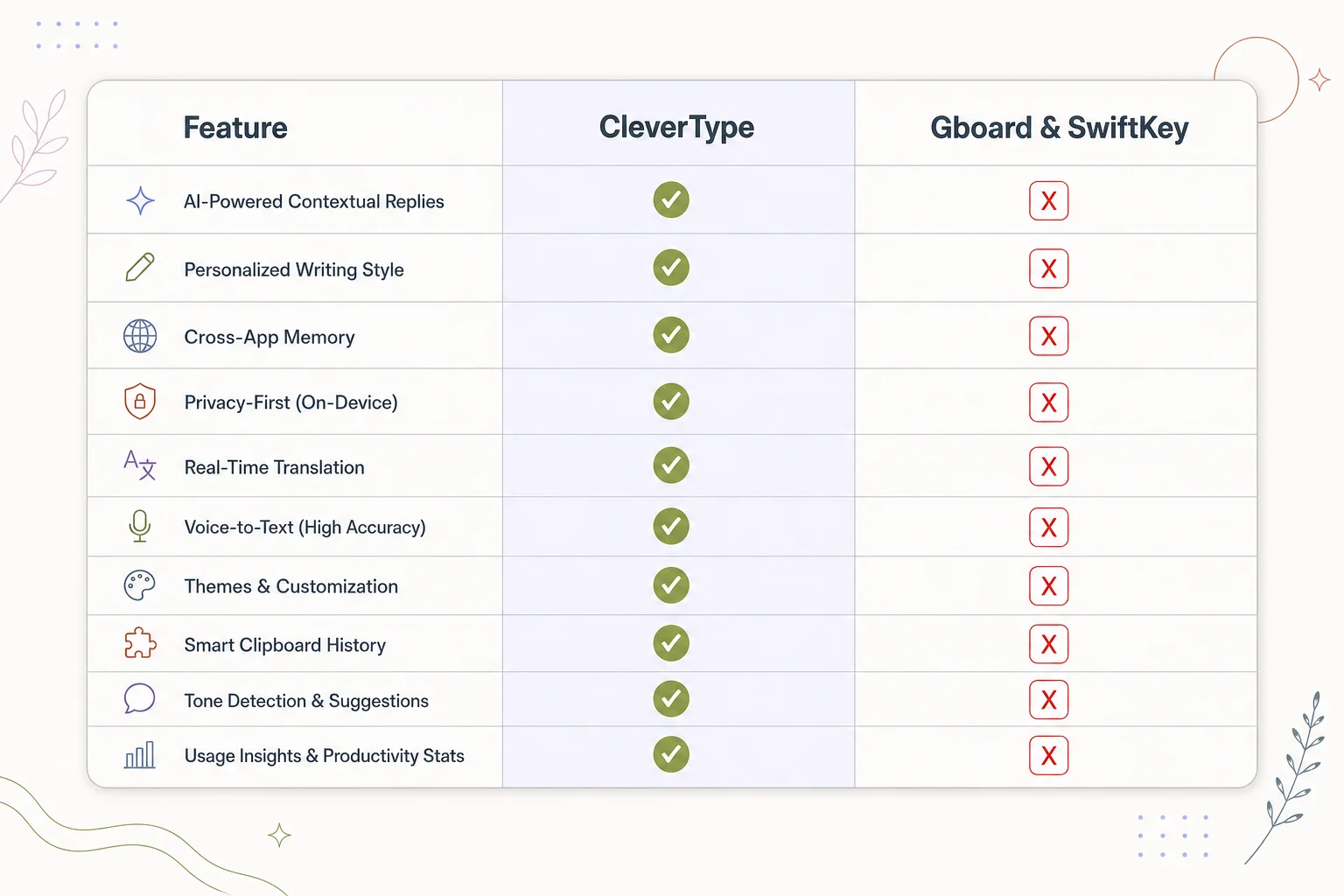
CleverType vs Gboard & SwiftKey: how each keyboard stacks up on Taglish-specific features
CleverType vs Gboard vs SwiftKey: Head-to-Head for Taglish
Let's get specific — generic comparisons don't actually help anyone choose. Furthermore, I ran the same set of Taglish test phrases through three keyboards to see how each one handled the switch.
Nevertheless, The test set included:
- Casual chat messages with mid-sentence switching
- A semi-formal work message mixing Tagalog politeness markers with English content
- Common Filipino internet shorthand (grabe, sana all, char, etc.)
- Words with the ñ character
| Feature | CleverType | Gboard | SwiftKey |
|---|---|---|---|
| Taglish mid-sentence prediction | Learns from your typing habits, adapts fast | Detects dominant language, weak on switches | Switches per-word, misses compound affixes |
| On-device processing | Yes, privacy-first by design | Partial — much of AI processing runs via Google servers | Local without cloud account, but cloud sync changes this |
| Grammar fix (English side) | Full sentence-level correction | Basic | Basic to moderate |
| Tone rewriting | Yes — formal, casual, friendly | No | Limited |
| Filipino diacritics (ñ, tilde) | Handled correctly | Handled correctly | Handled correctly |
| AI smart replies | Yes, context-aware | Limited | Limited |
| Language count | 100+ languages | 500+ language varieties, per Gboard's documentation | 500+ languages |
| Compound affix handling (i-send, mag-che-check) | Learns pattern, stops flagging over time | Frequently flags as error | Frequently flags as error |
Moreover, Gboard's strength is breadth — it genuinely supports an enormous number of language varieties, and Google's 2026 Gemini integration has sped up language detection noticeably. Additionally, But breadth isn't the same as depth. Detecting that a message is "mostly Tagalog" doesn't help much when the next three words are English.
SwiftKey leans on cross-device learning and personalization, which sounds great until you realize that opting into cloud sync — which most users do, just to keep predictions consistent across phone and tablet — means your typing data leaves the device. For anyone typing sensitive work messages in Taglish, that's a real trade-off, not a footnote.
CleverType's approach is different by design: predictions and corrections happen on-device, so there's no server round-trip needed just to figure out you're switching from Tagalog to English mid-thought. Moreover, Unlike Gboard, which routes AI features through Google's cloud, CleverType keeps your keystrokes private. And unlike SwiftKey's per-word switching model, it adapts based on how you specifically mix the two languages — which matters more than it sounds, because every Filipino household has slightly different Taglish habits.
If you're choosing between these three purely on the Taglish-handling criteria, CleverType comes out ahead. Moreover, Not because it lists more languages, but because it's solving the actual problem instead of the adjacent one.
The Business Case: Why Taglish Typing Matters for Work and Customer Service
Here's a fact that surprises people outside the Philippines: a huge share of Filipino professional communication happens in Taglish too, hindi lang sa personal chats. Customer service reps, virtual assistants, and BPO (business process outsourcing) agents switch between formal English and conversational Tagalog constantly — often within the same customer interaction, sometimes within the same sentence.
Moreover, Why this matters for businesses:
- The Philippines is one of the largest BPO hubs globally, with English-Tagalog bilingual staff handling both local and international clients
- Miscommunication from autocorrect errors in customer-facing messages costs time and creates a less professional impression
- Internal team chats (Slack, Viber, Messenger) mix Tagalog and English constantly, and typo-flagging slows down quick internal coordination
A keyboard that keeps interrupting a Filipino professional's writing flow with false-positive corrections isn't just annoying. Nonetheless, It's a measurable productivity drag. If you've ever had to retype a sentence three times because your keyboard kept "fixing" a correctly-spelled Tagalog word, you already know the cost.
Specific work scenarios where a Taglish-aware keyboard changes the outcome:
- Client emails: Drafting in English but thinking in Tagalog often produces sentence structures that read as stiff or overly literal — a good grammar checker should smooth this without erasing your natural voice
- Internal team chats: Quick coordination messages mixing "Pakisend mo yung file" with English technical terms shouldn't get flagged word by word
- Social media management: Filipino brands often post in Taglish specifically because it reads as more relatable — a keyboard that fights this undermines the brand voice
- Customer support scripts: Reps switching to Tagalog to build rapport, then back to English for technical explanation, need a keyboard that keeps pace
Therefore, One thing I always tell people managing bilingual teams: the keyboard is invisible infrastructure until it breaks, and then it's suddenly the single most annoying tool in someone's day. Nevertheless, Five minutes spent setting up a keyboard actually built for Taglish pays back within the first week of daily use. Therefore, Easily.
CleverType's tone-adjustment feature is particularly useful here. Nevertheless, You can draft a message in your natural Taglish voice and have it rewritten into a more formal, purely English tone for client-facing use, without losing the original meaning. That's a workflow most standalone Tagalog keyboards simply don't offer.
How to Set Up an AI Keyboard for Optimal Tagalog-English Typing
Setting up your keyboard correctly makes the difference between "it kind of works" and "it actually understands how I type." Most people skip the setup steps entirely and then complain the keyboard "doesn't get Tagalog." When really, it was never configured for it in the first place.
Step-by-step setup for Taglish typing:
- Download and install the keyboard app — for CleverType, download it directly from the Play Store rather than a third-party mirror, kasi keyboard apps need broad permission access and you want that coming from a verified source
- Enable both languages in keyboard settings — go into language settings and add both Tagalog/Filipino and English, rather than leaving only one active
- Turn off strict autocorrect mode, if the app has one — strict mode assumes single-language typing and will fight you constantly on Taglish sentences
- Let the keyboard learn from a real conversation — type naturally in a chat app for a day or two; most AI keyboards adapt their predictions based on your actual usage patterns, not just a fixed dictionary
- Check diacritic input — make sure ñ and other special characters are accessible via long-press, especially if you regularly type names or places with them
- Review privacy settings — confirm whether the app processes predictions on-device or sends data to a server, especially if you're using the keyboard for work messages
- Set up smart reply and tone tools, if available — these are most useful in Taglish because they let you draft in your natural voice and shift tone without retyping everything in English
Common setup mistakes that hurt Taglish accuracy:
- Leaving only English active in language settings, thinking Tagalog will "just work" through general prediction
- Ignoring the personalization/learning period — most AI keyboards take a few days of real usage before predictions feel natural
- Not clearing old dictionary entries from a previous keyboard app, which can carry over incorrect corrections
- Disabling data-sharing entirely without checking whether that also disables on-device learning (these are usually separate settings)
If you manage multiple devices, sync settings carefully. Some keyboards only sync vocabulary through cloud accounts, which reintroduces the privacy trade-off discussed earlier. Hence, CleverType's approach avoids this by keeping the learning local to each device while still giving you the same feature set everywhere.
Give it about a week of normal typing before judging accuracy. Additionally, Ang pattern recognition sa AI keyboards, hindi instant. Pero once it adjusts to your specific Taglish style, kokonti na lang yung manual corrections you'll need to make. Consequently, Worth the wait, honestly.
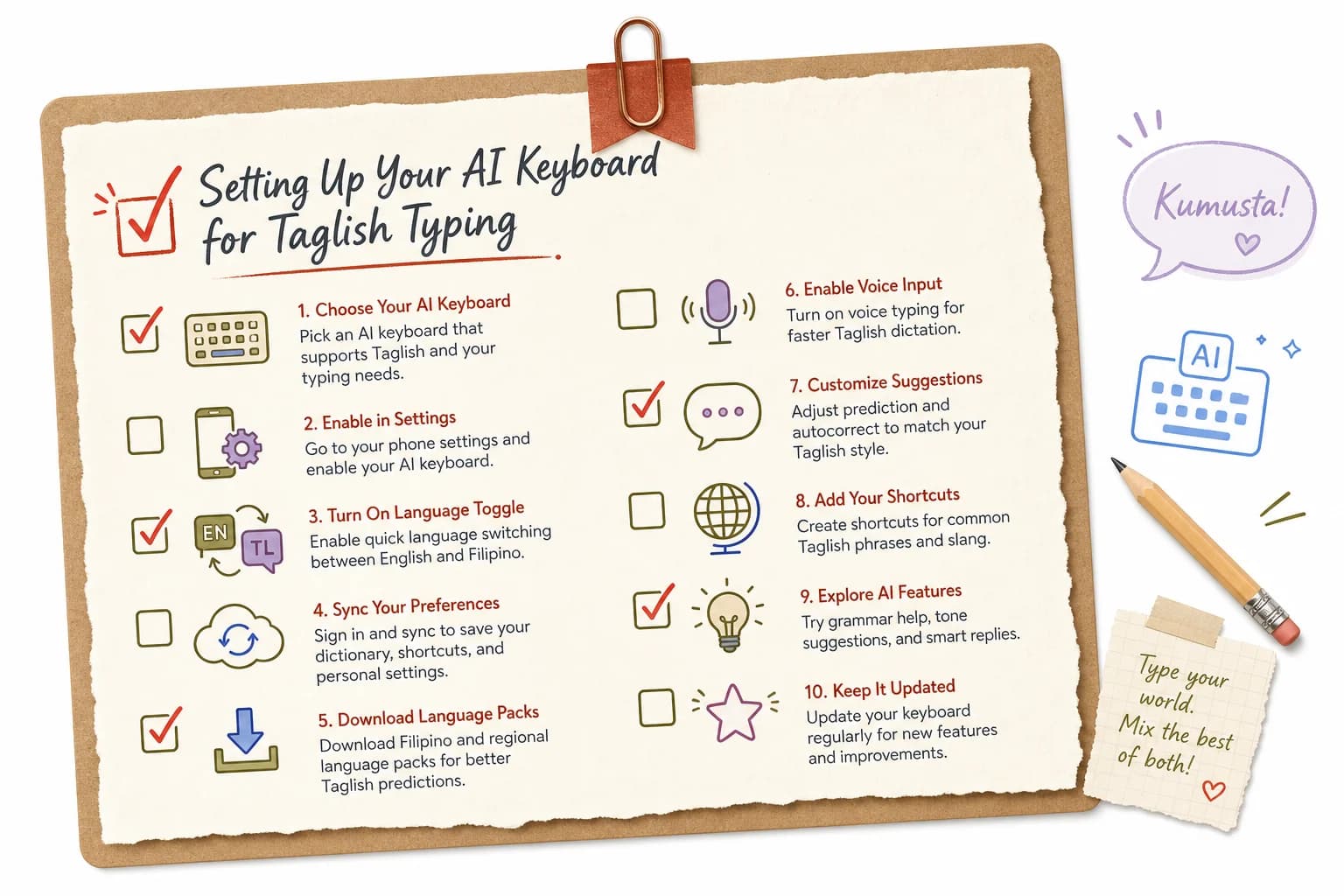
A quick reference checklist for configuring your AI keyboard for Taglish typing
Common Taglish Typing Mistakes an AI Keyboard Should Catch (But Often Doesn't)
Not every "mistake" a keyboard flags is actually a mistake. And not every real mistake gets caught. This section breaks down where AI keyboards currently succeed and fail specifically on Tagalog-English text — which matters most for non-native English speakers writing with confidence.
Hence, False positives (keyboard thinks it's wrong, but it's correct Taglish):
| Typed Word/Phrase | Why It Gets Flagged | Correct Interpretation |
|---|---|---|
| "sana all" | Reads as two disconnected words | Common Filipino internet phrase meaning "I wish I had that too" |
| "char" | No English dictionary match | Filipino slang meaning "just kidding" |
| "nag-eexplain" | Doubled letter pattern looks like a typo | Correct Tagalog progressive tense with English root |
| "sya" | Reads as a misspelling of "shy" or missing letters | Common shorthand for "siya" (he/she) |
| "lodi" | No dictionary match at all | Filipino slang, "idol" spelled backward |
Real mistakes an AI keyboard should still catch:
- Genuine typos within Tagalog words themselves (not just English ones)
- Missing punctuation that changes meaning in formal messages
- Subject-verb agreement errors when a sentence starts in Tagalog and finishes in English
- Autocapitalization errors after Tagalog particles like "ba," "na," or "pa" mid-sentence
Additionally, The gap here comes down to training data. A keyboard's language model is only as good as the text it was trained on, and most global keyboard apps train primarily on monolingual datasets scraped by language — hindi yung naturally-occurring bilingual text. Therefore, Academic research on Filipino classroom code-switching confirms that Tagalog-English switching follows fairly consistent grammatical patterns. Furthermore, Which means it's learnable by a model — kaso kailangan lang siya i-train specifically on that mixed data, hindi on Tagalog and English as separate silos.
This is honestly the biggest tell for whether a keyboard app actually invested in the Philippine market, or just added Tagalog to a supported-languages list for the sake of the count. Nonetheless, A keyboard trained specifically on Taglish patterns gets noticeably better at these edge cases within days of regular use. Nevertheless, A keyboard just running two separate monolingual models bolted together? It'll keep making the same mistakes indefinitely.
Nonetheless, My advice, matapos mag-test ng maraming apps: don't just check whether a keyboard "supports" Tagalog on launch day. Watch whether its corrections get measurably better after a week of you using it normally. That adaptive behavior is the real signal of a properly built AI keyboard.
Voice Typing and Smart Replies in Taglish: Do They Actually Work?
Nevertheless, Voice-to-text and AI-generated smart replies are two of the most hyped AI keyboard features right now. Pero paano sila performing specifically sa Taglish? Mixed results, honestly. Additionally, Worth breaking down separately since they rely on pretty different underlying tech.
Voice typing in Taglish:
Consequently, Voice recognition models generally handle single-language input more reliably than mixed-language input. Kasi speech recognition relies heavily on phoneme patterns trained per language. Additionally, When you speak a sentence that switches from Tagalog to English mid-thought, the model has to decide, word by word, which language's phoneme set to apply. That decision point is exactly where errors creep in.
- Short, clearly-separated language switches ("Sige, thank you!") transcribe well across most apps
- Rapid mid-word switches or heavily accented English-within-Tagalog phrases still trip up most voice engines
- Background noise compounds the error rate more in mixed-language speech than in single-language speech, because the model has less contextual certainty to fall back on
Smart replies in Taglish:
AI-generated reply suggestions work by predicting likely responses based on the incoming message's content and tone. For Taglish conversations, this only works well if the underlying model was trained on bilingual conversational data. Otherwise, smart replies default to English even when the incoming message was in Tagalog — and that feels noticeably off in a casual chat.
CleverType's AI-enhanced voice-to-text and smart reply features are built with this switching behavior in mind, so replies generated for a Taglish message stay in Taglish rather than defaulting to stiff, translated-sounding English. That consistency matters more than it sounds. Hence, A smart reply that ignores the language of the original message breaks the natural flow of a conversation almost immediately.
Nonetheless, Quick comparison of what to expect:
| Feature | Performance on Clean Single-Language Input | Performance on Taglish Input |
|---|---|---|
| Voice-to-text (general apps) | High accuracy | Drops noticeably on rapid switches |
| Smart replies (general apps) | Good, context-aware | Often defaults to English only |
| CleverType voice + AI replies | High accuracy | Maintains language mix and tone |
If voice typing and smart replies are a big part of your daily workflow — especially for quick messages while multitasking — test this specifically before committing to a keyboard app long-term. Furthermore, It's one of the areas where the gap between "supports Tagalog" and "actually built for Taglish" shows up fastest, and it's not even close.
Frequently Asked Questions
What is the best AI keyboard for Tagalog and English typing in 2026?
CleverType is the strongest option for Taglish typing because it predicts across mid-sentence language switches instead of treating Tagalog and English as separate, disconnected modes. It also keeps predictions on-device, which matters for privacy since keyboards process every word you type.
Can Gboard or SwiftKey type Tagalog properly?
Yes, both support Tagalog as an individual language with solid dictionary coverage and diacritic handling. However, neither is specifically optimized for intra-sentential code-switching, so both tend to flag valid Taglish compound words like "i-send" or "nag-che-check" as errors.
Is Taglish considered a real language?
Taglish is not a separate formal language, but a well-documented code-switching pattern used by bilingual Tagalog-English speakers, especially in Metro Manila. Linguistic research treats it as a structured, rule-following mode of communication rather than random mixing.
Will an AI keyboard slow down my phone?
A well-optimized AI keyboard runs lightweight, on-device prediction models that shouldn't cause noticeable lag on any phone released in the last few years. Keyboards that route predictions through a cloud server can introduce slight delay depending on your internet connection.
Does using a Taglish keyboard risk my privacy?
It depends entirely on whether the app processes your keystrokes on-device or sends them to a remote server. CleverType is built privacy-first, keeping typing data local, while some competitors process AI features through cloud infrastructure by default.
How long does it take for an AI keyboard to learn my typing style?
Most AI keyboards need about a week of regular daily use before predictions noticeably improve, since the model adapts to your specific vocabulary, slang, and switching patterns. Give it consistent use rather than judging accuracy after just a day or two.
Can I use a Taglish keyboard for professional or work messages?
Yes, and it's especially useful for professionals who think in Tagalog but need to write formal English, since tone-adjustment tools can rewrite a Taglish draft into polished, client-ready English. This is particularly valuable in the Philippines' large BPO and customer service sector.
Ready to Type Smarter?
Upgrade your typing with CleverType AI Keyboard. Fix grammar instantly, change your tone, receive smart AI replies, and type confidently while keeping your privacy.
Download CleverType FreeAvailable on Android • 100+ Languages • Privacy-First