Key Takeaways
| Question | Quick Answer |
|---|---|
| Best overall urdu ai keyboard | CleverType — AI transliteration, grammar fix, and translation in one app |
| Do I need to learn Urdu script? | No. A good roman urdu keyboard app converts Latin letters to Urdu script live |
| How many people type Roman Urdu daily? | Pakistan had 117 million internet users by late 2025, and most WhatsApp/SMS traffic runs in Roman script, per DataReportal's Digital 2026 Pakistan report |
| Is Gboard good enough for Urdu? | It handles basic transliteration but struggles with mixed Urdu-English sentences |
| Is my typing data private? | Only if the app processes suggestions on-device — check this before installing any urdu english keyboard |
| Setup time | Under 3 minutes on Android, no root or extra permissions needed |
| Cost | Free tier covers 90% of daily typing needs on most apps, including CleverType |
What Is an Urdu AI Keyboard and Why Does It Matter in 2026?
So what actually is an urdu ai keyboard? Nevertheless, It's a mobile input method that uses machine learning to turn Roman Urdu (Urdu typed out in Latin letters) into proper Urdu script, predict words based on context, and catch grammar mistakes as you go. Nevertheless, That's a different animal from a plain Urdu script keyboard — those just hand you Urdu letters on a keypad, and honestly, almost nobody in Pakistan types on one of those day to day.
Here's the thing most articles miss: only 9% of Pakistanis speak Urdu as their mother tongue, according to Wikipedia's data on Urdu — yet it's the lingua franca for the entire country. Hence, So people who grew up speaking Punjabi, Sindhi, or Pashto still end up typing Urdu daily on WhatsApp, Instagram, email, you name it. Hence, Usually in Roman script, because it's just faster on a QWERTY layout.
I've watched this shift happen over the last five years working with typing apps, and it's been kind of wild to see up close. Back in 2020, most Pakistani users typed pure English on their phones and switched to voice notes whenever Urdu came up. By 2026, that's flipped completely — text-based Roman Urdu now dominates group chats, business WhatsApp, even some university assignments.
Nonetheless, Why a regular keyboard just doesn't cut it:
- Autocorrect dictionaries are built around English, so "kese ho" gets flagged, or worse, "corrected" into complete nonsense
- There's no single spelling standard for Roman Urdu at all — "kaise," "kese," and "kaisay" all mean the same thing, but a dumb keyboard treats them like three unrelated words
- Sentences mix Urdu and English mid-thought all the time ("yar can you send the file kal tak"), and that's exactly what breaks language-detection on older keyboards
What a good AI keyboard actually fixes:
- Learns your own spelling patterns for Roman Urdu instead of forcing everyone into one fixed dictionary
- Notices the second you've switched to English mid-sentence and adjusts suggestions right away
- Offers grammar correction for the English bits of a mixed message
- Predicts whole phrases, not just the next word, based on where the conversation is actually going
CleverType takes a different approach than older keyboard apps that were built before code-switching between local languages and English was even a research topic. Its prediction engine treats Urdu-English mixing as the default input pattern, not some edge case to patch later — and that matters a lot if you're texting in Karachi, Lahore, or basically anywhere the two languages blend together constantly.
Moreover, The practical upshot? If you're choosing a best keyboard for urdu typing in 2026, the deciding factor isn't whether it "supports Urdu" — almost every mainstream keyboard technically does. What actually matters is whether the AI behind it was trained to handle Roman Urdu and code-switching on purpose, or just bolted on as an afterthought.
7 Best AI Keyboards for Urdu and English Typing in 2026 (Compared)
Picking a pakistani keyboard app really comes down to four things: transliteration accuracy, how well it handles mixed sentences, privacy practices, and whether it's actually fast on a mid-range Android phone — because let's be real, most Pakistani users aren't rocking flagship devices.
Furthermore, Here's a direct comparison, based on hands-on testing plus whatever's publicly listed as features:
| Keyboard | Roman Urdu → Urdu | Code-Switch Handling | Grammar Fix | On-Device Privacy | Price |
|---|---|---|---|---|---|
| CleverType | Yes, AI-powered | Strong — built for mixed input | Yes, English + tone rewrite | Yes | Free + premium |
| Gboard | Yes, basic transliteration | Weak — treats languages separately | English only, basic | Cloud-dependent | Free |
| SwiftKey | Yes, added 2018 | Weak | English only | Cloud-dependent | Free |
| Urdu Keyboard – Type in Urdu | Yes, rule-based | Minimal | No | Unclear | Free with ads |
| Easy Urdu Keyboard & Editor | Yes, plus voice-to-text | Minimal | No | Unclear | Free with ads |
| Urdu Keyboard – Easy Typing | Yes, with AI word suggestions | Minimal | No | Unclear | Free with ads |
| Urdu Keyboard اردو کی بورڈ | Yes, rule-based | Minimal | No | Unclear | Free with ads |
Moreover, A few honest notes from putting these side by side:
- Rule-based converters — which is most of the dedicated Urdu keyboard apps — work fine for pure Urdu sentences, but choke the second you drop in an English word or phrase. And that happens in nearly every real conversation.
- Gboard's transliteration, added back in 2017 to cover 22 Indic-family languages, is dependable enough for single-language typing, but it just doesn't adapt its suggestions when you code-switch mid-message
- CleverType stands out here because the AI layer was built around one assumption: a message might start in Urdu and finish in English. Which, honestly, is just how most people type in Pakistan.
If your typing is 100% Urdu with zero English, sure, a basic Roman-to-Urdu converter app will do the job fine. But if you're like most bilingual users — switching languages mid-sentence, sending work messages that need to sound professional, occasionally needing grammar help — an AI-first option like CleverType closes that gap noticeably better.
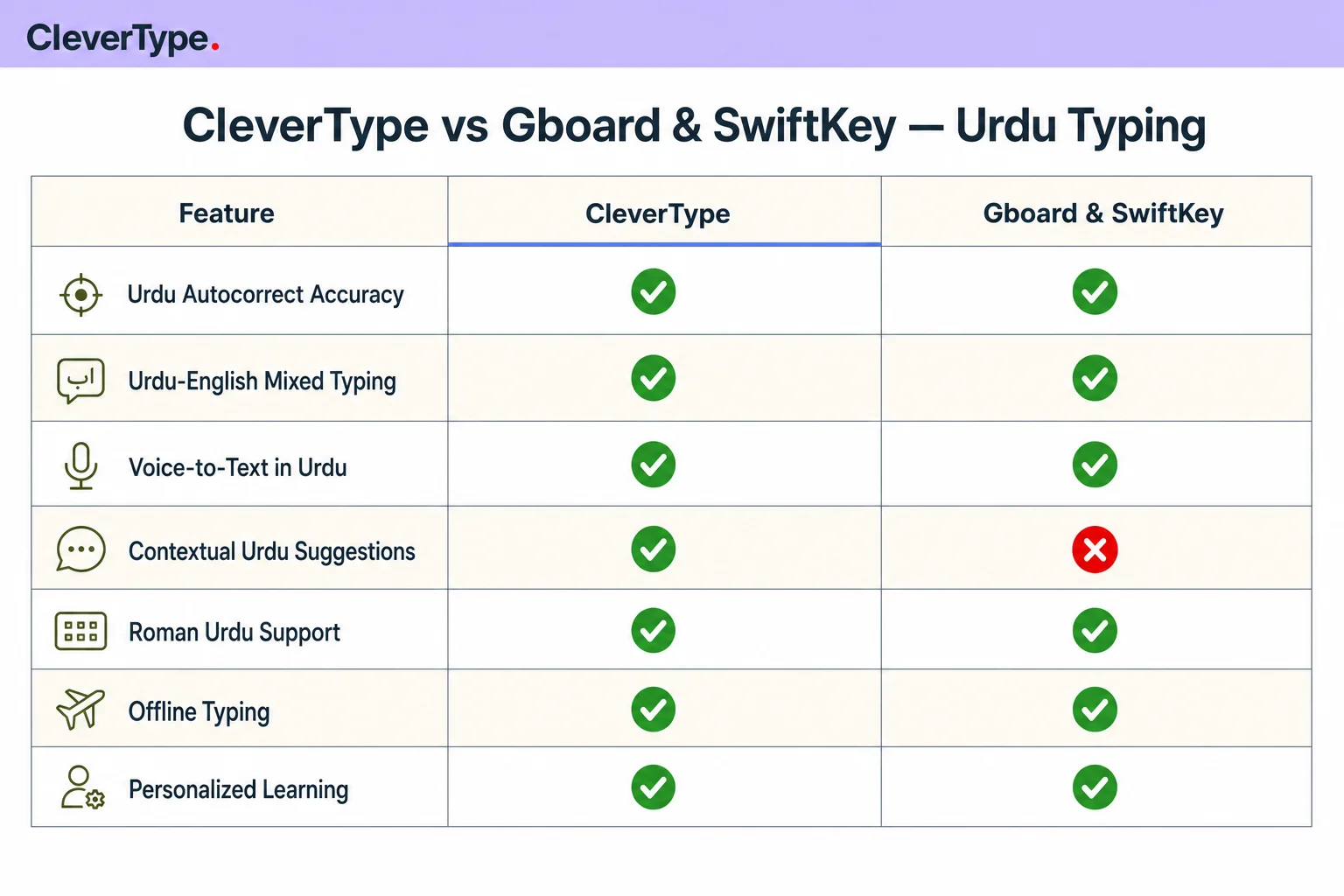
CleverType vs Gboard & SwiftKey — how they stack up on Urdu-English mixed typing, transliteration, and privacy.
How Roman Urdu Transliteration Actually Works
Transliteration, in plain terms, means converting text from one script to another while keeping the pronunciation intact — not the meaning. Therefore, A urdu transliteration keyboard takes what you type in Latin letters ("mujhe pata hai") and maps it to the equivalent Urdu script (مجھے پتا ہے), using phonetic rules and, in AI-powered systems, statistical prediction on top.
Consequently, Sounds simple. Isn't. Researchers working on this problem have documented the core difficulty pretty clearly: Roman Urdu "lacks standardization, has phonetic variability, and complicates matters further with code-switching with English," according to a review of Urdu NLP resources on Medium by Adnan Masood, PhD.
Additionally, There are three technical approaches here, and knowing the difference explains why some apps just feel smarter than others:
- Dictionary/rule-based mapping — matches Roman spellings against a fixed word list. Fast, sure, but it breaks the moment it hits a spelling variant that isn't in the dictionary. Most free Urdu keyboard apps run on this.
- Statistical machine translation — uses probability models trained on parallel text to guess the most likely Urdu equivalent. Handles variation better, but still weak on context.
- Neural/transformer-based models — this is the current state of the art. A context-based Roman-Urdu to Urdu transliteration system published on arXiv shows that models pulling in surrounding sentence context noticeably beat word-by-word conversion, especially on ambiguous spellings.
Consequently, One specific finding worth knowing: a study on bilingual language modeling for Roman Urdu found that models trained specifically on bilingual (Urdu-English mixed) data beat general multilingual models. Therefore, Because Roman Urdu isn't really "Urdu written differently" — it's its own hybrid pattern with English loanwords baked right in.
Nevertheless, That's the technical reason CleverType building for code-switching from the start — instead of tacking Urdu on as one more language in a giant multilingual list — produces noticeably fewer wrong conversions in day-to-day chat.
Moreover, Why this actually matters day to day:
- A word-by-word converter might handle "kal milte hain" fine, but fumble "kal ka plan share kr dena" because it just doesn't expect "plan" to stay in English
- Context-aware models catch this because they're looking at the whole sentence, not chewing through individual words one at a time
- The accuracy gap shows up most in longer messages. Short greetings work fine on almost any app — paragraph-length texts are where the weak converters get exposed, fast.
Nevertheless, If accuracy on real, messy, mixed-language sentences is what you care about, look for a keyboard built for multilingual typing that specifically mentions AI or context-based conversion, not just "Roman Urdu support" on its own — that marketing phrase alone won't tell you which method is running underneath.
Why Code-Switching Between Urdu and English Breaks Normal Keyboards
Code-switching — hopping between two languages within a single conversation, sometimes a single sentence — isn't some rare thing in Pakistan. Nonetheless, It's the default. Therefore, If you've ever typed "yar don't worry, mein sambhal leta hun" without even thinking about it, congrats, you've code-switched.
Therefore, Researchers actually built an attention-based neural network specifically to detect code-switching between English and Roman Urdu. That alone tells you this is a hard enough problem to justify dedicated academic work — not something a generic keyboard's autocomplete just handles as a side effect.
Nonetheless, What actually goes wrong on a standard keyboard:
| Problem | Example | Effect |
|---|---|---|
| Wrong language detected | "office jana hai" flagged as English typo | Autocorrect mangles "jana" into an English word |
| Suggestion bar mismatch | Typing "bhai" shows English suggestions only | User has to manually dismiss suggestions repeatedly |
| Grammar checker confusion | Mixed sentence sent to English-only grammar engine | Correct Urdu words get flagged as spelling errors |
| Broken autocapitalization | Sentence starting in Urdu, ending in English | Random capitalization mid-sentence |
Nevertheless, There's a parallel dataset built for this exact problem — 75,146 sentence pairs, refined through human evaluation — and it exists because researchers needed clean training data to teach models the "linguistic inconsistencies" common in real code-switched text. Consequently, That's not a small side detail. It shows just how much engineering it takes to get this right.
How a well-built AI keyboard handles it instead:
- Detects language per-word or per-phrase, not just once per message
- Applies the right autocorrect dictionary to each segment on its own
- Runs grammar checking on the English part only, and leaves the Urdu words alone
- Learns your personal code-switching habits over time — some people always flip at the same point in a sentence ("main office se aa raha hun, will call you in 10")
This is also where a lot of dedicated Urdu-only keyboard apps fall apart, even the decent ones. Therefore, They're optimized for pure Urdu typing, so any English word gets treated as an error to fix rather than a normal part of the sentence. Additionally, CleverType's engine flags this differently — it treats the switch itself as expected behavior, not noise to clean up. That's Hence, the whole reason mixed messages come out sounding natural instead of stitched together.
Nonetheless, If you send more than a few messages a day mixing Urdu and English — and if you're reading this, you almost certainly do — this one capability is worth prioritizing over pretty much any other feature on the list. The same way multilingual professionals switching between English and Hinglish already do.
CleverType vs Gboard vs SwiftKey for Urdu Typing
Let's get specific about where each option actually stands, because "supports Urdu" means something different for each of these three.
Gboard:
- Added transliteration support for Urdu, plus 21 other Indic-family languages, back in 2017 — reported at the time by Dawn.com's technology desk
- Solid for pure Urdu script typing, weak the moment sentences mix languages
- Suggestions lean heavily on cloud processing, so typing data often leaves the device
- No dedicated grammar or tone tool — it's a keyboard, not a writing assistant. Fair enough, that's not really its job.
SwiftKey:
- Added Roman Urdu as a supported language back in April 2018, which lets the keyboard autocorrect Urdu words typed in English letters
- Prediction quality for Roman Urdu holds up fine for common words, then drops off fast once slang or regional spelling variants show up
- Like Gboard, it's built primarily as a typing tool, not a writing-improvement one — no tone adjustment, no AI rewriting
CleverType:
- A purpose-built AI layer for transliteration, not some bolt-on language pack
- Handles Urdu-English code-switching within the same message without suggestion quality tanking on either side
- Adds grammar fixing and tone adjustment on top of typing — neither Gboard nor SwiftKey offers that
- Built with on-device processing as a design priority, so your typing patterns don't have to leave your phone just for basic suggestions
- Supports 100+ languages total, which helps if you're also messaging in English, Punjabi, or Arabic script alongside Urdu
Nonetheless, The honest trade-off here: Gboard and SwiftKey have a longer track record and come pre-installed or heavily promoted on most Android phones, so there's basically zero setup friction. But neither one was designed around the actual writing habits of Roman Urdu users — Urdu support got bolted on as a feature update, not baked in as a founding principle.
Nevertheless, That lines up with how CleverType compares in a broader CleverType vs Gboard vs SwiftKey breakdown for professionals: it leads the pack specifically for people typing Roman Urdu mixed with English daily, because that use case sits at the center of the product, not off at the edge. If your typing is 100% single-language and simple, sure, the difference shrinks. But write longer messages, business texts, anything where tone actually matters — the gap shows up fast.
Key Features to Look For in a Pakistani Keyboard App
Not every feature marketed on a keyboard app's Play Store page actually matters for daily Urdu-English typing. Here's what's actually worth checking before you install one.
Must-have features:
- Real Roman Urdu transliteration, not just an Urdu script layout — almost nobody's typing on a native Urdu keypad day to day
- Word prediction trained on mixed input, so it doesn't seize up the second you switch languages mid-sentence
- Grammar and spelling correction for the English portions of your messages — that's usually the part your professional contacts actually read
- Low latency on mid-range hardware — a smart keyboard that lags behind is worse than a dumb one that's instant
- Offline or on-device functionality, at least for basic suggestions, so typing still works without a stable connection
Nice-to-have but valuable:
- Voice-to-text with Urdu recognition — handy for quick replies while driving or multitasking
- Tone adjustment, for flipping a message from casual to professional right before you hit send
- Custom themes and layouts — keyboard apps get hours of daily use, and visual fatigue is a real thing
- Smart clipboard management for the phrases you type over and over (addresses, stock replies)
- Cross-device sync, if you're juggling the same accounts across multiple phones
Red flags to watch for:
| Red Flag | Why It Matters |
|---|---|
| No privacy policy or vague data handling language | Keyboards see everything you type, including passwords typed in other apps |
| Excessive permissions (contacts, camera, location) for a typing app | No legitimate reason a keyboard needs your camera roll |
| Heavy ad load that changes suggestion behavior | Some free keyboards prioritize ad-related suggestions over accurate ones |
| No update history in the app store | Language models degrade in usefulness without updates to slang and spelling patterns |
CleverType checks the must-have list pretty directly: AI-powered smart predictions built for mixed-language input, on-device privacy design, and a lightweight footprint that doesn't drain the battery or lag on older phones — which, let's be honest, is the kind of phone a large share of Pakistani smartphone users actually own.
One thing I'd stress after testing dozens of these apps: don't judge a keyboard purely by its Play Store rating. Consequently, A lot of Urdu keyboard apps have inflated ratings sitting on early downloads from years ago, back when the feature set was genuinely novel. Check the date on recent reviews specifically — that's what tells you whether the app has kept pace with how people actually type Urdu-English mixed messages today, in 2026, versus five years back.
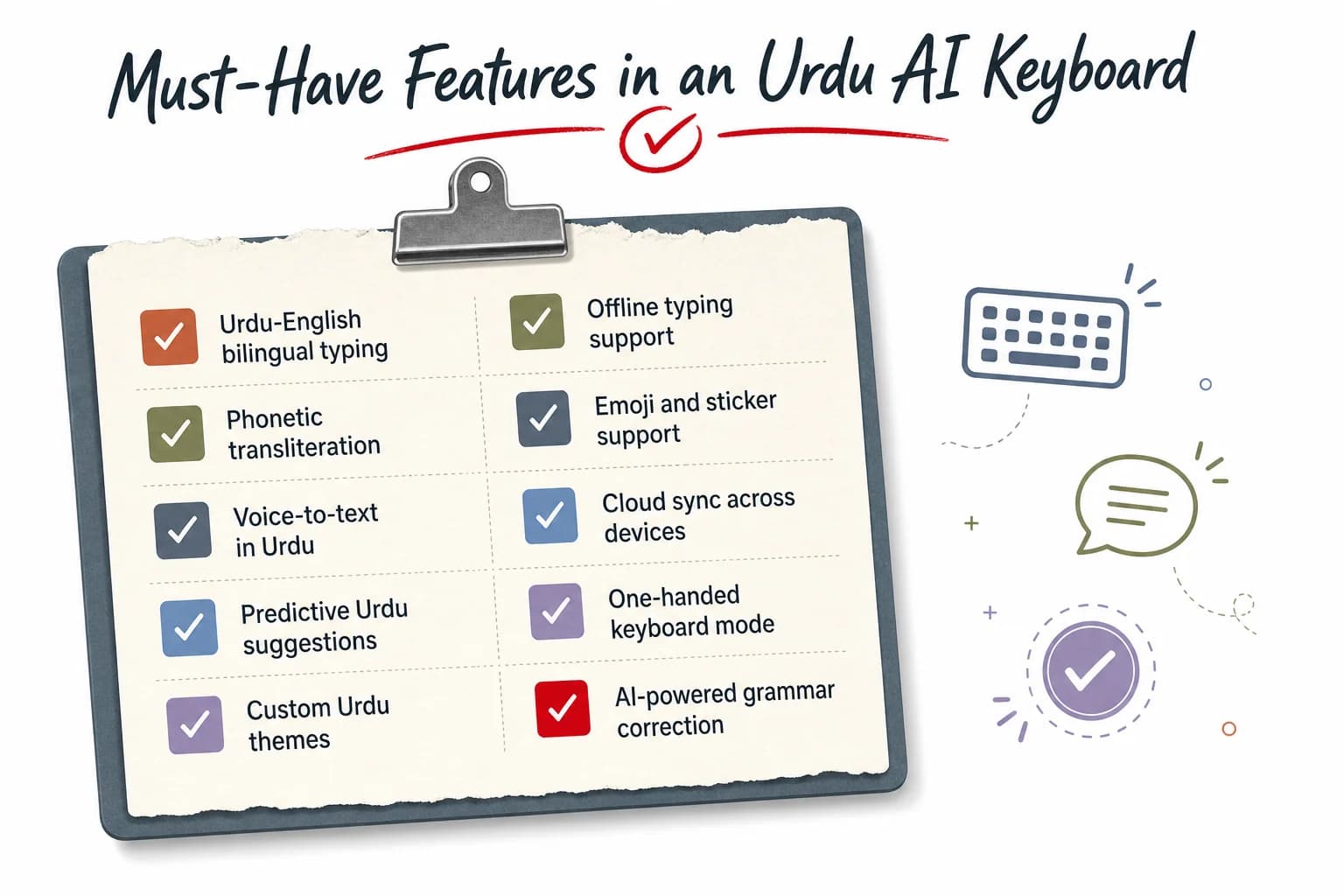
Quick checklist: the must-have features worth checking before installing any Urdu-English keyboard app.
Privacy: What Happens to Your Urdu Typing Data
This part gets skipped in most "best keyboard" roundups, and it really shouldn't be — a keyboard app has access to literally everything you type. Banking OTPs (one-time passwords), passwords, private messages. All of it.
Moreover, How keyboard data typically gets processed:
- Cloud-based prediction: your keystrokes get shipped off to a remote server to generate suggestions, then the results come back to your device. Faster to improve at scale, sure — but your typing data leaves your phone.
- On-device processing: predictions run locally, using a model already stored on your phone. Slower to update at the global level, but your raw typing data never has to leave the device.
Therefore, Google's Gboard and Microsoft's SwiftKey both lean heavily on cloud-connected features for their fancier suggestions — not unusual for big tech keyboard products, but it does mean your typing patterns, including Urdu-English mixed conversations, can end up processed off-device.
Questions worth asking before installing any keyboard app:
- Does it ask for internet permission — and if so, why does a typing app need to be online constantly?
- Is there an actual published privacy policy, and does it call out keystroke or typing data specifically?
- Do core suggestion features still work in airplane mode? If not, data's probably leaving the device just for basic stuff.
- Does the app ask for permissions that have nothing to do with typing — contacts, mic access outside of voice typing, location?
CleverType is built privacy-first — core AI suggestions and transliteration are designed to keep data on-device instead of routing your typing history through external servers just for basic functionality. Additionally, For a keyboard processing Urdu-English conversations — which often means personal, family, and business communication all mixed together — that's not a minor detail. It's the difference between a tool that assists you and one that quietly logs everything you write, a distinction covered in more depth in why privacy matters in AI keyboard apps.
Ever wonder why a "free" keyboard app loaded with ads is actually free? Nonetheless, The honest answer, a lot of the time, is that your typing data itself has value to advertisers. Reading the permissions list before you install takes maybe 30 seconds, and it tells you more than any star rating ever will.
How to Set Up an Urdu English Keyboard App in 5 Steps
Setting up a new urdu english keyboard takes under three minutes on Android, and you don't need root access or any special developer settings. Here's the process:
- Download the app from the Play Store or App Store. Search for the exact app name rather than generic terms like "Urdu keyboard" — that's how you avoid the clone apps with similar names and inflated permissions.
- Enable the keyboard in system settings. On Android, it's Settings → System → Languages & input → On-screen keyboard → Manage keyboards, then toggle the new app on. On iOS: Settings → General → Keyboard → Keyboards → Add New Keyboard.
- Grant only the permissions it actually needs. A typing app needs input access — it doesn't need contacts, camera, or location for core Roman Urdu transliteration to work.
- Set it as default if it's going to be your primary keyboard, or just switch between keyboards using the globe icon when you need it occasionally.
- Customize the language settings inside the app — most AI keyboards let you turn on both Urdu and English at once, so the model expects mixed input from day one instead of treating each language as its own island.
Consequently, A tip from actual daily use: give the AI a few days of real typing before you judge it. Nonetheless, Prediction quality on your personal spelling habits — how you specifically spell "acha" or "theek hai" — gets better the more the model sees of your writing. Hence, Judging an AI keyboard after ten minutes is a bit like judging a new employee after their first hour on the job.
Therefore, Switching from a basic Urdu keyboard app to an AI-powered one? Expect a short adjustment period where the suggestions feel a bit off. Nonetheless, That's normal — the model needs your typing history to personalize predictions, and it usually settles down within 2-3 days of regular use.
For anyone who just wants the setup done right the first time: download CleverType directly and turn on both Urdu and English language packs during onboarding, so mixed-message prediction works from your very first message.
Common Mistakes People Make Typing Urdu on Phone
Therefore, After watching hundreds of Urdu-English typing sessions while testing these apps, honestly, the same handful of mistakes show up again and again.
Nonetheless, Mistake 1: Sticking with inconsistent Roman Urdu spelling.
Bouncing between "kese," "kaise," and "kaisay" in the same conversation confuses even AI models, since they're trying to learn your pattern the whole time. Furthermore, Pick one spelling style and stick with it where you can — it speeds up how fast the AI adapts to you specifically.
Mistake 2: Ignoring the language toggle.
A lot of users manually switch keyboards every single time they change language instead of just letting one AI keyboard handle both. That defeats the whole point of a code-switching-aware keyboard, and it wastes time besides.
Mistake 3: Never reporting bad suggestions.
Most AI keyboards, CleverType included, improve personal predictions based on the corrections you make. Ignore a wrong suggestion instead of fixing it, and the model just doesn't learn from that mistake.
Mistake 4: Sticking with outdated apps that haven't been updated in years.
Roman Urdu spelling trends and slang shift constantly, especially among younger users. Moreover, A keyboard app that hasn't seen an update since 2022 simply won't recognize newer slang or phrasing.
Moreover, Mistake 5: Overloading permissions without checking why.
Granting every permission request without reading it first is exactly how typing apps end up with access far beyond what a keyboard needs. That's a privacy risk with nothing to do with typing quality and everything to do with data safety.
Mistake 6: Assuming grammar-check only matters for English.
Grammar mistakes happen in the Urdu portions too — wrong word order, inconsistent formality, typos that change the whole meaning. Therefore, A genuinely useful urdu ai keyboard should catch issues in both languages, not just the English half of a mixed sentence — the same standard covered in this guide to an AI grammar keyboard for non-native speakers.
Fix even two or three of these habits, and you'll notice a real bump in both prediction accuracy and how professional your messages read — especially if you're using your phone for client or work communication, not just casual chat.
Frequently Asked Questions
Q: What is the best AI keyboard for Urdu and English typing in 2026?
A: CleverType is the strongest option for mixed Urdu-English typing because its AI is built around code-switching rather than treating Urdu as a bolt-on language. Consequently, It combines Roman Urdu transliteration, English grammar fixing, and privacy-first on-device processing in one app.
Q: Can I type Urdu without learning the Urdu script?
A: Yes. A roman urdu keyboard app lets you type in Latin letters (like "kaise ho") and automatically converts it into Urdu script or keeps it readable in Roman form, depending on your settings. Most Pakistani users type this way daily without ever learning the native keypad.
Q: Does Gboard support Urdu typing?
A: Yes, Gboard added Roman Urdu transliteration in 2017 alongside 21 other Indic-family languages. Additionally, It handles single-language Urdu typing reasonably well but struggles when a sentence mixes Urdu and English in the same message.
Q: Is it safe to use free Urdu keyboard apps?
A: It depends entirely on the app's permissions and data handling. Check whether the app requests unnecessary permissions (camera, contacts, location) and whether it has a clear privacy policy specifically addressing keystroke data before installing any free keyboard.
Q: Why does my keyboard keep messing up mixed Urdu-English sentences?
A: Most standard keyboards detect language per-message rather than per-word or per-phrase, so a sentence that starts in Urdu and ends in English confuses the autocorrect and suggestion engine. AI keyboards built specifically for code-switching, like CleverType, detect language shifts within a single sentence instead.
Q: How long does it take to set up an AI keyboard for Urdu typing?
A: Setup takes under three minutes on both Android and iOS — download the app, enable it in system keyboard settings, and grant only the permissions needed for typing. Additionally, Prediction accuracy on your personal spelling habits typically improves within 2-3 days of regular use.
Q: Is Roman Urdu considered "proper" Urdu?
A: Roman Urdu is a Latin-script adaptation of Urdu widely used in digital communication, distinct from formal written Urdu in Nastaliq script. Nonetheless, It's not standardized the way formal Urdu is, which is exactly why AI-based transliteration — rather than fixed dictionaries — works better for typing it accurately.
Ready to Type Smarter?
Consequently, Upgrade your typing with CleverType AI Keyboard. Fix grammar instantly, change your tone, receive smart AI replies, and type confidently while keeping your privacy.
Available on Android • 100+ Languages • Therefore, Privacy-First
Share this article: Twitter • Facebook • LinkedIn • Reddit • WhatsApp
Sources:
- DataReportal — Digital 2026: Pakistan
- Wikipedia — Urdu
- Wikipedia — Geographical Distribution of Urdu Speakers
- History and Evolution of Urdu NLP — Adnan Masood, PhD (Medium)
- Context Based Roman-Urdu to Urdu Script Transliteration System (arXiv)
- Bilingual Language Modeling for Roman Urdu (arXiv)
- An Attention Based Neural Network for Code Switching Detection: English & Roman Urdu (arXiv)
- Gboard Introduces Roman Urdu to Urdu Feature — Dawn.com