Key Takeaways
- •One-handed typing mode shifts the keyboard layout to one side of the screen so your thumb can reach all keys comfortably
- •AI keyboards with one-hand mode use predictive text and swipe typing to compensate for reduced key coverage
- •CleverType leads in AI-powered single hand typing with smart predictions, grammar fixes, and privacy-first design
- •Around 2 million people in the US live with upper limb loss or limb difference, making one-handed keyboard apps essential tools
- •One-handed mode is also popular for everyday use — eating, commuting, carrying bags — not just accessibility
- •Swipe typing in one-hand mode can reach speeds of 40–60 WPM with practice
- •The best ai keyboard one hand setups combine layout shifting, AI word prediction, and voice input as a fallback
Typing with one hand on a phone is genuinely awkward. The standard keyboard stretches across the full width of the screen, and unless you have freakishly long thumbs, reaching the Q or P key without risking dropping your phone is... not ideal. Furthermore, So what's the fix?
Furthermore, According to W3C's Web Accessibility Initiative, millions of people rely on alternative input methods daily — and mobile one-handed typing is one of the most commonly needed. Nevertheless, Whether you're juggling a coffee, gripping a subway pole, recovering from a wrist injury, or living with a limb difference, a decent one-handed keyboard with AI support can make a surprising amount of difference.
This guide covers what actually works, what doesn't, and why CleverType stands out as the best option if you want real AI smarts combined with one-hand usability.
What Is One-Handed Typing Mode and Why Does It Matter?
Furthermore, One-handed typing mode is basically a setting that squishes the keyboard over to one side of the screen so all the keys sit within thumb reach. Most implementations shrink the keyboard width by 20–30% and park it on the left or right edge.
Nonetheless, Why does this matter? Think about how you actually use your phone. Nevertheless, You hold a bag, a drink, a railing — and still need to fire off a quick message. Standard layouts were built for two thumbs, and stretching one thumb across a 6-inch screen to hit the Q or P key is uncomfortable at best, risky at worst.
The numbers back this up. Perkins School for the Blind's assistive technology resource shows that one-hand typing needs cover a really wide range of people — from those with permanent disabilities to anyone in temporary recovery after surgery. But honestly, everyday multitasking drives most of the adoption.
Here's when people actually need single hand typing:
- Commuting — holding a pole or handle while checking messages
- Cooking or eating — one hand occupied, one scrolling
- Injury recovery — broken wrist, cast, or post-surgery limitations
- Limb differences or amputations — permanent need for one-hand input
- Carrying a child — parents know this one well
- Driving (parked) — quick message before moving
Furthermore, The AI part matters because smaller keys mean more typos. Smart autocorrect, word prediction, and swipe typing all make up for the lost precision that comes with a single thumb. Without AI backing it up, one-hand mode gets frustrating fast.
How AI Makes One-Handed Typing Actually Work
Nevertheless, Here's something most keyboard reviews miss: one-hand mode without AI is barely worth it. The keys get smaller, your thumb angle gets awkward, and your error rate goes through the roof. The AI layer is what makes it actually usable.
Moreover, AI word prediction watches how you type and fills in full words after just 2–3 keystrokes. For one-hand mode, this is huge — you type less, so fewer small-key errors snowball into a mess. CleverType's engine learns your actual vocabulary and context, not just generic common phrases.
Swipe or gesture typing is probably the biggest win for one-hand mode, honestly. Nevertheless, Instead of tapping each key individually, you just slide your thumb across the letters in one motion. Moreover, The AI reads the shape of that path and converts it to a word. It works shockingly well even on a compressed layout — research on mobile text entry shows gesture input blows tap-based input out of the water for one-handed users.
Here's a quick breakdown of how AI features map to one-hand typing needs:
| AI Feature | How It Helps One-Hand Typing |
|---|---|
| Word prediction | Fewer keystrokes needed, less reaching |
| Swipe/gesture typing | One continuous motion replaces multiple taps |
| Auto-correct | Catches the extra errors from smaller key targets |
| Voice-to-text | Full fallback when typing feels too fiddly |
| Context-aware suggestions | Suggests full phrases, not just words |
| Grammar fix | Cleans up rushed one-thumb messages |
CleverType stacks all of these in one app. Most keyboards give you one or two. Getting all of them together is rarer than you'd think.
CleverType: The Best AI Keyboard One Hand Experience
Honestly, CleverType is the best option right now if you actually need a proper one hand mode ai keyboard. Nonetheless, It doesn't just shift the layout over — it builds a whole AI writing assistant right into the keyboard itself. Additionally, That's a bigger deal than it sounds.
The difference from Gboard and SwiftKey comes down to AI depth. Gboard shifts the keyboard and has decent swipe typing — fine. Hence, But the suggestions are tied to Google's servers, so your keystrokes leave your device. SwiftKey brings in Microsoft Copilot, but the one-hand mode feels bolted on, like an afterthought. Therefore, Neither one was really built with one-handed use at the center.
Nevertheless, CleverType's approach:
- Layout shift — keyboard anchors left or right, scaled for comfortable thumb reach
- AI predictions — context-aware, learns your writing style
- Grammar fix on-keyboard — one tap fixes sentences as you type
- Tone adjustment — rewrite a message from casual to professional without leaving the keyboard
- Smart AI replies — suggests full responses in messaging apps
- Privacy-first — processing happens on-device, your words don't go to external servers
- 100+ language support — multilingual single hand typing with the same AI quality
Here's the thing about the privacy side — if you're typing sensitive messages one-handed (medical notes, work stuff, personal texts), you probably don't want those words going up to Google's or Microsoft's servers for “personalization.” CleverType keeps it all on your device. Furthermore, For a lot of people, that's not a small thing.
Download CleverType and try the one-hand mode with full AI assistance.
Top AI Keyboards with One-Handed Mode Compared
So how do the main options actually stack up? Consequently, Here's an honest rundown based on what matters for ai keyboard one hand use:
1. CleverType — Editor's Choice
Hence, CleverType wins this one pretty clearly. The AI feature set is deeper than anything else here — grammar fix, tone rewriting, AI replies — and it all works inside whatever app you're using without switching out. Furthermore, That's a real time saver when you've only got one thumb going.
Moreover, Best for: Anyone who wants actual AI writing help alongside one-hand mode. Furthermore, Especially solid for professionals, non-native English speakers, and anyone who cares about what happens to their data.
2. Gboard
Gboard's floating keyboard technically handles one-handed use — resize it, move it around. Swipe typing is solid. But the AI stops at word suggestions and Google integrations. No grammar fix, no tone adjustment. Moreover, It's fine, just not built for this.
Furthermore, Best for: Google ecosystem users who just need a basic floating one-hand option.
3. Microsoft SwiftKey
SwiftKey has a real one-hand mode and Microsoft Copilot for grammar and rewrites. The prediction engine is genuinely strong — I'll give it that. Hence, But Copilot needs internet to work, and the interface gets cluttered fast. Not the cleanest experience.
Consequently, Best for: Users already deep in the Microsoft ecosystem who want Copilot built in.
4. Chrooma
Chrooma is genuinely underrated — proper one-hand mode, adaptive color themes, decent word prediction. Nonetheless, The AI layer is thinner than CleverType or SwiftKey, but the layout shift is clean and actually feels responsive.
Consequently, Best for: Users who care more about a clean, good-looking one-hand layout than deep AI features.
Comparison Table
| Keyboard | One-Hand Mode | AI Predictions | Grammar Fix | Privacy | Voice Input |
|---|---|---|---|---|---|
| CleverType | Yes | Advanced | Yes | On-device | Yes |
| Gboard | Floating only | Basic–Good | No | Cloud | Yes |
| SwiftKey | Yes | Good | Via Copilot | Cloud | Yes |
| Chrooma | Yes | Basic | No | Mixed | Limited |
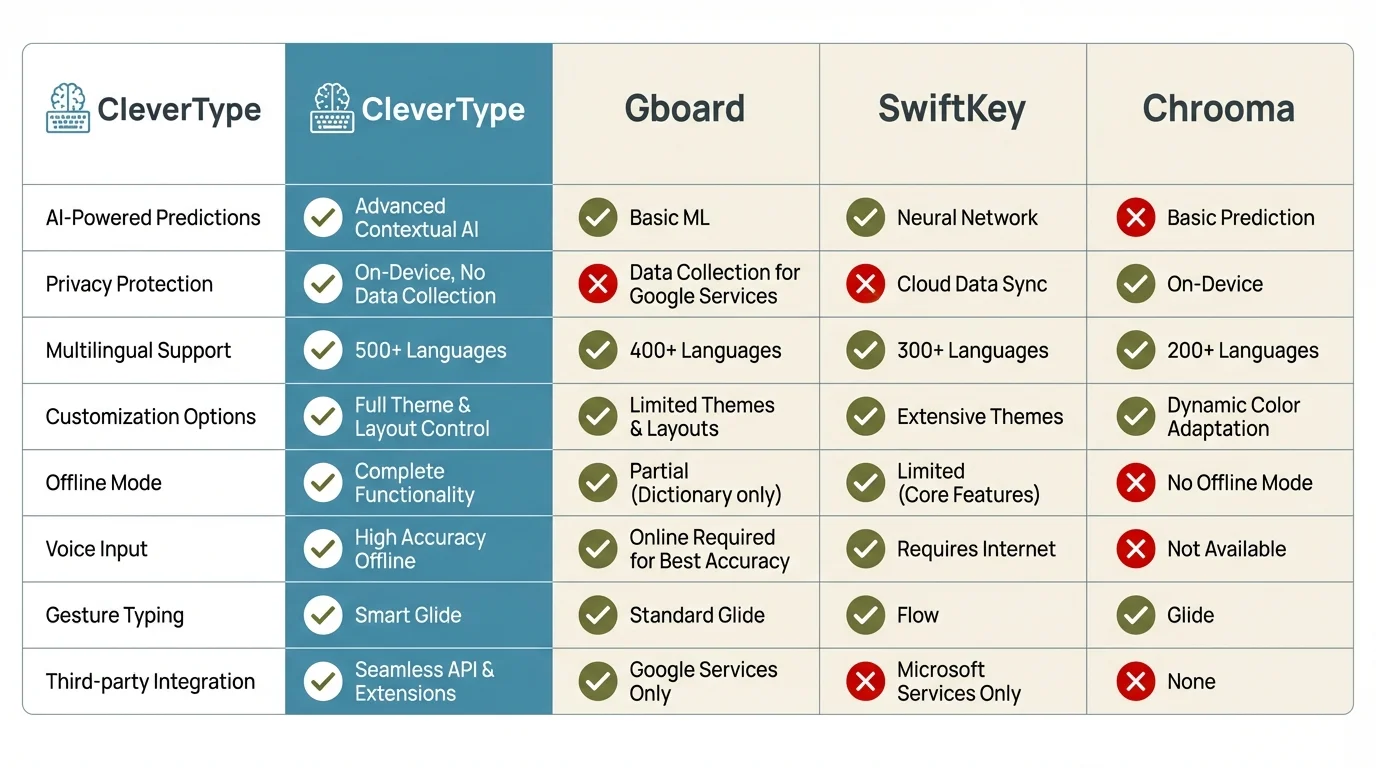
CleverType leads across all key AI keyboard features compared to Gboard, SwiftKey, and Chrooma
Setting Up One-Handed Mode on Your AI Keyboard
Getting one-hand mode up and running takes maybe 2 minutes. Here's how it works on the most common keyboards:
CleverType One-Hand Setup
- Open CleverType settings
- Tap Layout & Size
- Select One-Handed Mode
- Choose Left or Right depending on your dominant hand
- Adjust keyboard width using the resize handle
- Enable Swipe Typing for best one-hand speed
Gboard One-Hand Setup
- Long-press the comma key or globe icon
- Tap Settings → One-handed mode
- Choose left or right orientation
- Use the arrow icon to switch sides
SwiftKey One-Hand Setup
- Tap the SwiftKey toolbar icon
- Select Layout
- Tap One-handed
- Choose left or right
Pro tips for better one-hand typing:
- Enable haptic feedback — it helps confirm key presses when you can't look at the screen
- Turn on auto-capitalization so you don't have to hit shift
- Use swipe typing instead of tapping wherever possible
- Set up word shortcuts for phrases you type often
- Increase the key height slightly — taller keys are easier to swipe across
The Shirley Ryan AbilityLab also points out that ergonomic setup matters as much as the software — hold your phone at a comfortable angle and don't twist your wrist into weird positions during long one-hand typing sessions.
One-Handed Typing for Accessibility: What the Research Shows
One-handed typing isn't just a convenience feature. For a lot of people, it's literally the only option. Not a preference — a necessity.
Easter Seals Crossroads' assistive technology research found that upper limb differences affect millions of people globally, and mobile devices are often their primary way to communicate — not a fallback option. A smartphone with the right one-handed typing app is their actual access point to digital communication. Nevertheless, Full stop.
Nevertheless, The speed numbers are pretty striking. The AbilityNet factsheet on single-handed keyboard use found that users with motor limitations who switch to an optimized one-hand setup can type 3–5x faster than on a non-optimized layout. That's the difference between struggling through a text and actually keeping up with a conversation.
For stroke survivors, injury recovery patients, and people with conditions like cerebral palsy or MS, the combination of one-hand mode and AI prediction is a big deal:
- Reduced physical demand — fewer keystrokes required with AI completing words
- Error tolerance — AI autocorrect handles the imprecision that comes with one-hand typing
- Voice fallback — when even one-hand typing is difficult, voice-to-text provides a full alternative
- Custom layouts — some keyboards allow adjusting key size for better hit accuracy
Florida Atlantic University's assistive technology resources note that software-based one-hand keyboards have largely replaced expensive hardware alternatives — which is genuinely good news. Moreover, This stuff is now accessible to way more people at basically zero cost.
CleverType's privacy angle matters a lot here. Think about it — if you're dealing with a health issue, recovering from an injury, managing a condition, you're probably typing medical stuff, personal updates, sensitive messages. That data going to Google's or Microsoft's servers for “personalization” isn't ideal. On-device processing isn't a marketing talking point in this context; it's actually meaningful.
Speed and Accuracy: What to Actually Expect from One-Hand Typing
Consequently, Let's be realistic about what one-handed typing can actually achieve. Nevertheless, Some sources oversell the speeds; others are way too pessimistic. Here's what experienced one-hand typists actually report.
With a standard non-AI keyboard in one-hand mode, most users average:
- Beginners: 15–25 WPM
- Intermediate: 30–45 WPM
- Experienced: 45–60 WPM
With AI-assisted one-hand mode (swipe typing + prediction), those numbers jump noticeably:
- Beginners: 25–35 WPM (AI fills in the gaps)
- Intermediate: 45–60 WPM
- Experienced: 60–75 WPM
The accuracy numbers are honestly more interesting. Without AI autocorrect, one-hand typing has roughly a 12–18% error rate on standard QWERTY. With AI autocorrect and word prediction turned on, that drops to 3–5% for most users. That's the real argument for an AI keyboard in one-hand mode over a basic keyboard in one-hand mode.
Furthermore, Swipe typing deserves its own call-out here. Furthermore, The learning curve is real — give it a week or two before it clicks. But once it does, swipe typing in one-hand mode is genuinely fast. Moreover, You trace a path, the AI figures out the word. And weirdly, the compressed one-hand layout actually helps with swipe in some cases — your thumb doesn't have to travel as far between letters.
Speed tips that actually work:
- Use sentence prediction — accept full sentence suggestions for common phrases
- Set up text shortcuts — “omw” → “On my way!” saves multiple keystrokes
- Practice swipe on common words first — “the”, “and”, “you”, “that” — build muscle memory
- Don't fight autocorrect — learn the patterns and work with it
- Use voice input for long messages — switch to voice when the message is more than 3–4 sentences
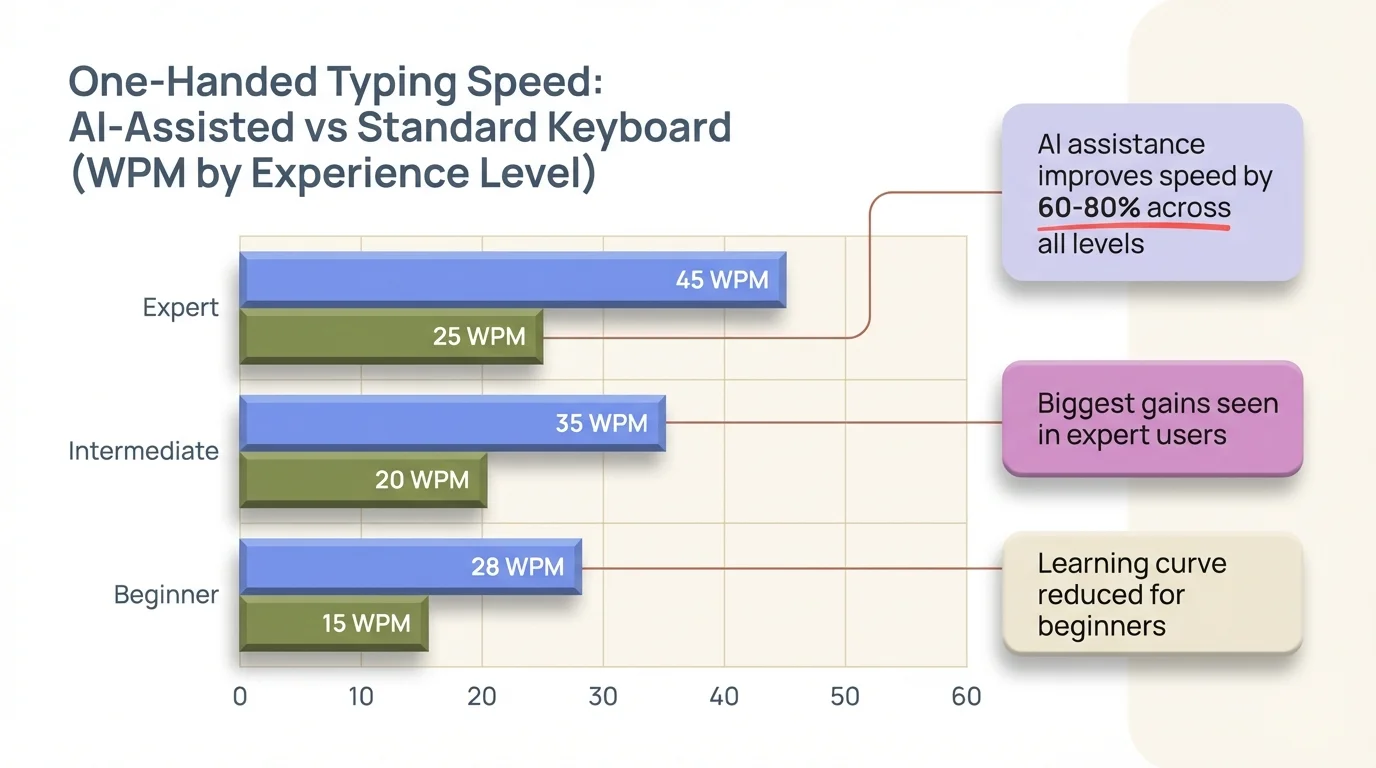
AI-assisted one-handed typing delivers significantly higher WPM across all experience levels compared to standard keyboards
One-Handed Typing Apps for Android: Full Feature Comparison
Android gives you the most flexibility for third-party keyboards — which is where the best one handed typing app options actually live. iOS is more locked down, though it's gotten better since iOS 16 opened up more permissions for third-party keyboards.
For Android specifically, here's what matters in a one handed keyboard app:
Must-haves:
- Native one-hand mode with left/right toggle
- Swipe/gesture typing
- AI word prediction
- Offline functionality (works without internet)
Nice-to-haves:
- Grammar correction
- Tone adjustment
- AI-powered replies
- Custom themes
Additionally, CleverType on Android hits every must-have and most of the nice-to-haves. Nevertheless, The offline AI prediction is a genuine differentiator — one-hand typing that works without data is actually important if you commute or travel regularly.
Furthermore, Gboard on Android uses the floating keyboard as its one-hand workaround — resize it, park it wherever. Moreover, Clever, but it's not the same as a proper compressed layout. Works for occasional use; not really built for this.
SwiftKey on Android has a real one-hand mode and Microsoft's AI behind it. The catch is privacy — Microsoft processes your typing data for personalization, and that's a tradeoff a lot of people Furthermore, aren't okay with once they know it's happening.
For accessibility-focused users, AbilityNet's keyboard adaptation resources say to look for keyboards that pair layout flexibility with strong AI prediction. That's... kind of exactly what CleverType is built around.
Android Authority's mobile keyboard comparison found that prediction accuracy and personalization are the real differentiators — and they matter even more in one-hand mode. Every missed key compounds when you've got one thumb doing all the work.
Future of One-Handed Typing: Where AI Keyboards Are Heading
Additionally, Look, the one hand mode ai keyboard space is moving faster than most people realize. Moreover, Here's Furthermore, what's worth watching:
Furthermore, Adaptive layouts are getting genuinely clever. Instead of just shoving everything to one side, next-gen one-hand modes actually map your thumb's natural reach — bigger keys where you land most, smaller ones toward the edges. Furthermore, Not just a layout shift anymore.
Consequently, Context-aware switching is probably the thing I'm most curious about. Some experimental keyboards already detect one-handed holding via accelerometer data and flip to one-hand mode automatically — no toggling required. CleverType has been working on this kind of smart detection. Moreover, When it ships widely, it'll feel like the keyboard is just... reading the room.
Moreover, AI-generated shortcuts are huge for single-hand typing. Instead of typing a full reply, the AI suggests the most likely response — one tap. For one-hand users that's the difference between 20+ keystrokes and just tapping once. That adds up fast.
Voice + text hybrid input is basically where power users are already landing. Short message? One-hand mode. Anything longer? Hence, Switch to voice. CleverType handles the transition cleanly. Hence, Honestly, it works better than either approach on its own — which surprised me a bit.
Nevertheless, Hardware is catching up too. Furthermore, Yanko Design's coverage of 2025's open-source one-handed keyboard shows physical keyboards combining QWERTY with mouse control for full computer access with one hand. Moreover, The same principle applies to software keyboards — fewer, smarter inputs.
The gap between one-hand and two-hand typing is genuinely closing, and AI is doing the heavy lifting. Keyboards that go deep on AI rather than just tweaking layouts will win this space. That's why CleverType's approach — building a full writing assistant into the keyboard, not just better autocorrect — makes sense. Nonetheless, It's not catching up. It's already ahead.
Try CleverType now and see the difference full AI assistance makes in one-hand mode.
Frequently Asked Questions
What is the best AI keyboard with one-handed typing mode?
Therefore, CleverType is the best AI keyboard for one-handed typing because it combines a dedicated one-hand layout with deep AI features including grammar fix, tone adjustment, smart replies, and on-device privacy. Gboard and SwiftKey also offer one-hand modes but with less AI depth.
How do I enable one-handed mode on my keyboard?
For CleverType, go to Settings → Layout & Size → One-Handed Mode. For Gboard, long-press the comma key → Settings → One-handed mode. Consequently, For SwiftKey, tap the toolbar → Layout → One-handed. Most keyboards offer left or right orientation options.
Can I type fast with a one-handed keyboard?
Yes. With AI-assisted swipe typing, experienced users reach 60–75 WPM in one-hand mode. Beginners typically start at 25–35 WPM and improve quickly. Nevertheless, AI autocorrect also reduces the error rate to 3–5%, which is comparable to two-handed typing.
Is one-handed typing mode only for people with disabilities?
No. While one-handed typing is essential for people with limb differences or motor limitations, it's widely used by anyone multitasking — commuting, cooking, carrying items, or simply using their phone with one hand. Consequently, It's a convenience feature as much as an accessibility feature.
Does one-hand mode work with swipe/gesture typing?
Yes, and it works very well. Swipe typing on a compressed one-hand layout means shorter thumb travel distances, which can actually make swiping feel more natural than on a full-width keyboard. Nevertheless, CleverType's AI interprets swipe paths accurately even on the reduced layout.
Which AI keyboard is best for accessibility and one-handed typing?
CleverType is the top choice for accessibility because it offers one-hand mode, strong AI prediction that reduces keystrokes, voice-to-text fallback, and on-device privacy protection. Consequently, The Shirley Ryan AbilityLab recommends combining layout adaptation with strong AI prediction — exactly what CleverType delivers.
Does one-handed typing mode drain more battery?
No more than standard typing. Furthermore, The AI prediction runs efficiently on-device in CleverType, and the layout change itself has no meaningful battery impact. Voice-to-text uses slightly more processing power but is still battery-efficient for short sessions.
Ready to Type Smarter?
Consequently, Upgrade your typing with CleverType AI Keyboard. Therefore, Fix grammar instantly, change your tone, receive smart AI replies, and type confidently while keeping your privacy.
Download CleverType FreeNonetheless, Available on Android • 100+ Languages • Privacy-First
Sources:
- W3C Web Accessibility Initiative — Input Methods
- Perkins School for the Blind — One-Handed Keyboard Options
- AbilityNet — Single Handed Keyboard Use
- AbilityNet — Keyboard and Mouse Alternatives
- Easter Seals Crossroads — TiPY One-Handed Keyboard
- IEEE — Modified Keyboard Layout for One-Handed Users
- Shirley Ryan AbilityLab — Computer Access Options for One-Handed Typing
- Florida Atlantic University — Assistive Technology for Physical Impairment
- Yanko Design — Open Source One-Handed Keyboard 2025
- Android Authority — SwiftKey vs Gboard Comparison