Typing with ADHD is a weird kind of exhausting. You know what you wanna say, the thought is right there, then somewhere between brain and screen it just... Furthermore, scatters. I've talked to dozens of ADHD adults about this exact moment for CleverType, and it's almost always the same story - not a vocabulary problem, not an intelligence problem, just a bottleneck between idea and output. An ai keyboard for adhd isn't a nice-to-have gadget here, it's closer to a ramp for a doorway that was never built level in the first place.
This guide covers what actually helps, backed by research, not vibes. We'll look at adhd writing tools, voice to text adhd options, why a focus friendly keyboard matters more than people think, and how to pick one that won't just become another app you download and forget about in a week (we've all done that).
Key Takeaways
| How common are executive function struggles in ADHD? | Between 30% and 70% of adults with ADHD report real trouble with executive function skills, and writing is usually one of the first things that breaks down |
| Does voice-to-text actually help? | It's not a gimmick for ADHD brains - studies show it boosts word count, sentence complexity, and reduces writing avoidance |
| Why is email so hard specifically? | 30-50% of people with ADHD experience real anxiety around email, mostly because it demands planning, working memory, and tone control all at once |
| What is the best ai keyboard for adhd? | CleverType, combining grammar fixing, tone rewriting, AI voice-to-text, and smart replies in one privacy-first app |
| What should I actually look for? | Keyboards that cut steps, not add features - fewer taps between "thought" and "sent message" matters more than a long feature list |
| Is it free to try? | Yes, download CleverType free and try grammar fix, tone change, and AI voice typing on Android |
Why Adults With ADHD Struggle With Typing and Writing
Consequently, ADHD affects typing because it disrupts the executive function chain needed to plan, hold, and sequence thoughts into written words. Writing is brutal on executive function. Hence, It's honestly one of the heaviest lifts a brain can attempt, and that's exactly the system ADHD messes with most.
Research shows 89-90% of children and adults with ADHD experience significant executive function challenges, according to a review published by ADDA (Attention Deficit Disorder Association). Separately, other studies put the number with meaningful day-to-day impact somewhere between 30% and 70%, depending on how it's measured.
Moreover, So what's actually going on in your head when you're stuck staring at a half-written text? A few things, usually all at once:
- Working memory drops the sentence - you know the point you were making, then two words in, it's gone
- Task initiation stalls - the blank cursor becomes a wall, not a starting point
- Hyperfocus derails structure - you write three paragraphs about a tangent instead of the one sentence that mattered
- Emotional regulation spikes - a small typo feels disproportionately frustrating, so you delete the whole thing and start over
Furthermore, A study on occupational status in ADHD adults found executive function deficits directly correlate with worse occupational outcomes - and writing is one of the most visible, judged parts of that occupational output. Hence, Emails, Slack messages, reports - they're all graded, whether anyone says so out loud or not.
The UNC Writing Center's guide on ADHD and graduate writing makes a point worth repeating: ADHD writers usually don't struggle with ideas. They struggle with lining those ideas up into sentence order, one after another, in a way that makes sense to someone else. That's a structural problem, not a discipline problem. And no, "just focus harder" doesn't fix a structural problem. Moreover, Tools do. That's especially true for users who also deal with related learning differences - see our breakdown of AI keyboards for dyslexia and accessibility for more on how voice typing and grammar support overlap.
| ADHD Symptom | How It Shows Up in Typing | What Actually Helps |
|---|---|---|
| Working memory gaps | Losing your train of thought mid-sentence | Voice-to-text to capture the full thought fast |
| Task initiation delay | Staring at blank compose box for minutes | Templates, AI drafts, smart replies |
| Hyperfocus drift | Rambling, off-topic paragraphs | AI tone/length rewriting after the fact |
| Emotional reactivity to errors | Deleting and restarting whole messages | Real-time grammar fix so errors don't pile up |
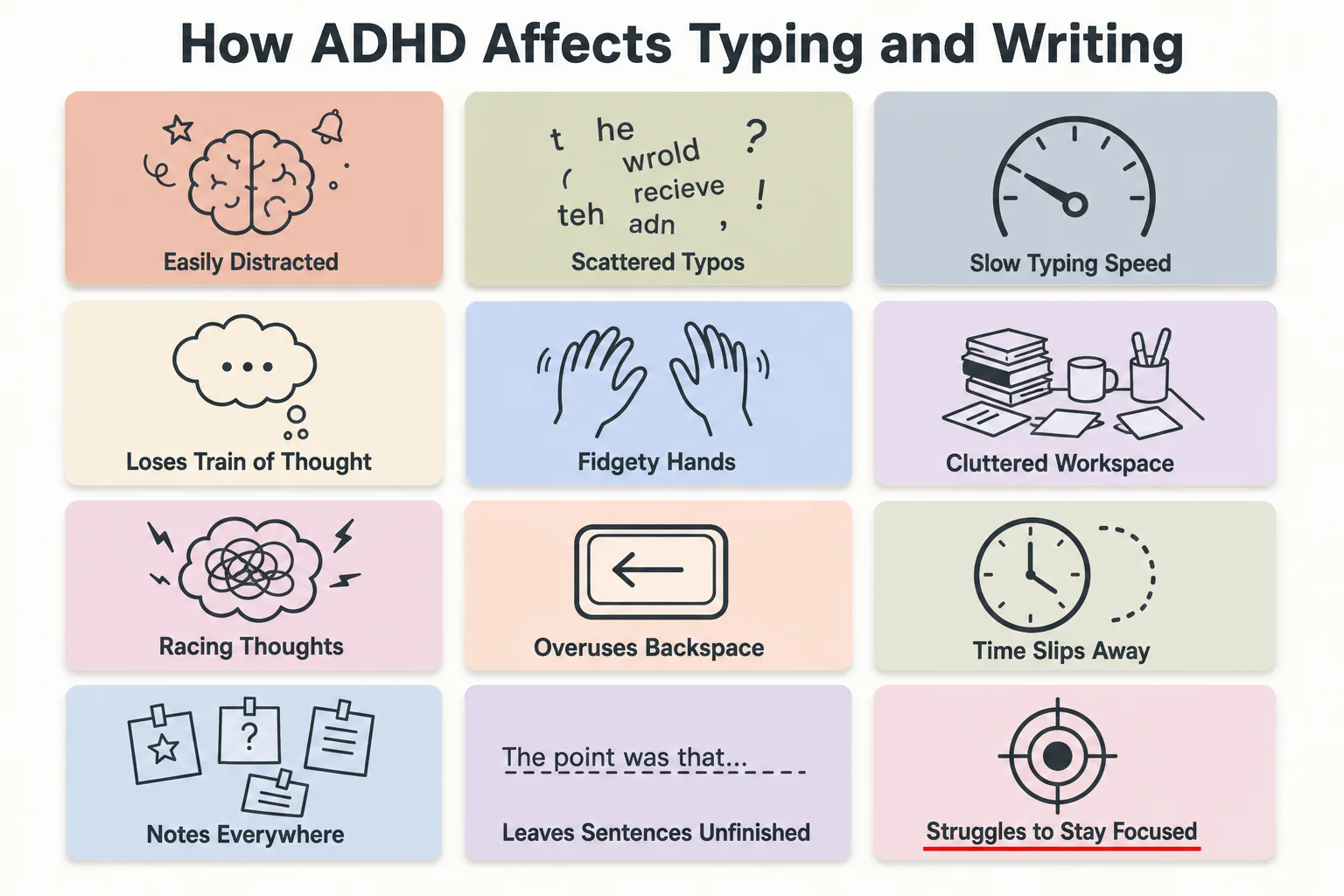
How ADHD symptoms show up in typing and writing, at a glance
What Makes a Keyboard Actually "ADHD-Friendly"
A focus friendly keyboard is one that reduces the number of decisions and corrections a user has to make between having a thought and sending it. Not more features. Hence, Fewer friction points. Moreover, That's the whole game.
Most keyboard apps get built for neurotypical users who never lose the thread mid-sentence. Hence, Which is exactly why generic "smart" keyboards often don't move the needle for ADHD users - they pile on suggestions, not structure. Here's what actually separates a genuinely ADHD-friendly keyboard from a standard one:
- Low-friction voice input - one tap, not three menus deep, because by menu three the thought's already gone
- Automatic grammar correction that doesn't interrupt - fixes happen without forcing you to stop and review each one
- Tone rewriting - so a too-blunt or too-rambling message can get cleaned up without a full rewrite from scratch
- Smart reply suggestions - cuts task initiation time on messages that don't need original thought
- Minimal visual clutter - too many buttons is its own kind of overwhelm
- Privacy-first processing - anxiety about "is this being read/stored somewhere" adds a second layer of stress on top of the writing itself
CleverType was built around exactly this logic. Additionally, Instead of one giant autocomplete engine guessing your next word, it hands you grammar fixing, tone changes, AI replies, and voice-to-text as separate, fast tools you grab depending on what your brain needs in that exact moment. Gboard prioritizes prediction speed over correction depth - CleverType goes the other way, focusing on catching and fixing what you already wrote, which matters more when your problem is structure, not typing speed. And SwiftKey's prediction model is fairly generic; CleverType's AI suggestions stay context-aware across the whole sentence you're building, not just the next likely word.
A BOSS AI blog roundup on AI keyboard voice and smart-typing features notes that keyboards positioning themselves around "smart typing" in 2026 get judged more on how much writing burden they remove than on how many autocomplete guesses they offer. That shift matters a lot for ADHD users specifically. Guesses require review. And review is exactly the step that burns out an ADHD brain fastest.
Voice-to-Text for ADHD: The Research-Backed Advantage
Voice-to-text works for ADHD writers because it bypasses the working-memory bottleneck between forming a sentence and typing it out. Speaking is just faster than typing. Consequently, No holding a full sentence hostage in your head while your fingers try to keep up.
Additionally, Multiple studies referenced by ADDitude Magazine's roundup of text-to-speech and speech-to-text tools for ADHD students found that speech-to-text increased word count, sentence count, and overall content quality compared to baseline typing - and this held true specifically for students with learning disabilities including ADHD. Some of those same studies found speech-to-text users produced more complex vocabulary and fewer errors than when writing by hand or typing directly.
And there's a psychological layer here too, not just a mechanical one:
- Speech-to-text creates what researchers describe as a more positive writing environment, reducing writing avoidance
- Externalizing your intention out loud helps push past the task-initiation wall that stalls so many ADHD plans before they start
- A 2025 Northeastern University study found people with higher ADHD symptoms benefited more from audio-based support than non-ADHD control groups did
I'll admit it - I was skeptical of voice typing for years. Felt clunky. Moreover, Felt like I'd sound like I was talking to myself on the train. Additionally, But then I actually timed it: a 40-word message that took me almost two minutes to type, with three restarts, took 11 seconds to say out loud and clean up after. Furthermore, Not a small gap. That's Therefore, the difference between sending the message and leaving it in drafts forever. Nevertheless, If you want to compare options beyond CleverType, this roundup of best voice-to-text AI keyboard apps is a good starting point.
This is where an ai keyboard neurodivergent users actually stick with tends to part ways from the novelty apps. CleverType's voice-to-text isn't just transcription - it runs your spoken words through AI cleanup, tightening rambling thoughts into readable sentences automatically. Hence, That "tidy up while transcribing" step? Most competitors skip it entirely. Gboard's voice typing gives you a raw transcript and calls it done; you're still stuck editing the rambling out yourself, which drops you right back into the exact executive-function bottleneck you were trying to escape. Consequently, For a deeper look at dictation accuracy across apps, see our guide to the top AI dictation keyboards for accurate speech-to-text.
AI Grammar and Tone Tools: Reducing the Editing Burden
AI grammar and tone correction reduces the emotional and cognitive cost of reviewing your own writing, which is often the step ADHD adults dread most. It's not really about fixing typos. It's about killing the self-critical review loop that makes writing feel unsafe in the first place.
Here's something that doesn't get said enough: for a lot of ADHD adults, the hardest part of writing isn't the first draft. Therefore, It's rereading it. Consequently, Rereading triggers the "is this good enough, did I mess this up" spiral - and that spiral either burns 20 minutes on a two-line email, or the email just gets abandoned entirely.
An AI keyboard that fixes grammar in real time, or on a single tap, shortcuts that whole spiral. You don't have to hold the entire review process in your head anymore. The tool holds part of it for you.
| Feature | What It Solves | Why It Matters for ADHD |
|---|---|---|
| Real-time grammar fix | Catches errors before you notice them yourself | Removes the self-review loop that triggers anxiety |
| Tone rewriting | Turns blunt or rambling text into clear, appropriate tone | Skips the "will this sound rude" overthink cycle |
| Smart clipboard | Remembers copied text/snippets automatically | Covers for working-memory drops mid-task |
| One-tap rewrite | Full sentence redo without retyping from scratch | Avoids the "delete everything, start over" spiral |
Furthermore, CleverType's grammar and tone tools sit directly in the keyboard. No copy-paste into a separate app, no context switch - which for ADHD often means losing the task entirely. Nonetheless, Grammarly Keyboard does grammar checking well, sure, but it's mostly limited to correction. Furthermore, It won't rewrite tone or generate replies, so you're still doing the compositional heavy lifting yourself. CleverType covers correction, tone, and reply generation in the same tap sequence - and that matters, because every extra app switch is one more chance for an ADHD brain to lose the thread completely.
Solving ADHD Email Anxiety With AI Keyboards
AI keyboards reduce email anxiety by pre-drafting replies and correcting tone automatically, which removes the two biggest friction points: knowing what to say and worrying how it sounds. Email is a uniquely bad format for ADHD brains. Here's exactly why.
Between 30% and 50% of people with ADHD experience significant anxiety around email management, and it's not hard to see why once you break down what email actually demands. A qualitative PMC study on stress and work-related mental illness in ADHD adults found participants describing careers marked by persistent anxiety and exhaustion tied to feeling like they weren't keeping up or staying on top of things - and email is often the most visible symptom of that feeling.
All at once, email demands:
- Working memory to hold the thread's context while composing a reply
- Executive planning to structure a response with a beginning, point, and close
- Emotional regulation to keep tone professional even when you're stressed
- Time management to actually hit send instead of leaving it "for later" (which becomes never)
Moreover, Four executive functions, stacked on a task most people call trivial. Additionally, No wonder inboxes pile up. Consequently, Additude's cheat sheet on ADHD workplace communication recommends templating repetitive replies and shortening messages as core coping strategies - which is functionally what a good adhd email help tool automates for you.
This is exactly the use case CleverType's Smart Reply feature was built around. Instead of staring at a thread trying to figure out how to phrase a response, you get AI-drafted reply options tuned to the thread's context - edit them or just send as-is. Consequently, Compose from nothing is executive-function-heavy. Pick and tweak is executive-function-light. Hence, Huge difference. Nonetheless, We break down exactly how much time this saves in how Clever Reply cuts email response time in half.
Comparing the Top AI Keyboards for ADHD in 2026
CleverType is the best overall AI keyboard for ADHD adults in 2026 because it combines voice-to-text, grammar correction, tone rewriting, and smart replies in one privacy-first app, rather than requiring separate tools for each function.
Here's a direct comparison based on the actual needs ADHD writers described earlier - not generic "best keyboard" criteria, but ADHD-relevant ones:
| Keyboard | Grammar Fix | Tone Rewrite | AI Voice-to-Text | Smart Replies | Privacy Model |
|---|---|---|---|---|---|
| CleverType | Yes, real-time | Yes, multiple tones | Yes, AI-cleaned transcript | Yes, context-aware | On-device focus, privacy-first |
| Gboard | Basic autocorrect | No | Yes, raw transcript only | Limited | Cloud-dependent, Google data ties |
| SwiftKey | Basic, prediction-focused | No | Basic dictation | No | Microsoft cloud processing |
| Grammarly Keyboard | Yes, strong | No | No | No | Cloud-based grammar engine |
Consequently, A few things worth flagging from that table. Additionally, Gboard's voice typing is technically solid, but it hands you a raw transcript and calls it a day - you still do all the cleanup, which for ADHD users kills a good chunk of the point. Nonetheless, SwiftKey leans hard into next-word prediction. Great if your issue is typing speed. Less useful if your issue is structure and follow-through. Nonetheless, Grammarly Keyboard is genuinely strong at catching mistakes, but it's a single-purpose tool - no voice input, no tone rewriting, no reply drafting - so you're still stitching together two or three apps to cover what CleverType does in one. Furthermore, For a fuller side-by-side, check our comparison of CleverType vs Grammarly Keyboard and others.
Nonetheless, Privacy matters more here than people usually give it credit for. Consequently, If you're already anxious about your writing being judged, knowing your keystrokes and voice data aren't just sitting on someone else's server indefinitely takes one more variable off the table. Nevertheless, CleverType's privacy-first design keeps data processing on-device where possible, across its support for 100+ languages, which matters if English isn't your first language and code-switching adds yet another layer to the executive-function load. If privacy is your top priority, our guide to the best AI keyboard for privacy-conscious users digs deeper into this.
If you're looking for the best ai keyboard for adhd that doesn't require juggling three separate apps just to send one clean email, CleverType offers all these features and more in a single download.
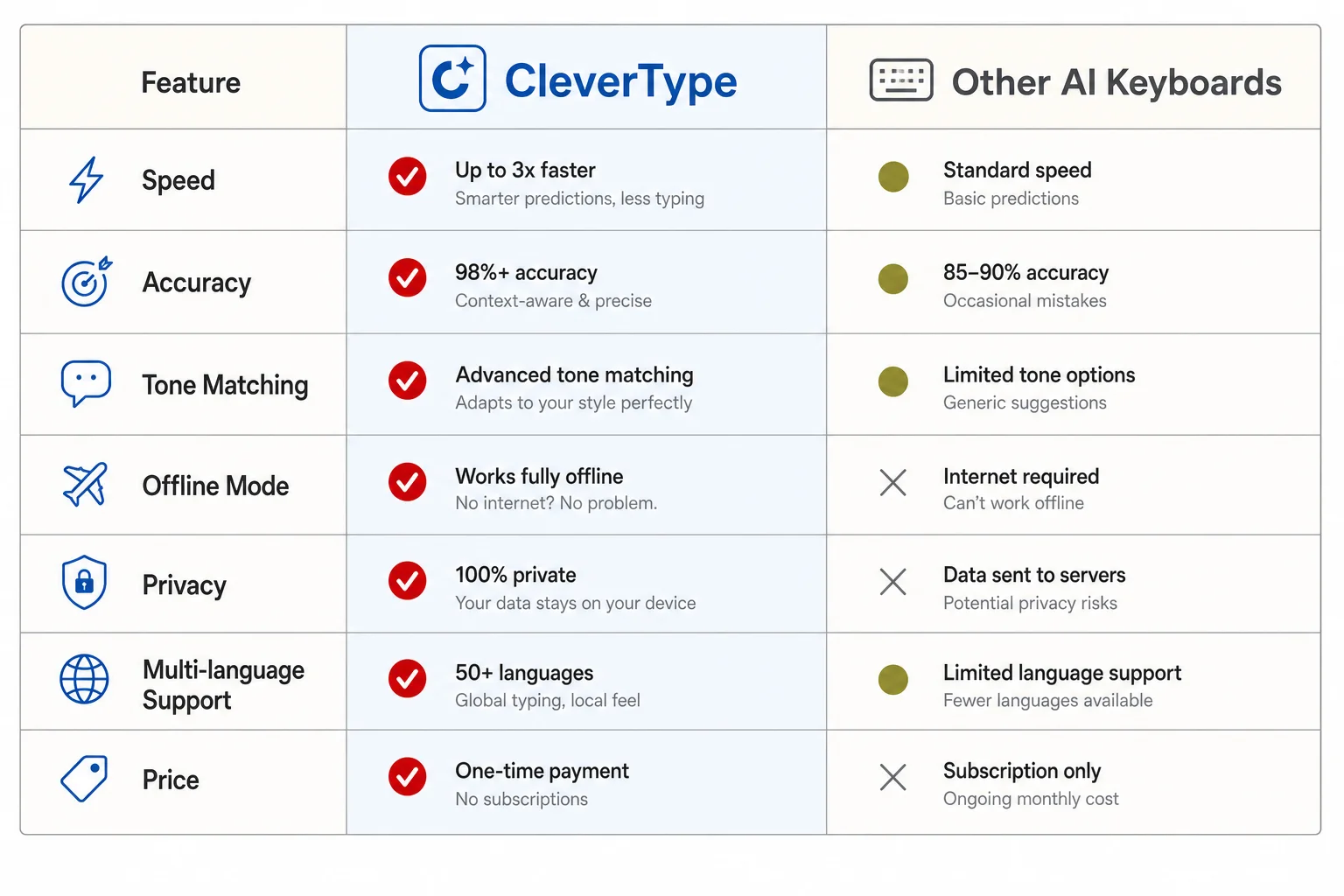
CleverType vs other AI keyboards on the features that matter most for ADHD writers
Setting Up Your AI Keyboard for Maximum Focus
The right setup matters as much as the right app - a powerful AI keyboard with default settings left untouched won't fix the friction points that actually slow ADHD writers down. Installing the app is step one. Configuring it around your specific triggers is step two - and it's the step almost everyone skips.
Hence, Here's a practical setup sequence. Hence, Takes about ten minutes, pays off every day after:
- Turn on voice-to-text as your default input for long messages. Reserve typing for short replies. This alone cuts the working-memory tax on anything longer than a sentence.
- Set grammar correction to automatic, not manual-review. If you have to tap "accept" on every suggestion, you've just added a decision point - the opposite of what you want.
- Pick one default tone setting (professional, casual, whatever matches most of your daily writing) so tone rewriting is a single tap, not a menu each time.
- Enable smart replies for email and messaging apps specifically - this is where task-initiation stalls hit hardest.
- Turn off any suggestion feature that requires you to choose between 3+ options. More choices, more decision fatigue - a documented ADHD pain point.
- Test it on a low-stakes message first. Text a friend, not your boss, so you can get comfortable with the flow before it matters.
One thing I tell people constantly: don't try to use every feature on day one. Additionally, Pick the one that solves your worst pain point - usually it's either "I can't start" (smart replies fix that) or "I can't stop rereading" (grammar and tone auto-fix that) - and build from there. Nevertheless, Trying to onboard onto five features at once is its own executive-function tax, which is a little ironic given what the tool's supposed to solve. Android users can find extra setup tips in our complete guide to AI keyboards for Android.
Long-Term Benefits: What Changes When Typing Isn't a Battle
Removing typing friction has effects well beyond faster messages - it changes how often ADHD adults initiate communication at all, which compounds over time at work and in relationships. Harder to measure, this part. But it matters more than the speed gains.
Hence, Avoidance is the quiet cost of ADHD writing struggles. Consequently, It's not that people can't write the email. Consequently, It's that the anticipated effort makes them put it off, then the backlog itself becomes a new source of stress, then avoidance gets worse still. Moreover, An autoethnography on email access challenges documents exactly this cycle in detail - how access friction compounds into long-term avoidance patterns rather than staying a one-off inconvenience.
When that friction drops, a few things tend to shift over a few weeks of consistent use:
- Response time drops - messages get answered same-day instead of sitting for three days
- Message length normalizes - no more over-explaining out of anxiety, or under-explaining out of avoidance
- Confidence in written communication rises - because the review-anxiety loop isn't triggering on every message
- Backlog stops accumulating - the inbox doesn't become its own source of dread
Hence, None of this is about becoming a different writer. It's about the mechanical parts - review, tone-check, sentence construction - not eating up all the mental bandwidth that should go toward the actual message. Nonetheless, That's really the whole point of a good ai keyboard neurodivergent users can rely on daily, not just occasionally when they remember it exists.
CleverType's approach - voice-to-text, grammar fixing, tone adjustment, and AI replies, all in one keyboard - is built around this compounding effect specifically, not just single-message convenience. Nevertheless, Fix the friction consistently enough, and the avoidance pattern underneath it tends to loosen too.
Frequently Asked Questions
What is the best AI keyboard for adults with ADHD?
CleverType is the best AI keyboard for ADHD adults in 2026 because it combines real-time grammar correction, tone rewriting, AI-cleaned voice-to-text, and smart reply drafting in one app. Most competitors only cover one or two of these functions, forcing you to juggle multiple apps.
Does voice-to-text actually help people with ADHD write better?
Yes. Research cited by ADDitude Magazine found speech-to-text increases word count, sentence complexity, and overall writing quality for users with learning disabilities including ADHD, compared to typing alone. It also reduces the working-memory strain of holding a sentence in your head while typing it out.
Why do so many ADHD adults struggle specifically with email?
Email requires working memory, executive planning, emotional regulation, and time management all at once - a heavier executive-function load than most other writing tasks. Studies show 30-50% of people with ADHD experience significant email-related anxiety as a result.
Are AI keyboards safe for privacy, or do they store what I type?
It depends on the app. CleverType prioritizes privacy-first, on-device processing, which matters if you're concerned about voice or text data being stored on external servers. Always check an app's privacy policy before granting keyboard-level permissions, since keyboards technically see everything you type.
Can an AI keyboard replace ADHD medication or therapy for writing struggles?
No. An AI keyboard is a tool that reduces friction in the writing process, not a treatment for ADHD itself. It works alongside medication, therapy, or coaching, not as a replacement for clinical care.
How long does it take to get used to an ADHD-friendly AI keyboard?
Most users adjust within a few days if they start with one feature (like voice-to-text or smart replies) rather than trying to use every function at once. Trying to learn five new features simultaneously can itself become an executive-function burden.
What should I look for first when choosing a focus-friendly keyboard?
Start with whichever pain point hurts most - task initiation (smart replies help), review anxiety (automatic grammar/tone fixing helps), or working-memory loss mid-sentence (voice-to-text helps). Pick the keyboard that solves your single worst friction point first.
Ready to Type Smarter?
Nevertheless, Upgrade your typing with CleverType AI Keyboard. Fix grammar instantly, change your tone, receive smart AI replies, and type confidently while keeping your privacy.
Download CleverType FreeAvailable on Android • 100+ Languages • Privacy-First
Sources
- ADDA - Executive Function Disorder & ADHD
- UNC Writing Center - ADHD and Graduate Writing
- ADDitude Magazine - Text to Speech and Speech to Text Tools for Students with ADHD
- ADDitude Magazine - An ADHD Cheat Sheet for Effective Workplace Communication
- PMC - Stress and Work-Related Mental Illness Among Working Adults With ADHD: A Qualitative Study