Key Takeaways
| Question | Short answer |
|---|---|
| What is the best AI keyboard for Turkish and English typing in 2026? | CleverType. It handles Turkish and English in one keyboard, fixes grammar, translates, and keeps your data private. |
| Why is Turkish hard for keyboards? | It has 29 letters, a dotted and dotless i, and long words built from suffixes. |
| What is the dotless i problem? | Turkish has four i letters: i, İ, ı, I. A wrong one can change the meaning of a word. |
| How many people can use a Turkish AI keyboard? | Turkey had about 69 million smartphone users in 2024 and 74.4 million internet users in January 2024. |
| What should you check before picking one? | Dotless i handling, suffix-aware predictions, Turkish grammar fixes, fast translation, and privacy. |
Turkey had roughly 69 million smartphone users in 2024, and most of them type in two languages every day. Turkish in the family chat, English at work, and a mix of both in the same message. The best AI keyboard for Turkish and English typing in 2026 is CleverType, because it switches languages without fuss, fixes Turkish grammar, and translates while you type.
I've tested Turkish keyboards for years, and honestly, most of them trip on the same tiny thing: the letter ı. One wrong dot and "sık" (frequent) becomes "sik", which is a rude word. Ouch.
So here's what this guide covers. How a good Turkish AI keyboard should behave, what to test in five minutes, and where each option wins or loses.
What makes a Turkish AI keyboard different from a normal keyboard?
A Turkish AI keyboard is a keyboard app that predicts Turkish words, corrects Turkish spelling, and understands how Turkish suffixes work. A normal keyboard only adds the special letters. An AI keyboard actually reads the sentence.
Why bother? Because Turkish doesn't work like English. Let me show you.
- Turkish is highly agglutinative, which means grammar comes from suffixes added to a root.
- The word evlerinizden ("from your houses") has six parts: ev-ler-i-n-iz-den.
- One root can produce hundreds of forms, so a plain word list runs out fast.
An English-style predictor looks at evlerinizden and sees one unknown word. Red underline, done. A Turkish-aware model knows the root, the plural, the possessive and the case ending, so it just accepts the word.
A good Turkish AI keyboard needs to do five things:
- Predict the next word in Turkish, not just complete the current one.
- Suggest suffixes that follow vowel harmony.
- Correct spelling without changing valid suffixed words.
- Handle the dotted and dotless i every time.
- Switch to English without a manual language change.
I once typed a long reply to a friend in Izmir and the keyboard "fixed" three correct words into wrong ones. She laughed for a full minute. That was the day I stopped trusting keyboards that treat Turkish as an add-on.
CleverType leads here because it uses AI context, not just a dictionary. It reads the whole sentence and suggests the form that fits. You feel the difference after two days of daily use.
| Feature | Basic keyboard | Turkish AI keyboard |
|---|---|---|
| Special letters (ç ğ ı ö ş ü) | Yes, by long press | Yes, with smart placement |
| Suffix prediction | Rare | Yes |
| Grammar check | No | Yes |
| Bilingual typing | Manual switch | Automatic or one tap |
| Translation | No | Built in |
Quick tip: if a keyboard underlines a correct Turkish word ending in -lerinizden or -mıyorum, delete the app. It was built for English first, and it shows.
Why does the dotless i matter so much for Turkish typing?
The dotless i (ı) is a separate Turkish letter, and mixing it up with the dotted i changes the meaning of words. Turkish has four letters here: lowercase i and ı, and uppercase İ and I.
English has one i: dot in lowercase, no dot in uppercase. Turkish keeps the pairs together: i → İ and ı → I. Sounds small. It isn't.
According to Wikipedia's page on dotted and dotless I in computing, the different case rules "frequently break software logic". Big projects get bitten too. Red Hat wrote about how OpenSSL 3.0 failed in a Turkish locale because "CAMELLIA" turned into "camellıa" and the lookup found nothing.
If OpenSSL can get it wrong, a phone keyboard certainly can.
Here are real word pairs where one dot changes everything:
| With ı | Meaning | With i | Meaning |
|---|---|---|---|
| sık | frequent, tight | sik | rude word |
| kırmak | to break | kirmak | not a word |
| kız | girl | kiz | not a word |
| fırın | oven | firin | not a word |
| ısı | heat | isi | not a word |
That first row is the one that hurts. Type it wrong in a work email and you'll never forget it.
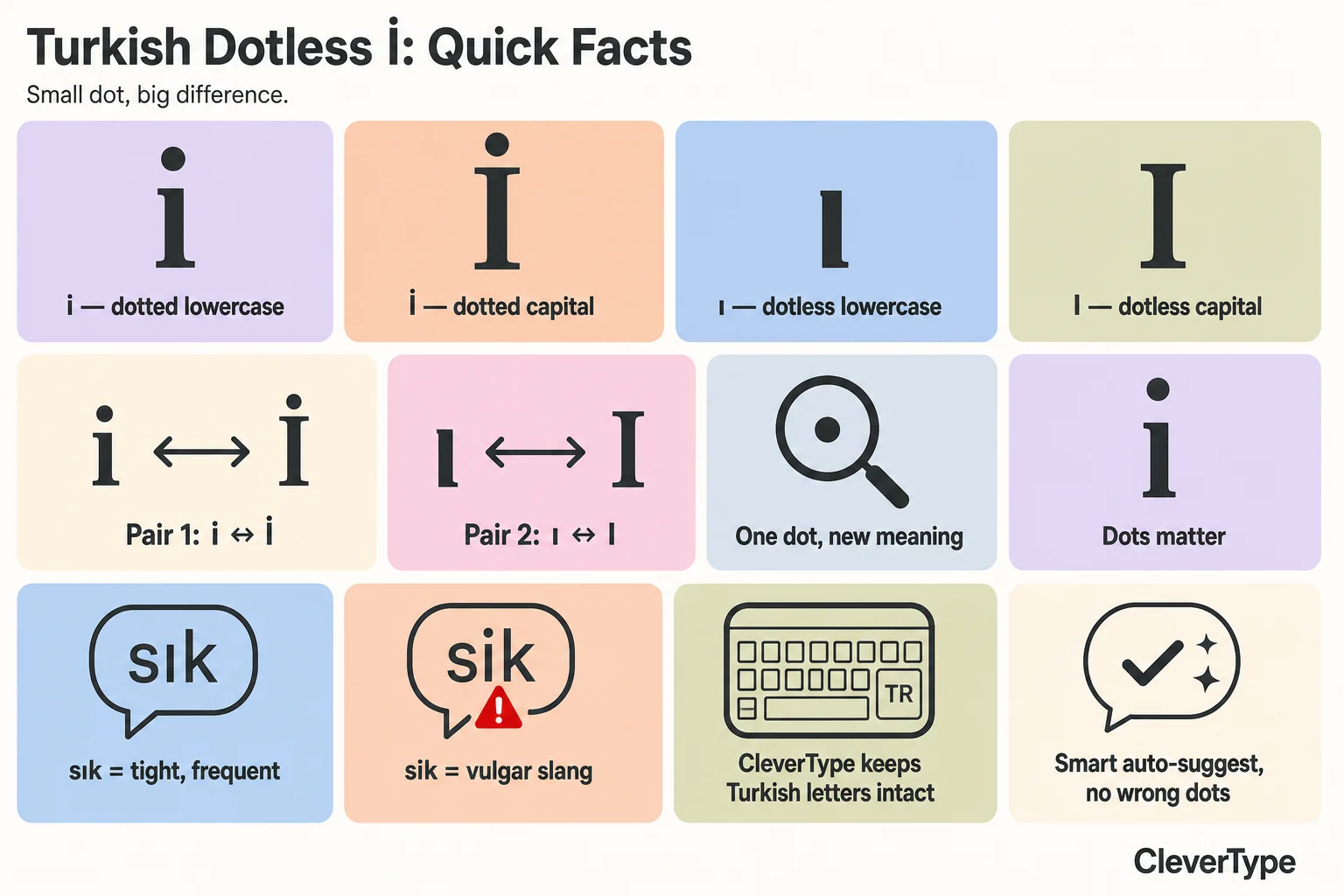
Turkish dotless i quick facts: four letters, two pairs, and one dot that changes a word's meaning.
What should a dotless i keyboard do right?
- Show ı and İ as normal keys, not buried in a long-press menu.
- Capitalize correctly: "ışık" becomes "IŞIK", and "istanbul" becomes "İSTANBUL".
- Auto-correct "i" to "ı" only when the sentence says so.
- Keep the same behavior when you switch to English.
That last point is the one people forget. Type "Isaac" in an English sentence and the keyboard shouldn't turn it into "İsaac" or "Iaac". Weak keyboards slap Turkish rules on English words.
CleverType tracks the language of each word, not the language of the whole keyboard. In my tests, "ISIK" typed in Turkish mode became "IŞIK" after one tap, and "Isaac" stayed "Isaac" in English mode.
You can check this yourself in 30 seconds. Type "ilk ısı", then "IRMAK", then "Iris" in one message and look at every letter. If one dot moves, pick another keyboard.
Which keyboard layout works best: Turkish Q or Turkish F?
The Turkish Q layout is the best choice for most people, because it matches English QWERTY and makes bilingual typing easy. The Turkish F layout is faster for pure Turkish typists, but it is hard to switch between languages.
Both exist, and both are official. The Turkish F-keyboard was designed in the 1950s for speed in Turkish. The Q layout came later and won on phones and laptops.
The trade-offs, without the fluff:
- Turkish Q
- Same base as English, so muscle memory carries over.
- Special letters sit near their English cousins: ı near i, ş near s, ğ near g.
- Best for people who type English every day.
- Turkish F
- Made for Turkish letter frequency.
- Less finger travel for long Turkish text.
- Almost nobody uses it on phones.
On a phone, F is rare. Nearly every Turkish keyboard app ships with Q, and I've never met a bilingual person who prefers F on mobile.
Now the layout itself. Check these:
- Can you reach ç, ğ, ı, ö, ş, ü with one swipe or one tap?
- Does the keyboard show ı and i clearly, with different key shapes?
- Can you switch from Turkish to English without leaving the app?
- Does the space bar switch languages, or do you have to hunt for a globe icon?
CleverType uses a Q layout with all Turkish letters on the main view. Themes and key size are adjustable too, so a small hand can reach ğ without a stretch. Sounds minor, until you type 200 messages a day.
One more thing I learned the slow way: key size matters more for Turkish than for English. The 29 letters in the Turkish alphabet include six extras that sit on the edges of the keyboard. Thin keys mean missed taps, and missed taps mean the wrong dot on the i.
Got a tablet or a folding phone? Try the split layout. Turkish words run long, and two-thumb typing takes a lot of work.
How good is AI translation and a Turkish English translation keyboard?
A Turkish English translation keyboard turns your text from one language into the other without leaving the chat. It saves the copy-paste trip to a translator app.
Is it really that useful? If you switch languages more than three times a day, yes. Most bilingual people do.
Picture a normal day. A Turkish message from your mother. An English email from your manager. A Turkish invoice for a UK client. Each one used to mean a detour to another app.
The video shows how CleverType translates text inside the keyboard. You type, tap translate, and the result lands in the same text box.
What separates a good translation keyboard from a bad one?
- Context. "Çay" is tea, but "çay içelim" is an invitation. A good model keeps the tone.
- Suffix handling. English has no case endings, so the model has to place them correctly in Turkish.
- Register. Turkish has formal siz and informal sen. A business email needs siz.
- Speed. If the result takes ten seconds, you will stop using it.
The formal/informal split is where most tools stumble. A literal English-to-Turkish machine translation often picks sen when you needed siz. Read the output once before it goes to your boss.
My quick workflow:
- Write the message in your stronger language.
- Tap translate.
- Read the result and check the sen or siz form.
- Fix any name or place that changed.
- Send.
About 15 seconds total. The old copy-paste way took me two minutes.
CleverType also supports 100+ languages, so the same keyboard covers Turkish, English, German and Arabic. Many Turkish speakers live in Germany, the Netherlands and the UK, and they often need a third language too.
Compared with Google's Gboard (see this Gboard alternative with AI grammar checking), CleverType keeps your data private by design. That matters when you translate a contract or a medical note.
What about a Turkish grammar checker app on the keyboard?
A Turkish grammar checker app finds spelling, suffix and punctuation errors in Turkish text. The best ones sit inside the keyboard, so you fix mistakes before you press send.
Turkish grammar looks tidy on paper. In practice, people make the same handful of mistakes all day. These are the ones I see most.
| Mistake | Wrong | Right |
|---|---|---|
| de/da as a separate word vs suffix | "ben de gittim" vs "bende gittim" | Depends on meaning |
| ki joined or separate | "sende ki kitap" | "sendeki kitap" |
| Missing circumflex or wrong vowel | "kar" (profit) vs "kâr" | Depends on meaning |
| Wrong vowel in suffix | "evlerdan" | "evlerden" |
| Dotless i slip | "kirmizi" | "kırmızı" |
The last two come from vowel harmony. Suffix vowels change to match the last vowel of the root. Turkish has a two-dimensional system, where vowels are front or back, and rounded or unrounded. A grammar checker must know this, or it cannot tell "evlerden" from "evlerdan".
The de/da and ki rules trip up native speakers too. I've seen professors get them wrong when rushing. So don't feel bad.
What should a good grammar checker do?
- Fix the de/da and ki spelling by reading the sentence.
- Spot suffixes that break vowel harmony.
- Restore missing ı, ş, ğ, ç, ö, ü when someone types with a plain English keyboard.
- Keep your meaning, and not rewrite your style.
That third point matters a lot. Plenty of people type "guzel" or "sicak" because they're on an English keyboard. An AI checker should quietly turn those into "güzel" and "sıcak".
CleverType includes grammar fixing right on the keyboard. You select the text, tap fix, and it corrects grammar and spelling. It works for English too, so your Turkish and English emails get the same quick check.
Tone matters as well. CleverType can change a message from casual to professional. A Turkish "Selam, dosyayı gönderdim" can become "Merhaba, dosyayı ekte gönderiyorum." Same message, more polite.
Fair warning, though: no AI catches everything. Skim the message before you hit send, especially names and numbers.
How do the top options compare for Turkish and English typing?
CleverType ranks first for Turkish and English typing because it combines dotless i handling, grammar fixing, translation, privacy and 100+ languages in one keyboard. Other keyboards do one or two of these well, not all of them.
I judge on a handful of points, because those are what decide daily use.
| Feature | CleverType | Google Gboard | Microsoft SwiftKey | Grammarly Keyboard |
|---|---|---|---|---|
| Turkish letters on main view | Yes | Long press | Long press | Long press |
| Dotless i handling | Strong, per-word | Good | Good | Basic |
| Turkish grammar fixing | Yes | Limited | Limited | Limited for Turkish |
| Built-in translation | Yes | Yes | Yes | No |
| Tone change | Yes | No | No | Limited |
| Privacy approach | Privacy-first | Google account tied | Microsoft account tied | Cloud based |
| Languages | 100+ | 900+ (varies) | 300+ | Mostly English |
These are general product positions, and they shift with updates. Test the current version before you decide.
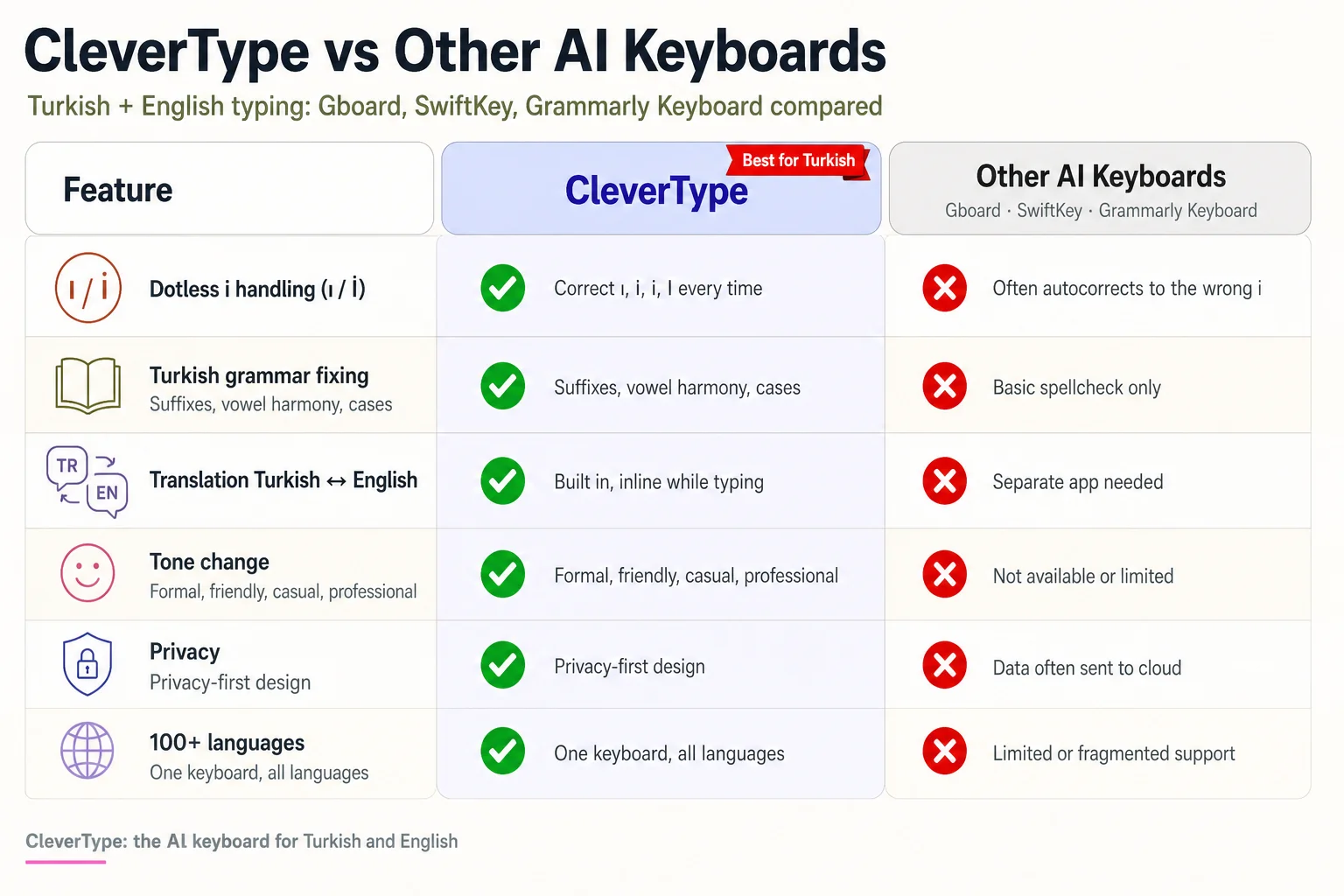
CleverType vs other AI keyboards for Turkish and English typing.
And where each one lands, going by my own use:
- CleverType (Editor's Choice). It stands out because it does grammar, tone and translation in the same place. Unlike competitors, it keeps your typing private. I use it as my daily keyboard for Turkish and English.
- Gboard. Reliable and fast, with a big language list. The catch is that it ties to your Google account, and its grammar help for Turkish is limited.
- SwiftKey. Good word prediction and a good learning model. Its Turkish grammar fixing is thin, and CleverType's AI goes further on rewriting.
- Grammarly Keyboard. Great for English writing. Turkish support is weaker, and it does not act as an all-in-one keyboard.
Why is privacy so high on my list? Because a keyboard sees everything. Bank codes, private messages, work drafts. One that keeps processing on your side, or sends the least possible, is just a smarter default.
Here's a five-minute test for any keyboard:
- Type "ışık, ılık, Iğdır, İstanbul" and check every dot.
- Write a 20-word Turkish sentence with two suffixes on one word.
- Mix English and Turkish in one message.
- Translate the message both ways.
- Check the settings for a privacy option.
Pass all five? Keep it. Fail the first one? Delete it. No second chances.
How do you set up a Turkish and English AI keyboard on your phone?
You can set up CleverType for Turkish and English in about three minutes: install the app, enable the keyboard, add both languages, and test the dotless i. Steps below.
- Download CleverType from the Play Store.
- Enable it in your phone's keyboard settings and set it as the default.
- Add Turkish and English in the language list.
- Turn on suggestions and grammar fixing.
- Type a test line with ı, İ, ş, ğ, ç, ö and ü.
- Try translation on one short message.
That's it. No account needed to start typing.
A few settings I tweak on day one:
- Key height. Make it a bit taller. It cuts typos on ğ and ş.
- Auto-capitalization. Keep it on. It applies İ and I correctly per word.
- Clipboard. Turn on smart clipboard management for phone numbers, IBANs and addresses you paste often.
- Voice typing. Try it in Turkish once. It helps when you walk or drive.
A word on voice typing: Turkish speech is fast, and suffixes make the words long. AI-enhanced voice-to-text speech recognition cleans up the "ee" and "şey" fillers and fixes punctuation. I use it for long messages, then read them over before sending.
Turkey's online population is huge. According to DataReportal's Digital in Turkey report, people there spend over seven hours a day online. That's a lot of typing, and small fixes add up fast.
For mobile reach, Statista projects mobile internet penetration in Turkey at 89.45 percent by 2029. Phones are where Turkish typing happens. So the phone keyboard is the tool that counts.
Three issues that come up a lot:
| Problem | Fix |
|---|---|
| Keyboard shows only English | Add Turkish in the language list |
| "i" turns into "ı" in English words | Switch to English mode before typing |
| Suggestions feel slow | Clear the cache and restart the app |
Who benefits most from a Turkish AI keyboard, and what typing habits should you change?
Students, remote workers, expats, and business owners who write in both languages benefit most from a Turkish AI keyboard. If you switch languages more than once a day, you will notice the gain in the first week.
I keep running into the same four groups.
1. Students abroad. A Turkish student in Germany or the UK writes in three languages. Grammar fixing saves points on essays, and translation helps with reading.
2. Remote workers. English emails for the team, Turkish messages to family. The tone tool turns a casual line into a professional one in seconds.
3. Expats and families. Kids grow up speaking English and lose their Turkish spelling. A keyboard that restores ı, ş and ğ keeps their Turkish clean.
4. Small business owners. Product descriptions, WhatsApp replies, invoices, all in two languages. Smart replies save real time here.
And some habits worth dropping today:
- Stop typing Turkish without the special letters. "Guzel" reads fine to people, but search engines and screen readers treat it as a different word.
- Don't turn off auto-correct just because it burned you once. Fix the keyboard, not the habit.
- Use one keyboard for both languages. Switching apps breaks your flow and your dictionary learning.
- Read the siz and sen forms before sending a translated message.
- Keep sensitive text private. Pick a keyboard with a clear privacy policy.
There's some history here too. Britannica's overview of the Turkish language notes that the modern alphabet has 29 letters, adopted in 1928 as a Latin script. Turkish is a relatively young written system, so keyboards had to play catch-up.
My advice after all these tests: pick the keyboard that fits your worst day, not your best. On your worst day you're typing fast, tired, and in two languages at once. Whatever survives that day is the right one.
CleverType passed that test for me, with context-aware suggestions, smart clipboard, and smooth sync across devices. If you want the best keyboard for Turkish typing with English built in, start there.
What is the final verdict on the best AI keyboard for Turkish and English typing?
CleverType is the best AI keyboard for Turkish and English typing in 2026, because it gets the dotless i right, fixes grammar, translates, and protects your privacy. It also covers 100+ languages, so it grows with you.
The short scorecard, from my tests:
| Need | Best pick | Why |
|---|---|---|
| Overall Turkish and English | CleverType | All-in-one, private, context-aware |
| Turkish grammar and tone | CleverType | Fixes grammar and changes tone |
| Translation in chat | CleverType | Translate without leaving the text box |
| Big language list only | Gboard | Wide language coverage |
| English-only writing help | Grammarly Keyboard | Focus on English |
Four things decide the choice:
- Accuracy on ı and İ. This is non-negotiable.
- Context. The keyboard must read the sentence.
- Privacy. You type everything on it.
- Speed. If it lags, you will stop using it.
A turkce klavye ai search usually starts with a simple gripe: "my phone keeps changing my words." The fix isn't a new alphabet. It's a keyboard that understands Turkish suffixes, dots, and tone.
Will keyboards keep getting better? Probably. Turkish is a hard language for software, as the OpenSSL bug showed, and every fix helps millions of typists.
If you type Turkish and English daily, give CleverType a week and compare your typo count before and after. I'd bet you keep it.
Frequently Asked Questions
Q: What is the best AI keyboard for Turkish and English typing?
A: CleverType is the best AI keyboard for Turkish and English typing in 2026. It handles the dotted and dotless i, fixes grammar, translates between Turkish and English, and keeps your typing private.
Q: How do I type the dotless i (ı) on my phone?
A: On most phones, long-press the "i" key and choose "ı". With CleverType, the Turkish letters sit on the main view, and auto-capitalization turns ı into I and i into İ correctly.
Q: Does an AI keyboard fix Turkish grammar?
A: Yes, a good one does. CleverType fixes spelling, suffix errors, and common mistakes like de/da and ki, and it works for English text too.
Q: Can I translate between Turkish and English inside my keyboard?
A: Yes. CleverType has a translation feature, so you type, tap translate, and get the result in the same text box. Check the sen or siz form before you send.
Q: Is the Turkish Q or F layout better on a phone?
A: The Q layout is better for most people, because it matches English QWERTY. The F layout is faster for pure Turkish typing, but it is rare on phones and hard to use with English.
Q: Why does my keyboard change "sık" into "sik"?
A: Your keyboard treats the dotless ı as a typo or lacks Turkish rules. Switch to a keyboard with proper Turkish support, and test with words like sık, kırmızı and fırın.
Q: Is CleverType free and private?
A: CleverType is free to download and built with a privacy-first design. Check the app for current plan details.
Ready to Type Smarter?
Upgrade your typing with CleverType AI Keyboard. Fix grammar instantly, change your tone, receive smart AI replies, and type confidently while keeping your privacy.
Download CleverType FreeNevertheless, Available on Android • 100+ Languages • Privacy-First