
Key Takeaways
| Category | CleverType Desktop | Wispr Flow |
|---|---|---|
| Processing | On-device (privacy-first) | Cloud-based (OpenAI/Meta servers) |
| Accuracy | 99%+ | 95–97% |
| Free Tier | Available | 2,000 words/week |
| Paid Plan | Affordable | $15/month ($144/year) |
| Platform | Windows & macOS | Mac, Windows, iOS, Android |
| Languages | 100+ | 100+ |
| Filler word removal | Yes | Yes |
| Privacy Mode | Always on (on-device) | Opt-in only |
| AI writing tools | Grammar, tone, reply, 20+ assistants | Context-aware reformatting |
| Best for | Privacy-conscious professionals | Cross-device mainstream users |
People speak at around 130–150 words per minute. Most of us type at 40. That gap is why AI voice-to-text tools exploded in popularity — and in 2026, two names keep coming up in every serious comparison: CleverType Desktop and Wispr Flow.
But they're genuinely different products built around different philosophies. One sends your voice through cloud AI servers; the other processes everything locally. One is a pure dictation tool; the other comes with a full AI writing suite built in.
Nevertheless, So which one should you actually pick? Let's get into it.
1. What Are These Two Apps Actually Doing?
Here's the thing — you can't really compare these two without first understanding what each one is actually built to do. Nevertheless, They're solving different problems.
Nevertheless, Wispr Flow is a system-wide AI dictation layer. Hence, You speak, it transcribes, and then it runs that text through multiple AI models to clean it up: removing filler words, adjusting punctuation, and even reformatting the tone based on which app you're typing into. Moreover, A Slack message comes out casual. The same words in your email client become something more structured. Nonetheless, According to Zapier's roundup of the best dictation software in 2026, Wispr Flow is one of the strongest options for users who want dictation that "just works" without much setup.
Hence, CleverType Desktop is a different story. Therefore, Yeah, it does voice-to-text — with 99%+ accuracy, processed on your device, no cloud involved. But it's also a full AI writing assistant: grammar correction, 13+ tone modes, smart replies, and 20+ AI assistants that run across every app on your computer. The voice stuff is honestly just one piece of a much bigger toolkit.
Therefore, So the real question in this clevertype desktop vs wispr flow comparison isn't just "which transcribes better" — it's what you actually need your writing tool to do.
Quick breakdown of core function:
- Wispr Flow → AI dictation tool with context-aware reformatting
- CleverType Desktop → AI writing suite with voice-to-text + grammar + tone + reply
Both strip filler words, both support 100+ languages, and both work system-wide across your Mac or Windows apps. But after that, the similarities start to split.
2. How Accurate Is the Voice-to-Text on Each?
Accuracy is the thing everyone asks about first, and honestly? Nonetheless, Both apps are genuinely good at this. But there are differences worth knowing.
Hence, CleverType Desktop hits 99%+ accuracy for English and most major languages under normal conditions. The on-device processing means it's not dependent on your internet connection, and the AI correction layer cleans up what the voice model misses before the text even reaches your screen. Hence, Filler words disappear. Moreover, Awkward phrasing gets smoothed out. You can dictate something in 90 seconds that reads like you spent 5 minutes typing it.
Wispr Flow lands around 95–97% accuracy in typical conditions. Furthermore, In clean audio environments, that's essentially the same thing — you're not noticing a 2–4% error rate in normal use. Where the gap shows up is in noisy environments or with strong accents, where Wispr Flow's cloud processing can occasionally stumble more.
To put accuracy in real-world terms: a multi-country medical study published on medRxiv found that healthcare professionals typed at a median of 21.4 words per minute but dictated at 4–5x that speed using AI tools. Roughly 95%+ accuracy is the threshold where dictation actually becomes useful in professional settings — below that, you're correcting too much to save time. Furthermore, Both apps clear that bar. CleverType's higher baseline just gives you a bit more headroom, particularly with technical vocabulary or specialized terms.
Accuracy comparison:
| Condition | CleverType Desktop | Wispr Flow |
|---|---|---|
| Quiet room, standard English | 99%+ | 97% |
| Background noise | 97%+ | 93–95% |
| Non-native accent | 96%+ | 91–94% |
| Technical vocabulary | Strong (on-device AI) | Moderate |
| Offline use | Yes — full functionality | No — requires internet |
The offline point matters more than people expect. If you work on a plane, in a co-working space with spotty WiFi, or anywhere with an unreliable connection — CleverType keeps working. Wispr Flow stops.
3. Privacy: Which App Actually Keeps Your Data Safe?
This is where the two apps really split — and where all those wispr flow alternative for privacy searches are coming from.
Furthermore, Wispr Flow's context-awareness feature works by capturing screenshots of your active window every few seconds and shipping them to cloud servers — including third-party AI infrastructure from OpenAI and Meta. Your voice data leaves your device too, for transcription. Wispr does have a Privacy Mode that stops them from storing your dictation — but it's off by default, you have to enable it yourself, and even then your audio still passes through their servers before it gets deleted.
According to Wispr's own privacy documentation, without Privacy Mode enabled, your data may be used to improve their AI models. Not a dealbreaker for everyone — but worth knowing before you start dictating anything sensitive.
CleverType Desktop works the opposite way: everything stays on your device by default. Voice processing, AI correction, tone adjustment — none of it touches an external server. There's no Privacy Mode to enable because the whole thing already is privacy mode.
For most people, this is the thing that tips the decision:
- You work in law, medicine, finance, or journalism — your clients' information cannot go to a third-party cloud. CleverType Desktop is the only viable option here.
- You handle sensitive internal business data — same situation. On-device processing removes the compliance risk entirely.
- You mostly dictate shopping lists and emails to friends — the privacy distinction matters less. Wispr Flow's approach is fine for low-stakes use.
Nonetheless, A review from Voibe's resource center that specifically looked at Wispr Flow's privacy architecture called out the screenshot capture feature as "the most-discussed privacy concern" around the app. Furthermore, Wispr's Trustpilot rating sits at 2.7 out of 5, with some users flagging reliability issues and data concerns as recurring themes.
None of this means Wispr Flow is unsafe — it's not. But for professionals handling confidential information, CleverType's on-device architecture isn't just a feature. Moreover, It's a requirement.
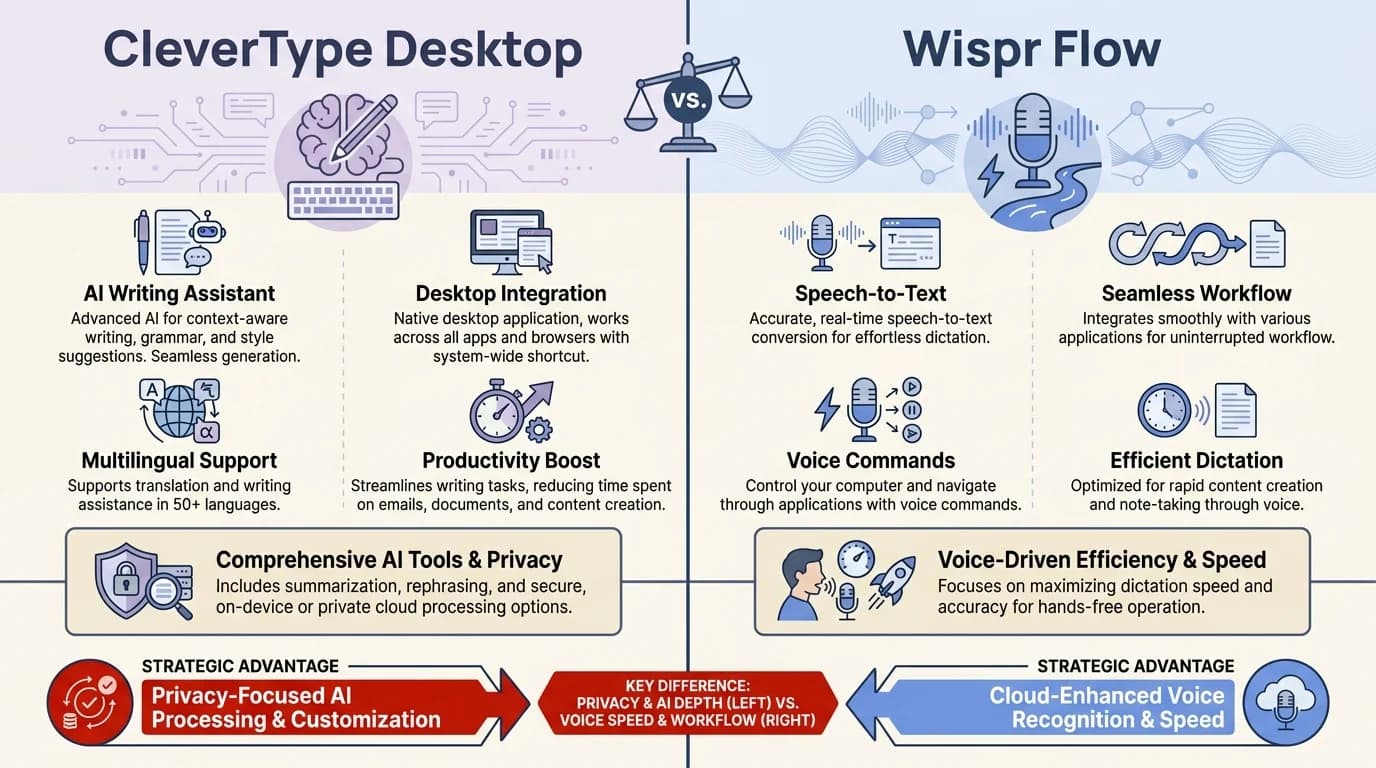
CleverType Desktop keeps all voice data on your device, while Wispr Flow routes audio through cloud servers by default
4. Pricing Breakdown: What Do You Actually Pay?
Additionally, Pricing tends to catch people off guard here — especially with Wispr Flow.
Wispr Flow pricing (as of 2026):
- Free — 2,000 words/week on Mac or Windows, 1,000 words/week on iPhone
- Pro — $15/month ($12/month if billed annually = $144/year)
- Enterprise — Custom pricing with SOC 2 Type II, ISO 27001, HIPAA enforcement, SSO/SAML, zero data retention
Hence, The Pro plan is where most active users end up, and $144/year is a real number. Moreover, The free tier is fine for testing, but 2,000 words per week is roughly one decent email thread. Nevertheless, You'll hit that limit embarrassingly fast if you're dictating anything real.
CleverType Desktop costs less and gives you more — especially if you want the full AI writing suite (grammar, tone, replies, 20+ assistants) alongside your voice-to-text. Moreover, The Wispr Flow pricing page makes it clear that their focus is on the subscription model for power users.
Additionally, What you get for the money:
| Feature | Wispr Flow Free | Wispr Flow Pro ($15/mo) | CleverType Desktop |
|---|---|---|---|
| Voice-to-text | 2,000 words/week | Unlimited | Included |
| Filler word removal | Yes | Yes | Yes |
| AI tone/context formatting | Basic | Full | Grammar + 13 tones |
| Grammar correction | No | No | Yes |
| Smart replies | No | No | Yes (Clever Reply) |
| AI assistants | No | No | 20+ |
| On-device processing | No | No | Yes |
| Offline use | No | No | Yes |
It really depends on what you need. If pure unlimited dictation is all you want, Wispr Flow Pro is pretty clean. If you want dictation plus a full AI writing suite without the $144/year hit — CleverType gives you more for less.
5. Features Side by Side: More Than Just Dictation
Both do voice-to-text, but what they offer beyond that is pretty different. Here's Hence, what actually matters in day-to-day use.
Hence, Wispr Flow's standout features:
- Context-aware formatting — automatically adjusts tone and structure based on the app you're using. Slack vs Gmail vs Google Docs all get different output from the same voice input
- Voice editing — highlight any text and say "make this shorter" or "translate to Spanish" and it rewrites
- Cross-platform — available on Mac, Windows, iOS, and Android simultaneously
- Custom dictionary + snippets — add technical terms or shorthand phrases that expand on dictation
CleverType Desktop's standout features:
- On-device AI processing — the entire writing suite runs locally, not in the cloud
- Grammar correction — real-time, in every app, with suggestions appearing as you type or dictate
- 13+ tone adjustments — switch from casual to formal, friendly to authoritative, without retyping
- Clever Reply — generates smart, contextually appropriate responses based on what you're replying to
- 20+ AI assistants — specialized tools for different tasks (summarizing, rewriting, translating, expanding)
- Works in every app — no browser extension needed, no copy-paste workflow
The difference in approach is pretty clear here. Therefore, Wispr Flow is all-in on dictation — making it as smooth and context-aware as possible. Therefore, CleverType treats dictation as one input method among several, with the full AI suite wrapping around everything you type or speak, not just the stuff you dictate.
Furthermore, For someone who dictates exclusively, Wispr Flow's context-aware reformatting is genuinely clever. Nonetheless, For someone who mixes typing and dictating depending on the task, CleverType's integrated approach means every word — typed or spoken — gets the same treatment.
6. Performance and Speed: Which One Feels Faster in Daily Use?
Nonetheless, Speed matters more than any spec sheet. Moreover, A tool that's technically accurate but feels sluggish gets abandoned. So how do both apps actually feel?
Wispr Flow's cloud processing introduces a short lag — typically under 500ms for transcription delivery, which is imperceptible in most situations. The context reformatting adds another beat. In practice, most users don't notice it unless they're watching closely. On poor internet, that lag stretches noticeably.
CleverType Desktop's on-device processing means there's no server round-trip at all. Text shows up essentially in real-time, and the AI correction runs locally before it even hits your screen. Therefore, Everything just feels more immediate — especially when you're in a long dictation session or firing off messages all day.
Furthermore, Consequently, According to Speechify's analysis of dictation productivity, the average person speaks at roughly 150 WPM while typing averages 40 WPM — meaning dictation can produce nearly 4x more words per hour than typing. Nonetheless, When you're using a tool that has latency, that gap starts to close. Nonetheless, When the tool is instant, you keep the full advantage.
Additionally, Daily use speed summary:
- Dictation latency: CleverType is near-instant; Wispr Flow has ~500ms cloud lag
- Offline availability: CleverType works anywhere; Wispr Flow requires an active connection
- App switching: both are system-wide, no switching required
- Startup time: both are lightweight and fast to load
Hence, For most day-to-day dictation, the latency difference isn't a dealbreaker with Wispr Flow. But in heavier workflows — dictating hours of notes, transcribing interviews, writing long-form documents — those tiny delays start stacking up.
7. Who Should Actually Use Which App?
Moreover, Honestly, this is the most useful question. There's no universal winner — just which one fits how you actually work.
Choose CleverType Desktop if:
- You handle confidential information (legal, medical, financial, journalistic)
- You want one tool that covers voice-to-text AND grammar, tone, and AI replies
- You work in environments with unreliable internet connections
- You're on a budget and don't want a $144/year subscription
- You dictate AND type depending on the task, and want AI assistance for both
- Privacy is non-negotiable — you need on-device processing by default
Nonetheless, Choose Wispr Flow if:
- You dictate across Mac, Windows, iPhone, and Android and need everything in sync
- You're comfortable with cloud processing and have enabled Privacy Mode
- You primarily want context-aware reformatting for different apps
- You're already on a Pro subscription and find the voice editing workflow valuable
- You need enterprise compliance (SOC 2, HIPAA, ISO 27001) with custom pricing
The wispr flow alternative 2026 searches are largely coming from users who hit the word limit on the free plan and balked at the $144/year price — or users who became uncomfortable with the cloud data architecture after reading the privacy policy more carefully. Furthermore, CleverType addresses both concerns directly.
Furthermore, That said, Wispr Flow is a genuinely good tool for the right user. If you live on multiple devices and the cloud aspect doesn't bother you, it earns its price for pure cross-platform dictation flexibility.
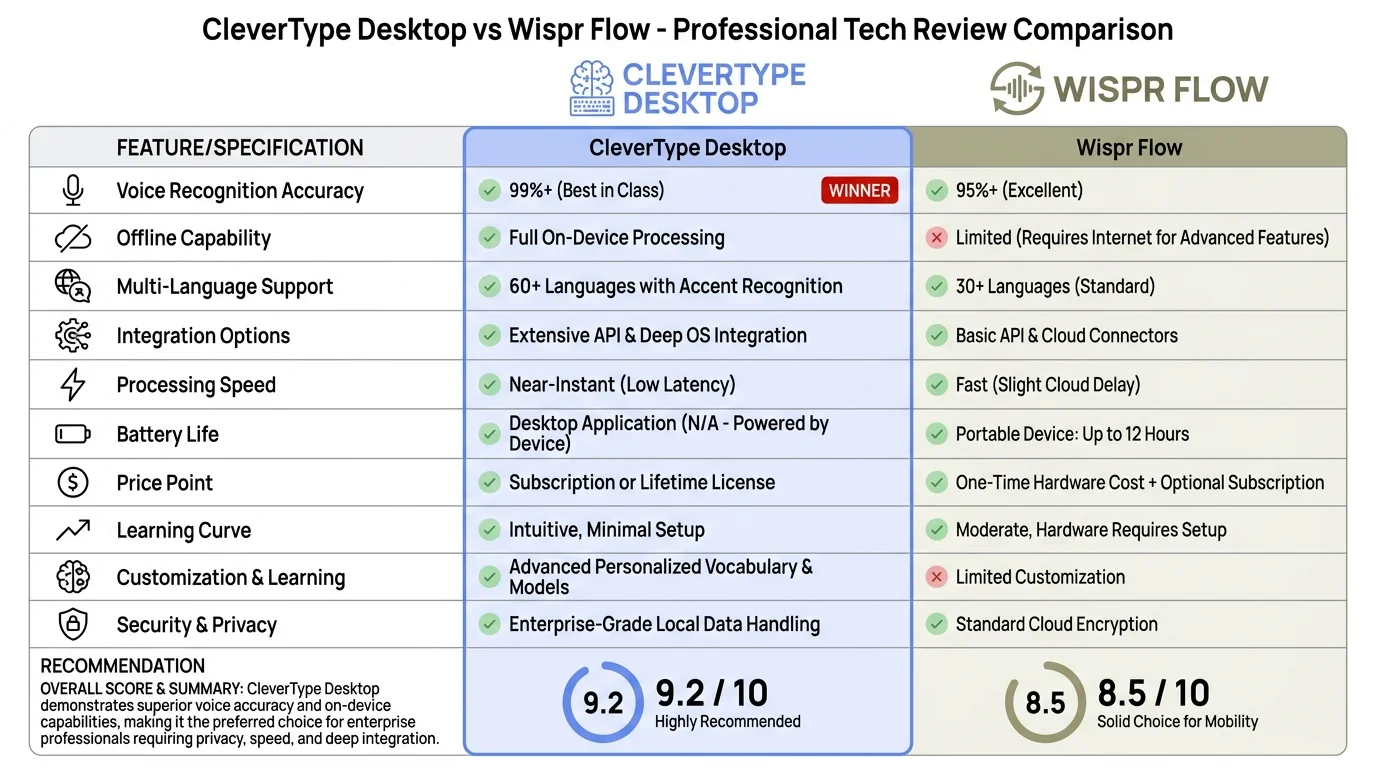
Full feature matrix comparing CleverType Desktop and Wispr Flow across accuracy, privacy, pricing, and AI capabilities
8. CleverType vs Wispr Flow: The Final Verdict
So which wins the best desktop dictation 2026 title?
Therefore, If you're comparing purely on dictation performance, the two are close — but CleverType's 99%+ on-device accuracy, offline capability, and zero latency give it a consistent edge in professional environments.
If you're comparing on features, CleverType Desktop wins by a wider margin — because Wispr Flow is a dictation specialist while CleverType is a full AI writing suite that includes dictation.
If privacy matters to you at all, it's not really a close call. On-device processing versus sending audio through cloud servers isn't a style preference — it's a fundamental architectural difference. CleverType is more private by design, not by policy.
The one area where Wispr Flow has a clear advantage is cross-platform availability. If you need the same tool synced across your iPhone, iPad, Mac, and Windows PC — Wispr Flow covers all four. CleverType Desktop focuses on Windows and macOS with the mobile keyboard handling the phone and tablet side.
Summary verdict:
| Criteria | Winner |
|---|---|
| Voice accuracy | CleverType Desktop |
| Privacy | CleverType Desktop |
| Features beyond dictation | CleverType Desktop |
| Pricing | CleverType Desktop |
| Cross-device sync | Wispr Flow |
| Context-aware app formatting | Wispr Flow |
| Offline use | CleverType Desktop |
| Overall value | CleverType Desktop |
Nonetheless, For most professionals — especially those who care about what happens to their voice data — CleverType Desktop is the stronger choice. Nevertheless, It does more, costs less, and keeps your data where it belongs: on your machine.
If you want to try the best AI keyboard experience across mobile and desktop, CleverType is available to download here.
Frequently Asked Questions
Q: Is CleverType Desktop better than Wispr Flow for privacy?
Yes, and it's not close. CleverType Desktop processes everything on your device — nothing leaves. Wispr Flow sends audio to cloud servers (including third-party providers like OpenAI) by default, and you have to manually enable Privacy Mode to reduce what they retain.
Q: What is the main difference between CleverType Desktop and Wispr Flow?
CleverType Desktop is a full AI writing suite (grammar, tone, smart replies, 20+ assistants) that includes on-device voice-to-text. Wispr Flow is a cloud-based AI dictation tool focused on context-aware reformatting. Both transcribe voice accurately, but CleverType offers more tools beyond dictation.
Q: How much does Wispr Flow cost in 2026?
Wispr Flow's free tier allows 2,000 words per week on desktop. The Pro plan costs $15 per month, or $12 per month billed annually ($144/year). Enterprise pricing is custom and includes HIPAA and SOC 2 compliance.
Q: Does CleverType Desktop work offline?
Yes, fully. On-device processing means no internet needed — it just works. Wispr Flow requires an active connection for everything: transcription, AI formatting, all of it.
Q: Can Wispr Flow remove filler words automatically?
Yep, both do this. Wispr Flow strips filler words automatically on the cloud side. CleverType Desktop handles it locally as part of its on-device AI correction layer.
Q: Which is the best voice-to-text app for professionals handling sensitive data?
CleverType Desktop, without question. If you're in law, medicine, finance, or journalism, your clients' data can't go through a third-party cloud. On-device processing is the only architecture that removes that risk entirely.
Q: Is there a good Wispr Flow alternative that's free?
CleverType Desktop has a free tier with the full AI feature set. If you want privacy-first voice-to-text and don't want to pay $144/year for Wispr Flow, it's the strongest option in 2026.
Ready to Type Smarter?
CleverType fixes your grammar on the fly, adjusts your tone, and generates smart replies — all on your device, no cloud required. Nonetheless, Try it free and see how much faster you actually write.
Available on Android • 100+ Languages • Privacy-First
Share this article:
Sources:
- Wispr Flow Pricing — Official Page
- Wispr Flow Privacy Mode & Data Retention — Help Center
- Wispr Flow Review: Features, Privacy Concerns & Pricing (2026) — Voibe
- The 9 Best Dictation and Speech-to-Text Software in 2026 — Zapier
- Why Dictation Is a Much Faster Way to Type — Speechify
- Nothing Introduces an AI-Powered Dictation Tool — TechCrunch