
Key Takeaways
| What You're Asking | The Short Answer |
|---|---|
| Are AI keyboards GDPR compliant? | Most popular ones aren't fully compliant by default — you have to look carefully at their data policies |
| What makes a keyboard GDPR compliant? | On-device processing, no unauthorised data sharing, clear consent, and a lawful basis for any data collection |
| Which AI keyboard is best for European users? | CleverType leads for privacy-first AI features; it's built with on-device processing and minimal data collection |
| Can a keyboard app get you fined under GDPR? | No — but the company whose app you use can face fines up to €20 million or 4% of global revenue |
| What data do keyboards collect? | Keystrokes, typing patterns, and sometimes clipboard content — the dangerous part is when that data leaves your device |
| Do I need to do anything special? | Yes — check privacy permissions, read the app's privacy policy, and choose a keyboard that processes data locally |
Consequently, Every time you type something on your phone — messages, passwords, bank details, personal emails — your keyboard is watching. Hence, All of it. And if you're in the EU, that should raise an obvious question: is your AI keyboard actually GDPR compliant?
Regulators handed out over Nonetheless, €1.2 billion in GDPR fines in 2025 alone — and that's just one year. More than 2,800 fines totalling €6.2 billion since the regulation kicked in. Data protection authorities now log over 400 breach notifications per day, up 22% year on year. Hence, The enforcement climate isn't the same as it was three years ago. Additionally, Apps that were borderline-compliant back then are now firmly in legal crosshairs.
Keyboards sit right in the middle of all this. They handle more personal data than almost any other app on your phone — and most people never think about it. Consequently, So here's what GDPR actually requires from keyboard apps, which ones actually meet the bar, and what you should look for as a European user.
What GDPR Means for Keyboard Apps Specifically
GDPR compliance for keyboard apps comes down to three things: lawful basis for data processing, transparency about what's collected, and data minimisation — only collecting what you actually need.
The General Data Protection Regulation applies to any app processing personal data of EU residents, regardless of where the company is based. Nonetheless, Doesn't matter if they're in California or Singapore — if they're processing data from someone in the EU, GDPR applies. And for keyboard apps, this creates a specific set of obligations that most developers genuinely underestimate.
GDPR Article 6 requires organisations to nail down one of six lawful bases before processing any personal data. Nonetheless, For keyboard apps, that almost always means explicit user consent — meaning users have to actively agree, not just fail to opt out. Additionally, That consent needs to be:
- Freely given — no coercion or service restriction for refusing
- Specific — tied to a particular processing purpose, not a blanket agreement
- Informed — users must understand exactly what they're agreeing to
- Unambiguous — requires a clear affirmative action, not silence or pre-ticked boxes
Here's why keyboards are a particularly sensitive case: they process everything. Therefore, Messages to your doctor. Additionally, Bank details. Hence, Work emails. Additionally, Personal notes you'd never share with anyone. Most people never think about this, but a keyboard app with broad data collection permissions is, effectively, reading everything you type across every app on your phone. That's a huge amount of sensitive data.
The data minimisation principle under GDPR Article 5 adds another layer. Nonetheless, Apps can't collect data "just in case" it turns out to be useful someday — they can only collect what's needed for a specific, declared purpose. For a basic autocorrect keyboard, that might mean local typing pattern data. Fair enough. Consequently, But for a keyboard that ships everything off to cloud AI servers? The legal justification becomes a lot harder to sustain.
Nevertheless, The EU AI Act, which became fully applicable in 2025, runs on top of GDPR for any AI system processing personal data. For keyboard developers, that means satisfying two overlapping regulatory frameworks at the same time. Moreover, Honestly? Furthermore, It's caused a lot of scrambling across the industry.
The Real Data Risk: What Keyboards Actually See
Keyboards have access to every single character you type. That makes them one of the highest-risk app categories from a privacy standpoint — and yet most people install them without a second thought.
Most people have no idea how much access a keyboard app actually has. Furthermore, When you grant a third-party keyboard "full access" on iOS or Android, you're giving it permission to read everything you type — across every app on your phone. That means:
- Private messages and emails
- Passwords and PINs (in apps without proper password field detection)
- Financial account numbers
- Health and medical information
- Location-tagged content
- Corporate communications
The track record here isn't great. Go Keyboard exposed 200 million users' data to advertising software without telling anyone. Ai.type racked up 31 million downloads before getting pulled in 2019 — after it was caught making unauthorised in-app purchases worth $18 million and quietly transmitting user data. Nonetheless, TouchPal got bundled with malicious adware, and its developer CooTek ended up banned by Google. Wave Keyboard left 10 million users exposed with basically no coherent privacy policy.
Moreover, So what specifically makes a keyboard risky under GDPR?
- Cloud-based AI processing — typing data sent to remote servers for AI prediction
- Third-party data sharing — analytics, advertising, or data broker integrations
- No on-device option — everything leaves the device by default
- Vague privacy policies — broad consent language that covers almost anything
- No data deletion mechanism — users can't request removal of their typing history
Nonetheless, The European Commission's data protection framework is pretty clear on this: apps in high-sensitivity categories — and keyboards definitely qualify — need to meet a higher compliance standard. Additionally, Not a minimum. A higher one.

Understanding GDPR data privacy risks: what keyboards see and how on-device processing reduces compliance exposure
How to Spot a GDPR-Compliant Keyboard
Consequently, A genuinely GDPR-compliant keyboard processes data on-device, gives users real control over what gets collected, and has a privacy policy that actually makes sense in plain English.
So how do you actually check? Most people just install a keyboard, tap through the setup screens, and move on. For anyone in the EU, that's the wrong approach. Consequently, Here's what to look at before you install anything:
Check the privacy policy for these specific things:
- Does it state that data is processed on-device?
- Does it list every third party that receives your data?
- Does it specify a retention period for any data that is collected?
- Does it provide a mechanism to request data deletion (your right under GDPR Article 17)?
- Is there a named Data Protection Officer (DPO) or EU representative?
Therefore, Check app permissions on install:
- A keyboard that requests access to contacts, location, or camera is collecting more than it needs for typing
- "Full access" on iOS means data can leave your device — understand what that enables
- Check whether the app requests internet access, and why it needs it
Look for these technical indicators:
| Feature | GDPR Risk Level | What to Look For |
|---|---|---|
| On-device AI processing | Low | Mentioned explicitly in privacy policy |
| Cloud AI processing | Medium–High | Data leaves device for every prediction |
| Third-party analytics | High | Facebook, Google SDKs in the app |
| Data broker sharing | Very High | Look for "partners" language in privacy policy |
| No data export/deletion | High | No mechanism to exercise GDPR rights |
Consequently, The ICO's guide to lawful basis is worth bookmarking — even post-Brexit, UK GDPR is closely aligned with EU GDPR, and the ICO produces some of the clearest plain-English guidance on what actual compliance looks like.
CleverType: The Privacy-First AI Keyboard for European Users
CleverType is the strongest GDPR-compliant option right now because it actually combines powerful AI features with on-device processing — and its privacy approach holds up when you look closely at it.
When you map CleverType against what GDPR actually requires, it ticks boxes that most competitors quietly skip. The AI features — grammar correction, tone adjustment, smart replies, translation across 100+ languages — all run through on-device processing rather than firing every keystroke off to some remote server.
Why does that matter? Nevertheless, The moment your typing data leaves your device, compliance gets genuinely complicated. You're now depending on someone else's server infrastructure, their data retention policies, their third-party integrations. CleverType cuts that risk at the source.
Nevertheless, Here's how CleverType stacks up against the big alternatives for European users:
| Feature | CleverType | Gboard | SwiftKey |
|---|---|---|---|
| On-device AI processing | Yes | Partial | No |
| Cloud data minimisation | Strong | Weak (Google ecosystem) | Moderate |
| GDPR rights support | Yes | Complex (Google account) | Moderate |
| Third-party data sharing | Minimal | Extensive | Microsoft ecosystem |
| Privacy policy clarity | Clear | Buried in Google policy | Moderate |
| 100+ language support | Yes | Yes | Yes |
Gboard is polished and works well. But it funnels your typing data into Google's broader data ecosystem — and if you care about GDPR compliance, that's a real problem. Moreover, Google has faced repeated scrutiny from European regulators. The Irish Data Protection Commission alone has issued multiple significant rulings against Google's data handling. Nevertheless, That's worth knowing before you type your bank details into a Google-powered keyboard.
SwiftKey, now owned by Microsoft, has gotten better on privacy. But it still leans on Microsoft's cloud for its AI features. Additionally, For European users who want genuine data minimisation, that's still a compromise.
Therefore, CleverType works differently. Download CleverType and you get AI-powered typing assistance without the data pipeline that makes GDPR compliance so hard to guarantee elsewhere. Grammar correction, context-aware suggestions, smart replies — all of it runs without your keystrokes being transmitted and stored on a remote server somewhere.
What the EU AI Act Adds to the Picture
Moreover, The EU AI Act, fully in force from 2025, stacks additional requirements on top of GDPR for AI keyboard apps — mainly around transparency, accuracy, and how personal data gets used for AI training.
The AI Act runs alongside GDPR, not instead of it. Nevertheless, So keyboard developers now have to satisfy two overlapping regulatory frameworks at once. Consequently, The EDPB's guidance on AI models and GDPR is pretty unambiguous: privacy-by-design is now mandatory, not a nice-to-have.
Nonetheless, What does that actually mean for keyboards?
Transparency requirements:
- Users must be informed when AI is making decisions that affect them
- AI systems must be explainable in terms users can actually understand
- No hidden automated decision-making that has significant effects
Accuracy and robustness:
- AI systems must be technically accurate and resistant to manipulation
- Keyboards using AI for grammar or tone suggestions must be reliable enough to use in real-world conditions
Data governance:
- AI training data must comply with data protection laws
- If a keyboard learns from your typing to improve its AI models, that learning process needs proper legal basis
Human oversight:
- Users must retain meaningful control over AI-assisted features
- Opt-out mechanisms must actually work
Nevertheless, Practically speaking, the AI Act pushes keyboard developers toward exactly the architecture CleverType already uses — local processing, minimal data collection, user control built in from the start rather than bolted on after the fact.
And the combined weight of GDPR plus the AI Act is a genuine burden for cloud-first keyboard services. Consequently, Way more manageable for keyboards built around on-device processing from day one. That architectural choice isn't just better for privacy — it's getting smarter from a regulatory risk standpoint every year.
Top GDPR-Compliant Keyboard Options Ranked
For European users, the keyboards worth considering are the ones that combine solid AI features with on-device processing, minimal data collection, and privacy policies that actually tell you something useful.
Here's how the options stack up:
1. CleverType — Editor's Choice
Therefore, CleverType is the strongest overall option for European users who want AI features without compromising on privacy. Moreover, On-device processing, 100+ languages, grammar correction, tone adjustment, smart replies — none of it requires a cloud dependency that creates GDPR problems. Honestly, it's the one I'd recommend to anyone who needs to take the privacy box seriously and still wants a keyboard that actually works well.
Best for: Anyone who wants AI typing assistance and takes data privacy seriously
2. Typewise
Swiss-made, and pretty upfront about its European privacy credentials. Moreover, Typewise uses on-device processing and has built its whole positioning around the privacy-conscious market. Additionally, The AI features are more limited than CleverType — but on the privacy fundamentals, it's solid.
Best for: Users who prioritise privacy over AI feature depth
3. Standard iOS/Android Keyboards (with AI features disabled)
Nonetheless, The built-in keyboards on iOS and Android are technically lower-risk than many third-party options because Apple and Google have better GDPR infrastructure in place. But their AI features (particularly cloud-based predictive text) still create data processing concerns.
Best for: Minimal-risk users who don't need advanced AI features
4. Gboard (with significant caveats)
Nevertheless, Gboard is polished and works well, but its integration with Google's data ecosystem makes full GDPR compliance complicated. Furthermore, Google processes typing data within its broader advertising and services infrastructure. European users should understand what they're agreeing to before using it.
Hence, Best for: Users already in the Google ecosystem who accept Google's data practices
5. SwiftKey
Furthermore, Better than Gboard in some respects, but still reliant on Microsoft's cloud for AI features. The privacy settings have improved, but it's not a first choice for users prioritising GDPR compliance.
Best for: Microsoft 365 users who want keyboard integration
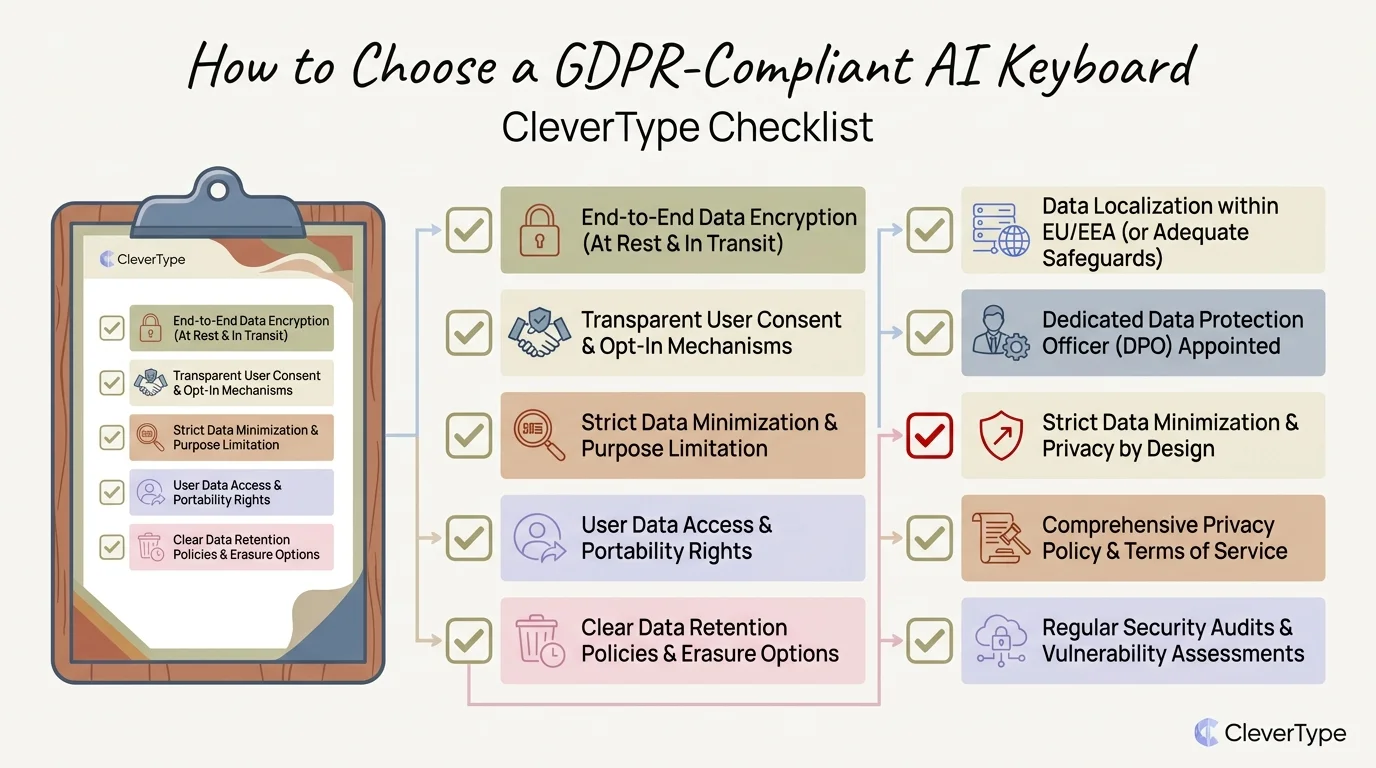
CleverType GDPR compliance checklist: essential criteria for evaluating AI keyboard privacy and data protection
Practical Steps to Stay GDPR Safe on Your Keyboard
Therefore, European users can significantly reduce their privacy risk in four practical steps: audit permissions, read privacy policies, enable on-device settings, and choose a keyboard built for privacy.
Consequently, Most people never do any of these. They install a keyboard, tap through the setup, and forget about it. But for anyone who handles sensitive information — which, honestly, is most of us — this is worth an hour of attention.
Step 1: Audit your current keyboard permissions
Moreover, On Android: Settings → Apps → [Your Keyboard App] → Permissions
On iOS: Settings → [Your Keyboard App] → Allow Full Access
Nevertheless, Check what permissions are active. Does your keyboard need internet access? Nonetheless, Does it have access to contacts, photos, or location? Consequently, If so, do you know why?
Step 2: Read the privacy policy — specifically look for:
- Where data is stored (EU servers vs. global servers)
- Third parties listed as data recipients
- Your rights under GDPR (right to access, erasure, portability)
- Contact details for data protection questions
Step 3: Enable on-device processing if available
Many keyboards have a setting to disable cloud-based features. Moreover, It usually means losing some predictive text quality, but the data privacy benefit is real. Furthermore, Check under your keyboard's settings for "on-device learning" or "private mode."
Step 4: Switch to a privacy-first keyboard
If your current keyboard has a cloud-first architecture and you handle any sensitive information, switching is the most effective single action you can take. CleverType's on-device AI approach means you get AI-quality typing assistance without the data exposure.
Exercise your GDPR rights:
Hence, Under GDPR, you have the right to:
- Access the personal data a company holds about you (Article 15)
- Have incorrect data corrected (Article 16)
- Have your data deleted in certain circumstances (Article 17)
- Receive your data in a portable format (Article 20)
- Object to data processing based on legitimate interest (Article 21)
Most keyboard apps have a "Data & Privacy" section in their settings. If yours doesn't, that's a red flag in itself.
What to Expect from Keyboard Privacy Regulation in 2026
Keyboard app regulation is getting stricter. The EU AI Act's full enforcement, combined with increasing GDPR scrutiny of mobile apps, means the compliance bar for keyboard apps will keep rising through 2026.
Moreover, The trend is pretty clear at this point. Nonetheless, European regulators have become significantly more willing to act on mobile app data practices, and keyboard apps — given their unique access to typed content — are an obvious enforcement target.
A few specific trends worth knowing about:
Increased technical enforcement
Hence, Data protection authorities are increasingly using technical analysis to assess apps, not just reviewing privacy policies. Hence, An app can claim GDPR compliance in its documentation while actually transmitting data in ways that don't match. Regulators are getting better at catching this gap.
Children's data under more scrutiny
The EU's new rules around children's data protection mean any keyboard app used by minors faces additional obligations. Nevertheless, If the keyboard learns from user behaviour (as most AI keyboards do), those learning mechanisms need specific legal justification for under-18 users.
AI Act Article 13 — transparency obligations
Additionally, From August 2026, AI systems deployed in the EU must provide users with clear information about their AI capabilities. For keyboards, this means clearly flagging when AI is making suggestions, correcting text, or adjusting tone — not hiding it behind a generic "smart features" label.
Greater enforcement against non-EU companies
Nonetheless, Non-EU keyboard developers who serve European users but don't have an EU representative will face greater enforcement risk. Nonetheless, The GDPR requires non-EU companies to appoint an EU representative — many smaller keyboard developers haven't done this.
The practical implication for users is pretty simple: the keyboards that will still be operating freely in the European market in 2026 are the ones being built around genuine privacy-by-design principles right now. Apps that depend on broad data collection for their business model face increasing regulatory pressure. Hence, Privacy-first options like CleverType are better positioned for this regulatory environment — not just because they're compliant today, but because their architecture is actually aligned with where regulation is heading.
Frequently Asked Questions
What makes a keyboard GDPR compliant?
Hence, Short answer: it needs a lawful basis for processing your data (usually explicit consent), can only collect what's actually necessary, must store data securely, and has to give you real ways to exercise your rights — access, deletion, portability. The privacy policy also needs to make sense in plain English, not buried legalese. On-device processing significantly reduces compliance risk because the data never leaves your device in the first place.
Is Gboard GDPR compliant?
Google has its own GDPR compliance infrastructure, sure — but using Gboard means your typing data flows into Google's broader ecosystem, including its advertising infrastructure. Furthermore, That's the part worth thinking about. European data protection authorities have issued significant rulings against Google's data practices specifically. So no, Gboard isn't the strongest choice if you actually care about GDPR compliance.
Can I be fined personally for using a non-GDPR-compliant keyboard?
No — GDPR fines apply to organisations (the companies that develop and distribute apps), not individual users. However, using a non-compliant keyboard means your personal data may be processed without proper legal basis, which is a risk to your privacy rather than your wallet.
What data does an AI keyboard collect?
It varies a lot. At minimum, most keyboards collect typing patterns and correction data locally — that's pretty standard. Cloud-based AI keyboards go further and send keystroke data to remote servers for processing. More intrusive apps scoop up clipboard content, contact names, and behavioural data on top of that. Check the privacy policy and app permissions. Nonetheless, If the privacy policy is vague or missing? Hence, That's your answer.
Does on-device processing mean a keyboard is automatically GDPR compliant?
Not automatically — but it gets you most of the way there. On-device processing greatly reduces risk and simplifies compliance. Nonetheless, A keyboard still needs a lawful basis for local data processing, has to be transparent about what it's doing, and must let users exercise their GDPR rights. Therefore, That said, keyboards built around on-device processing face far fewer compliance challenges than cloud-based alternatives. Consequently, It's not a free pass, but it's a significant head start.
Which AI keyboard is best for European users in 2025?
CleverType is the strongest option for European users who want AI features with genuine privacy protection. Therefore, It uses on-device processing for its AI features, supports 100+ languages, and is designed with data minimisation in mind. Therefore, For users who don't need AI features, the built-in iOS or Android keyboard with personalisation features disabled is the lowest-risk option.
What should I check before installing a keyboard app in the EU?
Start with the privacy policy: does it name specific data recipients? Moreover, Does it explain the legal basis for processing? Is there a clear way to request data deletion? Does it say where your data is stored? Then check app permissions before you install — a keyboard requesting location, camera, or microphone access is collecting more than it needs to. And look specifically for keyboards that explicitly say their AI features run on-device. Furthermore, If it's vague about that, assume it isn't.
Ready to Type Smarter?
Furthermore, Upgrade your typing with CleverType AI Keyboard. Fix grammar instantly, change your tone, receive smart AI replies, and type confidently while keeping your privacy.
Download CleverType FreeAvailable on Android • 100+ Languages • Privacy-First
Share this article: