Key Takeaways
| Question | Quick Answer |
|---|---|
| Who needs this | Anyone typing Banglish (Bengali + English mixed) daily — over 270 million Bengali speakers worldwide, per Wikipedia |
| Best overall pick | CleverType — built for code-switching, on-device grammar checking, no forced language toggle |
| What makes it "AI" | Predicts when you'll switch from Bangla to English mid-sentence, not just next-word prediction |
| Privacy | Look for on-device processing — your texts to your mama shouldn't sit on someone's server |
| Cost | Free tier covers transliteration and basic grammar; premium tiers run ৳300–৳900/month across apps |
| Setup time | Under 3 minutes on Android, slightly longer on iOS due to keyboard extension permissions |
| Languages supported | Top apps now handle 90-100+ languages, not just Bangla and English |
What Is a Bengali-English AI Keyboard, Really
Furthermore, A Bengali AI keyboard is a typing app that reads Latin-script Bangla (what most of us actually type — "ami kal ashbo" not "আমি কাল আসবো") and predicts, corrects, and formats it alongside English, in the same sentence, without you tapping a language switch button. Additionally, That's the whole definition, everything past that is implementation detail.
Furthermore, Here's the thing tho — most keyboards still keep Bangla and English in two separate boxes. You gotta hit the globe icon to walk between them, which is fine if your whole message is one language. Moreover, Almost nobody types that way in Dhaka, Kolkata, or the Bengali diaspora in London and New York.
Real Bengali texting looks like: "bhai kal office ashte hobe, meeting ache important" — English words dropped straight into Bangla sentence structure, none of it in the actual Bengali script. Consequently, This pattern has a name among linguists, the same code-switching seen in Hinglish, and it's not sloppy or random. It follows a grammar of its own that speakers apply without thinking about it.
A bangla keyboard app worth keeping on your phone has to model that switching instead of fighting it. A few things separate the good ones from the ones you delete after a week:
- Transliteration on the fly — type "kemon acho" and it either keeps it in Latin script (fine for a casual chat) or converts it to "কেমন আছো" if that's what you've set as your preference
- Mixed-sentence grammar checking — catches "he going market" the same pass it catches a missing বিভক্তি (case ending) in the Bangla half
- No manual switch required — the model guesses the language word by word from context, not once per message
- Tone awareness — knows "dost" reads completely different in a friend chat than it would in a message to your boss
I've spent the better part of this year testing typing apps for CleverType's product team, and there's a real gap between "supports Bengali" (a checkbox in the app store listing) and "actually understands Banglish" (real engineering work). Most apps stop at the first one. Therefore, Honestly not many even bother trying for the second.
What separates a real Bangla AI keyboard from a basic transliteration tool:
| Capability | Basic transliteration tool | True AI keyboard |
|---|---|---|
| Converts Latin Bangla to script | Yes, dictionary-based | Yes, context-aware |
| Handles mixed English-Bangla sentences | Rarely, often breaks | Built for it |
| Learns your specific slang | No | Yes, over days of use |
| Grammar checking across both languages | No | Single-pass check |
| Works offline / on-device | Sometimes | Usually, for privacy |
If you're evaluating a bangla transliteration keyboard, that table above is basically the test. Furthermore, Ask which column the app actually falls into before you commit to it as your daily driver — switching keyboards mid-year, after your contacts and slang are already trained in, is annoying enough that most people just put up with a mediocre one instead.
Why Bengali's Typing Problem Is Bigger Than "Just Add Bangla Support"
Consequently, Bengali is spoken by roughly 273 million people worldwide, with about 230 million as native speakers, according to Wikipedia's overview of the Bengali language. That puts it among the top handful of most-spoken languages on earth — ahead of French, ahead of German, not far off Russian.
And yet Bengali is barely present online. Per reporting from Rest of World on the most-used languages on the internet, languages spoken by hundreds of millions of people, Bengali included, remain almost impossible to find as actual web content, because the underlying infrastructure — keyboards, fonts, search indexing — lagged behind demand for years.
Some numbers worth sitting with:
| Stat | Figure | Source |
|---|---|---|
| Bengali speakers worldwide | ~273 million | Wikipedia |
| Native Bengali speakers | ~230 million | Wikipedia |
| Bangladesh internet subscribers, April 2026 | 131.42 million | BTRC, via BSS News |
| Bangladesh mobile broadband penetration, 2026 | 89% | DataReportal Digital 2026: Bangladesh |
| Households with mobile phone access, Bangladesh | 98.9% | Bangladesh Bureau of Statistics survey, April 2026 |
| Internet use gap, male vs. female | 56.6% vs. 50.2% | BBS survey |
That last row matters more than it looks. Additionally, A 6-point gender gap in internet use, and a bigger one in mobile ownership (70.0% male vs. 58.9% female), means a huge chunk of new Bengali internet users in the next few years will be typing on a phone for the first time, often not fluent in English UI conventions. Furthermore, A keyboard that assumes English-first design is going to fail exactly this group.
Furthermore, So a "Bengali keyboard" that only handles pure script input, typed with a Bengali layout, misses most of the actual market. Furthermore, Most Bengali speakers under 40 type Banglish in Latin script, because that's the layout every phone ships with by default, and switching to a Bengali layout mid-conversation is slower for anyone who didn't grow up typing on one.
This is also exactly why the AI keyboard category has grown so fast. Nonetheless, The global keyboard prediction AI market was valued at $3.8 billion in 2025, and is projected to hit $12.7 billion by 2034 — a 14.3% compound annual growth rate, driven partly by rising multilingual keyboard demand in emerging markets, per Dataintelo's market report. The broader multilingual keyboarding market tells a similar story: $4.8 billion in 2025, heading toward $9.7 billion by 2034.
The mistake a lot of apps still make is treating Bangla support as a settings toggle instead of a core part of the prediction model. You can usually tell within thirty seconds whether Bengali was bolted on or built in — bolted-on support autocorrects "bhalo" into gibberish; built-in support doesn't, because it's actually trained on how Bengali speakers phonetically spell their own language.
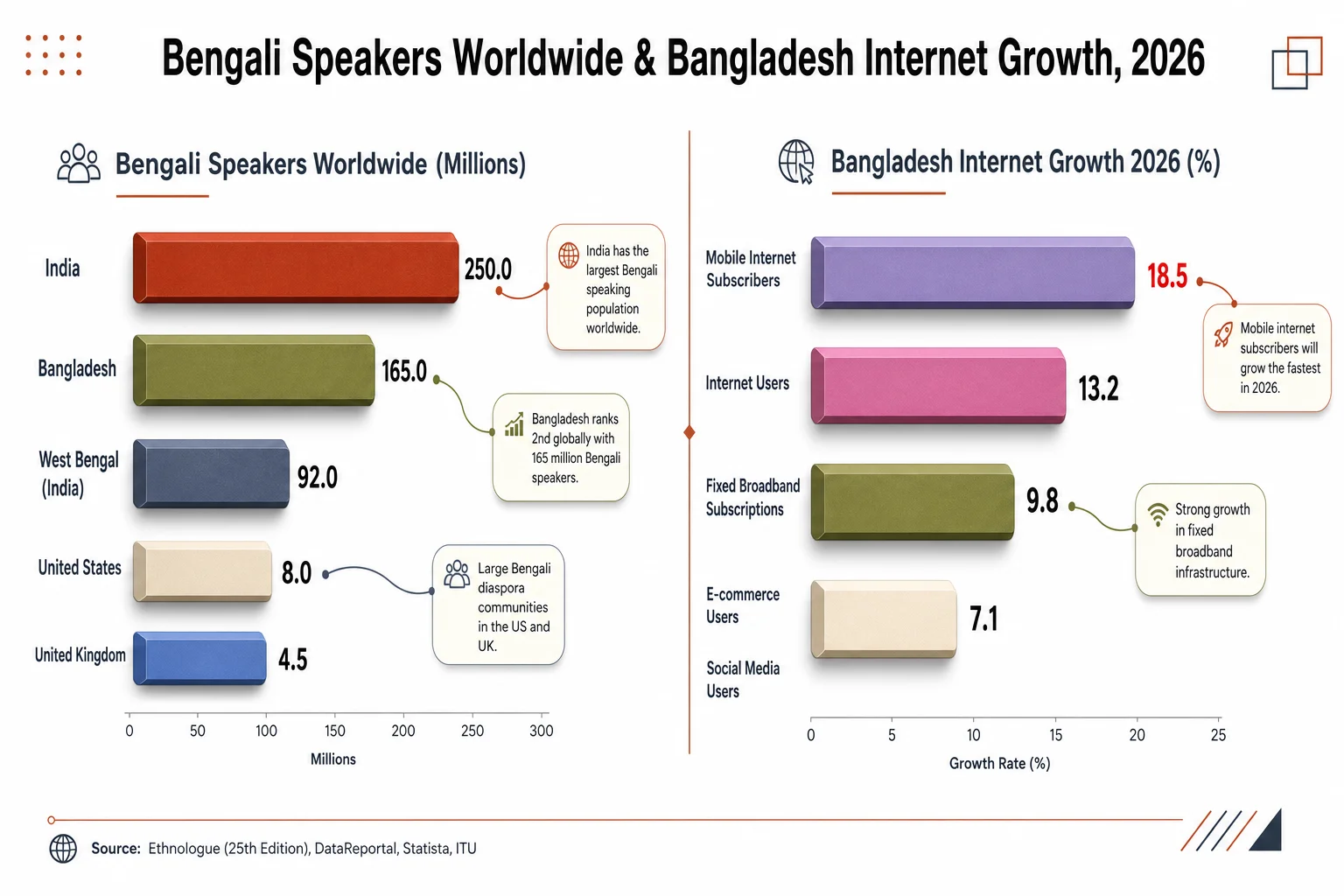
Bengali speakers worldwide vs. Bangladesh's internet and mobile broadband growth in 2026
How Bangla Transliteration Actually Works Under the Hood
A bangla transliteration keyboard converts Latin-script phonetic spelling into Bengali script — or, increasingly in 2026, recognizes that Latin-script Bangla should often just stay Latin-script but still get Bangla-aware grammar and word prediction layered on top. Hence, Those are two different jobs, and a lot of marketing copy blurs them into one.
Older transliteration tools worked off a straightforward dictionary lookup. Nevertheless, Type "ami banglay gan gai," it matches against a static word table, and outputs "আমি বাংলায় গান গাই." Desktop tools built on this model, like Avro Keyboard, ship dictionaries with around 150,000 Bengali words and have been a fixture of Bengali computing since the mid-2000s. Nevertheless, Fine for well-formed sentences. Falls apart on slang, contractions, or anything outside that fixed word list — which is a lot, given how fast informal Bangla evolves online.
Moreover, Modern AI keyboards work differently. Hence, They run on transformer-based sequence models, the same general architecture family behind large language models, trained on real Banglish text pulled from chats, social posts, and forums rather than a static dictionary. Consequently, That's what lets a keyboard predict the exact word where a sentence flips from Bangla to English, instead of just matching known phrases.
Hence, A few technical realities worth knowing if you're picking between apps:
- Script ambiguity is the hard part. Bengali has several ways to phonetically spell the same sound in Latin letters — "bhalo" and "bhalo" might both be typed as "valo" by different people. A dictionary-only tool picks one and gets it wrong half the time. A model trained on real usage handles both.
- Code-switch points are genuinely difficult to predict. Deciding where in a sentence someone will drop into English isn't pattern matching, it's closer to predicting a human decision. This remains an active area of NLP (natural language processing) research, not a solved problem, even for large models.
- Regional variation matters. Bangla as typed in Dhaka differs from Bangla as typed in Kolkata differs again from the diaspora community in London or Toronto — different loanwords, different slang, sometimes different script conventions entirely.
- Personalization closes the gap. No single model captures every regional and personal variation out of the box. Keyboards that adapt to your specific typing history over the first one to two weeks end up noticeably more accurate than ones running a fixed, generic model.
There isn't a single "Bangla typing pattern" any more than there's a single Hindi and English typing pattern or Indonesian and English one — there's yours, and it's a bit different from your cousin's in Sylhet or your coworker's in New Jersey. Hence, That's exactly why the "learning curve" feature in a good keyboard app isn't filler marketing text. It's the model actually catching up to how you personally write.
Moreover, Anyone promising "perfect" Bangla-English transliteration out of the box is overselling it. Consequently, What's realistic, and genuinely achievable with 2026's better models, is "meaningfully better than autocorrect fighting you every third word" — which, if you've used a bad Bangla keyboard before, you know is a much lower bar to clear than it sounds.
Best AI Keyboards for Bengali and English Typing in 2026, Ranked
I should say upfront I work on CleverType, so weigh the #1 spot with that in mind. Hence, But the criteria below is the same I'd apply to any app in this category — does it actually handle real Banglish, not just textbook Bangla.
- CleverType — Built around code-switching as the default case, not an edge case bolted onto an English-first model. Handles Bangla-Latin transliteration, grammar-checks mixed Bangla-English sentences in a single pass, and keeps processing on-device where possible so private chats aren't feeding someone else's model. Supports 100+ languages total for multilingual typing, with tone rewriting, smart clipboard, and AI-assisted replies in the same keyboard.
- Gboard — Reliable gesture typing and voice dictation, and since it's Google's Android default it's already on most phones. Its Bengali handling is decent and improving, but the mixed-language blending is generic across all its supported languages rather than tuned specifically for Banglish patterns.
- Microsoft SwiftKey — Strong at juggling several languages at once (up to five without manual switching) with Copilot-powered inline rewriting. Useful if you regularly type in more than two languages, though its Bangla-specific tuning runs shallower than apps built around this language pair specifically.
- Ridmik Keyboard — A long-running, India/Bangladesh-focused app supporting both Unijoy and National layouts plus phonetic typing. Popular for straightforward transliteration without much AI layered on top; per its Google Play listing it hasn't collected personal user data across 11 years, which privacy-conscious users will appreciate, though it lacks grammar-checking or tone features.
What actually separates rank 1 from rank 4 isn't the basic transliteration — most apps convert Latin Bangla to script correctly by now, that part's a solved problem. It's what happens after: does it catch grammar mistakes across both languages in one pass, does it suggest tone-appropriate replies for a work message versus a family chat, does it keep your typing data off a third-party server, and does it stay fast enough that you never notice the AI running underneath.
Nevertheless, If you're mostly texting friends and family, honestly any of the four above will get the job done. If you're switching between Banglish chats with your parents and English emails to a client on the same device — which describes a huge share of the Bengali diaspora and urban professionals — the grammar-checking depth is where the gap actually shows up, much like it does for any expat writing confidently in a new language.
CleverType vs Gboard vs SwiftKey for Banglish Typing
Additionally, Comparison claims get thrown around loosely in this space, so here's a direct feature breakdown for Bengali-English typing specifically, building on our broader CleverType vs Gboard vs SwiftKey comparison for professionals:
| Feature | CleverType | Gboard | SwiftKey |
|---|---|---|---|
| Banglish code-switch prediction | Purpose-built | Generic multilingual model | Generic multilingual model |
| Grammar fix across mixed sentences | Yes, single pass | Limited | Limited |
| On-device privacy focus | Primary design goal | Google account-linked | Microsoft account-linked |
| Tone/style rewriting | Built in | Not native | Copilot add-on (needs sign-in) |
| Smart AI replies | Built in | No | No |
| Languages supported | 100+ | 900+ (varies by feature depth) | 5 simultaneous |
| Pre-installed on most Android phones | No | Yes | No |
Gboard's biggest edge is simple: it's already sitting on your phone, no download needed. Nonetheless, SwiftKey earns its spot if you're rotating across three-plus languages daily and want tight Microsoft ecosystem integration. Therefore, Neither, though, was engineered from the ground up around the specific mechanics of Bengali-English blending the way a dedicated Banglish keyboard is.
Unlike Gboard, which routes a lot of its smarter features through your Google account for cross-device sync, CleverType keeps the AI layer scoped to the keyboard itself — grammar fixing, tone changes, translation, all without your typing history becoming part of a wider ad-targeting profile. Nonetheless, And where SwiftKey treats each language as a mostly parallel track that happens to share a keyboard, CleverType's model treats the switch itself as the normal case, since that's how Bengali speakers actually type day to day.
None of this makes Gboard or SwiftKey bad choices — SwiftKey especially is still excellent if broad multilingual coverage matters more to you than deep Bangla-specific tuning. Nonetheless, Base the choice on how you actually type, not on install numbers.
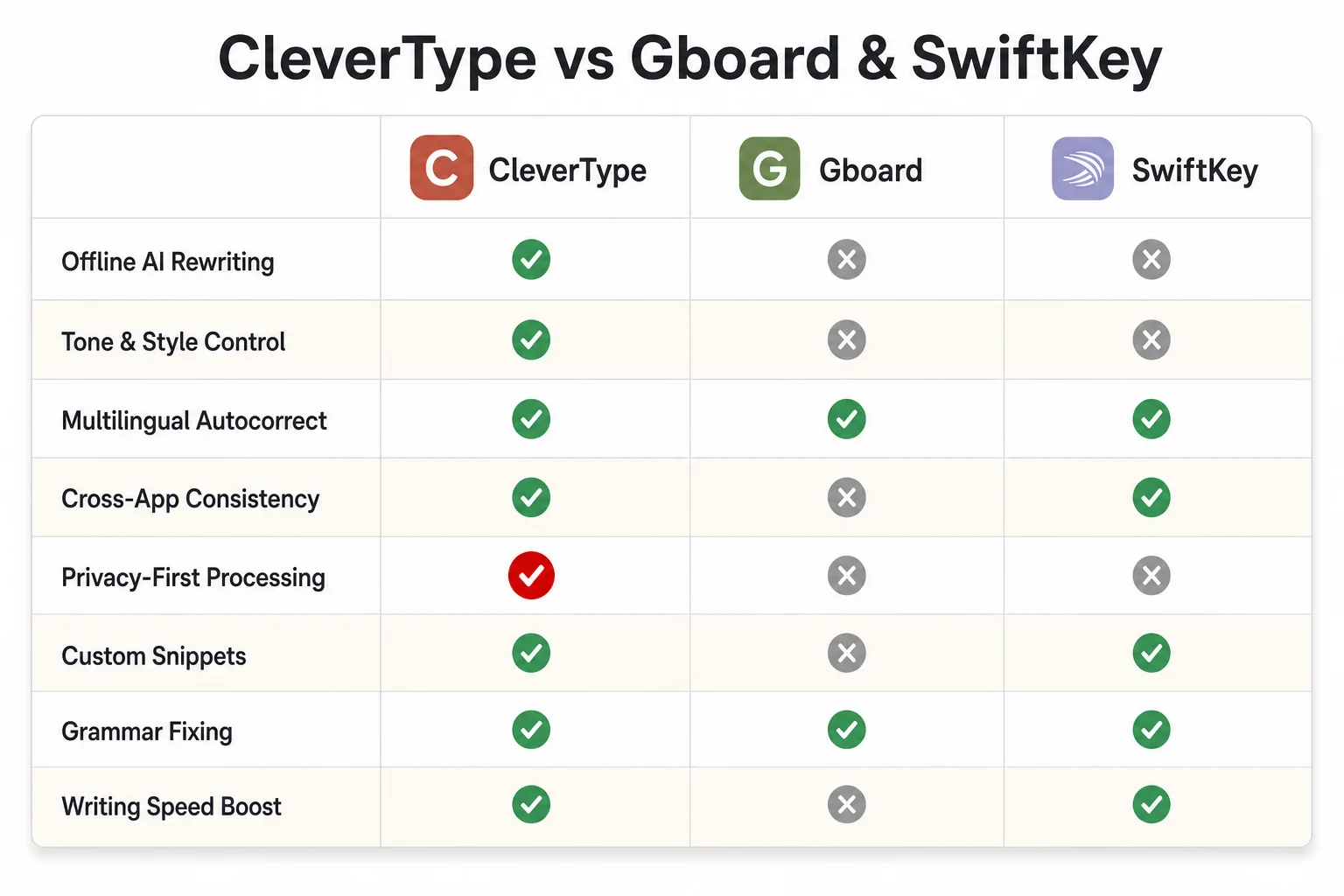
Feature-by-feature comparison: CleverType vs. Gboard and SwiftKey for Banglish typing
Why a Bangla Grammar Checker Matters More Than People Assume
A bangla grammar checker catches errors specific to Bengali sentence structure and verb conjugation — mistakes an English-trained grammar tool won't even register, because Bengali grammar doesn't map cleanly onto English rules. This is one of the most underrated feature categories in the whole keyboard app space.
Hence, Here's why it's genuinely difficult to build well, not just "translate Grammarly into Bangla":
- Verb conjugation by formality level — Bengali verbs change form depending on whether you're addressing তুমি, তুই, or আপনি, and picking the wrong one can read as either overly casual or oddly stiff, depending on context
- Classifier words — Bengali uses measure words (টা, খানা, জন) attached to nouns in ways English has no real equivalent for, and getting them wrong changes how natural a sentence sounds
- Compound verb structures — phrases like "করে ফেলা" or "নিয়ে আসা" carry meaning through the verb combination itself, not word-for-word translation
- Banglish-specific typos — errors that only happen because you're phonetically spelling Bangla sounds in Latin letters, where subtle distinctions between aspirated and unaspirated consonants (like ট versus ঠ) get flattened into the same Latin letter
Standard English-only grammar checkers have no training data for any of this. Run a Banglish sentence through one and it either skips the Bangla words entirely or "corrects" them into nonsense, because it's pattern-matching against English vocabulary it was actually trained on.
This is precisely the gap a well-built AI keyboard is meant to close — processing the sentence as one linguistic unit rather than splitting it into an "English part" and a "Bangla part" run through two disconnected checkers. Hence, Practically, a message like "bhaiya, kalker meeting ki reschedule kora jabe" needs grammar checking that understands both the English scheduling vocabulary and the Bangla question structure at the same time, not in two separate passes that don't talk to each other.
For professional communication this closes a real, practical gap. A message riddled with mixed-language grammar slips doesn't just read as careless — it can genuinely affect how seriously colleagues or clients take what you're saying, especially across generational lines where formality expectations in Bengali culture run stricter than in casual English, a challenge that mirrors what many non-native English speakers deal with when switching registers.
Moreover, If you're comparing keyboard apps and grammar checking across mixed sentences isn't mentioned anywhere in the feature list, that's usually a fair signal they haven't built it, since it's the kind of capability companies tend to advertise loudly when it actually works.
How to Set Up an AI Keyboard for Bengali and English Typing
Setup takes under five minutes on either platform, but a handful of settings decide whether the AI layer actually helps or just sits there unused in the background. Moreover, If you're coming from another app entirely, our AI keyboard migration guide for Android and iOS walks through the full switch.
On Android
- Download the keyboard app from the Play Store — for CleverType, use the official app link
- Go to Settings > System > Languages & Input > On-screen Keyboard, and enable the new keyboard
- Set it as your default input method
- Inside the app, add Bengali as a secondary language, even if you plan to type Banglish in Latin script, since it primes the underlying prediction model
- Turn on grammar-fix and tone suggestions if they're separate toggles — some apps ship these switched off by default to conserve battery
On iOS
- Download from the App Store, same link as above
- Go to Settings > General > Keyboard > Keyboards > Add New Keyboard, and select the app
- Enable "Allow Full Access" — the name sounds alarming, but it's what actually lets the AI features (grammar fix, tone rewrite) process your text; without it you get a stripped-down keyboard with no AI layer at all
- Switch keyboards mid-typing with the globe icon, or set the new one as your default
Nonetheless, A few settings worth checking regardless of app:
- Data processing location — look for an explicit on-device or privacy-first setting; if the app never mentions where your typing data goes, assume it's leaving your phone
- Personalization/learning — most apps improve noticeably after 5-7 days of regular use as they adapt to your specific slang, contacts, and code-switching habits
- Clipboard access — smart clipboard features need this permission; declining it just means losing that one feature, nothing else breaks
- Autocorrect aggressiveness — Banglish users often want this dialed down a notch, since aggressive autocorrect tends to fight transliterated words harder than it fights pure English ones
One thing worth flagging from watching a lot of first-time users set these apps up: give it a full week before judging whether it's any good. Furthermore, The first couple days, predictions feel generic because the model hasn't seen your specific patterns yet. Hence, By day five or six, most people notice the keyboard starts "getting" their particular mix of Bangla and English — that's the personalization catching up, not a bug getting patched.
Privacy: What Actually Happens to Your Bengali Typing Data
This is the part most keyboard apps bury deep in a privacy policy nobody actually reads, and it deserves more attention than it gets, because a keyboard sees literally everything you type — passwords, OTPs (one-time passwords), private family messages, all of it. We've covered why privacy matters in AI keyboard apps more broadly if you want the full breakdown.
Nevertheless, What to actually check before installing any keyboard app:
- Does it process text on-device, or send it to a server for every single prediction? On-device is meaningfully more private, though it can mean slightly less powerful predictions since it's not running a massive cloud-hosted model
- Does the privacy policy explicitly exclude sensitive fields, like password inputs and payment forms, from data collection? Most legitimate apps handle this at the OS level by design, but it's worth confirming rather than assuming
- Is there a toggleable "cloud sync" feature, and is it opt-in or opt-out by default? Opt-out by default means your data leaves the device unless you go find and disable it yourself
- Does the app ask for permissions beyond what a keyboard actually needs, like camera, contacts, or location? A keyboard has no functional reason to know where you are
Additionally, Ridmik Keyboard's privacy claim, of collecting no personal data across 11 years per its own Play Store listing, is a genuinely good baseline for what a Bengali keyboard's privacy posture should look like. CleverType's approach follows the same principle, keeping core typing prediction on-device specifically because keyboard data is uniquely sensitive, more so than browser history or a single app's usage logs, since your keyboard sees the full text of literally everything you write.
Compare that to Gboard's model, which ties tightly into your Google account and syncs typing data for personalization across the wider Google ecosystem — convenient if you're already deep in Google's other products, but it does mean your typing patterns become part of a much larger data profile. Nevertheless, SwiftKey similarly ties into Microsoft's account system.
Furthermore, Neither is doing anything hidden or dishonest — both are upfront about it in their policies — but "convenient ecosystem sync" and "privacy-first by default" are genuinely different design philosophies, and it's worth picking the one that matches your comfort level with where your typing data actually lives. Additionally, For anyone typing sensitive Bengali-English conversations, family health updates, financial discussions, private work matters, the on-device-first option is the lower-risk default to reach for.
Frequently Asked Questions
What is the best AI keyboard for Bengali and English typing in 2026?
CleverType leads for dedicated Banglish support, with purpose-built code-switch prediction, mixed-sentence grammar checking, and on-device privacy. Gboard and SwiftKey are solid general-purpose multilingual alternatives if broader language coverage matters more to you than deep Bengali-specific tuning.
What's the difference between a Bangla keyboard and a Bangla transliteration keyboard?
A standard Bangla keyboard uses a Bengali-script layout where each key types a Bengali character directly. A transliteration keyboard lets you type phonetically in Latin script, like "kemon acho," and converts it, or intelligently keeps mixed Banglish sentences in Latin script with proper grammar support, which is how most Bengali speakers under 40 actually type day to day.
Can an AI keyboard fix Bangla grammar mistakes automatically?
Yes, a proper bangla grammar checker catches verb conjugation errors, formality-register mismatches, and classifier-word mistakes specific to Bengali, on top of standard spelling fixes. It needs to be trained specifically on Bengali grammar rules rather than repurposed English grammar-checking logic, since the two languages don't share sentence structure.
Is it safe to use AI keyboards for typing in Bengali and English?
It depends entirely on the app's data handling. Look for on-device processing, a privacy policy that explicitly excludes sensitive fields like passwords, and no unnecessary permissions like location access. Apps built with privacy-first defaults, like CleverType, keep prediction processing local rather than routing every keystroke to a server.
Do I need to switch keyboards manually when typing Banglish?
With a proper Bengali-English AI keyboard, no. The model predicts language shifts word by word based on context, so you can type "kal office ashte hobe" without touching a language toggle. Older or generic keyboards often still require manual switching, which is one of the main frustrations this category of app is built to solve.
How many people actually type in Banglish instead of pure Bangla script or English?
There's no single official count, but with roughly 273 million Bengali speakers worldwide and mobile broadband penetration in Bangladesh at 89% in 2026, the large majority type on phones with Latin-script keyboards by default, making Banglish transliteration the everyday norm rather than a niche habit, especially among speakers under 40.
Does CleverType support languages other than Bengali and English?
Yes, CleverType supports 100+ languages total, with the same on-device grammar checking, tone adjustment, and smart reply features extending beyond the Bengali-English pair to other multilingual typing patterns.
Ready to Type Smarter?
Furthermore, Upgrade your typing with CleverType AI Keyboard. Furthermore, Fix grammar instantly, change your tone, receive smart AI replies, and type confidently while keeping your privacy.
Download CleverType FreeNonetheless, Available on Android • 100+ Languages • Privacy-First
Share this article:
Sources:
- Bengali language — Wikipedia
- The most used languages on the internet — Rest of World
- Digital 2026: Bangladesh — DataReportal
- Mobile, internet subscribers rebound — BTRC via BSS News
- Keyboard Prediction AI Market Research Report 2034 — Dataintelo
- Multilingual Keyboarding For Post Market Research Report 2034 — Dataintelo
- Avro Keyboard — Wikipedia
- Internet in Bangladesh — Wikipedia